To back up your photos the right way with a simple 3-2-1 approach, make three copies of your images. Store two copies on different media types, like an external hard drive and a cloud service such as Google Photos or Dropbox. Keep at least one copy off-site for extra security. Following these steps reduces the risk of losing everything. Keep exploring to find out more tips on protecting your digital memories effectively.
Key Takeaways
- Follow the 3-2-1 rule: keep three copies, use two different media types, and store at least one off-site.
- Organize photos by date or event for easier management and efficient backups.
- Use reliable cloud services like Google Photos or Dropbox for automatic, off-site backups.
- Regularly update your backups to include new photos and protect against data loss.
- Ensure backups are encrypted and secure, combining multiple layers for maximum protection.

Have you ever lost precious photos due to a computer crash or accidental deletion? If so, you know how heartbreaking it can be to realize your memories are gone in an instant. That’s why backing up your photos is vital. The key to doing it right is understanding the 3-2-1 backup rule, which emphasizes having three copies of your photos, stored on two different types of media, with one copy kept off-site. This approach minimizes the risk of total loss and guarantees your memories remain safe no matter what happens.
Protect your memories with the 3-2-1 backup rule: three copies, two media types, one off-site.
When it comes to photo organization, it’s essential to keep your images well-categorized and easy to find. Before backing up, spend a little time organizing your photos by date, event, or album. This makes future retrieval much simpler and helps you identify duplicates or poor-quality images that you may want to delete. A well-organized library also streamlines the backup process, so you’re not copying unnecessary files. Once your photos are neatly arranged, you can confidently proceed with your backup strategy. Additionally, maintaining a consistent naming convention can improve your photo retrieval process and make managing backups more efficient.
Cloud storage options are a popular choice for off-site backups because they offer convenience, accessibility, and automatic syncing. Services like Google Photos, Dropbox, and OneDrive provide reliable ways to store your images securely online. Many of these platforms automatically back up new photos from your devices, so you don’t have to remember to do it manually. Cloud storage also allows you to access your photos from anywhere, whether you’re using a computer, tablet, or smartphone. Just make sure you choose a service with good security measures, such as encryption, to keep your memories safe from unauthorized access. Additionally, understanding the importance of cloud backup can help you select the right service for your needs. Having reliable backup solutions in place is essential for protecting your digital memories. Remember, a comprehensive backup plan ensures your photos are protected across multiple layers of security and storage options.
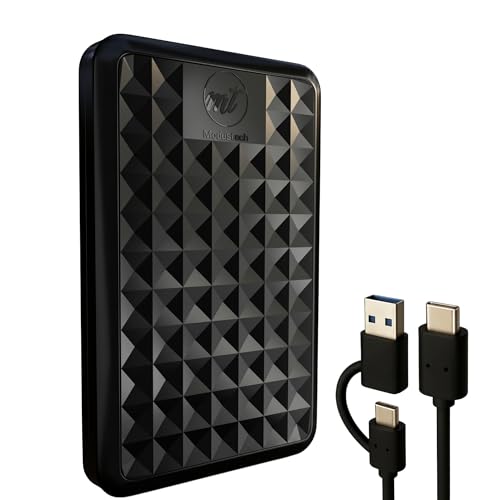
ModusTech Facet 500GB External Hard Drive Portable USB-C/USB 3.1 Plug & Play Ultra- Slim HDD Hard Drive for Backup, Gaming, PC, Mac, Laptop, PS4, Xbox, Smart TV (Black)
- High Storage Capacity: Up to 2TB of portable storage
- Universal Connectivity: USB-C and USB 3.1 compatibility
- Fast Data Transfer: Transfer speeds up to 100MB/s
As an affiliate, we earn on qualifying purchases.
As an affiliate, we earn on qualifying purchases.
Frequently Asked Questions
What Is the 3-2-1 Backup Rule?
The 3-2-1 backup rule means you keep three copies of your photos, with two stored on different media types, and one offsite. This helps protect your photo metadata and guarantees data safety even if one backup gets damaged. Always use backup encryption to secure your copies, especially the offsite one, so your photos remain private and protected from unauthorized access.
How Often Should I Back up My Photos?
You should back up your photos regularly, ideally weekly, to avoid losing recent shots. Don’t fall for photo storage myths that suggest infrequent backups are enough; consistent backups are key. Use backup automation tips to streamline the process, so you don’t forget. Automating backups guarantees your photos stay safe without extra effort, giving you peace of mind knowing your memories are protected and up-to-date.
Which Cloud Services Are Best for Photo Backup?
Think of cloud services as your digital vaults for photo backup. Google Photos, iCloud, and Dropbox stand out for their reliable cloud storage and seamless photo synchronization. They automatically sync your images across devices, keeping your memories safe and accessible. Choose one based on your ecosystem (Android or Apple), storage needs, and budget. Trust these services to keep your photos protected, organized, and always within reach.
How Do I Organize Photos Before Backing Up?
You should start by creating a clear folder hierarchy, grouping photos by date, event, or location. Use photo tagging to add keywords, making it easier to search later. Before backing up, delete duplicates and poorly-lit images to declutter. Organize consistently, so every new batch fits into your system. This way, your photos stay well-structured, easy to find, and ready for secure backup.
What Hardware Do I Need for Local Backups?
A stitch in time saves nine, so start with the right hardware. You’ll need external drives, which are simple to connect and store your backups locally. Consider network storage options like NAS devices for more capacity and accessibility. Both options keep your photos safe, making sure you’re covered in case of hardware failure. Choose based on your storage needs and how quickly you want to access your backups.
Conclusion
Remember, the 3-2-1 backup rule isn’t just a myth—it’s backed by data that shows having multiple copies in different locations markedly reduces the risk of losing precious photos. Think of it like wearing a seatbelt: it may seem unnecessary until you actually need it. So, follow this simple strategy, stay consistent, and you’ll guarantee your memories stay safe no matter what happens. Protect your photos today—your future self will thank you.