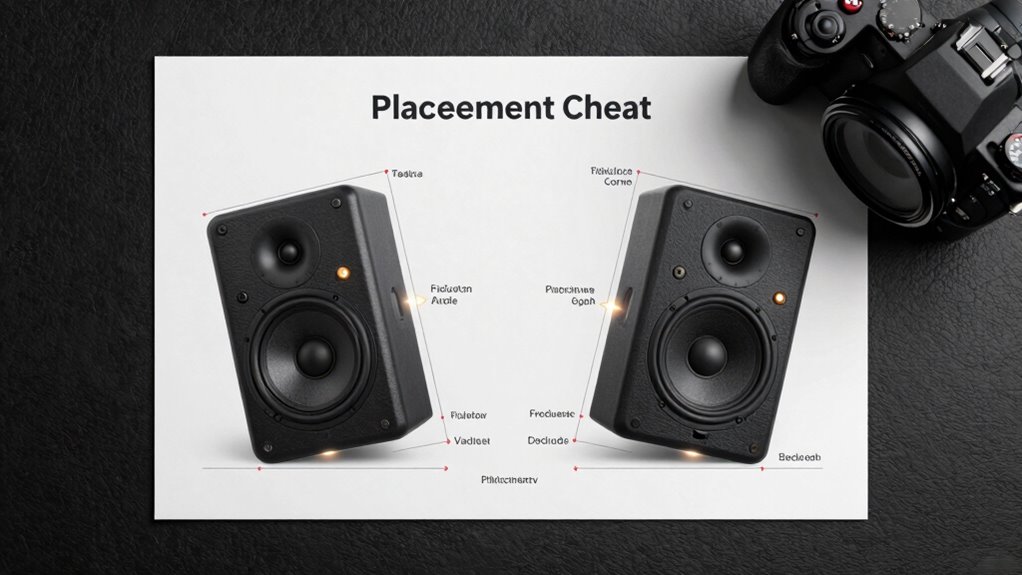

To optimize your speaker placement, start by positioning them at equal distances from your listening spot, forming an approximate equilateral triangle. Angle the speakers inward (toe-in) to focus sound and improve imaging, but adjust slightly outward for a broader soundstage if desired. Keep tweeters at ear level for clarity. Experiment with these settings, and if you’re ready to fine-tune further, exploring specific techniques can elevate your listening experience even more.
Key Takeaways
- Position speakers at equal distance from the listening spot to form an equilateral triangle for optimal imaging.
- Adjust toe-in angle to focus sound directly at the listening position or to widen the soundstage, based on preference.
- Keep tweeters at ear level when seated to ensure accurate sound reproduction and proper imaging.
- Fine-tune speaker distances and angles incrementally, listening critically to achieve balanced sound and clarity.
- Consider room acoustics and reflections to refine placement, enhancing imaging and minimizing muddiness.

Are you unsure about how to position your speakers for the best sound experience? Proper placement is essential, and understanding the fundamentals can dramatically improve your listening. One of the key factors to consider is room acoustics, which influences how sound waves interact with your space. Hard surfaces like glass or tile reflect sound, creating echoes and muddiness, while soft furnishings absorb certain frequencies, affecting clarity. Before adjusting your speakers, take a moment to evaluate your room and think about adding rugs, curtains, or acoustic panels to balance reflection and absorption. This initial step helps set a foundation for ideal sound.
Room acoustics shape sound quality; balance reflections and absorption with rugs, curtains, or panels for better listening.
Next, focus on speaker calibration, which involves fine-tuning your setup to match your room and equipment. Correct calibration ensures your speakers produce a balanced, natural sound. Many modern systems include calibration tools or room correction software, but manual adjustments are equally important. Start by setting your speakers at an equal distance from your listening position, forming an approximate equilateral triangle. This helps with imaging, creating a stereo image that feels centered and precise. The distance you choose impacts the soundstage—if your speakers are too close or too far, the sound can feel disconnected or smeared. Experiment with small adjustments to find the perfect spot where the sound feels most natural and immersive.
The concept of toe-in—angling your speakers inward toward your listening position—is another vital aspect. Toe-in influences imaging and soundstage width. Pointing your speakers directly at you can sharpen focus and improve clarity, especially in the midrange frequencies. Conversely, a slight outward angle can broaden the soundfield, making it feel more expansive. The ideal toe-in depends on your room and personal preference, so don’t hesitate to experiment. Remember, the goal is to create a cohesive, balanced sound that accurately reproduces the original recording. Additionally, understanding speaker placement can help optimize your setup for the best acoustic environment. Proper speaker height also plays a crucial role in achieving optimal sound, as it can affect how sound waves reach your ears. Considering room acoustics during your setup can further help in minimizing unwanted reflections and enhancing sound clarity. Paying attention to speaker positioning can ensure that your setup is tailored to your unique listening environment for optimal results.
Finally, pay attention to your speaker’s height and height relative to your ears. Ideally, the tweeters should be at ear level when you’re seated in your usual listening position. Adjusting toe-in and distance, combined with proper room acoustics and calibration, will profoundly enhance your sound experience. Take your time, listen critically, and make incremental changes. With patience, your setup will deliver a rich, detailed, and immersive sound that truly transforms your listening experience.
bookshelf speakers with adjustable toe-in
As an affiliate, we earn on qualifying purchases.
As an affiliate, we earn on qualifying purchases.
Frequently Asked Questions
How Do Room Acoustics Affect Speaker Placement?
Room acoustics considerably influence speaker placement because reflections can distort sound. You should consider room reflections and how they bounce off walls, causing muddiness or echo. Acoustic treatment, like bass traps and diffusers, helps control these reflections, enabling clearer sound. By adjusting your speaker position to minimize reflections and using acoustic treatment, you’ll achieve better imaging and a more accurate listening experience.
What Is the Ideal Speaker Height for Best Sound?
Think of your speakers as the orchestra’s conductors, guiding the sound to your ears. The ideal speaker height aligns the tweeters with your listening position’s ear level, creating a seamless soundscape. For the best sound, set your speaker height so that the tweeters point directly at your ears when you’re seated comfortably. This helps guarantee clear, detailed audio, making your listening experience truly immersive and balanced.
How Do I Adjust Speaker Placement for Different Genres?
You should adjust your speaker placement based on genre-specific settings and your listening environment. For example, jazz and vocals benefit from a wider, more open soundstage, so position speakers slightly farther apart with a gentle toe-in. For bass-heavy genres like hip-hop or electronic music, bring speakers closer and reduce toe-in to emphasize low frequencies. Always consider your room’s acoustics and experiment to optimize clarity and immersion.
Can Speaker Placement Improve Stereo Imaging Significantly?
Yes, speaker placement can dramatically improve stereo imaging. Think of it as creating a stereo illusion, where sound sources seem to come from specific points in space. When you position speakers correctly, sound coherence is enhanced, making vocals and instruments feel more lifelike and anchored in your room. I once adjusted my speakers, and suddenly, the stage felt wider and more immersive—proving how vital placement is for an authentic listening experience.
What Tools Can Help Me Measure Optimal Speaker Distances?
You can use measurement tools like a tape measure or laser distance meter to determine ideal speaker distances accurately. These tools help you follow placement guidelines by guaranteeing consistent spacing from your listening position and between speakers. A ruler or marked tape can also assist with precise toe-in angles. Proper measurement ensures balanced stereo imaging, clear soundstage, and an immersive listening experience, making your setup more effective and enjoyable.
room acoustic panels for sound clarity
As an affiliate, we earn on qualifying purchases.
As an affiliate, we earn on qualifying purchases.
Conclusion
By applying these speaker placement tips, you’ll notice a significant boost in your listening experience. Did you know that proper toe-in and positioning can increase stereo imaging accuracy by up to 30%? Imagine hearing every instrument clearly, as if they’re placed right in your room. So, take the time to fine-tune your speakers—your ears will thank you, and your music will sound more immersive than ever before.
speaker calibration microphone
As an affiliate, we earn on qualifying purchases.
As an affiliate, we earn on qualifying purchases.
ear level speaker stands
As an affiliate, we earn on qualifying purchases.
As an affiliate, we earn on qualifying purchases.