
A streaming microphone XLR bundle can simplify a desk setup, but the right choice depends on whether you need a mixer, a boom arm, USB flexibility, or more than one microphone. My best overall pick is the FIFINE Gaming Streaming Bundle with XLR Microphone and RGB Audio Mixer for a streaming-focused all-in-one setup. The MAONO G1 NEO and PD200XS bundle stands out for gaming controls, while the Movo PodPak4A suits multi-person recording. The main tradeoffs are dynamic versus condenser pickup, how much control the mixer adds, and whether the included accessories fit your room and workflow. Read on for the full comparison and guidance on matching a bundle to your setup.

Get the latest gadgets delivered free with Prime
- Fast, free delivery on millions of items
- Prime Video, Amazon Music and more included
- Member-only deals all year
Complete the kit



Key Takeaways
- Streaming-first bundles lead this lineup: the FIFINE gaming sets pair microphones with mixers, while several other options focus on a mic and boom arm without the same control surface.
- USB/XLR flexibility is common, but mixer inclusion is not: a dual-output microphone can connect directly to a computer over USB, yet an XLR setup still needs a separate interface or mixer.
- Dynamic microphones dominate the single-speaker streaming options: they can be a practical fit for untreated rooms, while the MAONO A04 Gen2 and Movo PodPak4A use condenser microphones and suit different recording needs.
- Included accessories change the real setup effort: bundles with boom arms or stands can reduce extra shopping, but their fit and desk compatibility matter as much as the microphone itself.
- Multi-person recording calls for a different kind of bundle: the Movo PodPak4A and portable Movo kit prioritize multiple microphones and shared recording, unlike the single-user gaming bundles.
| FIFINE Gaming Streaming Bundle with XLR Microphone and RGB Audio Mixer |  | Best for a Straightforward Mixer Bundle | Microphone type: Dynamic, unidirectional | Connectivity: USB and XLR | Mixer channels: 1 | VIEW ON AMAZON | See Our Full Breakdown |
| Podcast Equipment Bundle with USB/XLR Dynamic Microphone and Streaming Mixer |  | Best for USB-First Beginners | Microphone type: Dynamic, cardioid | Frequency response: 50 Hz–12 kHz | Connectivity: USB and XLR | VIEW ON AMAZON | See Our Full Breakdown |
| FIFINE AmpliTank K688T Dynamic Microphone Set with Boom Arm |  | Best for a Desk-Ready Mic Setup | Connectivity: USB and XLR | Polar pattern: Unidirectional (cardioid) | Frequency range: 50 Hz–16 kHz | VIEW ON AMAZON | See Our Full Breakdown |
| FIFINE Gaming Microphone and Audio Mixer Bundle, XLR/USB Dynamic Microphone with Gain Knob and Slider Fader |  | Best for USB Mixer Controls and RGB | Microphone type: Dynamic | Connectivity: USB and XLR | Audio input: XLR and USB | VIEW ON AMAZON | See Our Full Breakdown |
| FIFINE AmpliTank K688CT USB/XLR Dynamic Podcast Microphone Kit | 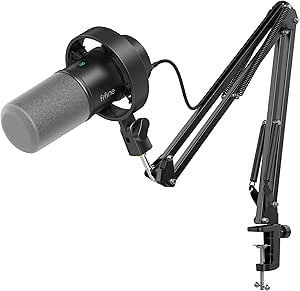 | Best for Flexible USB-to-XLR Upgrades | Connectivity: USB and XLR | Microphone type: Dynamic | Polar pattern: Unidirectional | VIEW ON AMAZON | See Our Full Breakdown |
| FIFINE AmpliGame KS5 XLR/USB Gaming Microphone and Mixer Bundle |  | Best for Gaming Mixer Control | Microphone type: Dynamic | Connectivity: XLR and USB | Mixer channels: 4 | VIEW ON AMAZON | See Our Full Breakdown |
| FIFINE AmpliGame AM8T USB/XLR Dynamic Gaming Microphone Kit with Boom Arm |  | Best for a Simple Starter Setup | Microphone type: Dynamic | Connectivity: USB and XLR | Polar pattern: Unidirectional (cardioid) | VIEW ON AMAZON | See Our Full Breakdown |
| FIFINE AmpliGame AM8PROT XLR/USB Dynamic Gaming Microphone Kit |  | Best for USB Software Controls | Connectivity: USB and XLR | Polar pattern: Unidirectional | Frequency response: 20 Hz–20 kHz | VIEW ON AMAZON | See Our Full Breakdown |
| MAONO A04 Gen2 USB/XLR Condenser Microphone Kit |  | Best Condenser Kit for Detailed USB Recording | Microphone type: Studio condenser | Connectivity: USB, USB Type-C, and XLR | Polar pattern: Cardioid | VIEW ON AMAZON | See Our Full Breakdown |
| Movo PodPak4A 4-Pack XLR Condenser Microphone Podcast Bundle |  | Best for Multi-Person Podcast Recording | Microphones: 4 cardioid condenser microphones | Connectivity: XLR | Audio resolution: 48 kHz/16-bit | VIEW ON AMAZON | See Our Full Breakdown |
| MAONO G1 NEO Gaming Mixer and PD200XS XLR Dynamic Microphone Bundle |  | Best for Effects-Driven Gaming Streams | Bundle includes: G1 NEO audio mixer and PD200XS XLR dynamic microphone | Mixer channels: 4 | Connectivity: Auxiliary, Bluetooth, USB-C, XLR | VIEW ON AMAZON | See Our Full Breakdown |
| FIFINE AmpliGame AM8 USB/XLR Dynamic Microphone |  | Best for USB-to-XLR Upgrades | Microphone type: Dynamic | Connectivity: USB, XLR | Polar pattern: Unidirectional cardioid | VIEW ON AMAZON | See Our Full Breakdown |
| FIFINE K688 USB/XLR Dynamic Microphone with Low-Profile Boom Arm |  | Best for a Clear, Low-Profile Desk Setup | Model: K688+BM88 | Microphone connectivity: USB, XLR | Polar pattern: Unidirectional cardioid | VIEW ON AMAZON | See Our Full Breakdown |
| Movo Portable Podcast Equipment Bundle – Podcast Kit with Audio Interface, 2 CastMic Dynamic Microphones, 2 Stands, Boom Arms & Headphones |  | Best for Two-Person Podcasts on the Move | Bundle: Two CastMic XLR dynamic microphones, dual-channel MDX-2 interface, headphones, stands, accessories | Channels: 2 | Connectivity: XLR audio input; USB-A, USB-C, and Lightning device connections | VIEW ON AMAZON | See Our Full Breakdown |
| FIFINE AM8T+SC3 USB/XLR Gaming Microphone and Audio Mixer Set |  | Best for Hands-On Mixer Control | Model: AM8T+SC3 | Microphone connectivity: USB and XLR | Mixer channels: 4 | VIEW ON AMAZON | See Our Full Breakdown |
| streaming microphone xlr bundle | Connectivity | Microphone type |
|---|---|---|
| FIFINE Gaming Streaming Bundle | USB and XLR | Dynamic, unidirectional |
| Podcast Equipment Bundle with | USB and XLR | Dynamic, cardioid |
| FIFINE AmpliTank K688T Dynamic | USB and XLR | — |
| FIFINE Gaming Microphone and A | USB and XLR | Dynamic |
| FIFINE AmpliTank K688CT USB/XL | USB and XLR | Dynamic |
| FIFINE AmpliGame KS5 XLR/USB G | XLR and USB | Dynamic |
| FIFINE AmpliGame AM8T USB/XLR | USB and XLR | Dynamic |
| FIFINE AmpliGame AM8PROT XLR/U | USB and XLR | — |
| MAONO A04 Gen2 USB/XLR Condens | USB, USB Type-C, and XLR | Studio condenser |
| Movo PodPak4A 4-Pack XLR Conde | XLR | — |
| MAONO G1 NEO Gaming Mixer and | Auxiliary, Bluetooth, USB-C, XLR | — |
| FIFINE AmpliGame AM8 USB/XLR D | USB, XLR | Dynamic |
| FIFINE K688 USB/XLR Dynamic Mi | — | — |
| Movo Portable Podcast Equipmen | XLR audio input; USB-A, USB-C, and Lightning device connections | — |
| FIFINE AM8T+SC3 USB/XLR Gaming | — | — |
More Details on Our Top Picks
FIFINE Gaming Streaming Bundle with XLR Microphone and RGB Audio Mixer
This bundle suits streamers who want a dynamic mic and a dedicated mixer in one set, rather than a microphone that depends on a separate interface. The mixer gives you a gain knob, mute button, and volume fader for quick adjustments, while its single XLR input keeps the setup focused on one voice. The included 10-foot shielded cable also means you can position the mic without sourcing an XLR lead separately. Compared with the FIFINE Gaming Microphone and Audio Mixer Bundle, this model specifies built-in 48V phantom power, which supports compatible condenser mics if your setup changes. The tradeoff is limited expansion: there is only one mixer channel, and USB microphones cannot use its XLR input. Choose it for a tidy single-mic streaming rig, not a multi-person show.
Pros:- USB and XLR connectivity gives you a choice between direct computer connection and mixer use.
- Mixer has individual gain, mute, and volume-fader controls for hands-on adjustments.
- Includes a 10-foot shielded XLR cable.
- Built-in 48V phantom power supports compatible condenser microphones.
Cons:- Single-channel mixer limits expansion to one microphone input.
- USB microphones cannot connect through the mixer’s XLR input.
- The included microphone is dynamic, so it is not a direct match for buyers seeking a condenser mic.
Best for: Solo streamers who want a dynamic microphone, physical mixer controls, and an included XLR cable in one setup.
Not ideal for: Co-hosted shows or creators who need multiple mic inputs; the mixer has only one channel.
- Microphone type:Dynamic, unidirectional
- Connectivity:USB and XLR
- Mixer channels:1
- Phantom power:48V
- Included XLR cable:10 ft
- Mixer controls:Gain knob, mute button, volume fader
- Enclosure material:Metal
- Compatible devices:Personal computer and XLR equipment
Our verdict“Choose this bundle for a single-person stream where included XLR cabling and physical mixer controls matter more than adding extra microphones.”
Podcast Equipment Bundle with USB/XLR Dynamic Microphone and Streaming Mixer
This is the most approachable choice here for someone who wants to start streaming over USB and keep XLR as a later option. Its cardioid dynamic microphone, USB noise reduction, touch mute, gain control, and headphone monitoring put everyday controls close at hand, and the weighted adjustable stand helps keep the mic settled on a desk. Compared with the FIFINE AmpliTank K688T, this bundle emphasizes broad device compatibility and USB conveniences rather than including a boom arm and shock mount. Its listed eight mixer channels may appeal to buyers planning a more involved setup, but the description does not spell out each channel’s use. The main compromise for an XLR-focused buyer is clear: no XLR cable is included, and noise reduction and microphone controls are unavailable in XLR mode. It is strongest as a plug-and-play USB kit, not a ready-made XLR rig.
Pros:- USB connection supports Windows, Mac, iOS, Android, and PS5.
- Cardioid pickup and USB noise reduction are suited to reducing unwanted room sound.
- Headphone monitoring and touch mute provide accessible controls during a stream.
- Weighted adjustable desktop stand is included.
Cons:- XLR cable is not included.
- Noise reduction and microphone controls are unavailable when connected via XLR.
- The listed eight mixer channels are not detailed enough to clarify the mixer’s specific routing options.
Best for: New streamers who plan to connect by USB to a computer, phone, or console and want headphone monitoring and onboard mute.
Not ideal for: Buyers assembling an XLR-first setup who expect the included controls to work in XLR mode or need an XLR cable in the box.
- Microphone type:Dynamic, cardioid
- Frequency response:50 Hz–12 kHz
- Connectivity:USB and XLR
- Mixer channels:8
- Headphone monitoring:3.5 mm jack
- Compatible devices:Windows, Mac, iOS, Android, PS5
- Included stand:Weighted adjustable desktop stand
- Warranty:90-day manufacturer warranty
Our verdict“Pick this bundle if you want an easy USB starting point with wide device support, but choose another kit for a fully equipped XLR workflow.”
FIFINE AmpliTank K688T Dynamic Microphone Set with Boom Arm
The K688T is a microphone-centered kit for streamers who want their mic mounted and positioned without piecing together accessories. Its boom arm, windscreen, and shock mount help keep the microphone off the desk and reduce handling and airflow distractions. USB offers a direct route to a computer, while XLR leaves room to move to a separate interface or mixer later. Unlike the Podcast Equipment Bundle with USB/XLR Dynamic Microphone and Streaming Mixer, this set does not include a mixer; its advantage is the supplied mounting hardware and a stated 50 Hz–16 kHz frequency range. Tap-to-mute, gain adjustment, and headphone monitoring add useful USB control. The key limitation is that XLR use requires a separate interface or mixer, so this is not a complete XLR bundle on its own. Its single channel also suits solo recording, not a multi-mic podcast.
Pros:- Includes a boom arm, windscreen, and shock mount.
- USB and XLR connectivity support both direct connection and later interface use.
- Tap-to-mute, gain adjustment, and headphone monitoring are available.
- Boom arm supports up to 2 kg and offers vertical and horizontal adjustment.
Cons:- A separate audio interface or mixer is required for XLR use.
- Single-channel design is aimed at one microphone.
- The kit does not provide the bundled mixer controls offered by the FIFINE Gaming Streaming Bundle.
Best for: Solo streamers who want a boom arm and shock mount included, with USB now and the option to add an XLR interface later.
Not ideal for: Buyers who need an XLR mixer or interface included, or co-hosts seeking a multi-microphone setup.
- Connectivity:USB and XLR
- Polar pattern:Unidirectional (cardioid)
- Frequency range:50 Hz–16 kHz
- Signal-to-noise ratio:80 dB
- Maximum SPL:130 dB
- Channels:1
- Boom arm capacity:Up to 2 kg
- Boom arm adjustment:180° vertical, 135° horizontal
- Materials:Alloy steel and metal
Our verdict“Choose the K688T if supplied mounting gear is your priority and you are comfortable adding XLR hardware separately.”
FIFINE Gaming Microphone and Audio Mixer Bundle, XLR/USB Dynamic Microphone with Gain Knob and Slider Fader
This bundle puts hands-on streaming controls and visual customization front and center. Its mixer has slider controls and five RGB modes, while the dynamic mic adds a gain knob, mute button, and headphone monitoring when connected by USB. That USB condition matters: unlike the FIFINE Gaming Streaming Bundle with XLR Microphone and RGB Audio Mixer, whose description specifies built-in 48V phantom power, this model’s listed mute, monitoring, volume, and RGB functions are unavailable over XLR. So although both offer USB and XLR connectivity, this one is best understood as a USB-led mixer setup with XLR as an alternative connection, not a fully featured XLR control surface. It works with common desktop operating systems and audio software, but its single mixer channel limits growth. Pick it if tactile sliders and lighting matter more than XLR-mode controls.
Pros:- Mixer has slider controls and five RGB modes.
- Microphone supports both USB and XLR connections.
- USB mode provides microphone gain, mute, and headphone monitoring.
- Compatible with Linux, Windows, and macOS and listed audio software.
Cons:- Listed mute, monitoring, volume, and RGB functions are unavailable over XLR.
- Headphone monitoring is available only over USB.
- One mixer channel limits multi-microphone expansion.
Best for: USB-connected gamers and streamers who want slider-based mixer adjustments, RGB options, and a dynamic mic in one bundle.
Not ideal for: XLR-first users who need mute, headphone monitoring, volume, or RGB functions to remain available through the XLR connection.
- Microphone type:Dynamic
- Connectivity:USB and XLR
- Audio input:XLR and USB
- Mixer channels:1
- RGB modes:5
- Compatible devices:Personal computer
- Operating systems:Linux, Windows, macOS
- Supported software:Audacity, Adobe Audition, FL Studio
- Item weight:1.46 kg
Our verdict“Choose this bundle for USB streaming with tactile sliders and RGB, but skip it if you expect its controls to carry over to XLR.”
FIFINE AmpliTank K688CT USB/XLR Dynamic Podcast Microphone Kit
The K688CT makes the most sense for a creator who wants a complete desk-mounted microphone kit now and a path toward XLR later. A metal boom arm, shock mount, and windscreen are included, while the cardioid dynamic mic can connect by USB or XLR. USB mode adds mute, gain, headphone-volume controls, and monitoring, making it convenient for direct-to-computer streams. Compared with the FIFINE AmpliTank K688T, this model lists a specific desk-clamp limit and separates headphone volume control from gain, which can make USB adjustments more direct. But those onboard controls work only over USB; XLR requires external gear for mic control and monitoring. The clamp also fits desks under two inches thick, so check your furniture before choosing it. This is a more accessory-complete pick than a standalone mic, but not a mixer bundle.
Pros:- Includes a metal boom arm, shock mount, and windscreen.
- USB and XLR connectivity support a direct setup and a later interface upgrade.
- USB mode offers mute, gain, headphone volume, and headphone monitoring.
- Cardioid pickup is suited to focusing on a nearby voice.
Cons:- Microphone controls work only in USB mode.
- Desk clamp fits desks under 2 inches thick.
- No mixer or XLR interface is included.
Best for: Solo podcasters and streamers who want included mounting accessories, USB monitoring today, and XLR compatibility for a future interface.
Not ideal for: Creators with desks two inches thick or more, or XLR users who expect onboard mute and headphone controls to work without external equipment.
- Connectivity:USB and XLR
- Microphone type:Dynamic
- Polar pattern:Unidirectional
- Frequency range:50 Hz–16 kHz
- Maximum SPL:130 dB
- Signal-to-noise ratio:80 dB
- Included accessories:Metal boom arm, shock mount, windscreen
- Desk clamp capacity:Desks under 2 inches thick
- USB controls:Mute button, gain knob, headphone volume knob
Our verdict“Pick the K688CT for an accessory-rich USB setup with future XLR flexibility, provided its desk clamp fits your workspace.”
FIFINE AmpliGame KS5 XLR/USB Gaming Microphone and Mixer Bundle
The KS5 makes the most sense for streamers who want a microphone and four-channel mixer together, rather than buying a mic first and adding controls later. Its mixer supplies mute, headphone monitoring, and a volume fader, giving you quick hands-on adjustments during a live session. Compared with the FIFINE AmpliGame AM8T, which includes a boom arm but no mixer, the KS5 is better equipped for managing audio at the desk; the AM8T is the simpler pick if positioning hardware matters more.
The key tradeoff is that the microphone’s mute, gain, and monitoring controls work over USB, not XLR. XLR use also requires the mixer or other compatible equipment. Choose this bundle for its integrated streaming workflow, not for a fully featured mic that behaves the same on either connection.
Pros:- Includes a four-channel mixer with mute, headphone monitoring, and a volume fader
- Microphone supports both USB and XLR connectivity
- Five RGB lighting effects suit gaming-focused desk setups
- Designed for gaming, streaming, and podcasting
Cons:- Microphone function keys are unavailable in XLR mode
- XLR operation requires a mixer or other compatible audio equipment
Best for: PC and console streamers who want physical mixer controls and multiple channels for managing a gaming audio setup.
Not ideal for: Buyers seeking a straightforward XLR microphone to connect directly to an interface, or anyone who wants the microphone’s onboard controls while using XLR.
- Microphone type:Dynamic
- Connectivity:XLR and USB
- Mixer channels:4
- Audio inputs:XLR and USB
- RGB effects:5
- Compatible devices:Gaming console, headphones, laptop, personal computer, speaker
- Item weight:1.48 kg
Our verdict“Choose the KS5 if mixer controls and a four-channel streaming setup matter more than using the microphone’s onboard controls over XLR.”
FIFINE AmpliGame AM8T USB/XLR Dynamic Gaming Microphone Kit with Boom Arm
The AM8T is a practical entry point for a streamer who wants one dynamic mic for USB now and XLR later. USB provides plug-and-play computer use, along with gain, mute, and headphone monitoring controls; its included boom arm helps position the mic without a separate stand purchase. Compared with the FIFINE AmpliGame KS5, this kit skips the mixer and its extra channel controls, but it takes up less of the setup with standalone audio hardware.
That simpler approach has limits: the XLR cable is not included, and XLR users will need a mixer or interface. The cardioid pattern is suited to a single speaker, though it is not a substitute for treating a noisy room. Check the desk clamp before buying, since it fits desktops under two inches thick. This is a better fit for a first streaming desk than for multi-source audio management.
Pros:- Supports USB plug-and-play and XLR connectivity
- Includes an adjustable boom arm, C-clamp, and windscreen
- USB mode offers mute, gain, and headphone monitoring controls
- Cardioid pickup pattern focuses on a single speaker
Cons:- XLR cable is not included
- Desk clamp is limited to desktops less than two inches thick
- XLR use requires a compatible mixer or audio interface
Best for: New PC streamers who want a boom arm, USB monitoring, and a future XLR option without starting with a separate mixer.
Not ideal for: Buyers with desks two inches thick or more, or anyone who wants an XLR cable and mixer included in the box.
- Microphone type:Dynamic
- Connectivity:USB and XLR
- Polar pattern:Unidirectional (cardioid)
- Sensitivity:-50 dB
- Frequency range:50 Hz–16 kHz
- Signal-to-noise ratio:80 dB
- Included accessories:Boom arm stand, C-clamp, 8.2 ft USB-to-USB-C cable, windscreen
- XLR cable:Not included
- Desk clamp compatibility:Desktops less than 2 inches thick
Our verdict“Pick the AM8T for a compact USB-first starter kit with a boom arm, provided your desk fits the clamp and you can supply XLR gear later.”
FIFINE AmpliGame AM8PROT XLR/USB Dynamic Gaming Microphone Kit
The AM8PROT suits streamers who expect to spend most of their time on USB and want mix controls and EQ software alongside the usual mute and monitoring functions. Its included boom arm and windscreen make it a ready-to-position single-mic kit, while 48 kHz/24-bit USB recording provides a stated capture format for computer sessions. Compared with the FIFINE AmpliGame AM8T, this model adds desktop software and USB mix settings, making it the more control-oriented choice for PC use.
Those features do not carry over to XLR: mixing, monitoring, and RGB controls are USB-only. That narrows its appeal if you are building around an audio interface or mixer from the start. The AM8T is the more straightforward alternative for basic dual-connection use; choose the AM8PROT when its USB software workflow is the reason you want this kit.
Pros:- Supports USB and XLR connectivity
- USB mode includes tap-to-mute, monitoring, volume, and mix controls
- Desktop software provides EQ and mix channel settings
- Includes a boom arm, windscreen, and USB cable
Cons:- Mix, monitoring, and RGB features are available only over USB
- XLR cable is not listed among the included accessories
- The software-focused controls offer less benefit in an XLR-based setup
Best for: PC streamers who want software EQ, USB mix controls, and an included boom arm for a single-microphone setup.
Not ideal for: XLR-first users who expect the microphone’s mixing, monitoring, and lighting controls to work through an audio interface.
- Connectivity:USB and XLR
- Polar pattern:Unidirectional
- Frequency response:20 Hz–20 kHz
- Sample rate and bit depth:48 kHz/24-bit
- Signal-to-noise ratio:75 dB
- Boom arm extension:Up to 30 inches
- USB cable length:8.2 ft
- Compatible devices:Laptop, PC, PS4, PS5
- Enclosure material:Acrylonitrile butadiene styrene and metal
Our verdict“Choose the AM8PROT if you want software-driven control on USB, but pick a simpler XLR-focused option if you will rarely use USB.”
MAONO A04 Gen2 USB/XLR Condenser Microphone Kit
The A04 Gen2 stands apart from the dynamic gaming mics here by using a cardioid condenser capsule. Its USB mode supports 192 kHz/24-bit sampling, and the included arm, shock mount, pop filter, and windscreen give a solo creator several useful recording accessories in one kit. Compared with the FIFINE AmpliGame AM8T, it is the better match for someone prioritizing a condenser-style studio setup and USB software controls over gaming-focused lighting and mic functions.
That choice brings a different setup burden: condensers can be less forgiving of room noise, and XLR mode requires phantom power. An XLR cable is also not included, while gain and noise-reduction software controls are USB-only. It is not compatible with Xbox. I’d choose this for a treated or relatively quiet recording space, not as the most plug-and-play console streaming option.
Pros:- Offers USB and XLR connectivity
- USB mode supports 192 kHz/24-bit sampling
- Includes an adjustable arm, shock mount, pop filter, and windscreen
- USB software provides gain, noise-reduction, and audio controls
Cons:- XLR mode requires phantom power
- XLR cable is not included
- Software controls are available only in USB mode and the mic is not compatible with Xbox
Best for: Solo podcasters and streamers recording in a quiet room who want a condenser mic, bundled acoustic accessories, and high-resolution USB capture.
Not ideal for: Xbox users, noisy-room streamers who prefer a dynamic mic, or XLR buyers without phantom power and a separate cable.
- Microphone type:Studio condenser
- Connectivity:USB, USB Type-C, and XLR
- Polar pattern:Cardioid
- Capsule size:16 mm
- Sampling rate and bit depth:192 kHz/24-bit
- Frequency response:30 Hz–16 kHz
- Signal-to-noise ratio:70 dB
- XLR power requirement:Phantom power
- Compatibility note:Not compatible with Xbox
Our verdict“Choose the A04 Gen2 for a quiet-room condenser setup with useful bundled accessories, but skip it if you need Xbox support or a noise-tolerant dynamic mic.”
Movo PodPak4A 4-Pack XLR Condenser Microphone Podcast Bundle
The PodPak4A earns its place for one specific job: equipping a four-person podcast table with individual microphones and arms. Each cardioid condenser comes with a 30-inch articulating arm, shock mount, pop filter, and XLR cable, so the bundle covers more of the physical setup than the single-mic kits in this roundup. Compared with the MAONO A04 Gen2, it gives you four recording positions and cables, but it lacks USB connectivity and is not aimed at a solo streamer who wants direct computer controls.
The central tradeoff is the supporting audio system: all four mics require +48 V phantom power, and you’ll need compatible equipment with enough inputs to record them together. Its listed 48 kHz/16-bit resolution is also a more modest specification than the A04 Gen2’s USB mode. Choose it for group conversations, not for a compact one-person streaming desk.
Pros:- Includes four cardioid condenser microphones for group recording
- Each mic has a 30-inch articulating desk arm
- Bundle includes shock mounts, pop filters, and XLR cables
- 20 Hz–20 kHz frequency response
Cons:- Requires +48 V phantom power
- Needs compatible multi-input XLR equipment to use all four microphones
- XLR-only connectivity does not provide direct USB operation
Best for: Podcast hosts setting up a four-person recording table with an XLR mixer or interface that supplies phantom power and enough microphone inputs.
Not ideal for: Solo streamers, USB-only creators, or buyers without multi-input XLR equipment and +48 V phantom power.
- Microphones:4 cardioid condenser microphones
- Connectivity:XLR
- Audio resolution:48 kHz/16-bit
- Frequency response:20 Hz–20 kHz
- Power requirement:+48 V phantom power
- Desk arm length:30 inches
- Signal-to-noise ratio:60 dB
- Included accessories:Desk arms, shock mounts, pop filters, and XLR cables
- Warranty:1 year
Our verdict“Pick the PodPak4A for a group podcast table when you already have, or plan to add, a phantom-powered mixer or interface with four inputs.”
MAONO G1 NEO Gaming Mixer and PD200XS XLR Dynamic Microphone Bundle
I’d pick the MAONO G1 NEO bundle for streamers who want sound shaping and audience interaction built into the setup, rather than a basic mic-and-mixer pairing. Its four-channel mixer adds customizable effects, voice changing, reverb, loopback, and Bluetooth input, giving it more on-device production options than the FIFINE AM8T+SC3, whose appeal centers on channel controls and straightforward streaming features. One-click mute and direct monitoring also make live operation easier. The tradeoff is compatibility: this bundle does not support USB microphones or Xbox, and its software limitations may matter to MAONO users who rely on the Link, Arena, or Prostudio apps. It also suits a gaming desk better than a minimal, audio-only setup, where the effects and 11 RGB variations add little value.
Pros:- Four-channel mixer provides customizable effects, voice changing, reverb, and loopback.
- One-click mute and direct monitoring support quick adjustments during a live stream.
- Bluetooth input and support for computers, phones, tablets, PS4, and PS5 offer flexible connections.
- Eleven RGB lighting variations let gaming streamers tailor the desk setup.
Cons:- Does not support USB microphones or Xbox.
- Not compatible with MAONO Link, MAONO Arena, or MAONO Prostudio.
- Its gaming effects and lighting may be unnecessary for creators who want a simpler recording setup.
Best for: PC, PlayStation, and phone streamers who want voice effects, loopback, and Bluetooth input available from a compact mixer.
Not ideal for: Xbox streamers, anyone planning to use a USB microphone, or creators who depend on MAONO Link, MAONO Arena, or MAONO Prostudio.
- Bundle includes:G1 NEO audio mixer and PD200XS XLR dynamic microphone
- Mixer channels:4
- Connectivity:Auxiliary, Bluetooth, USB-C, XLR
- Audio inputs:Microphone, Bluetooth, computer, smartphone
- Output connectors:3.5 mm, USB-C
- Supported devices:Phones, computers, tablets, PS4, PS5
- Power:Corded electric, 5 V
- Dimensions and weight:6.29 x 2 x 5.19 in; 1.2 lb
Our verdict“Choose this bundle over the FIFINE AM8T+SC3 if built-in voice effects and Bluetooth matter more than keeping the mixer simple.”
FIFINE AmpliGame AM8 USB/XLR Dynamic Microphone
The FIFINE AmpliGame AM8 is a microphone, not a complete XLR bundle: I’d shortlist it for someone who wants to begin with USB and move to a mixer or interface later. In USB mode, tap-to-mute, headphone monitoring, gain controls, and RGB lighting keep everyday streaming functions close at hand. Switch to XLR, though, and those onboard controls and lighting stop working, so an external audio device becomes more important. Unlike the FIFINE K688 with low-profile boom arm, the AM8 listing does not include a boom arm, and neither option includes an XLR cable. Its cardioid pattern is useful for focusing on a nearby speaker, but buyers seeking a ready-to-use mixer-and-mic kit should look at the MAONO G1 NEO or FIFINE AM8T+SC3 instead.
Pros:- USB and XLR connections provide a path from direct computer use to an audio interface.
- Cardioid pickup pattern helps prioritize voice in front of the microphone.
- USB mode includes tap-to-mute, headphone monitoring, and volume controls.
- Built-in 3/8-inch and 5/8-inch stand threads fit compatible mic stands.
Cons:- XLR cable is not included.
- Mute, RGB, monitoring, and control features are inactive in XLR mode.
- The microphone listing does not include a mixer or boom arm.
Best for: First-time streamers who want USB convenience now and the option to connect the microphone by XLR when they add an interface.
Not ideal for: Buyers who need a complete XLR streaming bundle, a supplied XLR cable, or onboard mute and monitoring controls while using XLR.
- Microphone type:Dynamic
- Connectivity:USB, XLR
- Polar pattern:Unidirectional cardioid
- Frequency response:50 Hz–16 kHz
- Signal-to-noise ratio:80 dB
- USB features:Tap-to-mute, RGB lighting, headphone monitoring, volume controls
- Stand threads:3/8-inch and 5/8-inch
- XLR cable:Not included
Our verdict“Choose the AM8 if you want one mic for USB streaming today and XLR use later, but not if you need a complete bundle.”
FIFINE K688 USB/XLR Dynamic Microphone with Low-Profile Boom Arm
I’d choose the FIFINE K688 with BM88 boom arm when desk placement is the deciding factor: the included metal arm reaches up to 29 inches and keeps a microphone positioned without the footprint of a more prominent stand. Its USB/XLR design also lets a creator start with direct computer connection and later add an interface. Compared with the FIFINE AM8, this package gives you the boom arm, but neither microphone listing supplies an XLR cable. USB-only headphone monitoring is another limitation: plugging into XLR means you’ll need monitoring through your mixer or interface instead. The cardioid pattern and tap-to-mute button support focused voice capture and quick silencing, while the arm’s 3.3-pound capacity suits compatible microphones. It is a focused desk-mic setup, not a bundle with a mixer or headphones.
Pros:- Included low-profile metal boom arm reaches up to 29 inches.
- Arm supports microphones weighing up to 3.3 pounds and includes cable management.
- USB and XLR connectivity allow a later move to an audio interface.
- Tap-to-mute, gain control, and USB headphone monitoring support basic recording adjustments.
Cons:- XLR cable is not included.
- Headphone monitoring works only over USB.
- No mixer or headphones are included, unlike the more complete Movo PodPro-TH kit.
Best for: Desk-based streamers and podcasters who want a low-profile adjustable arm and the choice of USB or XLR connection.
Not ideal for: Creators seeking a mixer, headphones, or included XLR cable, and anyone who needs headphone monitoring while connected over XLR.
- Model:K688+BM88
- Microphone connectivity:USB, XLR
- Polar pattern:Unidirectional cardioid
- Frequency response:20 kHz
- Boom arm reach:Up to 29 inches
- Boom arm capacity:3.3 lb (1.5 kg)
- Monitoring:3.5 mm headphone jack; USB connection only
- XLR cable:Not included
Our verdict“Pick the K688 bundle over the AM8 if an included low-profile boom arm matters more than having a more compact mic-only setup.”
Movo Portable Podcast Equipment Bundle – Podcast Kit with Audio Interface, 2 CastMic Dynamic Microphones, 2 Stands, Boom Arms & Headphones
For a two-host show that may be recorded away from a desk, the Movo PodPro-TH is the most complete fit in this group. Two CastMic dynamic microphones, a dual-channel interface, headphones, stands, cables, and a travel case mean there is less separate gear to assemble than with the single-mic FIFINE K688 or AM8. Battery operation and USB-A, USB-C, and Lightning connection options widen its use across phones, tablets, and computers. That portability comes with real bulk: at 5.74 kg, the kit is not a lightweight grab-and-go choice, and using phantom power cuts the stated interface battery life from eight hours to three. Its two-channel format favors conversation recording over the G1 NEO’s gaming effects and RGB controls, so solo streamers may be carrying more kit than they need.
Pros:- Two XLR dynamic microphones and a dual-channel interface support two speakers at once.
- Battery-powered interface enables recording away from a powered desk.
- USB-A, USB-C, and Lightning connections support a broad range of computers and mobile devices.
- Includes headphones, stands, cables, and a travel case for a more complete recording setup.
Cons:- The 5.74 kg package is heavy for creators prioritizing minimal travel gear.
- Interface battery life falls to three hours with phantom power enabled.
- Its podcast-focused two-mic setup is less suited to solo gaming than the MAONO G1 NEO bundle.
Best for: Two-person podcast teams who record on phones, tablets, or computers and need a self-contained kit for travel or field sessions.
Not ideal for: Solo gaming streamers who want a compact mixer with effects, or travelers who need the lightest possible recording kit.
- Bundle:Two CastMic XLR dynamic microphones, dual-channel MDX-2 interface, headphones, stands, accessories
- Channels:2
- Connectivity:XLR audio input; USB-A, USB-C, and Lightning device connections
- Frequency response:40 Hz–16 kHz
- Maximum sample rate:48 kHz
- Operating systems:Android, Windows, iOS, macOS
- USB interface battery life:8 hours; 3 hours with phantom power
- Item weight:5.74 kg
Our verdict“Choose the Movo over the single-microphone FIFINE kits when you need two speakers, mobile connections, and recording gear in one package.”
FIFINE AM8T+SC3 USB/XLR Gaming Microphone and Audio Mixer Set
The FIFINE AM8T+SC3 fits streamers who want physical mixer controls alongside a USB/XLR microphone, without stepping up to the MAONO G1 NEO’s emphasis on voice changing and sound effects. Its four individually controlled channels, gain knob, mute button, headphone monitoring, and included boom arm put common adjustments within reach during a broadcast. That makes it a more tactile choice than the standalone FIFINE AM8, which lacks a mixer, while the MAONO offers more described effects and Bluetooth input. The main gap is the missing XLR cable, so an XLR-based setup needs an extra connection cable. The product data also does not specify software update support, which may matter to buyers who value a clear support roadmap. This is a gaming-oriented desk bundle, not a portable or two-person podcast kit like the Movo PodPro-TH.
Pros:- USB and XLR microphone connectivity supports direct computer use or connection to audio equipment.
- Four mixer channels have individual volume controls.
- Includes a boom arm, mute button, gain knob, and headphone monitoring.
- Customizable RGB lighting suits gaming desk setups.
Cons:- XLR cable is not included.
- Software update support date is unspecified.
- Compared with the MAONO G1 NEO, the listed features provide fewer built-in sound effects and no stated Bluetooth input.
Best for: PC streamers who prefer physical channel, gain, and headphone controls and want a microphone, mixer, and boom arm together.
Not ideal for: Buyers who need a supplied XLR cable, a portable battery-powered kit, or a two-microphone podcast setup.
- Model:AM8T+SC3
- Microphone connectivity:USB and XLR
- Mixer channels:4
- Audio input:XLR
- Output connector:TRS
- Included components:Microphone, boom arm, audio mixer
- Mixer controls and features:Individual channel controls, mute button, gain knob, headphone monitoring, customizable RGB lighting
- XLR cable:Not included
Our verdict“Choose the AM8T+SC3 over the standalone AM8 if physical mixer controls and an included boom arm matter more than a supplied XLR cable.”

How We Picked
I compared each bundle against the needs behind the search: a usable microphone for streaming, a practical XLR connection path, and included gear that makes sense for the stated setup. I looked at microphone type, USB/XLR flexibility, whether a mixer or interface is included, the control options suggested by the bundle, and how much setup work remains for the buyer. I also weighed the accessories and intended use, since an arm, stand, or extra microphones can matter more than extra controls for some desks.
The ranking favors bundles that make a coherent streaming setup with fewer missing pieces, then separates them by versatility, ease of use, and fit for distinct buyers. A microphone that offers both USB and XLR is not automatically ranked above a bundle with a mixer: the key question is whether the buyer wants a simple direct connection or hands-on control. Multi-mic podcast kits remain useful picks, but they rank below streaming-focused options for a one-person gaming desk because their strengths serve a different workflow.
| streaming microphone xlr bundle | Microphone type |
|---|---|
| FIFINE Gaming Streaming Bundle | Dynamic, unidirectional |
| Podcast Equipment Bundle with | Dynamic, cardioid |
| FIFINE AmpliTank K688T Dynamic | — |
| FIFINE Gaming Microphone and A | Dynamic |
| FIFINE AmpliTank K688CT USB/XL | Dynamic |
| FIFINE AmpliGame KS5 XLR/USB G | Dynamic |
| FIFINE AmpliGame AM8T USB/XLR | Dynamic |
| FIFINE AmpliGame AM8PROT XLR/U | — |
| MAONO A04 Gen2 USB/XLR Condens | Studio condenser |
| Movo PodPak4A 4-Pack XLR Conde | — |
| MAONO G1 NEO Gaming Mixer and | — |
| FIFINE AmpliGame AM8 USB/XLR D | Dynamic |
| FIFINE K688 USB/XLR Dynamic Mi | — |
| Movo Portable Podcast Equipmen | — |
| FIFINE AM8T+SC3 USB/XLR Gaming | — |
Factors to Consider When Choosing Streaming Microphone Xlr Bundle
Before choosing a bundle, decide what role each included component should play in your setup. A microphone marked XLR does not by itself provide the connection, monitoring, or control features of an audio interface or mixer. These broader checks can help prevent buying a bundle that looks complete but does not match your room, desk, or recording habits.
Choose a connection path before comparing microphones
USB is the direct route to a computer, while XLR sends the microphone signal to an interface or mixer first. Some microphones offer both connections, which lets a beginner start with USB and add an XLR setup later. That flexibility does not mean both outputs can be used at once or that the XLR cable and interface are included. Check exactly what comes in the box and what your computer can accept. A common mistake is to buy an XLR microphone bundle without accounting for the interface, cable, or available desk space. If you want physical controls for several audio sources, prioritize a bundle with a mixer rather than relying on a dual-output microphone alone.
Match pickup style to your room and speaking habits
Dynamic microphones are often a sensible starting point for a typical home streaming space because they tend to favor sound close to the mic. They still pick up room noise and require thoughtful positioning, so they are not a substitute for controlling a loud fan or echo. Condenser microphones can suit detailed voice recording, but room reflections and background sounds may be more apparent. Think about how close you can sit to the microphone and whether you move around while speaking. A quieter, treated room gives you more freedom to choose a condenser; a noisy shared room may make a close-positioned dynamic mic easier to manage. Do not choose by microphone type alone: placement, speaking distance, and gain settings all affect the result.
Buy mixer controls for a specific workflow
A mixer can make level changes and source control more accessible while you stream, but it adds another device to power, connect, and learn. Decide which tasks you want to do without opening software: adjusting mic level, balancing other audio, or using physical controls. A bundle with a mixer can be a better fit for live gaming than a bare microphone if you will use those controls regularly. If you only need to capture your voice and already manage audio in software, the extra hardware may add clutter rather than value. Check the mixer’s inputs and outputs against the sources you actually use, including headphones and any second microphone. Avoid paying for a control surface whose features do not match your routine.
Treat included arms, stands, and mounts as fit questions
An included boom arm can save a separate purchase and free desk space, but its reach and mounting method have to suit your furniture. Check desk thickness, edge shape, available clearance, and whether the arm can hold the microphone where you speak. A compact setup may benefit more from a low-profile arm than from a larger stand that blocks a monitor or keyboard. Included accessories can also vary in usefulness: a bundle with more pieces is not automatically a better match if you will replace them. Think through cable routing and where the arm folds when not in use. Leave room for a pop filter or other accessory if your speaking style calls for one.
Scale the bundle to the number of speakers
Single-microphone gaming kits are designed around one person at a desk, while multi-microphone podcast bundles address conversations or shared recording. For two or more speakers, count the XLR inputs on the interface or mixer rather than just the microphones in the box. Each voice needs a suitable position, and stands or arms must reach each speaker without creating a crowded table. A four-mic kit can be excessive for a solo streamer and may require more input channels than a basic computer setup provides. Conversely, trying to share one desk mic between speakers can lead to uneven levels and awkward positioning. Buy for the recording format you expect to use most often, not a rare future scenario.
Know when paying for a fuller bundle makes sense
A more complete bundle is useful when its included components solve real setup gaps: a mixer for live control, an arm for desk placement, or multiple microphones for a panel. It is less useful when you already own those pieces or would replace them with equipment suited to your workspace. Compare the whole signal path, from microphone to computer and headphones, rather than focusing on the microphone name alone. Also check whether the bundle supports the software and operating system you use, since physical connectors do not guarantee every workflow feature. Beginners may value fewer separate purchases, while experienced users may prefer choosing an interface and microphone independently. The best fit is the one that reduces setup friction without adding unused hardware.
Frequently Asked Questions
Can I use an XLR microphone bundle without buying a separate audio interface?
Only if the bundle includes a mixer or interface that connects the XLR microphone to your computer. An XLR microphone by itself cannot plug directly into a standard computer audio input. Some microphones in this roundup also offer USB, which can provide a direct connection without using XLR. Check the included components and connection details rather than relying on the word “bundle.” If you plan to start with USB and move to XLR later, confirm that the microphone supports both and budget for the additional XLR gear when you make that change.
Should I choose a dynamic or condenser microphone for a bedroom stream?
For many untreated bedrooms, a dynamic microphone is a practical choice because it is commonly used close to the speaker and can make room sound less prominent than a sensitive condenser setup. It will not remove keyboard noise, fans, or echo, so mic position and room conditions still matter. A condenser may be a better fit if your room is quiet and you also want a detailed recording setup. In this roundup, most single-speaker gaming options use dynamic microphones, while the MAONO A04 Gen2 and Movo PodPak4A offer condenser designs. Choose based on your room and recording distance, not on the assumption that one type always sounds better.
Is a mixer bundle worth choosing if my microphone has USB?
A USB connection may be enough if you only need to capture your voice and adjust levels in software. A mixer earns its place when you want physical controls or need to manage other audio sources during a live session. It also adds cables, desk space, and another device to configure. Compare the mixer’s actual controls and connections with the tasks you perform during a stream. If you do not expect to use those features, a simpler USB/XLR microphone kit may be easier to set up and maintain.
What should I check before buying a bundle with a boom arm?
Measure your desk thickness and available edge space, then check that the clamp can attach securely without interfering with drawers, monitor stands, or other gear. Consider the arm’s reach and where the microphone needs to sit relative to your mouth. A bundle can include an arm and still fail to suit a shallow desk or a crowded corner. Also think about whether the arm can move out of the way when you are not streaming and how its cable will route. If the included arm does not match your workspace, a microphone-only option may be a better starting point.
Do I need a multi-microphone bundle for a two-person podcast?
Two microphones help each speaker maintain a consistent position and voice level, but the recording chain needs enough XLR inputs to handle both at once. Check whether the bundle includes an interface or mixer with the required number of inputs; the microphones alone do not provide that capability. You will also need space for each stand or arm and a way to monitor the recording. The Movo two-microphone kit and four-microphone PodPak4A serve shared recording better than single-user gaming bundles, but they differ in scale. For a recurring two-person show, choose a setup that supports both speakers without requiring improvised connections.
Conclusion
For most solo streamers who want a coordinated mic-and-control setup, my best overall recommendation is the FIFINE Gaming Streaming Bundle with XLR Microphone and RGB Audio Mixer. The best value direction is a FIFINE USB/XLR microphone kit with the accessories you will actually use, especially if you do not need a mixer. For the best premium fit, choose the bundle whose added controls and components match a more involved streaming workflow rather than paying for unused gear. Beginners should favor a USB/XLR option with a clear connection path and a useful included arm, while gaming-focused buyers can look closely at the MAONO G1 NEO and PD200XS pairing. For multi-person recording, the Movo PodPak4A or portable Movo kit makes more sense than a single-speaker gaming bundle. Match the mic, mixer, and accessories to your room and routine, and the right choice becomes much clearer.
Halloween Picks

10.5 ft Lighted Pumpkin and Ghost Halloween Inflatable Archway

Govee Outdoor Halloween Projector Light with 3D Effects

10 ft Halloween Inflatable Archway – Pumpkin, Skeleton & Candy Yard Décor
As an affiliate, we earn on qualifying purchases.