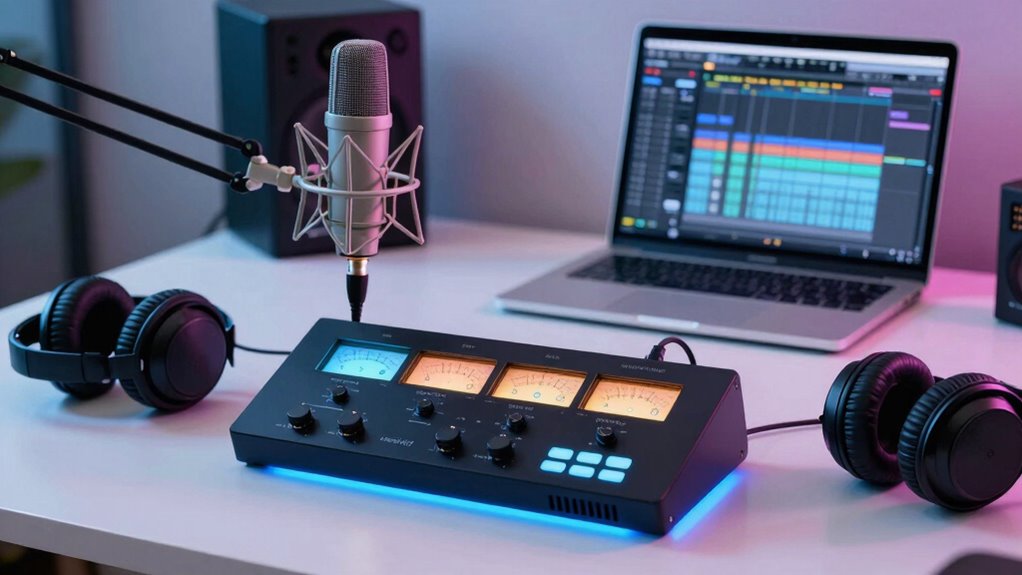
The Focusrite Vocaster Two is my best overall audio interface for podcasting because its two-host focus is a practical fit for interviews and co-hosted shows. For a compact single-host setup, the Vocaster One is more purpose-built than a basic recording interface, while the MAONO AME2 suits creators who want mixer-style controls and multiple inputs. The main choice is between podcast-specific controls, simple USB recording, and extra connections for guests or live production. More inputs and effects can add flexibility, but they can also mean a larger setup and more controls to learn. Read on for the full breakdown, selection criteria, and advice for matching an interface to your show.

Get the latest gadgets delivered free with Prime
- Fast, free delivery on millions of items
- Prime Video, Amazon Music and more included
- Member-only deals all year
Complete the kit



Key Takeaways
- Host count matters more than headline specs: The Vocaster One is tailored to solo recording, while the Vocaster Two makes more sense when two people regularly share microphones.
- Podcast mixers serve a different job from simple interfaces: The MAONO AME2 and E2 Gen2 are aimed at creators who want hands-on control, while the Scarlett Solo and M-Track Solo keep the recording path simpler.
- More inputs are useful only when the show needs them: A multi-person or multi-source setup can benefit from options such as the Scarlett 2i2 or MAONO AME2; solo hosts may gain little from the added complexity.
- Entry-level choices involve different compromises: The M-Track Solo and M-Track Duo focus on straightforward USB recording, whereas the MAONO P1 and MAONOCASTER G1 NEO lean toward podcast or streaming-oriented controls.
- Compatibility and workflow separate close contenders: Before choosing among the 14, check your microphone connection, computer or phone setup, guest count, and whether you want physical mixing controls or just clean input and output.
| Focusrite Vocaster One Podcasting USB Audio Interface | 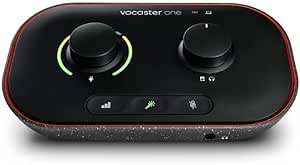 | Best for Solo Podcasting | Channels: 1 | Connectivity: USB | Microphone gain: Over 70 dB | VIEW ON AMAZON | See Our Full Breakdown |
| MAONO P2 Hybrid USB Audio Interface with Dual XLR Inputs |  | Best for Hybrid Phone-and-Computer Recording | Channels: 2 | Connectivity: USB | Microphone gain: 56 dB | VIEW ON AMAZON | See Our Full Breakdown |
| MAONO AME2 10-Channel Podcast Audio Interface Mixer |  | Best for Effects-Heavy Live Shows | Channels: 10 | Microphone inputs: 2 XLR inputs | Microphone gain: Up to 60 dB | VIEW ON AMAZON | See Our Full Breakdown |
| MAONO E2 Gen2 Podcast Audio Interface and Mixer |  | Best for Portable Podcast Sessions | Channels: 10 | XLR inputs: 2 | Maximum preamp gain: 60 dB | VIEW ON AMAZON | See Our Full Breakdown |
| Focusrite Scarlett Solo 4th Gen USB-C Audio Interface |  | Best for Podcasting Plus Music Recording | Channels: 2 | Inputs: 1 XLR microphone preamp; 1 Hi-Z instrument input | Connectivity: USB | VIEW ON AMAZON | See Our Full Breakdown |
| M-Audio M-Track Solo USB Audio Interface |  | Best Budget Starter Interface | Audio resolution: 48 kHz | Inputs: 1 XLR/line combo input with phantom power; 1 switchable line/instrument input | Outputs: Stereo RCA; 1/8-inch headphone output | VIEW ON AMAZON | See Our Full Breakdown |
| MAONOCASTER G1 NEO Gaming Audio Mixer with XLR Input and 48V Phantom Power | 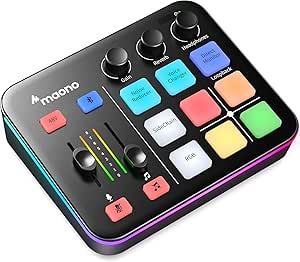 | Best for Gamers Who Podcast | Channels: 4 | Connectivity: Auxiliary, Bluetooth, USB | Audio input sources: Microphone, Bluetooth, computer, smartphone | VIEW ON AMAZON | See Our Full Breakdown |
| Focusrite Vocaster Two Podcasting Interface | 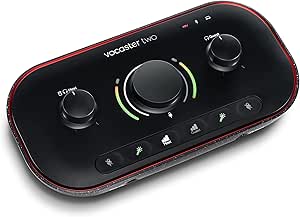 | Best Overall for Host-and-Guest Podcasts | Model: AMS-VOCASTER-TWO | Connectivity: USB | Channels: 2 | VIEW ON AMAZON | See Our Full Breakdown |
| Synido 2×2 USB-C Audio Interface for Recording, Streaming, and Podcasting |  | Best for Flexible Monitoring | Channels: 2 | Bit depth and sample rate: 24-bit, maximum 48 kHz | Inputs: XLR and 6.35 mm | VIEW ON AMAZON | See Our Full Breakdown |
| MAONO P1 USB Audio Interface with 70 dB Gain |  | Best for High-Gain and Mobile Routing | Channels: 2 | Maximum sample rate: 192 kHz | Gain: Up to 70 dB | VIEW ON AMAZON | See Our Full Breakdown |
| Focusrite Scarlett Solo 3rd Gen USB-C Audio Interface |  | Best for Solo Podcasters | Connectivity: USB | Channels: 2 | Audio inputs: XLR and instrument | VIEW ON AMAZON | See Our Full Breakdown |
| Focusrite Scarlett 2i2 4th Gen USB-C Audio Interface |  | Best Overall for Two-Mic Podcasting | Connectivity: USB-C | Channels: 2 | Microphone preamps: 2 | VIEW ON AMAZON | See Our Full Breakdown |
| M-Audio M-Track Duo USB Audio Interface |  | Best Value for a Basic Two-Mic Setup | Inputs: 2 combo XLR/line/instrument inputs | Preamps: Crystal Preamps with phantom power | Audio resolution: 48 kHz | VIEW ON AMAZON | See Our Full Breakdown |
| PIYONE Q2 2×2 USB-C Audio Interface, 24-bit/192 kHz, Alloy Red |  | Best Compact USB-C Alternative | Channels: 2 | Connectivity: USB-C | Inputs: 2 XLR/TRS combo inputs | VIEW ON AMAZON | See Our Full Breakdown |
| audio interface for podcasting | Channels | Connectivity | Maximum sample rate | Compatible operating systems |
|---|---|---|---|---|
| Focusrite Vocaster One Podcast | 1 | USB | 48 kHz | Mac OS, Windows OS, iOS |
| MAONO P2 Hybrid USB Audio Inte | 2 | USB | 192 kHz | Android, ChromeOS, Windows, iOS, macOS |
| MAONO AME2 10-Channel Podcast | 10 | — | — | — |
| MAONO E2 Gen2 Podcast Audio In | 10 | AUX, Bluetooth, USB-C | 48 kHz | — |
| Focusrite Scarlett Solo 4th Ge | 2 | USB | 192 kHz | Mac OS, Windows OS, iOS |
| M-Audio M-Track Solo USB Audio | — | — | — | — |
| MAONOCASTER G1 NEO Gaming Audi | 4 | Auxiliary, Bluetooth, USB | — | — |
| Focusrite Vocaster Two Podcast | 2 | USB | Listed as 24,000 kHz; unusual specification | Mac OS, Windows OS, iOS |
| Synido 2×2 USB-C Audio Interfa | 2 | AUX, USB | — | Windows 7 and above, Mac OS X 10.11 and above, Android, iOS 10.0 and above |
| MAONO P1 USB Audio Interface w | 2 | USB | 192 kHz | Android, ChromeOS, Windows, iOS |
| Focusrite Scarlett Solo 3rd Ge | 2 | USB | 192 kHz | Mac OS, Windows OS, iOS |
| Focusrite Scarlett 2i2 4th Gen | 2 | USB-C | 192 kHz | Mac OS, Windows OS, iOS |
| M-Audio M-Track Duo USB Audio | — | — | — | — |
| PIYONE Q2 2×2 USB-C Audio Inte | 2 | USB-C | 192 kHz | Windows, Mac |
More Details on Our Top Picks
Focusrite Vocaster One Podcasting USB Audio Interface
For a podcast built around one host and an XLR microphone, the Vocaster One keeps setup focused rather than adding mixer controls you may never use. Its more than 70 dB of gain can accommodate a broad range of microphones without a separate booster, while Auto Gain and voice-enhancement presets help new hosts get a usable starting level quickly. Phone, camera, and stereo loopback connections also make it more adaptable for interviews or streaming than a basic recording interface such as the Scarlett Solo 4th Gen.
The tradeoff is its single microphone channel: it is not the right choice for two in-person hosts or a guest with a separate XLR mic. Its 48 kHz ceiling is also lower than the Scarlett Solo’s 192 kHz capability, though that is less relevant to straightforward podcast delivery. Pick this for a solo show; choose a dual-input mixer if your format is likely to grow.
Pros:- More than 70 dB of microphone gain supports a wide range of XLR microphones without a booster.
- Auto Gain and one-button voice-enhancement presets simplify setup for newer hosts.
- Phone, camera, and stereo loopback connections suit streaming and flexible recording setups.
- Compact 349 g design is easy to fit into a small podcast workspace.
Cons:- One microphone channel limits it to solo XLR recording.
- Maximum sample rate is 48 kHz, below the Scarlett Solo 4th Gen’s 192 kHz capability.
Best for: Solo podcasters who want a simple XLR setup, guided gain setting, and connections for a phone or camera.
Not ideal for: Two-host shows using separate XLR microphones, or creators who need recording above 48 kHz.
- Channels:1
- Connectivity:USB
- Microphone gain:Over 70 dB
- Maximum sample rate:48 kHz
- Frequency response:20 kHz
- Compatible operating systems:Mac OS, Windows OS, iOS
- Dimensions:4.45 × 7.66 × 1.99 in (D × W × H)
- Weight:349 g
Our verdict“Choose the Vocaster One for a streamlined solo podcast setup, but move to a dual-XLR interface if you record co-hosts in the same room.”
MAONO P2 Hybrid USB Audio Interface with Dual XLR Inputs
The MAONO P2 is a flexible fit for podcasters who move between a computer-based show and phone or tablet content. Its two XLR inputs allow a pair of hosts to use separate microphones, and simultaneous computer and mobile-device connections can reduce cable swapping between workflows. Direct monitoring, loopback, and dedicated mute controls serve the practical demands of live conversations and streams. Against the Focusrite Vocaster One, the P2 is the more suitable pick for two XLR voices and higher-resolution recording.
That extra flexibility comes with a more involved setup: the included ProStudio 2 routing software is listed for PC workflows, which may take configuration before everything behaves as intended. Its 56 dB of gain is also below the Vocaster One’s stated figure, so mic choice and output level deserve attention. Choose the P2 for multi-device routing and two-person recording, not for the simplest possible solo setup.
Pros:- Two XLR inputs support separate microphones for a host and guest.
- 24-bit/192 kHz recording supports high-resolution capture.
- Computer and phone or tablet connections support hybrid recording and streaming workflows.
- Direct monitoring, loopback, and individual mute controls help manage live audio.
Cons:- ProStudio 2 routing software may add configuration steps for PC users.
- 56 dB of microphone gain is lower than the Focusrite Vocaster One’s stated gain.
- The listed frequency response gives only a 20 kHz figure, without a lower bound.
Best for: Two-person podcast teams and creators who need to route audio between a computer and a phone or tablet.
Not ideal for: Solo beginners who want guided, minimal setup or users whose microphones need more gain than 56 dB provides.
- Channels:2
- Connectivity:USB
- Microphone gain:56 dB
- Audio resolution:24-bit
- Maximum sample rate:192 kHz
- Compatible operating systems:Android, ChromeOS, Windows, iOS, macOS
- Dimensions:6.42 × 8.27 × 3.23 in
- Weight:0.5 kg
Our verdict“Pick the P2 if your podcast alternates between computer and mobile workflows and needs two XLR microphones, provided you are comfortable configuring routing.”
MAONO AME2 10-Channel Podcast Audio Interface Mixer
The MAONO AME2 is better understood as a compact podcast production mixer than a bare-bones interface. Alongside two XLR inputs and 48 V phantom power, it offers 11 customizable sound pads, noise reduction, reverb, auto-tune, loopback, and connections for instruments and mobile devices. That range makes it a stronger fit than the Focusrite Scarlett Solo 4th Gen for a live show that uses stingers, effects, or a guitar input, and needs controls within reach rather than relying on separate software.
The extra tools bring a learning curve and do not replace a simple recording workflow. The AME2 does not support USB microphones, so hosts need compatible XLR mics, and some pads can hold audio for only up to 20 seconds. Its 0.95 kg body is also less portable than a small interface. I’d choose it for an effects-led stream or interactive podcast, not a clean, minimal voice-recording setup.
Pros:- Two XLR inputs with 48 V phantom power support condenser microphones and two-person shows.
- Eleven customizable sound pads support stingers and recurring show cues.
- Instrument input and connections for phones, tablets, and cameras suit varied production setups.
- Noise reduction, reverb, auto-tune, and loopback add live-production options.
Cons:- USB microphones are not supported, limiting compatibility with existing USB-only mic setups.
- Some sound pads record for only up to 20 seconds.
- Its 0.95 kg weight and many controls make it less portable and simpler to misconfigure than a basic interface.
Best for: Live podcasters and streamers who use two XLR microphones, sound cues, voice effects, or instrument inputs.
Not ideal for: Hosts using USB microphones or anyone seeking a small, straightforward interface for voice-only recording.
- Channels:10
- Microphone inputs:2 XLR inputs
- Microphone gain:Up to 60 dB
- Phantom power:48 V
- Sound pads:11 customizable pads
- Connections:XLR, 3.5 mm TRRS, 6.35 mm, USB-C, Bluetooth
- Compatibility:Windows, Mac OS, smartphones, tablets, and cameras; USB microphones not supported
- Dimensions:9.64 × 6.18 × 2.16 in
- Weight:0.95 kg
Our verdict“Choose the AME2 for a live, effects-rich podcast with XLR microphones, but skip it if you want a simple voice interface or rely on USB mics.”
MAONO E2 Gen2 Podcast Audio Interface and Mixer
For recording away from a fixed desk, the MAONO E2 Gen2 pairs two XLR inputs with a built-in battery rated for up to eight hours. That makes it easier to host a mobile interview or stream without keeping the mixer plugged into a power source. It also includes loopback, Bluetooth and AUX connectivity, plus eight customizable effect buttons, so it can handle more than basic microphone capture. Compared with the MAONO AME2, the E2 Gen2 gives up three sound buttons but adds battery operation and a lighter stated weight.
Its 48 kHz maximum sample rate is aimed at standard podcast and streaming workflows rather than higher-resolution capture like the MAONO P2’s 192 kHz mode. The buttons’ 20-second limit also restricts longer clips, and the unit does not support phone charging or power delivery. It suits portable productions that value self-powered operation; for a permanent studio, a less mobile interface may be a better match.
Pros:- Two XLR inputs and up to 60 dB of preamp gain support two-mic podcast sessions.
- Built-in battery is rated for up to eight hours of use.
- Loopback, Bluetooth, and AUX connections support flexible mobile and streaming setups.
- Eight customizable sound-effect buttons and voice effects provide onboard production tools.
Cons:- Maximum sample rate is 48 kHz, unlike the MAONO P2’s 192 kHz capability.
- The unit does not support phone charging or power delivery.
- Each sound-effect button supports clips of up to 20 seconds.
Best for: Mobile podcast hosts who need two XLR microphones, onboard effects, and battery-powered sessions away from an outlet.
Not ideal for: Creators who need phone charging, recording above 48 kHz, or longer sound-pad clips.
- Channels:10
- XLR inputs:2
- Maximum preamp gain:60 dB
- Maximum sample rate:48 kHz
- Connectivity:AUX, Bluetooth, USB-C
- Battery life:Up to 8 hours
- Sound effect buttons:8 customizable; up to 20 seconds per button
- Dimensions:9.64 × 6.18 × 2.16 in
- Weight:0.89 kg
Our verdict“Choose the E2 Gen2 for battery-powered, two-mic podcast sessions on the move, not for high-resolution capture or charging a connected phone.”
Focusrite Scarlett Solo 4th Gen USB-C Audio Interface
The Scarlett Solo 4th Gen makes the most sense when podcasting is one part of a broader home-recording setup. It has one XLR mic preamp for a host and a separate Hi-Z instrument input for guitar or bass, plus 24-bit/192 kHz recording and a stated 120 dB dynamic range. Air mode can add presence to vocals, while the bundled software and plugins give buyers tools for editing and recording beyond a basic podcast chain. Compared with the Vocaster One, it favors music-friendly inputs and higher sample-rate capability over podcast-specific conveniences such as Auto Gain and phone or camera connections.
That distinction matters: this is not a two-microphone interface, and its one mic preamp limits in-person co-host recording. It also depends on compatible recording software and a computer or iOS device. I’d pick it for a solo host who also records instruments; for a dedicated podcast with guided setup, the Vocaster One is the more focused option.
Pros:- 24-bit/192 kHz recording supports high-resolution capture.
- Separate XLR microphone preamp and Hi-Z instrument input suit podcasting alongside music recording.
- Air mode can add presence and harmonic character to vocals and guitars.
- Bundled recording software and plugins provide a starting point for production.
Cons:- Only one microphone preamp is available for XLR podcast microphones.
- Recording requires compatible software and a computer or iOS device.
- It lacks the Vocaster One’s listed Auto Gain and dedicated phone and camera connections.
Best for: Solo podcasters who also record guitar, bass, or vocals and want one interface for podcasting and music production.
Not ideal for: Two-person shows needing two XLR microphones, or beginners who prefer podcast-specific controls and guided gain setup.
- Channels:2
- Inputs:1 XLR microphone preamp; 1 Hi-Z instrument input
- Connectivity:USB
- Maximum sample rate:192 kHz
- Dynamic range:120 dB
- Compatible operating systems:Mac OS, Windows OS, iOS
- Compatible devices:Microphone, instrument, personal computer, headphones, studio monitors
- Dimensions:3.78 × 5.63 × 1.83 in
- Weight:14.4 ounces
Our verdict“Choose the Scarlett Solo 4th Gen if you want to record a solo podcast and instruments, but opt for a dual-preamp model for co-hosts.”
M-Audio M-Track Solo USB Audio Interface
For a solo host building a simple microphone-and-computer setup, the M-Track Solo keeps the essentials compact: one XLR combo input with phantom power, USB power, and direct monitoring so you can hear yourself without distracting delay. Its second input accepts a line or instrument signal, which is handy for adding a guitar, but it does not provide a second microphone input for a co-host. That makes it less suited to two-person interviews than the Focusrite Vocaster Two, which has two mic inputs and separate headphone outputs. The M-Track Solo is also more basic than the Synido 2×2, which offers 24-bit recording and multiple monitoring modes. In return, this M-Audio is a straightforward, portable starting point; the tradeoffs are its 48 kHz resolution and limited mic capacity.
Pros:- One XLR combo input with phantom power supports condenser microphones.
- USB-powered design suits compact desks and portable recording setups.
- USB/Direct switch enables zero-latency monitoring.
- Includes Ableton Live Lite and MPC Beats software.
Cons:- Only one input is designed for a microphone, limiting two-person podcast recording.
- Maximum audio resolution is 48 kHz.
- The 1/8-inch headphone output may require an adapter for headphones with a 1/4-inch plug.
Best for: Solo podcasters who want a small, USB-powered interface for one XLR microphone, with the option to connect an instrument.
Not ideal for: Hosts recording two XLR microphones at once, or buyers who need higher-than-48 kHz recording resolution and more flexible monitoring modes.
- Audio resolution:48 kHz
- Inputs:1 XLR/line combo input with phantom power; 1 switchable line/instrument input
- Outputs:Stereo RCA; 1/8-inch headphone output
- Monitoring:USB/Direct switch for zero-latency monitoring
- Power:USB-powered
- Compatible devices:Guitar, headphones, keyboard, laptop, microphone, computer, smartphone, speaker, tablet
- Supported software:Ableton Live Lite, MPC Beats
Our verdict“Choose the M-Track Solo for a portable, no-frills solo-host setup, but pick a two-mic interface for regular guest interviews.”
MAONOCASTER G1 NEO Gaming Audio Mixer with XLR Input and 48V Phantom Power
The MAONOCASTER G1 NEO is the most streaming-oriented pick here: its XLR input and 48V phantom power handle a conventional podcast microphone, while sound pads, voice effects, Bluetooth accompaniment, loopback, and one-click mute cater to live, personality-led shows. Those controls can make a gaming broadcast more interactive, but they are a different priority from the clean, guest-focused workflow of the Focusrite Vocaster Two, which supplies two mic inputs and separate headphone feeds. The G1 NEO has four channels, yet the supplied details do not identify it as a two-XLR-mic interface, so I would not choose it for a host-and-guest mic setup. Its phone, computer, and PlayStation compatibility is useful for a streamer, while the lack of Xbox and USB-microphone support narrows its reach. USB power may also prove unstable under demanding use; the included 5V adapter is recommended.
Pros:- XLR preamp with switchable 48V phantom power supports condenser microphones.
- Sound pads, voice effects, reverb, and sidechain features suit interactive streams.
- Bluetooth input, loopback, and direct monitoring support flexible live audio routing.
- Compact unit includes a one-click mute control and 12 RGB color variations.
Cons:- Does not support USB microphones or Xbox.
- The listed features do not establish support for two XLR microphones, limiting its fit for co-hosted podcasts.
- USB power alone may be unstable during demanding use; the 5V adapter is recommended.
Best for: Gaming streamers who also make solo podcast or live-talk content using an XLR microphone, sound effects, and phone or Bluetooth audio.
Not ideal for: Xbox users, podcasters with USB microphones, and interview shows that need two dedicated XLR microphone inputs.
- Channels:4
- Connectivity:Auxiliary, Bluetooth, USB
- Audio input sources:Microphone, Bluetooth, computer, smartphone
- Microphone power:Switchable 48V phantom power
- Output connectors:3.5 mm, USB-C
- Compatibility:Phones, computers, tablets, PS4, PS5; not compatible with Xbox or USB microphones
- Dimensions:6.29 × 2 × 5.19 in
- Weight:1.2 lb
Our verdict“Pick the G1 NEO for a gaming-led show with effects and Bluetooth audio, not for a conventional two-microphone podcast studio.”
Focusrite Vocaster Two Podcasting Interface
For a podcast built around a host and guest, the Focusrite Vocaster Two is the clearest fit in this group. Two microphone inputs and separate headphone outputs let both speakers connect directly, while Auto Gain helps set levels without as much manual adjustment. Bluetooth phone connectivity and a camera connection also suit interview formats that bring in call audio or record video. Compared with the solo-focused M-Audio M-Track Solo, this model is far better equipped for two-person sessions; unlike the streamer-focused MAONOCASTER G1 NEO, its feature set is centered on podcast voices rather than gaming effects. The tradeoff is a more specialized setup: buyers recording alone may not need its extra guest connections. The supplied maximum-sample-rate specification is listed as 24,000 kHz, an unusual figure that I would verify before relying on it.
Pros:- Two microphone inputs accommodate a host and guest.
- Separate headphone outputs let both speakers monitor the session.
- Auto Gain and one-button sound enhancement simplify setup.
- Bluetooth phone connectivity and camera connections support interview and video workflows.
Cons:- The listed maximum sample rate of 24,000 kHz is unusual and should be verified.
- Its two-person controls and connections may be unnecessary for a solo host.
- The feature set is more podcast-specific than a general-purpose interface for varied studio recording.
Best for: Two-person podcast teams who want two microphone connections, individual headphone outputs, simple level setting, and phone or camera integration.
Not ideal for: Solo hosts seeking the smallest, simplest interface, or buyers who need a clearly stated and verified maximum sample rate before purchase.
- Model:AMS-VOCASTER-TWO
- Connectivity:USB
- Channels:2
- Microphone inputs:2
- Headphone outputs:2
- Maximum sample rate:Listed as 24,000 kHz; unusual specification
- Compatible operating systems:Mac OS, Windows OS, iOS
- Dimensions and weight:4.45 × 8.84 × 1.99 in; 1.8 lb
Our verdict“Choose the Vocaster Two if two people need to speak and monitor at once; solo podcasters can opt for a simpler interface.”
Synido 2×2 USB-C Audio Interface for Recording, Streaming, and Podcasting
The Synido 2×2 stands out for its three monitoring modes—Stereo, Mix, and USB—which give a podcaster more ways to balance live input against computer playback than the simple direct-monitoring switch on the M-Audio M-Track Solo. Its XLR input, 48V phantom power, and level indicators cover the basics for a mic-based show, while 24-bit/48 kHz recording is a useful step up from the M-Track Solo’s listed 48 kHz resolution. The compact 300 g design and broad computer and mobile compatibility make it appealing for creators who move between a desk and a portable setup. It is still a two-channel interface with a 48 kHz ceiling, not a higher-rate studio upgrade. Some Windows setups may need a third-party ASIO driver, adding a bit of configuration that the plug-and-play description does not remove.
Pros:- Stereo, Mix, and USB monitoring modes offer more routing flexibility than the M-Track Solo’s USB/Direct switch.
- 24-bit/48 kHz recording and 48V phantom power support a capable basic microphone setup.
- Compact 300 g build and included cables suit portable recording.
- Compatible with Windows, Mac, Android, and iOS devices.
Cons:- Maximum sample rate is limited to 48 kHz.
- Some setups may need a third-party ASIO driver for best compatibility.
- Product information lists conflicting weight figures: 300 g and 0.41 kg.
Best for: Mobile-minded podcasters who want a compact interface with phantom power and distinct monitoring modes for mic, mix, and computer audio.
Not ideal for: Buyers seeking sample rates above 48 kHz or a setup that avoids possible third-party driver installation on Windows.
- Channels:2
- Bit depth and sample rate:24-bit, maximum 48 kHz
- Inputs:XLR and 6.35 mm
- Phantom power:48V
- Monitoring modes:Stereo, Mix, USB
- Connectivity:AUX, USB
- Compatible operating systems:Windows 7 and above, Mac OS X 10.11 and above, Android, iOS 10.0 and above
- Dimensions and weight:4.53 × 5.51 × 1.77 in; listed as 300 g and 0.41 kg
Our verdict“Choose the Synido 2×2 for portable recording and more monitoring choices, provided 48 kHz is enough for your workflow.”
MAONO P1 USB Audio Interface with 70 dB Gain
The MAONO P1 is the most feature-rich two-channel option here for a podcaster who needs extra gain and wants to route audio between a computer and mobile device. Its stated up to 70 dB of gain may help accommodate microphones that need more amplification, while loopback, direct monitoring, auto-gain, mute controls, and routing software address common recording and streaming tasks. That makes it more configurable than the simpler M-Audio M-Track Solo, and a better match for a multi-device workflow than the Focusrite Vocaster Two, which is more purpose-built for a host and guest. The P1’s listed 24-bit/192 kHz recording is its strongest spec claim, but the supplied frequency response is only stated as 20 kHz, so the information is incomplete. Some functions also depend on its routing software, which may add setup steps.
Pros:- Up to 70 dB of gain can suit microphones that need substantial amplification.
- Listed 24-bit/192 kHz recording supports higher-rate capture than the 48 kHz M-Track Solo and Synido 2×2.
- Loopback, direct monitoring, auto-gain, and mute controls suit podcasting and streaming.
- Supports simultaneous computer and mobile device connections in a compact zinc-alloy housing.
Cons:- Some routing features depend on the included software.
- The supplied frequency-response specification is incomplete, listing only 20 kHz.
- The product information does not specify two XLR microphone inputs for co-host recording.
Best for: Solo creators who need high stated gain, loopback, and connections spanning a computer and phone or tablet.
Not ideal for: Two-host shows that need two dedicated XLR mic inputs, or buyers who prefer a simple hardware-only workflow without routing software.
- Channels:2
- Maximum sample rate:192 kHz
- Gain:Up to 70 dB
- Connectivity:USB
- Features:Auto-gain, loopback, direct monitoring, mute controls, ASIO support
- Compatible operating systems:Android, ChromeOS, Windows, iOS
- Housing:Zinc alloy
- Dimensions:5.9 × 5.98 × 3.46 in (D × W × H)
Our verdict“Pick the P1 for a high-gain, software-assisted mobile and computer workflow, but choose a two-mic podcast interface for regular guest sessions.”
Focusrite Scarlett Solo 3rd Gen USB-C Audio Interface
The Scarlett Solo 3rd Gen is the clearest fit here for a host who records alone and wants a familiar, compact interface rather than podcast-specific mixer controls. Its single microphone preamp handles one host mic, while the separate instrument input suits a guitar or bass; Air mode can add presence to a voice, and Halo metering helps set levels without relying only on software. Compared with the Scarlett 2i2 4th Gen, it gives up a second mic preamp and newer recording aids such as Auto Gain and Clip Safe, so it is less flexible for interviews. It does offer 24-bit/192 kHz recording and a software bundle, but that bundle requires registration and downloads. Choose it for a straightforward solo setup, not a two-person show.
Pros:- One mic preamp plus a separate instrument input supports a simple voice-and-instrument setup.
- Switchable Air mode can add presence to vocal and acoustic recordings.
- Halo metering offers a quick visual cue for input levels.
- Records at up to 24-bit/192 kHz and includes recording software and plug-ins.
Cons:- A single microphone preamp limits recording to one mic at a time.
- The included software requires purchase, registration, and download.
Best for: Solo hosts recording one microphone at a time who also want an instrument input for music or acoustic segments.
Not ideal for: Two-host interview shows or anyone who needs two microphone preamps for simultaneous guest recording.
- Connectivity:USB
- Channels:2
- Audio inputs:XLR and instrument
- Maximum sample rate:192 kHz
- Bit depth:24-bit
- Compatible operating systems:Mac OS, Windows OS, iOS
- Dimensions:1.71 x 5.65 x 3.77 inches
- Warranty:3 years
Our verdict“Choose the Scarlett Solo 3rd Gen for a compact solo-host setup; pick the Scarlett 2i2 4th Gen if you need two mic inputs and easier level management.”
Focusrite Scarlett 2i2 4th Gen USB-C Audio Interface
For a podcast built around two people speaking at once, the Scarlett 2i2 4th Gen is the strongest all-rounder in this group. Two microphone preamps let a host and guest use separate mics, while Auto Gain and Clip Safe help reduce the chance of mismatched levels or clipped takes. That makes it a more practical interview interface than the Scarlett Solo 3rd Gen, which has only one mic preamp, and a more capable recording choice than the M-Track Duo when automatic level assistance and a broader software bundle matter. Air mode adds another voice-shaping option. The tradeoff is that this remains a two-channel interface, not a podcast mixer with multiple routing or on-device production controls. Its feature set suits a growing recording setup, but may be more than a solo host needs.
Pros:- Two low-noise mic preamps support host-and-guest recording with separate microphones.
- Auto Gain and Clip Safe help manage levels and guard against clipping.
- Air mode provides an option for adding presence and harmonic drive to voices.
- Includes recording software and plug-ins for getting a session started.
Cons:- Two channels limit the number of simultaneous microphones and sources.
- Its level-assistance and input capacity may be unnecessary for a host who records alone.
Best for: Two-person podcast teams who want separate microphone inputs and recording aids without moving to a larger mixer.
Not ideal for: Solo hosts who want the simplest, smallest interface, or production teams needing more than two simultaneous inputs and mixer-style controls.
- Connectivity:USB-C
- Channels:2
- Microphone preamps:2
- Maximum sample rate:192 kHz
- Dynamic range:120 dB
- Analogue gain:69 dB
- Compatible operating systems:Mac OS, Windows OS, iOS
- Included software:Pro Tools Intro+, Ableton Live Lite, Cubase LE, Hitmaker Expansion
Our verdict“Choose the Scarlett 2i2 4th Gen for two-mic shows that benefit from level-assistance features, rather than the simpler Scarlett Solo 3rd Gen.”
M-Audio M-Track Duo USB Audio Interface
The M-Track Duo makes sense for a budget-conscious podcaster who needs two mic-capable inputs and basic monitoring, without paying for advanced recording aids. Its two combo inputs accept microphones, instruments, or line-level sources, and phantom power supports compatible condenser mics. The USB/Direct switch gives you zero-latency monitoring, so you can hear your voice without the distracting delay that can disrupt a recording. Compared with the Scarlett 2i2 4th Gen, it is a more stripped-back choice: there is no listed Auto Gain or Clip Safe, and the stated audio resolution is 48 kHz rather than 192 kHz. That is sufficient for many spoken-word workflows, but it offers less headroom for other recording uses. Check your headphone plug, too, as an adapter may be needed.
Pros:- Two combo inputs accept microphones, instruments, and line-level sources.
- Phantom power supports compatible condenser microphones.
- USB/Direct switching enables zero-latency monitoring.
- USB-powered compact design and MPC Beats software support a simple starter setup.
Cons:- The stated audio resolution is 48 kHz, below the 192 kHz capability listed for the Scarlett 2i2 4th Gen.
- iOS use requires an Apple Lightning to USB 3 Camera Adapter.
- The headphone output may need a 1/4-inch adapter for some headphones.
Best for: New podcasters recording two people on Mac or PC who want two flexible inputs and direct monitoring without extra production features.
Not ideal for: Creators who need confirmed straightforward iOS connection, advanced level-management tools, or a specified high-resolution recording format.
- Inputs:2 combo XLR/line/instrument inputs
- Preamps:Crystal Preamps with phantom power
- Audio resolution:48 kHz
- Outputs:Stereo 1/4-inch outputs and 1/4-inch headphone output
- Monitoring:USB/Direct switch for zero-latency monitoring
- Power:USB-powered
- Supported platforms:Mac, PC, and iOS (adapter required)
- Included software:MPC Beats
Our verdict“Pick the M-Track Duo for a basic two-input podcast setup with direct monitoring, but choose the Scarlett 2i2 4th Gen for recording aids and higher stated resolution.”
PIYONE Q2 2×2 USB-C Audio Interface, 24-bit/192 kHz, Alloy Red
The PIYONE Q2 packs two combo inputs and direct monitoring into a portable USB-C interface, making it an option for podcasters who want a compact two-mic-capable unit and a 3.5 mm headphone jack. Its 48V phantom power supports condenser microphones, while Hi-Z input accommodates an instrument without an extra box. On paper, its 24-bit/192 kHz format matches the Scarlett Solo 3rd Gen and exceeds the M-Track Duo’s stated 48 kHz resolution. The more significant distinction is ecosystem confidence: the Q2 lists Windows and Mac compatibility but does not confirm iOS support, while both Focusrite options list iOS. Product details also provide fewer assurances about recording software and level-management tools. It is a feature-rich portable pick, but buyers prioritizing clearly documented compatibility may prefer a Focusrite.
Pros:- Two XLR/TRS combo inputs support microphones and other audio sources.
- 48V phantom power and Hi-Z support cover condenser mics and instruments.
- Zero-latency direct monitoring helps speakers hear their input without software delay.
- 24-bit/192 kHz recording and a 3.5 mm headphone jack are listed.
Cons:- The listed compatibility covers Windows and Mac but does not confirm iOS support.
- Product information does not list a bundled recording software package.
- At 0.74 kg, it is heavier than the 12.32-ounce Scarlett Solo 3rd Gen.
Best for: Mac or Windows podcasters who want two combo inputs, direct monitoring, and a standard 3.5 mm headphone connection in a portable interface.
Not ideal for: iOS-based creators or buyers who want documented software bundles and established level-management features.
- Channels:2
- Connectivity:USB-C
- Inputs:2 XLR/TRS combo inputs
- Maximum sample rate:192 kHz
- Bit depth:24-bit
- Phantom power:48V
- Monitoring:Zero-latency direct monitoring
- Compatible operating systems:Windows, Mac
- Warranty:2-year limited
Our verdict“Choose the PIYONE Q2 for a portable two-input USB-C setup with a 3.5 mm headphone jack, but favor the Scarlett Solo 3rd Gen if confirmed iOS compatibility matters.”

How We Picked
I ranked these interfaces around podcasting tasks: connecting the right number of microphones, recording intelligible speech, monitoring without awkward delays, and fitting the device into a repeatable home or mobile workflow. I also weighed usability, control layout, connection flexibility, and how readily each model could serve a show as it grows. Podcast-focused interfaces and mixers earned consideration for hands-on production features; conventional two-channel interfaces were judged on whether their simpler recording setup is a better match for voice work.
The order reflects fit, not a claim that one design is best for every host. The Vocaster Two leads for its direct match to two-person podcasting, while the Vocaster One offers a more focused solo route. Models with more inputs or mixer controls rank well for specific production needs, but do not automatically outrank simpler devices: added flexibility matters only if a buyer will use it. I also treated product naming and feature sets cautiously, since closely related models can have different controls and connection options.
| audio interface for podcasting | Connectivity | Compatible operating systems |
|---|---|---|
| Focusrite Vocaster One Podcast | USB | Mac OS, Windows OS, iOS |
| MAONO P2 Hybrid USB Audio Inte | USB | Android, ChromeOS, Windows, iOS, macOS |
| MAONO AME2 10-Channel Podcast | — | — |
| MAONO E2 Gen2 Podcast Audio In | AUX, Bluetooth, USB-C | — |
| Focusrite Scarlett Solo 4th Ge | USB | Mac OS, Windows OS, iOS |
| M-Audio M-Track Solo USB Audio | — | — |
| MAONOCASTER G1 NEO Gaming Audi | Auxiliary, Bluetooth, USB | — |
| Focusrite Vocaster Two Podcast | USB | Mac OS, Windows OS, iOS |
| Synido 2×2 USB-C Audio Interfa | AUX, USB | Windows 7 and above, Mac OS X 10.11 and above, Android, iOS 10.0 and above |
| MAONO P1 USB Audio Interface w | USB | Android, ChromeOS, Windows, iOS |
| Focusrite Scarlett Solo 3rd Ge | USB | Mac OS, Windows OS, iOS |
| Focusrite Scarlett 2i2 4th Gen | USB-C | Mac OS, Windows OS, iOS |
| M-Audio M-Track Duo USB Audio | — | — |
| PIYONE Q2 2×2 USB-C Audio Inte | USB-C | Windows, Mac |
Factors to Consider When Choosing Audio Interface For Podcasting
Before choosing a model, map out the show you actually record: how many microphones are live at once, where guests connect, and whether you mix during recording or afterward. Those details often matter more than recording-resolution figures or a long feature list.
Count microphones and guests, not just channels
Start by counting the microphones you need to use simultaneously, then check what each input accepts. A two-input interface may suit two hosts, but it does not automatically cover a remote caller, a phone, and a music source at the same time. Also distinguish microphone inputs from line-level or instrument connections; a port count alone can be misleading. If guests join remotely, software may handle their voices without another hardware input, though that changes how you monitor and record the conversation. Buying far more inputs than your show needs can add cost and setup work, while buying too few can force a hardware replacement when the format changes.
Match the controls to your recording style
A straightforward interface is often easier when you record each voice and edit the episode later. A mixer-style unit may be more useful if you want to adjust levels, trigger sounds, or balance several sources while recording or streaming. Physical controls can speed up live adjustments, but they also create more settings to learn and more chances to change the wrong level mid-show. Think about whether you need effects and sound pads in the hardware or can apply processing in your recording software. Avoid choosing a mixer just because its feature list is longer; a simpler signal path can be easier to repeat reliably.
Check microphone needs before buying
Dynamic and condenser microphones can place different demands on an interface, particularly around gain and phantom power. Confirm that the device supports the power requirements of your chosen microphone and that its gain range suits the mic’s output. Phantom power is intended for compatible microphones; it is not a general sound-quality upgrade and should not be switched on without checking connected equipment. Gain problems can lead to noisy recordings or a signal that is too quiet to edit comfortably. If you already own a microphone, treat compatibility with that exact model as a buying filter rather than assuming every XLR interface will perform the same way.
Plan monitoring and remote recording
Closed-back headphones help hosts hear speech clearly without sending the headphone sound back into the microphone. Direct monitoring can make your own voice feel immediate, while software monitoring may introduce delay depending on the computer and settings. For interviews, check how many headphone outputs are available and whether each person can hear a suitable mix; one headphone jack may require a separate distribution device for a group. Remote guests are usually handled through software, so test how that call audio enters and returns before a live session. These routing details can matter more to a smooth show than a higher sample-rate specification.
Choose portability and connections around your actual devices
USB-C describes a connector, not a guarantee that every computer, tablet, or phone can power and operate an interface in the same way. Check the manufacturer’s compatibility details, cable needs, and whether your mobile device requires an adapter or external power. A compact bus-powered unit can simplify travel, while a larger mixer may suit a fixed desk better. If you plan to record away from a computer, confirm that the device supports that workflow rather than assuming a USB interface records independently. Choosing around the devices you already own can prevent extra adapters and unexpected setup limits.
Pay for useful headroom, not unused features
Spending more can make sense when it buys a real improvement in workflow: another host input, more useful monitoring, or controls that reduce reliance on software during a live show. It is harder to justify extra hardware features that duplicate tools you already use in your computer. For a first podcast, a basic interface can be a sound choice if it has the right mic connection and monitoring options. Leave room in your setup plan for headphones, microphone stands, cables, and recording software, since the interface is only one part of the chain. Pick the least complicated device that supports your current show and a realistic next step.
Frequently Asked Questions
Should I buy a podcast mixer or a standard USB audio interface?
Choose a standard interface if your main task is recording microphone audio into software and editing the show afterward. A podcast mixer is a better fit when you want hands-on control over several sources, live adjustments, or built-in production features. Mixers can shorten some workflows, but their extra controls may take time to learn and do not replace a clear recording plan. Compare the inputs and routing you will use every episode rather than buying by category name. For many solo hosts, a simple interface is enough; a live multi-source show has a stronger case for mixer-style hardware.
Is one microphone input enough if I interview guests remotely?
Often, yes: the host’s microphone can connect to the interface while a remote guest joins through conferencing or recording software. The key is how that software routes guest audio to your recording and whether you can monitor both voices without echo or feedback. You may need separate tracks or a dedicated remote-recording workflow if you want more control over edits. A second hardware input is more useful when a guest is physically in the room with a separate microphone. Test the complete call-and-record setup before committing to a one-input device.
Do I need 48V phantom power for podcasting?
You need phantom power only if your microphone requires it, as many condenser microphones do; many dynamic microphones do not. Check the microphone’s documentation before switching phantom power on, especially when several devices share the interface. Having the feature can give you more microphone choices later, but it does not improve every microphone by itself. Also check whether the interface supplies enough gain for your particular mic, since phantom power and microphone gain solve different problems. If you have not picked a microphone yet, treat phantom power as a useful compatibility option rather than a sound-quality guarantee.
Can I record two hosts with a two-input interface?
Usually, a two-input interface can record two microphones at once if both inputs are suitable for microphones and the software can capture them as separate sources. Confirm that the model provides the right connectors and independent gain controls; a device with two total inputs may assign one to a different signal type. Check headphone monitoring as well, since two hosts may need more than one listening connection. A two-input setup can work well for a fixed two-person show, but extra in-room guests or additional audio sources may call for more inputs. Decide based on simultaneous sources, not the number of people who appear in a typical episode.
Should I choose a newer generation of an interface over an older one?
Not automatically. A newer generation may change controls, connections, or workflow, but the right choice depends on whether those changes solve a problem in your setup. Compare the exact model’s input count, monitoring, microphone support, computer compatibility, and included features rather than relying on the generation number. The Scarlett Solo 3rd Gen and 4th Gen, for example, should be evaluated as separate devices against your recording needs, not treated as interchangeable labels. If your current microphone and recording workflow fit an older model, a newer version only makes sense when its differences are useful to you.
Conclusion
For most two-person shows, I recommend the Focusrite Vocaster Two as the best overall fit because its podcast focus aligns with a common co-host setup. The M-Audio M-Track Solo is my best value-style pick for a basic, single-microphone recording chain, while the MAONO AME2 is the best premium-style choice here for creators who want a more involved mixer workflow and will use its added controls. Beginners recording alone should start with the Focusrite Vocaster One for a podcast-oriented setup, or compare it with the Scarlett Solo 4th Gen if they prefer a conventional interface. For specific needs, choose the Vocaster Two for two hosts, the MAONO E2 Gen2 or AME2 for mixer-led production, and a compact two-input option such as the Synido 2×2 when portability is a priority. My final filter is simple: buy for the microphones and sources you record at once, then favor the least complicated controls that support your show.