
The best video doorbell overall in this lineup is the Tapo D225 2K+ Smart Video Doorbell with Chime, a balanced pick for shoppers who want sharp video and a chime included. For a wired premium option, the Google Nest Doorbell (Wired, 3rd Gen) brings 2K HDR, while the Blink Video Doorbell and Outdoor 4 bundle suits households that want doorbell coverage alongside outdoor cameras. The main tradeoffs are wired reliability versus battery flexibility, and richer features versus subscription or ecosystem requirements. Some models also bundle extra cameras or a chime, which can make setup more convenient but less useful if you already own compatible gear. Read on for the full breakdown and guidance on which video doorbell fits your home.

Get the latest gadgets delivered free with Prime
- Fast, free delivery on millions of items
- Prime Video, Amazon Music and more included
- Member-only deals all year
Complete the kit



Key Takeaways
- Tapo D225 is the strongest all-around fit: its 2K+ video and included chime balance useful clarity with a straightforward package.
- Wiring changes the shortlist: Google Nest and Ring Wired suit homes with compatible existing wiring, while battery models avoid that installation constraint.
- Bundles are only valuable when the extras fit your plan: Blink‘s Outdoor 4 system and Ring‘s Indoor Cam Plus bundle add coverage beyond the front door, but may duplicate equipment you already have.
- Resolution is not the whole picture: field of view, HDR or night vision, alerts, and placement all affect how useful recorded footage is.
- Subscription and storage terms deserve an early check: the BOIFUN explicitly advertises no subscription, while buyers should verify the current recording and feature requirements for other brands before choosing.
| Blink Video Doorbell + Outdoor 4 Wireless Security Cameras System |  | Best for Expanding Coverage | Doorbell resolution: 1440 x 1440p | Outdoor 4 resolution: 1080p HD | Doorbell field of view: 150° | VIEW ON AMAZON | See Our Full Breakdown |
| Google Nest Doorbell (Wired, 3rd Gen) – 2K HDR, Snow |  | Best for Google Home Homes | Video resolution: 2K HDR (2000) | Field of view: 166° | Night vision: Yes | VIEW ON AMAZON | See Our Full Breakdown |
| Orbitell 1080p Wireless Video Doorbell Camera with Two-Way Audio and Night Vision |  | Best for Simple Person Alerts | Model: M52 | Video resolution: 1080p | Connectivity: 2.4 GHz Wi-Fi only; not compatible with 5 GHz Wi-Fi | VIEW ON AMAZON | See Our Full Breakdown |
| Blink Battery Doorbell 2K+ with Blink Chime and Sync Module Core, White |  | Best Battery Doorbell Bundle | Video resolution: 2K (1920 x 1920) | Field of view: 140° horizontal, 140° vertical | Frame rate: Up to 24/25 FPS | VIEW ON AMAZON | See Our Full Breakdown |
| Tapo D225 2K+ Smart Video Doorbell with Chime |  | Best for Local Storage and Wide Coverage | Video resolution: 2K QHD | Field of view: 180° head-to-toe | Power options: Built-in 10,000 mAh battery or 8–24 V hardwired | VIEW ON AMAZON | See Our Full Breakdown |
| Ring Wired Doorbell 2K (2nd Gen), Speckled Gray |  | Best for Wired Ring Setups | Video resolution: Retinal 2K | Enhanced zoom: Up to 6x | Field of view: 140° horizontal × 140° vertical | VIEW ON AMAZON | See Our Full Breakdown |
| Blink Wired Doorbell 2K+ |  | Best for Head-to-Toe Wired Viewing | Video resolution: 2K (1920 × 1920) | Field of view: 140° horizontal × 140° vertical | Aspect ratio: 1:1 | VIEW ON AMAZON | See Our Full Breakdown |
| Ring Battery Doorbell (2nd Gen) and Indoor Cam Plus Bundle, Speckled White and White |  | Best Doorbell-and-Indoor-Camera Bundle | Doorbell video: Retinal 2K with 6x Enhanced Zoom | Doorbell field of view: 140° horizontal × 140° vertical | Doorbell power: Lithium-ion battery | VIEW ON AMAZON | See Our Full Breakdown |
| BOIFUN Wireless Video Doorbell Camera 2K HD with No Subscription, 166° Wide View, HDR Night Vision, Motion Alerts, Two-Way Audio, Battery Powered | 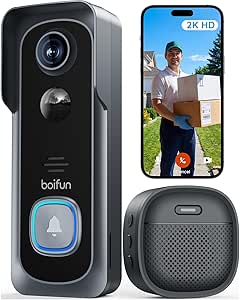 | Best for Subscription-Free Local Storage | Resolution: 2K HD | Field of view: 166° | Night vision: HDR with 940 nm IR | VIEW ON AMAZON | See Our Full Breakdown |
| video doorbell | Connectivity | Video resolution | Field of view |
|---|---|---|---|
| Blink Video Doorbell + Outdoor | 2.4 GHz Wi-Fi 802.11b/g/n | — | — |
| Google Nest Doorbell | Wired and Wi-Fi | 2K HDR (2000) | 166° |
| Orbitell 1080p Wireless Video | 2.4 GHz Wi-Fi only; not compatible with 5 GHz Wi-Fi | 1080p | — |
| Blink Battery Doorbell 2K+ wit | 2.4 GHz Wi-Fi 802.11b/g/n | 2K (1920 x 1920) | 140° horizontal, 140° vertical |
| Tapo D225 2K+ Smart Video Door | — | 2K QHD | 180° head-to-toe |
| Ring Wired Doorbell 2K | Wi-Fi 4, single-band 2.4 GHz | Retinal 2K | 140° horizontal × 140° vertical |
| Blink Wired Doorbell 2K+ | 2.4 GHz Wi-Fi (802.11b/g/n) | 2K (1920 × 1920) | 140° horizontal × 140° vertical |
| Ring Battery Doorbell | Single-band 2.4 GHz Wi-Fi 4 | — | — |
| BOIFUN Wireless Video Doorbell | 2.4 GHz Wi-Fi only | — | 166° |
More Details on Our Top Picks
Blink Video Doorbell + Outdoor 4 Wireless Security Cameras System
This bundle makes the most sense for buyers who want a doorbell plus several camera viewpoints, rather than the most advanced doorbell image on its own. The doorbell records at 1440 x 1440, while the included Outdoor 4 cameras add 1080p coverage around the property; together, they can monitor more than the front step without mixing separate systems. Its up to two-year battery life reduces battery changes, though that figure applies to the supplied batteries and usage conditions can affect runtime. Compared with the Tapo D225, the Blink doorbell offers a wider system bundle but lacks the Tapo’s stated 180° head-to-toe view and local microSD storage option. Cloud storage and advanced features require a Blink subscription, so this is a better fit for people who value multi-camera coverage over subscription-free recording.
Pros:- Includes a 1440 x 1440 video doorbell and two Outdoor 4 cameras for broader property coverage
- Supplied lithium batteries are rated for up to two years of life
- Doorbell provides infrared night vision, two-way audio, and a 150° field of view
- Mounting and installation accessories are included
Cons:- Cloud storage and advanced features require a Blink Subscription Plan
- The doorbell and cameras rely on replaceable batteries rather than rechargeable power
- Requires a high-speed internet connection for connected monitoring
Best for: Homeowners who want a coordinated doorbell and outdoor-camera system, with battery operation and coverage beyond the front entrance.
Not ideal for: Buyers who only need a doorbell, want local recording without a subscription, or prefer a wider head-to-toe view from the doorbell itself.
- Doorbell resolution:1440 x 1440p
- Outdoor 4 resolution:1080p HD
- Doorbell field of view:150°
- Frame rate:30 FPS
- Power:3 AA lithium batteries for doorbell; 2 AA lithium batteries per Outdoor 4 camera
- Battery life:Up to two years
- Connectivity:2.4 GHz Wi-Fi 802.11b/g/n
- Operating temperature:-5°F to 113°F (-20°C to 45°C)
Our verdict“Choose this bundle if you want a battery-powered doorbell paired with outdoor cameras, but pick the Tapo D225 if local storage and a broader doorbell view matter more.”
Google Nest Doorbell (Wired, 3rd Gen) – 2K HDR, Snow
The Nest Doorbell is the clearest fit for buyers who already use Google Home and can connect a doorbell to existing wiring. Its 2K HDR video and 166° field of view give the front entrance a broad, detailed view, while wired power removes the battery replacement routine found with the Blink Video Doorbell + Outdoor 4 system and the battery-powered Tapo D225. Google Home and Gemini features add a software advantage for households that want intelligent alerts and video summaries, though some Gemini features require a Google Home Premium subscription. The tradeoff is installation: unlike the Tapo D225, which can run from a battery, this model needs wired power. I’d choose it for a Google-centered setup, but not for a rental or a doorway without compatible wiring.
Pros:- 2K HDR video captures detailed footage with color and contrast
- 166° field of view covers a broad area around the entrance
- Wired power avoids routine battery charging or replacement
- Works with Google Home and supports Gemini features
Cons:- Requires wired installation, unlike the battery-powered Tapo D225
- Some Gemini features require a Google Home Premium subscription
Best for: Google Home users with existing doorbell wiring who prioritize detailed video, a broad field of view, and connected alerts.
Not ideal for: Renters or homeowners without compatible doorbell wiring, and buyers who want battery installation or to avoid subscription-dependent Gemini features.
- Video resolution:2K HDR (2000)
- Field of view:166°
- Night vision:Yes
- Power source:Corded electric
- Connectivity:Wired and Wi-Fi
- Dimensions:5.16 x 1.65 x 1.14 inches
- Weight:4.96 ounces
- Color:Snow
Our verdict“Pick the Nest if you have doorbell wiring and use Google Home; choose the Tapo D225 if you need battery installation flexibility.”
Orbitell 1080p Wireless Video Doorbell Camera with Two-Way Audio and Night Vision
Orbitell keeps its pitch focused: 1080p video, two-way audio, and person detection in a wireless doorbell. Its AI detection is intended to identify people and filter out vehicles and animals, which may help reduce interruptions compared with a basic motion alert. Against the Blink Battery Doorbell 2K+, though, Orbitell gives up resolution and Blink’s included chime-and-Sync Module bundle; its case is strongest when straightforward person alerts and an IP65 weather-resistant design matter more than a higher-resolution image. It also works only on 2.4 GHz Wi-Fi, and subscribers are needed for pre-capture recording through cloud storage. That makes it a pared-back choice for a compatible home network, not the pick for someone who wants local recording, 5 GHz support, or the clearest footage in this group.
Pros:- AI motion detection identifies people and filters out vehicles and animals
- Two-way audio supports conversations with visitors
- Infrared night vision and a wide-angle view help monitor the entrance after dark
- IP65 weather resistance suits outdoor installation
Cons:- 1080p resolution is lower than the 2K video offered by the Blink Battery Doorbell 2K+ and Tapo D225
- Works only with 2.4 GHz Wi-Fi, not 5 GHz
- Pre-capture recording requires a cloud storage subscription
Best for: Buyers seeking a wireless doorbell with person-focused motion alerts and two-way audio on a 2.4 GHz Wi-Fi network.
Not ideal for: Households using only 5 GHz Wi-Fi, or buyers who want 2K video, local storage, or pre-capture recording without a subscription.
- Model:M52
- Video resolution:1080p
- Connectivity:2.4 GHz Wi-Fi only; not compatible with 5 GHz Wi-Fi
- Audio:Two-way audio
- Night vision:Infrared LEDs
- Cloud storage:AES-128 encrypted; subscription required for pre-capture recording
- Weather resistance:IP65
- Dimensions:1.77 x 1.34 x 5.4 inches
Our verdict“Choose Orbitell for person-focused alerts on a 2.4 GHz network, but opt for the Blink Battery Doorbell 2K+ if higher resolution and an included chime are priorities.”
Blink Battery Doorbell 2K+ with Blink Chime and Sync Module Core, White
This Blink package is a practical middle ground for buyers who want a higher-resolution doorbell without committing to wired installation: it runs on batteries, can connect to existing 8–24 VAC wiring, and includes a Blink Chime and Sync Module Core. Its 2K square video, noise-canceling two-way audio, and night vision make it a more doorbell-focused package than the Blink Video Doorbell + Outdoor 4 bundle, which adds outdoor cameras but uses a 1440 x 1440 doorbell. The tradeoff is that this model uses non-rechargeable AA lithium batteries, and person detection requires a compatible Blink subscription. Its stated 140° horizontal and vertical view is also narrower than the Tapo D225’s 180° head-to-toe view. Choose Blink for its included indoor chime and flexible power; choose Tapo for local storage and broader coverage.
Pros:- 2K video with color night vision
- Two-way audio includes noise cancellation
- Can run on batteries or connect to compatible 8–24 VAC wiring
- Includes a Blink Chime and Sync Module Core
Cons:- Uses non-rechargeable AA lithium batteries
- Person detection requires a compatible Blink subscription
- Its 140° horizontal and vertical view is narrower than the Tapo D225’s 180° view
Best for: Buyers who want a 2K battery-powered doorbell with an included indoor chime and the option to use existing wiring.
Not ideal for: People who want subscription-free person detection, rechargeable power, or the broadest head-to-toe field of view.
- Video resolution:2K (1920 x 1920)
- Field of view:140° horizontal, 140° vertical
- Frame rate:Up to 24/25 FPS
- Power:Three non-rechargeable AA 1.5V lithium batteries
- Wired power compatibility:8–24 VAC
- Connectivity:2.4 GHz Wi-Fi 802.11b/g/n
- Weather resistance:IP65
- Included accessories:Blink Chime, Sync Module Core, batteries, mounting kit, removal tool, wire extenders, USB-C cable, and power cord
Our verdict“Choose this Blink bundle for a 2K doorbell with an included chime and flexible power, but pick the Tapo D225 for local storage and a wider view.”
Tapo D225 2K+ Smart Video Doorbell with Chime
The Tapo D225 stands apart for combining a 180° head-to-toe view with a choice of battery or hardwired power. That broad framing can show more of the doorstep, while its person, package, and vehicle detection gives alerts more context than the Orbitell’s person-focused detection. It also supports a microSD card up to 512 GB, letting buyers store footage locally without relying on cloud storage; the card is sold separately. Full-color night vision uses a motion-activated spotlight, which can reveal more color detail than infrared-only night vision but may be more noticeable outside. Compared with the Google Nest Doorbell (Wired, 3rd Gen), Tapo is more flexible to install and offers local storage, while Nest is built around wired power and Google Home features. The main limits are 2.4 GHz-only Wi-Fi and battery life of up to eight months.
Pros:- 180° head-to-toe view paired with 2K QHD video
- Can run on its built-in rechargeable battery or 8–24 V hardwired power
- Person, package, and vehicle detection are included
- Supports local microSD storage up to 512 GB without a subscription
Cons:- Supports 2.4 GHz Wi-Fi but not 5 GHz
- microSD card is not included
- Optional Tapo Care cloud storage requires a subscription
Best for: Homeowners who want a wide 2K view, battery or hardwired installation, and local recording without a cloud subscription.
Not ideal for: Buyers whose Wi-Fi network is 5 GHz-only, who want a microSD card included, or who prefer a longer stated battery life.
- Video resolution:2K QHD
- Field of view:180° head-to-toe
- Power options:Built-in 10,000 mAh battery or 8–24 V hardwired
- Battery life:Up to 8 months
- Wi-Fi:2.4 GHz; does not support 5 GHz
- Storage:microSD card up to 512 GB (not included) or optional Tapo Care cloud storage
- Night vision:Full-color with motion-activated spotlight
- Smart home compatibility:Alexa and Google Assistant
Our verdict“Choose the Tapo D225 for flexible installation, broad coverage, and local storage; pick the wired Google Nest if Google Home integration matters more.”
Ring Wired Doorbell 2K (2nd Gen), Speckled Gray
The Ring Wired Doorbell 2K suits homeowners who already have compatible doorbell wiring and want detailed views without relying on a rechargeable battery. Its 140° by 140° field of view pairs with up to 6x Enhanced Zoom, helping capture more of the entry and inspect details in the image. Live View and Two-Way Talk add a direct way to check on visitors, while Alexa compatibility can fit into an existing Ring-oriented home. Compared with the Ring Battery Doorbell and Indoor Cam Plus Bundle, this is a door-only setup, but it avoids managing a doorbell battery. The tradeoff is dependence on compatible wiring and 2.4 GHz Wi-Fi; some recording history and alert features also require Ring Protect. I’d choose it over the battery bundle when permanent power and a single front-door camera matter more than indoor coverage.
Pros:- Retinal 2K video with up to 6x Enhanced Zoom
- 140° horizontal and vertical field of view
- Wired power avoids routine doorbell battery recharging
- Live View, Two-Way Talk, and support for select Alexa devices
Cons:- Requires compatible wiring or a specified power supply
- Some video history and alert features require a Ring Protect subscription
- Uses single-band 2.4 GHz Wi-Fi and recommends at least 10 Mbps upload speed
Best for: Homeowners with compatible doorbell wiring who want a high-resolution Ring doorbell and do not need an included indoor camera.
Not ideal for: Renters or homes without compatible wiring, and buyers who want recording and alert features without a Ring Protect subscription.
- Video resolution:Retinal 2K
- Enhanced zoom:Up to 6x
- Field of view:140° horizontal × 140° vertical
- Power:Wired; compatible with standard doorbell systems, specified Ring adapters or transformers, or 24VDC 12W
- Connectivity:Wi-Fi 4, single-band 2.4 GHz
- Audio:Two-Way Talk
- Weather resistance:IP65
- Dimensions:2.1 × 5.2 × 1.02 in
Our verdict“Choose this Ring model if you have compatible wiring and want a detailed, permanently powered doorbell without the extra indoor camera in Ring’s battery bundle.”
Blink Wired Doorbell 2K+
The Blink Wired Doorbell 2K+ is a strong fit for a wired setup where seeing more than a visitor’s face matters. Its square 1:1 image and Head-to-Toe view are designed to show more of the doorway, while two-way audio with noise cancellation helps keep conversations clearer around street or household noise. Color night vision and an IP65 rating add useful coverage after dark and in exposed locations. Compared with the Ring Wired Doorbell 2K, Blink emphasizes its Head-to-Toe framing and noise-canceling audio rather than zoom; person detection also requires a Blink subscription. It needs existing wiring, and a Blink Chime is sold separately, so it is less self-contained for households that want an in-home alert. I’d favor it when the doorway view is the priority and the wiring and alert setup are already sorted.
Pros:- 2K square video with Head-to-Toe viewing
- Two-way audio includes noise cancellation
- Hardwired power supports continuous operation
- IP65 weather resistance and color night vision in low light
Cons:- Requires existing doorbell wiring
- Person detection requires a compatible Blink subscription
- Blink Chime for in-home alerts is sold separately
Best for: Homeowners with compatible wiring who want a square, Head-to-Toe view and clearer two-way conversations at the front door.
Not ideal for: Renters, homes without compatible wiring, or buyers who want person detection without a subscription or an included in-home chime.
- Video resolution:2K (1920 × 1920)
- Field of view:140° horizontal × 140° vertical
- Aspect ratio:1:1
- Frame rate:Up to 24/25 FPS
- Power:12–24V AC, 10–40 VA, 50/60 Hz, or 24V DC, 0.42A
- Connectivity:2.4 GHz Wi-Fi (802.11b/g/n)
- Audio:Two-way audio with noise cancellation
- Weather resistance:IP65
Our verdict“Pick the Blink Wired Doorbell 2K+ if Head-to-Toe framing and noise-reduced talk matter more than included chime hardware or subscription-free person detection.”
Ring Battery Doorbell (2nd Gen) and Indoor Cam Plus Bundle, Speckled White and White
This Ring bundle is for buyers who want the front entrance and an indoor area covered by one purchase. The battery-powered doorbell avoids the wiring requirement of the Ring Wired Doorbell 2K, and both devices offer 2K video, motion alerts, Live View, and two-way talk. The indoor camera adds color night vision, a privacy lens cover, and a remote-activated siren, giving it a role the doorbell-only options cannot fill. That wider coverage comes with extra setup: the camera needs a nearby outlet, and the doorbell’s battery will need charging. Both devices use single-band 2.4 GHz Wi-Fi, while some recording and features require a compatible Ring subscription. I’d pick this over a standalone doorbell when indoor monitoring is part of the plan; buyers focused only on the front door can avoid paying in complexity for a second device they may not use.
Pros:- Battery-powered doorbell does not require doorbell wiring
- Both devices provide 2K video and two-way talk
- Doorbell offers Retinal 2K video with 6x enhanced zoom
- Indoor camera includes color night vision, privacy lens cover, and remote-activated siren
Cons:- Indoor camera requires a nearby power outlet
- Doorbell battery requires recharging
- Some recording and features require a compatible Ring subscription
Best for: Households that want a battery-powered front-door camera plus indoor monitoring, especially where doorbell wiring is unavailable.
Not ideal for: Buyers who need only a doorbell, lack a convenient indoor outlet, or want all recording features without a compatible Ring subscription.
- Doorbell video:Retinal 2K with 6x Enhanced Zoom
- Doorbell field of view:140° horizontal × 140° vertical
- Doorbell power:Lithium-ion battery
- Doorbell dimensions:2.11 × 5.78 × 1.41 in
- Indoor camera video:2K
- Indoor camera field of view:115° horizontal × 60° vertical
- Indoor camera power:USB-C cable and power adapter
- Connectivity:Single-band 2.4 GHz Wi-Fi 4
- Indoor camera features:Color night vision, privacy lens cover, and remote-activated siren
Our verdict“Choose this bundle over a standalone Ring doorbell if you want indoor camera coverage as well as a wire-free front entrance.”
BOIFUN Wireless Video Doorbell Camera 2K HD with No Subscription, 166° Wide View, HDR Night Vision, Motion Alerts, Two-Way Audio, Battery Powered
The BOIFUN Wireless Video Doorbell stands apart from the Ring and Blink picks by supporting local microSD storage for core features without a subscription. Its 2K video and 166° field of view give it the widest stated viewing angle among these four, while 940 nm infrared night vision is designed for discreet low-light monitoring. Battery power also makes installation less dependent on existing doorbell wiring than the Blink Wired Doorbell 2K+. The tradeoffs are practical: the microSD card is not included, Wi-Fi is limited to 2.4 GHz, and battery life varies with use despite the up-to-60-day lab estimate. This is a more direct choice for buyers who value local recording and avoiding recurring service fees; those seeking a broader smart-home ecosystem or included indoor coverage should look at the Ring bundle instead.
Pros:- 2K HD video with a 166° field of view
- Core features support use without subscription fees
- Local storage supports microSD cards up to 128GB
- Battery-powered installation and 940 nm infrared night vision
Cons:- MicroSD card is not included
- Supports 2.4 GHz Wi-Fi only
- Battery life varies with activity and use
Best for: Homeowners or renters seeking a battery-powered doorbell with local microSD recording and core features that do not require a subscription.
Not ideal for: Buyers who need dual-band Wi-Fi, do not want to supply a microSD card, or prefer a doorbell integrated with Ring or Blink devices.
- Resolution:2K HD
- Field of view:166°
- Night vision:HDR with 940 nm IR
- Connectivity:2.4 GHz Wi-Fi only
- Battery life:Up to 60 days under lab conditions
- Storage:Supports microSD cards up to 128GB
- App:BoifunCam
Our verdict“Choose BOIFUN if local storage and avoiding subscription fees matter more than dual-band Wi-Fi or a larger smart-home camera bundle.”

How We Picked
I ranked these video doorbells by how well they fit real installation and monitoring needs, not by resolution alone. I weighed wired or battery power, image details such as 2K or HDR, included chimes and cameras, two-way audio, night viewing, and the practical value of each package. A feature counts most when it changes what a household can see, hear, or install without extra equipment.
Fit and tradeoffs shape the order. The Tapo D225 leads as a balanced doorbell package; the wired Google Nest and Ring options make more sense for shoppers prioritizing a powered setup or a particular smart-home ecosystem. Blink bundles earn attention when buyers want additional camera coverage, while simpler or subscription-free-oriented choices can suit tighter feature requirements. Because the product list does not establish every model’s storage terms, compatibility, or included installation hardware, I treat those as details to confirm before purchase rather than making unsupported claims.
Factors to Consider When Choosing Video Doorbells
Choosing between video doorbells starts with the conditions at your door, not the longest feature list. Use these checks to avoid paying for a camera bundle you do not need or choosing a power setup that does not suit your home.
Match the power source to your installation
A wired doorbell can be a good fit when compatible wiring is already in place and you want to avoid routinely charging a battery. Battery models offer more placement flexibility, but you will need a plan for charging and may need to remove the unit periodically. Before ordering, check your existing doorbell wiring, transformer requirements, and the product’s installation instructions rather than assuming every wired unit is a direct replacement. Renters should also check mounting rules and whether the doorbell can be installed without altering the property. A battery model is not automatically easier if the entrance is hard to reach or exposed to frequent activity. Choose based on the maintenance you can live with, not just the convenience of installation day.
Check what the camera can actually capture
Resolution labels describe image detail, but they do not tell you whether a camera captures a visitor’s face, a package near the threshold, or activity approaching from the side. Compare the stated field of view and vertical framing with the shape of your porch and the location of your doorbell. Night vision and HDR can help with low light or bright backlighting, yet mounting position and porch lighting still influence usable footage. A wide-angle view may show more of the entry but can make distant details appear smaller. Before choosing, think through where a delivery is usually left and where a visitor tends to stand. This is often more useful than treating the highest resolution as the automatic winner.
Understand recording, storage, and ongoing features
Do not assume that live viewing, motion alerts, event history, and video downloads are all included under the same terms. Check whether recordings are stored locally or in the cloud, how long they remain available, and which features require a subscription or account. A no-subscription claim can be appealing, but verify what recording functions and storage method it covers rather than reading it as a guarantee of every feature. If you mainly want to answer a visitor in real time, your needs may differ from someone who wants a searchable history of motion events. Review the current service terms before purchase because storage plans and feature availability can change. This check can matter more over time than a small difference in camera resolution.
Treat bundles as a coverage plan, not a bargain by default
A doorbell bundled with outdoor or indoor cameras makes sense when you want to cover more than the front step and are comfortable setting up multiple devices. If you already own cameras, a bundle may leave you with duplicate equipment or an app ecosystem you do not want to add. Map the areas you need to monitor first: a side entrance, driveway, or shared indoor space may call for a different camera position than the doorbell can provide. Also check what the package includes, such as a chime or sync module, since accessories can affect setup and compatibility. More devices mean more alerts, power needs, and account management. Buy the wider system only when the added views solve a real coverage gap.
Consider sound, alerts, and household routines
Two-way audio is most useful when you can respond promptly to a visitor or delivery, but it does not replace a clear alerting plan. Think about whether you need an included chime, phone notifications, or both, especially if household members do not keep their phones nearby. Motion alerts can become distracting when a doorbell faces a busy path or street, so check what motion-zone or sensitivity controls are available. A doorbell that records useful footage but produces too many notifications may be ignored over time. Families should also decide who receives alerts and who can access recorded video. These practical details shape day-to-day usefulness more than a feature list alone.
Frequently Asked Questions
Should I choose a wired video doorbell or a battery model?
Choose wired when your home has compatible wiring and you prefer not to remove a unit for charging. A battery model is more flexible for homes without a suitable wired connection or where installation changes are limited, but it adds a recurring charging task. Check the exact power requirements and installation guidance for the model you have in mind; the word “wired” does not establish compatibility with every existing setup. Also consider how easy it is to reach the doorbell for maintenance. The right choice is the one that fits both your entrance and your tolerance for upkeep.
Does a 2K video doorbell always show more useful detail than a 1080p model?
Higher resolution can provide more image detail, but it does not guarantee that a visitor or package will be easier to identify. Field of view, camera angle, lighting, and the distance from the doorbell all affect the image. A 1080p camera placed well may capture a useful view, while a higher-resolution model pointed at a bright window or distant walkway may not. Compare framing and night-view features alongside the resolution label. If you are choosing between models, prioritize the view of the areas you actually need to monitor.
Can I use a video doorbell without paying for a subscription?
That depends on the model and on which functions you expect to use. Some doorbells may offer live view or alerts without a paid plan while placing recorded video history or other features behind a subscription. The BOIFUN listing in this roundup advertises no subscription, but buyers should still verify its storage method and the features included under that claim. For every brand, check current service terms before purchase, since recording options can vary by plan or change over time. If saved footage matters to you, confirm how clips are stored and retrieved rather than relying on a general subscription-free label.
Is a doorbell-and-camera bundle a better choice than buying a doorbell alone?
A bundle is a better fit when its extra cameras cover locations the doorbell cannot, such as a side entry or indoor area. It is less compelling if you already own cameras, want to keep your setup simple, or do not need additional views. Check whether the bundle includes accessories you would otherwise buy, and whether all devices work within the same account and app arrangement. More cameras can also mean more alerts and more devices to maintain. Decide where you need coverage before choosing a package based on the number of included devices.
What should I check before installing a video doorbell at an apartment or rental?
Start with your lease or building rules: some properties restrict changes to wiring, door frames, or shared entrances. A battery-powered option may avoid electrical work, but mounting hardware can still leave marks or conflict with building policies. Check whether the doorbell can be mounted using an approved removable method and whether it can capture shared hallways or neighbors’ doors. Also confirm Wi-Fi reach at the entrance, since a weak connection can interfere with alerts and live video. If installation approval is unclear, ask the property manager before buying.
Conclusion
For most shoppers, I recommend the Tapo D225 2K+ Smart Video Doorbell with Chime as the best overall because it combines detailed video with a useful included accessory. The Blink Video Doorbell and Outdoor 4 bundle is my best value for buyers who also need outdoor camera coverage, while the wired Google Nest Doorbell is the best premium pick for shoppers who prioritize 2K HDR and already want a wired setup. For beginners, I would start with a doorbell-only package that matches the home’s power and installation needs, rather than taking on an unnecessary multi-camera system. If avoiding a subscription is your main priority, examine the BOIFUN’s current storage and feature details before choosing it. In short: match power and recording terms first, then choose the camera features and extras that solve your specific coverage needs.