
A Wi-Fi router with VPN built in can protect traffic from multiple connected devices without installing VPN software on each one. My best overall pick is the GL.iNet Flint 3, which pairs Wi-Fi 7 with tri-band wireless and five 2.5G ports for a capable home network. The GL.iNet Flint 2 is a strong value-oriented alternative, while the GL.iNet GL-BE3600 Slate 7 suits travelers who want VPN controls in a portable router. The main tradeoff is between VPN flexibility and setup simplicity, with speed, coverage, and portability adding other choices. Read on for the full comparison and help matching a router to your network.

Get the latest gadgets delivered free with Prime
- Fast, free delivery on millions of items
- Prime Video, Amazon Music and more included
- Member-only deals all year
Complete the kit



Key Takeaways
- The Flint 3 is the most capable home-focused pick in this lineup, combining tri-band Wi-Fi 7 with five 2.5G ports; it makes more sense for demanding networks than for basic browsing.
- The Flint 2 offers a practical step down for buyers who want a dedicated GL.iNet VPN router without needing Wi-Fi 7 or the Flint 3’s multi-gig port setup.
- The Slate 7 and Beryl AX fill a different role from home routers: their compact travel designs make portable privacy more useful than whole-home coverage.
- The ASUS RT-BE82U and RT-AX1800S require closer VPN feature checks before purchase; router VPN support can vary by protocol, firmware, and whether the router acts as a client or server.
- Wi-Fi generation alone does not determine VPN performance. Processor capacity, VPN protocol support, wired ports, and the number of devices sharing the connection all affect the real-world fit.
| ASUS RT-BE82U Dual-Band Wi-Fi 7 Router |  | Best for Wired Wi-Fi 7 Homes | Wi-Fi standard: Wi-Fi 7 (802.11be) | Frequency bands: Dual-band | Maximum advertised speed: Up to 6,500 Mbps | VIEW ON AMAZON | See Our Full Breakdown |
| GL.iNet GL-BE3600 Slate 7 Wi-Fi 7 Travel Router with Touchscreen and Dual 2.5G Ethernet |  | Best Travel Router for Hands-On VPN Control | Wi-Fi generation: Wi-Fi 7 | Frequency bands: Dual-band, 2.4 GHz and 5 GHz | Wireless speed: 688 Mbps (2.4 GHz) + 2,882 Mbps (5 GHz) | VIEW ON AMAZON | See Our Full Breakdown |
| ASUS RT-AX1800S Dual-Band WiFi 6 Router |  | Best Entry-Level ASUS VPN Router | Wi-Fi generation: Wi-Fi 6 (802.11ax) | Frequency band: Dual-band | Data transfer rate: 1,800 Mbps | VIEW ON AMAZON | See Our Full Breakdown |
| GL.iNet Flint 3e BE6500 Wi-Fi 7 Router with VPN |  | Best for Fast VPN Throughput | Wi-Fi standard: Wi-Fi 7 (802.11be) | Frequency bands: Dual-band | Wi-Fi speed: Up to 6.5 Gbps | VIEW ON AMAZON | See Our Full Breakdown |
| GL.iNet Flint 3 Tri-Band Wi-Fi 7 Router with 5 2.5G Ports |  | Best Tri-Band Wi-Fi 7 Pick | Wi-Fi standard: Wi-Fi 7 | Frequency bands: Tri-band, including 6 GHz | Wireless speed: Up to 9 Gbps | VIEW ON AMAZON | See Our Full Breakdown |
| GL.iNet Flint 2 Wi-Fi 6 Gaming Router |  | Best for Fast VPN at Home | Wi-Fi standard: Wi-Fi 6 (802.11ax) | Maximum data transfer rate: Up to 6 Gbps | Frequency bands: Dual-band | VIEW ON AMAZON | See Our Full Breakdown |
| GL.iNet GL-MT3000 Beryl AX Wi-Fi 6 Travel Router | 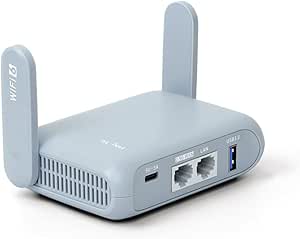 | Best Compact Travel VPN Router | Wi-Fi generation and bands: Wi-Fi 6; dual-band, 2.4 GHz and 5 GHz | Wireless speeds: 574 Mbps (2.4 GHz) + 2402 Mbps (5 GHz) | Ports: 2.5G WAN, 1 Gbps LAN, USB 3.0 | VIEW ON AMAZON | See Our Full Breakdown |
| wifi router with vpn built in | Frequency bands | Wi-Fi standard | Security protocols | Ports |
|---|---|---|---|---|
| ASUS RT-BE82U Dual-Band Wi-Fi | Dual-band | Wi-Fi 7 (802.11be) | — | — |
| GL.iNet GL-BE3600 Slate 7 Wi-F | Dual-band, 2.4 GHz and 5 GHz | — | WPA3, DNS over HTTPS, DNS over TLS | — |
| ASUS RT-AX1800S Dual-Band WiFi | — | — | — | 1 Gigabit WAN and 4 Gigabit LAN |
| GL.iNet Flint 3e BE6500 Wi-Fi | Dual-band | Wi-Fi 7 (802.11be) | WPA-Enterprise, WPA-PSK, WPA3 | — |
| GL.iNet Flint 3 Tri-Band Wi-Fi | Tri-band, including 6 GHz | Wi-Fi 7 | WPA2-PSK, WPA3, WPA2-Enterprise, WPA-Enterprise, WPS | 5 x 2.5G |
| GL.iNet Flint 2 Wi-Fi 6 Gaming | Dual-band | Wi-Fi 6 (802.11ax) | — | 2 x 2.5G, 4 x 1G |
| GL.iNet GL-MT3000 Beryl AX Wi- | — | — | WPA2-PSK, WPA3 | 2.5G WAN, 1 Gbps LAN, USB 3.0 |
More Details on Our Top Picks
ASUS RT-BE82U Dual-Band Wi-Fi 7 Router
The RT-BE82U is the strongest fit here for a home that needs several fast wired connections alongside Wi-Fi 7 and router-level VPN support. Its five 2.5GbE ports give it a practical advantage over the GL.iNet Flint 3e, whose port bandwidth is listed at 2,500 Mbps but whose port configuration is less clearly detailed. AiMesh can also help extend coverage with compatible ASUS hardware, while AiProtection Pro and parental controls add network-management tools.
The tradeoff is its dual-band design: unlike the tri-band GL.iNet Flint 3, it has no separate 6 GHz band for compatible devices. The product listing also gives inconsistent speed and Wi-Fi-generation specifications, so I would verify the exact configuration before buying. Choose this ASUS for wired flexibility; skip it if a clearly specified tri-band setup is your priority.
Pros:- Five 2.5GbE ports support multiple fast wired connections.
- Wi-Fi 7 and AiMesh support provide a path to faster wireless devices and compatible mesh expansion.
- AiProtection Pro, firewall tools, parental controls, and VPN support combine security and network management.
Cons:- Dual-band Wi-Fi lacks the additional 6 GHz band offered by the tri-band GL.iNet Flint 3.
- The listing contains inconsistent speed and Wi-Fi-generation specifications, making the advertised configuration less clear.
Best for: Households with several multi-gig wired devices that also want Wi-Fi 7, AiMesh expansion, and built-in VPN features.
Not ideal for: Buyers who specifically want tri-band Wi-Fi with a 6 GHz band or need perfectly consistent published specifications before choosing.
- Wi-Fi standard:Wi-Fi 7 (802.11be)
- Frequency bands:Dual-band
- Maximum advertised speed:Up to 6,500 Mbps
- Ethernet ports:5 x 2.5GbE
- Antennas:4 fixed antennas
- Mesh support:ASUS AiMesh
- Security and VPN:AiProtection Pro, firewall, parental controls, and VPN support
Our verdict“Choose the RT-BE82U if five 2.5GbE ports and ASUS mesh features matter more than tri-band Wi-Fi.”
GL.iNet GL-BE3600 Slate 7 Wi-Fi 7 Travel Router with Touchscreen and Dual 2.5G Ethernet
The Slate 7 is the clearest travel-focused pick in this group: its touchscreen controls let you manage VPN status, network modes, and Wi-Fi sharing without relying entirely on a phone app. It runs OpenWrt and supports WireGuard and OpenVPN as both client and server, a useful mix for travelers who want to route traffic through a VPN or connect back to their own network. Its two 2.5G Ethernet ports also offer more wired flexibility than the compact GL.iNet Beryl AX, while Wi-Fi 7 gives it newer wireless support.
The main limitation is VPN throughput: the listed maximum is 540 Mbps with WireGuard and 100 Mbps with OpenVPN, which is less than the Flint 3e’s listed 1,100 Mbps. Its portable form also means this is not the obvious choice for replacing a high-capacity home router. The touchscreen shortcut button needs configuration before it works.
Pros:- Touchscreen provides direct access to VPN toggles, network modes, speed monitoring, and Wi-Fi sharing.
- Supports OpenVPN and WireGuard in client and server modes.
- OpenWrt 23.05 supports customization and plugin installation.
- Two 2.5G Ethernet ports add fast wired WAN and LAN options in a travel router.
Cons:- Listed VPN throughput tops out at 540 Mbps with WireGuard and 100 Mbps with OpenVPN.
- The touchscreen shortcut button has no function until configured.
- Its travel-oriented design is less suited to serving as a high-capacity home router.
Best for: Frequent travelers and remote workers who want a portable router with visible VPN controls, OpenWrt customization, and wired 2.5G connections.
Not ideal for: Households seeking the highest listed VPN throughput or a primary router for broad home coverage and heavy multi-device use.
- Wi-Fi generation:Wi-Fi 7
- Frequency bands:Dual-band, 2.4 GHz and 5 GHz
- Wireless speed:688 Mbps (2.4 GHz) + 2,882 Mbps (5 GHz)
- Ethernet ports:2 x 2.5G (1 WAN, 1 LAN)
- Operating system:OpenWrt 23.05 (Kernel 5.4.213)
- VPN support:OpenVPN and WireGuard client and server
- Maximum VPN speed:100 Mbps with OpenVPN; 540 Mbps with WireGuard
- Security protocols:WPA3, DNS over HTTPS, DNS over TLS
- Touchscreen:QR code Wi-Fi sharing, speed monitoring, VPN toggle, and network mode controls
Our verdict“Pick the Slate 7 if portable use and easy, screen-based VPN management matter more than maximum VPN throughput.”
ASUS RT-AX1800S Dual-Band WiFi 6 Router
The RT-AX1800S makes sense for buyers who want basic router-level VPN access and Wi-Fi 6 without moving to the newer, faster Wi-Fi 7 models in this roundup. Its ASUS Instant Guard feature, AiProtection Classic, and compatibility with AiMesh provide a familiar set of security and network tools. Compared with the RT-BE82U, it gives up Wi-Fi 7 and 2.5GbE ports, but its five Gigabit Ethernet ports still cover ordinary wired devices such as TVs, consoles, and desktop computers.
This is a more modest option: its advertised data transfer rate is 1,800 Mbps, and the listing does not state a VPN throughput figure. That makes it harder to judge how much speed remains during VPN use than with the GL.iNet Flint 3e, which lists VPN performance. I would choose the AX1800S for a straightforward ASUS setup, not for multi-gig internet or demanding VPN speeds.
Pros:- ASUS Instant Guard provides a VPN access feature alongside the router’s security tools.
- Wi-Fi 6 features MU-MIMO and OFDMA for handling multiple connected devices.
- Five Gigabit Ethernet ports serve common wired home devices.
- AiMesh compatibility allows expansion with compatible ASUS routers.
Cons:- Wi-Fi 6 and Gigabit Ethernet are less capable than the Wi-Fi 7 and 2.5GbE options in this roundup.
- The product data does not specify VPN throughput, making VPN speed harder to compare with the GL.iNet models.
- The listed 1,800 Mbps data rate is modest for homes seeking faster wireless capacity.
Best for: Small households with a standard broadband plan that want Wi-Fi 6, ASUS security tools, and VPN access without needing multi-gig ports.
Not ideal for: Buyers with multi-gig internet, a need for Wi-Fi 7, or a specific minimum VPN speed they want to verify before purchase.
- Wi-Fi generation:Wi-Fi 6 (802.11ax)
- Frequency band:Dual-band
- Data transfer rate:1,800 Mbps
- Maximum upstream data transfer rate:1,201 Mbps
- Bandwidth:80 MHz
- Ports:1 Gigabit WAN and 4 Gigabit LAN
- Antennas:4 external antennas
- Security and VPN:AiProtection Classic, WPA-Enterprise, WPA2-Enterprise, and ASUS Instant Guard VPN access
Our verdict“Choose the RT-AX1800S for basic ASUS VPN features and Wi-Fi 6, but not for multi-gig networking or documented high VPN throughput.”
GL.iNet Flint 3e BE6500 Wi-Fi 7 Router with VPN
The Flint 3e stands out for buyers who want Wi-Fi 7 and a clearly stated VPN speed in a home router. Its listed VPN throughput reaches up to 1,100 Mbps with WireGuard or OpenVPN, putting it ahead of the Slate 7’s stated WireGuard maximum of 540 Mbps for buyers who plan to route more traffic through a VPN. The router also pairs parental controls with AdGuard Home, which can filter ads and trackers at the network level rather than requiring separate settings on every device.
Its dual-band configuration is the key compromise. The tri-band GL.iNet Flint 3 adds a 6 GHz band and advertises up to 9 Gbps wireless speed, while the Flint 3e lists up to 6.5 Gbps and coverage up to 2,500 square feet. Those figures describe different strengths, not a guarantee of real-world performance. I would favor the 3e for its stated VPN capacity and coverage, while buyers prioritizing 6 GHz should compare the Flint 3.
Pros:- Lists VPN speeds up to 1,100 Mbps with WireGuard or OpenVPN.
- Wi-Fi 7 supports MLO and 4K-QAM, with advertised wireless speed up to 6.5 Gbps.
- AdGuard Home and parental controls add network-wide filtering and family management.
- Advertised coverage reaches up to 2,500 square feet.
Cons:- Dual-band design lacks the 6 GHz band included with the tri-band Flint 3.
- Actual Wi-Fi and VPN speeds depend on the network, ISP, and VPN service.
- The product description does not specify a warranty duration.
Best for: Homes that want a Wi-Fi 7 router with high stated VPN throughput, network-level ad filtering, and parental controls.
Not ideal for: Buyers who specifically want tri-band Wi-Fi with 6 GHz or who need actual coverage and speed guarantees beyond the listed estimates.
- Wi-Fi standard:Wi-Fi 7 (802.11be)
- Frequency bands:Dual-band
- Wi-Fi speed:Up to 6.5 Gbps
- VPN speed:Up to 1,100 Mbps with WireGuard or OpenVPN
- Coverage:Up to 2,500 sq ft
- RAM:1 GB DDR4
- LAN port bandwidth:2,500 Mbps
- Security protocols:WPA-Enterprise, WPA-PSK, WPA3
- Operating system:Linux
Our verdict“Choose the Flint 3e if stated VPN throughput and broad advertised coverage outweigh having a third Wi-Fi band.”
GL.iNet Flint 3 Tri-Band Wi-Fi 7 Router with 5 2.5G Ports
The Flint 3 is the strongest choice here for buyers who want tri-band Wi-Fi 7 with a 6 GHz band and several fast wired connections. Its five 2.5G ports and advertised wireless speed up to 9 Gbps make it a more capable networking hub on paper than the dual-band Flint 3e, especially where newer 6 GHz devices can use that extra band. VPN support, AdGuard Home, and parental controls also bring the privacy and household-management features expected from a router with VPN built in.
There is a meaningful tradeoff: listed VPN speeds are up to 680 Mbps for WireGuard and OpenVPN, below the Flint 3e’s stated 1,100 Mbps. Its advertised coverage is also up to 2,000 square feet, compared with the 3e’s 2,500. Buyers should install the recommended firmware update during setup and treat speed and coverage figures as estimates, since actual performance depends on the network and service.
Pros:- Tri-band Wi-Fi 7 includes a 6 GHz band and advertises wireless speeds up to 9 Gbps.
- Five 2.5G ports support multiple fast wired devices.
- Built-in WireGuard and OpenVPN support is joined by AdGuard Home and parental controls.
- Designed for more than 100 devices, with 1 GB of RAM and 8 GB of eMMC storage.
Cons:- Listed VPN speed of up to 680 Mbps is lower than the Flint 3e’s stated 1,100 Mbps.
- Advertised coverage of up to 2,000 square feet is lower than the Flint 3e’s stated 2,500 square feet.
- A firmware update is recommended during initial setup, and actual performance varies with network conditions.
Best for: Wi-Fi 7 households with compatible 6 GHz devices, multiple 2.5G wired connections, and a preference for tri-band capacity.
Not ideal for: VPN-heavy homes that prioritize the highest listed VPN throughput or buyers whose coverage needs exceed the stated 2,000-square-foot estimate.
- Wi-Fi standard:Wi-Fi 7
- Frequency bands:Tri-band, including 6 GHz
- Wireless speed:Up to 9 Gbps
- Ports:5 x 2.5G
- VPN speeds:Up to 680 Mbps for WireGuard and OpenVPN
- Coverage:Up to 2,000 square feet
- Device capacity:Over 100 devices
- RAM and storage:1 GB DDR4 RAM and 8 GB eMMC
- Security protocols:WPA2-PSK, WPA3, WPA2-Enterprise, WPA-Enterprise, WPS
Our verdict“Choose the Flint 3 if tri-band Wi-Fi 7 and five 2.5G ports matter more than the Flint 3e’s higher listed VPN speed.”
GL.iNet Flint 2 Wi-Fi 6 Gaming Router
The Flint 2 is the stronger fit for a home network that needs VPN throughput as well as room for wired devices. Its listed WireGuard speed reaches 900 Mbps, with OpenVPN up to 880 Mbps, and the dual 2.5G plus four 1G ports make it more flexible as a central router than the compact Beryl AX. Linux-based software supports both VPN protocols, while AdGuard Home, guest mode, and QoS add network controls beyond tunneling.
Compared with the GL.iNet GL-MT3000 Beryl AX, this model is built for a fixed setup and substantially higher listed VPN speeds; the Beryl is easier to pack and carry. The tradeoff is a larger home-router role, and setup calls for a firmware update. Actual speeds also depend on the internet service, client devices, and network conditions.
Pros:- Listed VPN speeds reach 900 Mbps with WireGuard and 880 Mbps with OpenVPN.
- Two 2.5G ports and four 1G ports support a broad mix of wired devices.
- Supports both OpenVPN and WireGuard on a Linux-based platform.
- AdGuard Home, guest mode, and QoS add useful network-management options.
Cons:- A firmware update is recommended during initial setup.
- Real-world speeds can vary with the internet connection and network conditions.
Best for: Households that want a central Wi-Fi 6 router with high listed VPN throughput, several wired connections, and controls such as guest access and ad blocking.
Not ideal for: Travelers and buyers prioritizing a small, portable router; the Beryl AX is designed for that job, while this model’s strengths center on a home network.
- Wi-Fi standard:Wi-Fi 6 (802.11ax)
- Maximum data transfer rate:Up to 6 Gbps
- Frequency bands:Dual-band
- Ports:2 x 2.5G, 4 x 1G
- VPN speeds:Up to 900 Mbps WireGuard; up to 880 Mbps OpenVPN
- Memory and storage:1 GB DDR4 RAM; 8 GB eMMC
- Security:WPA3
- Features:Access Point Mode, Guest Mode, QoS, AdGuard Home
Our verdict“Choose the Flint 2 for a wired-device-heavy home that wants fast listed VPN performance; pick the Beryl AX instead if portability matters more.”
GL.iNet GL-MT3000 Beryl AX Wi-Fi 6 Travel Router
The Beryl AX brings VPN routing into a travel-friendly package, making it the most portable choice here for connecting several devices through one protected network. It supports OpenVPN and WireGuard as both client and server, and its 2.5G WAN, gigabit LAN, and USB 3.0 give it useful connection options for a compact router. OpenWrt firmware and customizable plugins offer more room to tailor the setup than a basic travel hotspot.
Compared with the Flint 2, the Beryl AX is easier to carry but its listed VPN speeds are lower: up to 300 Mbps on WireGuard and 150 Mbps on OpenVPN. Its physical toggle also needs configuration in the admin panel before it works as intended. A VPN service requires an active subscription, so this router does not provide a service by itself. Choose it for portability, not maximum VPN throughput.
Pros:- Compact design is suited to travel and temporary network setups.
- Supports OpenVPN and WireGuard client and server functions.
- Includes a 2.5G WAN port, gigabit LAN port, and USB 3.0.
- OpenWrt firmware supports customizable plugins, and the router includes a physical toggle switch.
Cons:- Listed VPN speeds top out at 300 Mbps for WireGuard and 150 Mbps for OpenVPN.
- Using a VPN service requires an active subscription.
- The physical toggle switch must be configured in the admin panel before use.
Best for: Frequent travelers, remote workers, and hotel guests who want to route multiple devices through a compact router with configurable VPN support.
Not ideal for: Households seeking high VPN throughput or many wired connections; the Flint 2 offers much higher listed VPN speeds and more Ethernet ports.
- Wi-Fi generation and bands:Wi-Fi 6; dual-band, 2.4 GHz and 5 GHz
- Wireless speeds:574 Mbps (2.4 GHz) + 2402 Mbps (5 GHz)
- Ports:2.5G WAN, 1 Gbps LAN, USB 3.0
- Firmware:OpenWrt 21.02
- VPN protocols:OpenVPN and WireGuard; client and server functions
- Maximum VPN speed:150 Mbps OpenVPN; 300 Mbps WireGuard
- Security protocols:WPA2-PSK, WPA3
- Additional features:Access Point Mode, Guest Mode, QoS, VPN cascading, configurable physical toggle switch
Our verdict“Pick the Beryl AX when a carry-on-friendly router and flexible VPN options matter more than the Flint 2’s higher listed VPN speeds.”

How We Picked
I ranked these routers by how directly their built-in VPN features serve the buyer’s likely use: routing home devices through a VPN, connecting remotely to a home network, or carrying a protected network while traveling. I also weighed wireless generation and band configuration, port selection, ease of managing VPN connections, and whether each model’s size and feature set match its intended setting. A router that is fast on Wi-Fi but vague about VPN modes is a less straightforward choice for this specific search than a model with clearly presented VPN controls.
The order favors a strong balance of VPN usefulness and network capability, then separates home-focused options from travel models and simpler mainstream routers. I treated premium wireless hardware as a benefit only when it adds meaningful capacity for the intended buyer; extra bands and multi-gig ports are not useful to everyone. VPN throughput and available features can depend on firmware, protocol, server location, and the buyer’s VPN service, so I recommend checking current documentation for the exact setup before purchase.
| wifi router with vpn built in | Wi-Fi standard | Frequency bands | Security protocols |
|---|---|---|---|
| ASUS RT-BE82U Dual-Band Wi-Fi | Wi-Fi 7 (802.11be) | Dual-band | — |
| GL.iNet GL-BE3600 Slate 7 Wi-F | — | Dual-band, 2.4 GHz and 5 GHz | WPA3, DNS over HTTPS, DNS over TLS |
| ASUS RT-AX1800S Dual-Band WiFi | — | — | — |
| GL.iNet Flint 3e BE6500 Wi-Fi | Wi-Fi 7 (802.11be) | Dual-band | WPA-Enterprise, WPA-PSK, WPA3 |
| GL.iNet Flint 3 Tri-Band Wi-Fi | Wi-Fi 7 | Tri-band, including 6 GHz | WPA2-PSK, WPA3, WPA2-Enterprise, WPA-Enterprise, WPS |
| GL.iNet Flint 2 Wi-Fi 6 Gaming | Wi-Fi 6 (802.11ax) | Dual-band | — |
| GL.iNet GL-MT3000 Beryl AX Wi- | — | — | WPA2-PSK, WPA3 |
Factors to Consider When Choosing Wifi Router With Vpn Built In
Choosing a router for VPN use means looking beyond the Wi-Fi label. I would start with the way you plan to use the VPN, then match the router’s controls, capacity, and coverage to that job.
Decide Whether You Need VPN Client, Server, or Both
A VPN client routes devices on your network through a commercial VPN provider, while a VPN server lets you connect back to your home network when away. These are different jobs, and a router advertising VPN support may offer one, the other, or several protocols with different setup steps. Before buying, identify which devices should use the VPN and whether they need access to local services such as printers or streaming devices. A whole-network VPN can simplify protection, but it may make some websites or apps behave as if you are in another region. If you need only one laptop protected, a router purchase may add complexity without much benefit.
Check VPN Protocols and Setup Controls
Protocol support affects connection speed, compatibility, and how much configuration you must do. Look for documentation that names supported protocols and explains whether the router can store multiple VPN profiles, switch between them, or assign VPN use to selected devices. Those controls matter more than a broad claim of built-in VPN support when household members need different network routes. A simple setup flow can help beginners, while advanced users may value policy rules and custom configuration. Also check whether the features are available in the router’s current firmware rather than relying on an old setup guide.
Match Router Capacity to VPN Traffic
Wi-Fi speed ratings describe wireless capability, not the speed you will necessarily get through an encrypted VPN connection. The router’s processor, VPN protocol, internet plan, VPN server, and number of active devices can all limit throughput. Buyers with fast broadband or several simultaneous VPN users should check independent performance information for the relevant protocol, not just the router’s Wi-Fi generation. If your connection is modest, paying for the highest wireless tier may not improve VPN downloads. Leave room for other network traffic too, especially video calls, gaming, and large file transfers.
Think About Coverage, Bands, and Wired Ports
A travel router and a home router solve different coverage problems, even when both include VPN features. Portable models can create a private network from a hotel or shared connection, but they are not a substitute for broad home coverage across multiple rooms. At home, consider the layout, wall materials, device count, and whether wired connections are needed for computers, consoles, or network storage. Multi-band Wi-Fi can help busy networks distribute wireless traffic, while multi-gig Ethernet is useful only if your internet service or local equipment can use it. Avoid paying for ports and bands that your current setup cannot take advantage of.
Plan for Updates and VPN Service Changes
A router’s VPN usefulness depends on ongoing firmware support as much as its launch-day feature list. Check how the manufacturer publishes security updates, documents configuration changes, and handles the VPN functions you plan to use. A commercial VPN subscription is generally separate from the router, so the router does not automatically provide a VPN account or server access. If you already subscribe to a provider, confirm its supported router configurations and whether your preferred locations or features work through a router connection. This check can prevent buying hardware that supports VPNs in theory but does not fit your provider’s setup.
Choose How Much Control You Want
More VPN controls can make a router flexible, but they can also create more settings to maintain. Device-specific routing, multiple profiles, and custom rules are useful when some devices need a VPN and others need a direct connection. A simpler router may be a better match if you want one network-wide setting and rarely change it. Think about who will manage the network after installation, not just who is buying the device. For shared households, clear status indicators and easy recovery from a dropped VPN connection can matter more than a long list of advanced options.
Frequently Asked Questions
Will a router VPN protect every device connected to my Wi-Fi?
It can route traffic from connected devices through a VPN when the router is configured as a VPN client, but that does not mean every device is automatically covered in every setup. Some routers let you choose which devices use the VPN, and guest networks or wired devices may follow different rules. Devices using their own VPN apps can also create overlapping connections. Check the router’s routing controls and verify the connection on each device you expect to protect. A router VPN does not replace secure device software or careful account practices.
Do I need a separate VPN subscription with these routers?
Usually, yes: a router with VPN support supplies the network feature, not a commercial VPN subscription. You may instead configure a VPN server you control, but that requires a reachable endpoint and a suitable internet connection. Before choosing a commercial provider, confirm it supports router configuration and the protocol your chosen router offers. Some provider features available in desktop or mobile apps may not carry over to a router setup. Treat the router and VPN service as separate parts of the decision.
Will using a VPN router slow down my internet?
It can, because encrypted traffic must be processed by the router and routed through a VPN server. The effect varies with the protocol, router hardware, server distance, service load, and your broadband speed. A newer Wi-Fi standard does not by itself guarantee high VPN throughput, so look for performance information tied to the protocol you plan to use. You can also route only selected devices through the VPN to keep time-sensitive or bandwidth-heavy devices on a direct connection. Test the finished setup with your own provider and network rather than assuming the router’s headline wireless rate reflects VPN speed.
Should I choose a travel router or a full-size home router?
Choose a travel model when portability and connecting through unfamiliar networks are the main goals. A compact router can create a separate network for your devices, but its coverage and ports are generally aimed at travel rather than a whole home. A home router is the better fit for multiple rooms, more connected devices, and permanent wired equipment. Some buyers may use both: a capable home router for daily use and a small travel unit away from home. Decide based on where the VPN needs to operate, not just on which model is easier to carry.
Can I use a router VPN for only certain devices?
Some routers support device-based routing or rules that send selected clients through a VPN while others use the regular internet connection. This is useful when a work device, streaming box, or game console has different network needs from the rest of the household. The exact controls vary, so check whether the router supports per-device rules and whether they are manageable from its interface. If that feature is unavailable, separate Wi-Fi networks may offer a workaround, though they can be less convenient. Decide which devices need different treatment before choosing a model.
Conclusion
For a capable home network centered on VPN use, I would choose the GL.iNet Flint 3 as best overall; it combines tri-band Wi-Fi 7 and five 2.5G ports, though its extra capacity may be unnecessary for a small household. The Flint 2 is my best value-oriented choice for buyers who want a dedicated VPN router without prioritizing Wi-Fi 7. For a more advanced home setup, the Flint 3e or ASUS RT-BE82U may suit buyers focused on newer wireless hardware, provided their VPN requirements match the available firmware features. Beginners should look closely at the ASUS RT-AX1800S for a simpler mainstream-router approach, but should verify its VPN modes before buying. Travelers can choose the Slate 7 for newer Wi-Fi 7 capability or the Beryl AX for a compact Wi-Fi 6 option; neither should be mistaken for a whole-home replacement.