A smart lock compatible with Apple HomeKit can add convenient control, but the right choice depends on whether you value Apple Home Key, fingerprint entry, broader connectivity, or a familiar keypad and key. My best overall pick is the Aqara Smart Lock U100, which pairs Home Key access with a fingerprint reader; the Schlage Encode Plus is a strong alternative for buyers who prioritize an established lock design, while the Aqara U400 stands out for its UWB-based approach. These options differ in entry methods, lock formats, and the setup or hub requirements buyers may need to check. A deadbolt is not a fit for every door, and HomeKit support does not automatically mean every feature works without extra hardware. Read on for the full breakdown and guidance on matching a lock to your door and Apple setup.

Get the latest gadgets delivered free with Prime
- Fast, free delivery on millions of items
- Prime Video, Amazon Music and more included
- Member-only deals all year
Complete the kit



Key Takeaways
- Aqara U100 is the most balanced feature pick: it combines Apple Home Key and fingerprint entry in a deadbolt format, with two color variants listed here.
- Home Key is not the same as complete HomeKit feature parity: check which controls and remote-access features depend on a hub, network, or other Apple home hardware.
- The Schlage Encode Plus and Aqara models serve different priorities: Schlage is the established smart deadbolt option in this lineup, while Aqara offers more variety in entry methods and lock formats.
- Door style can narrow the field before features do: the Aqara U300 is a lever lock, while most picks are deadbolts, so check your existing hardware and door preparation first.
- Specialized connectivity choices need extra scrutiny: the ULTRALOQ Bolt SE emphasizes Matter over Thread, and the Aqara U400 highlights UWB; verify ecosystem compatibility and required equipment before buying.
| ULTRALOQ Bolt SE Wi-Fi Smart Lock with Matter over Thread | 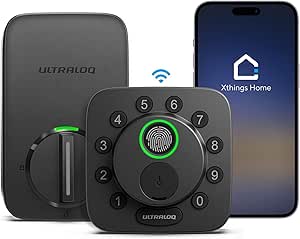 | Best for Flexible Entry Methods | Entry methods: Fingerprint, passcode, smartphone app, web portal, shared eKey or code, voice control, 2 mechanical keys | Fingerprint capacity: Up to 50 fingerprints | Passcode capacity: Up to 50 codes | VIEW ON AMAZON | See Our Full Breakdown |
| Aqara Smart Lock U50 Keyless Deadbolt with Apple Home Key, Black |  | Best Value Apple Home Key Pick | Model: DL-D05D | Unlock methods: Apple Home Key, keypad, remote passwords, one-time local passwords, temporary passwords, and key | Smart home compatibility: Apple Home; Google Home, Alexa, and IFTTT with an Aqara Zigbee 3.0 hub | VIEW ON AMAZON | See Our Full Breakdown |
| SMONET AH1 Smart Lock with Apple Home Key, Fingerprint, and Wi-Fi |  | Best for Built-In Remote Access | Model: AH1 | Connectivity: Built-in Wi-Fi | Smart home compatibility: Apple Home, Alexa, Google Assistant | VIEW ON AMAZON | See Our Full Breakdown |
| Aqara Smart Lock U100 Fingerprint Deadbolt with Apple Home Key, Silver | 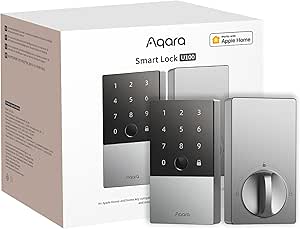 | Best for Fingerprint-First Apple Homes | Model: SDL-D01 | Unlock methods: Apple Home Key, fingerprint, password, mechanical key | Fingerprint capacity: Up to 50 fingerprints | VIEW ON AMAZON | See Our Full Breakdown |
| Aqara U400 UWB Smart Lock with Apple Home Key and Fingerprint Entry |  | Best Premium Hands-Free Pick | Model: U400 (DL-D06E) | Unlock methods: UWB, Apple Home Key, fingerprint, passcode, voice assistant, app, NFC card (sold separately), physical key | Connectivity: Matter over Thread | VIEW ON AMAZON | See Our Full Breakdown |
| ThorBolt X1 Smart HomeKit Fingerprint Deadbolt, Silver |  | Best for High-Capacity Household Access | Connectivity: Apple HomeKit over Thread | Unlock methods: Fingerprint, Apple Home Key, Siri, app, passcode, traditional key | User capacity: Up to 50 users | VIEW ON AMAZON | See Our Full Breakdown |
| Aqara Smart Lock U100 Fingerprint Deadbolt with Apple Home Key, Gray |  | Best for Apple Home and Aqara Automation | Model: SDL-D01 | Smart home support: Apple Home; Aqara, Google Home, Alexa, and IFTTT features require an Aqara Zigbee 3.0 hub | Fingerprint capacity: Up to 50 fingerprints | VIEW ON AMAZON | See Our Full Breakdown |
| eufy Security Smart Lock C34 Keyless Entry Deadbolt |  | Best for Multi-Platform Setup Without an Extra Hub | Model: C34 (T85D2) | Connectivity: Built-in Wi-Fi | Smart home compatibility: Apple Home, Matter, Google Home, Alexa, SmartThings | VIEW ON AMAZON | See Our Full Breakdown |
| Schlage Encode Plus Smart WiFi Deadbolt, Matte Black |  | Best for Built-In Wi-Fi and Remote Monitoring | Model: Encode Plus Century WiFi Deadbolt (BE499WBCEN622) | Connectivity: Built-in Wi-Fi | Compatibility: Apple HomeKit and home keys, Amazon Alexa, Google Assistant | VIEW ON AMAZON | See Our Full Breakdown |
| Aqara U300 Smart Lever Lock with Handle, Apple Home Key, and Fingerprint Sensor, Black |  | Best Lever Lock for Apple Home Key | Model: DL-D02D | Lock type: Smart lever lock with handle | Connectivity: Matter over Thread, Bluetooth | VIEW ON AMAZON | See Our Full Breakdown |
| smart lock compatible with apple homekit | Connectivity | Model | Fingerprint capacity | Battery life |
|---|---|---|---|---|
| ULTRALOQ Bolt SE Wi-Fi Smart L | 2.4 GHz Wi-Fi; Matter over Thread requires a compatible hub | — | Up to 50 fingerprints | Up to 18 months |
| Aqara Smart Lock U50 Keyless D | — | DL-D05D | — | Up to 6 months |
| SMONET AH1 Smart Lock with App | Built-in Wi-Fi | AH1 | — | — |
| Aqara Smart Lock U100 Fingerpr | Apple Home; Aqara Zigbee 3.0 hub required for some features and integrations | SDL-D01 | Up to 50 fingerprints | Up to 8 months |
| Aqara U400 UWB Smart Lock with | Matter over Thread | U400 (DL-D06E) | — | Up to 6 months per charge |
| ThorBolt X1 Smart HomeKit Fing | Apple HomeKit over Thread | — | Up to 100 fingerprints | — |
| Aqara Smart Lock U100 Fingerpr | — | SDL-D01 | Up to 50 fingerprints | — |
| eufy Security Smart Lock C34 K | Built-in Wi-Fi | C34 (T85D2) | — | Up to 8 months at approximately 10 unlocks per day |
| Schlage Encode Plus Smart WiFi | Built-in Wi-Fi | Encode Plus Century WiFi Deadbolt (BE499WBCEN622) | — | — |
| Aqara U300 Smart Lever Lock wi | Matter over Thread, Bluetooth | DL-D02D | Up to 25 | — |
More Details on Our Top Picks
ULTRALOQ Bolt SE Wi-Fi Smart Lock with Matter over Thread
I’d choose the ULTRALOQ Bolt SE when a household wants more ways to get through the door than Apple Home Key alone provides. Fingerprint access, up to 50 passcodes, shared eKeys, mechanical keys, and app or web control give it a broader access mix than the Aqara Smart Lock U50, which centers its appeal on Apple Home Key and keypad entry. Built-in 2.4 GHz Wi-Fi allows remote access without relying on Thread, while Matter over Thread is available with a compatible hub. Activity history and real-time alerts add visibility into household access. The tradeoff is that this is not an Apple Home Key lock, and buyers who want a door sensor must add one separately. Its IP65 body and claimed battery life of up to 18 months are useful advantages, though Wi-Fi is limited to 2.4 GHz.
Pros:- Offers fingerprint, passcode, app, web portal, shared eKey, voice control, and mechanical-key entry.
- Built-in 2.4 GHz Wi-Fi enables remote access without a separate Thread hub.
- Supports up to 50 fingerprints and 50 passcodes.
- IP65-rated body and claimed battery life of up to 18 months.
Cons:- Does not list Apple Home Key support.
- Matter over Thread requires a compatible hub, and Wi-Fi supports 2.4 GHz only.
- Door sensor is not included.
Best for: Households with several users who want fingerprint, code, shared eKey, and remote access options in one lock.
Not ideal for: Apple users who specifically want tap-to-unlock with Apple Home Key, or buyers who need a door sensor included.
- Entry methods:Fingerprint, passcode, smartphone app, web portal, shared eKey or code, voice control, 2 mechanical keys
- Fingerprint capacity:Up to 50 fingerprints
- Passcode capacity:Up to 50 codes
- Connectivity:2.4 GHz Wi-Fi; Matter over Thread requires a compatible hub
- Battery life:Up to 18 months
- Material and weather resistance:Zinc alloy; IP65
- Installation:DIY installation; approximately 10 minutes
- Warranty:Lifetime mechanical coverage; 18-month electronic coverage
Our verdict“Choose the Bolt SE for varied entry methods and built-in Wi-Fi, but pick an Aqara Home Key model if tap-to-unlock from an iPhone or Apple Watch is your priority.”
Aqara Smart Lock U50 Keyless Deadbolt with Apple Home Key, Black
The Aqara Smart Lock U50 is a straightforward pick for Apple households that want Home Key tap-to-unlock alongside a keypad and physical key. That Apple-first convenience gives it a clear advantage over the ULTRALOQ Bolt SE, which offers more entry types but does not list Home Key support. The U50 also supports one-time and temporary passwords, making it more adaptable for guests than a lock limited to household codes. Its rekeyable cylinder can help buyers match an existing key setup, and USB-C emergency charging offers a fallback if the batteries run down. The main compromise is a listed battery life of up to six months, shorter than the U100’s up to eight months. Remote passwords and broader integrations depend on an Aqara Zigbee hub, so check the hub requirement before choosing it for remote management.
Pros:- Supports Apple Home Key for unlocking with a compatible iPhone or Apple Watch.
- Combines keypad access, temporary and one-time passwords, and a physical key.
- Rekeyable cylinder and USB-C emergency charging provide useful fallback options.
- Zinc alloy body has an IPX5 rating and the lock meets BHMA Level 3.
Cons:- Battery life is listed as up to six months, shorter than the Aqara U100’s up to eight months.
- Remote passwords and some smart home integrations require an Aqara Zigbee 3.0 hub.
- NFC card is sold separately.
Best for: iPhone and Apple Watch households that want Home Key, keypad access, and temporary codes for guests or service providers.
Not ideal for: Buyers who want longer listed battery life or remote password features without adding an Aqara Zigbee hub.
- Model:DL-D05D
- Unlock methods:Apple Home Key, keypad, remote passwords, one-time local passwords, temporary passwords, and key
- Smart home compatibility:Apple Home; Google Home, Alexa, and IFTTT with an Aqara Zigbee 3.0 hub
- Matter support:With a compatible Aqara hub
- Power:4 included AA batteries (6V)
- Battery life:Up to 6 months
- Emergency charging:USB-C to A port
- Material and water resistance:Zinc alloy; IPX5
- Security standard:BHMA Level 3
Our verdict“Pick the U50 for an Apple Home Key deadbolt with flexible guest codes, provided you’re comfortable with its hub-dependent remote features and shorter battery interval.”
SMONET AH1 Smart Lock with Apple Home Key, Fingerprint, and Wi-Fi
The SMONET AH1 pairs Apple Home Key with built-in Wi-Fi, making it a fit for buyers who want Apple-friendly entry and remote control without the hub-dependent setup described for some Aqara U50 features. It also covers everyday alternatives to phone access: fingerprint, passcode, IC fob, app, and mechanical key. Compared with the Aqara U100, the AH1 lists built-in Wi-Fi and support for Alexa and Google Assistant, while the U100 provides a stated battery-life estimate and an IP65 rating. The AH1’s IP64 protection and Type-C emergency charging are practical, but its product information gives no battery-life figure or installation-time details. Door fit is specified for 1⅜–2⅛-inch thicknesses and either handing, though buyers should confirm those measurements before ordering.
Pros:- Supports Apple Home Key on compatible iPhone and Apple Watch devices.
- Built-in Wi-Fi enables remote control and activity checks.
- Offers fingerprint, passcode, IC fob, app, and mechanical-key entry.
- Fits left- or right-hand doors 1⅜–2⅛ inches thick and has Type-C emergency charging.
Cons:- No battery-life information is provided.
- Installation requirements and setup details are not specified.
- IP64 weather resistance is lower than the IP65 rating listed for the Aqara U100.
Best for: Apple households that want Home Key plus built-in Wi-Fi remote control and several non-phone entry choices.
Not ideal for: Buyers who need a stated battery-life estimate, detailed setup guidance, or a higher listed weather-resistance rating.
- Model:AH1
- Connectivity:Built-in Wi-Fi
- Smart home compatibility:Apple Home, Alexa, Google Assistant
- Unlock methods:Apple Home Key, fingerprint, passcode, IC fob, app, mechanical key
- Material:Aluminum
- Weather resistance:IP64
- Compatible door thickness:1⅜–2⅛ inches
- Door handing:Left- and right-hand doors
- Emergency charging:Type-C
Our verdict“Choose the AH1 if built-in Wi-Fi and multiple entry methods matter more to you than having published battery-life and installation details.”
Aqara Smart Lock U100 Fingerprint Deadbolt with Apple Home Key, Silver
I’d put the Aqara U100 ahead of the U50 for households that want biometric entry as a regular alternative to Apple Home Key. It supports up to 50 fingerprints, as well as passwords and a mechanical key, while its listed battery life reaches up to eight months—two months longer than the U50’s stated figure. Both Aqara models offer Apple Home Key and hub-dependent smart home features, so the U100’s stronger case is its fingerprint capacity and longer battery estimate, not a different Apple approach. The lock adds automatic locking, Do Not Disturb mode, USB-C emergency charging, and an IP65-rated zinc alloy body. Some remote access and integrations still require an Aqara Zigbee 3.0 hub, and the NFC card is sold separately. Buyers who mainly want Home Key and keypad entry may find the U50’s feature set sufficient.
Pros:- Supports Apple Home Key and up to 50 stored fingerprints.
- Listed battery life of up to eight months exceeds the U50’s up to six months.
- Includes automatic locking, Do Not Disturb mode, and USB-C emergency charging.
- IP65-rated zinc alloy body and BHMA Level 3 security standard.
Cons:- Some remote access and smart home integrations require an Aqara Zigbee 3.0 hub.
- NFC card is sold separately.
- Uses four AA alkaline batteries rather than a rechargeable battery.
Best for: Apple households where several family members prefer fingerprint entry and want Home Key as another way in.
Not ideal for: Buyers seeking remote access without an Aqara Zigbee hub, or those who only need Home Key and basic keypad-style access.
- Model:SDL-D01
- Unlock methods:Apple Home Key, fingerprint, password, mechanical key
- Fingerprint capacity:Up to 50 fingerprints
- Battery:4 AA alkaline batteries
- Battery life:Up to 8 months
- Emergency charging:USB-C
- Connectivity:Apple Home; Aqara Zigbee 3.0 hub required for some features and integrations
- Material and weather resistance:Zinc alloy; IP65
- Security standard:BHMA Level 3
Our verdict“Choose the U100 if fingerprint access is as important as Apple Home Key; the U50 is a better fit if you do not need biometric entry.”
Aqara U400 UWB Smart Lock with Apple Home Key and Fingerprint Entry
The Aqara U400 is the most feature-forward choice here for Apple households interested in UWB hands-free unlocking, rather than simply tapping Home Key or using a fingerprint. It also supports passcodes, app access, voice assistant control, and a physical key, so buyers are not tied to one entry method. Compared with the Aqara U100, the U400 adds UWB and Matter over Thread, plus a removable rechargeable battery; the U100 instead lists a longer battery estimate of up to eight months, while the U400 is rated for up to six months per charge. UWB needs compatible Apple devices, and Thread-based features require a compatible hub or controller. That setup dependency makes this a less simple choice than the U50. Its NFC card is sold separately, and buyers should confirm their Apple and Matter equipment supports the features they want.
Pros:- Adds UWB hands-free unlocking alongside Apple Home Key and fingerprint entry.
- Matter over Thread supports use across compatible smart home ecosystems.
- Removable rechargeable battery is rated for up to six months per charge.
- IP65-rated exterior and BHMA certification.
Cons:- UWB unlocking requires compatible Apple devices and a Thread-enabled Apple Home hub.
- Some features require a compatible Thread-enabled Matter controller.
- NFC card is sold separately, and battery life is shorter than the U100’s stated estimate.
Best for: Apple users with compatible devices and a Thread-enabled Apple Home hub who want hands-free UWB entry alongside fingerprint and passcode access.
Not ideal for: Buyers who want a simpler hub-light setup, a longer stated battery interval, or UWB without checking device compatibility.
- Model:U400 (DL-D06E)
- Unlock methods:UWB, Apple Home Key, fingerprint, passcode, voice assistant, app, NFC card (sold separately), physical key
- Connectivity:Matter over Thread
- Battery:Rechargeable, removable lithium battery
- Battery life:Up to 6 months per charge
- Exterior weather resistance:IP65
- Certification:BHMA-certified
- Included components:Outer panel, inner panel, deadbolt, installation diagram, user manual, strike plate kit, mounting plate, adapter ring, mechanical key, mounting plate screw kit
Our verdict“Choose the U400 for compatible-device UWB convenience and Matter over Thread, but favor the U100 if a simpler feature set and longer listed battery life suit you better.”
ThorBolt X1 Smart HomeKit Fingerprint Deadbolt, Silver
The ThorBolt X1 makes the most sense for a busy household that wants several ways to get inside without relying on a phone: fingerprint, Apple Home Key, Siri, app, passcode, and a physical key are all supported. Its capacity for 50 users and 100 fingerprints gives it more room for household members and regular visitors than the Aqara U300, which stores up to 25 fingerprints. Thread connects it to Apple HomeKit, while IP65 weather resistance adds flexibility for exposed entryways. The tradeoff is the setup dependency: remote access requires a Thread-enabled Apple home hub within the stated range, and the eight AA batteries may need to be purchased separately. I’d choose it for access capacity, not for a hub-free setup.
Pros:- Six entry methods include fingerprint, Apple Home Key, passcode, and a physical key
- Stores up to 100 fingerprints and supports up to 50 users
- Apple HomeKit connectivity uses Thread
- IP65 weather resistance and stated battery life of up to one year
Cons:- Remote access requires a Thread-enabled Apple home hub within 33 feet
- Uses eight AA batteries, which are not specified as included
Best for: Households with many residents or recurring visitors who want fingerprint entry alongside Apple Home Key and passcodes.
Not ideal for: Buyers without a compatible Thread-enabled Apple home hub, or anyone who wants to avoid supplying eight AA batteries.
- Connectivity:Apple HomeKit over Thread
- Unlock methods:Fingerprint, Apple Home Key, Siri, app, passcode, traditional key
- User capacity:Up to 50 users
- Fingerprint capacity:Up to 100 fingerprints
- Passcode capacity:Up to 100 passcodes
- Power:8 AA alkaline batteries; up to 1 year
- Weather resistance:IP65
- Door fit:1-3/8 to 1-3/4 inches thick; 2-3/8 to 2-3/4 inch backset
Our verdict“Choose the ThorBolt X1 if you need broad household access capacity and can provide its required Apple Thread hub.”
Aqara Smart Lock U100 Fingerprint Deadbolt with Apple Home Key, Gray
The U100 is a strong fit for Apple households that also want a path into Aqara’s wider automation system. Apple Home Key and fingerprint entry cover quick everyday access, while app-configured and one-time passwords help when guests need temporary entry. Compared with the Schlage Encode Plus, the U100 has a richer biometric-access story, but some remote password features and third-party ecosystem support depend on an Aqara Zigbee 3.0 hub. Its zinc-alloy body, IP65 rating, and locally stored AES-encrypted fingerprint data add practical protection; included batteries and USB-C emergency charging are useful details. The main limits are its stated battery life of up to eight months and the separately sold NFC card. I’d favor it over a simpler Apple-only lock when Aqara automations matter.
Pros:- Combines Apple Home Key, fingerprint access, passwords, and a mechanical key
- Supports auto-lock and smart home automations
- IP65-rated zinc-alloy body with locally stored AES-encrypted fingerprint data
- Includes four AA batteries and USB-C emergency charging
Cons:- An Aqara Zigbee 3.0 hub is needed for remotely configurable passwords and third-party ecosystem compatibility
- NFC card is sold separately
- Battery life is stated as up to eight months
Best for: Apple Home users who want fingerprint access, temporary visitor passwords, and the option to build Aqara-based automations.
Not ideal for: Buyers who want third-party integrations or remotely configurable passwords without adding an Aqara Zigbee 3.0 hub.
- Model:SDL-D01
- Smart home support:Apple Home; Aqara, Google Home, Alexa, and IFTTT features require an Aqara Zigbee 3.0 hub
- Fingerprint capacity:Up to 50 fingerprints
- Power:4 included AA 1.5V batteries; up to 8 months
- Emergency charging:USB-C
- Ingress protection:IP65
- Material:Zinc alloy
- Safety standard:BHMA Level 3
Our verdict“Pick the U100 if you want biometric entry and Aqara automation options and are comfortable adding its hub for expanded features.”
eufy Security Smart Lock C34 Keyless Entry Deadbolt
The eufy C34 stands apart here by pairing built-in Wi-Fi with support for Apple Home, Matter, Google Home, Alexa, and SmartThings without an additional hub. That breadth makes it a practical choice for a home where Apple devices share space with other platforms. Access is more conventional than on the ThorBolt X1 or Aqara U100: the listed methods are app, keypad, physical key, and voice, with no fingerprint reader or Apple Home Key called out. In return, installation is designed for standard US and Canadian doors without drilling, which may appeal to renters or DIY installers. Its eight AA batteries are rated for up to eight months under typical use. I’d choose it for easy multi-platform access, not biometric convenience.
Pros:- Supports Apple Home, Matter, Google Home, Alexa, and SmartThings without an additional hub
- Built-in Wi-Fi enables app-based control
- Offers keypad, app, physical-key, and voice access
- Designed to fit standard US and Canadian doors without drilling
Cons:- Fingerprint entry and Apple Home Key are not listed among its features
- Requires eight AA batteries, with stated life of up to eight months at approximately 10 unlocks per day
Best for: DIY installers who want Apple Home and other major smart home platforms to work without buying a separate hub.
Not ideal for: Buyers who specifically want Apple Home Key or fingerprint unlocking, or who prefer a lock that uses fewer than eight AA batteries.
- Model:C34 (T85D2)
- Connectivity:Built-in Wi-Fi
- Smart home compatibility:Apple Home, Matter, Google Home, Alexa, SmartThings
- Control methods:App, keypad, physical key, voice
- Power:8 AA batteries
- Battery life:Up to 8 months at approximately 10 unlocks per day
- Installation:Standard US and Canadian doors; no drilling
- Dimensions:7.68 x 4.33 x 7.68 inches
Our verdict“Choose the C34 if hub-free, multi-platform control and no-drill installation matter more to you than fingerprint or Apple Home Key entry.”
Schlage Encode Plus Smart WiFi Deadbolt, Matte Black
The Schlage Encode Plus is the clearest choice in this group for buyers who prioritize remote lock control and activity visibility. Built-in Wi-Fi and the Schlage Home app let you control and monitor the door remotely, review lock history, and manage up to 100 access codes. Apple HomeKit and home keys are supported, alongside Alexa and Google Assistant, so Apple compatibility is not its only route into a connected home. Compared with the Aqara U100, the Schlage emphasizes Wi-Fi-based monitoring rather than fingerprint access; biometric entry is not listed. Its alarm and encrypted connection add security-focused features, and installation uses a screwdriver rather than hardwiring. The tradeoff is dependence on Wi-Fi for app features, with voice control also requiring a compatible device. I’d pick it for remote oversight, not biometric unlocking.
Pros:- Built-in Wi-Fi supports remote control and monitoring through the Schlage Home app
- Supports Apple HomeKit and Apple home keys, plus Alexa and Google Assistant
- Manages up to 100 access codes and provides lock history
- Includes an alarm and an encrypted connection
Cons:- App features require a Wi-Fi connection
- Voice control requires a compatible voice-enabled device
- Fingerprint unlocking is not listed
Best for: Apple Home households that want built-in Wi-Fi, remote door monitoring, lock history, and a large access-code capacity.
Not ideal for: Buyers seeking fingerprint entry or those who need app features to remain available without a Wi-Fi connection.
- Model:Encode Plus Century WiFi Deadbolt (BE499WBCEN622)
- Connectivity:Built-in Wi-Fi
- Compatibility:Apple HomeKit and home keys, Amazon Alexa, Google Assistant
- Access codes:Up to 100
- Installation:Screwdriver required; no hardwiring
- Door thickness:1-3/8 to 1-3/4 inches
- Backset:2-3/8 or 2-3/4 inches
- Warranty:Limited lifetime mechanical and finish; limited three-year electronics
Our verdict“Choose the Encode Plus if remote monitoring and a large code roster matter more than biometric access.”
Aqara U300 Smart Lever Lock with Handle, Apple Home Key, and Fingerprint Sensor, Black
The Aqara U300 is the distinctive pick for buyers who want a smart lever rather than a deadbolt. Apple Home Key, a touchscreen keypad, and fingerprint recognition give household members several ways to enter, while Matter over Thread and Bluetooth support connected control when paired with compatible equipment. Its fingerprint capacity is up to 25, less than the ThorBolt X1’s 100, so larger households may prefer that deadbolt’s broader biometric roster. The U300 counters with up to 10 months of battery life, auto-lock, locally stored AES-encrypted fingerprints, and dual USB-C backup ports. Apple Home Key and other platform integrations require compatible Thread-enabled hubs or controllers, and alkaline batteries are specified to avoid instability. I’d select it for lever-style hardware and Apple access, not as a hub-free shortcut.
Pros:- Combines Apple Home Key, fingerprint recognition, and a touchscreen keypad
- Matter over Thread supports multiple smart home platforms with compatible equipment
- Stores fingerprints locally with AES encryption
- Offers up to 10 months of battery life and dual USB-C backup ports
Cons:- Apple Home Key and platform integrations require compatible Thread-enabled hubs or controllers
- Fingerprint capacity is limited to 25, below the ThorBolt X1’s 100
- Alkaline batteries are specified to avoid malfunction or instability
Best for: Buyers replacing or choosing lever-style hardware who want Apple Home Key, fingerprint entry, and Matter over Thread support.
Not ideal for: Households needing more than 25 stored fingerprints, or buyers without a compatible Thread-enabled hub or controller for Apple Home Key and platform integrations.
- Model:DL-D02D
- Lock type:Smart lever lock with handle
- Connectivity:Matter over Thread, Bluetooth
- Control methods:App, remote
- Fingerprint capacity:Up to 25
- Fingerprint recognition time:Under 0.3 seconds
- Power and battery life:4 AA alkaline batteries; up to 10 months
- Backup power:Dual USB-C ports
- Auto-lock:Yes
Our verdict“Choose the U300 if you specifically want lever hardware with Apple Home Key and fingerprint access and have the required Thread equipment.”
How We Picked
I compared these ten locks by how directly they address the Apple HomeKit use case: stated Apple Home Key or HomeKit compatibility, available entry methods, lock format, and the likely complexity of setup. I gave greater weight to options that pair Apple-focused access with useful alternatives such as fingerprint or keypad entry, while also accounting for buyers who may prefer a conventional deadbolt or need a lever-style lock.
The ranking reflects practical fit, not a claim that every lock suits every door or Apple setup. Models with distinct strengths earn a place for a specific buyer, but I distinguish broad-purpose picks from more specialized options such as Thread, UWB, or lever hardware. Because compatibility and remote functions can depend on the exact model, software, hub, and home configuration, I treat those as verification points rather than assuming every advertised feature works identically for every household.
| smart lock compatible with apple homekit | Fingerprint capacity | Battery life | Unlock methods |
|---|---|---|---|
| ULTRALOQ Bolt SE Wi-Fi Smart L | Up to 50 fingerprints | Up to 18 months | — |
| Aqara Smart Lock U50 Keyless D | — | Up to 6 months | Apple Home Key, keypad, remote passwords, one-time local passwords, temporary passwords, and key |
| SMONET AH1 Smart Lock with App | — | — | Apple Home Key, fingerprint, passcode, IC fob, app, mechanical key |
| Aqara Smart Lock U100 Fingerpr | Up to 50 fingerprints | Up to 8 months | Apple Home Key, fingerprint, password, mechanical key |
| Aqara U400 UWB Smart Lock with | — | Up to 6 months per charge | UWB, Apple Home Key, fingerprint, passcode, voice assistant, app, NFC card (sold separately), physical key |
| ThorBolt X1 Smart HomeKit Fing | Up to 100 fingerprints | — | Fingerprint, Apple Home Key, Siri, app, passcode, traditional key |
| Aqara Smart Lock U100 Fingerpr | Up to 50 fingerprints | — | — |
| eufy Security Smart Lock C34 K | — | Up to 8 months at approximately 10 unlocks per day | — |
| Schlage Encode Plus Smart WiFi | — | — | — |
| Aqara U300 Smart Lever Lock wi | Up to 25 | — | — |
Factors to Consider When Choosing Smart Lock Compatible With Apple Homekit
Before choosing a model, I would start with the door and the way people in the household actually enter. Apple Home Key is only one part of the decision: hardware fit, connectivity, fallback access, and the difference between local and remote control can matter just as much.
Check the Door Before Comparing Smart Features
Smart-lock listings often sound interchangeable, but a deadbolt and a lever lock are not substitutes. Confirm whether your door has a separate deadbolt, what type of latch and bore holes it uses, and whether the lock’s dimensions suit the existing hardware. A lever model such as the Aqara U300 may fit a door that needs a handle replacement, while a deadbolt is the natural format for many entry doors. Measure rather than relying on the appearance of product photos. Also check whether the door and frame align cleanly, since a smart lock can struggle if the bolt already binds. Resolve fit and alignment questions before treating app features as the deciding factor.
Separate Apple Home Key From Remote Home Control
Home Key describes a way to unlock with a supported Apple device; it does not by itself promise every remote-control feature or automation. A lock may need a compatible Apple home hub, a bridge, or a particular network setup for access away from home. Read the current compatibility details for the exact model and your Apple devices, since support can vary by generation and software. If you only need convenient entry while standing at the door, local access options may matter more than remote control. If you expect to check lock status or manage access while away, confirm the required equipment before purchase. This distinction can prevent paying for a feature set your home cannot use as expected.
Choose Entry Methods Around Household Habits
Apple Home Key is convenient for people who regularly carry a supported iPhone or Apple Watch, but it should not be the only access plan for every household. Fingerprint readers can help children or guests who do not have a compatible Apple device, while keypads and physical keys provide other forms of backup. Each extra method adds its own setup and upkeep, including managing access credentials or replacing batteries. Think about who needs entry, how often guests change, and what happens when a phone is misplaced or uncharged. A feature-rich lock is not automatically easier if the household relies on methods nobody wants to manage. Match access options to real routines rather than choosing the longest feature list.
Understand Thread, Wi-Fi, and UWB Requirements
Connectivity labels can describe very different experiences. Matter over Thread, direct Wi-Fi, and UWB each involve distinct compatibility and equipment questions, so do not assume one automatically provides better range or simpler setup. Check whether the lock needs a Thread border router, a bridge, or a specific home hub, and confirm that your Apple home configuration supports the functions you want. UWB-based features can also depend on compatible devices and configuration. If you prefer a straightforward installation, fewer network dependencies may be more useful than a newer connectivity label. Buyers with an established smart-home system may value wider integration, but should still verify which functions are available inside Apple Home.
Plan for Batteries, Manual Access, and Lockouts
Smart locks add maintenance that a standard deadbolt does not: batteries need replacement, firmware and app access may need attention, and electronic entry can fail for reasons unrelated to the door itself. Look for clear low-battery warnings and understand how the lock can be opened if its electronics stop responding. Keep a backup access method available, and make sure every household member knows how to use it. Consider how easy it is to replace batteries without disrupting the door hardware. A lock with several entry options can reduce dependence on one device, though it may take more effort to configure. A simple contingency plan is more useful than assuming connected access will always be available.
Pay for Useful Access, Not Redundant Features
Extra sensors, biometrics, and connectivity can be worthwhile when they solve a specific household problem, but each can add setup and maintenance. A buyer who mainly wants to tap an Apple device may not benefit from paying for several alternative access methods. By contrast, a busy household with children, visitors, or varied routines may appreciate fingerprints or a keypad. Compare the lock’s format and Apple features first, then ask whether each additional method will actually be used. Also account for any separately required hub or bridge when judging the total setup burden. The best choice is the one whose features reduce friction without adding systems your household does not need.
Frequently Asked Questions
Does Apple HomeKit compatibility mean I can unlock every lock with Apple Home Key?
No. HomeKit compatibility and Apple Home Key support are related but distinct capabilities, and a lock may support one without offering the other. Check the exact model’s listing for explicit Home Key support rather than relying on a general smart-home compatibility label. Also confirm that your iPhone or Apple Watch supports the relevant feature. If Home Key is your main reason for buying, verify setup requirements and what happens when your device is unavailable. A keypad, fingerprint reader, or physical key can provide a useful backup.
Will these locks let me control the door remotely without buying anything else?
Not necessarily; remote access can depend on the lock’s connection method and the Apple home equipment already in your home. Some functions may work locally while you are nearby, while access away from home can require a compatible hub, bridge, or network configuration. Confirm the requirements for the specific model and the features you want, such as checking status or controlling the lock remotely. Matter or Wi-Fi branding alone does not tell you which Apple Home functions are available in your setup. If remote access is essential, treat the hardware requirements as part of the purchase decision.
Should I choose a fingerprint lock or rely on Apple Home Key?
Choose based on who needs to enter, not just which method sounds most convenient. Home Key suits people who carry compatible Apple devices, while fingerprint access can help household members or visitors who do not. A lock with multiple methods can reduce reliance on a phone, but it also means managing more credentials and settings. If you rarely share access, Home Key plus a physical backup may be enough. For families with children or frequent guests, a fingerprint reader or keypad may solve a real access problem.
Can I replace my existing handle with any smart lock in this roundup?
No. Most models listed are deadbolts, while the Aqara U300 is a lever-style lock, and the two formats are designed for different hardware arrangements. Check whether your door has a separate deadbolt and handle or a combined latch setup before choosing. Measure the existing holes, door thickness, backset, and clearance against the lock’s installation requirements. A mismatch can turn an otherwise suitable smart lock into an unsuitable replacement. If your door has unusual hardware, confirm fit with the manufacturer before ordering.
What should I do if the lock loses power or my Apple device is unavailable?
Plan a backup before installation rather than waiting for an access problem. Depending on the model, a physical key, keypad, fingerprint reader, or another authorized user’s device may provide an alternative. Learn how the lock signals low batteries and how battery replacement works, then keep the required battery type available. Confirm that each household member can use at least one fallback method without relying on the same phone. A backup plan matters even for a lock with convenient Home Key access, since electronic features still depend on power and compatible devices.
Conclusion
For most Apple households seeking a capable deadbolt with multiple entry options, I would start with the Aqara Smart Lock U100 as the best overall choice. The Aqara U50 is a sensible value-oriented pick for buyers focused on Home Key access without making fingerprint entry the priority, while the Schlage Encode Plus fits shoppers who prefer a familiar smart deadbolt option. Beginners should favor the model whose requirements match their existing Apple home setup and whose installation fits their door, rather than choosing by feature count alone. For specialized needs, choose the Aqara U400 for its UWB focus, the Aqara U300 when a lever lock is needed, or the ULTRALOQ Bolt SE if Matter over Thread suits your home. Before committing, verify door fit, exact Home Key support, and any hub or network requirements.
Halloween Picks
halloween
As an affiliate, we earn on qualifying purchases.