
For most buyers seeking an 8K resin 3D printer, I’d choose the ELEGOO Saturn 4 Ultra 16K for its higher-resolution screen and feature-rich approach; the Phrozen Sonic Mega 8K S stands out for larger-format projects, while the Phrozen Sonic Mighty 8K offers a more manageable footprint. The main tradeoff is not resolution alone: build volume, ease of setup, and the cost and space demands of washing and curing prints can matter just as much. The lineup also includes 10K and 16K models, so an 8K label is only a starting point for comparison. Read on for my ranking, buyer guidance, and picks for different printing needs.

Get the latest gadgets delivered free with Prime
- Fast, free delivery on millions of items
- Prime Video, Amazon Music and more included
- Member-only deals all year
Complete the kit


Key Takeaways
- The Saturn 4 Ultra 16K leads on screen resolution, but buyers should weigh its extra detail against whether their models and workflow benefit from it.
- The Sonic Mega 8K S is the large-format choice; its appeal is print capacity, not a compact setup.
- The two Photon Mono 4 10K listings share the same printer name, so the meaningful distinction is whether the Wash and Cure Station is included.
- The Mighty 8K bundle combines printing with post-processing gear, while the standalone Mighty 8K leaves buyers to source that equipment separately.
- The Mars 5 Ultra is the smaller-machine alternative; it fits buyers prioritizing a more compact printer over the larger-format capacity of the Phrozen options.
| ELEGOO Saturn 4 Ultra 16K Resin 3D Printer |  | Best Overall for Detail and Automation | Technology: Resin 3D printing | Resolution: 16K monochrome LCD | Display size: 10 inches | VIEW ON AMAZON | See Our Full Breakdown |
| Phrozen Sonic Mega 8K S LCD/MSLA Resin 3D Printer | 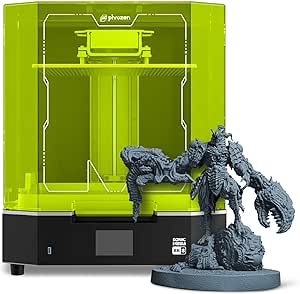 | Best for High-Volume Production | Technology: LCD/MSLA resin | Screen: 15-inch Mono LCD | XY resolution: 43 µm | VIEW ON AMAZON | See Our Full Breakdown |
| ANYCUBIC Photon Mono 4 Resin 3D Printer with 7-Inch 10K Mono LCD Screen |  | Best Compact 10K Value | Print technology: Resin | LCD: 7-inch 10K monochrome; 9024 × 5120 resolution | Pixel size: 17 × 17 µm | VIEW ON AMAZON | See Our Full Breakdown |
| Phrozen Sonic Mighty 8K Resin 3D Printer Bundle with Wash and Cure Kit |  | Best 8K Starter Bundle | Printer type: LCD resin 3D printer | Resolution: 28 µm | LCD screen: 10 inches | VIEW ON AMAZON | See Our Full Breakdown |
| ANYCUBIC Photon Mono 4 10K Resin 3D Printer with Wash and Cure Station |  | Best Compact Complete Setup | LCD: 7-inch 10K monochrome | Resolution: 9024 × 5120 | XY pixel size: 17 × 17 µm | VIEW ON AMAZON | See Our Full Breakdown |
| ELEGOO Mars 5 Ultra Resin 3D Printer |  | Best for Speed and Print Monitoring | LCD: 7-inch 9K monochrome LCD | XY resolution: 18 µm | Maximum stated print speed: Up to 150 mm/h | VIEW ON AMAZON | See Our Full Breakdown |
| Phrozen Sonic Mighty 8K Resin 3D Printer |  | Best for Larger 8K Prints | Display: 10-inch monochrome LCD | XY resolution: 28 µm | Print volume: 8.6 × 4.8 × 9.3 inches | VIEW ON AMAZON | See Our Full Breakdown |
| 8k resin 3d printer | Build volume |
|---|---|
| ELEGOO Saturn 4 Ultra 16K Resi | 8.33 × 4.66 × 8.66 inches |
| Phrozen Sonic Mega 8K S LCD/MS | 12.99 × 7.28 × 11.81 inches (33 × 18.5 × 30 cm) |
| ANYCUBIC Photon Mono 4 Resin 3 | 153.4 × 87 × 165 mm (6.04 × 3.42 × 6.49 inches) |
| Phrozen Sonic Mighty 8K Resin | — |
| ANYCUBIC Photon Mono 4 10K Res | 153.4 × 87 × 165 mm (6.04 × 3.42 × 6.49 inches) |
| ELEGOO Mars 5 Ultra Resin 3D P | — |
| Phrozen Sonic Mighty 8K Resin | — |
More Details on Our Top Picks
ELEGOO Saturn 4 Ultra 16K Resin 3D Printer
The Saturn 4 Ultra is the strongest all-round pick here for buyers who want fine detail without giving up a generous build area. Its 16K monochrome LCD exceeds the 8K resolution of the Phrozen Sonic Mega 8K S, while automatic leveling reduces setup work. Tilt-release printing is rated up to 150 mm/h, and 30 °C tank heating helps keep resin conditions consistent. The AI camera, residue detection, and alerts add monitoring tools that the simpler Photon Mono 4 lacks. Those features do not remove the need to handle liquid resin carefully, and AI detection can vary with the print environment and materials. At 35.5 pounds and 24 × 17 × 15 inches, it also needs more room than the compact Photon. I’d choose it for a versatile, feature-rich setup rather than the largest production runs.
Pros:- 16K monochrome LCD supports fine model detail
- Automatic leveling cuts down on manual setup
- Tank heating and tilt-release printing support consistent, faster production
- AI camera and sensors provide print monitoring and issue alerts
Cons:- AI detection may vary with the environment, model, and resin
- Its 35.5-pound weight and substantial dimensions call for a sturdy, dedicated workspace
- Liquid resin still requires careful handling
Best for: Makers who want high-resolution prints, a roomy build area, and automated setup and print monitoring in one machine
Not ideal for: Buyers with a small workbench, or those who want a lightweight printer with minimal resin-handling steps
- Technology:Resin 3D printing
- Resolution:16K monochrome LCD
- Display size:10 inches
- Build volume:8.33 × 4.66 × 8.66 inches
- Maximum print speed:150 mm/h
- Resin tank temperature:30 °C
- Leveling:Automatic
- Print monitoring:AI camera with chamber light and time-lapse
- Dimensions and weight:24 × 17 × 15 inches; 35.5 pounds
Our verdict“Choose the Saturn 4 Ultra if you want more resolution and automation than the 8K alternatives without stepping up to the Phrozen Sonic Mega 8K S’s heavier large-format footprint.”
Phrozen Sonic Mega 8K S LCD/MSLA Resin 3D Printer
The Sonic Mega 8K S earns its place by prioritizing large-batch output over compact size. Its 12.99 × 7.28 × 11.81-inch build volume can handle bigger runs than the Saturn 4 Ultra or either Photon Mono 4, and Phrozen says it can produce 80 miniatures in under 90 minutes. The 15-inch 8K Mono LCD has a stated 43 µm XY resolution, aimed at detailed production rather than simply maximizing the pixel-count label. A lift-up lid helps when overhead clearance is limited, while the drip hanger supports a tidier resin workflow. Compared with the Saturn 4 Ultra, this is the more production-focused machine, but it is also much heavier at 57.3 pounds and occupies a sizable footprint. I’d skip it for occasional small prints or a cramped hobby desk.
Pros:- Large build volume suits batch printing and bigger models
- 15-inch 8K Mono LCD provides 43 µm XY resolution
- Lift-up lid suits workspaces with limited overhead clearance
- Built-in metal drip hanger can reduce mess and resin waste
Cons:- At 57.3 pounds, it requires a sturdy, stable workspace
- Large footprint is poorly suited to compact home setups
- Its production capacity may be unnecessary for occasional small prints
Best for: Miniature studios, small commercial shops, and prolific hobbyists who need to print many models or larger batches at once
Not ideal for: Beginners with a small desk or anyone who mainly prints a few small parts and does not need a large build volume
- Technology:LCD/MSLA resin
- Screen:15-inch Mono LCD
- XY resolution:43 µm
- Build volume:12.99 × 7.28 × 11.81 inches (33 × 18.5 × 30 cm)
- Reported batch output:Up to 80 miniatures in under 90 minutes
- Product dimensions:18.6 × 15 × 22.3 inches
- Weight:57.3 pounds
- Model number:MEGA8KS000US
Our verdict“Pick the Sonic Mega 8K S when batch capacity matters more than desk space, and choose the Saturn 4 Ultra instead for a lighter, more automated all-round setup.”
ANYCUBIC Photon Mono 4 Resin 3D Printer with 7-Inch 10K Mono LCD Screen
The Photon Mono 4 is the compact choice for detail-focused buyers who do not need a large-format machine. Its 7-inch 10K LCD and 17 × 17 µm pixels offer fine-resolution output in a printer weighing just 7.7 pounds. The LighTurbo matrix light source is designed to distribute exposure evenly, while the laser-engraved platform supports adhesion. Compared with the bundled Photon Mono 4 package in this roundup, this version leaves the wash-and-cure station out, so it suits buyers who already own finishing equipment or want to choose it separately. It also lacks the larger capacity and monitoring features of the Saturn 4 Ultra. The four-point leveling requires more manual setup than the Saturn’s automatic system, and the Anycubic app is not supported. I’d pick it for a compact, capable 10K printer, not for connected control or large parts.
Pros:- 7-inch 10K LCD with 17 × 17 µm pixels supports fine detail
- LighTurbo matrix light source is designed for even illumination
- Laser-engraved platform supports print adhesion
- Power-loss recovery can resume a print after power returns
Cons:- Anycubic app is not supported
- Four-point leveling takes more manual setup than the Saturn 4 Ultra’s automatic leveling
- Wash-and-cure equipment is not included
Best for: Space-conscious hobbyists who want detailed small-to-medium prints and already have, or plan to source, separate wash-and-cure equipment
Not ideal for: Buyers seeking app control, automatic leveling, a large build area, or an all-in-one printer-and-finishing bundle
- Print technology:Resin
- LCD:7-inch 10K monochrome; 9024 × 5120 resolution
- Pixel size:17 × 17 µm
- Light source:Anycubic LighTurbo matrix
- Build volume:153.4 × 87 × 165 mm (6.04 × 3.42 × 6.49 inches)
- Print platform:Laser-engraved
- Leveling:Four-point
- Print recovery:Resumes after power is restored
- Dimensions and weight:10 × 10 × 15 inches; 7.7 pounds
Our verdict“Choose this Photon Mono 4 for compact 10K printing if you value a light machine over app support, a large build area, or included post-processing gear.”
Phrozen Sonic Mighty 8K Resin 3D Printer Bundle with Wash and Cure Kit
This Sonic Mighty 8K bundle is the clearest pick for buyers who want a matched printer and post-processing setup rather than assembling a workflow piece by piece. The 10-inch LCD and 28 µm resolution put it in a detail-oriented class, while dual linear rails support the printer’s build mechanism. Its main advantage over the standalone Photon Mono 4 is the included wash-and-cure kit, with fan drying to help manage residual liquid after washing. The bundle is less compelling for users who already own finishing stations, since those included components may duplicate equipment. Compared with the Saturn 4 Ultra, it has less automation and no stated heated tank or AI monitoring, but it keeps the focus on an 8K printing workflow with finishing gear in the box. The stated best fit is for build plates under 10 inches, so large-format buyers should look to the Sonic Mega 8K S.
Pros:- 28 µm resolution supports detailed prints
- 10-inch LCD offers a larger display area than the Photon Mono 4
- Wash-and-cure kit is included
- Fan drying helps manage drips and drying time
Cons:- Best matched with build plates under 10 inches
- Included finishing equipment adds little value for buyers who already own wash-and-cure stations
- Lacks the stated heated tank and AI print monitoring of the Saturn 4 Ultra
Best for: New resin-printing hobbyists who want an 8K printer and wash-and-cure equipment together, especially for models on build plates under 10 inches
Not ideal for: Owners of wash-and-cure stations or buyers who need the larger build volume and batch capacity of the Sonic Mega 8K S
- Printer type:LCD resin 3D printer
- Resolution:28 µm
- LCD screen:10 inches
- Rails:23.5 cm dual linear rails
- Included accessories:Wash-and-cure kit
- Drying mode:Fan drying
- Recommended build plate fit:Under 10 inches
Our verdict“Choose this Sonic Mighty bundle for a convenient 8K printer-and-finishing setup, but choose the Sonic Mega 8K S if large batches or larger models are the priority.”
ANYCUBIC Photon Mono 4 10K Resin 3D Printer with Wash and Cure Station
This Photon Mono 4 package pairs a compact 10K resin printer with the cleanup and curing equipment many beginners would otherwise need to source separately. The printer shares its 7-inch, 9024 × 5120 LCD, 17 × 17 µm pixels, and 153.4 × 87 × 165 mm build volume with the standalone Mono 4, but adds a Wash & Cure 3 with a 3-liter cleaning basket and flexible gooseneck curing light. That makes it a more ready-to-finish option than the standalone Photon, while the Phrozen Sonic Mighty 8K bundle offers a larger 10-inch LCD and 28 µm resolution. The tradeoff is that this remains a compact printer, not a large-format machine, and resin prints still need separate washing and curing steps. I’d favor this bundle for a limited workspace and a more complete entry setup.
Pros:- 7-inch 10K monochrome LCD with 17 × 17 µm pixels
- Wash & Cure 3 is included with a 3-liter cleaning basket
- Flexible gooseneck curing light can reach small parts
- Compact printer dimensions suit smaller workspaces
Cons:- Build volume is smaller than the large-format Sonic Mega 8K S
- Printing still requires separate washing and curing steps
- The bundled station may duplicate equipment for established resin-printing users
Best for: New resin-printing hobbyists with limited workspace who want a compact 10K printer and compatible wash-and-cure equipment in one package
Not ideal for: Buyers printing large models or batches, or owners who already have cleaning and curing equipment
- LCD:7-inch 10K monochrome
- Resolution:9024 × 5120
- XY pixel size:17 × 17 µm
- Build volume:153.4 × 87 × 165 mm (6.04 × 3.42 × 6.49 inches)
- Single-layer exposure time:1.5 seconds
- Cleaning basket capacity:3 liters
- Cleaning bucket volume:4 liters
- Curing light:Flexible gooseneck design
Our verdict“Choose this Photon Mono 4 bundle for compact 10K printing with finishing gear included, and choose the Sonic Mega 8K S if your workload calls for larger models or batch production.”
ELEGOO Mars 5 Ultra Resin 3D Printer
The Mars 5 Ultra is a strong fit for buyers who want fine detail without waiting as long between prints. Its 7-inch 9K mono LCD and 18 µm XY resolution offer finer stated XY detail than the Phrozen Sonic Mighty 8K’s 28 µm, while tilt-release printing up to 150 mm/h prioritizes throughput. The AI camera and smart sensors add monitoring features that can help flag print problems, though detection can vary with the resin and setup. Wi-Fi cluster printing is more useful for someone running several compatible machines than for a single-printer hobbyist. Compared with the larger-format Mighty 8K, the Mars 5 Ultra gives up the emphasis on a roomy build volume in favor of speed and monitoring. It is a 9K model, not an 8K one, so it suits shoppers comparing detail-focused resin printers broadly.
Pros:- 7-inch 9K mono LCD with 18 µm XY resolution for fine surface detail.
- Tilt-release system supports stated print speeds up to 150 mm/h.
- AI camera monitoring can flag print errors during a job.
- Wi-Fi cluster printing supports coordinated control of multiple units.
Cons:- AI detection accuracy may vary with the resin and printing environment.
- Its feature set favors speed and monitoring over the larger build-volume focus of the Phrozen Sonic Mighty 8K.
- Cluster printing offers limited value to buyers operating only one printer.
Best for: Detail-focused makers who want faster print cycles, camera monitoring, or control of multiple compatible printers over Wi-Fi.
Not ideal for: Buyers whose priority is a larger build area, or single-printer users who have little use for cluster printing and camera monitoring.
- LCD:7-inch 9K monochrome LCD
- XY resolution:18 µm
- Maximum stated print speed:Up to 150 mm/h
- Release technology:Tilt-release
- Monitoring:AI camera with real-time error detection
- Connectivity:Wi-Fi cluster printing
- Dimensions:15.75 × 18.5 × 9.06 inches
- Weight:19.36 pounds
- Model number:EL-3D-M5U
Our verdict“Choose the Mars 5 Ultra if you value fine 9K detail, faster printing, and monitoring features more than a larger build area.”
Phrozen Sonic Mighty 8K Resin 3D Printer
The Sonic Mighty 8K makes the most sense when a standard compact resin printer feels too limiting. Its 10-inch monochrome LCD and 8.6 × 4.8 × 9.3-inch print volume give buyers room for larger models or several parts in one run, while 28 µm XY resolution keeps detail suited to many display pieces and miniatures. The dual linear rails are designed to steady Z-axis movement, and the firmware and thermal improvements aim to reduce failed prints. Against the ELEGOO Mars 5 Ultra, the Mighty prioritizes build capacity rather than finer stated XY resolution or camera monitoring. Its 31.5-pound weight also makes it less convenient to move, and resin still requires careful handling and post-print cleanup. Pick it for the extra room, not for the smallest possible footprint.
Pros:- 10-inch monochrome LCD and roomy 8.6 × 4.8 × 9.3-inch print volume.
- 28 µm XY resolution supports detailed resin prints.
- Dual linear rails support steadier Z-axis movement.
- Smart firmware and improved thermal performance are designed to help reduce failed prints.
Cons:- At 31.5 pounds, it is less convenient to relocate than the lighter ELEGOO Mars 5 Ultra.
- Its 28 µm XY resolution is less fine on paper than the Mars 5 Ultra’s 18 µm.
- Resin printing still involves post-print cleanup and careful material handling.
Best for: Miniature painters, prop makers, and hobbyists who need to print larger resin models or multiple parts together on an 8K machine.
Not ideal for: Makers with limited workspace or those prioritizing finer stated XY resolution and print monitoring over build volume.
- Display:10-inch monochrome LCD
- XY resolution:28 µm
- Print volume:8.6 × 4.8 × 9.3 inches
- Z-axis structure:Dual linear rails
- Product dimensions:13.27 × 13.27 × 20.32 inches
- Weight:31.5 pounds
- Model number:MITY8K000NA
- Manufacturer:PHROZEN TECH CO., LTD.
Our verdict“Choose the Sonic Mighty 8K if you need a larger 8K build area and can accommodate its heavier, less portable frame.”

How We Picked
I ranked these printers by how well their resolution, build capacity, included equipment, and usability match distinct buyer needs. Screen resolution matters, but it does not tell the whole story: a larger screen can support bigger models, while a higher pixel count can support finer detail. I also considered whether a listing includes washing and curing equipment, since post-processing is part of the practical workflow and can affect the room and supplies a buyer needs.
The Saturn 4 Ultra 16K takes the lead as the most versatile high-detail pick, while the Sonic Mega 8K S ranks higher for buyers whose priority is larger prints. The Mighty 8K models separate by whether a wash-and-cure kit is bundled, and the Photon Mono 4 10K listings offer a lower-complexity route where bundle contents matter. The Mars 5 Ultra rounds out the selection for shoppers who prefer a smaller machine. I treat advertised resolution as one factor, not a guarantee of print quality; resin choice, exposure settings, model geometry, and careful setup still affect results.
Factors to Consider When Choosing 8k Resin 3d Printer
Choosing an 8K resin printer works best when you start with the prints you actually plan to make. Resolution labels can distract from workspace, workflow, and the size of your models. These factors help separate a machine that sounds impressive from one that fits your routine.
Match Resolution to Model Detail
Higher screen resolution can help reproduce fine features, but the label alone does not predict the appearance of every finished print. Pixel size, screen dimensions, model orientation, and exposure settings all play a part. Miniature faces and tiny surface details may benefit more from fine pixel-level detail than broad, smooth objects do. A larger screen with a lower pixel count can trade some fineness for room to print bigger parts. Avoid paying for a resolution tier your models cannot visibly use; a well-tuned machine and suitable resin can matter more than a number on the box. Treat 8K, 10K, and 16K as useful comparison points, not standalone quality ratings.
Choose Build Volume for Your Actual Projects
Build volume determines whether a model fits in one piece, not just how many small parts fit on the plate. Large cosplay components, terrain, and display pieces may favor a machine like the Sonic Mega 8K S, while miniatures and small prototypes rarely need that much room. Larger printers also claim more workspace and can require more resin for a full plate. Measure the printer’s footprint and the clearance needed to remove the cover and handle the build plate before ordering. Check the usable build dimensions rather than relying on screen size or product family names. If your typical part is small, a more compact printer can make daily handling easier without limiting your work.
Budget for Washing and Curing as Part of the Workflow
A resin print is not finished when it leaves the build plate; it needs cleaning and post-curing, along with suitable protective equipment and a plan for handling waste. A bundle that includes a wash-and-cure station can simplify the initial setup, as with the Mighty 8K bundle and the Photon Mono 4 10K station listing. Bundled equipment still takes up space and may not suit every build-plate size or cleaning routine. Before choosing a bundle, check what is included and whether the station can handle the parts you expect to print. A standalone printer may be the better choice if you already own compatible equipment. Account for gloves, cleaning supplies, and safe resin storage as well as the machine itself.
Compare Listings by Included Gear, Not Just Printer Name
Near-identical product names can refer to different purchase packages, and the Photon Mono 4 10K listings illustrate why bundle details deserve a close read. One listing names the printer alone, while the other specifies a Wash and Cure Station. Confirm whether a bundle includes the station, resin, replacement films, or other accessories before comparing what each package provides. Included items can reduce setup friction, but they are useful only if they fit your workflow. Check the exact model designation and seller listing details, since accessory packages can vary. This matters even more when a product name is reused across multiple configurations.
Plan for Workspace, Ventilation, and Maintenance
Resin printing requires more than a place for the printer: reserve room for handling uncured parts, cleaning tools, and curing equipment. Ventilation and safe storage matter because resin and cleaning materials need careful handling. A larger-format machine can make oversized prints possible, but it also raises the demands on your work area and post-processing setup. Look into the manufacturer’s maintenance guidance for the screen, release film, and vat before choosing a model. Routine cleaning and part replacement are part of ownership, not unusual failures. Buyers with limited space may be happier prioritizing a compact setup over maximum capacity.
Decide Whether Ease of Setup or Capacity Matters More
For a first resin printer, a straightforward workflow and clear setup guidance can be more useful than the largest build area or highest resolution. A bundled wash-and-cure station may simplify the equipment list, although it does not remove the need to learn safe handling and resin cleanup. Experienced users may prefer a standalone machine if they already have suitable post-processing gear. Larger printers can reduce the need to split models, but they may add setup and handling demands. Before buying, check the manufacturer’s instructions, replacement-part availability, and software support for the exact model. Prioritize the feature that removes your biggest practical obstacle, whether that is setup, space, or print size.
Frequently Asked Questions
Should I choose a 16K printer over an 8K printer?
Not automatically. A 16K screen can offer finer pixel-level detail, but the visible benefit depends on the screen dimensions, model design, resin, and print settings. If you mainly print larger props or broad shapes, build volume may affect your results more than the resolution label. The Saturn 4 Ultra 16K is this roundup’s high-detail lead, while the Phrozen Sonic Mega 8K S is a stronger match when capacity is the priority. Choose the higher resolution when your models contain details fine enough to use it.
Is a wash-and-cure bundle worth choosing for my first resin printer?
A bundle can make it easier to assemble a complete post-processing workflow, especially if you do not already own cleaning and curing equipment. It does not make resin printing mess-free or remove the need for protective gear, safe waste handling, and a suitable workspace. Check the station’s capacity against the parts you plan to print, and confirm exactly which accessories the listing includes. The Mighty 8K bundle and the Photon Mono 4 10K station listing offer this route, while their standalone counterparts leave you more freedom to choose separate equipment. If you already have compatible stations, a bundle may add cost and clutter without much benefit.
Will an 8K resin printer make larger models than a 10K or 16K printer?
Resolution and build volume describe different things. Resolution relates to how finely the screen can expose detail, while build dimensions determine the maximum space available for a print. A model with a higher resolution label is not necessarily larger, and a lower-resolution machine can have a more generous build area. Compare the stated usable build dimensions with the parts you want to make, including room for supports and orientation. For this lineup, the Sonic Mega 8K S is the large-format option, while the Saturn 4 Ultra’s appeal centers more on its 16K screen.
How do I choose between the two Photon Mono 4 10K listings?
Start by checking whether you need a wash-and-cure station. One listing names the Photon Mono 4 10K printer, while the other explicitly includes a Wash and Cure Station. If you are building a setup from scratch, the bundled equipment may simplify shopping, provided its capacity suits your parts. If you already own compatible post-processing gear, the printer-only package may better match your needs. Read the full listing contents before buying, since a similar product name does not guarantee identical accessories.
Is the Phrozen Sonic Mega 8K S a good first resin printer?
It can suit a first-time buyer who already has space for a larger machine and expects to print parts that benefit from its format. For someone learning resin printing with miniatures or small models, its capacity may be more than needed, while the workspace and post-processing demands remain. A compact choice such as the Mars 5 Ultra may be easier to fit into a smaller setup. A beginner should compare the full workflow, not just the printer: washing, curing, ventilation, protective equipment, and cleanup all matter. Choose the Mega when larger prints are a real need rather than a future possibility.
Conclusion
For the best overall balance in this lineup, I’d pick the ELEGOO Saturn 4 Ultra 16K, especially for buyers focused on fine detail. The best premium large-format choice is the Phrozen Sonic Mega 8K S for projects that need more room to print. For best value through included workflow gear, compare the Phrozen Sonic Mighty 8K bundle and the Photon Mono 4 10K with Wash and Cure Station against the equipment you already own; the bundle that fills a real gap is the better fit. The best beginner option depends on setup: the Mars 5 Ultra suits buyers prioritizing a more compact printer, while a wash-and-cure package can help newcomers assemble a complete workflow. If you want the Mighty 8K’s format without bundled gear, choose its standalone version; if you only need a 10K printer, the Photon Mono 4 listing without a station keeps the setup separate. I’d make the final choice by matching model size, detail needs, and available workspace before giving resolution the deciding vote.
Fall Picks

DJI Osmo Action 4 Essential Combo Waterproof 4K Action Camera
As an affiliate, we earn on qualifying purchases.