A smart lighting starter kit pairs connected bulbs or dimmers with the hardware or controls needed to get started. My best overall pick is the Philips Hue Starter Kit with Bridge and four White and Color A19 bulbs, a strong fit for households that want color options and room to expand. For a simpler white-light setup, the Philips Hue White Starter Kit with Bridge and two bulbs keeps the system focused, while Sengled’s three-bulb kit adds a wireless switch for hands-on control. The main tradeoffs are how many lights you get, whether you need color, and how much you want to spend on a hub-based system or premium controls. Read on for the full breakdown and help matching a kit to your home.

Get the latest gadgets delivered free with Prime
- Fast, free delivery on millions of items
- Prime Video, Amazon Music and more included
- Member-only deals all year
Complete the kit



Key Takeaways
- Four-bulb Hue kits give buyers more room coverage at the outset; two-bulb kits make more sense for a single room or a smaller first step.
- White-only and color kits serve different jobs: white-only models focus on everyday lighting, while color models add scenes and accent lighting.
- Bridge-based Hue kits recur across the lineup, but Bridge Pro bundles add a distinct upgrade path and, in some versions, physical controls.
- Sengled and Broadlink include practical starter controls such as switches or scene controls, which can matter more than a larger app feature set for some households.
- Lutron Caseta is the outlier: its dimmer-and-remote approach suits buyers who want to control existing compatible lighting rather than replace several bulbs.
| Sengled Smart Light Bulbs, Alexa Compatible RGB Color Changing 3-Pack Starter Kit with Smart Switch, A19 E26 Dimmable LED (60W Equivalent, 800LM) |  | Best for Hands-On Room Control | Bulb count: 3 | Bulb type and base: A19 LED, E26 | Brightness: 800 lumens | VIEW ON AMAZON | See Our Full Breakdown |
| Philips Hue Smart Light Starter Kit with Bridge and 4 White and Color A19 Bulbs |  | Best Overall Color Starter Kit | Included: Hue Bridge and 4 smart bulbs | Bulb type and base: A19 LED, E26 | Maximum brightness: 1100 lumens per bulb | VIEW ON AMAZON | See Our Full Breakdown |
| Broadlink Smart Bulbs Starter Kit – 3 A19 FastCon Color Changing Light Bulbs with Music Sync, Wireless Scene Switch and Hub, 16 Million Colors, Works with Alexa & Google Home, 5-Piece Set |  | Best for Music-Synced Scenes | Included: 3 bulbs, wireless scene switch, and Mini Hub | Bulb type and base: A19 LED, E26 | Brightness: 800 lumens per bulb | VIEW ON AMAZON | See Our Full Breakdown |
| Philips Hue White Smart Light Starter Kit with Bridge and 2 A19 LED Bulbs |  | Best for Simple White Lighting | Bulb count: 2 | Bridge: Included | Bulb type and base: A19 LED, E26 | VIEW ON AMAZON | See Our Full Breakdown |
| Philips Hue Starter Kit with Bridge Pro and 4 A19 E26 Smart Bulbs |  | Best Premium Expansion Kit | Included: Hue Bridge Pro and 4 smart bulbs | Bulb type and base: A19 LED, E26 | Brightness: Up to 1100 lumens per bulb | VIEW ON AMAZON | See Our Full Breakdown |
| Philips Hue Starter Kit with Bridge Pro, 3 A19 E26 Smart Bulbs, and Tap Dial Switch |  | Best for Hands-On Control | Bulbs included: 3 | Bulb type and shape: LED, A19 | Bulb base: E26 | VIEW ON AMAZON | See Our Full Breakdown |
| Philips Hue Essential Starter Kit with Bridge and 4 E26 Smart Bulbs |  | Best for Lighting Multiple Rooms | Included components: 1 Hue Bridge and 4 E26 smart bulbs | Color options: Millions of colors | Dimming range: 2% to 100% | VIEW ON AMAZON | See Our Full Breakdown |
| Philips Hue White and Color Ambiance Smart Bulb Starter Kit with Bridge, 2 A19 Bulbs |  | Best for Cross-Platform Homes | Bulbs included: 2 A19 LED bulbs | Bulb base: E26 | Brightness: 1100 lumens | VIEW ON AMAZON | See Our Full Breakdown |
| Philips Hue Essential Starter Kit with Bridge and Two E26 Color Smart Bulbs |  | Best for Low-Level Dimming | Included components: 1 Hue Bridge and 2 E26 smart bulbs | Bulb shape and source: A19 LED | Wattage: 8.8 W | VIEW ON AMAZON | See Our Full Breakdown |
| Sengled Smart Light Bulb Starter Kit – 2 Pack A19 E26 Dimmable Color Changing LED Bulbs with Hub |  | Best for Voice-Assistant Variety | Bulbs included: 2 | Bulb shape and base: A19, E26 | Wattage: 8.6 W | VIEW ON AMAZON | See Our Full Breakdown |
| Philips Hue White and Color Ambiance Smart Light Bulbs Starter Kit with Bridge, 2 A19 Bulbs |  | Best for a First Hue Color Setup | Included: 1 Hue Bridge and 2 A19 LED bulbs | Bulb base and shape: E26, A19 | Brightness: Up to 800 lumens per bulb | VIEW ON AMAZON | See Our Full Breakdown |
| Philips Hue Starter Kit with Bridge Pro, 3 A19 E26 Color Smart Bulbs, and Button |  | Best for a More Expandable Hue Setup | Included components: Hue Bridge Pro, smart button, and 3 A19 E26 LED bulbs | Bulb type and shape: LED, A19 | Bulb base: E26 | VIEW ON AMAZON | See Our Full Breakdown |
| Lutron Caseta Diva Smart Dimmer Starter Kit with Hub and Pico Remote | 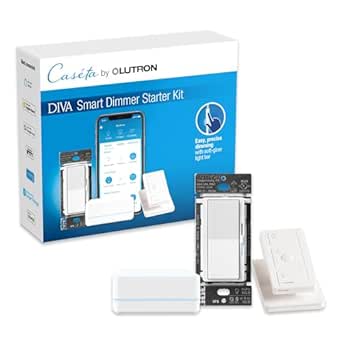 | Best for Keeping Existing Dimmable Bulbs | Included components: Diva smart dimmer switch, Pico remote, Pico pedestal, and Lutron Smart Hub | Maximum LED load: 150 watts | Maximum incandescent or halogen load: 600 watts | VIEW ON AMAZON | See Our Full Breakdown |
More Details on Our Top Picks
Sengled Smart Light Bulbs, Alexa Compatible RGB Color Changing 3-Pack Starter Kit with Smart Switch, A19 E26 Dimmable LED (60W Equivalent, 800LM)
I’d choose this Sengled kit for a buyer who wants color bulbs plus a physical switch, not just app and voice controls. Its three 800-lumen A19 bulbs offer broad color choice and dimming down to 1%, while the included switch gives the household another way to adjust lights. Sunrise and sunset scheduling adds useful routine control. Compared with the Philips Hue White and Color Starter Kit with four bulbs, Sengled supplies a switch but fewer bulbs and less brightness per bulb; Hue also includes its Bridge. The tradeoff here is that the Sengled Hub is required for full functionality and is not included, and each hub is limited to 10 bulbs without an upgrade. I’d skip it if a ready-to-run kit or larger expansion capacity matters more than switch-based control.
Pros:- Three dimmable A19 bulbs provide 16 million color options.
- Included smart switch adds physical control alongside voice control.
- Dimming range runs from 1% to 100%.
- Wake-up and sleep scheduling can automate daily lighting.
Cons:- Full functionality requires a separately purchased Sengled Hub.
- Hub capacity is limited to 10 bulbs without an upgrade.
- At 800 lumens per bulb, it is less bright than the Hue four-bulb color kit’s 1100-lumen bulbs.
Best for: Households that want color lighting, scheduled routines, and a physical switch for controlling a small room.
Not ideal for: Buyers who want a complete hub-included setup, need more than 10 bulbs on one hub, or prioritize brighter bulbs.
- Bulb count:3
- Bulb type and base:A19 LED, E26
- Brightness:800 lumens
- Color:RGB, 16 million colors
- Color temperature:2000K–6500K
- Dimming:1%–100%
- Connectivity:Wi-Fi and Zigbee
Our verdict“Choose this kit if a physical switch and flexible color control matter more than having the hub included or maximizing brightness.”
Philips Hue Smart Light Starter Kit with Bridge and 4 White and Color A19 Bulbs
This is my strongest all-around pick for someone setting up a first smart-lit room and wanting room to grow. The kit pairs four color-and-white A19 bulbs with the Hue Bridge, so routines, remote access, and app or voice control are part of the package rather than dependent on buying a separate hub. Each bulb reaches 1100 lumens, giving it a brightness advantage over the 800-lumen Sengled and Broadlink kits. The Bridge can manage up to 50 light points, making this a more expandable starting point than those smaller ecosystems. The tradeoff is indoor-only use, and the Bridge is needed for the full automation feature set. Compared with the Hue White starter kit with two bulbs, this one costs you no color flexibility in the product choice—but includes more bulbs and color lighting instead of a simpler soft-white setup.
Pros:- Includes the Hue Bridge and four bulbs in one kit.
- Color and white lighting support varied scenes and everyday illumination.
- Each bulb provides up to 1100 lumens.
- Bridge supports up to 50 light points and remote access.
Cons:- Bulbs are specified for indoor use only.
- The Bridge is needed for the full range of automations and remote access.
- A larger feature set may be unnecessary for buyers who only need simple white dimming.
Best for: First-time smart-lighting buyers who want a hub-included color setup for several indoor fixtures and room to expand.
Not ideal for: Buyers who only need soft-white lighting, want outdoor-rated bulbs, or prefer a setup without a separate Bridge.
- Included:Hue Bridge and 4 smart bulbs
- Bulb type and base:A19 LED, E26
- Maximum brightness:1100 lumens per bulb
- Lighting:White and color
- Dimming:Yes
- Connectivity:Bluetooth and Zigbee
- Control:App, voice, and routines
- Bridge capacity:Up to 50 light points
Our verdict“Pick this Hue kit for a ready-to-expand indoor setup with four bright color bulbs and the Bridge included.”
Broadlink Smart Bulbs Starter Kit – 3 A19 FastCon Color Changing Light Bulbs with Music Sync, Wireless Scene Switch and Hub, 16 Million Colors, Works with Alexa & Google Home, 5-Piece Set
Broadlink takes a more entertainment-focused approach than the Hue kits: its clearest distinction is music sync paired with a wireless scene switch. Three 800-lumen color bulbs and a Mini Hub form a compact starter set, with app and voice controls for everyday use and music-reactive effects for parties or gaming spaces. Its stated support for up to 250 devices on one mesh network gives it a larger potential device count than the included Hue Bridge in the four-bulb kit, though buyers should weigh the ecosystems and listed controls rather than capacity alone. Unlike the Sengled kit, Broadlink includes its hub, but operation requires a 2.4 GHz Wi-Fi network. The 45.7-watt equivalent output is also below the Hue bulbs’ 75-watt equivalent rating, so this is a better match for colorful effects than for maximum room brightness.
Pros:- Music sync adds dynamic effects for entertainment spaces.
- Includes three color bulbs, a wireless scene switch, and Mini Hub.
- Works with Alexa and Google Assistant.
- FastCon mesh network is specified to support up to 250 devices.
Cons:- Requires a 2.4 GHz Wi-Fi network and the Mini Hub.
- 800-lumen output and 45.7-watt equivalent are lower than the Hue color kit’s 1100 lumens and 75-watt equivalent.
- The entertainment-oriented features may be unnecessary for buyers who mainly want straightforward white routines.
Best for: Buyers setting up a small entertainment room who want music-reactive color effects, a scene switch, and a hub in the box.
Not ideal for: Those who need brighter general-purpose lighting, lack 2.4 GHz Wi-Fi, or want a larger four-bulb starter set.
- Included:3 bulbs, wireless scene switch, and Mini Hub
- Bulb type and base:A19 LED, E26
- Brightness:800 lumens per bulb
- Wattage:9 watts per bulb
- Color:16 million colors
- Color rendering index:100
- Control:Remote, app, and voice
- Connectivity:FastCon; 2.4 GHz Wi-Fi required
- Network capacity:Up to 250 devices
Our verdict“Choose Broadlink for music-linked color scenes and included physical control, rather than for the brightest everyday room lighting.”
Philips Hue White Smart Light Starter Kit with Bridge and 2 A19 LED Bulbs
I’d point buyers toward this Hue kit when the goal is dependable smart control for ordinary white lighting, not color effects. It includes the Hue Bridge and two 1100-lumen soft-white bulbs, bringing app and voice control, dimming, schedules, and routines into a smaller package than the four-bulb color Hue kit. That makes it a sensible way to start with a couple of fixtures while retaining a Bridge that can support up to 50 light points. The compromise is clear: these bulbs provide soft white only, unlike the color-changing Hue kit or the Sengled and Broadlink options. Remote access and automation also depend on the Bridge. I’d choose this over the four-bulb kit for practical white-light routines, but skip it if colored scenes or more bulbs out of the box are part of the plan.
Pros:- Includes the Hue Bridge and two A19 bulbs.
- 1100-lumen output suits general-purpose indoor lighting.
- Dimming, schedules, routines, and preset scenes support useful daily control.
- Bridge can support up to 50 light points.
Cons:- Bulbs offer soft white only, unlike the Hue color starter kit.
- Bridge is required for automation and control from outside the home.
- Includes two bulbs rather than the four supplied with the Hue color kit.
Best for: Buyers who want smart dimming and schedules for two everyday indoor lights and do not need color-changing bulbs.
Not ideal for: Anyone seeking color scenes, a larger bulb count out of the box, or automation without the Hue Bridge.
- Bulb count:2
- Bridge:Included
- Bulb type and base:A19 LED, E26
- Brightness:1100 lumens
- Light color:Soft white
- Dimming:Yes
- Connectivity:Bluetooth and Zigbee
- Operating life:25,000 hours
- Bridge capacity:Up to 50 light points
Our verdict“Pick this kit for Bridge-based routines and bright white light in two fixtures, provided you have no need for color.”
Philips Hue Starter Kit with Bridge Pro and 4 A19 E26 Smart Bulbs
This is the most expansion-minded choice in this group: the Bridge Pro supports 150+ lights and 50+ accessories, while four full-color bulbs make the kit useful from day one. Each bulb reaches up to 1100 lumens and offers tunable warm-to-cool white plus 16 million colors, so the setup can handle practical lighting as well as scenes. The Bridge Pro also supports MotionAware and up to 500 scenes, features that matter more as a home’s smart lighting grows. Compared with the standard Hue kit with Bridge and four color bulbs, this one’s value is its higher stated bridge capacity and added features, not a different bulb count. MotionAware needs at least three Hue devices, and the bulbs are indoor-only, so this premium configuration is harder to justify for a two-bulb starter setup.
Pros:- Includes four color-capable A19 bulbs and Bridge Pro.
- Bulbs provide up to 1100 lumens with tunable white and 16 million colors.
- Bridge Pro supports 150+ lights and 50+ accessories.
- Supports up to 500 scenes and MotionAware.
Cons:- MotionAware requires at least three Hue devices.
- Bulbs are intended for indoor use.
- The expanded Bridge Pro capacity offers less benefit to buyers building a small, fixed setup.
Best for: Smart-home planners who expect to expand beyond one room and want Hue color lighting with a higher-capacity Bridge Pro.
Not ideal for: Buyers who only need a couple of basic lights, need outdoor bulbs, or will not use the Bridge Pro’s added capacity and scene features.
- Included:Hue Bridge Pro and 4 smart bulbs
- Bulb type and base:A19 LED, E26
- Brightness:Up to 1100 lumens per bulb
- Wattage:9.5 watts
- Light output options:Tunable white and 16 million colors
- Color temperature:Up to 6500K
- Bridge capacity:150+ lights and 50+ accessories
- Scene capacity:Up to 500 scenes
- Compatibility:Apple Home, Alexa, Google, and Samsung SmartThings
Our verdict“Choose this kit if you want four bright color bulbs now and plan to build a larger Hue system around Bridge Pro.”
Philips Hue Starter Kit with Bridge Pro, 3 A19 E26 Smart Bulbs, and Tap Dial Switch
This kit earns its place for buyers who want more than app control from day one. Alongside three color-capable bulbs, the Hue Bridge Pro supports more than 150 lights and 50 accessories, leaving room to expand well beyond a starter setup. The customizable tap dial switch gives household members a direct way to adjust lights without reaching for a phone, a useful difference from the Hue Essential kits, which focus on bulbs and app-based setup. Scene storage for up to 500 options also suits homes with distinct routines or rooms. The tradeoff is that its Bridge Pro headroom may go unused in a small setup, and MotionAware requires at least three Hue devices. It is indoor-only, so it is not a fit for exterior lighting.
Pros:- Includes three color-capable bulbs, a Bridge Pro, and a customizable tap dial switch
- Bridge Pro supports more than 150 lights and 50 accessories
- Stores up to 500 scenes for varied room routines
- Tunable white and multicolor lighting offer both practical and decorative options
Cons:- MotionAware features require at least three Hue devices
- Indoor-only design rules out outdoor fixtures
- The expanded bridge capacity may be unnecessary for a small starter setup
Best for: Households that want a physical lighting controller now and plan to add many Hue lights or accessories later
Not ideal for: Shoppers lighting one or two rooms on a tight budget, or anyone who needs bulbs rated for outdoor use
- Bulbs included:3
- Bulb type and shape:LED, A19
- Bulb base:E26
- Light color:Tunable white and multicolor
- Wattage:10.5 W
- Incandescent equivalent:75 W
- Control:App and tap dial switch
- Bridge capacity:More than 150 lights and 50 accessories
- Scene storage:Up to 500 scenes
Our verdict“Choose this kit if you want physical controls and room to grow a larger Hue system; skip it if a simple, small setup is your goal.”
Philips Hue Essential Starter Kit with Bridge and 4 E26 Smart Bulbs
For a buyer starting with several fixtures, the standout is simple: this Hue Essential kit includes four bulbs and a Bridge, more coverage than the two-bulb Hue Essential kit. That can make it easier to establish matching scenes across a living room and bedroom without buying another starter set. Color options and preset scenes give beginners an approachable way to change the mood, while dimming down to 2% supports low evening light that ordinary on-off smart bulbs cannot provide. Alexa, Google Assistant, and Apple Home support also leave several familiar control paths. Compared with the Bridge Pro kit with a tap dial, this package gives you an extra bulb but no included physical switch or stated expanded bridge capacity. The available product details do not specify bulb brightness or wattage, so buyers who prioritize those figures should check compatibility for their fixtures before choosing.
Pros:- Includes a Hue Bridge and four E26 smart bulbs
- Color options and preset scenes give beginners accessible ways to customize rooms
- Dimming reaches 2% for very low ambient lighting
- Supports Alexa, Google Assistant, and Apple Home
Cons:- No physical control switch is listed as included
- Brightness and wattage details are not provided in the product data
- Four bulbs may be more than needed for a small starter setup
Best for: New smart-lighting buyers who want to outfit four E26 fixtures across a couple of rooms with app, voice, and scene control
Not ideal for: Shoppers who want a physical switch in the box, need stated brightness or wattage figures, or only need one or two bulbs
- Included components:1 Hue Bridge and 4 E26 smart bulbs
- Color options:Millions of colors
- Dimming range:2% to 100%
- Preset scenes:Supported
- Voice assistant compatibility:Alexa, Google Assistant, Apple Home
- Bridge:Included
Our verdict“Pick this kit to bring four fixtures into Hue together, but choose a smaller bundle if you do not need that much initial coverage.”
Philips Hue White and Color Ambiance Smart Bulb Starter Kit with Bridge, 2 A19 Bulbs
This two-bulb Hue kit is the clearest fit for a home where smart lighting needs to coexist with several platforms. Its Bridge-based control supports automations and remote access, while stated compatibility includes Alexa, Google Assistant, Apple HomeKit, and Matter. That is a broader named ecosystem list than the Hue Essential two-bulb kit, which also supports major platforms but does not list Matter in its supplied specs. The 1100-lumen, 75-watt-equivalent bulbs are useful when the starter kit needs to light a room, not just add accent color, and warm-to-cool white plus multicolor covers everyday and decorative scenes. The tradeoff is a two-bulb start, so buyers covering multiple rooms may prefer the four-bulb Hue Essential bundle. Setup also depends on the Hue app and Bridge, and these bulbs are for indoor use only.
Pros:- Lists compatibility with Matter, Apple HomeKit, Alexa, and Google Assistant
- Includes a Bridge for automations and remote control
- Each bulb is rated at 1100 lumens and a 75-watt incandescent equivalent
- Offers multicolor light and warm-to-cool white
Cons:- Only two bulbs are included, limiting initial room coverage
- Setup requires the Hue app and Bridge
- Indoor-only use excludes exterior fixtures
Best for: Households mixing Apple HomeKit, Matter, and voice assistants that want two full-output bulbs for indoor rooms
Not ideal for: Buyers who need a four-bulb bundle, want to avoid a Bridge and Hue app, or need outdoor-rated lighting
- Bulbs included:2 A19 LED bulbs
- Bulb base:E26
- Brightness:1100 lumens
- Incandescent equivalent:75 W
- Light color:Multicolor and warm-to-cool white
- Color temperature:Up to 6500 K
- Bridge:1 Hue Bridge included
- Compatibility:Matter, Alexa, Google Assistant, Apple HomeKit
- Use:Indoor
Our verdict“Choose this two-bulb kit when broad smart-home compatibility and full-room brightness matter more than getting four bulbs at the outset.”
Philips Hue Essential Starter Kit with Bridge and Two E26 Color Smart Bulbs
The appeal here is precise everyday control in a compact Hue bundle. These two color and tunable-white bulbs dim to 2%, giving night-time scenes more range than a basic dimmable bulb, while the included Bridge connects them to voice assistants and compatible smart-home platforms. Its listed support for Alexa, Google Assistant, Samsung SmartThings, and Apple Home makes it a flexible entry point for homes already using one of those systems. Compared with the Hue White and Color Ambiance kit, it offers a similarly small bulb count and broad control options, but this listing adds an explicit 2% dimming figure and a 2200K–6500K range. The tradeoff is that the smart features depend on the Bridge, and the two-bulb indoor package is less suited to lighting several rooms at once. Check the listed 240 V specification against your region and fixtures.
Pros:- Dimming reaches 2% for low-light scenes
- Offers millions of colors and tunable white from 2200K to 6500K
- Includes a Hue Bridge for app, voice, and compatible smart-home control
- Lists compatibility with Alexa, Google Assistant, SmartThings, and Apple Home
Cons:- Hue smart features require the included Bridge
- Two bulbs provide limited coverage for multi-room setups
- Indoor-only use does not suit exterior fixtures
Best for: People who want a small Hue setup for bedrooms or living spaces where very low dimming and voice-platform support matter
Not ideal for: Buyers who want a bridge-free setup, need outdoor lighting, or plan to outfit several rooms with the initial bundle
- Included components:1 Hue Bridge and 2 E26 smart bulbs
- Bulb shape and source:A19 LED
- Wattage:8.8 W
- Incandescent equivalent:75 W
- Color temperature:2200K–6500K
- Dimming:Down to 2%
- Color options:Millions of colors
- Compatibility:Alexa, Google Assistant, Samsung SmartThings, Apple Home
- Voltage:240 V
Our verdict“Choose this kit for two Hue bulbs with especially low dimming and broad platform support, provided you are comfortable using a Bridge.”
Sengled Smart Light Bulb Starter Kit – 2 Pack A19 E26 Dimmable Color Changing LED Bulbs with Hub
Sengled is the alternative for buyers who want color lighting and several voice or smart-home routes without committing to Hue. The kit pairs two A19 color bulbs with a hub, and the listed compatibility spans Alexa, Google Home, SmartThings, Wink, Habitat, and Siri. Its 1–100% brightness range gives broad adjustment, while wake-up and sleep schedules make it practical for daily routines as well as color scenes. Compared with the Hue Essential two-bulb kit, Sengled lists a wider range of third-party platforms and a dual-band Wi-Fi hub, but Hue offers Bridge-based scene control and a stated 2% dimming floor. The Sengled bulbs are also rated at 800 lumens and 60-watt equivalent, below the 1100-lumen Hue White and Color Ambiance bulbs. A hub is required for voice control when the speaker lacks a built-in hub, and the kit is indoor-only.
Pros:- Supports Alexa, Google Home, Siri, SmartThings, Wink, and Habitat
- Includes two dimmable A19 E26 color bulbs and a hub
- Brightness adjusts from 1% to 100%
- App supports wake-up and sleep schedules
Cons:- The hub is needed for voice control with speakers that lack a built-in hub
- 800-lumen output is lower than the 1100-lumen Hue White and Color Ambiance bulbs
- Indoor-only design limits where the kit can be installed
Best for: Smart-home owners who want two color bulbs with scheduling and compatibility across multiple voice assistants and platforms
Not ideal for: Buyers seeking brighter 75-watt-equivalent bulbs, an especially low dimming level, or outdoor-rated lighting
- Bulbs included:2
- Bulb shape and base:A19, E26
- Wattage:8.6 W
- Incandescent equivalent:60 W
- Light output:800 lumens
- Color temperature:2000K–6500K
- Connectivity:Wi-Fi, 2.4 GHz and 5 GHz
- Hub:Included; required for voice control with speakers without a built-in hub
- Compatibility:Alexa, Google Home, SmartThings, Wink, Habitat, Siri
Our verdict“Pick Sengled for broad platform compatibility and scheduled color lighting, but choose a brighter Hue kit if room-filling output is your priority.”
Philips Hue White and Color Ambiance Smart Light Bulbs Starter Kit with Bridge, 2 A19 Bulbs
This kit is a practical entry point for buyers who want color lighting plus Hue automations without starting with a larger bundle. The two A19 bulbs fit standard E26 sockets and provide up to 800 lumens each, while the included Bridge adds schedules, scenes, and control away from home. Compared with the Hue Bridge Pro kit with three bulbs and a button, this set has fewer bulbs and no physical smart button, but it covers the core Hue experience in fewer rooms. It also offers Alexa, Apple HomeKit, and Google Assistant support. The tradeoff is that the Bridge is needed for the full feature set, so setup involves more than simply screwing in bulbs; these bulbs are indoor-only as well.
Pros:- Includes a Hue Bridge and two color-changing A19 bulbs
- Offers millions of colors and warm-to-cool white light
- Supports schedules, scenes, and automations through the Bridge
- Works with Alexa, Apple HomeKit, and Google Assistant
Cons:- Full smart-home features depend on setting up the Hue Bridge
- Two bulbs cover fewer rooms than larger Hue starter kits
- Bulbs are designed for indoor use only
Best for: First-time Hue buyers who want color scenes and app or voice control in one or two indoor rooms.
Not ideal for: Buyers who want to equip several rooms at once, prefer a physical control button, or need outdoor-rated bulbs.
- Included:1 Hue Bridge and 2 A19 LED bulbs
- Bulb base and shape:E26, A19
- Brightness:Up to 800 lumens per bulb
- Power consumption:9.5 watts per bulb
- Incandescent equivalent:60 watts
- Connectivity:Bluetooth, Zigbee, and Wi-Fi
- Control:App and voice
- Compatible assistants:Amazon Alexa, Apple HomeKit, and Google Assistant
- Usage:Indoor
Our verdict“Choose this kit for a straightforward start with Hue color lighting in a small indoor setup.”
Philips Hue Starter Kit with Bridge Pro, 3 A19 E26 Color Smart Bulbs, and Button
This bundle suits buyers who want more than app-controlled bulbs from the outset: it pairs three color bulbs with a Bridge Pro and customizable button. The extra bulb can extend a scene into another room, while the button gives household members a simple control option without opening an app. Its Bridge Pro is designed to support 150+ lights, 50+ accessories, and up to 500 scenes, a wider expansion path than the two-bulb Hue kit. It also supports MotionAware lighting automation when used with three Hue devices. That feature is a differentiator, but it depends on having three Hue devices and may not matter to someone building a basic setup. Like the other Hue bulb kits here, this one is indoor-only; buyers who want to dim existing bulbs should look at the Lutron Caseta Diva kit instead.
Pros:- Combines three color bulbs, a Bridge Pro, and a customizable smart button
- Bridge Pro supports 150+ lights, 50+ accessories, and up to 500 scenes
- Offers tunable white light and 16 million colors
- Supports MotionAware automation when used with three Hue devices
Cons:- MotionAware requires three Hue devices, so it is not a standalone motion-sensing feature
- Indoor-rated bulbs do not suit outdoor fixtures
- Its expansion capacity may be more than a small starter setup needs
Best for: Hue buyers planning to add more lights and accessories, and households that want a physical button alongside app control.
Not ideal for: Shoppers seeking a minimal two-bulb starter set, outdoor lighting, or a smart dimmer for their existing bulbs.
- Included components:Hue Bridge Pro, smart button, and 3 A19 E26 LED bulbs
- Bulb type and shape:LED, A19
- Bulb base:E26
- Wattage:10.5 watts
- Incandescent equivalent:75 watts
- Light:Multicolor with tunable white
- Bridge capacity:150+ lights and 50+ accessories
- Scene capacity:Up to 500 scenes
- Smart home platforms:Apple Home, Alexa, Google, and Samsung SmartThings
Our verdict“Pick this bundle if you want Hue color lighting with a physical button and room to grow beyond a few bulbs.”
Lutron Caseta Diva Smart Dimmer Starter Kit with Hub and Pico Remote
Unlike the Hue kits, this starter set makes the wall switch—not the bulb—the smart device. The Diva dimmer works with existing dimmable bulbs, so it can add app control, schedules, scenes, and voice-assistant access without replacing a room’s bulbs with color-changing models. That makes it a better fit for buyers who want familiar wall control or already have suitable lighting. The included Pico remote and pedestal also let you add a wireless control point without wiring another switch. Compared with the Hue two-bulb kit, it does not provide colored light or smart-bulb features at individual fixtures; instead, it controls compatible bulbs together at the circuit. The Smart Hub is required for smart-home connectivity, and the wallplate is sold separately.
Pros:- Works with existing dimmable bulbs instead of requiring smart-bulb replacements
- Does not require a neutral wire
- Includes a Pico remote and pedestal for flexible wireless control
- Supports Alexa, Apple HomeKit, Google Home, Ring, and Sonos
Cons:- Smart-home connectivity requires the Lutron Smart Hub
- Wallplate is sold separately
- Does not add color-changing capability to existing bulbs
Best for: Homeowners who want smart dimming and scheduling for existing dimmable lights, especially where a neutral wire is unavailable.
Not ideal for: Renters or buyers seeking plug-in color bulbs, fixture-by-fixture color control, or a complete wallplate-inclusive kit.
- Included components:Diva smart dimmer switch, Pico remote, Pico pedestal, and Lutron Smart Hub
- Maximum LED load:150 watts
- Maximum incandescent or halogen load:600 watts
- Neutral wire required:No
- Control options:Lutron app, Pico remote, and compatible smart home systems
- Smart home compatibility:Alexa, Apple HomeKit, Google Home, Ring, and Sonos
- Wallplate:Sold separately
Our verdict“Choose the Caseta kit if you want to make an existing dimmable lighting circuit smart rather than replace bulbs with Hue color models.”

How We Picked
I ranked these kits by how well their included parts form a useful first setup: the number and type of bulbs or dimmers, the role of the hub, the availability of physical controls, and the flexibility to grow beyond the first room. I gave more weight to kits that make their intended use clear and provide a practical balance of coverage and control, rather than treating every color feature or accessory as equally useful.
The order also reflects the tradeoffs between the Hue options, Sengled and Broadlink kits, and the Lutron dimmer system. Four-bulb color bundles rank well for buyers seeking a versatile starting point; smaller white kits suit focused, simpler setups. Bridge Pro packages are stronger fits for buyers seeking upgraded infrastructure or controls, while the Lutron kit earns a distinct place for homes where a wall dimmer and remote suit the lighting better than smart bulbs. Product names and included components guide these comparisons; the list does not assume identical compatibility or capabilities across models.
Factors to Consider When Choosing Smart Lighting Starter Kit
Before choosing a kit, decide what problem you want the first smart lights to solve. Bulb count and color options matter, but room layout, existing switches, household habits, and the kind of lighting you already own can change which package makes sense. These broader factors can prevent an appealing bundle from becoming an awkward fit.
Match the Kit to the Room, Not Just the Bulb Count
Count the fixtures you want to control and check what bulb bases they take before choosing a bundle. A four-bulb kit can cover more sockets at once, but it may leave you with extras if the room only needs one or two connected lights. Conversely, a small kit might require another purchase before a room feels consistently controllable. Think about whether the lights are used together or separately; bulbs in different fixtures may need individual control. Check fixture labels and dimensions, especially for enclosed or unusual fittings. A good first kit fits the room you have, not an imagined future setup.
Choose White or Color Based on How You Use Light
Color bulbs can add atmosphere and accent scenes, but they are not automatically the best choice for every socket. If your main goal is scheduled everyday lighting, a white-light kit may keep the setup simpler and avoid paying for color features you rarely use. Color is more useful where you want flexible scenes, decorative effects, or a room that serves several purposes. Many buyers benefit from mixing bulb types: color in a shared living space and simpler white lighting in less-used areas. Decide which fixtures need adjustable color before buying a bundle. That prevents treating every bulb in the house as though it needs the same features.
Think Through Hub Placement and Network Needs
A kit with a bridge or hub adds a separate device to place and connect, so check where it can sit near power and your home network. The hub may be part of the system’s communication and expansion plan, meaning it is not just an accessory to ignore. A hub-based kit can suit a home that expects to add compatible lights over time, while a simpler setup may appeal if you want fewer devices to manage. Check the exact product’s supported ecosystem and requirements before purchase; names alone do not confirm that every kit works the same way. Keep in mind that a bridge can add setup steps as well as system options. Your tolerance for another device is part of the buying decision.
Decide Whether Physical Controls Are a Must
App control is convenient, but it can be a poor fit when guests, children, or other household members expect a regular switch. A wireless scene switch, remote, or wall dimmer can make smart lighting feel accessible without asking everyone to open an app. There is a practical catch: how a smart bulb behaves when a conventional wall switch cuts power may differ from how a dimmer-based system controls the circuit. Consider who will use the lights and whether they need familiar, immediate control. If wall control matters, choose a kit designed around it rather than assuming any smart bulb can replace a dimmer. The included control method may be more valuable to your home than extra color options.
Check What Expansion Will Require
A starter kit is often the first part of a larger lighting plan, so check which additional bulbs, controls, or bridges your preferred system supports. Do not assume accessories included in one bundle are standard in another, even when product names are similar. If you expect to add lights room by room, look at the system’s available bulb types and control options before committing. A premium bundle can make sense if its included hardware matches a clear expansion plan; it is harder to justify when you only need one room lit. Keep a list of the features you would actually add rather than buying around a vague idea of future use. This helps separate useful headroom from unused complexity.
Compare Smart Bulbs with Smart Dimmer Kits
Smart bulbs change the light source, while a smart dimmer kit changes how a compatible lighting circuit is controlled. Bulbs are a natural fit when you want individual fixture control, color options, or lighting without replacing a wall control. A dimmer-centered kit may suit a room with several existing bulbs on one switch, particularly when physical control is a priority. Before choosing a dimmer, confirm the fixture and bulbs are compatible and check whether installation fits your household’s needs. Neither approach is automatically better: the right one depends on whether you want to control individual bulbs or the whole circuit. This distinction explains why a dimmer kit should not be compared with bulb bundles by bulb count alone.
Frequently Asked Questions
Should I start with a two-bulb or four-bulb smart lighting kit?
Choose based on the number of fixtures you want to control now, rather than assuming a bigger bundle is always better. A two-bulb kit can be a tidy first step for one room or a pair of lamps, while a four-bulb kit can cover more sockets without mixing purchases. Check whether the bulbs will be used together and whether your fixtures share the same base type. Also compare what controls and hub hardware each bundle includes, since identical bulb counts do not guarantee identical setups. If you have no clear use for extra bulbs, starting smaller can keep the system easier to plan.
Is a white-only starter kit enough, or should I get color bulbs?
White-only lighting is a sensible choice when you mainly want app or scheduled control for everyday illumination. Color bulbs make more sense if you plan to use decorative scenes or want one room to shift between functional and ambient lighting. Ask which actual fixtures would benefit from color; you may not need it throughout the home. A mixed approach can be more practical than buying color bulbs for every socket. Compare the included bulb count and intended room use before deciding that color is worth the added flexibility.
Do I need the bridge or hub included with a smart lighting kit?
That depends on the specific kit and the system you want to build, so check the product’s stated requirements rather than assuming all smart bulbs connect the same way. A bundled bridge may serve as the system’s link for setup or future compatible devices, but it also needs a suitable place and power connection. If you want to add more lights later, hub compatibility can matter as much as the first bulbs. If you prefer fewer devices, check whether the model offers the control method and connections you need without additional hardware. Confirm those details before buying, especially when comparing similar product names.
Should I choose a smart bulb kit or a smart dimmer starter kit?
Choose smart bulbs when you want control over individual lights or want features such as color changes in specific fixtures. A dimmer kit is a better match when you want familiar wall control over a compatible lighting circuit, rather than separate smart control for each bulb. Check the existing bulbs, switch arrangement, and installation requirements before choosing a dimmer. Smart bulbs can lose smart control if someone switches off their power at the wall, while a dimmer system follows a different control approach. The choice comes down to whether you want to upgrade the bulbs or the way a circuit is operated.
What should I check before buying a kit for multiple rooms?
Start with a room-by-room count of fixtures, bulb bases, and the controls people already use. Verify the kit’s bridge or hub supports the expansion you have in mind, and check which additional products work with that system. Decide where physical switches or remotes are needed; relying on one phone-based routine may not suit every household. Separate must-have lighting from accent lighting so you do not buy color features for rooms that only need basic illumination. Planning around actual sockets and habits makes it easier to choose between a larger bundle and a few targeted kits.
Conclusion
For the best overall, I’d start with the Philips Hue Bridge kit with four White and Color A19 bulbs: it combines color flexibility with more initial coverage than the smaller Hue bundles. The best value for a focused setup is the Sengled two-bulb hub kit if you want a compact color-bulb start, while the Sengled three-bulb kit is a better fit if its included wireless switch suits your household. For beginners seeking simpler everyday lighting, the Philips Hue White kit with two bulbs keeps the starting point focused. The best premium direction is a Hue Bridge Pro bundle, with the Tap Dial or Button version appealing when its physical control matches your needs. For a specific need—controlling compatible existing lighting with a wall dimmer and remote—the Lutron Caseta Diva kit is the distinct pick. Choose by room, control style, and expansion plans; those factors matter more than simply counting bulbs.