Laser engravers offer precise, versatile options for creating detailed designs on a variety of materials. The best overall pick in 2026 is the Creality Falcon 10W because of its high power and broad material compatibility, but options like the xTool F2 excel in fine detail and compact design. Buyers face tradeoffs between power, precision, size, and ease of use, which can make choosing the right machine challenging. Continue reading for a full breakdown of the top laser engravers and what makes each stand out.

Get the latest gadgets delivered free with Prime
- Fast, free delivery on millions of items
- Prime Video, Amazon Music and more included
- Member-only deals all year
Complete the kit



Key Takeaways
- Power levels vary significantly, impacting material compatibility and cutting speed.
- Compact models like the LaserPecker LP1 Plus are ideal for portability but may lack power for thicker materials.
- Advanced features like dual cameras or UV laser options cater to specialized projects and professionals.
- Ease of use and safety features are critical for beginners, often influencing the choice of enclosed designs.
- Price often correlates with build quality, power, and feature set, requiring buyers to prioritize their specific needs.
| Creality Falcon 10W Laser Engraver Machine, 72W High Precision Laser Cutter and Engraver for Wood, Metal, Acrylic, Leather |  | Best Overall for Versatility and Power | Laser Power: 72W | Laser Spot Size: 0.06mm | Work Area: 15.7″×16.3″ | VIEW ON AMAZON | See Our Full Breakdown |
| ACMER S1 Laser Engraver Machine, 2500mW Laser Cutter for Wood and Acrylic |  | Best for Beginners and Hobbyists on a Budget | Laser Power: 2500mW | Wavelength: 455±5nm | Working Area: 130x130mm | VIEW ON AMAZON | See Our Full Breakdown |
| ATOMSTACK 20W Laser Engraver A20 PRO V2 |  | Best for High-Speed, Professional-Grade Engraving | Laser Power: 20W | Laser Class: 4 | Engraving Speed: up to 400mm/s | VIEW ON AMAZON | See Our Full Breakdown |
| Creality Falcon 10W Laser Engraver with Air Assist and Rotary Roller | 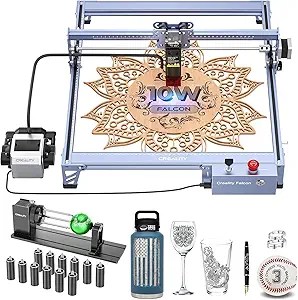 | Best for Versatile Small-Scale Projects with Cylindrical Capabilities | Laser Output Power: 10,000mW | Work Area Dimensions: 17.32 x 9.33 x 24.8 inches | Repositioning Accuracy: less than 0.007 inches | VIEW ON AMAZON | See Our Full Breakdown |
| xTool F2 Ultra UV Laser Engraver, 5W UV Laser 3D Inner Fine Glass Engraving |  | Best for 3D Inner Glass and Crystal Engraving | Laser Power: 5W | Laser Type: UV | Max Speed: 15,000 mm/s | VIEW ON AMAZON | See Our Full Breakdown |
| BlazeX M3 10W Laser Engraver Machine, Ultra-Precision Desktop Laser Cutter & Engraver for Wood, Metal, Glass, Leather |  | Best for Beginners and Hobbyists | Laser Power: 10W | Accuracy: 0.01mm | Material Compatibility: Wood, Metal, Glass, Leather | VIEW ON AMAZON | See Our Full Breakdown |
| Twotrees TTS-55 Pro Laser Engraver 5500mW |  | Best for Enthusiasts Requiring Powerful Cutting Capability | Laser Power: 5500mW | Working Area: 300x300mm | Material Compatibility: Wood, Leather, Acrylic, Stainless Steel | VIEW ON AMAZON | See Our Full Breakdown |
| xTool F2 5W IR & 15W Diode Dual Laser Engraver with Built-in 50MP Camera |  | Best for Versatile and Precise Dual-Laser Projects | Laser Power (Diode): 15W | Laser Power (IR): 5W | Camera Resolution: 50MP | VIEW ON AMAZON | See Our Full Breakdown |
| K15 Pro Laser Engraver 10W – CNC Laser Cutter for Metal, Wood, Acrylic, Glass, Stone |  | Best for Small-Scale Professional Use | Laser Power: 10W | Work Area: 11.8×7.9 inches | Material Compatibility: Wood, Acrylic, Metal, Leather | VIEW ON AMAZON | See Our Full Breakdown |
| xTool S1 40W Laser Cutter and Engraver with Rotary Bundle |  | Best for Large-Scale and Heavy-Duty Projects | Laser Power: 40W | Bed Size: 23.93″ x 15.16″ | Speed: 600mm/s | VIEW ON AMAZON | See Our Full Breakdown |
| xTool M2 10W Color Craft Laser Engraver with Full-Color CMYK Printer and Dual Cameras |  | Best for Versatile Creative Projects Combining Color and Laser | Laser Power: 10W | Material Compatibility: Wood, Leather, Felt, Fabric, Paper, Cardstock, and more | Safety Class: Class 1 | VIEW ON AMAZON | See Our Full Breakdown |
| Creality Falcon 5W Laser Engraver Machine, 72W High Precision 0.06mm Laser Cutter and Engraving Machine for Wood, Leather, Acrylic, Glass, 400x415mm Working Area |  | Best for High-Precision and Large-Scale Projects | Laser Power: 5W | Laser Spot Size: 0.06mm | Max Speed: 10,000 mm/min | VIEW ON AMAZON | See Our Full Breakdown |
| xTool M2 10W Laser Engraver with Dual Cameras, Enclosed Safe Design for DIY Crafts |  | Best for Safe, Home-Based Crafting with Dual Camera Precision | Laser Power: 10W | Built-in Cameras: Dual cameras | Safety Class: Class 1 | VIEW ON AMAZON | See Our Full Breakdown |
| LaserPecker LP1 Plus Mini Laser Engraver for Beginners, Pocket-Sized Portable Laser Engraving Machine with Adjustable Stand and 360° Multi-Angle Engraving |  | Best for Portability and Simplicity for Beginners | Laser Type: Mini laser engraver | Material Support: Wood, leather, acrylic, paper | Power Source: Power banks | VIEW ON AMAZON | See Our Full Breakdown |
| xTool F2 5W IR & 15W Diode Dual Laser Engraver with Slide Extension and Rotary |  | Best for Versatile and High-Speed Dual-Laser Applications | Laser Power (Diode): 15W | Laser Power (IR): 5W | Camera Resolution: 50MP | VIEW ON AMAZON | See Our Full Breakdown |
| laser engraver | Material Compatibility | Laser Power |
|---|---|---|
| Creality Falcon 10W Laser Engr | over 200 materials | 72W |
| ACMER S1 Laser Engraver Machin | Wood, bamboo, leather, plastic, PCB | 2500mW |
| ATOMSTACK 20W Laser Engraver A | Wood, metal, acrylic, leather | 20W |
| Creality Falcon 10W Laser Engr | — | — |
| xTool F2 Ultra UV Laser Engrav | Glass, crystal, acrylic, ceramics | 5W |
| BlazeX M3 10W Laser Engraver M | Wood, Metal, Glass, Leather | 10W |
| Twotrees TTS-55 Pro Laser Engr | Wood, Leather, Acrylic, Stainless Steel | 5500mW |
| xTool F2 5W IR & 15W Diode Dua | 300+ materials | — |
| K15 Pro Laser Engraver 10W | Wood, Acrylic, Metal, Leather | 10W |
| xTool S1 40W Laser Cutter and | Wood, Metal, Acrylic | 40W |
| xTool M2 10W Color Craft Laser | Wood, Leather, Felt, Fabric, Paper, Cardstock, and more | 10W |
| Creality Falcon 5W Laser Engra | Over 200 materials | 5W |
| xTool M2 10W Laser Engraver wi | Wood, leather, felt, fabric, paper | 10W |
| LaserPecker LP1 Plus Mini Lase | — | — |
| xTool F2 5W IR & 15W Diode Dua | 300+ materials | — |
More Details on Our Top Picks
Creality Falcon 10W Laser Engraver Machine, 72W High Precision Laser Cutter and Engraver for Wood, Metal, Acrylic, Leather
The Creality Falcon 10W stands out for its impressive combination of high power, large workspace, and material compatibility. Its 72W laser allows cutting through thicker materials like wood and acrylic with precision, making it suitable for serious hobbyists and small businesses. Compared to the ACMER S1, which has less power but is more portable, this model demands a more involved setup but rewards users with larger projects and faster speeds. The safety features, including UV filtering and goggles, add confidence during operation. The main tradeoff is its weight and the need for some technical familiarity to maximize its capabilities. This pick makes the most sense for users seeking professional-grade results in a versatile, large-format machine.
Pros:- Exceptional cutting power suitable for thick materials
- Large work area supports bigger projects
- Compatibility with multiple software platforms and offline use
Cons:- Relatively heavy and bulky for small spaces
- Requires technical setup and familiarity with laser software
Best for: Enthusiasts and small business owners needing high power and large work areas
Not ideal for: Beginners or casual hobbyists who prefer portable, plug-and-play options
- Laser Power:72W
- Laser Spot Size:0.06mm
- Work Area:15.7″×16.3″
- Repositioning Accuracy:less than 0.007 inches
- Material Compatibility:over 200 materials
- Speed:10,000mm/min
Our verdict“Best suited for those who need a powerful, versatile laser engraver capable of handling large and demanding projects.”
ACMER S1 Laser Engraver Machine, 2500mW Laser Cutter for Wood and Acrylic
The ACMER S1 offers a compact and user-friendly entry point into laser engraving with its 2500mW diode laser. Its small footprint and straightforward setup make it ideal for hobbyists or those testing the waters, especially compared to larger, more complex machines like the Creality Falcon 10W. While it supports a variety of materials including wood, leather, and plastic, its limited working area of 130x130mm restricts larger projects. The laser power, though sufficient for light engraving and thin cuts, isn’t ideal for thicker or denser materials. Still, its compatibility with popular software and portability make it a strong choice for newcomers who want decent results without heavy investment. The main drawback is its limited size and laser power for more ambitious projects.
Pros:- Compact, lightweight, and portable design
- Easy setup and user-friendly interface
- Good material compatibility for beginner projects
Cons:- Limited working area restricts project size
- Insufficient laser power for thicker materials
Best for: Hobbyists and newcomers exploring laser engraving with limited space
Not ideal for: Users needing large-scale or industrial-grade engraving capabilities
- Laser Power:2500mW
- Wavelength:455±5nm
- Working Area:130x130mm
- Material Compatibility:Wood, bamboo, leather, plastic, PCB
- Connectivity:macOS, Windows, Linux
- Dimensions:250×250×162mm
Our verdict“Ideal for beginners seeking a straightforward, portable laser engraver for small projects and experimentation.”
ATOMSTACK 20W Laser Engraver A20 PRO V2
The ATOMSTACK A20 PRO V2 provides a significant upgrade in laser power with 20W output, enabling faster and more detailed engraving on a variety of materials like metal, wood, and acrylic. Its high engraving speed—up to 400mm/s—and 0.01mm accuracy make it a favorite for small businesses or serious hobbyists looking for efficiency. Compared to the Creality Falcon 10W, which excels in large-scale projects, the A20 PRO V2 offers more speed and precision in a compact form but demands careful handling due to its high laser power. Its durable aluminum frame and safety features add confidence, though the high power might be overkill for simple projects or beginners. This model suits those who want professional results with rapid turnaround times.
Pros:- Fast engraving speeds up to 400mm/s
- High precision with 0.01mm accuracy
- Durable aluminum construction and safety features
Cons:- Requires careful handling due to high laser power
- Higher cost may be prohibitive for hobbyists
Best for: Small business owners and advanced hobbyists prioritizing speed and precision
Not ideal for: Casual users or those with limited space and lower budget
- Laser Power:20W
- Laser Class:4
- Engraving Speed:up to 400mm/s
- Engraving Accuracy:0.01mm
- Material Compatibility:Wood, metal, acrylic, leather
- Lifespan:up to 10,000 hours
Our verdict“Best suited for users needing fast, detailed engravings with professional quality in a compact machine.”
Creality Falcon 10W Laser Engraver with Air Assist and Rotary Roller
The Creality Falcon 10W with Air Assist combines high-precision engraving with added features like a rotary roller for cylindrical objects and an air assist for cleaner cuts. Its 10W laser, while less powerful than the Falcon 10W in the first entry, is optimized for detailed work on smaller or more delicate projects, especially with the rotary attachment. Its support for offline operation via TF card and the adjustable air assist make it highly versatile for on-demand production. Compared to the larger Falcon 10W, this version emphasizes precision and convenience over raw cutting power. The main constraints are assembly complexity and some user concerns about safety features, making it better suited for experienced hobbyists or small-scale makers.
Pros:- High-precision detailed engraving
- Includes rotary roller for cylindrical objects
- Effective air assist system for cleaner cuts
Cons:- Assembly can be time-consuming for beginners
- Limited to certain materials for optimal performance
Best for: Users needing precise engraving on small or cylindrical objects with versatile features
Not ideal for: Large-scale or high-power cutting projects requiring thick materials
- Laser Output Power:10,000mW
- Work Area Dimensions:17.32 x 9.33 x 24.8 inches
- Repositioning Accuracy:less than 0.007 inches
- Compatibility:LaserGRBL, LightBurn, Windows, macOS
- Safety Features:UV filter, emergency stop
- Additional Features:Rotary roller, air assist
Our verdict“Ideal for makers focused on detailed, small-scale projects involving cylindrical or intricate engravings.”
xTool F2 Ultra UV Laser Engraver, 5W UV Laser 3D Inner Fine Glass Engraving
The xTool F2 Ultra UV is specialized for internal 3D engraving inside glass and crystal, offering micron-level precision with its 5W UV laser. Its advanced auto-focus system paired with dual 48MP cameras simplifies alignment, making detailed interior work feasible and highly accurate. Unlike larger surface engravers like the Creality Falcon 10W, this model excels at creating fine, detailed images inside delicate, transparent materials. Its enclosed design ensures safety during operation, though it demands careful setup and understanding of laser safety protocols due to its Class 4 certification. While its specialized function limits use on thicker or opaque materials, it opens creative possibilities for personalized gifts and awards. This machine is best for professionals or artists focused on intricate interior engraving.
Pros:- Micron-level engraving precision inside glass
- Auto-focus with dual high-resolution cameras
- Fully enclosed for safety and clean operation
Cons:- Price and complexity may challenge beginners
- Limited to interior, not surface, engraving
Best for: Professionals or artists needing precise 3D engraving inside glass and crystal
Not ideal for: Users seeking versatile surface engraving or larger project sizes
- Laser Power:5W
- Laser Type:UV
- Max Speed:15,000 mm/s
- Camera Resolution:Dual 48MP
- Engraving Area:Spacious, exact dimensions not specified
- Material Compatibility:Glass, crystal, acrylic, ceramics
Our verdict“Perfect for detailed internal engraving inside delicate transparent materials for high-end customization.”
BlazeX M3 10W Laser Engraver Machine, Ultra-Precision Desktop Laser Cutter & Engraver for Wood, Metal, Glass, Leather
The BlazeX M3 stands out for delivering high-precision engraving at an accessible price point, making it a strong choice for hobbyists and newcomers to laser engraving. Its 0.01mm accuracy allows for detailed work on materials like wood, leather, and glass, comparable to more advanced models like the xTool F2, but with less complexity and a more compact footprint. However, its limited size means it’s best suited for small-scale projects, and the 10W laser may struggle with thicker or denser materials. The included safety features and all-in-one starter kit make it easier for beginners to get started, though some calibration and setup are still required. This engraver balances precision and ease of use, but isn’t designed for high-volume or industrial applications.
Pros:- High-precision 0.01mm engraving accuracy
- All-in-one starter kit with safety features
- Versatile material compatibility including glass and metal
Cons:- Limited to small projects due to size constraints
- Requires technical setup and calibration
- Laser power may be insufficient for thick or dense materials
Best for: Beginners and hobbyists looking for a precise, safe, and easy-to-use desktop laser engraver
Not ideal for: Professionals or small businesses needing larger working areas or higher power for batch production
- Laser Power:10W
- Accuracy:0.01mm
- Material Compatibility:Wood, Metal, Glass, Leather
- Weight:8 pounds
- Color:Metal
Our verdict“Ideal for hobbyists and beginners prioritizing detailed work on small projects with safety in mind.”
Twotrees TTS-55 Pro Laser Engraver 5500mW
The Twotrees TTS-55 Pro offers a significant boost in laser power with 5500mW, enabling deeper cuts and engraving on thicker materials like plywood and stainless steel, making it a clear upgrade over lower-powered models like the BlazeX M3. Its large 300x300mm working area supports more ambitious projects, and wireless connectivity simplifies operation. However, the high power demands some technical knowledge to set up safely and optimize, and the laser’s strength raises safety concerns if proper precautions are not followed. Compared with the xTool S1, this model is less equipped with AI features but excels in raw power and cutting depth. It’s best suited for users with some laser experience or those willing to learn safety protocols for demanding materials.
Pros:- High laser power for deep cuts and engraving
- Large 300x300mm working area
- Wireless control with multiple software support
Cons:- Requires technical knowledge for safe operation
- Limited to materials compatible with high-powered laser
- Potential safety hazards if mishandled
Best for: Experienced hobbyists or small business owners needing powerful, precise cuts in large formats
Not ideal for: Total beginners or users with limited technical skills, due to safety and setup complexity
- Laser Power:5500mW
- Working Area:300x300mm
- Material Compatibility:Wood, Leather, Acrylic, Stainless Steel
- Cutting Thickness:up to 5mm plywood, 3mm acrylic
- Focus Spot:0.08*0.46mm
- Connectivity:Wi-Fi, TF card
Our verdict“Best for users who need high power and large format capability but are comfortable with technical setup and safety precautions.”
xTool F2 5W IR & 15W Diode Dual Laser Engraver with Built-in 50MP Camera
The xTool F2 combines dual lasers—5W IR and 15W diode—for remarkable versatility, capable of engraving over 300 materials including metals and thicker substrates. Its built-in 50MP camera offers exceptional alignment accuracy, making it ideal for detailed projects and batch processing. The ultra-fast speeds up to 6000mm/s outperform many single-laser models like the BlazeX M3, especially for commercial or high-volume use. Yet, as a Class 4 laser, it demands strict safety procedures and proper handling, which may be daunting for beginners. While its advanced features and speed make it appealing for experienced users, the high cost and complexity mean it’s less suited for casual hobbyists.
Pros:- Dual laser system for diverse materials
- High-precision with 50MP camera for alignment
- Ultra-fast engraving speeds for productivity
Cons:- Class 4 laser requires strict safety precautions
- Potentially high cost for advanced features
- Complex setup might be overwhelming for beginners
Best for: Professional makers or small businesses needing fast, accurate, multi-material engraving and cutting
Not ideal for: Novice users or those seeking a simple, budget-friendly entry-level engraver
- Laser Power (Diode):15W
- Laser Power (IR):5W
- Camera Resolution:50MP
- Max Speed:6000mm/s
- Material Compatibility:300+ materials
- Included Accessories:Base plate, material kit
Our verdict“Designed for experienced users who need speed, precision, and material versatility in a dual-laser setup.”
K15 Pro Laser Engraver 10W – CNC Laser Cutter for Metal, Wood, Acrylic, Glass, Stone
The K15 Pro offers a 10W laser with a compact A4 workspace, making it suitable for detailed work on small projects, similar to the BlazeX M3 but with a focus on small-scale professional or hobbyist use. Its 4K precision and fast 15,000mm/min engraving speed enable sharp, intricate designs on materials like metal, acrylic, and wood. Compared with larger, high-power models like the xTool S1, the K15 Pro’s smaller work area limits large projects but simplifies setup and operation for users working on smaller items. The upgrade options—like an IR laser head and rotary roller—add versatility, though they require some technical knowledge to install. This model suits those needing detailed, high-quality work in tight spaces.
Pros:- High-precision 4K engraving
- Easy to assemble and operate
- Upgradeable with optional modules for versatility
Cons:- Limited workspace size restricts larger projects
- Requires technical knowledge for upgrades
- Primarily designed for small-scale use
Best for: Small business owners or advanced hobbyists seeking precise, detailed engraving on small items
Not ideal for: Users requiring large working areas or heavy-duty cutting of thick materials
- Laser Power:10W
- Work Area:11.8×7.9 inches
- Material Compatibility:Wood, Acrylic, Metal, Leather
- Max Cutting Thickness:12mm plywood, 8mm acrylic
- Engraving Speed:15,000mm/min
- Upgrade Options:IR laser head, rotary roller
Our verdict“Best suited for users needing high-precision detail on small objects with room for upgrades.”
xTool S1 40W Laser Cutter and Engraver with Rotary Bundle
The xTool S1 offers a robust 40W laser capable of tackling large-scale projects with ease, making it a compelling choice for small businesses or advanced hobbyists who need to cut and engrave substantial materials like thick wood or metal. Its 23.93″ x 15.16″ bed supports sizable items, and the advanced automation—such as auto-focus and safety features—enhance usability. Compared to smaller models like the BlazeX M3 or K15 Pro, the S1’s size and power make it suitable for more ambitious, production-oriented tasks. However, its larger footprint and complex features may be overwhelming for beginners, and it likely involves a higher investment. This laser makes quick work of large projects, combining power with safety and precision.
Pros:- High-powered 40W laser for fast, deep cuts
- Large working surface for big projects
- Advanced safety and automation features
Cons:- Requires ample workspace and setup space
- Complex interface may be overwhelming for novices
- Potentially high cost for hobbyists
Best for: Small businesses or experienced hobbyists needing a large, powerful laser for detailed and bulk projects
Not ideal for: Beginners or users with limited space or budget constraints
- Laser Power:40W
- Bed Size:23.93″ x 15.16″
- Speed:600mm/s
- Material Compatibility:Wood, Metal, Acrylic
- Auto-focus:Yes
- Safety Features:Enclosed, flame sensors, emergency stop
Our verdict“Perfect for users who require large-scale, high-power laser capabilities with advanced safety features.”
xTool M2 10W Color Craft Laser Engraver with Full-Color CMYK Printer and Dual Cameras
The xTool M2 stands out for merging full-color CMYK printing with laser engraving, making it ideal for personalized gifts and small business branding. Unlike the Creality Falcon 5W, which emphasizes high-precision laser cutting over color printing, the M2 offers a creative combo that appeals to craft enthusiasts seeking customization. However, switching modules between printing and engraving can slow workflow, and the laser’s 10W power limits heavy-duty industrial tasks. Its dual cameras enable precise placement, while the user-friendly software simplifies design creation. Still, extra modules like IR are sold separately, adding to the cost. Best suited for hobbyists and small-scale entrepreneurs prioritizing color visuals over raw power.
Pros:- Combines color printing and laser engraving in one device
- Built-in dual cameras for accurate workspace preview
- User-friendly software with templates and AI image generator
- Safe, enclosed design suitable for home environments
Cons:- Requires module switching which can interrupt workflow
- Limited 10W laser power may not handle thick or dense materials
Best for: Home crafters and small business owners wanting integrated color and laser capabilities
Not ideal for: Industrial manufacturers needing high-powered, heavy-duty laser cutting for thick materials
- Laser Power:10W
- Material Compatibility:Wood, Leather, Felt, Fabric, Paper, Cardstock, and more
- Safety Class:Class 1
- Included Modules:CMYK Inkjet Printing Module, Deluxe Material Kit
- Laser Output Power:10,000mW
- Built-in Cameras:Dual cameras for workspace preview
Our verdict“This device is perfect for creative users seeking versatile, color-inclusive projects at the expense of industrial power.”
Creality Falcon 5W Laser Engraver Machine, 72W High Precision 0.06mm Laser Cutter and Engraving Machine for Wood, Leather, Acrylic, Glass, 400x415mm Working Area
The Creality Falcon 5W delivers exceptional detail with a 0.06mm spot size and a sizable 400x415mm work area, making it suitable for complex, detailed engravings on various materials. Compared with the xTool M2, which emphasizes color printing, the Falcon prioritizes fine detail and larger projects, though it requires additional accessories like rotary rollers and risers to maximize its potential. Its 5W laser, classified as Class 4, demands strict safety precautions, which might be a concern for casual users. The high-speed engraving up to 10,000 mm/min boosts productivity but may require tuning for optimal results. Suitable for professional craftspeople and small workshops, it balances precision with volume. Best suited for users needing detailed engraving on bigger pieces with high speed, but willing to handle safety and setup complexities.
Pros:- High-precision engraving with 0.06mm spot size
- Large working area supports bigger projects
- Fast engraving speed enhances productivity
- Enhanced safety features including automatic stop and eye protection
Cons:- Requires additional accessories for full functionality
- Class 4 laser demands strict safety protocols
- Limited power for very thick or dense materials
Best for: Small businesses or professionals focusing on detailed, large-format engraving projects
Not ideal for: Beginners or hobbyists seeking simple, plug-and-play devices due to safety and setup requirements
- Laser Power:5W
- Laser Spot Size:0.06mm
- Max Speed:10,000 mm/min
- Working Area:400 x 415mm
- Material Compatibility:Over 200 materials
- Laser Class:4
Our verdict“This laser is ideal for precise, large-scale work by experienced users who can manage safety and setup demands.”
xTool M2 10W Laser Engraver with Dual Cameras, Enclosed Safe Design for DIY Crafts
The xTool M2 with an enclosed design and dual cameras offers a safe environment for home crafters interested in detailed, multi-material projects. Unlike the Creality Falcon 5W, which excels in high-precision large-scale engraving, the M2 emphasizes versatility and safety for DIY use. While it supports full-color printing with additional modules, these are sold separately, and the 10W laser limits heavy industrial tasks. Its safety features and user-friendly interface make it accessible for beginners, though module switching can slow work flow. The dual cameras improve placement accuracy, making it suitable for personalized projects and crafts. Best suited for home hobbyists and DIY enthusiasts prioritizing safety and multi-material versatility.
Pros:- Built-in dual cameras for precise material placement
- Enclosed safety design suitable for home environments
- Supports full-color printing with optional modules
- User-friendly software with templates and AI features
Cons:- Additional modules like CMYK inkjet and rotary are sold separately
- Limited 10W laser power restricts heavy-duty or thick material work
- Module switching can interrupt workflow
Best for: Home users and hobbyists wanting a safe, versatile, and easy-to-use engraving machine
Not ideal for: Industrial or commercial users needing high-powered, continuous heavy-duty production
- Laser Power:10W
- Built-in Cameras:Dual cameras
- Safety Class:Class 1
- Material Compatibility:Wood, leather, felt, fabric, paper
- Enclosure:Fully enclosed
- Supported Modules:Full-color printing, rotary (sold separately)
Our verdict“This engraver suits home hobbyists seeking a safe, versatile machine with modern features for creative projects.”
LaserPecker LP1 Plus Mini Laser Engraver for Beginners, Pocket-Sized Portable Laser Engraving Machine with Adjustable Stand and 360° Multi-Angle Engraving
The LaserPecker LP1 Plus excels in portability, making it ideal for on-the-go projects and quick setups. Unlike the xTool M2 or Creality Falcon, which are larger and more feature-rich, the LP1 Plus is designed for non-metal materials like wood, leather, and acrylic. Its compact size and adjustable stand facilitate multi-angle engraving, but it cannot handle metal or dense materials, limiting versatility. The magnetic base simplifies positioning, and its rapid setup suits beginners or those needing a mobile solution. However, precise distance control is essential for quality results, and its small size limits project scale. Best suited for hobbyists and DIYers seeking a lightweight, portable, and easy-to-use engraving tool.
Pros:- Compact, lightweight, perfect for portable use
- Setup time under 2 minutes for quick projects
- Supports non-metal materials with adjustable angles
- Magnetic base and stand included for flexible positioning
Cons:- Cannot engrave metals or very dense materials
- Requires careful distance setting for best results
- Limited project size due to small working surface
Best for: Beginners and hobbyists wanting a portable, straightforward device for small projects
Not ideal for: Experienced users or those needing metal engraving or large-scale production
- Laser Type:Mini laser engraver
- Material Support:Wood, leather, acrylic, paper
- Power Source:Power banks
- Engraving Angles:360° multi-angle
- Stand:Adjustable included
- Supported Materials:Non-metal only
Our verdict“This pick is ideal for beginners and mobile users needing simple, on-the-go engraving of non-metal materials.”
xTool F2 5W IR & 15W Diode Dual Laser Engraver with Slide Extension and Rotary
The xTool F2 combines a 15W diode laser with a 5W IR laser, offering a broad range of capabilities from deep metal marking to detailed 3D embossing. This dual-laser setup outperforms single-laser models like the LaserPecker LP1 Plus in versatility, especially for multi-material projects. The inclusion of a 50MP camera and rapid operation at 6000mm/s enables high-resolution, high-speed workflows suitable for both personal and commercial use. While its weight at 4.6 kg may reduce portability, its compact design and advanced features make it a strong choice for experienced users capable of managing safety and setup complexity. Its diverse laser options make it the most adaptable device in this lineup. Best suited for users seeking a multifunctional, high-speed laser system with advanced features.
Pros:- Dual-laser system supports a wide range of materials and tasks
- High-speed engraving at up to 6000mm/s with high resolution
- Includes advanced features like a 50MP camera and batch processing
- Compact, fully enclosed design for safe indoor use
Cons:- Relatively heavy for portable applications
- Features may require a learning curve for new users
- Price considerations due to advanced capabilities
Best for: Small businesses or experienced hobbyists needing multi-material and high-resolution engraving
Not ideal for: Beginners or casual users who prefer simple, single-function laser engravers due to complexity
- Laser Power (Diode):15W
- Laser Power (IR):5W
- Camera Resolution:50MP
- Max Speed:6000mm/s
- Material Compatibility:300+ materials
- Included Accessories:Slide extension, RA3 rotary, air purifier
Our verdict“This device is ideal for users requiring a flexible, high-speed laser engraver capable of handling diverse materials with precision.”

How We Picked
To determine the best laser engravers, I evaluated each model based on performance, usability, build quality, versatility, and value. Performance metrics such as laser power, precision, and material compatibility were key factors. Usability considerations included ease of setup, software interface, safety features, and maintenance requirements. I prioritized models that offered a clear balance of features and affordability, ensuring that both hobbyists and professionals could find suitable options. The ranking reflects a combination of these criteria, highlighting machines that excel in specific categories while also providing overall reliability and value.Factors to Consider When Choosing Laser Engravers
Choosing the right laser engraver involves understanding several key factors that influence both performance and usability. While more powerful machines can handle thicker or harder materials, they often come at a higher cost and increased complexity. Conversely, compact or beginner models may be easier to operate but limited in scope. Balancing these aspects according to your specific projects and experience level will help you select the ideal machine.Power and Material Compatibility
Laser power directly impacts what materials you can work with and how quickly. Higher wattage lasers are better suited for cutting or engraving dense materials like metal or thick wood, but they tend to be larger and more expensive. Lower power models excel for delicate tasks on thin materials or detailed engraving but may struggle with tougher substrates. Assess what materials you plan to work with most often to choose the right power level that balances capability and budget.
Size, Portability, and Workspace
The physical dimensions of a laser engraver influence where and how you can use it. Compact, portable units are ideal for hobbyists or those with limited space, but they often sacrifice power or working area. Larger machines offer more workspace and higher power options but require dedicated setups. Consider your workspace size and whether portability or a larger working area aligns better with your project needs.
Ease of Use and Safety Features
Beginners benefit from models with intuitive interfaces, straightforward setup, and safety features like enclosed chambers or automatic shutdowns. More advanced machines may require technical knowledge for calibration and maintenance but offer greater control and precision. Investing in a machine with safety features can prevent accidents, especially if multiple users or novices will operate it regularly.
Software and Connectivity
Reliable, user-friendly software simplifies the design and engraving process. Compatibility with common design programs and connectivity options like USB, Wi-Fi, or SD cards matter for workflow flexibility. Some machines come with proprietary software that might be limiting, so consider whether the software ecosystem suits your skill level and project complexity before purchasing.
Price and Long-Term Value
Higher-priced models tend to offer more power, durability, and advanced features, making them better investments for professional use. Budget options can be sufficient for hobbyists but may require upgrades or replacements sooner. Think about your long-term needs and whether the initial investment aligns with your projected usage and growth in skills.
Frequently Asked Questions
Can I engrave metal with a laser engraver?
Yes, but not all laser engravers are capable of engraving metal. Generally, high-powered fiber or CO2 lasers with specific settings are needed for metal engraving. Some diode lasers can mark certain metals via annealing or surface oxidation, but for deep or permanent engraving, a dedicated metal laser is preferable. Always verify the machine’s specifications to ensure it suits your metalworking needs.
Is an enclosed laser engraver safer for beginners?
Enclosed laser engravers tend to be safer because they contain fumes, laser light, and debris within a protective chamber. This reduces exposure to harmful emissions and accidental contact with the laser beam. For beginners or those working in shared spaces, enclosed models provide peace of mind and easier compliance with safety standards. However, they might be more expensive and slightly less accessible for quick setup or adjustments.
What is the typical maintenance required for laser engravers?
Maintenance varies depending on the model and usage but generally includes cleaning the laser lens and mirrors, checking and replacing filters, and ensuring the cooling system functions properly. Regular calibration is necessary to maintain engraving accuracy, especially for high-precision work. Proper maintenance extends the lifespan of your machine and preserves engraving quality, so it’s essential to follow manufacturer guidelines and schedule routine checks.
How important is software compatibility when choosing a laser engraver?
Software compatibility is critical because it determines how easily you can design and send files to your laser. A machine that works seamlessly with popular design tools like Adobe Illustrator, CorelDRAW, or Inkscape simplifies your workflow. Compatibility with multiple file formats and connectivity options adds flexibility, especially if you plan to upgrade or scale your projects. Poor software support can lead to frustration and limit creative possibilities.
Should I prioritize power or size when selecting a laser engraver?
This depends on your primary use case. If you need to work on larger projects or thicker materials, prioritizing power and a bigger workspace makes sense. For hobbyists or those with limited space, a smaller, lower-power engraver might be more practical, even if it takes longer or cannot handle heavy-duty tasks. Matching the machine’s capabilities with your project scope ensures you get the best value and performance for your needs.
Conclusion
For casual hobbyists or those just starting out, the LaserPecker LP1 Plus offers portability and ease of use. Serious makers or professionals seeking high power and versatility will find the Creality Falcon 10W to be the best overall choice. Those working with delicate materials or requiring fine detail should consider the xTool F2 for its precision capabilities. Budget-conscious buyers can opt for reliable, entry-level models like the ACMER S1, while professionals needing advanced features may lean toward the xTool M2 or F2 UV laser. Ultimately, your selection should match your project scope, workspace, and experience level to ensure satisfaction and growth in your laser engraving endeavors.
Fall Picks
fall essentials
As an affiliate, we earn on qualifying purchases.