Among these budget laptops, I’d choose the NIMO 15.6-inch Ryzen 7 as the best overall for buyers who need stronger performance, 16GB of RAM and a Full HD screen. The HP 14-inch Intel N150 models are more practical for basic Windows tasks, while the Gateway Chromebook 314 offers a Full HD display for people comfortable with ChromeOS. The main tradeoff is between low-cost configurations with just 4GB of RAM and roomier, faster systems that handle more demanding work. Operating system, storage type and screen resolution matter as much as the processor name. Read on for the full breakdown and guidance on which compromises make sense for your needs.

Get the latest gadgets delivered free — and shop member deals
- Fast, free delivery on millions of items
- Access to Prime Big Deal Days deals on October 6–7
- Prime Video, Amazon Music and more included
Complete the kit



Key Takeaways
- The NIMO Ryzen 7 is the performance outlier: its 16GB of DDR5 memory and 512GB SSD give it far more headroom than the many 4GB entry-level models.
- Several HP N150 listings are close substitutes: compare their stated storage and included services carefully, since the processor and memory are similar across these configurations.
- ChromeOS favors simple, web-based routines: the HP and Dell Chromebooks can suit browsing and schoolwork, but their 64GB and 16GB storage capacities leave little room for local files.
- Screen resolution varies sharply: the Gateway and NIMO list Full HD displays, while several 14-inch and 15-inch options are HD, which can affect how much text and content fit onscreen.
- More advertised storage does not always mean more built-in space: the HP Stream with 416GB total storage and the HP model with 1TB OneDrive include storage beyond their local drive, so check what is online or service-based.
| HP 14-inch HD Chromebook with Intel Celeron N4120, 4GB RAM, 64GB eMMC |  | Best for Chrome OS Basics | Processor: Intel Celeron N4120, 4 cores, up to 2.6GHz | Display: 14-inch HD anti-glare, 1366 × 768 | Memory: 4GB LPDDR4x | VIEW ON AMAZON | See Our Full Breakdown |
| HP 15-inch HD IPS Laptop, Intel Pentium, 4GB RAM, 128GB SSD, Windows 11 (Renewed) |  | Best for a Larger Windows Screen | Processor: Intel Pentium, up to 3.68GHz | Display: 15-inch IPS LED, 1366 × 768, 60Hz | Memory: 4GB DDR4 | VIEW ON AMAZON | See Our Full Breakdown |
| HP Stream 14-inch Laptop, Intel N150, 4GB RAM, 256GB Storage, Windows 11 S, Silver | 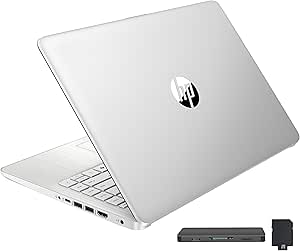 | Best for Included Extras | Processor: Intel N150 | Display: 14-inch LED, 1366 × 768 | Memory: 4GB DDR4 | VIEW ON AMAZON | See Our Full Breakdown |
| HP 14-Inch Laptop with Intel N150, 4GB RAM, 128GB Storage, and Windows 11 Home |  | Best for Everyday Portability | Processor: Intel N150, 4 cores, up to 3.6GHz | Display: 14-inch HD anti-glare, 1366 × 768, 250 nits | Memory: 4GB LPDDR5-4800 | VIEW ON AMAZON | See Our Full Breakdown |
| NIMO 15.6-Inch FHD Laptop with AMD Ryzen 7 7735HS, 16GB DDR5 RAM, and 512GB SSD |  | Best for Performance Headroom | Processor: AMD Ryzen 7 7735HS, 8 cores, 16 threads, up to 4.75GHz | Memory: 16GB DDR5 | Storage: 512GB SSD | VIEW ON AMAZON | See Our Full Breakdown |
| HP 14-inch Slim Laptop with Intel N150, 4GB RAM, 128GB SSD, and 1TB OneDrive Storage |  | Best for Microsoft 365 Users | Processor: Intel N150, 4 cores, up to 3.6 GHz | Memory: 4GB RAM | Storage: 128GB SSD and 1TB OneDrive storage | VIEW ON AMAZON | See Our Full Breakdown |
| HP Stream 14-Inch HD Laptop, Intel Celeron N4120, 16GB RAM, 416GB Total Storage, Windows 11 S, Gold |  | Best for Accessory Bundling | Processor: Intel Celeron N4120 | Memory: 16GB DDR4 | Storage: 416GB total: 128GB eMMC, 256GB docking station storage, and 32GB MicroSD card | VIEW ON AMAZON | See Our Full Breakdown |
| 15.6-Inch Laptop with Intel Celeron N4020, 4GB RAM, 128GB eMMC, and Windows 11 |  | Best Full HD Screen on a Basic Windows Laptop | Processor: Intel Celeron N4020 | Memory: 4GB LPDDR4 RAM | Storage: 128GB eMMC | VIEW ON AMAZON | See Our Full Breakdown |
| Dell Chromebook 11 3100, 11.6-inch, Intel Celeron N4020, 4GB RAM, 16GB Flash Memory, Chrome OS (Renewed) |  | Best Compact Chromebook | Processor: Intel Celeron N4020 | Memory: 4GB RAM | Storage: 16GB flash memory | VIEW ON AMAZON | See Our Full Breakdown |
| HP 14-inch Laptop with Intel N150, 4GB RAM and 128GB SSD |  | Best Straightforward Everyday Windows Pick | Processor: Intel N150, 4 cores, up to 4.4 GHz | Memory: 4GB DDR5 SDRAM | Storage: 128GB SSD | VIEW ON AMAZON | See Our Full Breakdown |
| HP Chromebook 14 Laptop, Intel Celeron N4120, 4 GB RAM, 64 GB eMMC, 14-inch HD Display |  | Best for Long Battery Life | Processor: Intel Celeron N4120, quad-core | Memory: 4 GB RAM | Storage: 64 GB eMMC | VIEW ON AMAZON | See Our Full Breakdown |
| S7HI 15.6-Inch Laptop, Full HD, 6GB RAM, 128GB Storage |  | Best for Windows on a Larger Screen | Processor: Intel 5205U, 1.9 GHz base frequency | Memory: 6 GB RAM | Storage: 128 GB SSD, expandable by up to 512 GB | VIEW ON AMAZON | See Our Full Breakdown |
| HP 14-inch Laptop with Intel Celeron N4500, 4GB RAM, 128GB Storage, and Windows 11 Home in S Mode |  | Best for Windows Essentials | Processor: Intel Celeron N4500 | Memory: 4 GB DDR4 RAM | Storage: 128 GB total: 64 GB eMMC and 64 GB SD card | VIEW ON AMAZON | See Our Full Breakdown |
| Gateway Chromebook 314 14-inch Full HD Laptop |  | Best Chromebook Display | Processor: Intel Celeron N4500 dual-core, up to 2.8 GHz | Memory: 4 GB LPDDR4X | Storage: 64 GB eMMC | VIEW ON AMAZON | See Our Full Breakdown |
| 15.6-Inch Laptop with AMD Processor, 8GB RAM and 256GB SSD |  | Best for Local Storage | Processor: AMD processor, up to 3.2 GHz | Graphics: Integrated Radeon R5, up to 512 MB | Memory: 8 GB RAM | VIEW ON AMAZON | See Our Full Breakdown |
| budget laptop | Processor | Display | Memory | Storage |
|---|---|---|---|---|
| HP 14-inch HD Chromebook with | Intel Celeron N4120, 4 cores, up to 2.6GHz | 14-inch HD anti-glare, 1366 × 768 | 4GB LPDDR4x | 64GB eMMC |
| HP 15-inch HD IPS Laptop | Intel Pentium, up to 3.68GHz | 15-inch IPS LED, 1366 × 768, 60Hz | 4GB DDR4 | 128GB SSD |
| HP Stream 14-inch Laptop | Intel N150 | 14-inch LED, 1366 × 768 | 4GB DDR4 | — |
| HP 14-Inch Laptop with Intel N | Intel N150, 4 cores, up to 3.6GHz | 14-inch HD anti-glare, 1366 × 768, 250 nits | 4GB LPDDR5-4800 | 128GB UFS |
| NIMO 15.6-Inch FHD Laptop with | AMD Ryzen 7 7735HS, 8 cores, 16 threads, up to 4.75GHz | 15.6-inch IPS, 1920 × 1080 | 16GB DDR5 | 512GB SSD |
| HP 14-inch Slim Laptop with In | Intel N150, 4 cores, up to 3.6 GHz | 14-inch HD, 1366 × 768, anti-glare | 4GB RAM | 128GB SSD and 1TB OneDrive storage |
| HP Stream 14-Inch HD Laptop | Intel Celeron N4120 | 14-inch, 1366 × 768, 60 Hz, matte/anti-glare | 16GB DDR4 | 416GB total: 128GB eMMC, 256GB docking station storage, and 32GB MicroSD card |
| 15.6-Inch Laptop with Intel Ce | Intel Celeron N4020 | 15.6-inch Full HD, 1920 × 1080, anti-glare | 4GB LPDDR4 RAM | 128GB eMMC |
| Dell Chromebook 11 3100 | Intel Celeron N4020 | 11.6-inch, 1366 × 768 | 4GB RAM | 16GB flash memory |
| HP 14-inch Laptop with Intel N | Intel N150, 4 cores, up to 4.4 GHz | 14-inch HD non-touch, anti-glare, 250 nits, 45% NTSC | 4GB DDR5 SDRAM | 128GB SSD |
| HP Chromebook 14 Laptop | Intel Celeron N4120, quad-core | 14-inch HD, 1366 x 768, anti-glare | 4 GB RAM | 64 GB eMMC |
| S7HI 15.6-Inch Laptop | Intel 5205U, 1.9 GHz base frequency | 15.6-inch LCD, 1920 x 1080, 60 Hz | 6 GB RAM | 128 GB SSD, expandable by up to 512 GB |
| HP 14-inch Laptop with Intel C | Intel Celeron N4500 | 14-inch micro-edge, anti-glare | 4 GB DDR4 RAM | 128 GB total: 64 GB eMMC and 64 GB SD card |
| Gateway Chromebook 314 14-inch | Intel Celeron N4500 dual-core, up to 2.8 GHz | 14-inch Full HD, 1920 x 1080, anti-glare | 4 GB LPDDR4X | 64 GB eMMC |
| 15.6-Inch Laptop with AMD Proc | AMD processor, up to 3.2 GHz | 15.6-inch Full HD, 1920 x 1080 | 8 GB RAM | 256 GB SSD, expandable up to 1 TB |
More Details on Our Top Picks
HP 14-inch HD Chromebook with Intel Celeron N4120, 4GB RAM, 64GB eMMC
The HP 14-inch Chromebook is a straightforward fit for web browsing, video streaming, and schoolwork that lives in the cloud. Its up to 14-hour battery rating and modest 3.35-pound weight suit buyers who carry a laptop between classes or rooms. Unlike the Windows-based HP 15-inch HD IPS Laptop, it runs Chrome OS, which keeps the experience centered on browser apps and Google services rather than traditional Windows software. It also has a useful range of connections for this size, including USB-C, USB-A, and HDMI. The tradeoff is its 1366 × 768 screen and just 4GB of memory, while 64GB of eMMC leaves little room for local files. Choose it for uncomplicated online tasks; skip it if you need Windows programs or sustained multitasking.
Pros:- Chrome OS suits browser-centered work and cloud storage
- Rated for up to 14 hours of battery life
- USB-A, USB-C, and HDMI provide flexible connections
- At 3.35 pounds, it is manageable to carry
Cons:- 1366 × 768 resolution gives less workspace and detail than a Full HD screen
- 4GB of memory can constrain multitasking
- 64GB eMMC offers limited local storage
Best for: Students and home users who mainly use browser-based apps, stream video, and want a lightweight Chromebook with useful ports.
Not ideal for: Buyers who need Windows applications, a sharp Full HD display, or room for large local files.
- Processor:Intel Celeron N4120, 4 cores, up to 2.6GHz
- Display:14-inch HD anti-glare, 1366 × 768
- Memory:4GB LPDDR4x
- Storage:64GB eMMC
- Operating system:Chrome OS
- Ports:2 × USB-A, USB-C, HDMI, headphone jack
- Wireless:Wi-Fi 5, Bluetooth
- Weight:3.35 pounds
- Battery life:Rated for up to 14 hours
Our verdict“Pick this Chromebook for portable, cloud-centered basics, provided you do not need Windows software or much local storage.”
HP 15-inch HD IPS Laptop, Intel Pentium, 4GB RAM, 128GB SSD, Windows 11 (Renewed)
The renewed HP 15-inch gives Windows users a larger IPS panel and a 128GB SSD, making it a better fit for basic desktop-style work than the cloud-focused HP 14-inch Chromebook. The SSD provides more room for everyday files and can make routine startup and app loading feel more responsive than eMMC storage. Its 15-inch screen also gives documents and browser tabs more physical space, although the 1366 × 768 resolution limits how much detail fits onscreen. This is a renewed machine, so buyers should factor its condition into the decision. The listed 4Wh battery capacity is unusually small and offers no dependable runtime claim to plan around. With only 4GB of RAM, this model suits light Windows use, not heavy multitasking; compare it with the newer HP 14-inch N150 if portability and modern wireless matter more.
Pros:- Windows 11 supports traditional desktop applications
- 128GB SSD provides more local storage than 64GB eMMC
- 15-inch IPS display offers a larger viewing area
- USB-C, two USB-A ports, and HDMI cover common peripherals
Cons:- Renewed condition may not suit buyers seeking a new device
- 4GB RAM can limit running several apps at once
- 1366 × 768 resolution is modest for a 15-inch screen
- Listed battery capacity is only 4Wh
Best for: Budget-conscious Windows users who prefer a larger screen and need an SSD for documents, browsing, and light office tasks.
Not ideal for: Frequent travelers, heavy multitaskers, or buyers who want a high-resolution display and clearly specified all-day battery life.
- Processor:Intel Pentium, up to 3.68GHz
- Display:15-inch IPS LED, 1366 × 768, 60Hz
- Memory:4GB DDR4
- Storage:128GB SSD
- Operating system:Windows 11
- Ports:USB-C, 2 × USB-A, HDMI, headphone/microphone combo jack
- Wireless:Wi-Fi 802.11ac, Bluetooth
- Condition:Renewed
- Battery:Lithium-ion, listed capacity 4Wh
Our verdict“Choose this renewed HP for a larger Windows workspace and SSD storage, if its condition and limited memory fit your needs.”
HP Stream 14-inch Laptop, Intel N150, 4GB RAM, 256GB Storage, Windows 11 S, Silver
The HP Stream 14 bundles Windows 11 S with a one-year Microsoft 365 subscription, a docking station, and a MicroSD card, giving a student or home office several accessories alongside the laptop. Its Wi-Fi 6 and Bluetooth 5.4 are newer wireless standards than the Wi-Fi 5 on the HP Chromebook, and the included hub adds practical ways to connect peripherals. The advertised storage needs careful reading: the listed 256GB total combines a 128GB UFS drive with a docking station that has 1TB storage, so it is not all built into the laptop. Like the HP 14-inch N150 Windows 11 Home model, this Stream has 4GB RAM and an HD screen, but the Home model has clearer onboard storage details. The limited memory and 1366 × 768 display make this better for basic tasks than demanding workloads.
Pros:- Includes a one-year Microsoft 365 subscription
- Wi-Fi 6 and Bluetooth 5.4 support current wireless connections
- 7-in-1 docking station and accessories add connection options
- 128GB UFS storage is supplemented by external storage in the dock
Cons:- Only 4GB RAM may restrict multitasking
- 1366 × 768 display has limited detail and workspace
- The listed 256GB total includes a dock with 1TB storage, not just laptop storage
- Windows 11 S may limit software installation choices
Best for: Students and home users who want a basic Windows laptop bundled with Microsoft 365 and a hub for desk peripherals.
Not ideal for: Buyers who need ample built-in storage, reliable multitasking, or a Full HD screen.
- Processor:Intel N150
- Display:14-inch LED, 1366 × 768
- Memory:4GB DDR4
- Laptop storage:128GB UFS
- Operating system:Windows 11 S
- Wireless:Wi-Fi 6, Bluetooth 5.4
- Ports:USB-C, 2 × USB-A, HDMI 1.4b, media card reader, combo audio jack
- Included software:One-year Microsoft 365 subscription
- Included accessories:7-in-1 docking station with 1TB storage, 32GB MicroSD card and accessories
Our verdict“Consider the HP Stream if the bundled software and accessories suit your setup, and you are comfortable with its limited onboard storage and memory.”
HP 14-Inch Laptop with Intel N150, 4GB RAM, 128GB Storage, and Windows 11 Home
The HP 14-inch N150 is the most straightforward Windows choice here for basic browsing, documents, and online learning. Compared with the accessory-heavy HP Stream 14, this model has clearly specified 128GB UFS storage inside the laptop and runs Windows 11 Home, while still including a one-year Microsoft 365 Personal subscription. Its 3.24-pound weight and slim profile make it practical to carry, and the ports include USB-C with DisplayPort plus HDMI, a card reader, and two USB-A connections. The processor and Wi-Fi 6 make it a more current everyday package than the renewed HP 15-inch Pentium model. But the 4GB of memory is a firm limit for juggling many apps, and the 1366 × 768 display has less workspace than a Full HD panel. The battery rating also varies by activity: up to 11 hours of video, or 7.5 hours mixed use.
Pros:- Light 3.24-pound build is convenient for daily carrying
- Windows 11 Home and one-year Microsoft 365 Personal subscription included
- Wi-Fi 6 and Bluetooth 5.4
- USB-C with DisplayPort, HDMI, two USB-A ports, and SD card reader
Cons:- 4GB memory can hold back multitasking
- 128GB UFS storage may fill quickly with large files
- 1366 × 768 resolution offers limited screen detail
- Mixed-use battery rating is up to 7.5 hours
Best for: Students and commuters who need a light Windows laptop for documents, web research, and online classes.
Not ideal for: Users who run many applications at once, store large media libraries locally, or expect a Full HD screen.
- Processor:Intel N150, 4 cores, up to 3.6GHz
- Display:14-inch HD anti-glare, 1366 × 768, 250 nits
- Memory:4GB LPDDR5-4800
- Storage:128GB UFS
- Operating system:Windows 11 Home
- Wireless:Wi-Fi 6, Bluetooth 5.4
- Ports:USB-C with DisplayPort 1.2, 2 × USB-A, HDMI, SD card reader, combo audio jack
- Weight:3.24 pounds
- Battery life:Up to 11 hours video playback; up to 7.5 hours mixed use
Our verdict“Pick this HP for a portable, clearly specified Windows setup for everyday school or office tasks, as long as 4GB RAM is enough.”
NIMO 15.6-Inch FHD Laptop with AMD Ryzen 7 7735HS, 16GB DDR5 RAM, and 512GB SSD
The NIMO 15.6-inch stands apart from the entry-level HP models by pairing a Ryzen 7 processor with 16GB DDR5 memory and a 512GB SSD. That gives it more room for simultaneous apps, larger projects, and light creative work than the 4GB HP 14-inch N150, whose strengths are portability and bundled Microsoft 365. Its Full HD IPS display also provides more detail and workspace than the HD screens on the other Windows picks. Radeon 680M integrated graphics can handle light gaming, but they are not a substitute for a dedicated gaming GPU, and demanding games or graphics work may exceed its reach. The 3.8-pound build is heavier than the 14-inch HP options, while 512GB may still feel tight for large game libraries. This is the capable choice for buyers whose everyday workload would strain the simpler laptops.
Pros:- Ryzen 7 7735HS has 8 cores and 16 threads for heavier multitasking
- 16GB DDR5 memory provides more headroom than the 4GB alternatives
- Full HD IPS display offers sharper detail than the HD panels in this group
- Backlit keyboard, fingerprint reader, and numeric keypad add practical conveniences
Cons:- Integrated graphics are limited for demanding games
- 3.8-pound weight exceeds the 14-inch HP options
- 512GB SSD can be restrictive for large game or creative libraries
Best for: Students, remote workers, and casual creators who need more memory and processing capacity for multiple apps and light creative work.
Not ideal for: Buyers who prioritize a very light carry, need dedicated graphics for demanding games, or keep extensive media libraries on the laptop.
- Processor:AMD Ryzen 7 7735HS, 8 cores, 16 threads, up to 4.75GHz
- Memory:16GB DDR5
- Storage:512GB SSD
- Graphics:Integrated AMD Radeon 680M
- Display:15.6-inch IPS, 1920 × 1080
- Operating system:Windows 11
- Weight:3.8 pounds
- Connectivity:Wi-Fi, Bluetooth, HDMI, USB, USB-C
- Features:Backlit keyboard, fingerprint reader, numeric keypad
Our verdict“Choose the NIMO when you need far more multitasking capacity and a sharper screen than the basic HP laptops provide.”
HP 14-inch Slim Laptop with Intel N150, 4GB RAM, 128GB SSD, and 1TB OneDrive Storage
The HP 14-inch Slim pairs an Intel N150 with a 128GB SSD, so Windows and everyday files have local solid-state storage, while its 1TB of OneDrive space can help users who keep documents online. The included year of Microsoft 365 adds a useful productivity bundle. Compared with the similar HP 14-inch Laptop with Intel N150, this model adds OneDrive capacity and lists Wi-Fi 6 and Bluetooth 5.4, making it a stronger fit for cloud-based school or office work. The compromises matter: 4GB of RAM can constrain multitasking, and the 1366 × 768 screen gives less workspace and detail than a Full HD option such as the 15.6-Inch Laptop with Intel Celeron N4020. I’d choose it for light workloads and portability, not demanding apps or extensive offline storage.
Pros:- Intel N150 processor for everyday browsing and document work
- 1TB of OneDrive storage and a one-year Microsoft 365 subscription
- Wi-Fi 6 and Bluetooth 5.4 connectivity
- USB-C, HDMI, USB-A, and SD card reader
Cons:- 4GB of RAM limits comfortable multitasking
- 1366 × 768 display has less detail and workspace than Full HD screens
- Keyboard is not backlit
Best for: Students or home-office users who rely on Microsoft 365 and cloud-synced documents for light everyday work
Not ideal for: People who keep large files offline, run demanding applications, or want a sharper Full HD display
- Processor:Intel N150, 4 cores, up to 3.6 GHz
- Memory:4GB RAM
- Storage:128GB SSD and 1TB OneDrive storage
- Display:14-inch HD, 1366 × 768, anti-glare
- Operating system:Windows 11 Home 64-bit
- Wireless:Wi-Fi 6 and Bluetooth 5.4
- Battery life:Up to 11.5 hours
- Weight:3.24 lbs
- Included software:1-year Microsoft 365 subscription
Our verdict“Choose this HP for light Windows work centered on Microsoft 365 and cloud files, provided 4GB of RAM and an HD screen fit your needs.”
HP Stream 14-Inch HD Laptop, Intel Celeron N4120, 16GB RAM, 416GB Total Storage, Windows 11 S, Gold
The HP Stream is the outlier here: its 16GB of DDR4 RAM is far more generous than the 4GB in the HP 14-inch Laptop with Intel N150, which may help keep several modest tasks open at once. It also arrives with a docking station, card, and cables, so a buyer setting up a basic desk gets more in the box. The listed 416GB total storage needs a closer look: only 128GB is built-in eMMC, while the rest depends on the dock and MicroSD card. Its Celeron N4120 is an older entry-level processor, and Windows 11 in S mode restricts app installation to the Microsoft Store unless the mode is changed. The HD screen is also less crisp than the Full HD panel on the 15.6-Inch Laptop with Intel Celeron N4020. I’d rank it for bundled extras, not raw speed or screen quality.
Pros:- 16GB DDR4 RAM, more than the 4GB in most listed Windows picks
- Includes a 7-in-1 docking station and accessory set
- Multiple storage components provide more capacity than its built-in eMMC alone
- Includes a one-year Office 365 subscription
Cons:- Intel Celeron N4120 is an entry-level processor
- 1366 × 768 display is less sharp than Full HD alternatives
- Windows 11 in S mode limits app installation unless switched out
Best for: A first-time laptop buyer who wants included desk accessories and mostly uses lightweight apps
Not ideal for: Users who need strong processor performance, a Full HD display, or unrestricted app installation without changing S mode
- Processor:Intel Celeron N4120
- Memory:16GB DDR4
- Storage:416GB total: 128GB eMMC, 256GB docking station storage, and 32GB MicroSD card
- Display:14-inch, 1366 × 768, 60 Hz, matte/anti-glare
- Operating system:Windows 11 Home in S mode
- Wireless:Wi-Fi 5 (802.11ac)
- Ports:USB-C 3.0, 2 × USB-A 3.0, HDMI 1.4, media card reader, headphone/mic combo, AC Smart Pin
- Weight:3.24 lbs
- Included accessories:7-in-1 docking station, 32GB MicroSD card with adapter, cables, and cleaning cloth
Our verdict“Pick the HP Stream if its included accessories and higher RAM matter more to you than processor speed, built-in storage, or screen resolution.”
15.6-Inch Laptop with Intel Celeron N4020, 4GB RAM, 128GB eMMC, and Windows 11
For buyers who spend hours reading pages, editing documents, or watching video, the 15.6-inch Full HD anti-glare screen is the clearest advantage in this batch. It gives more detail than the HD panels on both HP 14-inch N150 laptops, and the larger workspace can make side-by-side windows easier to use. Two full-featured USB-C ports and fanless cooling add flexibility and quiet operation. That screen does not make this a fast multitasking machine: the Celeron N4020, 4GB of RAM, and 128GB of eMMC are modest, and eMMC is a different, generally more limited storage setup than the SSD in the HP N150 models. TF card expansion can add space for files, but it does not address memory limits. This is the display-first choice for basic tasks, with portability and heavier workloads taking a back seat.
Pros:- 15.6-inch Full HD anti-glare display
- Two full-featured USB-C ports plus two USB-A ports
- Fanless design runs quietly
- TF card slot supports storage expansion up to 1TB
Cons:- 4GB of RAM can restrict multitasking
- 128GB eMMC storage is limited for large offline libraries
- Larger screen makes it less compact than the 14-inch HP options
Best for: Home users and students who prioritize a large, sharp screen for documents, browsing, and video
Not ideal for: Frequent travelers seeking a compact laptop or users who keep many apps open or run demanding software
- Processor:Intel Celeron N4020
- Memory:4GB LPDDR4 RAM
- Storage:128GB eMMC
- Expandable storage:Up to 1TB via TF card slot
- Display:15.6-inch Full HD, 1920 × 1080, anti-glare
- Operating system:Windows 11 Home
- Ports:2 full-featured USB-C, 2 USB 3.2 Gen 1, 3.5mm audio jack
- Battery:38Wh
- Cooling:Fanless
Our verdict“Choose this model for its Full HD screen and quiet operation if your workload stays light and you do not need a compact machine.”
Dell Chromebook 11 3100, 11.6-inch, Intel Celeron N4020, 4GB RAM, 16GB Flash Memory, Chrome OS (Renewed)
The 11.6-inch Dell Chromebook 11 3100 is the most compact pick in this group, making it easier to carry than the 14-inch HP Stream or either 15.6-inch Windows laptop. Chrome OS also suits a browser-centered routine, where documents and coursework live in web apps and cloud services. That focus comes with a tight 16GB of flash storage; users who need substantial local files will hit the limit quickly. The 4GB of RAM and Celeron N4020 are similarly suited to basic use, not heavy multitasking. Compared with the HP 14-inch Slim, this renewed Dell sacrifices screen space, local storage, and Windows software compatibility for a smaller form. I’d choose it for a lightweight secondary or school Chromebook when the required apps work in Chrome, while checking that renewed condition is acceptable.
Pros:- 11.6-inch form is more compact than the 14-inch and 15.6-inch options
- Chrome OS fits browser-based schoolwork and cloud services
- Bluetooth connectivity
Cons:- 16GB flash storage leaves little room for local files
- 4GB RAM and Celeron N4020 limit demanding multitasking
- Renewed condition may not suit buyers who want a new laptop
Best for: Students or travelers who need a small Chrome OS device for web-based assignments and cloud documents
Not ideal for: Buyers who need Windows applications, substantial local storage, or a larger screen for multitasking
- Processor:Intel Celeron N4020
- Memory:4GB RAM
- Storage:16GB flash memory
- Display:11.6-inch, 1366 × 768
- Operating system:Chrome OS
- Graphics:Intel HD Graphics
- Bluetooth:Yes
- Condition:Renewed
Our verdict“Choose this renewed Dell for compact, browser-based use if 16GB of local storage and Chrome OS meet your needs.”
HP 14-inch Laptop with Intel N150, 4GB RAM and 128GB SSD
This HP keeps the package simple: an Intel N150, 128GB SSD, and Windows 11 in a light 14-inch chassis make sense for browsing, email, and school documents. It lists up to 11 hours of battery life and includes USB-C, two USB-A ports, and HDMI, so common peripherals and an external display are easy to connect. Compared with the HP 14-inch Slim with Intel N150, this model has similar core hardware but a stated 4.4 GHz processor boost and DDR5 memory; the Slim instead specifies Wi-Fi 6, Bluetooth 5.4, an SD reader, and 1TB of OneDrive storage. The main limitation is shared by both: 4GB of RAM leaves little room for heavier multitasking. Its 1366 × 768 screen also trails the Full HD panel on the 15.6-inch Celeron N4020 laptop. Pick this for basic Windows work, not demanding software.
Pros:- Intel N150 processor for everyday workloads
- 128GB SSD storage
- USB-C, two USB-A ports, and HDMI
- Up to 11 hours of stated battery life
Cons:- 4GB DDR5 memory can limit multitasking
- 14-inch HD display has less detail than Full HD alternatives
- Wi-Fi is 802.11ac rather than the Wi-Fi 6 listed for the HP 14-inch Slim
Best for: A student or home user who wants a light Windows laptop for documents, browsing, video calls, and basic daily tasks
Not ideal for: Multitaskers, creative workers, or buyers who want a Full HD display or larger memory capacity
- Processor:Intel N150, 4 cores, up to 4.4 GHz
- Memory:4GB DDR5 SDRAM
- Storage:128GB SSD
- Display:14-inch HD non-touch, anti-glare, 250 nits, 45% NTSC
- Operating system:Windows 11
- Wireless:Wi-Fi 802.11ac and Bluetooth
- Ports:USB-C, 2 × USB-A, HDMI, headphone/mic combo jack
- Battery life:Up to 11 hours
- Weight:3.24 lbs
Our verdict“Choose this HP for straightforward everyday Windows use and broad port selection if its 4GB RAM and HD screen are enough.”
HP Chromebook 14 Laptop, Intel Celeron N4120, 4 GB RAM, 64 GB eMMC, 14-inch HD Display
The HP Chromebook 14 suits students and commuters who mainly use browser-based tools and want fewer charging stops. Its stated up to 14-hour battery life leads the Gateway Chromebook 314’s 10.5-hour estimate, while fast charging can add power during a short break. The anti-glare 14-inch display is useful in bright rooms, but its HD resolution gives text and video less detail than the Gateway’s Full HD panel. ChromeOS keeps the setup focused on web apps and Android apps, though 4 GB of RAM and 64 GB of storage leave little room for heavy multitasking or local files. Choose this over the Windows-based HP 14-inch Celeron N4500 if battery life and a simple ChromeOS workflow matter more than Windows software.
Pros:- Up to 14 hours of stated battery life with fast charging
- Anti-glare display helps reduce reflections
- ChromeOS supports Google Play Android apps
- Stereo speakers and a multi-touch touchpad are included
Cons:- 1366 x 768 resolution is less detailed than the Gateway Chromebook 314’s Full HD screen
- 4 GB RAM can constrain multitasking
- 64 GB eMMC storage limits local files and app space
Best for: Students and commuters who work mostly in browser tabs, use Android apps, and want long stated battery life.
Not ideal for: Buyers who need Windows desktop software, sharp Full HD video, or room for many local files and simultaneous apps.
- Processor:Intel Celeron N4120, quad-core
- Memory:4 GB RAM
- Storage:64 GB eMMC
- Display:14-inch HD, 1366 x 768, anti-glare
- Operating system:Chrome OS
- Battery life:Up to 14 hours
- Connectivity:2×2 Wi-Fi 802.11a/b/g/n/ac and Bluetooth
Our verdict“Pick this Chromebook for a lightweight, browser-first routine where long battery life matters more than display detail or storage.”
S7HI 15.6-Inch Laptop, Full HD, 6GB RAM, 128GB Storage
The S7HI gives budget-minded Windows buyers a 15.6-inch Full HD display and a usable mix of everyday connections, including USB-C, HDMI, and an SD card reader. That larger workspace is better suited to side-by-side documents than the 14-inch HP Celeron N4500, while Windows 11 supports familiar desktop software. Its 128 GB SSD with an expansion slot also offers more flexibility than the 64 GB eMMC in the HP Chromebook 14. The tradeoff is modest headroom: 6 GB of RAM and an Intel 5205U are aimed at routine schoolwork and browsing, not demanding creative tools or busy multitasking. The stated battery life is up to eight hours, shorter than either HP Chromebook in this batch, so it fits a desk-to-class routine better than a long day away from an outlet.
Pros:- 15.6-inch Full HD screen provides more workspace than the 14-inch models
- Windows 11 supports familiar desktop applications
- 128 GB SSD storage with an expansion slot
- USB-C, HDMI, Wi-Fi 5, Bluetooth 4.2, and SD card reader
Cons:- 6 GB RAM limits heavier multitasking
- Intel 5205U is suited to basic everyday workloads
- Up to eight hours of stated battery life trails the Chromebook options
Best for: Students and home users who need Windows applications, a roomy Full HD screen, and basic ports for a monitor or accessories.
Not ideal for: People who regularly run demanding applications, keep many tasks open, or need all-day battery life away from charging.
- Processor:Intel 5205U, 1.9 GHz base frequency
- Memory:6 GB RAM
- Storage:128 GB SSD, expandable by up to 512 GB
- Display:15.6-inch LCD, 1920 x 1080, 60 Hz
- Operating system:Windows 11
- Weight:3.6 lb (1.63 kg)
- Battery life:Up to 8 hours
- Connectivity:Wi-Fi 5, Bluetooth 4.2, USB-C, HDMI, SD card reader
Our verdict“Choose the S7HI if you want an affordable Windows laptop with a large Full HD screen for routine work near a charger.”
HP 14-inch Laptop with Intel Celeron N4500, 4GB RAM, 128GB Storage, and Windows 11 Home in S Mode
This HP is a compact choice for buyers who need Windows 11 and basic school or home software in a lightweight 14-inch laptop. Compared with the HP Chromebook 14, it offers Windows compatibility and a bundled one-year Microsoft 365 subscription; compared with the S7HI, it is smaller and lists Wi-Fi 6E. The 128 GB storage figure combines 64 GB of eMMC with a 64 GB SD card, so it should not be mistaken for a roomy, fast SSD. Its 4 GB RAM and Celeron N4500 suit light browsing and document work, but multiple demanding apps can feel constrained. Windows starts in S mode, which restricts app installation to Microsoft Store software unless the user switches modes. That setup favors a simple, controlled workflow, but may frustrate buyers who need unrestricted installs.
Pros:- Windows 11 provides compatibility with familiar PC workflows
- One-year Microsoft 365 subscription is included
- Wi-Fi 6E and Bluetooth 5.4
- USB-C, two USB-A ports, HDMI, and SD card reader
Cons:- 4 GB RAM and the Celeron N4500 are limited to light workloads
- Listed 128 GB combines eMMC and SD card storage
- Windows 11 Home starts in S mode
Best for: Students or home users who need Windows, basic document work, and a compact laptop with a Microsoft 365 subscription included.
Not ideal for: Buyers who need unrestricted app installation immediately, frequent heavy multitasking, or fast, ample built-in SSD storage.
- Processor:Intel Celeron N4500
- Memory:4 GB DDR4 RAM
- Storage:128 GB total: 64 GB eMMC and 64 GB SD card
- Display:14-inch micro-edge, anti-glare
- Operating system:Windows 11 Home in S mode
- Battery life:Up to 12 hours
- Wireless:Wi-Fi 6E and Bluetooth 5.4
- Ports:USB-C 3.2 Gen 1, 2x USB-A 3.2 Gen 1, HDMI 1.4b, headphone/microphone combo jack, AC Smart Pin, SD card reader
Our verdict“This HP fits light Windows use and school documents, provided its memory, storage setup, and S mode match your software needs.”
Gateway Chromebook 314 14-inch Full HD Laptop
The Gateway Chromebook 314 stands out among the ChromeOS picks for its 14-inch Full HD anti-glare display. Compared with the HP Chromebook 14, it shows finer detail for reading and video, making it the stronger choice for screen-focused browsing. The cost of that sharper panel is modest storage: 4 GB RAM and 64 GB eMMC give it much the same limits for local files and multitasking as the HP Chromebook. ChromeOS, Google apps, and built-in security features suit web-first users who do not depend on Windows programs. Its stated battery life reaches 10.5 hours, below the HP Chromebook’s 14-hour claim, and the 3.31-pound weight is portable without being especially compact. Choose it for clearer viewing rather than the longest unplugged stretch.
Pros:- Full HD anti-glare display is sharper than the HP Chromebook 14’s HD panel
- Lightweight 3.31-pound design
- Up to 10.5 hours of stated battery life
- ChromeOS includes Google apps and built-in security features
Cons:- 4 GB RAM restricts heavier multitasking
- 64 GB eMMC leaves limited room for local files
- Stated battery life is shorter than the HP Chromebook 14’s
Best for: Web-first students and video viewers who want a sharper 14-inch screen and primarily use Google apps.
Not ideal for: Users who need Windows desktop software, extensive local storage, or the longest battery life in this group.
- Processor:Intel Celeron N4500 dual-core, up to 2.8 GHz
- Memory:4 GB LPDDR4X
- Storage:64 GB eMMC
- Display:14-inch Full HD, 1920 x 1080, anti-glare
- Operating system:ChromeOS
- Battery life:Up to 10.5 hours
- Weight:3.31 lb
- Wireless:Wi-Fi 5 (802.11ac) and Bluetooth 5.0
Our verdict“Choose the Gateway for a sharper Chromebook screen, as long as its limited memory and storage suit your web-based routine.”
15.6-Inch Laptop with AMD Processor, 8GB RAM and 256GB SSD
This 15.6-inch laptop is the most flexible pick here for buyers who keep files and applications on the machine. Its 256 GB SSD, expandable up to 1 TB, gives it a stronger local-storage case than the S7HI’s 128 GB SSD or the HP’s split eMMC-and-SD arrangement. The 8 GB RAM also gives everyday multitasking more room than the 4 GB options, while the Full HD screen and numeric keypad suit spreadsheets and document work. The AMD processor is specified only as running up to 3.2 GHz, so the listing does not establish how it compares with named processors in the S7HI or HP. Battery capacity is listed as 10000mAh, but no runtime is given. It is a practical feature mix, with less certainty about performance and unplugged endurance.
Pros:- 256 GB SSD expandable up to 1 TB
- 8 GB RAM offers more multitasking headroom than the 4 GB models
- Full HD 15.6-inch display and dedicated numeric keypad
- Physical camera privacy shutter
Cons:- Battery runtime is not specified
- AMD processor model is not identified
- Only 8 GB RAM, with no expansion details provided
Best for: Home users who store files locally, work with spreadsheets, and want more memory and upgradeable SSD capacity than the entry-level options.
Not ideal for: Buyers who need a stated battery runtime, a clearly identified processor model, or confidence for demanding workloads.
- Processor:AMD processor, up to 3.2 GHz
- Graphics:Integrated Radeon R5, up to 512 MB
- Memory:8 GB RAM
- Storage:256 GB SSD, expandable up to 1 TB
- Display:15.6-inch Full HD, 1920 x 1080
- Battery:10000 mAh; runtime not specified
- Weight:3.3 lb
- Connectivity:Wi-Fi 5, Bluetooth 4.2, USB 3.0, Type-C, audio jack, TF card slot
Our verdict“Pick this model for local storage, a numeric keypad, and more memory than the basic laptops, while accepting uncertainty about battery runtime and processor performance.”
How We Picked
I ranked these laptops around the jobs budget buyers most often need them to handle: web browsing, school assignments, documents, video calls and everyday entertainment. I weighed processor and memory together, since a capable CPU paired with only 4GB of RAM can still feel constrained when several apps or browser tabs are open. I also compared screen resolution, local storage, operating system and whether a listing identifies the unit as renewed. Those details shape daily usefulness more than a product name or a large combined storage figure.
The NIMO ranks first because its listed Ryzen 7 7735HS, 16GB DDR5 RAM, 512GB SSD and Full HD display are the strongest combination here, though buyers should verify the rest of the configuration and support details. I placed the HP N150 Windows laptops ahead of the older Celeron systems for basic Windows use, while treating near-identical HP listings as alternatives rather than distinct performance tiers. Chromebooks rank well for browser-centered users but lower for offline storage and Windows software needs. Models with sparse specifications, older chips, renewed status or very limited local storage rank lower because those gaps make long-term fit harder to judge.
Factors to Consider When Choosing Budget Laptops
Before choosing from this group, I’d pin down how you work, where your files live and which apps you need. Those answers can rule out several configurations before small differences in branding become a distraction.
Match the Operating System to Your Apps
A laptop that runs your required software is more useful than one with a stronger specification sheet. ChromeOS suits work done mainly in a browser, Google Workspace or web apps, while Windows supports a wider range of desktop programs and peripherals. Check whether school or work software requires a Windows installation before choosing a Chromebook. Windows 11 S Mode can limit app installation to Microsoft Store apps until you change modes, so check how that affects your setup. Also confirm that your everyday printer, headset or other accessories support the operating system. Picking the system first can prevent an otherwise capable laptop from becoming an awkward workaround.
Treat 4GB of RAM as a Real Limit
Memory affects how smoothly a laptop handles multiple open tabs, video calls and documents at the same time. With 4GB, a machine may be adequate for one light task at a time, but frequent multitasking can make it feel cramped. A larger RAM figure can be more useful than a modest processor upgrade if your routine involves many browser tabs. Check whether the memory is upgradeable before buying, because some slim or low-cost laptops have it soldered in place. Don’t assume a fast-sounding processor erases a small memory limit. If you plan to keep the laptop for several years, leave room for your workload to grow.
Check Local Storage and Online Storage Separately
Local SSD or eMMC capacity determines how much you can keep on the laptop when you are offline. Cloud storage can help with documents and photos, but it depends on an internet connection and may require an account or ongoing service. A listing that combines built-in capacity with cloud storage can make the total sound larger than the drive actually is. Before buying, estimate the space needed for downloads, school files, apps and offline media. SSDs generally make startup and file access feel quicker than slower storage types. If you regularly travel or work without reliable internet, prioritize local capacity.
Choose Screen Resolution for Your Work
Screen size alone does not tell you how much detail or workspace a display offers. A Full HD panel can show sharper text and more content at once than an HD panel, which helps with side-by-side documents and spreadsheets. On a small screen, some readers may prefer larger text over fitting more windows, so consider whether display scaling will suit you. Look for confirmed resolution in the listing rather than inferring it from a 14-inch or 15.6-inch size. Also check whether the display is IPS when viewing angles matter for shared viewing. For long study or office sessions, a clearer screen can make a basic laptop more comfortable to use.
Evaluate Renewed Listings and Sparse Specifications
A renewed laptop may offer a different balance of capability and condition than a new entry-level model. Read the listing for the return window, warranty coverage, battery condition and included accessories, since these vary by seller and product. If a model description leaves out display type, battery life or upgrade options, treat those as unanswered questions rather than assuming standard features. Compare the exact model number and configuration because similar product names can refer to different hardware. A low-capacity drive or older processor may be acceptable for a dedicated classroom or travel device, but less suitable as your only computer. Clear documentation can be worth more than a long feature list with missing details.
Spend More Only Where It Changes Your Routine
Paying for more performance makes sense when your tasks need it, such as heavier multitasking, coding or large creative projects. For email, streaming and a few documents, a stronger chip may go unused while a better screen or larger local drive would improve daily comfort. Consider the whole ownership picture, including whether memory and storage can be upgraded later. A compact 11.6-inch Chromebook can be easier to carry but less pleasant for long sessions than a larger screen. Similarly, a 15.6-inch laptop may suit a desk better while taking up more bag space. Choose the compromise you will notice least often.
Frequently Asked Questions
Is 4GB of RAM enough for a budget laptop?
It can be enough for light browsing, email and a document at a time, especially on a Chromebook with a browser-centered workload. It is a tighter fit for Windows multitasking, video calls alongside many tabs, or larger applications. In this roundup, many entry-level choices have 4GB, while the NIMO’s 16GB gives it substantially more breathing room. Check upgrade options before buying if you expect your workload to expand. For a primary laptop, more memory can extend how long the system stays comfortable to use.
Should I choose a Chromebook or a Windows laptop?
Choose a Chromebook if your daily work happens in web apps and you are comfortable storing much of your work online. A Windows model is the safer fit when you need desktop software, specific peripherals or broad offline app support. The HP and Dell Chromebooks in this group have limited local storage, so downloading lots of media may require external or cloud space. Windows models offer broader software flexibility, but their 4GB configurations can also constrain multitasking. Verify your essential apps and school or workplace requirements before deciding.
Does a laptop listing’s total storage include cloud storage?
It can. Some listings describe a combined figure that includes online storage or bundled services, rather than only the built-in drive. Cloud space is useful for backups and documents, but files may not be available offline unless downloaded, and access can depend on an account or subscription terms. Look for the laptop’s local SSD or eMMC capacity as a separate specification. If you travel or keep large files on the machine, base your choice on that local figure.
Are renewed budget laptops a sensible choice?
They can be a fit when the exact configuration meets your needs and the seller clearly explains the laptop’s condition and coverage. Check the return period, warranty, battery expectations and included charger before comparing it with a new device. This roundup includes a renewed HP Windows laptop and a renewed Dell Chromebook, so their status deserves separate scrutiny from processor and storage specs. A renewed model with older hardware may be less appealing as a long-term primary computer than as a basic spare. Judge the full listing, not the renewed label alone.
Which matters more for everyday use: a Full HD screen or a faster processor?
It depends on whether your daily frustration comes from performance or display space. A faster processor helps tasks complete more quickly, while Full HD can make text sharper and fit more content on screen. For browser tabs, documents and video calls, memory can become the bottleneck before either of those upgrades helps. The NIMO combines a stronger processor, 16GB RAM and Full HD, while the Gateway Chromebook stands out here for its Full HD display. If your apps are simple, prioritize the screen; for demanding multitasking, prioritize memory and processor capability.
Conclusion
I’d make the NIMO 15.6-inch Ryzen 7 my best overall pick for buyers who need the most capability in this lineup. For a simpler Windows routine, the HP 14-inch N150 models are the value-minded choices, though their 4GB RAM calls for modest expectations. Beginners who mainly browse and use web apps may find an HP Chromebook easier to keep focused on basic tasks, while the Gateway Chromebook 314 suits readers who put Full HD ahead of Windows flexibility. The best premium-style choice here is also the NIMO, since it is the only listed configuration with 16GB RAM and a Ryzen 7 chip. For compact travel, consider the Dell Chromebook 11 3100, but its 16GB local storage and renewed status make it a specialized pick rather than an all-purpose laptop.
Fall Picks
fall essentials
As an affiliate, we earn on qualifying purchases.