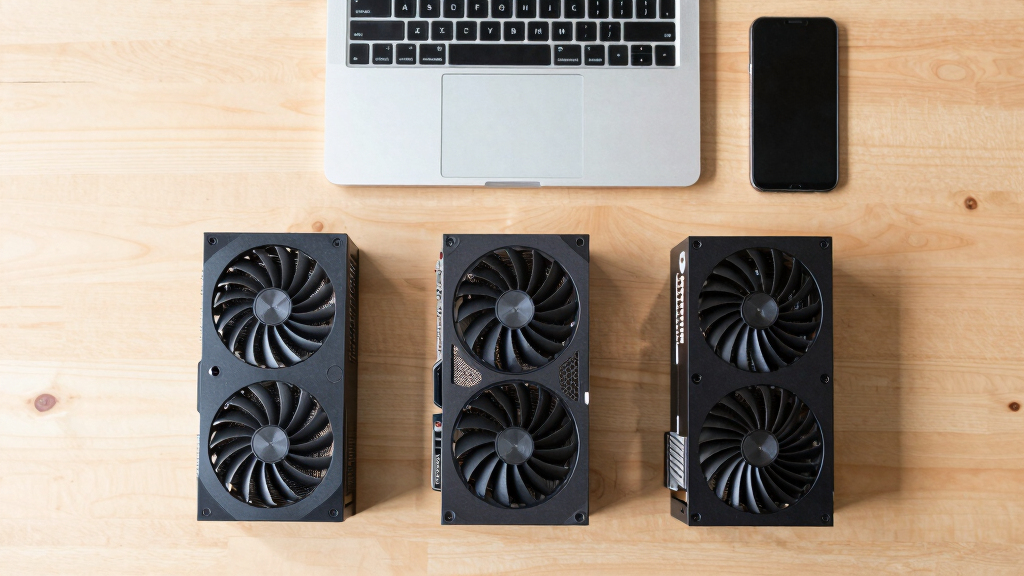

The best budget graphics cards range from simple display adapters to capable gaming GPUs, so the right pick depends on your PC and the games you play. I rank the Gigabyte GeForce RTX 4060 WINDFORCE OC 8G first for its modern features and efficient performance, while the EVGA GeForce RTX 3060 XC stands out for its 12GB of memory and the RX 580 8GB models for buyers seeking older, lower-cost gaming hardware. The main tradeoffs are gaming speed versus power use, newer features versus memory capacity, and full-size performance versus small-PC fit. The GT 730 and RX 550 serve light-duty systems, not demanding modern games. Read on for the full breakdown and a guide to matching a card to your system.

Get the latest gadgets delivered free with Prime
- Fast, free delivery on millions of items
- Prime Video, Amazon Music and more included
- Member-only deals all year
Complete the kit



Key Takeaways
- The RTX 4060 is the strongest all-round pick here: it pairs current-generation features with lower power demands than the older gaming cards, though its 8GB memory may limit some demanding workloads.
- The RTX 3060 offers the largest memory pool at 12GB, which can help with games and creative applications that use more video memory, but it is an older, less efficient option than the RTX 4060.
- The RX 580 cards are the budget gaming alternatives, but the two listings share the same GPU class; compare seller, cooling, ports, and warranty rather than assuming different branding means a performance gap.
- The GTX 1660 SUPER and GTX 1050 Ti sit between entry-level display cards and newer gaming GPUs: the former is more capable for gaming, while the latter can suit modest systems if expectations stay low.
- The GT 730 and RX 550 are for light workloads, such as extra displays or basic older games; neither should be treated as a sensible upgrade for modern high-settings gaming.
| Glorto GeForce GT 730 4GB Low-Profile Graphics Card |  | Best for Multi-Monitor Office PCs | GPU: NVIDIA GeForce GT 730 | Memory: 4GB DDR3 | Memory bus: 64-bit | VIEW ON AMAZON | See Our Full Breakdown |
| maxsun AMD Radeon RX 550 4GB GDDR5 ITX Graphics Card |  | Best Compact Gaming Pick | Chipset: AMD Radeon RX 550 | Memory: 4GB GDDR5 | Memory speed: 6000 MHz | VIEW ON AMAZON | See Our Full Breakdown |
| maxsun AMD Radeon RX 580 8GB 2048SP Graphics Card |  | Best for 8GB Budget Gaming | GPU: AMD Radeon RX 580 2048SP | Memory: 8GB GDDR5 | Memory interface: 256-bit | VIEW ON AMAZON | See Our Full Breakdown |
| EVGA GeForce GTX 1660 SUPER SC Ultra Gaming Graphics Card, 6GB GDDR6, Dual Fan, Metal Backplate |  | Best for 1080p Gaming | GPU: NVIDIA GeForce GTX 1660 SUPER | Memory: 6GB GDDR6 | Real boost clock: 1830 MHz | VIEW ON AMAZON | See Our Full Breakdown |
| Gigabyte GeForce RTX 4060 WINDFORCE OC 8G Graphics Card |  | Best Premium Budget Pick | GPU: NVIDIA GeForce RTX 4060 | Architecture: NVIDIA Ada Lovelace | Memory: 8GB GDDR6 | VIEW ON AMAZON | See Our Full Breakdown |
| ZER-LON GeForce GTX 1050 Ti 4GB GDDR5 Graphics Card |  | Best for Older PCs Without a Power Connector | GPU: NVIDIA GeForce GTX 1050 Ti | Memory: 4GB GDDR5 | GPU clock speed: 1752 MHz | VIEW ON AMAZON | See Our Full Breakdown |
| Kelinx AISURIX RX 580 8GB GDDR5 Graphics Card (2 HDMI / 1 DP) |  | Best for 1080p Gaming on an Older System | GPU: AMD RX 580 | Memory: 8GB GDDR5 | Stream processors: 2048 | VIEW ON AMAZON | See Our Full Breakdown |
| Glorto GeForce GT 730 4GB GDDR5 Low Profile Graphics Card |  | Best Compact Card for Display Output | GPU: NVIDIA GeForce GT 730 | Memory: 4GB GDDR5 | GPU clock speed: 902 MHz | VIEW ON AMAZON | See Our Full Breakdown |
| EVGA GeForce RTX 3060 XC Gaming 12GB GDDR6 Dual-Fan Metal Backplate |  | Best Premium Pick for a Budget-Minded Roundup | GPU: NVIDIA GeForce RTX 3060 | Memory: 12GB GDDR6 | Boost clock: 1882 MHz | VIEW ON AMAZON | See Our Full Breakdown |
| budget graphics card | Memory | GPU | Video outputs | Interface |
|---|---|---|---|---|
| Glorto GeForce GT 730 4GB Low- | 4GB DDR3 | NVIDIA GeForce GT 730 | 2x HDMI, DisplayPort, VGA | PCI Express 2.0 x8 |
| maxsun AMD Radeon RX 550 4GB G | 4GB GDDR5 | — | DVI, DisplayPort, HDMI | PCI Express x16 3.0 |
| maxsun AMD Radeon RX 580 8GB 2 | 8GB GDDR5 | AMD Radeon RX 580 2048SP | DVI, HDMI, DisplayPort | PCI Express x16 |
| EVGA GeForce GTX 1660 SUPER SC | 6GB GDDR6 | NVIDIA GeForce GTX 1660 SUPER | DVI, DisplayPort, HDMI | PCI-Express x16 |
| Gigabyte GeForce RTX 4060 WIND | 8GB GDDR6 | NVIDIA GeForce RTX 4060 | DisplayPort, HDMI | — |
| ZER-LON GeForce GTX 1050 Ti 4G | 4GB GDDR5 | NVIDIA GeForce GTX 1050 Ti | DVI, DisplayPort, HDMI | PCI Express x16, PCIe 3.0 |
| Kelinx AISURIX RX 580 8GB GDDR | 8GB GDDR5 | AMD RX 580 | 2 × DisplayPort, 1 × HDMI | PCI Express x16 3.0 |
| Glorto GeForce GT 730 4GB GDDR | 4GB GDDR5 | NVIDIA GeForce GT 730 | HDMI, DVI, VGA | PCI Express 2.0 x8 |
| EVGA GeForce RTX 3060 XC Gamin | 12GB GDDR6 | NVIDIA GeForce RTX 3060 | — | PCI Express x16 |
More Details on Our Top Picks
Glorto GeForce GT 730 4GB Low-Profile Graphics Card
The Glorto GT 730 is the lineup’s display-focused choice, not a card for demanding games. Its four-screen output and mix of HDMI, DisplayPort, and VGA make it useful for office desktops, signage, or an HTPC that needs to connect to varied displays. The included low-profile bracket helps it fit some small cases, while the standard bracket offers another installation option. Compared with the maxsun RX 550, though, its older DDR3 memory and PCIe 2.0 interface make it the weaker fit for gaming or graphics-heavy work. It also does not support micro form factor PCs, so case compatibility needs checking before purchase. I’d choose it for extra display connections and basic desktop duties, not as a gaming upgrade.
Pros:- Supports up to four-screen output
- Includes HDMI, DisplayPort, and VGA connections
- Comes with standard and low-profile brackets
- Lists Windows 11 compatibility
Cons:- Older DDR3 memory and a 64-bit bus limit its appeal for gaming
- Not compatible with micro form factor PCs
Best for: Office PC and HTPC owners who need to connect several monitors or older VGA displays and have a compatible low-profile or standard case.
Not ideal for: PC gamers, graphics-heavy users, and owners of micro form factor PCs; its older DDR3-based hardware is better suited to display output than demanding workloads.
- GPU:NVIDIA GeForce GT 730
- Memory:4GB DDR3
- Memory bus:64-bit
- Core frequency:902 MHz
- Video outputs:2x HDMI, DisplayPort, VGA
- Maximum resolution:2560 x 1600
- Interface:PCI Express 2.0 x8
- Dimensions:6.03 x 4.73 inches
- Compatibility:Windows 11, PC, HTPC, SFF; not compatible with micro form factor PCs
Our verdict“Choose the Glorto GT 730 for multi-monitor desktop use in a compatible case, but pick the maxsun RX 550 for a more gaming-capable budget option.”
maxsun AMD Radeon RX 550 4GB GDDR5 ITX Graphics Card
The maxsun RX 550 is a more balanced choice for a small build than the display-first Glorto GT 730. Its 4GB of GDDR5 memory and PCIe 3.0 x16 connection give it a better starting point for light gaming, while the compact ITX design suits space-conscious systems. The card also handles 4K video decoding and offers DVI, DisplayPort, and HDMI, so it can serve as both a modest gaming upgrade and a media-PC card. That versatility comes with limits: 4GB can constrain newer games, and the single 9 cm fan has less cooling capacity than the dual-fan cards higher in this roundup. I’d pick it for an older or compact PC where size matters more than high-detail gaming performance.
Pros:- Compact ITX form factor
- 4GB of GDDR5 memory
- DVI, DisplayPort, and HDMI outputs
- Supports 4K video decoding
Cons:- 4GB memory can limit demanding modern games
- Single-fan cooling offers less cooling capacity than dual-fan options
Best for: Small-form-factor PC owners who want a compact card for light gaming, everyday graphics, and 4K video decoding.
Not ideal for: Players targeting demanding modern games at high settings or buyers who want the stronger gaming headroom of the RX 580 or GTX 1660 SUPER.
- Chipset:AMD Radeon RX 550
- Memory:4GB GDDR5
- Memory speed:6000 MHz
- GPU boost clock:Up to 1183 MHz
- Stream processors:512
- Interface:PCI Express x16 3.0
- Video outputs:DVI, DisplayPort, HDMI
- Cooling:Single 9 cm fan
- Dimensions:7.28 x 4.44 inches
Our verdict“Choose the RX 550 for a compact PC that needs light gaming and media playback, not for high-detail modern gaming.”
maxsun AMD Radeon RX 580 8GB 2048SP Graphics Card
For buyers who want more memory headroom without moving to the newer RTX cards, the maxsun RX 580 offers 8GB of GDDR5 on a 256-bit interface. That gives it a more suitable basis for budget gaming than the RX 550, whose 4GB capacity is a tighter limit in demanding titles. Its two fans and heat sink also make it a more substantial gaming option than either low-profile GT 730. The tradeoff is age: this Polaris 20 design is an older platform, and the listed 2048SP version should not be mistaken for every RX 580 configuration. It also lacks the newer DLSS 3 feature set available on the Gigabyte RTX 4060. I’d favor it for buyers prioritizing memory capacity and conventional gaming over newer features.
Pros:- 8GB of GDDR5 memory
- 256-bit memory interface
- Two fans and a heat sink
- DVI, HDMI, and DisplayPort outputs
Cons:- Uses the older Polaris 20 architecture
- The 2048SP configuration is a specific RX 580 variant, not a guarantee of performance matching every RX 580
Best for: Budget-minded PC gamers who want 8GB of graphics memory and a dual-fan card for conventional gaming workloads.
Not ideal for: Buyers seeking newer features such as DLSS 3, or those who prefer a newer GPU architecture like the Gigabyte RTX 4060.
- GPU:AMD Radeon RX 580 2048SP
- Memory:8GB GDDR5
- Memory interface:256-bit
- Memory clock speed:6000 MHz
- Interface:PCI Express x16
- Video outputs:DVI, HDMI, DisplayPort
- Maximum resolution:7680 x 4320
- Cooling:2 fans and heat sink
- Dimensions:7.48 x 4.37 inches
Our verdict“Pick the maxsun RX 580 for an older budget gaming PC where 8GB of memory matters more than newer GPU features.”
EVGA GeForce GTX 1660 SUPER SC Ultra Gaming Graphics Card, 6GB GDDR6, Dual Fan, Metal Backplate
The EVGA GTX 1660 SUPER is the lineup’s straightforward step up for buyers focused on gaming rather than display duties. Its 6GB of GDDR6 and 1830 MHz real boost clock put it ahead of the RX 550 and GT 730 as a gaming-oriented choice, while the dual-fan cooler is designed for lower acoustic noise than a single-fan design. The metal backplate adds a more finished, supported construction. Compared with the Gigabyte RTX 4060, this card does without newer RTX 40-series features such as DLSS 3, so it is less attractive for buyers who want those tools. Its 6GB capacity can also be restrictive in some demanding games. I’d choose it for a practical gaming build that values a dedicated dual-fan design over the newest features.
Pros:- 6GB of GDDR6 memory
- Dual-fan cooling designed for low acoustic noise
- Metal backplate
- DVI, DisplayPort, and HDMI outputs
Cons:- 6GB of VRAM may limit demanding games
- Lacks the newer feature set offered by the RTX 4060
Best for: PC gamers seeking a dedicated graphics card for a budget gaming build who prefer dual-fan cooling and GDDR6 memory.
Not ideal for: Buyers who need 8GB or more of VRAM, want DLSS 3, or are choosing between it and the newer Gigabyte RTX 4060 for modern features.
- GPU:NVIDIA GeForce GTX 1660 SUPER
- Memory:6GB GDDR6
- Real boost clock:1830 MHz
- Memory clock speed:14000 MHz
- Video outputs:DVI, DisplayPort, HDMI
- Interface:PCI-Express x16
- Cooling:Dual fans
- Maximum resolution:7680 x 4320
- Dimensions:7.96 x 1.54 inches
Our verdict“Choose the GTX 1660 SUPER for a dual-fan, GDDR6 gaming card, but favor the RTX 4060 if newer features are a priority.”
Gigabyte GeForce RTX 4060 WINDFORCE OC 8G Graphics Card
The Gigabyte RTX 4060 sits at the feature-rich end of this budget-focused lineup. Its Ada Lovelace GPU supports DLSS 3, giving compatible games an upscaling and frame-generation option that the RX 580 and GTX 1660 SUPER do not offer. The 8GB of GDDR6 and dual-fan WINDFORCE cooler make it a more current choice than the older cards, and Dual BIOS offers a choice of performance or quieter operation. Compared with the EVGA GTX 1660 SUPER, it brings newer-generation features, but that does not remove every compromise: the 128-bit memory interface and 8GB capacity may constrain high-resolution play with demanding settings. It is also the most feature-forward choice here, so buyers seeking only basic display output should look to the less capable cards instead.
Pros:- Supports DLSS 3
- 8GB of GDDR6 memory
- Dual-fan WINDFORCE cooling and Dual BIOS
- Protective metal backplate and RGB Fusion lighting
Cons:- 128-bit memory interface may limit performance in high-resolution gaming
- 8GB of VRAM may be restrictive for future AAA games at ultra settings
Best for: PC gamers who want a newer-generation GPU, DLSS 3 support, and dual-fan cooling in a compact graphics card.
Not ideal for: Buyers focused on basic display output or those seeking ample VRAM and a wider memory interface for demanding high-resolution gaming.
- GPU:NVIDIA GeForce RTX 4060
- Architecture:NVIDIA Ada Lovelace
- Memory:8GB GDDR6
- Memory interface:128-bit
- GPU clock speed:1830 MHz
- Cooling:2x WINDFORCE fans
- Video outputs:DisplayPort, HDMI
- Maximum resolution:7680 x 4320
- Dimensions:7.56 x 4.72 inches
Our verdict“Choose the RTX 4060 if you want DLSS 3 and newer-generation features, but not if your priority is basic display output or more VRAM headroom.”
ZER-LON GeForce GTX 1050 Ti 4GB GDDR5 Graphics Card
The GTX 1050 Ti’s main advantage is its modest power demand: it draws about 75W and needs no external power connector, making it easier to add to older systems than the Kelinx AISURIX RX 580, which requires an 8-pin plug and can draw up to 185W. Its 4GB of GDDR5 and familiar mix of DisplayPort, HDMI, and DVI suit basic gaming, multi-display setups, and a graphics upgrade where the power supply is a constraint. The dual-fan cooler and aluminum heatsink provide active cooling, though the card is not a substitute for newer, faster picks such as the EVGA RTX 3060. I’d choose it for a compatible PC that needs a straightforward, low-power upgrade, not for demanding modern games. A 300W minimum power supply is still recommended, and an appropriate driver must already be available for the system.
Pros:- Does not require an external power connector
- About 75W maximum power draw
- DisplayPort, HDMI, and DVI support a range of monitors
- Dual-fan cooling with an aluminum heatsink
Cons:- 4GB of memory and older GPU hardware limit demanding gaming
- A 300W minimum power supply is recommended
- Requires a compatible driver
Best for: Owners of older desktop PCs with a compatible PCIe slot who need a low-power card and lack an available GPU power connector.
Not ideal for: Gamers seeking strong performance in demanding current games, or builders expecting a power-supply-free upgrade without checking the recommended 300W minimum.
- GPU:NVIDIA GeForce GTX 1050 Ti
- Memory:4GB GDDR5
- GPU clock speed:1752 MHz
- CUDA cores:768
- Interface:PCI Express x16, PCIe 3.0
- Video outputs:DVI, DisplayPort, HDMI
- Power draw:About 75W at full load
- External power connector:Not required
Our verdict“Choose the ZER-LON GTX 1050 Ti for a low-power upgrade to an older compatible PC, but skip it if modern-game performance is your priority.”
Kelinx AISURIX RX 580 8GB GDDR5 Graphics Card (2 HDMI / 1 DP)
The Kelinx AISURIX RX 580 is the gaming-focused choice here for buyers who want 8GB of GDDR5 memory and a mainstream GPU without stepping up to the EVGA RTX 3060. Its 2048 stream processors and 256-bit bus give it more room for games than the ZER-LON GTX 1050 Ti’s 4GB card, while its dual HDMI and DisplayPort outputs make multi-monitor connections convenient. The fan-stop feature keeps the fans still under low load, but heavy gaming can make them audible. Power is the bigger caveat: this card draws up to 185W and needs a single 8-pin connector, so it is a poor match for a basic office PC or a weak power supply. I’d shortlist it for a gaming build with the right PSU, not a compact or low-power system.
Pros:- 8GB of GDDR5 memory and a 256-bit bus
- Two DisplayPort outputs and one HDMI output
- Fan-stop operation at low load
- Dual-slot design with PCIe 3.0 x16 interface
Cons:- Maximum power draw of 185W requires an 8-pin power connector
- Fans may become audible during heavy gaming
- Older Polaris architecture is less suited to demanding newer games than the EVGA RTX 3060
Best for: Budget-minded PC gamers with a suitable power supply and an available 8-pin connector who want 8GB of memory and multiple display outputs.
Not ideal for: Small-form-factor builders and owners of low-wattage or connector-limited power supplies, since the card can draw 185W and requires an 8-pin plug.
- GPU:AMD RX 580
- Memory:8GB GDDR5
- Stream processors:2048
- Bus width:256-bit
- Interface:PCI Express x16 3.0
- Video outputs:2 × DisplayPort, 1 × HDMI
- Maximum power draw:185W
- Power connector:1 × 8-pin
Our verdict“Pick the RX 580 for a more gaming-oriented budget build with a capable PSU, and avoid it if low power use or quiet heavy-load operation matters most.”
Glorto GeForce GT 730 4GB GDDR5 Low Profile Graphics Card
The Glorto GT 730 earns its place for a job the faster cards in this roundup are not built around: adding graphics outputs to a small-form-factor PC or home theater system. Its half-height bracket and HDMI, DVI, and VGA ports can suit older displays and compact cases, while the ZER-LON GTX 1050 Ti is a stronger choice when gaming performance matters more. The listed 4GB of GDDR5 may sound generous, but the 64-bit memory bus and PCIe 2.0 x8 interface are reminders that this is an entry-level card, not a gaming upgrade for demanding titles. It supports up to three screens and is listed as compatible with Windows 11, but its single fan and modest core make it better for everyday display tasks than sustained graphics workloads. Check case clearance before buying.
Pros:- Half-height, low-profile form factor for compact PCs
- HDMI, DVI, and VGA outputs accommodate varied displays
- Supports triple-screen NVIDIA Surround
- Listed as compatible with Windows 11
Cons:- Modest gaming performance from the 902 MHz core and 64-bit bus
- PCIe 2.0 x8 interface is older and narrower than the PCIe 3.0 x16 cards here
- Single-fan cooling is less suited to sustained heavy workloads
Best for: Small-form-factor and HTPC owners who need a half-height card for basic display duties, legacy VGA connectivity, or multiple monitors.
Not ideal for: PC gamers who want meaningful performance in demanding titles; the GT 730’s 64-bit bus and PCIe 2.0 x8 interface make it a poor fit for that use.
- GPU:NVIDIA GeForce GT 730
- Memory:4GB GDDR5
- GPU clock speed:902 MHz
- Memory bus:64-bit
- Interface:PCI Express 2.0 x8
- Video outputs:HDMI, DVI, VGA
- Form factor:Low profile, half height
- Dimensions:6.03 in L × 4.73 in W
Our verdict“Choose the Glorto GT 730 for compact builds that need display connectivity, not for a budget gaming system.”
EVGA GeForce RTX 3060 XC Gaming 12GB GDDR6 Dual-Fan Metal Backplate
The EVGA RTX 3060 is the most capable option in this batch, with 12GB of GDDR6 memory, ray-tracing support, and a listed boost clock of 1882 MHz. It is a much larger performance step than the older GTX 1050 Ti or RX 580, and its extra memory gives games more room for detailed assets. That capability makes it the premium pick rather than the value-first choice in a budget-card roundup: buyers with basic display needs can spend less performance headroom by choosing the Glorto GT 730, while this card makes sense for gaming ambitions that justify the stronger GPU. The dual fans and metal backplate add cooling and structural support, but the provided specifications omit video-output details and power requirements. I’d confirm both case fit and PSU compatibility before choosing it.
Pros:- 12GB of GDDR6 memory
- Supports real-time ray tracing
- Dual-fan cooling
- All-metal backplate adds rigidity and protection
Cons:- A premium-performance choice rather than a basic, low-power upgrade
- Video-output details are not provided
- Power requirements are not listed in the supplied specifications
Best for: Gamers who want a more capable card for demanding games and ray tracing, and whose system can accommodate its size and power needs.
Not ideal for: Buyers focused on basic display output or an older low-power system; the listed information does not specify power requirements or video ports, so compatibility needs checking.
- GPU:NVIDIA GeForce RTX 3060
- Memory:12GB GDDR6
- Boost clock:1882 MHz
- Memory clock speed:15000 MHz
- Interface:PCI Express x16
- Cooling:2 fans
- Maximum resolution:7680 × 4320
- Dimensions:8.39 in L × 4.93 in W
Our verdict“Choose the EVGA RTX 3060 if you want the strongest gaming and ray-tracing capability in this batch, after confirming power and display compatibility.”

How We Picked
I ranked these cards by how well they serve a realistic budget-PC goal: useful graphics performance without creating avoidable demands on power, space, or system compatibility. Gaming capability and generation mattered most, followed by memory capacity, expected power needs, and whether a card has a clear role such as small-form-factor use or basic display output. I also separated cards meant for modern gaming from low-end options best suited to office, media, or older systems.
The order reflects those differences rather than treating every card as an equivalent bargain. The RTX 4060 leads for its newer feature set and efficiency, while the RTX 3060 and GTX 1660 SUPER offer alternatives with different performance and memory tradeoffs. The RX 580 models remain lower-cost gaming candidates but have older hardware and more uncertainty between listings. GT 730 variants rank for specialized low-demand uses, not gaming value; the two listings are similar enough that fit, ports, and seller support should decide between them.
| budget graphics card | Interface |
|---|---|
| Glorto GeForce GT 730 4GB Low- | PCI Express 2.0 x8 |
| maxsun AMD Radeon RX 550 4GB G | PCI Express x16 3.0 |
| maxsun AMD Radeon RX 580 8GB 2 | PCI Express x16 |
| EVGA GeForce GTX 1660 SUPER SC | PCI-Express x16 |
| Gigabyte GeForce RTX 4060 WIND | — |
| ZER-LON GeForce GTX 1050 Ti 4G | PCI Express x16, PCIe 3.0 |
| Kelinx AISURIX RX 580 8GB GDDR | PCI Express x16 3.0 |
| Glorto GeForce GT 730 4GB GDDR | PCI Express 2.0 x8 |
| EVGA GeForce RTX 3060 XC Gamin | PCI Express x16 |
Factors to Consider When Choosing 9 Best Budget Graphics Cards
Before choosing a card, I would match it to the job and the rest of the PC rather than focusing on the GPU name alone. These picks span very different levels of gaming ability, physical size, power demand, and age.
Start With the Workload, Not the GPU Name
A card that handles desktop displays is not automatically a gaming upgrade. The GT 730 is aimed at basic graphics tasks, while the RX 550 can handle lighter games; neither belongs in the same performance expectation as the RTX 4060 or RTX 3060. Check the requirements of the games or applications you actually use, including their recommended GPU class. Buyers who mostly browse, stream, or run office software may gain little from paying for a gaming card. Conversely, buying the cheapest model and expecting modern games to run smoothly can lead to a costly second upgrade.
Check Power Supply and Connectors Before Ordering
Graphics cards draw power from the PCIe slot, auxiliary power connectors, or both, and the PC’s power supply must support the card’s needs. Compare the manufacturer’s recommended system power and connector requirements with the exact power supply already installed. Older office PCs may lack the required cable even when the card physically fits. Avoid relying on questionable adapters as a substitute for a suitable power supply. A newer, efficient card can be a better fit for a modest system than an older GPU with higher power demands, but the specific system still needs verification.
Measure the Case and Check Slot Space
Card length, height, width, and cooler thickness all affect fit, especially in small-form-factor cases. Low-profile models can solve a clearance problem, but buyers should check whether the correct low-profile bracket is included and whether the case has room for the card’s cooling needs. Also count available expansion slots: a wide cooler can cover a neighboring slot or block another card. Measure the space from the rear bracket to nearby drives or case fans rather than relying on the GPU name. Compactness is useful only when airflow remains adequate.
Treat Video Memory as One Part of Performance
More video memory can help with high-resolution textures, large projects, and some creative workloads, but it does not make a slow GPU fast. The RTX 3060’s 12GB may suit memory-heavy tasks better than the 8GB RTX 4060, while the newer card can still deliver stronger efficiency and features. Look at the GPU generation, memory type, and workload alongside capacity. For 1080p gaming with modest settings, a balanced card may matter more than the largest memory number. Do not pay for extra capacity unless your games or applications can make use of it.
Compare Older and Third-Party Listings Carefully
Older models such as the RX 580, GTX 1660 SUPER, and GTX 1050 Ti can be attractive for upgrading an existing PC, but listing details deserve close attention. Confirm the exact GPU, memory configuration, display outputs, included accessories, warranty terms, and return policy. Two RX 580 listings may share a GPU class while differing in cooler, ports, or seller support. Ask whether the card is new, refurbished, or previously used if the listing does not make that clear. For aging hardware, dependable support and a clear return path can matter as much as a small performance difference.
Decide Whether Newer Features Are Worth the Tradeoff
Newer cards can bring more recent encoding, upscaling, and rendering features, which may extend usefulness beyond raw frame rates. Those features are most valuable when your games and software support them and your display settings suit the card. Older options can still make sense for a spare PC or a low-cost upgrade, but they may lack newer capabilities and can use more power. Think about how long you plan to keep the card and whether you stream, edit video, or use GPU-accelerated software. Paying more for a newer generation makes sense when those benefits match your routine, not simply because the model number is newer.
Frequently Asked Questions
Which of these cards makes the most sense for a new 1080p gaming PC?
I would start with the RTX 4060 if the rest of the PC can support it and you want a modern feature set with comparatively modest power needs. The RTX 3060 is an alternative if its 12GB of memory better matches your games or creative workload. The GTX 1660 SUPER and RX 580 can suit less demanding games, but their older hardware gives them less headroom for newer releases. Check game requirements and your power supply before choosing between them.
Can I use a GT 730 or RX 550 for modern games?
They can run some games, but they are better viewed as entry-level display cards than modern gaming upgrades. The GT 730 is most appropriate for basic desktop use, video playback, or older and undemanding titles. The RX 550 has more room for light gaming, but expectations should remain modest, especially with newer releases. If gaming is the main purpose, I would move up to the GTX 1660 SUPER, RX 580, or a newer RTX option, subject to system compatibility.
Is the RTX 3060’s 12GB of memory a better choice than the RTX 4060’s newer design?
It depends on whether your workload benefits more from extra memory or newer GPU features and efficiency. The RTX 3060’s 12GB can help with memory-heavy games and creative tasks, while the RTX 4060 is the more recent option and is generally a better fit for buyers prioritizing modern features and lower power demands. Memory capacity alone does not predict frame rates. Check the software you use and its memory requirements before treating the 12GB figure as decisive.
Will one of these cards work in an older office PC?
Possibly, but confirm the case clearance, power supply, PCIe slot, and required power connectors first. The GT 730 and RX 550 are the most plausible starting points for a low-power or compact system, though specific card dimensions and brackets still matter. A gaming card may need more power and space than an older office PC provides. Check the exact model listing and your computer’s documentation, and do not assume that physical slot compatibility alone means the system is suitable.
How should I choose between the two RX 580 listings?
Treat them as similar GPU-class options and compare the details of the individual listings rather than expecting a major performance difference from the brand name. Check the cooler design, card dimensions, display outputs, warranty, return policy, and whether the product is new or previously used. The Kelinx listing specifies multiple HDMI outputs and a DisplayPort connection, which may suit a particular monitor setup. The maxsun listing may be preferable if its exact build and seller terms fit your needs better; confirm those details before ordering.
Conclusion
For most buyers building or upgrading a budget gaming PC, I recommend the Gigabyte RTX 4060 as the best overall choice for its newer features and efficiency. The RX 580 8GB is my value-oriented gaming pick when an older GPU suits the system and the listing has clear condition and support details; the RTX 3060 is the best premium option here for buyers who value its 12GB memory. Beginners choosing a simple card for display output should look at the GT 730, while light gaming calls for the RX 550 rather than the GT 730. For compact or older PCs, prioritize low-profile fit, power needs, and available ports over gaming benchmarks; the GTX 1050 Ti and GT 730 listings may suit those specific constraints. Match the card to your workload and verify your PC’s fit and power support before deciding.
Halloween Picks
halloween
As an affiliate, we earn on qualifying purchases.