The Philips Smart Lighting Gradient Light Bars take the top spot among the best RGB smart light bars because they combine TV and music sync, polished WiZ app control, and even, color-blended output in one package. If budget is the deciding factor, the Eastfine RGB IC Light Bar 2-Pack delivers app control and music sync at a fraction of the cost, while the Nurmina Nova Light Bars Pro is the pick for smart-home enthusiasts who want Matter compatibility. The main tradeoff in this category is brightness and color blending versus price: cheap bars glow fine in a dark room but wash out during the day, and premium models add real smart-home integration that budget bars skip entirely. Another dividing line is power and placement — USB-powered desk bars suit monitors, while wall-washer style bars like the Yotivki 180W can light an entire wall. Keep reading for the full breakdown of all 15 options and who each one suits best.

Get the latest gadgets delivered free — and shop member deals
- Fast, free delivery on millions of items
- Access to Prime Big Deal Days deals on October 6–7
- Prime Video, Amazon Music and more included
Complete the kit



Key Takeaways
- RGBIC and RGBICW models (Philips Gradient, Govee Glide, DAYBETTER, Nurmina Nova) display multiple simultaneous colors per bar instead of one color at a time — the single biggest visual upgrade in this lineup, and worth paying for over basic RGB.
- Govee appears five times with meaningfully different products; its Gaming Light Bars Pro and 15-inch TV backlight are stronger choices than its older H6047, which now looks dated next to the Glide.
- USB-powered budget bars (Eastfine, NBBUFF, the generic 213-mode bar) are fine for monitor-sized setups but lack Wi-Fi, meaning no voice assistant control — only the pricier Wi-Fi models work with Alexa out of the box.
- The Yotivki 180W wall washer is the outlier: far brighter than every desk bar here and IP66-rated for outdoor use, but overkill and too bulky for a typical gaming desk.
- Matter compatibility remains rare at this price point — the Nurmina Nova Pro is the only option here that fits cleanly into an Apple Home or multi-ecosystem setup, which justifies its premium positioning.
| Yotivki 180W RGBCW Wall Washer Light Bar |  | Best for Outdoor Uplighting | Wattage: 180W (36W per color) | Brightness: 3,600 lumens per color | Light Color: RGB + 2700K–6500K tunable white | VIEW LATEST PRICE | See Our Full Breakdown |
| Philips Smart Lighting Gradient Light Bars (2-Pack) |  | Best Smart Home Integration | Technology: RGBIC LED | Light Bars: 2 | Wattage: 8.4 watts | VIEW LATEST PRICE | See Our Full Breakdown |
| Govee Glide Wall Lights (2-Panel Set) |  | Best Effects Library | Model: H610A | Panels: 2 panels, 3 light sections each | Colors: 16 million (24 simultaneous via RGBIC) | VIEW LATEST PRICE | See Our Full Breakdown |
| Eastfine RGB IC LED Light Bar (2 Pack) |  | Best Budget Starter Pair | Light Source: 18 LEDs per bar | Power Source: USB, 5V DC | Wattage: 5 watts | VIEW LATEST PRICE | See Our Full Breakdown |
| 16.5″ Smart RGB LED Light Bar for TV and Gaming Room | 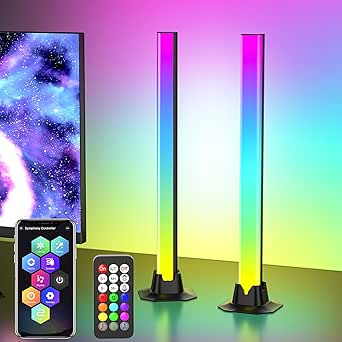 | Best Single-Bar Simplicity | Length: 16.5 inches | Light Source: 36 LEDs | Power Source: USB, 12 volts | VIEW LATEST PRICE | See Our Full Breakdown |
| RGB Smart LED Light Bar with Alexa, Music Sync, APP & Remote Control (2 Pack) |  | Best for Voice Control on a Budget | Brand: Eastfine | Power Source: USB Powered (adapter not included) | Wattage: 2 watts | VIEW LATEST PRICE | See Our Full Breakdown |
| DAYBETTER Smart LED Light Bar, RGBICW TV Light Bars for Gaming and Room Decor, Black |  | Best for Flexible Placement | Technology: RGBW+IC | Light Source: 60 LEDs | Wattage: 5 watts / 5 volts | VIEW LATEST PRICE | See Our Full Breakdown |
| RGB Smart LED Light Bar with Music Sync, 213 Modes, USB Powered |  | Best for Mode Variety | Power Source: DC USB, 5V (adapter not included) | Wattage: 5 watts | Light Source: 48 LEDs | VIEW LATEST PRICE | See Our Full Breakdown |
| NBBUFF IC+RGBW USB Powered Led Light Bar with App & Remote Control, 2 Pack |  | Best for TV-Powered Convenience | Power Source: USB (TV, PC, power bank compatible) | Cord Length: 60 inches | Technology: RGB+IC with independent white channel | VIEW LATEST PRICE | See Our Full Breakdown |
| Govee Smart Light Bar, RGBICWW TV Lights for Living Room, Gaming, Silver |  | Best Premium Smart-Home Pick | Technology: RGBICWW | Smart Home: Matter, Alexa, Google Home | Connectivity: Wi-Fi via Govee Home app | VIEW LATEST PRICE | See Our Full Breakdown |
| Smart RGB-IC Gaming Light Bars with Iron Plate Base, 2-Pack |  | Best Budget Starter Pick | Technology: RGB-IC | Quantity: 2-Pack | Base: Iron plate | VIEW LATEST PRICE | See Our Full Breakdown |
| Govee RGBIC Gaming Light Bars H6047 with Smart Controller |  | Best for the Gaming Ecosystem | Model: H6047 | Technology: RGBIC | Colors: 16.8 million | VIEW LATEST PRICE | See Our Full Breakdown |
| Nurmina Nova Light Bars Pro – Smart RGBWIC Ambient Gaming Lights, Matter Compatible |  | Best for Apple Home Users | Light Source: LED (RGBWIC) | Brightness: 800 lumens | Wattage: 15 watts | VIEW LATEST PRICE | See Our Full Breakdown |
| Govee Smart RGBWIC Light Bars, 15-Inch WiFi TV Backlight for 45-70-Inch TVs |  | Best for Living Room TV Ambience | Light Source: LED (RGBWIC) | Compatible TV Sizes: 45-70 inches | Power Source: Corded Electric (12V) | VIEW LATEST PRICE | See Our Full Breakdown |
| Govee Gaming Light Bars Pro, 16-Inch Smart RGBIC Wi-Fi LED Game Lights | 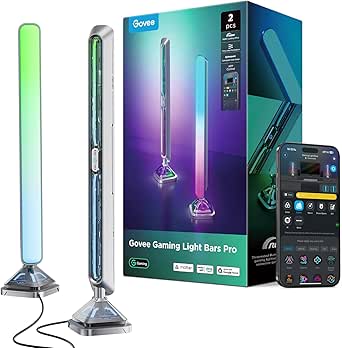 | Best Premium Pick for Screen Sync | Bar Length: 16 inches | Technology: RGBIC (16 million colors) | Connectivity: Wi-Fi | VIEW LATEST PRICE | See Our Full Breakdown |
| RGB smart light bar | Connectivity | Wattage | Power Source |
|---|---|---|---|
| Yotivki 180W RGBCW Wall Washer | Wi-Fi, 2.4G RF remote, voice control | 180W (36W per color) | — |
| Philips Smart Lighting Gradien | — | 8.4 watts | — |
| Govee Glide Wall Lights | Bluetooth, Wi-Fi | — | — |
| Eastfine RGB IC LED Light Bar | — | 5 watts | USB, 5V DC |
| 16.5" Smart RGB LED Light Bar | — | 5 watts | USB, 12 volts |
| RGB Smart LED Light Bar with A | Bluetooth, Wi-Fi, USB | 2 watts | USB Powered (adapter not included) |
| DAYBETTER Smart LED Light Bar | Bluetooth | 5 watts / 5 volts | — |
| RGB Smart LED Light Bar with M | Bluetooth, USB | 5 watts | DC USB, 5V (adapter not included) |
| NBBUFF IC+RGBW USB Powered Led | — | — | USB (TV, PC, power bank compatible) |
| Govee Smart Light Bar | Wi-Fi via Govee Home app | — | — |
| Smart RGB-IC Gaming Light Bars | Bluetooth app control | — | USB |
| Govee RGBIC Gaming Light Bars | Wi-Fi, Bluetooth | — | — |
| Nurmina Nova Light Bars Pro | Matter | 15 watts | Corded Electric |
| Govee Smart RGBWIC Light Bars | — | 10 watts | Corded Electric (12V) |
| Govee Gaming Light Bars Pro | Wi-Fi | — | — |
More Details on Our Top Picks
Yotivki 180W RGBCW Wall Washer Light Bar
Most light bars in this roundup are desk accessories — this one is a floodlight disguised as a smart bar. At 180W with 3,600 lumens per color and an IP66 die-cast aluminum housing, the Yotivki can wash an entire exterior wall in saturated color year-round, something no USB-powered option like the Eastfine 2-Pack could dream of doing. The tunable 2700K–6500K white range also means it doubles as practical architectural lighting, not just decoration. The tradeoff is scale: this is a corded 120V fixture nearly 40 inches long, so it belongs on walls and entryways rather than behind a monitor. Wi-Fi dependence outdoors can also be finicky depending on router placement, though the RF remote provides a fallback.
Pros:- Massive 3,600-lumen output per color for large walls and outdoor spaces
- IP66 waterproof aluminum build survives rain, snow, and temperature swings
- Three control paths: Wi-Fi app, RF remote, and voice
- Plug-and-play AC setup with no hardwiring or electrician needed
Cons:- Fixture is sealed and non-repairable if a component fails
- Full smart features depend on outdoor Wi-Fi coverage, which many yards lack
Best for: Homeowners who want bold, weatherproof color uplighting on exterior walls, patios, or event backdrops
Not ideal for: Desk and gaming setups — its size, AC power cord, and raw output are overkill for a monitor or TV
- Wattage:180W (36W per color)
- Brightness:3,600 lumens per color
- Light Color:RGB + 2700K–6500K tunable white
- Water Resistance:IP66
- Connectivity:Wi-Fi, 2.4G RF remote, voice control
- Cord Length:6.56 feet
- Mounting:Wall, ceiling, or floor with adjustable brackets
- Voltage:120V AC
Our verdict“Buy this if you’re lighting architecture outdoors; skip it for anything smaller than a wall.”
Philips Smart Lighting Gradient Light Bars (2-Pack)
Where most bars here live inside their own app ecosystems, the Philips Gradient bars speak Matter natively, which makes them the safest long-term pick for a multi-brand smart home — Alexa, Google Home, and Apple Home all work out of the box. Compared with the Govee Glide Wall Lights, Philips offers comparable RGBIC gradient effects in a more polished, furniture-friendly design that stands horizontally, vertically, or mounts behind a TV. The catch: at 8.4 watts total, output is modest, and two headline features cost extra or don’t exist — TV screen syncing requires separately sold hardware, and there’s no compatibility with Philips Hue, which will frustrate buyers assuming ecosystem family ties. This is the refinement-and-reliability pick, not the raw-effect pick.
Pros:- Native Matter support across all major ecosystems
- RGBIC gradient technology shows multiple colors at once
- Flexible placement: tabletop, vertical, or TV/monitor mounted
- Backed by a 2-year warranty from an established brand
Cons:- TV content syncing requires additional hardware sold separately
- Not compatible with Philips Hue products
- Low 8.4W total output limits room-filling brightness
Best for: Smart home enthusiasts running Matter, Alexa, Google Home, or Apple Home who want bars that integrate cleanly
Not ideal for: Philips Hue owners expecting ecosystem compatibility, and anyone wanting true on-screen TV sync without buying extra hardware
- Technology:RGBIC LED
- Light Bars:2
- Wattage:8.4 watts
- Dimensions (per bar):11.81″D x 1.81″W x 1.81″H
- Compatibility:Alexa, Google Home, Apple Home, Matter
- Control:WiZ app, voice control
- Mounting:Tabletop, horizontal, or bracket-mounted
- Warranty:2 years
Our verdict“The right choice if smart home reliability and cross-platform support matter more than maximum brightness.”
Govee Glide Wall Lights (2-Panel Set)
Govee’s real advantage is software: 64+ scene modes, 11 music sync styles, AI-generated effects, and RGBIC that pushes 24 simultaneous colors from 16 million total. Against the 16.5″ Smart RGB LED Light Bar‘s 213 preset modes, Govee’s library feels more alive and constantly updated through its app, and its Alexa and Google Assistant support is more deeply integrated than most budget rivals. The catch is commitment: these panels mount with velcro and adhesive, so your wall placement is semi-permanent, the bars are rigid with no bend, and everything must be connected before power-up. If you like rearranging your setup, a freestanding pair like the Eastfine bars will suit you better — this set rewards people who design a wall once and let the effects do the changing.
Pros:- 24 simultaneous RGBIC colors for complex gradient effects
- 64+ scene modes, 11 music sync modes, and AI-generated effects
- Works with Alexa, Google Assistant, and SmartThings
- Straightforward adhesive and velcro mounting
Cons:- Rigid panels can’t be flexed or repositioned freely
- All bars must be connected before plugging in power
- Adhesive needs about an hour to set firmly
Best for: Gamers and streamers who want the deepest library of animated, music-reactive effects on a dedicated wall space
Not ideal for: Renters or frequent re-arrangers — adhesive wall mounting is semi-permanent and the rigid bars can’t be reshaped
- Model:H610A
- Panels:2 panels, 3 light sections each
- Colors:16 million (24 simultaneous via RGBIC)
- Scene Modes:64+
- Music Modes:11
- Connectivity:Bluetooth, Wi-Fi
- Compatibility:Alexa, Google Assistant, SmartThings
- Mounting:Velcro and adhesive
Our verdict“Pick these for the richest animated effects in the lineup, provided your wall placement is settled.”
Eastfine RGB IC LED Light Bar (2 Pack)
These bars do the fundamentals well without asking much: 16 million colors, music sync with three rhythm modes, and three control paths (app, remote, button) at a price point well below the Philips Gradient bars. USB power makes them genuinely plug-and-play — stick them behind a monitor or TV, plug into any USB port, and you’re done, no hub, no Wi-Fi setup, no adhesive wall commitment like the Govee Glide. The compromises are honest ones: 5 watts and 18 LEDs per bar produce accent lighting, not room lighting, and the plastic build lacks the heft of premium options. For a first dip into ambient lighting, or a kid’s desk upgrade, those tradeoffs are easy to accept.
Pros:- Plug-and-play USB power with no hub or Wi-Fi setup
- Three control options: app, remote, and physical button
- Music sync with selectable rhythm modes
- 24-month manufacturer warranty
Cons:- Plastic construction feels lightweight and less durable
- Corded USB power tethers placement to a nearby port
- Modest 5W output limits brightness to accent-level lighting
Best for: First-time buyers and students who want simple USB-powered ambient lighting for a monitor or desk
Not ideal for: Anyone wanting room-filling brightness or premium build quality — these are accent lights with plastic housings
- Light Source:18 LEDs per bar
- Power Source:USB, 5V DC
- Wattage:5 watts
- Beam Angle:270 degrees
- Quantity:2 bars
- Dimensions:1.18″ x 1.18″ x 12.59″ per bar
- Special Features:Dimmable, color changing, music sync, app control
- Warranty:24 months
Our verdict“A low-risk entry point into RGB ambient lighting that covers the basics without premium polish.”
16.5″ Smart RGB LED Light Bar for TV and Gaming Room
One long bar instead of a pair — that’s the whole pitch, and it works. The 16.5-inch footprint spreads ambient light wider than the shorter Eastfine bars, while 213 preset dynamic modes and 8 scene modes give it more canned variety than most single fixtures. Music sync here runs through a sound sensor rather than a phone microphone, so it reacts to room audio directly rather than requiring the app to stay open — a small design choice that matters for movie nights. A memory function that recalls your last mode on power-up is another thoughtful touch. It’s still USB-powered and plastic-built, so it shares the placement and premium-feel limitations of the Eastfine pair, but for someone who wants one set-and-forget bar, it’s the cleaner option.
Pros:- Wide 16.5-inch single bar covers more area per fixture
- Sound-sensor music sync works without the app running
- 213 preset modes plus 8 scene modes offer lots of variety
- Remembers the last mode when powered back on
Cons:- USB-only power restricts placement to ports or adapters
- Plastic construction may feel less premium
- No smart assistant voice control — app, remote, and buttons only
Best for: TV and console gamers who want one wide, set-and-forget ambient bar without managing a multi-piece kit
Not ideal for: Buyers who want symmetric dual-bar lighting behind a monitor or wall-mounted effects — this is a single fixture
- Length:16.5 inches
- Light Source:36 LEDs
- Power Source:USB, 12 volts
- Wattage:5 watts
- Modes:213 preset dynamic modes, 8 scene modes
- Control Methods:App, remote control, USB cable buttons
- Mounting:Table mount
- Weight:0.45 kg
Our verdict“The easiest way to add wide ambient color behind a TV if you’d rather buy one bar than a kit.”
RGB Smart LED Light Bar with Alexa, Music Sync, APP & Remote Control (2 Pack)
Most budget light bars stop at Bluetooth app control, but this Eastfine two-pack adds genuine Alexa and Google Assistant voice control, which puts it a step above the DAYBETTER bar that relies only on remote, touch, and app. Voice commands mean you can change colors or kill the lights mid-game without reaching for anything. The 16 million colors and three music-sync rhythm modes cover the party basics, and having a spare bar for a second room sweetens the deal. The tradeoff is power: at 2 watts with no adapter included, these run dimmer than dedicated corded options like the Govee bar, so they read as accent glow rather than room lighting. Buyers will also need a spare USB port or charger on hand from day one.
Pros:- Works with Alexa and Google Assistant for hands-free voice control
- Three control methods: app, remote, and physical button
- Music sync with three selectable rhythm modes
- Two bars included, enough to flank a TV or light two desks
Cons:- Power adapter not included — USB powered only
- Low 2-watt output limits brightness compared with corded rivals
Best for: Budget shoppers who want true hands-free voice control across two rooms or setups
Not ideal for: Anyone wanting bright ambient fill for a large room — 2 watts per bar is strictly accent-level output
- Brand:Eastfine
- Power Source:USB Powered (adapter not included)
- Wattage:2 watts
- Light Source:36 LEDs per bar
- Connectivity:Bluetooth, Wi-Fi, USB
- Voice Assistants:Alexa, Google Assistant
- Mounting:Tabletop
- Warranty:12 months
Our verdict“This two-pack makes the most sense for buyers who want voice control and music sync without paying premium-brand prices.”
DAYBETTER Smart LED Light Bar, RGBICW TV Light Bars for Gaming and Room Decor, Black
Where the Eastfine two-pack is tabletop-only, the DAYBETTER bar earns its spot through placement freedom: lay it flat, stand it vertical, or tuck it behind a screen — no brackets required. The RGBW+IC technology means each of the 60 LEDs can show independent colors while still offering a true white channel, something the NBBUFF bars also do but with fewer light sources. Music sync works through a built-in microphone, so there’s no hub to configure. The honest limitation: at 110 lumens, this is mood lighting, not illumination — fine behind an 85-inch TV, underwhelming in a spacious living room. And unlike the Philips gradient bars, it can’t sync to actual on-screen content, only ambient sound.
Pros:- RGBW+IC chip with 60 independently controllable LEDs plus true white
- Multiple mounting positions with no brackets needed
- Long 8.2-foot cable gives real flexibility behind TVs
- Three control options: app, remote, and touch control box
Cons:- Only 110 lumens — too dim for large rooms
- Sound sync only, no direct TV content matching
- Not waterproof, so indoor use exclusively
Best for: TV and monitor owners who want bar lighting behind screens without drilling or brackets
Not ideal for: Large bright rooms or buyers chasing true screen-sync effects — it only reacts to sound
- Technology:RGBW+IC
- Light Source:60 LEDs
- Wattage:5 watts / 5 volts
- Brightness:110 lumens
- Connectivity:Bluetooth
- Bar Length:14 inches
- Cable Length:8.2 feet (2.5m)
- Weight:12.32 ounces
Our verdict“A strong pick for tucking lighting behind screens where install flexibility matters more than raw brightness.”
RGB Smart LED Light Bar with Music Sync, 213 Modes, USB Powered
While most bars in this roundup offer a handful of presets, this one goes long with 213 preset lighting modes, making it the pick for tinkerers who cycle through effects constantly rather than settling on one favorite scene. The built-in microphone syncs to music, movies, and game audio like the DAYBETTER, but the build quality stands apart: an alloy and plastic construction with anti-skid, counterweighted bases keeps the bars planted on a desk or shelf, and they can even hang vertically. Compared with the Eastfine two-pack, you give up voice assistant support entirely — control is limited to app, remote, and the on-unit box. As with most USB bars here, the missing power adapter means budgeting for a charger.
Pros:- 213 preset modes plus DIY colors and scene creation
- Durable alloy build with weighted anti-skid bases
- Supports both tabletop and hanging orientations
- Runs cool, safe around kids and pets
Cons:- No voice assistant support
- Power adapter not included
Best for: Effect hobbyists and gamers who want huge mode variety and stable desk placement
Not ideal for: Smart-home builders — no Alexa or Google Assistant integration at all
- Power Source:DC USB, 5V (adapter not included)
- Wattage:5 watts
- Light Source:48 LEDs
- Lighting Modes:213 presets
- Control Methods:App, Remote, Control Box
- Connectivity:Bluetooth, USB
- Height:13 inches
- Mounting:Tabletop & Hanging
Our verdict“The right choice if you’d rather have hundreds of lighting effects than smart-home connectivity.”
NBBUFF IC+RGBW USB Powered Led Light Bar with App & Remote Control, 2 Pack
The cleverest trick here is power management: plug these bars into your TV’s or PC’s USB port and they switch on and off in sync with the screen itself — no schedule needed, no forgetting to kill the lights at night. That’s a genuine convenience the 213-mode bar can’t match. The RGB+IC plus independent white channel design means the bars double as task lighting when you need a bright white work mode, then flip to 16-million-color chasing effects for gaming. With 64+ patterns, dimming from 1% to full, timers, and the LotusLamp X app, the feature set is broad. The compromises are the 60-inch cord, which limits placement behind larger wall-mounted TVs, and no voice assistant support — the Eastfine two-pack wins there.
Pros:- Powers on/off automatically when plugged into a TV or PC USB port
- Switchable RGB+IC color modes and dedicated bright white work mode
- 64+ patterns with 1%-100% dimming and scheduled timing
- Three control paths: app, 24-button remote, and inline button
Cons:- 60-inch cord restricts placement options
- No Alexa or Google Assistant voice control
Best for: TV and PC users who want lights that power on automatically with their screen
Not ideal for: Wall-mounted TV owners — the short 60-inch cord may not reach a USB source
- Power Source:USB (TV, PC, power bank compatible)
- Cord Length:60 inches
- Technology:RGB+IC with independent white channel
- Lighting Patterns:64+ patterns
- App:LotusLamp X
- Control Methods:App, 24-button remote, inline button
- Quantity:2 bars
Our verdict“Ideal for anyone who wants their TV backlight to behave like part of the TV rather than another gadget to manage.”
Govee Smart Light Bar, RGBICWW TV Lights for Living Room, Gaming, Silver
This is the most future-proofed option in the batch. Matter support means it plays cleanly with Alexa, Google Home, and Apple ecosystems without a hub — none of the other four picks here offer that level of interoperability. The RGBICWW technology adds tunable warm-to-cool white alongside segmented RGB color, and Govee’s app ecosystem brings 60+ scenes, room grouping with other Govee lights, and an AI lighting bot that builds custom effects from a text prompt. Compared with the NBBUFF bars, the polish is obvious; compared with the Philips gradient bars, you trade true on-screen sync for deeper customization tools. The catch: it’s tuned for monitors under 45 inches, so large-TV buyers should look at Govee’s 15-inch backlight instead, and the feature depth can feel like overkill if you just want a color glow.
Pros:- Matter support for cross-platform smart-home integration
- RGBICWW with both tunable white and segmented RGB color
- AI-generated lighting effects via the Govee Home app
- Includes brackets and a generous 106-inch cord
Cons:- Recommended only for screens under 45 inches
- Advanced app features carry a learning curve for casual users
Best for: Smart-home enthusiasts with Matter hubs who want deep customization on a desk setup
Not ideal for: Owners of TVs over 45 inches — this bar is sized and specced for monitor-scale setups
- Technology:RGBICWW
- Smart Home:Matter, Alexa, Google Home
- Connectivity:Wi-Fi via Govee Home app
- Scene Modes:60+ plus DIY and AI effects
- Music Sync:Built-in microphone
- Cord Length:106 inches
- Placement:Flat, vertical, or bracket-mounted
- Recommended Screen Size:Monitors under 45 inches
Our verdict“The premium pick for connected-home builders who want their light bar to integrate with everything they already own.”
Smart RGB-IC Gaming Light Bars with Iron Plate Base, 2-Pack
For anyone who wants to dip a toe into ambient RGB lighting without committing to a full smart home setup, this 2-pack is the simplest entry point in the lineup. The iron plate base keeps the bars steady behind a monitor, and USB power means no outlet hunting — just plug into your PC or a wall adapter and go. Compared with the Govee H6047, the feature set is far leaner: Bluetooth app control only, no Wi-Fi, no voice assistants, and no ecosystem integrations. That said, the built-in mic for music sync covers the effect most buyers actually want. The tradeoff is total dependence on the app — there’s no physical controller like Govee’s desktop dial, so every adjustment means pulling out your phone.
Pros:- USB-powered setup works from a PC or monitor port with no extra adapters
- Built-in mic handles music sync without extra hardware
- DIY app modes allow custom colors and brightness tuning
- Compact footprint with a weighted iron base that stays put behind monitors
Cons:- No physical buttons or remote — every change requires the phone app
- No voice assistant or smart home compatibility of any kind
Best for: First-time buyers or students who want cheap, USB-powered ambient lighting for a dorm desk or small gaming corner
Not ideal for: Smart home users who want Alexa, Google, or Matter control — this is Bluetooth app only with no voice integration
- Technology:RGB-IC
- Quantity:2-Pack
- Base:Iron plate
- Connectivity:Bluetooth app control
- Power Source:USB
- Music Sync:Built-in high-sensitivity microphone
Our verdict“A no-frills, app-and-USB starter kit that makes sense only if you want basic music-synced glow at the lowest complexity.”
Govee RGBIC Gaming Light Bars H6047 with Smart Controller
This model earns its spot for ecosystem depth. RGBIC lets each bar show multiple colors at once, and the audio reactivity syncs with headphones — not just speakers — which most budget bars like the Smart RGB-IC 2-Pack can’t manage. The standout hardware feature is the desktop dial controller: power, brightness, and mode changes happen with a twist instead of a phone unlock, something the app-only Nurmina Nova Pro can’t match. Add Razer Chroma compatibility, Alexa, and Google Assistant, and this becomes the pick for PC gamers whose peripherals already talk to each other. The catch is software sprawl — you’ll juggle Govee Home, Govee Desktop, and Razer Synapse 3 for full functionality, and there’s no camera-based screen color picking at this tier.
Pros:- Headphone audio sync captures game sound even when playing quietly
- Physical desktop dial avoids constant app fiddling
- Razer Chroma, Alexa, and Google Assistant integrations in one package
- RGBIC displays multiple simultaneous colors per bar for richer scenes
Cons:- Full feature set requires three separate apps (Govee Home, Govee Desktop, Razer Synapse 3)
- No screen color-picking capability despite the gaming focus
Best for: PC gamers with Razer peripherals who want lighting that reacts to in-game audio and integrates with their existing setup
Not ideal for: Buyers who want screen-matched bias lighting — there’s no camera or color-picking function here
- Model:H6047
- Technology:RGBIC
- Colors:16.8 million
- Scene Modes:60+
- Connectivity:Wi-Fi, Bluetooth
- Compatibility:Razer Synapse 3, Alexa, Google Assistant
- Controller:Smart Desktop Dial Controller
Our verdict“The best pick for gamers already invested in Razer Chroma who want dial-controlled, audio-reactive lighting without paying premium prices.”
Nurmina Nova Light Bars Pro – Smart RGBWIC Ambient Gaming Lights, Matter Compatible
Among these five, the Nova Pro is the only option with full Matter certification covering Apple Home, which makes it the clear choice for iPhone-centric households — the Govee bars lean on their own app first, with Matter as a bolt-on. Segment-level RGBWIC customization produces clean whites alongside saturated color, and at 800 lumens these are among the brightest bars in this batch. Control flexibility is unusually good: app, remote, or touch. Compared with the Govee H6047, you lose Razer Chroma and the desktop dial, but you gain true cross-platform smart home support without hubs. Two honest drawbacks: the IP20 housing has no real water resistance despite marketing language, and the corded design plus 16-inch height means placement planning matters.
Pros:- Matter support works natively with Apple Home, Alexa, and Google Home with no hub
- Segment-level RGBWIC control delivers both vivid color and true white tones
- Three control methods: app, remote, and touch
- 800-lumen output is brighter than most desk light bars in this range
Cons:- IP20 rating means zero meaningful water resistance despite waterproof claims
- Corded electric power restricts where the bars can sit
Best for: Apple Home users and multi-assistant households who want hub-free Matter lighting that also works with Alexa and Google
Not ideal for: Console or living-room gamers hoping to place bars anywhere — the corded power and fixed height limit flexible setups
- Light Source:LED (RGBWIC)
- Brightness:800 lumens
- Wattage:15 watts
- Height:16 inches
- Base Diameter:3 inches
- Connectivity:Matter
- Control Methods:App, Remote, Touch
- Power Source:Corded Electric
Our verdict“The pick for smart-home-first buyers, especially Apple Home users, who want Matter lighting that plays nicely across every assistant.”
Govee Smart RGBWIC Light Bars, 15-Inch WiFi TV Backlight for 45-70-Inch TVs
This is the only bar in the batch purpose-built for the TV wall rather than the desk. The RGBWIC upgrade with extra LEDs per bar gives smoother gradients and noticeably purer whites than standard RGB kits — closer to the Nurmina Nova Pro’s output than to Govee’s cheaper H6047. Placement flexibility is the real selling point: wall-mount behind the TV, free-stand, or lay them horizontal, which no desk-focused competitor here offers. Matter support and UL listing make it a safe, voice-controllable addition to a shared living space. The tradeoff versus the Govee Gaming Light Bars Pro is screen sync: this model has no color-matching function at all, so movies get mood lighting, not on-screen color matching. Corded 12V power also constrains wall placement near outlets.
Pros:- Wall-mount, free-standing, and horizontal placement options fit any TV setup
- RGBWIC with extra LEDs delivers smoother gradients and cleaner whites than standard RGB
- Matter support for Alexa, Google Home, and SmartThings without a hub
- UL Listed certification adds peace of mind for living room installation
Cons:- No screen color-matching function, so it can’t mirror TV content
- Corded 12V power limits where bars can be wall-mounted
Best for: Homeowners with a 45-70-inch TV who want hub-free, voice-controlled bias lighting for movie nights
Not ideal for: Cinema fans who want lighting that matches on-screen colors — this model has no screen sync
- Light Source:LED (RGBWIC)
- Compatible TV Sizes:45-70 inches
- Power Source:Corded Electric (12V)
- Wattage:10 watts
- Number of Light Sources:30
- Mounting:Wall Mount, Free-Standing, Horizontal
- Compatibility:Alexa, Google Assistant, SmartThings, Matter
- Certification:UL Listed
Our verdict“The right choice for a living room TV setup where flexible mounting and voice control matter more than screen sync.”
Govee Gaming Light Bars Pro, 16-Inch Smart RGBIC Wi-Fi LED Game Lights
If real-time screen-synced lighting is the goal, this is the only option in this batch that delivers it. Through Govee DreamView and the Govee Desktop app, the bars mirror your Windows display live — a capability the Govee TV Backlight (B0B14V95FJ) and the H6047 both lack. The triple-sided illumination with transparent mecha plates creates a 3D glow effect that looks striking next to a monitor, and the weighted metal base feels more premium than the iron-plate budget 2-pack. AI Lighting Bot 2.0 generates custom effects from a voice command or photo, which is a genuinely fun differentiator. The tradeoffs: screen sync is Windows only, and the bars themselves have no built-in color matching, so Mac and console players are paying for hardware they can’t fully use.
Pros:- Real-time screen sync via Govee DreamView actually matches lighting to gameplay
- Triple-sided mecha-plate design produces a distinctive 3D lighting effect
- AI Lighting Bot 2.0 creates custom effects from voice, text, or photos
- Matter support with Alexa and Google voice control, no hub needed
Cons:- Screen color-matching requires Govee Desktop software, which is Windows only
- No built-in color-matching function on the bars themselves
- Premium positioning means cheaper options cover basic needs fine
Best for: Windows PC gamers who want true real-time screen-matched lighting and don’t mind paying extra for it
Not ideal for: Mac or console gamers — the flagship screen sync feature only works through Windows desktop software
- Bar Length:16 inches
- Technology:RGBIC (16 million colors)
- Connectivity:Wi-Fi
- Smart Home Protocol:Matter
- Voice Assistants:Alexa, Google Home
- Screen Sync:Govee DreamView via Govee Desktop (Windows only)
- Compatibility:Razer Chroma, Govee Desktop
- Music Sync:Built-in microphone
Our verdict“The pick for dedicated Windows gamers who want lighting that reacts to what’s on screen — everyone else can save money lower in this list.”
How We Picked
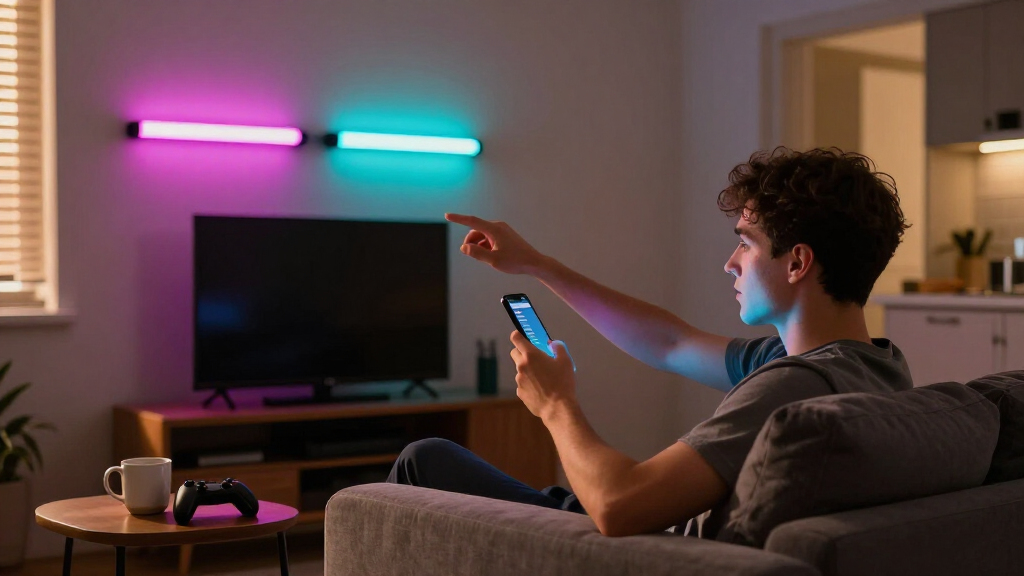
I ranked these light bars around four buyer-relevant criteria. Color capability came first: RGBIC and RGBICW bars that render multiple colors on a single bar at once scored above basic RGB bars, because the visual difference is obvious the moment you turn them on. Smart features came second — Wi-Fi connectivity, voice assistant support, music and screen sync, and app quality separated true smart bars from remote-controlled LED tubes dressed up with an app. Brightness and coverage mattered too: a bar that looks great behind a monitor may be invisible behind a 65-inch TV, so I matched each product to the room size it can actually handle.
The final factors were build quality and value: whether the base, mounting hardware, and power adapter feel built to last, and whether the price premium over cheaper rivals buys real capability rather than marketing. Products are ordered so the top picks balance all four criteria, mid-tier entries excel in one or two while making acceptable compromises, and the bottom entries are ranked by how narrow their use case or how dated their feature set is compared with newer rivals in the same list.
Factors to Consider When Choosing Best RGB Smart Light Bars
Before picking a specific model, it helps to understand what actually separates a satisfying light bar purchase from a disappointing one. These are the factors that shaped the rankings above — and the mistakes I see buyers make most often.RGB vs. RGBIC vs. RGBICW: The Difference You Actually See
This is the spec most buyers misjudge. A basic RGB bar displays one color at a time across its entire length — fine for a static glow, but gradients and rainbow effects are impossible. RGBIC divides the bar into independently controlled segments, so it can show a smooth sunset gradient or animated rainbow on a single tube. RGBICW adds a dedicated white LED, which produces cleaner whites for everyday ambient lighting instead of the bluish tint you get from mixing RGB. If a bar will be your main room lighting and not just a gaming accent, that dedicated white channel matters more than people expect. The common mistake is comparing brightness specs while ignoring this entirely — a brighter basic RGB bar still looks flat next to a dimmer RGBIC one.
Connectivity: Bluetooth-Only Bars Aren’t Fully Smart
Many budget bars advertise app control, but the fine print reveals Bluetooth-only connectivity. That means you must be within range with the app open, there’s no voice assistant integration, and features like scheduled on/off often don’t work reliably. Wi-Fi models enable Alexa and Google Assistant control, remote access, and screen sync via a camera or HDMI box. If you already use voice commands for lights elsewhere in your home, a Bluetooth-only bar will feel like a step backward no matter how good its colors are. And if you run Apple Home or a mixed smart-home setup, look for Matter support — it’s still rare in this category, which makes the few compatible models disproportionately valuable to smart-home owners.
Power Source and Placement
USB-powered bars are convenient — they plug into your TV, monitor, or a wall adapter — but they draw limited power, capping brightness and usually meaning no Wi-Fi, since Wi-Fi radios need more power than a USB port reliably supplies. Mains-powered bars are brighter, support full smart features, and suit TV backlighting and whole-room ambience, at the cost of needing an outlet and sometimes a visible power brick. Before buying, check where your nearest outlet is and how the cable will run; a beautiful bar with a dangling cord across your wall is a setup you’ll resent. Also check the base: some bars are desk-only, while others include wall mounts — assuming a bar can be wall-mounted when it can’t is a frequent return reason.
Screen Sync: What the Marketing Leaves Out
TV and gaming sync is the headline feature on several of these bars, but implementation varies widely. Camera-based sync points a small camera at your screen and guesses colors — it works, but it can lag and struggles in bright rooms. HDMI passthrough boxes read the actual video signal and are far more accurate, but usually cost extra and aren’t included with most bars here. Music sync via microphone is the loosest of all — it reacts to any sound in the room, not just your music. If on-screen action sync is the reason you’re buying, verify which method the product uses before committing, because the difference between guessing and reading the signal is the difference between a party trick and a feature you use daily.
Brightness, Room Size, and Realistic Expectations
A 15-inch desk bar and a 180W wall washer serve completely different rooms, yet both get marketed as ‘ambient lighting.’ Desk-scale bars are designed to be seen directly — they’re the light source themselves, and their output is too weak to illuminate a wall. Wall washers and high-output bars are designed to light surfaces, bouncing color across a room. If you want your whole wall to glow behind an entertainment center, a two-pack of slim desk bars will disappoint you. Match the tool to the job: small bars for monitors and shelves, mid-size mains-powered bars for TVs up to about 70 inches, and wall-washer units for large walls or covered outdoor spaces where weatherproofing is needed.
When to Pay More — and When Not To
Stepping up in price buys three things: multi-zone color (RGBIC/RGBICW), Wi-Fi and voice control, and better app and firmware support. That last one is underrated — established brands update their apps for years, while generic bars often ship with buggy apps that never get fixed. What higher prices don’t always buy is more brightness per dollar; some premium bars are actually dimmer than utilitarian wall washers. If you’re lighting a gaming nook on a tight budget, a basic USB two-pack is genuinely fine, and spending more is optional. But if the bar is central to your room’s look and you plan to automate it, buying the cheapest option almost always means replacing it within a year — the false economy I’d steer most buyers away from.
Frequently Asked Questions
Do I need RGBIC, or is regular RGB good enough for gaming?
Regular RGB is genuinely fine if you just want a single static color or simple breathing effect behind your monitor — plenty of gamers never change the mode. But if you want rainbow waves, gradients, or effects that react differently across the bar’s length, RGBIC is the only way to get them, because basic RGB hardware physically cannot display more than one color at a time. The visual gap is most noticeable during music sync and screen sync, where multi-segment bars create a sense of motion that single-color bars can’t replicate. My rule of thumb: if the bar will be a background glow you rarely think about, save money with RGB. If it’s part of your setup’s look that you’ll show off, RGBIC is worth the premium every time.
Will a USB-powered light bar work with Alexa or Google Assistant?
Almost never, and this catches a lot of buyers off guard. USB-powered bars typically connect over Bluetooth only, which supports the manufacturer’s app and sometimes an included remote, but not voice assistants — voice control requires the bar to be on your Wi-Fi network. A few USB models get around this by using a phone or hub as a bridge, but that workaround is unreliable and drops out when your phone leaves the house. If voice control is part of your plan, choose a mains-powered Wi-Fi model. If you’re happy controlling everything from an app or remote at your desk, USB is perfectly adequate and keeps your outlet count down.
How many light bars do I actually need for a TV setup?
For TVs under about 45 inches, a two-bar set placed vertically at either side usually provides balanced ambience. For 55- to 70-inch screens, you’ll get better coverage from wider bars placed behind the panel horizontally, or a dedicated TV backlight strip designed for your screen size — which is exactly why some models in this lineup specify a TV size range. One bar alone almost always looks lopsided behind a TV, since the glow concentrates on one side. Also remember that the goal is light on the wall behind the screen, not the screen itself, so position bars 4 to 8 inches behind the panel and aim them outward rather than at your seating position.
Are these light bars bright enough to be my main room lighting?
Most of them are not, and that’s by design — they’re accent lights meant to supplement, not replace, a ceiling fixture. Slim desk bars and RGBIC gaming bars produce enough output to be seen and to tint a nearby wall, but they won’t illuminate a room for reading or chores. The exceptions in this category are high-output wall washers like the Yotivki 180W, which genuinely can wash an entire wall in color and serve as dimmable primary lighting for a lounge or covered patio. If replacing a main light is the goal, check for a dedicated white channel (RGBW or RGBICW) too, since mixed-RGB white is unpleasant for actual tasks.
Is Matter compatibility worth paying extra for right now?
It depends entirely on your smart home. If your devices are split across Apple Home, Alexa, and Google — or you want to avoid being locked into one brand’s ecosystem — Matter is the cleanest path, and the Nurmina Nova Pro stands out here for that reason. Matter also means the bar should keep working with future platforms without the manufacturer maintaining individual integrations, which addresses the abandoned-app problem that plagues budget smart lights. On the other hand, if you already live happily inside one ecosystem and use the manufacturer’s own app for effects and sync, Matter adds little day-to-day value, since fancy scene effects often still require the native app anyway. Smart-home tinkerers should pay the premium; casual buyers can safely skip it.
Conclusion
For most buyers, the Philips Smart Lighting Gradient Light Bars are the best overall choice — the color blending, TV and music sync, and reliable WiZ platform make them the most complete package in this lineup. If value is the priority, the Eastfine RGB IC 2-Pack covers the essentials — app control, music sync, multi-color effects — at a price that leaves room in the budget. At the premium end, the Nurmina Nova Light Bars Pro earn their cost through Matter compatibility and clean RGBWIC output, making them the pick for serious smart-home setups, while the Govee Gaming Light Bars Pro is the stronger premium choice for pure gaming aesthetics.
Beginners should start with the Govee Smart Light Bar (silver) or the DAYBETTER RGBICW bars — both are forgiving to set up and capable enough that you won’t outgrow them quickly. For specific needs: the Yotivki 180W wall washer is unmatched for large walls and covered outdoor spaces, the Govee 15-inch TV backlight is purpose-built for 45- to 70-inch screens, and the USB-powered options from NBBUFF and the generic 213-mode bar make sensible secondary accents for a second monitor or shelf. Whatever you choose, decide first whether multi-color RGBIC, voice control, or sheer brightness matters most — that single decision narrows this list of fifteen down to two or three in seconds.
Fall Picks
fall essentials
As an affiliate, we earn on qualifying purchases.