The best AI smart home devices make everyday routines easier, but the right choice depends on whether you need a home hub, a display, a camera, or simple voice control. I name the Amazon Echo Show 11 my best overall pick for combining a large touchscreen with Alexa features, while the Linkind Matter Smart Plug is a straightforward way to add control to existing appliances and the Tapo CentralHub H500 suits buyers building around connected devices. The main tradeoffs are ecosystem compatibility, screen and speaker needs, privacy, and how much setup a device demands. A camera or hub can address a specific need, but it may not add much if it does not work with the rest of your home. Read on for the full breakdown of all 14 picks and how I’d match them to different buyers.

Get the latest gadgets delivered free with Prime
- Fast, free delivery on millions of items
- Prime Video, Amazon Music and more included
- Member-only deals all year
Complete the kit



Key Takeaways
- The Echo Show 11 is the broadest all-around choice: its larger screen gives it more room for household information and interaction than the compact Echo Show 5 or Echo Spot.
- Matter support makes the Linkind plug a low-commitment starting point: it can add control to compatible appliances without requiring a display or replacing existing gear.
- Smart home hubs solve a different problem from smart speakers: the Tapo CentralHub H500 and SwitchBot hub are aimed at device coordination, so buyers should check compatibility before choosing either.
- The camera picks serve distinct placement and coverage needs: the Orbitell doorbell is for an entryway, while the GNCC models and 2K clock camera are indoor options with different coverage formats.
- Echo model overlap makes role more useful than model count: compare display size, alarm use, and sound needs before choosing between the Echo Dot, Dot Max variants, Echo Spot, and Echo Show models.
| Amazon Echo Show 11 Smart Display, 11-Inch Full HD Touchscreen, Spatial Audio, Graphite |  | Best Overall Smart Home Display | Display: 10.95-inch Full HD touchscreen, 1920 x 1200 | Smart home connectivity: Zigbee, Matter, Thread Border Router | Processor: AZ3 Pro with AI Accelerator | VIEW LATEST PRICE | See Our Full Breakdown |
| Orbitell 1080p Wireless Video Doorbell Camera |  | Best AI Doorbell for Person Alerts | Resolution: 1080p | Connectivity: 2.4GHz Wi-Fi only | Motion detection: AI person detection | VIEW LATEST PRICE | See Our Full Breakdown |
| 2K Indoor Clock Camera with WiFi, Night Vision, and Two-Way Audio |  | Best Discreet Indoor AI Camera | Resolution: 3 MP (2K) | Night vision: Color night vision with black light starlight lens | Wi-Fi: Dual-band 2.4GHz/5GHz Wi-Fi 6 | VIEW LATEST PRICE | See Our Full Breakdown |
| Amazon Echo Show 5 Smart Display, Cloud Blue |  | Best Compact Smart Display | Display: 5.5 inches | Camera: 2 MP | Smart assistant: Alexa | VIEW LATEST PRICE | See Our Full Breakdown |
| Amazon Echo Dot (5th Gen) Smart Speaker, Deep Sea Blue |  | Best Voice-First Smart Home Starter | Generation: 5th Gen | Speaker: 1.6-inch full-range driver; mono playback | Audio bandwidth: 62 Hz–19 kHz | VIEW LATEST PRICE | See Our Full Breakdown |
| Amazon Echo Dot Max Smart Speaker with Alexa, Graphite |  | Best All-in-One Alexa Hub | Dimensions: 4.27 x 4.27 x 3.9 in | Weight: 17.82 oz | Drivers: 0.8-inch tweeter and 2.5-inch woofer | VIEW LATEST PRICE | See Our Full Breakdown |
| Amazon Echo Spot Smart Alarm Clock with Alexa, Glacier White |  | Best for Bedside Routines | Dimensions: 4.5 x 4.1 x 4.4 in | Weight: 14.3 oz | Display: 2.83-inch touchscreen, 240 x 320 px | VIEW LATEST PRICE | See Our Full Breakdown |
| Linkind Matter Smart Plug, 4-Pack | 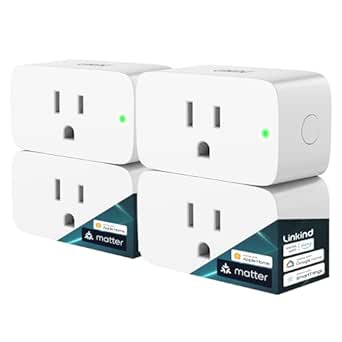 | Best Value for Cross-Platform Automations | Pack size: 4 plugs | Connectivity: Matter and 2.4 GHz Wi-Fi | Maximum amperage: 15 A | VIEW LATEST PRICE | See Our Full Breakdown |
| Tapo CentralHub H500 for Smart Devices |  | Best for Tapo Camera and Sensor Systems | Device compatibility: Up to 16 cameras and 64 sensors | Built-in storage: 16GB | Expandable storage: Up to 16TB via SATA HDD or SSD | VIEW LATEST PRICE | See Our Full Breakdown |
| SwitchBot AI Smart Home Hub with OpenClaw Support and 16GB MicroSD Card |  | Best for Local Automations and Home Assistant | Dimensions: 7.8 x 5.79 x 2.2 in | Weight: 1.17 lb | Included storage: 16GB microSD card | VIEW LATEST PRICE | See Our Full Breakdown |
| GNCC Cameras for Home Security 5Ghz WiFi Indoor Camera with 360° PTZ (4 Pack) |  | Best Multi-Room Camera Pack | Resolution: 2K Ultra HD | Wi-Fi: Dual-band 2.4 GHz and 5 GHz | Pan and tilt: 340° horizontal, 80° vertical | VIEW LATEST PRICE | See Our Full Breakdown |
| GNCC 2K Security Camera Indoor, 5G WiFi Cameras for Home Security, Phone App |  | Best Single-Camera Monitoring Pick | Resolution: 2K Ultra HD | Video frame rate: 10 fps | Wi-Fi bands: 2.4 GHz and 5 GHz | VIEW LATEST PRICE | See Our Full Breakdown |
| Amazon Echo Dot Max (newest model), Alexa speaker with room-filling sound and nearly 3x bass, Glacier White |  | Best Smart-Home Speaker Hub | Sound: Room-filling sound with nearly 3x bass | Smart-home features: Built-in smart home hub and device pairing | Sensing technology: Omnisense | VIEW LATEST PRICE | See Our Full Breakdown |
| Amazon Echo Show 15 (2nd Gen) 15.6-inch Full HD Smart Display |  | Best Family Smart-Home Command Center | Display: 15.6-inch Full HD, 1920 × 1080 | Dimensions: 16.1 × 10.1 × 1.4 inches | Weight: 4.96 lb | VIEW LATEST PRICE | See Our Full Breakdown |
| AI smart home device | Wi-Fi |
|---|---|
| Amazon Echo Show 11 Smart Disp | Wi-Fi 6E |
| Orbitell 1080p Wireless Video | — |
| 2K Indoor Clock Camera with Wi | Dual-band 2.4GHz/5GHz Wi-Fi 6 |
| Amazon Echo Show 5 Smart Displ | — |
| Amazon Echo Dot | Dual-band 802.11a/b/g/n/ac, 2.4 and 5 GHz |
| Amazon Echo Dot Max Smart Spea | Wi-Fi 6E |
| Amazon Echo Spot Smart Alarm C | Dual-band 802.11a/b/g/n/ac, 2.4 and 5 GHz |
| Linkind Matter Smart Plug | — |
| Tapo CentralHub H500 for Smart | — |
| SwitchBot AI Smart Home Hub wi | — |
| GNCC Cameras for Home Security | Dual-band 2.4 GHz and 5 GHz |
| GNCC 2K Security Camera Indoor | — |
| Amazon Echo Dot Max | — |
| Amazon Echo Show 15 | Wi-Fi 6E, tri-band, dual-antenna |
More Details on Our Top Picks
Amazon Echo Show 11 Smart Display, 11-Inch Full HD Touchscreen, Spatial Audio, Graphite
The Echo Show 11 is the most capable all-in-one control point in this group: its large Full HD touchscreen gives routines, cameras, lists, and video calls room to share the screen, while its built-in hub supports Zigbee, Matter, and Thread. Presence and temperature sensing can make routines respond to conditions at home instead of relying only on voice commands. Compared with the compact Echo Show 5, this model offers more space for managing devices and stronger listed audio hardware, but it takes up more room and weighs nearly three pounds. The 13 MP auto-framing camera is better suited to video calls than the Echo Show 5’s 2 MP camera. I’d choose it for a connected household that wants one central display, but skip it if you mainly need a small voice-control speaker.
Pros:- Built-in hub supports Zigbee, Matter, and Thread devices
- Large Full HD touchscreen gives controls and video content more usable space
- Presence and temperature sensors can trigger responsive routines
- 13 MP auto-framing camera supports video calls
Cons:- Large footprint and 45.92-ounce weight limit convenient placement
- Amazon Sidewalk is enabled by default unless it was previously turned off
- A screen-centered design is less suited to buyers who want a discreet speaker
Best for: Households with multiple Matter, Thread, or Zigbee devices that want a shared screen for controls, routines, calls, and everyday information.
Not ideal for: Buyers with limited counter space or those who only need basic voice commands and timers; the large display and heavier body are unnecessary for those needs.
- Display:10.95-inch Full HD touchscreen, 1920 x 1200
- Smart home connectivity:Zigbee, Matter, Thread Border Router
- Processor:AZ3 Pro with AI Accelerator
- Camera:13 MP with auto framing
- Audio:1 x 2.8-inch woofer and 2 full-range drivers
- Wi-Fi:Wi-Fi 6E
- Sensors:Ambient temperature, ambient light, presence detection, camera
- Dimensions and weight:10 x 5 x 7.2 inches; 45.92 oz
Our verdict“Choose the Echo Show 11 if you want a large, sensor-equipped Alexa hub to manage a broad smart home from one shared display.”
Orbitell 1080p Wireless Video Doorbell Camera
The Orbitell’s clearest AI benefit is at the front door: person detection is designed to filter out vehicles and animals, which can make motion alerts more useful than a camera that flags every movement. Its 1080p video, infrared night vision, and two-way audio cover the core needs for checking a visitor and responding remotely. Compared with the indoor 2K Indoor Clock Camera, the Orbitell is built for outdoor entry monitoring and carries an IP65 weather rating, but its video resolution is lower and its network support is narrower. It connects only to 2.4GHz Wi-Fi, so homes using only a 5GHz network need another solution. Pre-capture cloud recording also depends on a subscription, making this a better fit for buyers comfortable with cloud service terms than for those seeking subscription-free recording.
Pros:- AI person detection filters out vehicles and animals
- Two-way audio supports conversations with visitors from a phone
- Infrared night vision helps monitor the entry after dark
- IP65 weather resistance suits outdoor installation
Cons:- Works with 2.4GHz Wi-Fi only
- Pre-capture recording requires a cloud subscription
- 1080p resolution is lower than the 2K Indoor Clock Camera
Best for: Homeowners who want a wireless entry camera that prioritizes person alerts, visitor conversations, and weather-resistant outdoor placement.
Not ideal for: Households relying on 5GHz-only Wi-Fi or buyers who require pre-capture recordings without a cloud subscription.
- Resolution:1080p
- Connectivity:2.4GHz Wi-Fi only
- Motion detection:AI person detection
- Night vision:Infrared LEDs
- Audio:Two-way audio
- Cloud storage:AES-128 encrypted; pre-capture recording requires a subscription
- Weather resistance:IP65
- Dimensions and weight:1.77 x 1.34 x 5.4 inches; 6.08 ounces
Our verdict“Pick the Orbitell if person-focused door alerts and outdoor durability matter more than 5GHz support or subscription-free pre-capture storage.”
2K Indoor Clock Camera with WiFi, Night Vision, and Two-Way Audio
This camera is aimed at buyers who want monitoring without the conspicuous look of a standalone security camera: its clock-style display shows time, humidity, and temperature while housing a 2K camera. Color night vision, AI motion detection, and two-way audio add security functions, and dual-band Wi-Fi 6 gives it more network flexibility than the 2.4GHz-only Orbitell doorbell. That comparison has a tradeoff: the Orbitell is purpose-built for outdoor entry monitoring with an IP65 rating, while this model is for indoor spaces such as a nursery, office, or living area. Storage is another dividing line. A microSD card is not included, and cloud storage requires a subscription, so buyers should plan how they will save footage before choosing it. I’d favor it for discreet indoor coverage, not whole-home security.
Pros:- Clock design blends into indoor decor
- 2K video and color night vision provide detailed indoor monitoring
- Dual-band Wi-Fi 6 supports 2.4GHz and 5GHz networks
- AI motion detection and two-way audio support remote checks
Cons:- MicroSD card is not included and cloud storage requires a subscription
- Indoor-only design lacks the Orbitell doorbell’s outdoor weather rating
- Clock appearance may not suit buyers who prefer a clearly visible security camera
Best for: People who want a less conspicuous camera for a nursery, home office, or room where a visible clock and environmental readouts are useful.
Not ideal for: Buyers who need outdoor monitoring, included local storage, or cloud recording without an ongoing subscription.
- Resolution:3 MP (2K)
- Night vision:Color night vision with black light starlight lens
- Wi-Fi:Dual-band 2.4GHz/5GHz Wi-Fi 6
- Audio:Two-way audio
- Storage:MicroSD card (not included) or cloud (subscription required)
- Display:LED screen showing time, humidity, and temperature
- Compatibility:Works with Alexa
- Use:Indoor
Our verdict“Choose this clock camera for discreet 2K indoor monitoring, provided you are comfortable supplying storage or paying for cloud service.”
Amazon Echo Show 5 Smart Display, Cloud Blue
The Echo Show 5 brings Alexa controls and a screen into spaces where the larger Echo Show 11 would be cumbersome. Its 5.5-inch display can show news, weather, photos, and compatible camera feeds, while the built-in 2 MP camera handles video calls and home check-ins. Physical camera and microphone privacy controls make it a more reassuring bedside or desk companion for people who want a screen but also want a direct way to disable its sensors. The tradeoff is capability: unlike the Echo Show 11, the listed product details do not specify a built-in Zigbee, Matter, or Thread hub, and its small screen is less suited to shared household controls or extended video viewing. Some camera functions need compatible devices, and certain media or photo services may require Prime. I’d pick it for compact Alexa access, not as the home’s main control panel.
Pros:- Compact 5.5-inch screen fits desks and bedside tables
- Built-in camera supports video calls and home check-ins
- Physical camera shutter and microphone/camera off button offer direct privacy controls
- Controls compatible smart home devices through Alexa
Cons:- Small display is less useful for shared controls and longer video viewing than the Echo Show 11
- Some camera and smart home functions require compatible devices
- Prime membership may be needed for some video and cloud photo features
Best for: Apartment dwellers and bedside users who want a small Alexa screen for quick updates, calls, and compatible camera checks.
Not ideal for: Buyers who need a central display for managing many devices or want the Echo Show 11’s specified Zigbee, Matter, and Thread hub support.
- Display:5.5 inches
- Camera:2 MP
- Smart assistant:Alexa
- Privacy features:Microphone and camera off button; built-in camera shutter
- Color:Cloud Blue
- Recycled materials:Fabric yarn and aluminum made from 100% recycled materials
Our verdict“Choose the Echo Show 5 if you want a compact Alexa display with physical privacy controls, rather than a full-size smart home hub.”
Amazon Echo Dot (5th Gen) Smart Speaker, Deep Sea Blue
The Echo Dot is the simplest route into Alexa routines and voice control in this group: it handles timers, alarms, questions, music, and compatible smart home commands without asking you to give up counter space for a display. Its Matter compatibility helps it fit into supported smart home setups, while Bluetooth playback adds a way to use it beyond voice requests. Compared with the Echo Show 5, the Dot is smaller and skips the camera and screen, so it cannot show video feeds or visual information; in return, it suits rooms where hands-free audio is enough. It can also extend a compatible eero network, but that feature depends on having the right router and linked accounts. Its mono speaker is best treated as a compact everyday audio source, not a replacement for a larger speaker. I’d choose it for basic voice-led control.
Pros:- Voice control supports questions, timers, alarms, and compatible smart home routines
- Matter compatibility supports use with compatible smart home devices
- Bluetooth supports audio streaming from other devices
- Can extend a compatible eero network when paired with the required router and accounts
Cons:- No screen or camera for viewing updates and compatible camera feeds
- Mono 1.6-inch driver is less suited to buyers seeking fuller room-filling sound
- eero Built-in depends on a compatible eero router and linked accounts
Best for: First-time smart home buyers who want Alexa routines, Matter device control, and hands-free audio in a bedroom, kitchen, or office.
Not ideal for: People who need a screen for camera feeds or visual updates, or buyers expecting room-filling stereo sound without additional Echo devices.
- Generation:5th Gen
- Speaker:1.6-inch full-range driver; mono playback
- Audio bandwidth:62 Hz–19 kHz
- Wi-Fi:Dual-band 802.11a/b/g/n/ac, 2.4 and 5 GHz
- Smart home compatibility:Wi-Fi, Bluetooth Low Energy Mesh, and Matter
- Bluetooth:A2DP audio streaming and AVRCP voice control
- Dimensions and weight:3.9 x 3.9 x 3.5 inches; 10.7 oz
- eero Built-in coverage:Up to 1,000 sq. ft. with a compatible eero router
Our verdict“Pick the Echo Dot if voice control and routines matter more than a display, camera, or larger speaker system.”
Amazon Echo Dot Max Smart Speaker with Alexa, Graphite
The Echo Dot Max is the strongest fit here for buyers who want voice control, room-filling audio, and a smart home hub in one compact device. Its Zigbee, Matter, and Thread support can connect compatible devices without making a separate hub the center of the setup, while presence and temperature sensing can trigger routines based on room conditions. Compared with the Amazon Echo Spot, it is built more for shared-room listening and broader device control than bedside alarms. Automatic room adaptation and nearly three times the bass of the 2022 Echo Dot also give it more musical weight than a basic voice speaker. The tradeoff is that its eero coverage extension needs a compatible eero router, and Wi-Fi performance can vary; buyers who mainly want a clock or a central camera-storage system should look at the Echo Spot or Tapo H500 instead.
Pros:- Built-in Zigbee, Matter, and Thread support reduces the need for a separate smart home hub.
- Room-adaptive playback and a 2.5-inch woofer support fuller sound than a small bedside speaker.
- Presence and temperature sensing can trigger context-aware routines.
- Can extend compatible eero coverage by up to 1,000 sq. ft.
Cons:- eero Built-in requires a compatible eero router and account linking.
- Wi-Fi extension results and compatibility may vary.
- Two-way mono playback lacks the stereo separation of a multi-speaker setup.
Best for: Alexa households that want a single room speaker to anchor compatible Zigbee, Matter, and Thread devices, with routines based on presence or temperature.
Not ideal for: Buyers who need a dedicated smart display or local camera-storage hub, or who want eero extension without a compatible eero router.
- Dimensions:4.27 x 4.27 x 3.9 in
- Weight:17.82 oz
- Drivers:0.8-inch tweeter and 2.5-inch woofer
- Audio bandwidth:53 Hz–16 kHz
- Wi-Fi:Wi-Fi 6E
- Smart home hub:Zigbee, Matter, and Thread Border Router
- Processor:AZ3 with AI Accelerator
- eero Built-in:Up to 1,000 sq. ft. additional coverage with a compatible eero router
- Color:Graphite
Our verdict“Choose the Echo Dot Max if you want one Alexa speaker to combine stronger room audio with built-in support for several smart home standards.”
Amazon Echo Spot Smart Alarm Clock with Alexa, Glacier White
The Echo Spot makes the most sense when the smart home starts at the bedside: its compact touchscreen, Alexa controls, and alarm-focused routines put wake-up settings and basic device control within easy reach. A 2.83-inch display can show useful clock and alarm information without taking up the space of a larger smart display, while routines can pair a gradual wake-up with compatible lighting or music. Compared with the Echo Dot Max, the Spot gives up the Max’s fuller audio and built-in Zigbee, Matter, and Thread hub in favor of a small screen and alarm-clock form. It also has no camera, which may suit buyers who prefer a camera-free bedside device but rules out video calls. Its eero extension is useful only with a compatible router, so I would not choose it primarily as a Wi-Fi upgrade.
Pros:- Small touchscreen makes clock and alarm information easy to check at the bedside.
- Alexa routines can coordinate wake-up lighting and music.
- Controls compatible smart home devices by voice.
- Made with 36% recycled materials.
Cons:- No camera, so it cannot support video calls.
- The 1.73-inch speaker is less suited to room-filling listening than the Echo Dot Max.
- eero coverage extension requires a compatible eero router and account linking.
Best for: Alexa users who want a compact bedside clock with voice-controlled alarms, gradual wake-up routines, and basic smart home controls.
Not ideal for: Buyers who need video calling, a large display, stronger room audio, or a smart home hub with Zigbee, Matter, and Thread.
- Dimensions:4.5 x 4.1 x 4.4 in
- Weight:14.3 oz
- Display:2.83-inch touchscreen, 240 x 320 px
- Camera:None
- Speaker:1.73-inch full-range speaker
- Wi-Fi:Dual-band 802.11a/b/g/n/ac, 2.4 and 5 GHz
- Bluetooth:A2DP audio streaming and AVRCP voice control
- Recycled materials:36%
- Color:Glacier White
Our verdict“Pick the Echo Spot for a bedside Alexa clock and routine controller, not as a substitute for a larger smart display or hub.”
Linkind Matter Smart Plug, 4-Pack
For buyers adding intelligence to lamps and other plug-in devices, the Linkind four-pack offers a straightforward route to schedules, timers, remote control, and voice commands across several major smart home platforms. Matter support gives it broader platform flexibility than a device tied to one assistant, while local LAN control can keep supported commands working when internet access is unavailable. Unlike the Echo Dot Max, these plugs do not provide a voice interface, sensors, or a hub; they are practical endpoints that need a controller for most ecosystems. That means setup may involve an existing Matter-certified hub, and the plugs need a 2.4 GHz Wi-Fi network with IPv6. The 15 A, 1,800 W rating suits many household appliances, but buyers should still check a device’s electrical requirements rather than assume every high-load appliance is appropriate.
Pros:- Works with Apple Home, Alexa, Google Home, SmartThings, and the AiDot app.
- Schedules, timers, and remote access can automate ordinary plug-in devices.
- Local LAN control can support operation when internet access is unavailable.
- 15 A and 1,800 W ratings, with short-circuit and overload protection.
Cons:- Most supported platforms require a Matter-certified hub or controller.
- Requires 2.4 GHz Wi-Fi and IPv6 network support.
- Does not provide the sensors, speaker, or centralized controls of a hub device such as the Echo Dot Max.
Best for: Households with a Matter-compatible controller that want to automate several lamps or other suitable plug-in devices across different smart home platforms.
Not ideal for: Buyers without a 2.4 GHz IPv6 network or Matter controller, or anyone seeking a standalone voice assistant or central hub.
- Pack size:4 plugs
- Connectivity:Matter and 2.4 GHz Wi-Fi
- Maximum amperage:15 A
- Maximum power:1,800 W
- Plug type:Type A
- Network requirement:IPv6
- Certifications:FCC and ETL
- Model:LC09003256
Our verdict“Choose this four-pack to add cross-platform schedules and remote control to compatible plug-in devices, provided your network and Matter controller are ready.”
Tapo CentralHub H500 for Smart Devices
The Tapo H500 is the lineup’s most focused choice for building a centralized camera-and-sensor system, rather than adding voice control or a single-room routine device. It can manage up to 16 cameras and 64 sensors, with 16GB of built-in storage and room to expand through a SATA drive up to 16TB. That local-storage path makes it a different proposition from the SwitchBot AI Smart Home Hub, which stores camera event recordings on microSD or external storage and supports up to eight compatible cameras. The H500’s HDMI output and wired Ethernet option may suit a fixed monitoring setup, while WPA3 adds a stated network-security measure. There are limits: continuous recording supports only up to four cameras, and extra storage is a separate purchase. Its larger system scope may also take more setup effort than a plug-and-play speaker or plug.
Pros:- Manages up to 16 cameras and 64 sensors from one hub.
- Expandable SATA storage supports drives up to 16TB.
- Wi-Fi and wired Ethernet offer flexible placement and networking.
- HDMI output and a 110 dB alarm add monitoring and alert options.
Cons:- Continuous recording is limited to up to four cameras.
- Storage beyond the built-in 16GB requires a separately purchased drive.
- Setup complexity may challenge buyers new to multi-device systems.
Best for: Tapo users assembling a larger camera-and-sensor setup who want centralized management and the option to expand local storage.
Not ideal for: Beginners seeking a quick, voice-first smart home setup, or camera owners who need continuous recording from more than four cameras.
- Device compatibility:Up to 16 cameras and 64 sensors
- Built-in storage:16GB
- Expandable storage:Up to 16TB via SATA HDD or SSD
- Continuous recording:Up to 4 cameras
- Connectivity:Wi-Fi and wired Ethernet
- Encryption:WPA3
- Video output:HDMI
- Alarm volume:110 dB
- App support:Tapo App
Our verdict“Choose the H500 when a growing Tapo camera-and-sensor system and expandable local storage matter more than simple voice control.”
SwitchBot AI Smart Home Hub with OpenClaw Support and 16GB MicroSD Card
The SwitchBot hub is the more flexible pick for buyers who want to build around Home Assistant, Matter Bridge, and local camera-event storage, rather than stay within a single voice-assistant setup. Home Assistant comes pre-installed, and the hub supports up to eight compatible cameras with included 16GB microSD storage plus options for larger cards or an external drive. Compared with the Tapo CentralHub H500, it supports fewer cameras and sensors are not specified, but its Home Assistant and OpenClaw support may appeal to people who want more control over integrations and automations. AI features are not simply built in for unrestricted use: they require an AI+ subscription and compatible cameras. The hub also lacks IR control, so it cannot replace a device that manages infrared appliances. This is a better fit for technically confident users than buyers seeking a basic, guided setup.
Pros:- Home Assistant is pre-installed, with OpenClaw support and a Matter Bridge.
- Stores camera event recordings locally on the included 16GB microSD card.
- Supports up to eight compatible cameras.
- Storage can expand to a 1TB microSD card or 16TB external hard drive.
Cons:- AI features require an AI+ subscription and compatible cameras.
- No IR control for managing infrared appliances.
- Supports fewer cameras than the Tapo CentralHub H500’s stated maximum of 16.
Best for: Smart home hobbyists who want a Home Assistant starting point, Matter bridging, and local event recording for compatible cameras.
Not ideal for: Beginners seeking a simple setup, buyers who need built-in IR control, or anyone expecting AI camera features without a subscription and compatible cameras.
- Dimensions:7.8 x 5.79 x 2.2 in
- Weight:1.17 lb
- Included storage:16GB microSD card
- Expandable storage:Up to 1TB microSD or 16TB external hard drive
- Camera capacity:Up to 8 compatible cameras
- Connectivity:Dual-band Wi-Fi
- Smart home features:OpenClaw support, Home Assistant pre-installed, Matter Bridge
- Model number:W8002100
Our verdict“Pick the SwitchBot hub if you want a Home Assistant-centered system with local camera-event storage and accept subscription-gated AI features.”
GNCC Cameras for Home Security 5Ghz WiFi Indoor Camera with 360° PTZ (4 Pack)
I’d choose this four-camera bundle when coverage across several indoor rooms matters more than keeping setup simple. Each camera combines 2K video, pan-and-tilt movement, AI motion tracking, and two-way audio, so one set can monitor multiple spaces rather than relying on a single wide-view camera. Compared with the single GNCC 2K Indoor Security Camera, this package gives buyers more coverage points, but the core camera features are similar. Alexa compatibility adds voice control, while dual-band Wi-Fi offers more connection flexibility. The tradeoffs are practical: local recording requires separate SD cards, and full cloud features may involve a subscription after the trial. I’d pick this over the Echo Show 15 for room-by-room surveillance, but it lacks that display’s broader smart-home control and family dashboard.
Pros:- Four cameras provide coverage across multiple indoor spaces
- 2K video, night vision, and AI motion tracking support detailed monitoring
- Pan-and-tilt movement and customizable zones help direct attention to activity
- Two-way audio and Alexa compatibility add convenient ways to interact and control
Cons:- SD cards are not included, adding a separate requirement for local recording
- Full cloud features may require a subscription after the 14-day trial
- Setting up and managing four cameras may take more effort than installing the single-camera GNCC model
Best for: Households that want to monitor several indoor rooms with matching cameras and use Alexa for voice control
Not ideal for: Buyers seeking a camera with included local storage, a simple one-device setup, or a built-in screen for viewing feeds
- Resolution:2K Ultra HD
- Wi-Fi:Dual-band 2.4 GHz and 5 GHz
- Pan and tilt:340° horizontal, 80° vertical
- Night vision range:10 meters
- Audio:Two-way
- Storage:Cloud with 14-day free trial; SD card supported, 16–128 GB, not included
- Connectivity:Wi-Fi and Bluetooth
- Unit count:4
Our verdict“Choose this four-pack if you want matching, Alexa-compatible cameras across several rooms and are comfortable arranging storage separately.”
GNCC 2K Security Camera Indoor, 5G WiFi Cameras for Home Security, Phone App
This single GNCC camera is a more focused choice than the four-camera GNCC bundle: it brings the same general pan-and-tilt approach to one room without requiring buyers to place and manage a set of cameras. Its 2K video, 10-meter night vision, motion tracking, and customizable zones suit a nursery, living area, or entry space where checking activity remotely matters. The listed cry detection is a useful distinction for caregivers, although the camera remains an indoor monitor rather than a dedicated baby-monitor system. Bluetooth pairing and the Osaio app provide phone-based setup and control; the Echo Show 15, by comparison, offers a large shared display and broader smart-home connectivity instead of camera-first monitoring. Storage is the main compromise: an SD card is extra, while cloud service beyond the free trial may require a subscription.
Pros:- 2K resolution and infrared night vision support monitoring in varied lighting
- 340° horizontal and 80° vertical movement can cover a broad indoor area
- Customizable motion zones help focus alerts on selected parts of the room
- Cry detection, two-way audio, and Bluetooth pairing add monitoring and setup options
Cons:- SD card storage is not included, and cloud features may require a subscription after the trial
- The listed video frame rate is 10 fps
- The Osaio app may feel complex for buyers who want especially simple camera controls
Best for: Caregivers or homeowners who want one app-controlled, pan-and-tilt camera for a nursery or other indoor room
Not ideal for: People who need included recording storage, a multi-room camera bundle, or a camera with a higher listed frame rate
- Resolution:2K Ultra HD
- Video frame rate:10 fps
- Wi-Fi bands:2.4 GHz and 5 GHz
- Pan and tilt:340° horizontal, 80° vertical
- Night vision range:10 meters
- App:Osaio
- Storage:Cloud with 14-day free trial; SD card supported, 16–128 GB, not included
- Mount and placement:Wall mount; indoor use
- Connectivity:Wi-Fi and Bluetooth
Our verdict“Pick this for one room where pan-and-tilt monitoring and cry detection matter more than bundled cameras or a shared smart display.”
Amazon Echo Dot Max (newest model), Alexa speaker with room-filling sound and nearly 3x bass, Glacier White
I rank the Echo Dot Max as the strongest speaker-led smart-home pick here because it pairs room-filling sound with a built-in smart home hub and eero Wi-Fi extension. That makes it more than a voice-control point: compatible devices can connect through the hub, while the Wi-Fi extension can help reach areas up to 1,000 square feet. Compared with the Echo Show 15, it gives up a visual dashboard, camera, and large touchscreen in exchange for a smaller, audio-first role. Its Omnisense technology and Alexa+ support add personalized and conversational control, but the benefits depend on compatible devices and services. Buyers should also check their room and network setup: the speaker is larger than a standard Echo Dot, and its extra hub and mesh features have little value in a home that does not need them.
Pros:- Room-filling sound and nearly three times the bass of the stated comparison point
- Built-in smart home hub supports compatible device pairing
- eero Built-in can extend Wi-Fi coverage up to 1,000 square feet
- Omnisense and Alexa+ support personalized, conversational interactions
Cons:- Its larger size may be awkward in tight spaces
- Hub and Wi-Fi extension features depend on compatible devices and network needs
- It has no screen for widgets, video calls, or at-a-glance controls like the Echo Show 15
Best for: Alexa households that want a better-sounding speaker, smart-device hub, and Wi-Fi extension in one device
Not ideal for: Buyers who want a visual smart-home dashboard, have no compatible devices to connect, or need a compact speaker
- Sound:Room-filling sound with nearly 3x bass
- Smart-home features:Built-in smart home hub and device pairing
- Sensing technology:Omnisense
- Wi-Fi extension:eero Built-in; coverage up to 1,000 sq. ft.
- Voice assistant:Alexa+ support
- Home theater:Home theater integration
- Privacy:Privacy controls
- Color:Glacier White
Our verdict“Choose the Echo Dot Max if sound and Alexa-based device control matter more than a screen or a compact footprint.”
Amazon Echo Show 15 (2nd Gen) 15.6-inch Full HD Smart Display
The Echo Show 15 is the most screen-centered option in this group, designed to make household information and smart-home controls visible in a shared space. Its 15.6-inch Full HD display accommodates widgets, calendars, streaming, and video calls, while the included Alexa Voice Remote supports viewing from across the room. Unlike the Echo Dot Max, which concentrates on audio, this model makes visual access its main advantage. It also supports Zigbee, Matter, and Thread, giving compatible devices several ways to connect without relying only on voice commands. Wi-Fi 6E and an octa-core processor add to its connected-home focus. The tradeoffs are its substantial wall-display footprint and the possibility that some services require fees. Buyers should also check privacy settings, since Sidewalk is enabled by default unless it was previously turned off.
Pros:- Large Full HD touchscreen supports family widgets, streaming, and smart-home control
- Zigbee, Matter, and Thread support connect with a range of compatible devices
- 13 MP auto-framing camera has a physical shutter for video calls and added privacy control
- Wi-Fi 6E tri-band connectivity and Alexa Voice Remote support flexible use
Cons:- Its 16.1-inch width and 4.96-pound weight require planning for placement or mounting
- Some skills and services may require subscriptions or fees
- Sidewalk is enabled by default unless previously turned off
Best for: Families who want a shared kitchen or living-room screen for schedules, smart-home controls, streaming, and video calls
Not ideal for: Buyers with limited wall or counter space, those seeking a compact voice-only assistant, or households that prefer not to manage default connectivity settings
- Display:15.6-inch Full HD, 1920 × 1080
- Dimensions:16.1 × 10.1 × 1.4 inches
- Weight:4.96 lb
- Camera:13 MP auto-framing camera with shutter
- Audio:Two 2-inch woofers and two 0.6-inch tweeters
- Wi-Fi:Wi-Fi 6E, tri-band, dual-antenna
- Smart-home connectivity:Zigbee, Matter, Thread Border Router
- Processor:Octa-core SoC with Amazon AZ2 neural network engine
- Included accessories:Alexa Voice Remote with batteries, 30 W power adapter, 5 ft cord
Our verdict“Choose the Echo Show 15 if your household will use a large shared screen for organization and smart-home controls, not just voice commands.”

How We Picked
I ranked these options by how clearly each one solves a common smart-home task, then weighed everyday usability, device compatibility, and setup fit. A display or speaker is more useful when its controls and voice assistant suit the routines a household already has; a plug or hub earns its place when it can connect compatible devices without adding needless complexity. For cameras, I focused on their intended location and practical coverage rather than treating all video monitoring products as interchangeable.
The ranking favors products with a clear role and a useful balance of capability and ease of use. The Echo Show 11 leads as the most flexible single-device starting point, while the Linkind plug stands out for a focused, lower-complexity upgrade. Specialized cameras and hubs rank according to how well they serve a particular need, and similar Echo models are separated by size, sound, and intended use. I also account for tradeoffs such as ecosystem dependence, overlapping models, and the need to verify app, network, and smart-home compatibility before buying.
| AI smart home device | Wi-Fi |
|---|---|
| Amazon Echo Show 11 Smart Disp | Wi-Fi 6E |
| Orbitell 1080p Wireless Video | — |
| 2K Indoor Clock Camera with Wi | Dual-band 2.4GHz/5GHz Wi-Fi 6 |
| Amazon Echo Show 5 Smart Displ | — |
| Amazon Echo Dot | Dual-band 802.11a/b/g/n/ac, 2.4 and 5 GHz |
| Amazon Echo Dot Max Smart Spea | Wi-Fi 6E |
| Amazon Echo Spot Smart Alarm C | Dual-band 802.11a/b/g/n/ac, 2.4 and 5 GHz |
| Linkind Matter Smart Plug | — |
| Tapo CentralHub H500 for Smart | — |
| SwitchBot AI Smart Home Hub wi | — |
| GNCC Cameras for Home Security | Dual-band 2.4 GHz and 5 GHz |
| GNCC 2K Security Camera Indoor | — |
| Amazon Echo Dot Max | — |
| Amazon Echo Show 15 | Wi-Fi 6E, tri-band, dual-antenna |
Factors to Consider When Choosing Best AI Smart Home Devices
Before choosing from this lineup, I’d decide what job the device needs to do and what you already own. A smart display, camera, hub, and plug may all use AI or app-based control, but they solve different problems. These checks can help prevent buying a capable device that does not fit your home.
Start With the Job, Not the AI Label
Write down the task you want to improve: controlling lights, checking an entryway, viewing household information, or coordinating devices. AI branding alone does not tell you whether a product can perform that task, or whether its features depend on cloud services, an app, or a compatible hub. A speaker is not a substitute for a doorbell camera, and a camera will not automatically make disconnected appliances work together. Match the device type to the task before comparing assistant features. If you have several unrelated needs, start with the one you encounter most often rather than buying a bundle of overlapping devices.
Check Ecosystem and Matter Compatibility
Smart-home compatibility is more specific than a device saying it works with a voice assistant. Check whether it supports the platforms and device types already in your home, and whether key functions remain available through your preferred app. Matter can help compatible products work across supported platforms, but it does not promise that every feature will be shared everywhere. Hubs may also have their own device limits or setup requirements. A common mistake is to assume that two products with the same assistant will coordinate every routine; confirm the exact integration before you buy.
Choose Screen and Speaker Size for the Room
A larger display can make controls and shared household information easier to see from across a kitchen, while a compact screen can be a better fit for a bedside table. Speaker size matters when you want music to fill a room, but not as much for alarms or short voice commands. Think about viewing distance, available counter or wall space, and whether the device will be used by one person or several people. Bigger hardware can take over a small surface, while a small display may feel cramped for frequent visual tasks. Prioritize the experience you will use most, not the largest specification on the box.
Treat Camera Placement and Privacy as Separate Decisions
A doorbell camera, a fixed indoor camera, and a pan-and-tilt model are not interchangeable just because each records video. Decide which area needs coverage, whether the camera will be visible to household members, and how you want to handle notifications and account access. Check the privacy controls, recording options, storage terms, and app permissions before installation. Also verify the camera’s Wi-Fi band and signal strength at its planned location; a supported network on paper does not help if coverage is weak there. Avoid placing indoor cameras in private spaces or using them without clear household expectations.
Balance a Hub’s Reach Against Setup Work
A hub can reduce fragmentation when it coordinates multiple compatible devices, but it adds another app, account, and point of failure. Before paying for that role, list the devices you want it to connect and check that each is supported, including the features you care about. Buyers with only one or two simple devices may get more value from direct control or a smart plug. A hub makes more sense when the household has a growing mix of devices and needs shared routines. Check whether automations still run if the internet is unavailable, since local control differs by product.
Account for Ongoing Costs and Household Access
The purchase itself may not cover every feature: camera history, cloud storage, or advanced services can involve separate terms or recurring charges. Read the current service details before choosing a security device, and compare what remains available without a subscription. Consider who needs access to controls, alerts, and recordings, especially in a shared household. Use strong, unique account credentials and enable available security protections. A device that one person can operate but nobody else can manage may create more friction than convenience.
Frequently Asked Questions
Should I buy an Echo display or a smart home hub first?
Choose an Echo display first if you mainly want voice control, a shared screen, or hands-free access to household information. Choose a hub first if your main problem is connecting and coordinating devices that do not already work together. These roles can overlap, but a display does not automatically replace a dedicated hub’s compatibility or automation functions. Before ordering, check the exact devices you own against the product’s supported integrations. If you are starting with only a few compatible appliances, a smart plug may be a simpler first step.
Can I mix these devices if my home already uses more than one smart-home platform?
Possibly, but shared voice-assistant support does not mean every feature or routine works across platforms. Check each product’s current compatibility list and confirm whether it supports the particular function you need, such as live camera viewing or automation triggers. Matter support can improve cross-platform use for compatible devices, but it does not guarantee identical controls in every app. A hub may simplify coordination, though it can introduce its own supported-device limits. I’d verify your most important device pairings before adding more hardware.
Do indoor cameras need a subscription to be useful?
Not always, but the answer depends on what recording and playback features the camera provides without a paid service. Compare live viewing, alerts, local storage, recording history, and cloud access rather than assuming the camera includes them all. Subscription terms can change, so check the current service details before relying on a specific retention period or feature. If you only need occasional live checks, a paid recording plan may be unnecessary. For security decisions, confirm how footage is stored and who can access it.
Which device type makes the most sense for someone new to smart homes?
Start with the task that is easiest to define and reverse if it does not suit you. A compatible smart plug is a simple way to control an existing lamp or appliance, while an Echo speaker or display makes sense if voice interaction is the main goal. A camera or multi-device hub adds more setup and privacy decisions, so it is better to choose one when you have a clear use for it. Check Wi-Fi and app requirements before purchase, then add devices gradually. That approach makes compatibility problems easier to identify.
How should I choose between the Echo Show 11 and Echo Show 15?
Base the choice on where the display will live and how people will use it. A larger screen can be useful when several household members need to view information from farther away, but it takes more wall or counter space. A smaller display may fit a shared kitchen surface or an individual room with less visual bulk. Compare installation plans, viewing distance, and the specific functions you want rather than assuming the bigger model is always better. Also check the current feature details for each generation before making a final choice.
Conclusion
My best overall pick is the Amazon Echo Show 11 for buyers who want one flexible device with a useful screen and Alexa access. For best value in a focused upgrade, I’d start with the Linkind Matter Smart Plug if your goal is controlling compatible appliances without adding a screen or camera. The best premium fit is the Echo Show 15 for households that can make use of its larger display and have a suitable place to install it; for beginners, an Echo Dot or smart plug offers a less involved entry point. Choose the Orbitell for an entryway, a GNCC or clock camera for indoor monitoring, and a hub when coordinating several compatible devices matters more than adding another speaker. I’d verify platform support, network requirements, privacy settings, and any ongoing service terms before choosing.