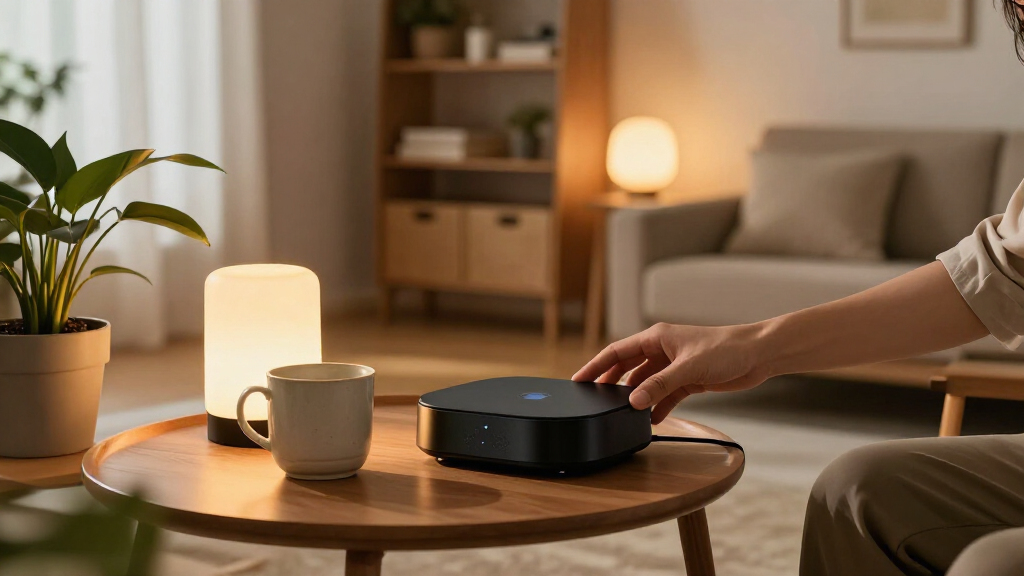

The Aqara Smart Home Hub M3 is my best overall pick for buyers who want broad smart-home connectivity and flexible setup options. For a more hands-on system, Home Assistant Green offers room to customize, while the Amazon Echo Hub is a stronger fit if you want a dedicated touchscreen control panel. The key tradeoff is between an easy, app-led setup and the added control of a hub that takes more configuration. Device compatibility matters just as much: a hub that works with one protocol or brand may not bring your whole home together. Read on for my comparison of all 13 options and how to choose among them.

Get the latest gadgets delivered free with Prime
- Fast, free delivery on millions of items
- Prime Video, Amazon Music and more included
- Member-only deals all year
Complete the kit



Key Takeaways
- Aqara M3 leads for flexibility: Its combination of hub features and support for multiple connection types makes it the most balanced choice in this group, though buyers should check device compatibility before committing.
- Home Assistant Green and amazon.com/dp/B0CR4G1G8M?tag=t3chbillion-20&ascsubtag=dc-1165094″ target=”_blank” rel=”nofollow sponsored noopener”>Hubitat prioritize control: They suit people who want to shape automations around their needs, but that flexibility can demand more setup than a screen-centered hub.
- Echo Hub and Echo Show 15 solve different problems: The Echo Hub is built around smart-home controls, while the larger Echo Show adds a broader display and entertainment role.
- SONOFF and Tapo are narrower, task-focused picks: Their appeal is strongest for compatible devices and specific functions, not as a universal home-control solution.
- Lutron Caséta stands apart for lighting: It is a focused choice for Caséta lighting systems, rather than a general-purpose hub for every connected device in the home.
| Aqara Smart Home Hub M3 |  | Best for Matter-Ready Aqara Setups | Model: HM-G01E | Connectivity: Zigbee, Thread, Bluetooth, dual-band Wi-Fi (2.4/5 GHz), PoE, USB-C | Matter: Matter controller and bridge | VIEW LATEST PRICE | See Our Full Breakdown |
| eufy Security Smart Display E10, 8-Inch Smart Home Hub |  | Best for eufy Security Monitoring | Model: T87A0 | Screen: 8 inches | Storage: 64 GB eMMC | VIEW LATEST PRICE | See Our Full Breakdown |
| SONOFF Zigbee Bridge Pro Hub – Zigbee 3.0 Smart Gateway with App Control and Multi‑Device Management |  | Best Basic Zigbee Value | Model: ZB Bridge-P | Connectivity: Wi-Fi and Zigbee | Device capacity: Up to 128 Zigbee sub-devices | VIEW LATEST PRICE | See Our Full Breakdown |
| Amazon Echo Hub 8-Inch Smart Home Control Panel |  | Best Wall-Mounted Control Panel | Screen: 8 inches | Connectivity: Wi-Fi, Bluetooth, Zigbee, Matter, Sidewalk, Thread | Smart home hub: Built in | VIEW LATEST PRICE | See Our Full Breakdown |
| SONOFF Bridge-M Smart Home Hub |  | Best Local Matter Bridge for Tinkerers | Model: Bridge-M | Connectivity: Wi-Fi, Ethernet, Zigbee | Protocols: Wi-Fi IEEE 802.11a/b/g/n/ac/ax; Zigbee IEEE 802.15.4 | VIEW LATEST PRICE | See Our Full Breakdown |
| Home Assistant Green Smart Home Hub |  | Best for Home Assistant Beginners | Operating system: Home Assistant OS | RAM: 4 GB LPDDR4X | Storage: 32 GB | VIEW LATEST PRICE | See Our Full Breakdown |
| Aeotec Smart Home Hub with SmartThings, Z-Wave, Zigbee, and Matter |  | Best for SmartThings Households | Model: V3 Smart Home Hub (2020) | Connectivity: Ethernet, Wi-Fi, Z-Wave, Zigbee, Matter | Z-Wave frequency: 908.42 MHz | VIEW LATEST PRICE | See Our Full Breakdown |
| Hubitat Elevation C-8 Pro Smart Home Hub |  | Best for Advanced Local Automations | Protocols: Matter 1.5, Z-Wave 800 Series, Zigbee 3.0, Bluetooth | Voice assistant compatibility: Amazon Alexa, Google Home, Apple HomeKit | Device compatibility: 1,000+ devices across 100+ brands | VIEW LATEST PRICE | See Our Full Breakdown |
| Lutron Caséta Smart Hub for Alexa, Apple HomeKit, Google Assistant, and More | 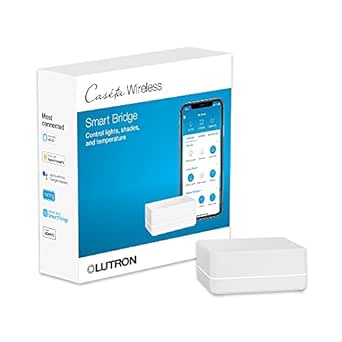 | Best for Caséta Lighting and Shades | Model: L-BDG2-WH | Supported devices: Up to 75 Caséta devices | Compatible platforms: Amazon Alexa, Apple HomeKit, Google Assistant, Ring, Serena shades, Sonos | VIEW LATEST PRICE | See Our Full Breakdown |
| Aqara Smart Hub M200 Matter Controller with Zigbee, Wi-Fi, IR, and PoE |  | Best Multi-Protocol Hub for Aqara Homes | Model: HM-G03E | Connectivity: Zigbee, Thread, Bluetooth, dual-band Wi-Fi (2.4/5 GHz), PoE, USB-C, IR | Device capacity: Up to 40 Aqara Zigbee devices and 40 Thread devices | VIEW LATEST PRICE | See Our Full Breakdown |
| Tapo H110 Matter-Certified Smart IR Hub with Chime |  | Best for Controlling Infrared Appliances | Connectivity: 2.4 GHz Wi-Fi, infrared, Matter | IR compatibility: More than 8,000 brands; 18 appliance types | Voice assistants: Amazon Alexa, Google Assistant, Apple Home via Matter | VIEW LATEST PRICE | See Our Full Breakdown |
| Tapo H100 Smart Hub with Built-In Chime |  | Best for a Tapo Sensor Setup | Connectivity: Wireless; requires 2.4 GHz Wi-Fi | Maximum range: 30 meters | Maximum connected devices: 64 | VIEW LATEST PRICE | See Our Full Breakdown |
| Amazon Echo Show 15 (2nd Gen) 15.6-Inch Full HD Smart Display with Fire TV |  | Best Smart Display Hub for Family Spaces | Display: 15.6-inch, 1920 × 1080 resolution | Dimensions: 16.1 × 10.1 × 1.4 inches | Weight: 4.96 lb | VIEW LATEST PRICE | See Our Full Breakdown |
| smart home hub | Connectivity | Model | Weight | Dimensions |
|---|---|---|---|---|
| Aqara Smart Home Hub M3 | Zigbee, Thread, Bluetooth, dual-band Wi-Fi (2.4/5 GHz), PoE, USB-C | HM-G01E | — | — |
| eufy Security Smart Display E1 | — | T87A0 | 2.46 pounds | — |
| SONOFF Zigbee Bridge Pro Hub | Wi-Fi and Zigbee | ZB Bridge-P | 1.2 ounces | 2.44 x 0.79 x 2.44 inches |
| Amazon Echo Hub 8-Inch Smart H | Wi-Fi, Bluetooth, Zigbee, Matter, Sidewalk, Thread | — | — | — |
| SONOFF Bridge-M Smart Home Hub | Wi-Fi, Ethernet, Zigbee | Bridge-M | 2.88 ounces | — |
| Home Assistant Green Smart Hom | Ethernet, USB, Bluetooth | — | — | 4.41 x 4.41 x 1.26 inches |
| Aeotec Smart Home Hub with Sma | Ethernet, Wi-Fi, Z-Wave, Zigbee, Matter | V3 Smart Home Hub (2020) | 1.1 pounds | — |
| Hubitat Elevation C-8 Pro Smar | — | — | 2.56 ounces | 2.95 x 3.23 x 0.67 inches |
| Lutron Caséta Smart Hub for Al | Router connection; Clear Connect Technology | L-BDG2-WH | — | 1.44 x 2.94 x 4.69 inches |
| Aqara Smart Hub M200 Matter Co | Zigbee, Thread, Bluetooth, dual-band Wi-Fi (2.4/5 GHz), PoE, USB-C, IR | HM-G03E | 4.6 ounces | 3.93 x 3.93 x 1.21 inches |
| Tapo H110 Matter-Certified Sma | 2.4 GHz Wi-Fi, infrared, Matter | — | — | — |
| Tapo H100 Smart Hub with Built | Wireless; requires 2.4 GHz Wi-Fi | — | — | 2.83 × 2.01 × 2.24 inches |
| Amazon Echo Show 15 | — | — | 4.96 lb | 16.1 × 10.1 × 1.4 inches |
More Details on Our Top Picks
Aqara Smart Home Hub M3
I’d choose the Aqara Smart Home Hub M3 for a home built around Aqara sensors and switches that needs a path into Matter. It can bridge compatible Aqara devices to Matter and run local automations, so routines can keep working without relying on cloud processing. Its Zigbee and Thread support also gives it more room to grow than the SONOFF Zigbee Bridge Pro, which is more focused on Zigbee and SONOFF devices. The M3 adds a useful extra: a 360° infrared blaster with status feedback for controlling compatible appliances.
The tradeoff is setup and ecosystem fit. Thread devices may need Thread repeaters, the USB power adapter is not included, and some cloud-based notifications still need internet access. I’d pick the Echo Hub instead if a screen and broad, visible device control matter more than Aqara-centered automation.
Pros:- Bridges compatible Aqara devices to Matter platforms.
- Runs local automations and can migrate devices from older Aqara hubs.
- Supports Zigbee, Thread, dual-band Wi-Fi, PoE, and USB-C.
- Adds a 360° infrared blaster with status feedback and learning.
Cons:- USB power adapter is not included.
- Thread devices may need separate Thread repeaters.
- Some cloud-based notifications require an internet connection.
Best for: Aqara households that want local automations, Matter bridging, and support for both Zigbee and Thread devices.
Not ideal for: Buyers seeking a display-first control panel or a hub that does not depend on an Aqara-centered setup; Thread devices may also require additional repeaters.
- Model:HM-G01E
- Connectivity:Zigbee, Thread, Bluetooth, dual-band Wi-Fi (2.4/5 GHz), PoE, USB-C
- Matter:Matter controller and bridge
- Device capacity:Up to 127 Aqara Zigbee devices and 127 Thread devices
- Infrared:360° blaster with status feedback and learning
- Local storage:8 GB, end-to-end encrypted
- Compatibility:Apple HomeKit, Alexa, SmartThings, Home Assistant
- Warranty:12 months
Our verdict“Choose the M3 if your home leans on Aqara and you want local automation plus Matter bridging; choose the Echo Hub for an on-wall visual control center.”
eufy Security Smart Display E10, 8-Inch Smart Home Hub
The eufy Security Smart Display E10 is the lineup’s security-focused choice, not a general-purpose protocol hub. Its 8-inch screen can show up to four live camera feeds, while voice alerts can surface doorbell rings, door unlocks, and camera activity without requiring someone to check a phone. Local event storage makes playback quick, and daily summaries add a convenient overview for households already using eufy security products.
That focus is also its main limit. Facial and package recognition summaries require HomeBase 3, and the supplied details do not list broad Zigbee, Thread, or Matter device control. The Amazon Echo Hub is a stronger fit for managing a mixed smart home across protocols; I’d choose the E10 instead when checking cameras and security events is the main job. Its 2.46-pound weight also makes placement less casual than a small hub.
Pros:- Shows up to four live camera feeds at once.
- Provides hands-free alerts for doorbell, door, and camera events.
- Stores event history locally for quick playback.
- Offers daily security summaries with HomeBase 3.
Cons:- Facial and package recognition features require HomeBase 3.
- The provided specifications do not establish broad Matter, Zigbee, or Thread device control.
- At 2.46 pounds, placement may be less flexible than a small hub.
Best for: eufy camera and doorbell households that want a dedicated screen for live feeds, alerts, and locally stored event playback.
Not ideal for: Buyers who need a broad smart home hub for mixed Zigbee, Thread, or Matter devices, or who want recognition summaries without HomeBase 3.
- Model:T87A0
- Screen:8 inches
- Storage:64 GB eMMC
- Weight:2.46 pounds
- Included components:5V/2A adapter, charging station, Type-C charging cable, wall mount
- Battery:Lithium-ion; 1 AAA battery included
- Color:Black and white
Our verdict“Pick the E10 if eufy security feeds and event alerts matter more than controlling a mixed-protocol smart home.”
SONOFF Zigbee Bridge Pro Hub – Zigbee 3.0 Smart Gateway with App Control and Multi‑Device Management
The SONOFF Zigbee Bridge Pro makes the most sense for buyers who want a compact gateway for a SONOFF-heavy Zigbee setup rather than a multi-protocol command center. It supports up to 128 Zigbee sub-devices and can run local scenes when the internet is down, giving routine control more resilience than a cloud-dependent setup. Home, away, and sleep security modes add practical app-based control without the screen and installation needs of the Amazon Echo Hub.
Its clear tradeoff is reach beyond its preferred ecosystem. The product is described as primarily optimized for SONOFF devices, so I wouldn’t choose it as the foundation for a diverse Matter or Thread home; the Aqara M3 offers broader protocol support and Matter bridging. WPS can simplify setup, but the listed battery requirement is an unusual ongoing consideration for a hub. This is a focused Zigbee pick, not a flexible hub for every platform.
Pros:- Supports up to 128 Zigbee sub-devices.
- Local scene execution can continue when the internet is down.
- Combines Wi-Fi and Zigbee connectivity for compatible SONOFF devices.
- WPS and a dedicated mobile app support straightforward setup and control.
Cons:- Primarily optimized for SONOFF devices, limiting confidence in third-party compatibility.
- The listed lithium battery requirement adds a maintenance consideration.
- Lacks the stated Matter and Thread support of the Aqara M3 and Echo Hub.
Best for: SONOFF users who need a small Zigbee gateway, local scene execution, and app-based home, away, or sleep modes.
Not ideal for: Households mixing many third-party brands or looking for Matter, Thread, or broad cross-platform support.
- Model:ZB Bridge-P
- Connectivity:Wi-Fi and Zigbee
- Device capacity:Up to 128 Zigbee sub-devices
- Local scenes:Scene execution supported when the internet is down
- Dimensions:2.44 x 0.79 x 2.44 inches
- Weight:1.2 ounces
- Power:5 volts
- Warranty:1 year
Our verdict“Choose this bridge for a compact SONOFF-centered Zigbee setup with local scenes, not as the hub for a mixed-protocol home.”
Amazon Echo Hub 8-Inch Smart Home Control Panel
The Amazon Echo Hub is the strongest fit here for people who want a shared, glanceable place to manage a mixed smart home. Its 8-inch customizable dashboard brings device controls, camera views, routines, security, and media together, while built-in support for Zigbee, Matter, and Thread reduces the need for separate protocol hubs. Compared with the eufy E10, it is designed for wider smart home control rather than centering on security feeds; compared with the Aqara M3, it makes those controls visible on a screen.
The panel’s flexibility comes with installation compromises. It is intended for wall mounting, the tabletop stand and wall cable pass-through are sold separately, and some power-over-Ethernet accessories also cost extra. Alexa+ features and certain Ring summaries or footage search may need separate services or subscriptions. I’d skip it if a small, unobtrusive hub or local-first automation is the priority.
Pros:- Customizable dashboard brings smart home controls into one visible place.
- Built-in support for Wi-Fi, Bluetooth, Zigbee, Matter, Sidewalk, and Thread.
- Combines device control with camera viewing, routines, security, and media playback.
- Includes privacy controls, including a microphone-off button.
Cons:- Tabletop stand, wall cable pass-through, and power-over-Ethernet adapter are sold separately.
- Some Alexa+ and Ring camera features require separate purchases or subscriptions.
- A wall-mounted display is less discreet than compact hubs such as the SONOFF Zigbee Bridge Pro.
Best for: Alexa households that want a shared wall-mounted panel for controlling mixed-protocol devices, routines, cameras, and media.
Not ideal for: Buyers who need a compact hub, prefer local-first automation, or want a tabletop setup without purchasing a separate stand.
- Screen:8 inches
- Connectivity:Wi-Fi, Bluetooth, Zigbee, Matter, Sidewalk, Thread
- Smart home hub:Built in
- Mounting:Wall mounted; tabletop stand sold separately
- Sustainability:27% recycled materials
- Packaging:97% wood fiber-based packaging
Our verdict“Choose the Echo Hub if you want a visible Alexa control panel with broad protocol support and can accommodate its mounting and accessory requirements.”
SONOFF Bridge-M Smart Home Hub
The SONOFF Bridge-M suits buyers who want to bring Zigbee, BTHome, and eWeLink devices into Matter platforms while keeping setup closer to home. Its local web console works without cloud access, and MQTT support gives Home Assistant users a route for building more customized integrations. That makes it a different proposition from the SONOFF Zigbee Bridge Pro, which focuses on Zigbee scenes and SONOFF app control, and from the Echo Hub, which puts a broad set of controls on a screen.
The Bridge-M’s flexibility is aimed at hands-on users, not plug-and-play buyers. The product details do not specify which third-party Zigbee devices are supported, so compatibility should be checked before building around it. Its 90 dB alarm also depends on compatible Zigbee security sensors. I’d favor this hub for local control and integration work, but choose the Aqara M3 if its more clearly stated device capacity and Aqara features matter more.
Pros:- Connects Zigbee, BTHome, and eWeLink devices to Matter platforms.
- Local web-based setup works without cloud access.
- Supports Home Assistant through MQTT.
- Includes a 90 dB alarm for compatible security sensors.
Cons:- The supported third-party Zigbee device list is not specified in the provided product details.
- The alarm and mobile notifications require compatible Zigbee sensors.
- Its web and MQTT features may be less approachable than the Echo Hub’s visual dashboard.
Best for: Home Assistant users and smart home tinkerers who want a local web setup, MQTT support, and a Matter bridge for supported devices.
Not ideal for: Beginners seeking a screen-based controller or buyers who need clearly documented third-party Zigbee compatibility before purchase.
- Model:Bridge-M
- Connectivity:Wi-Fi, Ethernet, Zigbee
- Protocols:Wi-Fi IEEE 802.11a/b/g/n/ac/ax; Zigbee IEEE 802.15.4
- Matter platforms:Alexa, Google Home, Apple Home
- Home Assistant:MQTT support
- Alarm:90 dB
- Weight:2.88 ounces
- Warranty:2 years
Our verdict“Pick the Bridge-M if local control and Home Assistant integration are your priorities, after checking that your Zigbee devices are supported.”
Home Assistant Green Smart Home Hub
Home Assistant Green is my pick for buyers who want the flexibility of Home Assistant without assembling a system from separate parts. It arrives with Home Assistant OS preinstalled, and its fanless design runs silently while keeping home data on the device. Compared with the Aeotec Smart Home Hub, Green puts more emphasis on local control and customization than on a ready-made SmartThings ecosystem. That flexibility has a learning curve, though, and it is not a wireless all-in-one hub: you need Ethernet to get started, and Z-Wave, Zigbee, and Thread require compatible USB adapters. Choose it if you want a capable foundation you can expand over time; skip it if you expect all major radio protocols to work straight out of the box.
Pros:- Home Assistant OS is preinstalled, avoiding a separate installation step.
- Fanless design operates silently.
- Home data stays on the device.
- USB ports allow expansion with compatible protocol adapters.
Cons:- Ethernet is required to get started.
- Z-Wave, Zigbee, and Thread support depends on separately obtained compatible USB devices.
Best for: Smart-home owners who want to start with Home Assistant and gradually add USB radios and custom automations.
Not ideal for: Buyers seeking a wireless setup or built-in Z-Wave, Zigbee, or Thread radios without extra adapters.
- Operating system:Home Assistant OS
- RAM:4 GB LPDDR4X
- Storage:32 GB
- Connectivity:Ethernet, USB, Bluetooth
- USB ports:2
- Dimensions:4.41 x 4.41 x 1.26 inches
Our verdict“Choose Home Assistant Green if you want a quiet, expandable Home Assistant base and are comfortable adding radios as needed.”
Aeotec Smart Home Hub with SmartThings, Z-Wave, Zigbee, and Matter
The Aeotec Smart Home Hub is the straightforward choice for households that want SmartThings automations alongside broad device compatibility. Its mix of Z-Wave Plus, Zigbee, and Matter makes it a more ready-to-connect option than Home Assistant Green, which needs USB adapters for Z-Wave and Zigbee. You can set it up over Wi-Fi or Ethernet, and many automations can run locally, so everyday routines are less dependent on the cloud. The tradeoff is that its strengths center on the SmartThings app and supported integrations rather than Home Assistant Green’s open-ended customization. It is also designed for North America, which limits its fit elsewhere. I’d choose it for a SmartThings-centered home; buyers who want deeper control over their hub platform may prefer another option.
Pros:- Supports Z-Wave Plus, Zigbee, and Matter.
- Can connect through Wi-Fi or Ethernet.
- SmartThings app supports custom automations, many of which can run locally.
- Works with Amazon Alexa and Google Assistant.
Cons:- Designed for use in North America.
- Its SmartThings-centered approach offers a different fit for buyers who want a more customizable Home Assistant setup.
Best for: North American households using SmartThings that want Z-Wave, Zigbee, and Matter support with Alexa or Google Home voice control.
Not ideal for: Buyers outside North America or those seeking Home Assistant’s more open-ended setup and customization.
- Model:V3 Smart Home Hub (2020)
- Connectivity:Ethernet, Wi-Fi, Z-Wave, Zigbee, Matter
- Z-Wave frequency:908.42 MHz
- Voice assistants:Amazon Alexa, Google Assistant
- Control methods:App, voice
- Weight:1.1 pounds
- Warranty:1 year
Our verdict“Pick the Aeotec hub if you want SmartThings automations and several major device protocols in a North American-ready setup.”
Hubitat Elevation C-8 Pro Smart Home Hub
Hubitat Elevation C-8 Pro suits buyers who want to build complex routines while keeping automation local. It supports Matter, Z-Wave 800 Series, Zigbee 3.0, and Bluetooth, and its listed compatibility spans Alexa, Google Home, and Apple HomeKit. Compared with the Aeotec Smart Home Hub, Hubitat leans more toward advanced automation tools and operation without an internet connection; that control can take more time to learn. There is no required subscription, which also separates it from hubs that tie features to recurring fees. The compact unit does not include a display or physical controls, so setup and day-to-day management rely on its smart-home tools rather than an on-device interface. I’d put it ahead of simpler hubs for automation-focused owners, but not for people who want the easiest possible setup.
Pros:- Automations can run locally, including when the internet is down.
- Supports Matter, Z-Wave 800 Series, Zigbee 3.0, and Bluetooth.
- Works with Alexa, Google Home, and Apple HomeKit.
- No recurring subscription is required.
Cons:- Advanced automation setup can take time to learn.
- No built-in display or controls are specified.
Best for: Experienced smart-home owners who want local routines across multiple protocols and are willing to learn an advanced automation system.
Not ideal for: Beginners who want guided, simple routines or shoppers looking for a hub with a built-in display and physical controls.
- Protocols:Matter 1.5, Z-Wave 800 Series, Zigbee 3.0, Bluetooth
- Voice assistant compatibility:Amazon Alexa, Google Home, Apple HomeKit
- Device compatibility:1,000+ devices across 100+ brands
- Antennas:2 dedicated external antennas
- Subscription:Not required
- Dimensions:2.95 x 3.23 x 0.67 inches
- Weight:2.56 ounces
Our verdict“Choose Hubitat C-8 Pro for protocol breadth and locally run, advanced automations if you are comfortable with a steeper learning curve.”
Lutron Caséta Smart Hub for Alexa, Apple HomeKit, Google Assistant, and More
The Lutron Caséta Smart Hub is a focused pick for homes built around Caséta lights, shades, and compatible temperature controls—not a general-purpose protocol hub. It connects up to 75 Caséta devices and links them with Alexa, Apple HomeKit, Google Assistant, Ring, and Sonos for app control, schedules, scenes, and voice commands. Compared with the Aqara Hub M200, it is narrower in device scope: the M200 combines several radios and supports Zigbee and Thread devices, while this hub centers on the Caséta ecosystem and Lutron’s Clear Connect Technology. That specialization is useful if you want to manage a larger Caséta setup, but it means compatible switches and other accessories must be purchased separately. It also needs a router and the Lutron app for setup. I’d choose it for Caséta control, not as a catch-all hub.
Pros:- Supports up to 75 Caséta devices.
- Integrates with Alexa, Apple HomeKit, Google Assistant, Ring, and Sonos.
- Enables app and voice control, scheduling, and scenes.
- Connects to a router and plugs into an outlet.
Cons:- Compatible dimmers, switches, and other accessories are sold separately.
- Requires a router and the Lutron app for setup.
- Its focus on Caséta devices makes it less versatile as a hub for mixed-brand protocols than the Aqara Hub M200.
Best for: Homeowners building or managing a Caséta lighting and shade system who want schedules, scenes, and voice-platform integration.
Not ideal for: Buyers who need one hub for a wide mix of Zigbee, Thread, Z-Wave, or other brands’ smart devices.
- Model:L-BDG2-WH
- Supported devices:Up to 75 Caséta devices
- Compatible platforms:Amazon Alexa, Apple HomeKit, Google Assistant, Ring, Serena shades, Sonos
- Connectivity:Router connection; Clear Connect Technology
- Operating voltage:120 volts
- Operating temperature:32–104 °F
- Dimensions:1.44 x 2.94 x 4.69 inches
Our verdict“Choose the Lutron Caséta hub if you want centralized control for Caséta devices, rather than a broad multi-protocol hub.”
Aqara Smart Hub M200 Matter Controller with Zigbee, Wi-Fi, IR, and PoE
Aqara Hub M200 earns its place for combining several jobs in one compact hub: it acts as a Matter controller, Thread border router, and Matter bridge, while also supporting Aqara Zigbee devices and a 360-degree IR blaster. Its capacity of up to 40 Aqara Zigbee and 40 Thread devices gives it a broader mix of connections than the Lutron Caséta hub, which is designed around Caséta products. PoE and dual-band Wi-Fi offer flexible placement and networking options, while local automations for Zigbee and Matter devices can continue without Wi-Fi or cloud access. The main limitation is ecosystem selectivity: it does not support third-party Zigbee devices. Its USB power adapter is not included, and only one air conditioner can be exposed to Matter. This is a strong fit for Aqara-centered homes, not mixed Zigbee collections.
Pros:- Combines Matter controller, Thread border router, Matter bridge, Zigbee, and IR features.
- Supports up to 40 Aqara Zigbee devices and 40 Thread devices.
- Offers PoE, USB-C, and dual-band Wi-Fi connectivity.
- Local Zigbee and Matter automations can continue without Wi-Fi or cloud access.
Cons:- Does not support third-party Zigbee devices.
- USB power adapter is not included.
- Only one air conditioner can be exposed to Matter.
Best for: Aqara households adding Matter and Thread devices that also want IR control, PoE, or local automations.
Not ideal for: Buyers with third-party Zigbee devices they need to connect, or shoppers who expect a USB power adapter in the box.
- Model:HM-G03E
- Connectivity:Zigbee, Thread, Bluetooth, dual-band Wi-Fi (2.4/5 GHz), PoE, USB-C, IR
- Device capacity:Up to 40 Aqara Zigbee devices and 40 Thread devices
- IR blaster:360° with status feedback and learning
- Compatibility:Apple HomeKit, Alexa, Google Home, SmartThings, Home Assistant
- Dimensions:3.93 x 3.93 x 1.21 inches
- Weight:4.6 ounces
Our verdict“Choose the M200 for a compact Aqara-centered setup that needs Thread, Matter, IR, and local automations, but skip it if you rely on third-party Zigbee devices.”
Tapo H110 Matter-Certified Smart IR Hub with Chime
The Tapo H110 earns its place by combining Matter support with an infrared remote that can operate compatible appliances from more than 8,000 brands. That makes it a more versatile fit for a home with older IR-controlled equipment than the Tapo H100, which focuses on connecting Tapo sensors, switches, and buttons. The H110 also supports voice assistants, app-based remote access, schedules, and location-based automations, while its 93 dB alarm and customizable chime add a notification role. Its limits are practical: infrared commands need a clear enough path and range to the appliance, and the 5V/2A power adapter is not included. Choose it for a mix of compatible appliances and smart devices, not as a universal hub for every radio protocol.
Pros:- Infrared control covers compatible appliances from more than 8,000 brands and 18 appliance types.
- Matter support and compatibility with Alexa, Google Assistant, and Apple Home broaden smart-home integration.
- Combines remote control, schedules, and location-based automations in the Tapo app.
- Built-in 93 dB alarm and customizable chime can provide audible alerts.
Cons:- Requires a separate 5V/2A USB power adapter.
- Infrared commands depend on the hub being within range of compatible appliances.
- Does not list Zigbee or Thread connectivity.
Best for: Households that want app and voice control for compatible infrared appliances alongside Matter-enabled devices and Tapo automations.
Not ideal for: Buyers who need a hub for Zigbee or Thread devices, or who cannot place the hub within infrared range of the appliances they want to control.
- Connectivity:2.4 GHz Wi-Fi, infrared, Matter
- IR compatibility:More than 8,000 brands; 18 appliance types
- Voice assistants:Amazon Alexa, Google Assistant, Apple Home via Matter
- Built-in alarm:93 dB
- Power:5V/2A USB power adapter required; sold separately
- Included:H110 hub, USB-C power cable, Quick Start Guide
Our verdict“Choose the H110 if you want one compact hub for compatible IR appliances and Matter-based control, but skip it if your setup depends on Zigbee or Thread.”
Tapo H100 Smart Hub with Built-In Chime
The Tapo H100 is a focused bridge for a home built around Tapo sensors, switches, and buttons, rather than a broad controller for mixed-brand devices. It supports up to 64 compatible devices and a stated range of up to 30 meters, giving sensor-based automations room to reach across a home. Paired with compatible sensors or a Smart Button, it can sound a siren up to 90 dB or play selectable chimes. Compared with the Tapo H110, the H100 skips infrared appliance control and Matter, so it is a narrower choice—but one aimed squarely at Tapo’s low-power accessories. It also cannot directly connect to Tapo smart plugs or lighting, which limits its usefulness as a general-purpose hub. Pick it when sensors are the center of your Tapo setup.
Pros:- Connects up to 64 compatible Tapo sensors, switches, and buttons.
- Low-power wireless protocol can help extend the battery life of connected devices.
- Up to 30 meters of range supports placement beyond a single room.
- Compatible sensors or a Smart Button can trigger selectable chimes or a siren up to 90 dB.
Cons:- Requires a 2.4 GHz Wi-Fi network.
- Does not directly connect to Tapo smart plugs or smart lighting.
- Its compatibility is centered on Tapo accessories rather than a broad multi-brand smart home.
Best for: Tapo users building a sensor-, switch-, and button-based system who want local audible alerts and support for multiple compatible accessories.
Not ideal for: Buyers seeking a hub for Tapo smart plugs or lighting, mixed-brand devices, or Matter and infrared appliance control.
- Connectivity:Wireless; requires 2.4 GHz Wi-Fi
- Maximum range:30 meters
- Maximum connected devices:64
- Siren volume:Up to 90 dB
- Compatible devices:Tapo smart sensors, switches, and buttons
- Dimensions:2.83 × 2.01 × 2.24 inches
- Operating system requirements:Android 5.0 or higher; iOS 10.0 or higher
- Included:Tapo H100 Smart Hub with Chime, Quick Start Guide
Our verdict“Choose the H100 for a Tapo sensor and button network with built-in alerts, but pick the H110 if you also need infrared control or Matter support.”
Amazon Echo Show 15 (2nd Gen) 15.6-Inch Full HD Smart Display with Fire TV
The Echo Show 15 is the lineup’s most screen-centered option: its 15.6-inch Full HD display combines family widgets, video calls, Fire TV, and smart-home controls in one wall-friendly device. Its support for Zigbee, Matter, and Thread gives it a broader built-in device-connection mix than the Tapo H100, which is limited to compatible Tapo accessories. The 13 MP camera has auto-framing and a privacy shutter, while the included Alexa Voice Remote supports hands-on Fire TV use. That versatility comes with a larger footprint and a different purpose from a dedicated control panel such as the Amazon Echo Hub: the Show 15 is also an entertainment and household information screen. Some content and services may require subscriptions or fees, and it cannot connect to ad-hoc Wi-Fi networks. Choose it when the display is part of the plan, not just a way to manage devices.
Pros:- Large 15.6-inch Full HD screen supports landscape or portrait orientation.
- Zigbee, Matter, and Thread support accommodate a broader range of smart-home devices.
- Fire TV and customizable widgets combine entertainment with household organization.
- 13 MP camera supports auto-framing video calls and includes a privacy shutter.
Cons:- Its 16.1 × 10.1-inch footprint and 4.96-pound weight call for a suitable mounting or placement area.
- Some content, skills, and services may require subscriptions or fees.
- Does not support connecting to ad-hoc Wi-Fi networks.
Best for: Families who want a shared kitchen or living-area screen for smart-home controls, household widgets, video calls, and Fire TV.
Not ideal for: Buyers who want a compact, dedicated smart-home controller, have no suitable display location, or need to connect through an ad-hoc Wi-Fi network.
- Display:15.6-inch, 1920 × 1080 resolution
- Dimensions:16.1 × 10.1 × 1.4 inches
- Weight:4.96 lb
- Camera:13 MP with privacy shutter
- Audio:Two 2-inch woofers and two 0.6-inch tweeters
- Wi-Fi:Wi-Fi 6E, tri-band, dual-antenna MIMO
- Smart home connectivity:Zigbee, Matter, Thread Border Router
- Included:Alexa Voice Remote (2024) with batteries, 30W power adapter, 5 ft. cord
Our verdict“Choose the Echo Show 15 if you want a large family display that also controls Zigbee, Matter, and Thread devices; choose a dedicated hub if screen-based entertainment is not a priority.”
How We Picked
I ranked these hubs by how well they help a buyer connect, control, and automate a real mix of smart-home devices. The main criteria were protocol and platform compatibility, the usefulness of local or app-based control, the ease of setup and everyday operation, and whether a hub serves a clear role beyond simply adding another app. I also weighed versatility against complexity: more customization is valuable only if the buyer is willing to configure it.
The order favors broad usefulness first, then increasingly specialized needs. The Aqara M3 earns the lead for balancing flexibility with an approachable hub role; Home Assistant Green and Hubitat rank highly for buyers who value control over simplicity. Display-focused options, brand-specific bridges, and hubs with a narrower device remit rank lower as general recommendations, but may be the better fit for the right household. I treated advertised compatibility as a starting point, not a guarantee: buyers should confirm support for their exact devices and preferred platform.
Factors to Consider When Choosing Best Smart Home Hubs
A smart home hub is not automatically the center of every smart home. The right choice depends on which devices you already own, how much configuration you want to handle, and whether you need a controller, a screen, or a bridge for a specific product family. These questions help separate useful compatibility from features that may never affect your setup.
Match the hub to your existing devices
Start with the product names and connection methods of the devices you already own, rather than choosing a hub by its protocol list alone. A hub may support Zigbee or Matter without supporting every device that uses those standards or every feature that device offers. Check the maker’s compatibility information for your exact lights, sensors, locks, and appliances. Also check whether your preferred voice assistant or smart-home platform can control them after pairing. A common mistake is buying for the next device you might add while overlooking the devices that need to work today. If several devices depend on one manufacturer’s app, a brand-aligned hub can be a simpler fit than a broader but more involved system.
Decide how much setup and automation control you want
Some buyers want a reliable place to tap a light or run a routine; others want detailed rules that react to multiple sensors and conditions. Those are different jobs, and a hub that excels at fine-grained automation may require more planning and maintenance. Before choosing, consider whether you are comfortable naming devices, organizing rooms, and troubleshooting connection issues yourself. Check which controls remain available if an app or internet connection is unavailable, since local control varies by system and device. Avoid paying for configuration freedom you will not use, but do not choose a simplified controller if complex routines are a central goal. The best match is the one whose setup demands fit your appetite for tinkering.
Treat Matter as a starting point, not a blanket promise
Matter can make devices from different brands easier to connect, but it does not mean every feature will work in every app or hub. A basic switch function may be supported while a device’s advanced settings remain tied to its maker’s software. Thread and Matter are also related but distinct, so check whether a product needs a separate border router or another piece of equipment for its intended setup. When planning a purchase, verify the full path: device to hub, hub to platform, and platform to the controls you use. This check can prevent buying a hub that technically fits a standard but does not deliver the routine you want. Keep a short list of must-have devices and features before comparing protocol labels.
Choose between a control panel and a hub that stays out of sight
A screen can make shared household controls easier to find, especially for people who do not want to open an app for every adjustment. It also takes up space, needs power, and can encourage use as a general display rather than a dedicated controller. A compact hub is less visible and may suit automations that run in the background, but it does not provide the same at-a-glance interface. Think about who will use the system: a wall-mounted panel may help guests and family members, while a phone-led setup can be enough for a smaller household. Do not assume a smart display is a stronger hub simply because it has a large screen. Prioritize the control method your household will actually reach for.
Weigh a specialist bridge against a single broad hub
Specialist hubs can do one job well, such as connecting a lighting ecosystem or controlling infrared appliances, without becoming the command center for the rest of the home. A broader hub may reduce app switching, though it may not offer the same depth for a specific brand or device type. Before adding another bridge, check whether your existing hub can already handle the task and whether the new bridge can pass useful controls into your main platform. Multiple hubs can improve coverage, but they can also create overlapping routines and more places to troubleshoot. If a specialist bridge solves a clear compatibility gap, its narrower role can be a benefit. If not, it may add complexity without simplifying daily control.
Plan for reliability, maintenance, and future changes
Hub choice affects more than initial setup: firmware updates, app support, network changes, and device replacements can all shape the experience over time. Check how the maker handles software support and what account or cloud services the system relies on. If local operation matters to you, confirm which automations and controls continue without internet access rather than assuming the entire setup does. Leave room in your plan for a replacement router or a future change in phone platform, since a system tied tightly to one ecosystem can be harder to move. A hub with more features is not automatically more resilient if it adds dependencies you do not want. Favor a setup you can maintain and explain to another person in your household.
Frequently Asked Questions
Can one smart home hub control every device I already own?
No single hub should be assumed to support every device, even when it lists familiar standards such as Zigbee or Matter. Compatibility can depend on the exact model, firmware, platform, and which features you expect to control. Make a list of your current devices and check each one against the hub maker’s compatibility resources. Pay particular attention to devices that use a manufacturer-specific bridge or app. If some devices fall outside the hub’s support, you may be able to keep a separate bridge, but that can mean extra setup and app switching.
Should I choose a hub with a screen or a compact hub without one?
Choose a screen if people in your home will benefit from visible, shared controls that are easy to reach without opening a phone app. A compact hub is a better match when your priority is connecting devices and running automations in the background. A screen does not automatically improve compatibility, and it adds another device to power, place, and maintain. Think about whether your household prefers voice, app, or touch control before deciding. For a mixed household, a display can be useful alongside a hub, but it may not replace one that provides the protocols your devices need.
Is Matter support enough to know that a hub will work with my devices?
No. Matter support is a helpful compatibility signal, but you should still confirm that the device model and the features you care about are supported by both the hub and your chosen platform. Some device options may appear only in the manufacturer’s app, even when basic control works elsewhere. Check whether the setup also depends on Thread, a border router, or another bridge. Look at the complete connection path before buying rather than relying on a single standards label. This matters most when a routine depends on advanced settings, not just turning a device on or off.
When does a specialist hub make more sense than a general-purpose one?
A specialist hub makes sense when it solves a specific problem that your main platform does not handle well, such as connecting a dedicated lighting system or controlling infrared equipment. It can also be the better choice if your home already relies heavily on that product family. Before adding one, check whether it can expose its devices and controls to your preferred smart-home platform. Otherwise, you may end up managing separate apps and duplicate routines. For a mixed setup with many device types, a broader hub is often a better starting point, with specialist bridges added only for clear gaps.
Will my automations still work if my internet connection goes down?
That depends on the hub, the automation, and the devices involved; internet access should not be assumed to be irrelevant just because a hub is installed at home. Some systems can run certain routines locally, while remote access, voice services, or cloud-linked features may stop working. Check the product documentation for which functions continue offline, and test that behavior before relying on an automation for an important task. A local control path can matter for lighting and sensors you use every day. If outage resilience is a priority, choose based on documented offline behavior rather than a broad claim about smart-home control.
Conclusion
For the broadest balance in this lineup, I recommend the Aqara Smart Home Hub M3 as best overall, provided its compatibility fits your devices. My best value direction is the SONOFF Zigbee Bridge Pro for buyers who mainly need a focused Zigbee connection, not a universal controller. Choose Home Assistant Green as the best premium-style pick for hands-on users who want extensive control, and the Amazon Echo Hub as my best choice for beginners who prefer a dedicated touchscreen interface. For specific needs, Lutron Caséta suits a lighting-focused setup, while the Tapo H110 is worth a look for compatible infrared equipment. If a hub’s role in your home is still unclear, start with your device list and preferred controls; those two details will narrow the choice faster than a long feature checklist.
Halloween Picks
halloween
As an affiliate, we earn on qualifying purchases.