
TL;DR
Wireless gaming headsets let you hear game audio and communicate with teammates without a cable, but performance depends on connection type, platform support, fit, battery, and microphone quality. For responsive play, a compatible 2.4 GHz USB connection is usually a safer starting point than Bluetooth alone; check the exact model and test how it feels during a long session.
Your headset’s battery can die right before the final round, and the cable you removed from your desk won’t be there to save you. Wireless gaming headsets give you room to stand, stretch, or grab a drink while you keep listening and talking. That freedom feels small until you’ve used it during a long session.

Get the latest gadgets delivered free with Prime
- Fast, free delivery on millions of items
- Prime Video, Amazon Music and more included
- Member-only deals all year
This guide explains what wireless means in practice, why a USB dongle and Bluetooth behave differently, and how to judge comfort, battery, microphone, and sound. You’ll also get a practical checklist for matching a headset to your console, PC, or phone. The goal is simple: choose a headset that suits the way you play, rather than paying extra for a feature you won’t use.
A compatible 2.4 GHz USB connection is usually a safer starting point than Bluetooth alone for responsive gaming audio.
Check each device and connection method; a “multi-platform” label does not promise identical wireless features on every platform.
Judge comfort by your usual session length, including pressure, ear-cup depth, heat, and glasses fit.
Treat advertised battery runtime as an estimate and check charging time and play-while-charging support.
For team games, test microphone clarity and chat controls instead of relying on feature names.
Know what wireless buys you—and what it costs
Wireless gaming headsets send sound and voice between the headset and your device without a cable joining them, giving you freedom to move while you play. That convenience comes with trade-offs: you need to charge the headset, check how it connects, and confirm that it works with your platform. Wireless describes the missing cable; it doesn’t promise universal compatibility.
Think of the headset as a little radio station on your head. It receives game audio and sends your voice back, and the connection between it and your console or computer affects how smoothly that exchange feels. A player who sits at a desk may barely move, while someone who gets up between matches may appreciate the extra range. Your routine matters as much as the spec sheet.
For example, imagine your PC sits beside your monitor and you play one-hour sessions. A wired headset might serve you well for less money. If you spend an evening on the couch with a controller, or step away to refill a glass without taking your headset off, wireless comfort may be worth the added cost. Neither choice wins for everyone; the right one fits your play space.
There’s also a simple battery trade: a wired model draws no headset battery charge during play, while a wireless one needs power. If the headset dies mid-match, the convenience disappears fast. Treat wireless as a useful feature with a small routine attached: charge it, check its remaining power, and know what it does when you plug it in.
Products Worth Considering

DJI Mini 4K Drone with 4K UHD Camera

Amazon Kindle Scribe (16GB) with Premium Pen, Tungsten

LG UltraGear 34G600A-B 34-Inch Curved WQHD Gaming Monitor
As an affiliate, we earn on qualifying purchases.
Pick a connection that keeps game audio responsive
For responsive wireless game audio, a dedicated 2.4 GHz USB connection is usually the safer choice than Bluetooth alone. Many gaming headsets use a small USB dongle to create a dedicated link, while Bluetooth is handy for phones and other devices. The best connection still depends on the specific headset, the platform, and your setup; no connection label guarantees perfect performance.
Latency is the gap between an action and the sound you hear. A little delay may go unnoticed while you explore a calm game world, but it can feel distracting in a rhythm game, where a beat lands late, or a competitive shooter, where footsteps help you judge direction. Distance and interference can also affect reliability, so keep the dongle within a sensible range and follow the headset maker’s setup instructions.
Bluetooth can be convenient for a podcast or casual play on a phone, but it may introduce more delay. Some Bluetooth setups also have limitations when you use the microphone and listen to high-quality audio at the same time. A dual-connection headset may help you keep a game link active while connecting to your phone, though some models let you switch between connections rather than use both at once.
If you play a timing-sensitive game on PC, start by checking whether the headset includes a compatible dongle and whether its manual describes the platform connection. If you mostly use a phone for casual games, Bluetooth may be enough. The useful question is not “Is Bluetooth good?” but “Does this connection fit the game and device I actually use?”
Check every platform before you trust the compatibility label
A wireless headset will work with a console or computer only if its exact model and connection method support that device. “Wireless” and “multi-platform” are broad labels, not a promise that every feature works everywhere. Before buying, check support for your specific PlayStation, Xbox, Nintendo Switch, PC, or mobile device.
A USB dongle that works on a PC might not provide wireless audio on every console. Some headsets use platform-specific wireless technology; others offer Bluetooth or a cable as a fallback. Even when a headset connects, microphone support, chat controls, or other features may differ between devices. That can turn a promising label into a frustrating setup if you discover the limitation after opening the box.
Picture a player moving between a PlayStation in the living room and a work laptop at a desk. They should check the connection method for each device separately, then see whether switching requires moving the dongle, changing a mode, or pairing Bluetooth again. That one-minute check can save a return trip and a week of gaming through a tinny laptop speaker.
Write down your devices before you shop. Then match each one to the manufacturer’s compatibility list and the headset’s manual, including how it connects. Product lineups and firmware support change, so verify current specifications rather than relying on an old review or a similar model name. A headset that suits a friend’s console may not suit yours.
Test comfort for the length of your real sessions
Comfort over your typical session matters more than a soft first impression in the store. Weight, clamping force, ear-cup depth, padding, and heat all affect whether you still enjoy wearing a headset an hour later. Fit is personal: a headband that feels secure to one player may pinch another.
Imagine playing a three-hour weekend session. At first, the ear cups may feel plush, but shallow padding can press your ears against the hard driver housing, while a tight band can leave pressure at your temples. Warm rooms and closed ear cups can also make your ears feel hot. A short try-on may not reveal those problems, so look for reviews that describe longer use and check the return policy when possible.
Comfort works like a shoe: the feature list can tell you the materials, but only wearing it tells you whether the fit suits you. If you wear glasses, pay attention to pressure where the arms meet the ear cups. If your room gets warm, look for comments about heat buildup. If you tend to lean back on the couch, note whether the headband shifts when you move.
When you can test a headset, wear it through a normal play session rather than adjusting it for a minute and calling it done. If you can’t, use weight and fit reports as clues, not guarantees. A comfortable model helps you focus on your match, not on the hot spot building under your left ear.
Match battery claims to your daily routine
Battery life is a use-dependent estimate, so compare it with your own session length and charging habits. Advertised runtime can vary with volume, lighting, wireless mode, and other features. The number on the box is a starting point, not a promise that every setting and session will produce the same result.
Suppose you play for two hours most nights. A headset that comfortably lasts several sessions between charges may be easy to maintain. If you regularly play marathon weekends, shorter runtime can mean stopping to recharge just when your group reaches the final tournament round. That is when a charging plan, quick-charge feature, or replaceable battery may make a real difference.
Check three practical details before you buy: how long a full charge takes, whether you can use the headset while it charges, and what the manual says about connection during charging. Some models support play while plugged in; others may behave differently or require a particular connection. Keep a cable near your chair if you plan to use it, and make sure it reaches without pulling at the headset.
Lighting can look great in a dark room, but if the headset offers adjustable lights, consider whether you need them every session. Features that affect runtime may be worth keeping for a special gaming night and switching off on ordinary evenings. A battery estimate is most useful when you compare it with your actual habits, not with a competitor’s best-case number.
Choose clear team chat and sound you can actually use
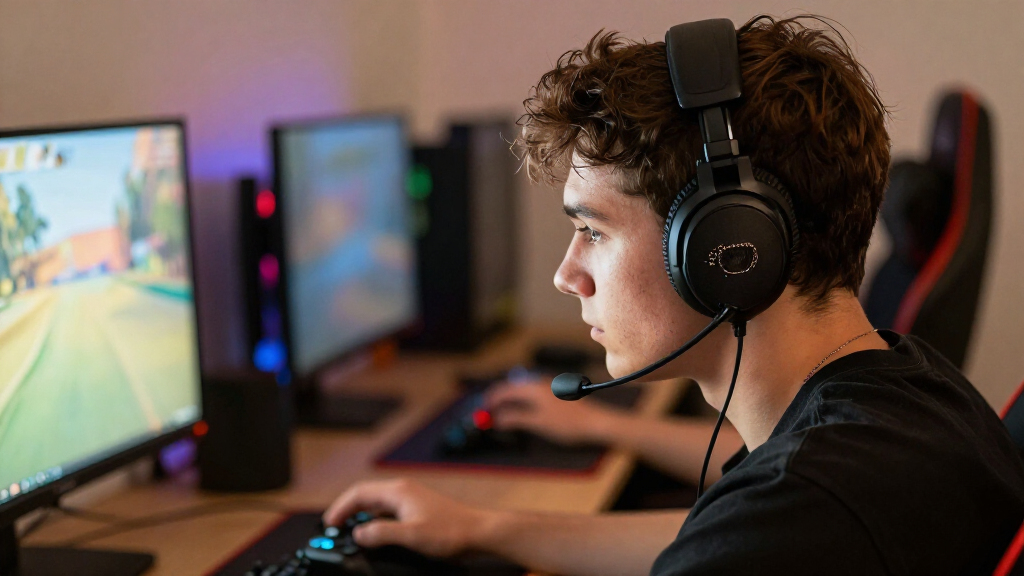
For team play, a clear, adjustable boom microphone is often more useful than a flashy audio feature. Your teammates need to hear your callouts cleanly, especially when keyboard clicks, a fan, or a busy room sits behind your voice. Noise reduction can help, but results differ by headset, so look for real voice samples and tests in noisy environments.
Sound controls matter in a different way. A game-and-chat mix lets you reduce loud explosions while keeping teammates audible; sidetone lets you hear some of your own voice so you don’t shout. Positional cues can help you tell whether an in-game sound comes from the left or right. Virtual surround or spatial audio changes how sound is presented, but it isn’t automatically better than a well-tuned stereo headset.
Consider a squad match where your team is calling positions as effects crash around you. If a microphone makes your voice thin or muffled, teammates may ask you to repeat yourself. If the chat/game balance is easy to adjust, you can turn down the rumble without digging through menus between rounds. Simple controls can matter more in the moment than a long list of software features.
Look for microphone recordings, adjustable controls, and reports about software requirements. Some features may require a companion app, and an equalizer or sound profile may work differently on different platforms. Try the headset with the type of game you play most. The best audio setting is the one that helps you hear what matters and speak clearly—not the mode with the most dramatic name.
Use this quick checklist to narrow your shortlist
Start with your device and main game, then check connection, fit, battery, and chat before paying for extras. That order helps you rule out a poor match early. A headset that misses your platform or feels uncomfortable during a normal session won’t become a good buy just because it offers spatial audio or a bright strip of lights.
For example, a PC player who competes in shooters may put a reliable 2.4 GHz link and a clear microphone near the top of the list. A couch player who swaps between a console and a phone may care more about verified support for both devices and whether dual connections work at the same time. Your own shortlist should reflect your setup, not a generic ranking.
- List your devices. Check support for each exact console, computer, or phone and note the connection method.
- Match the connection to your play. Consider a dedicated 2.4 GHz link for timing-sensitive games and Bluetooth for flexible phone use.
- Check comfort evidence. Look for weight, ear-cup depth, pressure reports, and fit notes from players with needs like yours.
- Compare battery details. Read runtime estimates alongside charging time and play-while-charging support.
- Listen to voice samples. Judge whether the microphone stays clear when background noise enters the room.
- Verify the extras. Check which features require an app, vary by platform, or work only in a particular mode.
This sequence won’t pick a model for you, but it will keep you from overvaluing a single impressive number. If two headsets meet your needs, compare price, build quality, replacement parts, and how easy each one is to control without leaving the game.
Frequently Asked Questions
Are wireless gaming headsets as good as wired ones?
Many wireless models work well for gaming, while wired models avoid battery concerns and may cost less. Wireless gives you more freedom to move; the right pick depends on your latency needs, budget, and daily routine.
Is Bluetooth good enough for gaming?
Bluetooth can suit casual play and phone use, but it may add more delay and can limit audio and microphone use at the same time. For responsive play, a compatible dedicated 2.4 GHz connection is usually a safer choice.
Will one headset work with every console and PC?
No. Support depends on the exact headset and how it connects, such as a USB dongle, Bluetooth, console-specific wireless technology, or a cable. Check each device on the manufacturer’s compatibility list.
How long does a wireless gaming headset battery last?
Runtime varies by model and use. Volume, lighting, wireless mode, and microphone use can affect battery life, so treat the advertised number as an estimate and check the charging details.
Can I use my headset while it charges?
Some models support play while charging, while others do not or behave differently depending on the connection. Check the exact model’s manual before counting on a charging cable as a backup.
Do I need surround sound or spatial audio?
No. Those features can change how positional audio sounds, but preference and implementation vary. A well-tuned stereo headset can also help you hear directional cues clearly.
Conclusion
Choose a headset around the way you play: confirm the platform connection, try to judge comfort over a real session, and check that its battery and microphone fit your routine. A clean feature list can’t tell you how a tight ear cup feels after three hours or whether your teammates can hear you over a desk fan.
Get those basics right, and wireless becomes what you wanted in the first place: room to stand, stretch, and grab a drink while the next match waits in your ears.