The best Apple HomeKit devices in this roundup cover everyday control, home security, and the hub hardware that ties a setup together. I’d put the Apple HomePod mini first for most homes: it combines Siri control with a practical starting point for a connected Home setup. The Aqara Camera E1 stands out for indoor monitoring, while the Linkind Matter Smart Plug 4-Pack makes it easy to add several lamps or small appliances. The main tradeoffs are choosing Matter or direct HomeKit support, deciding between plugs and installed switches, and matching a camera or speaker to your needs. Read on for how the 15 options compare and which one fits your home.

Get the latest gadgets delivered free with Prime
- Fast, free delivery on millions of items
- Prime Video, Amazon Music and more included
- Member-only deals all year
Complete the kit



Key Takeaways
- The HomePod mini is the most balanced starting point: it brings Siri voice control and smart-home coordination together, while the larger HomePod is better suited to buyers who also want a more capable speaker.
- Matter plugs offer a flexible route into smart control: Linkind and TP-Link Tapo provide multi-plug options, while the Kasa and meross plugs give buyers more direct HomeKit-focused alternatives.
- Plugs and switches solve different problems: plugs are easy to add and move, but the meross wall switches can control existing ceiling lights without relying on a smart bulb.
- Security needs split between indoor and entry monitoring: Aqara’s Camera E1 is aimed at rooms inside the home, while the G410 doorbell is designed for the front door and includes a chime.
- The specialist picks fill gaps a plug cannot: the Kasa outdoor plug, Airversa QliQ button, and Meross garage controller address weather-exposed outlets, physical scene control, and garage access respectively.
| Linkind Matter Smart Plug, 4-Pack |  | Best for Cross-Platform Flexibility | Pack size: 4 plugs | Connectivity: Matter, 2.4 GHz Wi-Fi, IPv6 | Maximum current: 15 A | VIEW LATEST PRICE | See Our Full Breakdown |
| meross 15A Smart Plugs with Apple HomeKit, Voice, and App Control, 4-Pack |  | Best for Direct HomeKit Setup | Pack size: 4 plugs | Model: MSS110HK | Connectivity: 2.4 GHz Wi-Fi | VIEW LATEST PRICE | See Our Full Breakdown |
| Linkind Matter Smart LED Bulbs, 6-Pack, A19 E26, 60W Equivalent |  | Best for Colorful Room-Wide Lighting | Pack size: 6 bulbs | Shape and base: A19, E26 | Brightness: 800 lumens | VIEW LATEST PRICE | See Our Full Breakdown |
| Aqara Camera E1 2K Indoor Security Camera |  | Best HomeKit Secure Video Camera | Resolution: 2304 × 1296 pixels (2K) | Viewing: 360-degree pan and tilt | Night vision: 940 nm infrared | VIEW LATEST PRICE | See Our Full Breakdown |
| TP-Link Tapo P125M Matter Smart Plug Mini, 3-Pack |  | Best Compact Matter Plug | Pack size: 3 plugs | Connectivity: Bluetooth, Matter, Wi-Fi | Operating voltage: 120 V AC | VIEW LATEST PRICE | See Our Full Breakdown |
| Kasa EP40A Outdoor Smart Plug with Apple HomeKit, 2 Outlets |  | Best Outdoor HomeKit Plug | Model: EP40A | Outlets: 2 independently controlled AC outlets | Maximum load per outlet: 15 A / 1875 W | VIEW LATEST PRICE | See Our Full Breakdown |
| Tapo P125 Mini Wi-Fi Smart Plug, 15A, 2-Pack |  | Best Compact HomeKit Plug | Model: P125 | Pack size: 2 | Maximum wattage: 1800 W | VIEW LATEST PRICE | See Our Full Breakdown |
| Kasa Smart Plug Mini 15A EP25P2 Apple HomeKit Supported |  | Best HomeKit Plug for Energy Monitoring | Operation mode: Automatic | Operating voltage: 120 V | Wattage: 1800 W | VIEW LATEST PRICE | See Our Full Breakdown |
| Meross Smart Light Switch, Single Pole, 2 Pack | 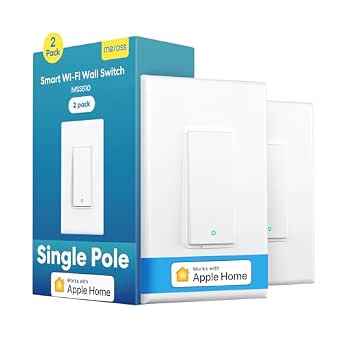 | Best HomeKit Upgrade for Fixed Lighting | Pack count: 2 | Operation: Single pole, on/off | Neutral wire: Required | VIEW LATEST PRICE | See Our Full Breakdown |
| Apple HomePod mini Smart Speaker, Black |  | Best HomeKit Voice-Control Hub | Model number: MTJT3LL/A-cr | Speaker type: Smart speaker | Audio output mode: Stereo | VIEW LATEST PRICE | See Our Full Breakdown |
| Airversa QliQ AC1 HomeKit Button Controller, White |  | Best for Physical Home Controls | Buttons: 3 | Automation inputs: Single click, double click, and long press | Connectivity: Thread | VIEW LATEST PRICE | See Our Full Breakdown |
| Meross Smart Light Switch Single Pole – Supports HomeKit & Wi‑Fi |  | Best Multi-Assistant HomeKit Switch | Switch type: 1-way, single-pole | Wiring requirement: Neutral wire required | Connectivity: 2.4 GHz Wi-Fi | VIEW LATEST PRICE | See Our Full Breakdown |
| Aqara Smart Doorbell Camera G410 with Chime, HomeKit Secure Video, Black |  | Best HomeKit Secure Video Doorbell | Video resolution: 2K; limited to 1600 × 1200 with Apple HomeKit | Field of view: 175° | Chime volume: 95 dB | VIEW LATEST PRICE | See Our Full Breakdown |
| Apple HomePod (2nd Generation) Smart Speaker with Siri – Midnight |  | Best Premium HomeKit Hub and Speaker | Model: MDEW4LL/A | Woofer: 1 × 4-inch | Tweeters: 5 beamforming tweeters | VIEW LATEST PRICE | See Our Full Breakdown |
| Meross MSG100HK Smart Garage Door Opener Remote |  | Best for HomeKit Garage Access | Model: MSG100HK | Connectivity: 2.4 GHz Wi-Fi | Compatible platforms: Apple HomeKit, Siri, CarPlay, Amazon Alexa, Google Assistant, and SmartThings | VIEW LATEST PRICE | See Our Full Breakdown |
| Apple HomeKit device | Connectivity |
|---|---|
| Linkind Matter Smart Plug | Matter, 2.4 GHz Wi-Fi, IPv6 |
| meross 15A Smart Plugs with Ap | 2.4 GHz Wi-Fi |
| Linkind Matter Smart LED Bulbs | Matter, 2.4 GHz Wi-Fi |
| Aqara Camera E1 2K Indoor Secu | Wi-Fi 6, 2.4 GHz; WPA3 |
| TP-Link Tapo P125M Matter Smar | Bluetooth, Matter, Wi-Fi |
| Kasa EP40A Outdoor Smart Plug | — |
| Tapo P125 Mini Wi-Fi Smart Plu | 2.4 GHz Wi-Fi, Bluetooth |
| Kasa Smart Plug Mini 15A EP25P | — |
| Meross Smart Light Switch | — |
| Apple HomePod mini Smart Speak | Bluetooth, Wi-Fi |
| Airversa QliQ AC1 HomeKit Butt | Thread |
| Meross Smart Light Switch Sing | 2.4 GHz Wi-Fi |
| Aqara Smart Doorbell Camera G4 | Dual-band 2.4 GHz and 5 GHz Wi-Fi; WPA3 |
| Apple HomePod | Wireless; Matter and Thread support |
| Meross MSG100HK Smart Garage D | 2.4 GHz Wi-Fi |
More Details on Our Top Picks
Linkind Matter Smart Plug, 4-Pack
The Linkind Matter Smart Plug suits households that want one set of plugs to work across Apple Home and other major smart home platforms. Matter supports local control when the internet is down, so compatible routines and commands can keep working within the home network. The four-pack is more useful for outfitting several lamps or small appliances than the three-plug Tapo P125M pack, though both offer Matter and a 15 A maximum load. The tradeoff is setup: Apple Home use requires a compatible Matter hub, and the plugs rely on 2.4 GHz Wi-Fi. Choose Linkind for broader coverage across rooms; skip it if you want HomeKit setup without adding a hub or your network uses only 5 GHz Wi-Fi.
Pros:- Matter support spans Apple Home, Alexa, Google Home, and SmartThings.
- Local network control can continue during an internet outage.
- Four plugs make it practical to automate several devices at once.
- Short-circuit and overload protection with fire-resistant materials.
Cons:- Apple Home and most other platforms require a compatible Matter hub.
- Works with 2.4 GHz Wi-Fi only.
Best for: Apple Home households that also use Alexa, Google Home, or SmartThings and want four plugs for lamps or other suitable appliances.
Not ideal for: Buyers without a compatible Matter hub, or those whose Wi-Fi network does not support 2.4 GHz.
- Pack size:4 plugs
- Connectivity:Matter, 2.4 GHz Wi-Fi, IPv6
- Maximum current:15 A
- Maximum power:1800 W
- Plug type:Type A
- Safety:Short-circuit and overload protection; fire-resistant materials
- Certifications:FCC, ETL
Our verdict“Choose Linkind if you need a four-pack for a multi-platform smart home and already have a compatible Matter hub.”
meross 15A Smart Plugs with Apple HomeKit, Voice, and App Control, 4-Pack
The meross MSS110HK is the straightforward pick for Apple households that want a four-pack of plugs with native HomeKit support, rather than a Matter-based setup like the Linkind or Tapo P125M. It handles Siri commands and Home app schedules, including sunrise and sunset routines, and its compact shape is designed to leave the neighboring outlet accessible. That makes it a practical fit for paired wall outlets where bulkier adapters can get in the way. It also supports Alexa and Google Assistant, though its appeal is less about cross-platform Matter flexibility and more about its direct HomeKit focus. Remote HomeKit control needs a compatible Apple device configured as a home hub, and setup requires 2.4 GHz Wi-Fi.
Pros:- Works with Apple HomeKit and Siri, as well as Alexa and Google Assistant.
- Sunrise and sunset schedules support convenient daily routines.
- Compact design is intended to leave the second outlet usable.
- Supports appliances up to 15 A and 1800 W.
Cons:- Remote HomeKit control requires a compatible Apple device set up as a home hub.
- Requires a 2.4 GHz Wi-Fi network.
Best for: Apple Home users who want four compact plugs for lamps and small appliances, with Siri control and time-based routines.
Not ideal for: Buyers who want Matter-based platform flexibility or lack a compatible Apple home hub for remote HomeKit access.
- Pack size:4 plugs
- Model:MSS110HK
- Connectivity:2.4 GHz Wi-Fi
- Maximum current:15 A
- Maximum power:1800 W
- Voltage:120 V
- Dimensions:2.68 × 2.3 × 1.5 in
- Certifications:ETL, FCC
Our verdict“Pick meross over the Matter plugs if direct HomeKit support and compact four-outlet coverage matter more than Matter flexibility.”
Linkind Matter Smart LED Bulbs, 6-Pack, A19 E26, 60W Equivalent
For buyers who want to change a room’s feel through Apple Home, the Linkind Matter bulbs offer a more expressive upgrade than a smart plug: they add 16 million colors, preset scenes, and music sync to ordinary E26 fixtures. The six-bulb pack makes it easier to coordinate a room than buying bulbs individually, while Matter compatibility also supports Alexa and Google Home. At 800 lumens per bulb, they suit everyday indoor lighting, but they are not a substitute for brighter fixtures when a space needs strong task illumination. Unlike the meross plugs, these bulbs need to stay powered at the wall to remain smart, and traditional dimmer switches are generally incompatible. They also depend on 2.4 GHz Wi-Fi, so check the fixture and network before replacing every bulb.
Pros:- Matter support works with Apple Home, Alexa, and Google Home.
- Six bulbs provide consistent color control across multiple fixtures.
- Color options, 104 preset scenes, and music sync add flexible ambience.
- 800-lumen output and a 90 CRI rating support everyday indoor use.
Cons:- Generally incompatible with traditional dimmer switches.
- Requires 2.4 GHz Wi-Fi and indoor fixtures.
- Smart control is lost if the wall switch cuts power to a bulb.
Best for: Apple Home users who want coordinated color scenes across several indoor lamps or ceiling fixtures with E26 sockets.
Not ideal for: Buyers who need high-output task lighting, use traditional dimmer switches, or want outdoor-rated smart bulbs.
- Pack size:6 bulbs
- Shape and base:A19, E26
- Brightness:800 lumens
- Power:9 W; 60 W incandescent equivalent
- Connectivity:Matter, 2.4 GHz Wi-Fi
- Color features:16 million colors; 104 preset scenes; music sync
- Color rendering:CRI 90
Our verdict“Choose this six-pack over smart plugs when your priority is coordinated color and scene control from multiple Apple Home lights.”
Aqara Camera E1 2K Indoor Security Camera
The Aqara Camera E1 brings a different kind of value to an Apple Home setup: a 2K pan-and-tilt camera that can cover a broad indoor area from one position. Its 360-degree movement and person tracking help follow activity across a room, while HomeKit Secure Video adds an Apple Home security option alongside local detection and microSD recording. Compared with the Linkind bulbs or smart plugs, this is a dedicated security device, so its usefulness depends on camera placement, power, and your recording preferences. It supports microSD cards up to 512 GB, but the card and required USB-A power supply are not included. The camera also uses 2.4 GHz Wi-Fi; some cloud recognition features require a subscription.
Pros:- 2K resolution with 360-degree pan-and-tilt viewing.
- Supports HomeKit Secure Video and encrypted storage.
- Local person and motion detection can support automations.
- MicroSD recording supports cards up to 512 GB.
Cons:- USB-A power supply and microSD card are not included.
- Uses 2.4 GHz Wi-Fi only.
- Some cloud recognition features require a subscription.
Best for: Apple Home users who want a movable indoor camera with HomeKit Secure Video, local recording options, and coverage of a larger room.
Not ideal for: Buyers who need an outdoor camera, want 5 GHz Wi-Fi, or expect included power and storage accessories.
- Resolution:2304 × 1296 pixels (2K)
- Viewing:360-degree pan and tilt
- Night vision:940 nm infrared
- Connectivity:Wi-Fi 6, 2.4 GHz; WPA3
- Power connection:USB-C
- Required power supply:5 V, 2 A USB-A supply; not included
- Local storage:microSD card up to 512 GB
- Compatible platforms:Apple HomeKit, Alexa, IFTTT
Our verdict“Choose the Aqara E1 over smart lighting and plug options if your Apple Home priority is flexible indoor monitoring with local recording choices.”
TP-Link Tapo P125M Matter Smart Plug Mini, 3-Pack
The Tapo P125M is the compact Matter choice for Apple Home users who want to add a few plugs without crowding neighboring sockets. Bluetooth onboarding can simplify initial setup, and local Matter control means supported control can continue across the home network if internet access drops. It shares the Linkind plugs’ cross-platform approach, but comes as a three-pack rather than four, making it a better fit for a smaller set of devices than a whole-home rollout. Its 1800 W maximum covers many everyday plug-in devices, though the 15 A limit rules out loads beyond its rating. Like the meross HomeKit plug, it depends on 2.4 GHz Wi-Fi, but Tapo’s Matter compatibility makes it the more flexible fit for homes mixing Apple Home with other platforms.
Pros:- Matter support spans Apple Home, Alexa, Google Home, and SmartThings.
- Compact build helps keep nearby outlets accessible.
- Bluetooth onboarding can simplify setup.
- Local Matter control can continue when internet access is unavailable.
Cons:- Three-plug pack provides less coverage than Linkind’s four-pack.
- Wi-Fi is limited to 2.4 GHz.
- Maximum load is 15 A / 1800 W.
Best for: Apple Home users who need a few low-profile smart plugs and want to share them with Matter-compatible platforms.
Not ideal for: Buyers outfitting many outlets at once, using only 5 GHz Wi-Fi, or controlling devices above the 15 A / 1800 W limit.
- Pack size:3 plugs
- Connectivity:Bluetooth, Matter, Wi-Fi
- Operating voltage:120 V AC
- Maximum current:15 A
- Maximum wattage:1800 W
- Control:App, voice, schedules, timers
- Compatible platforms:Apple Home, Amazon Alexa, Google Home, Samsung SmartThings
- Warranty:2-year limited warranty
Our verdict“Choose Tapo over the larger Linkind pack when compact size and a smaller Matter-enabled setup matter more than adding a fourth plug.”
Kasa EP40A Outdoor Smart Plug with Apple HomeKit, 2 Outlets
Two independently controlled outlets make the EP40A a practical way to automate separate outdoor lights or seasonal decorations without adding another smart plug. Its IP64-rated housing is suited to outdoor exposure, while support for Apple HomeKit, Siri, Alexa, and Google Assistant leaves room for mixed-platform households. Compared with the indoor Tapo P125, this Kasa is the clear choice for patios and yard equipment, but it is larger and not intended for indoor outlet-saving. Each outlet supports up to 15 A, though the stated maximum applies per outlet rather than making this a substitute for checking the total demands of connected equipment. It needs 2.4 GHz Wi-Fi, and HomeKit remote access depends on a networked Apple device at home.
Pros:- Two outlets can be controlled independently
- IP64 weather resistance supports outdoor use
- Works with Apple HomeKit, Siri, Alexa, and Google Assistant
- App control, grouping, and scheduling support flexible routines
Cons:- Requires a 2.4 GHz Wi-Fi connection
- HomeKit remote control requires a networked Apple device at home
- Outdoor-focused design is less suitable for keeping indoor outlets accessible
Best for: HomeKit households automating two outdoor lighting or appliance circuits that need separate schedules.
Not ideal for: Buyers who need a compact indoor plug, use only 5 GHz Wi-Fi, or lack a networked Apple device for remote HomeKit access.
- Model:EP40A
- Outlets:2 independently controlled AC outlets
- Maximum load per outlet:15 A / 1875 W
- Voltage:125 V AC
- Weather resistance:IP64
- Wi-Fi:2.4 GHz; 802.11 b/g/n
- Voice assistants:Siri, Alexa, Google Assistant
- Warranty:2 years
Our verdict“Choose the EP40A if you want one HomeKit-connected outdoor unit to control two loads separately.”
Tapo P125 Mini Wi-Fi Smart Plug, 15A, 2-Pack
The compact form is the main reason to pick the Tapo P125: it is designed to leave an adjacent outlet usable, making this two-pack easier to fit into crowded wall plates than a bulkier smart plug. It supports Apple HomeKit and Siri alongside Alexa, Google Assistant, and SmartThings, so it suits homes that use more than one platform. Scheduling, timers, and Away Mode cover straightforward automation, and Bluetooth setup can simplify initial pairing; there is no separate hub to add. Compared with the Kasa EP40A, the P125 belongs indoors and prioritizes a small footprint over weather protection or dual-outlet control. Its limits are the usual ones for this group: 2.4 GHz Wi-Fi only, and remote HomeKit access needs a networked Apple device at home.
Pros:- Compact design helps keep neighboring outlets accessible
- Supports Apple HomeKit and several other major smart home platforms
- Scheduling, timers, and Away Mode enable basic automation
- Bluetooth setup and no-hub operation simplify installation
Cons:- Works with 2.4 GHz Wi-Fi only
- Remote HomeKit control requires a networked Apple device at home
- Indoor plug design is not suited to outdoor use
Best for: HomeKit users who want a two-plug starter set for lamps or small appliances and need to preserve adjacent outlets.
Not ideal for: People automating outdoor equipment, relying on 5 GHz-only Wi-Fi, or seeking HomeKit remote access without a networked Apple device.
- Model:P125
- Pack size:2
- Maximum wattage:1800 W
- Operating voltage:120 V AC
- Connectivity:2.4 GHz Wi-Fi, Bluetooth
- Control:App, touch, voice
- Compatible platforms:Apple HomeKit, Siri, Amazon Alexa, Google Home, Samsung SmartThings
- Warranty:2-year limited warranty
Our verdict“Pick the P125 two-pack for compact, everyday indoor HomeKit control without adding a hub.”
Kasa Smart Plug Mini 15A EP25P2 Apple HomeKit Supported
The EP25P2 stands apart from the Tapo P125 by adding real-time and historical energy monitoring, which can help identify how much power a connected appliance uses rather than only switching it on and off. Its compact design is intended to leave other outlets free, and the two-unit set supports Apple HomeKit plus Alexa, Google Assistant, and SmartThings. With a 15 A, 1800 W limit, it can handle many common household devices, but buyers still need to match the rating to the appliance. Setup shortcuts for Amazon and Google ecosystems may help those households, although they are less relevant to an Apple-first setup. Like the other indoor Wi-Fi plugs here, it uses 2.4 GHz networks only; HomeKit remote access also needs an Apple home hub device on the network.
Pros:- Real-time and historical energy monitoring
- Compact design helps leave neighboring outlets available
- Supports Apple HomeKit and several other smart home platforms
- Rated for loads up to 15 A / 1800 W
Cons:- Requires a 2.4 GHz Wi-Fi network
- HomeKit remote control requires an additional networked Apple device
- Energy tracking may be unnecessary for buyers who only want on/off control
Best for: HomeKit users who want to automate appliances and track their power use from a compact two-plug set.
Not ideal for: Buyers who only need basic switching, use 5 GHz-only Wi-Fi, or want remote HomeKit control without a networked Apple device.
- Operation mode:Automatic
- Operating voltage:120 V
- Wattage:1800 W
- Dimensions:2.62 x 1.57 x 1.5 inches
- Unit count:2
- Switch type:Push button
- Controller types:Amazon Alexa, Apple HomeKit, Google Assistant, SmartThings
- Mounting type:Plug-in
Our verdict“Choose the EP25P2 over the Tapo P125 if energy-use tracking matters as much as HomeKit switching.”
Meross Smart Light Switch, Single Pole, 2 Pack
For lights controlled from a wall switch, this Meross two-pack offers a more permanent HomeKit setup than plug-in options such as the Kasa EP25P2: schedules and voice commands control the lighting circuit itself, not just a lamp plugged into an outlet. It works with Apple HomeKit, Siri, Alexa, Google Assistant, and SmartThings, and does not need a separate hub. That makes it a useful fit for single-pole rooms where the existing switch should remain the main control point. The tradeoff is installation: a neutral wire is required, and the switch does not support dimming or three-way circuits. Its 2.4 GHz Wi-Fi requirement also rules it out for homes running only 5 GHz Wi-Fi. Check the wiring and circuit type before choosing it over a plug.
Pros:- Controls fixed lighting through Apple HomeKit and Siri
- Two switches allow automation in more than one room
- Works with several voice assistants and smart home platforms
- No separate hub required
Cons:- Requires a neutral wire for installation
- Supports single-pole on/off circuits only, with no dimming or three-way operation
- Requires 2.4 GHz Wi-Fi
Best for: Homeowners with neutral-wire, single-pole lighting circuits who want fixed lights in HomeKit schedules and voice routines.
Not ideal for: Renters, homes without a neutral wire, or anyone needing dimming or three-way switch support.
- Pack count:2
- Operation:Single pole, on/off
- Neutral wire:Required
- Wi-Fi:2.4 GHz only
- Hub required:No
- Operating voltage:120 V
- Maximum wattage:400 W
- Compatible platforms:Apple HomeKit, Siri, Alexa, Google Assistant, SmartThings
Our verdict“Choose this Meross set over a smart plug when you want built-in HomeKit control for compatible single-pole lights.”
Apple HomePod mini Smart Speaker, Black
The HomePod mini is the most Apple-centered pick in this group: Siri voice control sits alongside a compact speaker, so it can handle music and smart-home commands from the same tabletop device. Its 360-degree audio and small footprint make it easier to place in a bedroom or kitchen than a larger speaker such as the Apple HomePod (2nd Generation) listed elsewhere in this roundup. That smaller format also means it is not the choice for buyers prioritizing fuller-room audio. For HomeKit users, having a speaker in a shared space can make hands-free control more convenient than reaching for an iPhone, though the supplied details do not specify its hub capabilities. It is corded and not water resistant, so placement needs to stay near power and away from wet areas.
Pros:- Siri enables hands-free smart-home and music control
- 360-degree sound suits placement in shared spaces
- Compact dimensions fit shelves and smaller rooms
- Designed to work with iPhone, iPad, Mac, and Apple TV
Cons:- Requires corded power and is not portable
- Not water resistant
- Smaller format is less suited to buyers seeking larger-speaker audio
Best for: Apple households wanting a compact Siri speaker for music and hands-free HomeKit commands in a shared room.
Not ideal for: Listeners seeking a larger-room audio system, a portable battery-powered speaker, or a device for damp locations.
- Model number:MTJT3LL/A-cr
- Speaker type:Smart speaker
- Audio output mode:Stereo
- Maximum output power:20 watts
- Connectivity:Bluetooth, Wi-Fi
- Dimensions:3.9 x 3.9 x 3.3 inches
- Weight:1.4 pounds
- Power source:Corded electric
Our verdict“Choose the HomePod mini over the larger HomePod when compact placement and Siri access matter more than room-filling sound.”
Airversa QliQ AC1 HomeKit Button Controller, White
The Airversa QliQ AC1 suits a HomeKit setup where tapping a button is easier than reaching for a phone or speaking to Siri. Its three buttons and single, double, and long-press actions provide up to nine automation inputs, giving one small controller room for several scenes. Compared with the Apple HomePod mini, which offers voice control and Thread support, the QliQ is a quieter, more direct way to trigger a chosen routine. The tradeoff is that it depends on a Thread-enabled Apple Home hub within 30 feet and works only with Apple Home. Its rechargeable battery lasts up to two months per charge, but that still means periodic charging. The included wall plate and magnetic attachment make placement flexible, while vibration and audible feedback confirm presses.
Pros:- Three buttons with three press types can trigger up to nine automations
- Thread connectivity integrates with Apple Home
- Includes both a wall plate and built-in magnetic mounting
- Vibration and audible feedback confirm button presses
Cons:- Requires a compatible Thread-enabled Apple Home hub within 30 feet
- Apple Home only, with no support for other smart home platforms
- Rechargeable battery needs charging as often as every two months
Best for: Apple Home households that want a wall-mounted or portable button for frequently used scenes, such as lights, bedtime routines, or entryway controls.
Not ideal for: Homes without a nearby Thread-enabled Apple Home hub, or buyers who want a controller that works across multiple smart home ecosystems.
- Buttons:3
- Automation inputs:Single click, double click, and long press
- Connectivity:Thread
- Compatibility:Apple Home (HomeKit); Thread-enabled Apple Home hub required within 30 feet
- Battery:Rechargeable lithium-ion; up to 2 months per charge
- Dimensions:2.99 x 1.26 x 0.57 inches
- Mounting:Surface mount; wall plate and built-in magnet included
- Weight:1.76 ounces
Our verdict“Choose the QliQ AC1 if you want quick, tactile HomeKit scene control and already have a nearby Thread-enabled Apple Home hub.”
Meross Smart Light Switch Single Pole – Supports HomeKit & Wi‑Fi
The Meross single-pole switch is a practical pick for replacing a conventional wall switch while keeping control in Apple Home. Its support for HomeKit, Alexa, Google Assistant, and SmartThings makes it more flexible across mixed-platform homes than the Apple-focused Airversa QliQ AC1. Schedules, timers, and sunrise or sunset routines can automate a hardwired light without adding a separate plug or bulb. Meross also describes local operation and offline scheduling, a useful distinction from controls that depend entirely on cloud access. The installation limits matter: the switch needs a neutral wire, connects only to 2.4 GHz Wi-Fi, and supports single-pole wiring rather than multi-way circuits. I’d shortlist it for a straightforward one-location light, but skip it if the switch box lacks a neutral wire or the light is controlled from multiple locations.
Pros:- Supports Apple HomeKit, Alexa, Google Assistant, and SmartThings
- Provides app and voice control for a hardwired light
- Offers timers, schedules, and sunrise or sunset automation
- Local operation and offline scheduling reduce reliance on cloud access
Cons:- Requires a neutral wire in the switch box
- Supports only single-pole wiring, not multi-way switching
- Connects to 2.4 GHz Wi-Fi only
Best for: Homeowners with a neutral wire and a single-location light who want HomeKit control alongside Alexa, Google Assistant, or SmartThings.
Not ideal for: Renters or households with no neutral wire, multi-way lighting circuits, or a Wi-Fi setup limited to bands other than 2.4 GHz.
- Switch type:1-way, single-pole
- Wiring requirement:Neutral wire required
- Connectivity:2.4 GHz Wi-Fi
- Compatibility:Apple HomeKit, Siri, Amazon Alexa, Google Assistant, and SmartThings
- Operating voltage:110 V
- Wattage:400 W
- Mounting:Wall mount
- Dimensions:4.7 x 2.8 x 1.5 inches
Our verdict“Pick this Meross switch for a neutral-wire, single-pole light circuit when cross-platform control matters more than multi-way support.”
Aqara Smart Doorbell Camera G410 with Chime, HomeKit Secure Video, Black
The Aqara G410 stands apart from simpler HomeKit accessories by combining a doorbell camera with a Zigbee and Matter hub. Its 175-degree field of view covers a broad entrance, while mmWave radar supports motion detection and the built-in chime reaches 95 dB. For Apple households, HomeKit Secure Video is a central draw, though Apple Home limits the video to 1600 × 1200 rather than the camera’s stated 2K resolution. Compared with the indoor-focused Aqara Camera E1, the G410 is built around doorbell duties and adds a loud chime, but its listed lack of water resistance is a serious placement concern for an outdoor product. Local face recognition and optional microSD storage add flexibility; the card is not included. Choose it for its ecosystem breadth and hub features only if the installation location is suitably protected.
Pros:- Supports HomeKit Secure Video, Matter, and several other smart home platforms
- Built-in Zigbee and Matter hub can serve compatible devices
- 175-degree field of view and 95 dB chime suit busy entryways
- Offers local face recognition and microSD storage support
Cons:- Listed as not water resistant, limiting exposed outdoor placement
- Apple Home limits video resolution to 1600 × 1200
- microSD card for local storage is not included
Best for: Apple Home households seeking a video doorbell with HomeKit Secure Video, broad ecosystem support, and a built-in hub for compatible devices.
Not ideal for: Buyers who need an exposed, weather-resistant doorbell or want full 2K resolution when viewing through Apple Home.
- Video resolution:2K; limited to 1600 × 1200 with Apple HomeKit
- Field of view:175°
- Chime volume:95 dB
- Connectivity:Dual-band 2.4 GHz and 5 GHz Wi-Fi; WPA3
- Smart home compatibility:Apple HomeKit Secure Video, Matter, Alexa, Google Assistant, SmartThings, and Home Assistant
- Built-in hub:Zigbee and Matter
- Motion detection:mmWave radar
- Storage:microSD up to 512 GB; card not included
- Water resistance:Not water resistant
Our verdict“Choose the G410 for a feature-rich HomeKit doorbell and built-in hub only if you can protect it from weather and accept Apple Home’s lower video resolution.”
Apple HomePod (2nd Generation) Smart Speaker with Siri – Midnight
The HomePod (2nd Generation) is the most complete choice here for buyers who want HomeKit control built into a high-fidelity speaker. Its 4-inch woofer and five beamforming tweeters put audio ahead of the smaller, more compact HomePod mini, while Siri handles voice requests and smart home commands. Matter and Thread support, plus temperature and humidity sensing, let the speaker play a role in compatible automations rather than serving only as an audio endpoint. That wider capability comes with a larger footprint and a stronger focus on room-filling sound than a button such as the Airversa QliQ AC1, which offers tactile control without taking over a tabletop. Buyers should also account for compatible-device requirements for some smart home features and additional HomePods for stereo or whole-home audio.
Pros:- 4-inch woofer and five beamforming tweeters support high-fidelity audio
- Siri provides voice control for playback and smart home devices
- Matter and Thread support add smart home connectivity
- Temperature and humidity sensors can support room-based automations
Cons:- Some smart home features require compatible devices
- Stereo and whole-home audio setups require additional HomePods
- Less compact than the HomePod mini and dedicated button controllers
Best for: Apple Home households that want a premium tabletop speaker to combine Siri voice control, Matter and Thread support, and room sensing.
Not ideal for: Buyers who need a compact or portable speaker, want tactile button control, or do not plan to use its audio and smart home functions.
- Model:MDEW4LL/A
- Woofer:1 × 4-inch
- Tweeters:5 beamforming tweeters
- Microphones:4
- Connectivity:Wireless; Matter and Thread support
- Sensors:Sound, temperature, and humidity
- Mounting type:Tabletop
- Color:Midnight
Our verdict“Choose the second-generation HomePod if you want strong tabletop audio and a voice-controlled HomeKit hub in one device.”
Meross MSG100HK Smart Garage Door Opener Remote
The Meross MSG100HK brings a compatible existing garage door opener into Apple Home, adding app and voice control without a separate hub or subscription. Unlike the Meross smart light switch, which replaces a wall control and needs neutral wiring, this controller works with an existing opener and keeps its wall button and remotes usable. Status checks, history, scheduled closing, and automatic closing give HomeKit users practical ways to manage a door remotely. Compatibility spans many brands and models, but buyers need to check their exact opener: some require an adapter, and Security+ 3.0 is not supported. It also connects over 2.4 GHz Wi-Fi and supports one opener. For the right garage setup, those limits may be acceptable; for an incompatible opener or multi-door control, this is the wrong fit.
Pros:- Adds Apple HomeKit, Siri, app, and voice control to a compatible opener
- Supports status checks, history, scheduled closing, and automatic closing
- Requires no separate hub or subscription
- Existing wall buttons and remotes remain usable
Cons:- Compatibility depends on the opener; some models need an adapter
- Does not support Security+ 3.0
- Supports one device and uses 2.4 GHz Wi-Fi
Best for: Homeowners with one compatible garage door opener who want Apple Home, Siri, or app-based control while retaining existing remotes and wall buttons.
Not ideal for: Households with a Security+ 3.0 opener, multiple doors to control, or an opener model that cannot work with the unit or a required adapter.
- Model:MSG100HK
- Connectivity:2.4 GHz Wi-Fi
- Compatible platforms:Apple HomeKit, Siri, CarPlay, Amazon Alexa, Google Assistant, and SmartThings
- Opener compatibility:200+ brands and 1,600+ models; adapter may be required
- Security+ support:Security+ 1.0 and 2.0 supported; Security+ 3.0 not supported
- Maximum supported devices:1
- Subscription fees:None
- Dimensions:3 x 2 x 1 inches
Our verdict“Choose the MSG100HK if your single garage opener is compatible and you want remote HomeKit control without replacing its existing controls.”
How We Picked
I ranked these devices by how well each one serves a clear HomeKit job, how straightforward it is to add and control, and how much flexibility it offers across everyday routines. I also weighed practical details such as outlet capacity and placement, whether a device is meant for indoor or outdoor use, and whether it replaces an existing control or adds a new one. For cameras and doorbells, I focused on their distinct monitoring roles; for HomePod speakers, I considered their value as voice-control and smart-home entry points.
The order favors products with broad usefulness for a typical Apple home, then separates close alternatives by their intended user and tradeoffs. That puts the HomePod mini ahead as a versatile starting point, while the full-size HomePod serves buyers who prioritize a more capable speaker. Multi-packs rank well for expanding a setup, but targeted devices such as the garage controller or outdoor plug are more compelling when their specific job matches the home. Matter support is a point of flexibility, not an automatic win: buyers still need to check their preferred platform, network, and hub requirements.
Factors to Consider When Choosing Best Apple HomeKit Devices
Before choosing a device, I’d map it to a specific routine or problem rather than buying a collection of smart products at once. These broader checks can help avoid compatibility surprises and make a HomeKit setup easier to maintain.
Check the difference between Matter and HomeKit support
Matter support can make a device easier to use across more than one smart-home platform, but it does not mean every feature works identically in every app. A product may still depend on a compatible hub or controller for remote access, automations, or particular functions. Check the manufacturer’s current compatibility details before buying, especially if you plan to share control with people using different phones. Avoid assuming that “works with Apple” means every feature is managed entirely through Apple’s Home app. If you only need a basic on-and-off action, the distinction may matter less than it does for cameras or complex routines.
Choose plugs for flexibility and switches for built-in lights
A smart plug is a low-commitment way to automate a lamp or another suitable appliance, and it can move with the device if your layout changes. A wall switch is a better fit when you want the built-in ceiling fixture controlled without asking everyone to use a phone or voice command. Check whether the switch requires a neutral wire and whether its wiring type matches the circuit before ordering. Also think about what happens when someone uses the physical switch: a smart bulb may lose power and become unreachable. Many homes benefit from choosing one approach per circuit rather than mixing a smart bulb with a switch that cuts its power.
Match outdoor devices and cameras to their placement
Indoor and outdoor products are not interchangeable just because both connect to HomeKit. For an outdoor plug, check the location, weather exposure, outlet cover, and whether the connected equipment stays within the device’s stated electrical limits. For a camera, decide whether you need a view of an indoor room or a doorbell view of visitors and deliveries; those positions call for different fields of view and installation plans. Review recording, notification, and storage requirements before assuming a camera will fit your preferred setup. A clear placement plan can matter more than adding extra devices that overlap the same area.
Plan for hubs, network coverage, and remote access
Some HomeKit functions rely on a home hub, while a device’s connection method can affect how reliably it responds in rooms far from the router. Before adding several accessories, check which Apple devices or hubs you already own and what each accessory requires for remote control and automations. A weak signal in a garage or at the edge of the home may be a network problem rather than a faulty plug. Keep the Wi-Fi details and any Matter setup information somewhere accessible for future troubleshooting. Building a small setup first can reveal coverage or account issues before they affect every room.
Decide when paying for a dedicated control is worthwhile
Not every routine needs a separate button, voice speaker, or garage controller. A dedicated physical control can make a scene easier for guests, children, or anyone who does not want to open an app, while a garage accessory can add a specific kind of remote access that a general plug cannot provide. Pay for that convenience when the action is frequent or tied to a meaningful task, such as closing a garage door. For occasional actions, an existing Home app control or Siri command may be enough. Think about who will use the device and where they will reach it before choosing a specialized accessory.
Frequently Asked Questions
Do I need a HomePod to use these Apple HomeKit devices?
No; many accessories can be controlled locally through their own setup process or through the Home app once added. A compatible home hub is useful for remote access and automations when you are away, and some Matter features may depend on a suitable controller. Check the requirements for each specific device rather than assuming every plug or camera works the same way. A HomePod mini can serve as a voice-control device and smart-home hub option, while the full-size HomePod is aimed more at buyers who also want a larger speaker.
Should I choose a Matter smart plug or one that directly supports HomeKit?
Choose based on the platforms and features you expect to use, not the label alone. Matter can be useful if you want flexibility across compatible smart-home ecosystems, while direct HomeKit support may be a simpler fit for a household focused on Apple’s Home app. Verify the exact setup process, hub needs, and available controls for the model you plan to buy. If you only want to automate a lamp, either route may work; if you rely on shared control or advanced routines, check those details before selecting a multi-pack.
Can I use a smart plug instead of replacing a wall light switch?
A smart plug controls a device plugged into an outlet; it does not control a hardwired ceiling light. A wall switch is the more direct option for built-in lighting, but installation and wiring compatibility matter. If you use a smart bulb with a conventional switch, someone can cut power at the wall and make the bulb unavailable to HomeKit. For a lamp, a plug is usually the simpler choice; for a fixed light fixture, check the circuit and switch requirements first.
What should I check before buying a HomeKit camera or doorbell?
Start with the location and the view you need: an indoor camera watches a room, while a doorbell is designed to cover an entry point and visitor activity. Check power and installation needs, Wi-Fi coverage at the mounting spot, and which recording and notification functions work with your chosen setup. For HomeKit Secure Video, review Apple’s current requirements for a home hub, storage, and plan eligibility before relying on recorded clips. Also decide who should receive alerts, since frequent motion notifications can become distracting if the camera covers a busy area.
Is a HomePod mini enough, or should I choose the full-size HomePod?
The HomePod mini is the more practical pick when the main goals are Siri access and smart-home control in one or more rooms. The full-size HomePod makes more sense if speaker performance is a major reason for buying and you want one device to serve as both a room speaker and a control point. Neither choice replaces checking your HomeKit hub needs and network setup. If music quality is secondary, the mini is the more focused starting point; if audio matters alongside smart-home use, compare the larger model against your room and listening habits.
Conclusion
For most Apple households, I’d choose the Apple HomePod mini as the best overall because it combines a useful voice interface with smart-home control. The Linkind Matter Smart Plug 4-Pack is my best value-style pick for adding several simple controls at once, while the Apple HomePod (2nd Generation) is the best premium choice for buyers who want a more capable speaker as part of their setup. Newcomers who want a low-effort first accessory should start with a plug such as the TP-Link Tapo P125M, after checking their hub and compatibility needs. For specific jobs, choose the Kasa EP40A for outdoor outlets, the Aqara G410 for a monitored entry, or the Meross MSG100HK for garage control. Pick the device that addresses the most frequent task in your home, then expand from there.
Columbus Day / Indigenous Peoples' Day Picks
long weekend sales
As an affiliate, we earn on qualifying purchases.