
This guide walks you through the complete setup of a pair of true wireless earbuds with active noise cancellation (ANC): charging them, pairing them with your phone or computer, getting a proper seal in your ears, turning noise cancellation on, and confirming that everything works. By the end, you will have earbuds that pair automatically, stay comfortably in place, and block out background noise when you want silence. The guide is written for beginners — no prior experience with Bluetooth audio is assumed. Expect the whole process to take 20 to 30 minutes, including an initial charge. The steps apply to most major brands (Apple AirPods Pro, Sony WF series, Bose QuietComfort Earbuds, Samsung Galaxy Buds, Jabra, Anker Soundcore, and others); where controls differ between brands, the differences are called out explicitly.

Get the latest gadgets delivered free — and shop member deals
- Fast, free delivery on millions of items
- Access to Prime Big Deal Days deals on October 6–7
- Prime Video, Amazon Music and more included
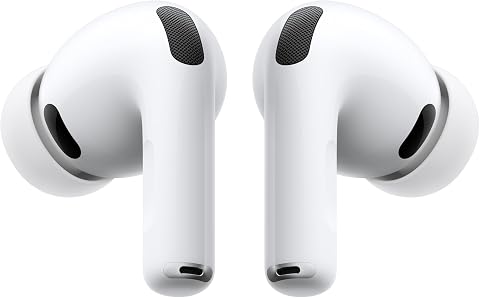
Apple AirPods Pro 3 Wireless Earbuds with Active Noise Cancellation
- ✔ Noise Cancellation: Active, up to 2x more than AirPods Pro 2
- ✔ Battery Life: Up to 8 hrs (ANC on), up to 10 hrs (Transparency)
- ✔ Ear Tip Sizes: 5

Soundcore P30i by Anker Noise Cancelling Wireless Earbuds
- ✔ ANC: Adaptive, up to 42dB
- ✔ Driver Size: 10mm with BassUp
- ✔ Battery Life: 10 hrs (6 with ANC); 45 hrs with case (25 with ANC)

JBL Vibe Beam 2 Noise Cancelling Earbuds – Black
- ✔ Driver Size: 8mm dynamic drivers
- ✔ Noise Cancelling: Active with Smart Ambient
- ✔ Battery Life: 10 hrs per charge, 40 hrs total with case (ANC off)
Difficulty: Beginner | Time: 20-30 minutes
What You’ll Need
Tools & Materials:
- Wireless earbuds with active noise cancellation (and their charging case)
- The USB charging cable that came with the earbuds (or a compatible one)
- A USB power adapter, computer port, or wireless charging pad
- A smartphone, tablet, or computer with Bluetooth
- The manufacturer’s companion app, if one exists (free download from your device’s app store)
Knowledge:
- Basic ability to navigate your phone’s settings menu and app store
- Ability to install and open a mobile app
- Familiarity with placing small objects in your ears safely
Before starting, locate the model name of your earbuds — it is printed on the box and usually inside the charging case lid or on the bottom of the case. You will need this to find the correct companion app and to search for specific control instructions if anything differs from this guide. Keep the manual or quick-start card that came in the box nearby.
Apple AirPods Pro 3 Wireless Earbuds with Active Noise Cancellation
If noise cancellation is the entire reason you’re shopping, the AirPods Pro 3 set the ceiling in this lineup. Apple claims up to 2x more noise removal than the AirPods Pro 2, and that advantage is exactly what separates them from the Soundcore P30i and JBL Vibe Beam 2, whose adaptive ANC is competent but built to a budget. For frequent flyers, commuters, and open-office dwellers, that difference is the whole purchase decision.Beyond raw cancellation, this model does things its two rivals simply can’t. Heart rate sensing supports up to 50 workout types, replacing a wrist strap for many runners, and five ear tip sizes (versus three from JBL) make a proper seal — the foundation of good ANC — far easier to achieve. Battery life is honest, too: up to 8 hours with ANC actively on, which beats the P30i’s 6 hours per charge under the same conditions.The tradeoff is ecosystem. Live Translation, Workout Buddy, and the hearing health features require Apple devices, so Android buyers would be paying a premium for hardware they can’t fully use — the P30i is the smarter cross-platform choice. Compared with the Vibe Beam 2, the AirPods also demand a real step up in investment for benefits that only matter if you live in Apple’s world.
Pros:
- Best-in-class ANC — up to 2x more noise removal than AirPods Pro 2
- Built-in heart rate sensing covering up to 50 workout types
- 8 hours of listening with ANC on, up to 10 in Transparency mode
- Five ear tip sizes for a secure, personalized fit
Cons:
- Live Translation and Workout Buddy require Apple devices
- Smart features are largely useless outside the Apple ecosystem
- Real-world performance can’t yet be cross-checked against long-term user feedback
Best for: iPhone users who want the strongest available noise cancellation and bonus fitness tracking in one device
Not ideal for: Android users, who lose access to most of the features that justify the premium
Bottom line: The strongest noise canceller here by a wide margin — provided you own an iPhone to unlock everything you’re paying for.
“The strongest noise canceller here by a wide margin — provided you own an iPhone to unlock everything you’re paying for.”
Soundcore P30i by Anker Noise Cancelling Wireless Earbuds
The Soundcore P30i prove you don’t need a flagship budget to get adaptive ANC up to 42dB that genuinely adapts to your surroundings. While the AirPods Pro 3 cancel more noise outright, the P30i close more of the gap than their price suggests — and unlike Apple’s offering, every feature works identically whether you pair to an iPhone or an Android phone.Where this model outmaneuvers both rivals is endurance and convenience. With ANC on, you still get 25 total hours with the case — comfortably ahead of what most budget ANC earbuds manage — and a 10-minute charge buys 2 hours of playback. The genuinely clever differentiator, though, is the charging case that doubles as a phone stand. Neither Apple nor JBL offers anything like it, and it turns the P30i into an accidental travel kit: watch a video hands-free on a plane tray table while your case holds the screen.The honest tradeoffs: per-charge battery drops from 10 hours to 6 with ANC engaged, and the 10mm BassUp-tuned drivers prioritize punchy, bass-heavy sound over the more balanced presentation JBL fans might expect from the Vibe Beam 2’s signature tuning. If you want maximum ANC per dollar with no ecosystem strings attached, this pick makes the most sense.
Pros:
- Adaptive ANC up to 42dB with transparency mode
- Charging case doubles as a hands-free phone stand
- 25 hours total playback with ANC on; 10-min charge = 2 hrs
- Full app support with EQ modes, adjustable ANC, and OTA updates
Cons:
- Battery life drops noticeably with ANC enabled (10 hrs to 6)
- Bass-forward tuning won’t suit listeners who want neutral sound
- No wired listening option
Best for: Cross-platform buyers who want strong adaptive ANC, long endurance, and everyday convenience at a mid-range price
Not ideal for: Audiophiles who prefer a neutral, reference-style tuning over boosted bass
Bottom line: The smartest balance of ANC strength, battery life, and price in this lineup — with a phone-stand case nobody else offers.
“The smartest balance of ANC strength, battery life, and price in this lineup — with a phone-stand case nobody else offers.”
JBL Vibe Beam 2 Noise Cancelling Earbuds – Black
The JBL Vibe Beam 2 are the entry point of this lineup, and they earn it by doing the fundamentals well rather than chasing the AirPods’ feature list. ANC is present and functional, but the real differentiator is Smart Ambient — an adjustable transparency mode that lets you dial in exactly how much of the outside world reaches your ears. Compared with the P30i’s more binary ANC/transparency toggle, that granularity is genuinely useful if you cycle between quiet offices and busy streets.JBL also wins the connectivity contest outright: pairing with up to 8 Bluetooth devices means seamless switching between a laptop, phone, and tablet without re-pairing — something neither rival matches. The 8mm Pure Bass drivers deliver the brand’s signature warm, bass-driven sound, and four microphones hold up on calls in noisy environments, matching the P30i’s mic count.The catch is battery honesty. That 40-hour total figure only applies with ANC switched off; enable cancellation and endurance falls considerably, closing the gap with — or behind — the Soundcore. There’s also no wireless charging. Still, for a first pair of ANC earbuds or a backup set, this model is better suited to the job than either pricier option.
Pros:
- ANC with adjustable Smart Ambient for granular awareness control
- Bluetooth multipoint pairing with up to 8 devices
- Fast charging: 10 minutes = 3 hours of playback
- Four mics for clear calls in noisy environments
Cons:
- 40-hour battery claim only holds with ANC off
- No wireless charging
- Only three ear tip sizes, limiting fit options for some ears
Best for: First-time ANC buyers and multitaskers who want adjustable ambient control and multi-device pairing at an entry price
Not ideal for: Travelers who need all-day ANC endurance on a single charge cycle
Bottom line: The most affordable route into adjustable ANC, with best-in-lineup multipoint pairing — as long as you accept shorter ANC-on battery life.
“The most affordable route into adjustable ANC, with best-in-lineup multipoint pairing — as long as you accept shorter ANC-on battery life.”
As an Amazon Associate we earn from qualifying purchases.
Before You Start
Do not skip the initial charge. Many earbuds ship with a partial battery, but some arrive nearly empty, and pairing can fail or behave erratically on a low battery. Give the case and earbuds at least 15–20 minutes on charge before you begin.
Clean and dry your ears and hands. Moisture or earwax on the earbuds’ sensors can prevent them from detecting when they are in your ears, which blocks pairing and ANC activation. Never insert wet earbuds into your ears.
Turn off other Bluetooth audio devices nearby (an old pair of headphones, a car stereo in range). This prevents your phone from trying to connect to the wrong device during pairing.
Safety note: Do not use noise cancellation in situations where you must hear your surroundings — traffic, train platforms, construction zones, or while operating machinery. Most earbuds offer a transparency or ambient mode for those situations, covered in Step 6.
Step-by-Step Instructions
Step 1: Charge the case and earbuds
Connect the charging case to power using the included cable. Place both earbuds inside the case and close the lid. Watch the indicator light on the front or inside of the case until it glows or blinks to show charging status. Leave them charging while you move to the next step.
Tip: Most cases use USB-C; older or budget models may use micro-USB, and some support wireless charging by laying the case flat on a Qi pad. Check the port on the back of the case if the included cable does not fit.
Check: The case’s indicator light is lit (usually amber or red while charging, green or white when full).
Step 2: Install the manufacturer’s companion app
Open the App Store (iPhone) or Google Play Store (Android) on your phone and search for your earbud brand’s app — for example, “Sony Headphones Connect,” “Bose Music,” “Galaxy Wearable,” or “Soundcore.” Install the app, then open it and sign in or skip sign-in if prompted. If your earbuds have no companion app, skip this step; all core functions will be available through on-earbud controls.
Tip: The companion app is where firmware updates, ANC strength settings, and ear-tip fit tests live. Installing it now saves troubleshooting later.
Check: The app opens to a home screen without an error message.
Step 3: Put the earbuds into pairing mode
Take both earbuds out of the case and look for a blinking white or blue light on each earbud — most models enter pairing mode automatically the first time. Press and hold the button on the case (or the touch surface of each earbud) for 3–8 seconds until the light flashes if nothing blinks after 10 seconds. For AirPods, keep the lid open and press the small round button on the back of the case until the front light flashes white.
Tip: Pairing mode typically lasts about two minutes. If it times out, return the earbuds to the case, wait five seconds, and take them out again.
Check: A light on the earbuds or case is blinking, indicating the earbuds are discoverable.
Step 4: Pair the earbuds with your phone or computer
Open Settings on your phone, tap Bluetooth, and toggle it on if it is not already on. Tap your earbuds’ name in the list of available devices (for example, “WF-1000XM5” or “Soundcore Liberty 4”). On a Windows PC, go to Settings > Bluetooth & devices > Add device > Bluetooth and select the earbuds. On a Mac, open System Settings > Bluetooth and click Connect next to the earbuds’ name. Accept any pairing confirmation prompt that appears.
Tip: If your phone shows an on-screen card or pop-up animation when the earbuds come near (common with AirPods on iPhone and Galaxy Buds on Samsung phones), tap Connect on that card — it completes setup in one tap.
Check: The earbuds appear in the Bluetooth list labeled “Connected,” and you hear a pairing confirmation tone in one or both ears.
Step 5: Get a proper ear-tip seal
Insert each earbud with the pre-installed medium silicone tips, rotating it slightly forward until it sits snugly. Tug lightly on your earlobe to open the ear canal while inserting if needed. Check the fit: a good seal should feel like a light plugging sensation with no pain and should not loosen when you move your jaw or walk. Swap in the small or large tips from the box if music sounds thin, bass is weak, or ANC seems ineffective, and repeat until you find the pair that seals without discomfort.
Tip: Many companion apps include an ear-tip fit test (often called “Fit Test” or “Check the fit of your earbuds”). Run it — it uses an in-ear measurement to tell you objectively whether each side seals properly.
Check: Bass sounds full, outside noise is noticeably muffled even before ANC is on, and the fit test (if available) passes on both ears.
Step 6: Turn on active noise cancellation
Activate ANC using one of three methods, depending on your model: (1) press and hold the stem or touch-and-hold the surface of one earbud until you hear a chime or voice announcement; (2) open the companion app and set the noise control mode to “Noise Cancellation”; or (3) on iPhone, open Control Center, press and hold the volume slider, and tap Noise Cancellation. Cycle through the modes — usually Off, Transparency/Ambient, and ANC — until ANC is active.
Tip: In the companion app, look for adjustable ANC strength. Medium or low settings reduce the pressure or “suction” sensation some people feel with full-strength ANC.
Check: Constant background noise such as a fan, refrigerator hum, or air conditioning drops sharply the moment ANC activates. Most models also play a short chime when the mode changes.
Step 7: Test both earbuds and run a firmware update
Play a song or video and confirm audio comes from both earbuds at proper volume. Pause and resume playback using the touch controls to confirm they respond. Open the companion app, look for a Firmware or Update section, and install any available update with the earbuds at 50% battery or more and the phone nearby. Updates fix pairing bugs and improve ANC performance.
Tip: Do not close the case or walk away from the phone during a firmware update — an interrupted update can leave the earbuds unusable until reset.
Check: Both earbuds play audio, touch controls work, and the app reports firmware is up to date.
Step 8: Practice switching modes and learn the controls
Practice the touch or button gestures for two minutes: tap once to play/pause, double-tap to skip forward, triple-tap to skip back, and press-and-hold to switch between ANC and transparency. Test transparency mode and confirm you can clearly hear your own voice and nearby conversation with the earbuds still in. Check which gestures your model uses, either from the quick-start card or the companion app’s control customization screen.
Tip: Remap gestures in the app if the defaults are awkward — for example, assigning ANC toggle to a single press on one earbud.
Check: You can switch between ANC, transparency, and off without looking at the app.
Common Mistakes to Avoid
- Skipping the ear-tip fit step and judging ANC as “weak.” — Run the fit test or try all included tip sizes. Noise cancellation only works well when the ear canal is sealed; even the best ANC cannot compensate for a loose tip.
- Pairing with the earbuds’ Bluetooth entry instead of the case’s, or connecting to only one earbud. — Always pair with the single device name listed in Bluetooth settings, not separate left/right entries. If both ears do not play, return both earbuds to the case for 10 seconds, then take them out together.
- Leaving ANC on and failing to hear traffic, announcements, or coworkers. — Build the habit of switching to transparency mode before walking outside, cycling, or entering conversations. Assign the mode switch to your easiest gesture.
- Interrupting a firmware update by closing the case or leaving Bluetooth range. — Keep the case open, the phone within a meter, and the earbuds above 50% charge for the entire update.
Troubleshooting
Problem: The earbuds do not appear in the Bluetooth list.
Solution: Confirm the earbuds are in pairing mode (blinking light). On your phone, tap the settings gear next to any old entry for these earbuds and choose Forget/Unpair, then re-enter pairing mode. Move away from other Bluetooth devices and try again.
Problem: Only one earbud connects or plays audio.
Solution: Place both earbuds in the case, close the lid, wait 10 seconds, and take both out at the same time. If the problem persists, perform a factory reset — usually a 10-second hold of the case button or a reset option in the app — then re-pair from scratch.
Problem: ANC seems ineffective or you hear a hiss or wind noise.
Solution: Check the ear-tip seal first (the most common cause). Remove any wax from the mesh openings with a dry, soft brush. In the app, lower ANC strength if wind noise is the issue, or switch to a mode labeled “wind noise reduction” if available.
Problem: Audio stutters or drops out during calls or while walking.
Solution: Keep your phone on the same side of your body as the primary earbud (usually the right), avoid walls and crowded Wi-Fi areas, and update firmware. Disable other Bluetooth devices paired to your phone, and if problems continue, unpair and re-pair the earbuds.
What Success Looks Like
Setup is complete when all of the following are true: both earbuds sit comfortably with a sealed fit and pass the fit test if your app offers one; they connect automatically within a few seconds of being taken out of the case; audio plays from both ears at balanced volume; pressing and holding an earbud (or using the app) switches between noise cancellation, transparency, and off, each confirmed by a chime; and with ANC on, steady background noise like a fan or HVAC system drops to a faint level. You should be able to carry on this verification in under a minute without opening any menus.
Next Steps
Establish a few habits to keep the earbuds working well. Wipe the earbuds and mesh openings with a dry cloth after each use and never charge them wet. Clean the charging contacts inside the case monthly with a dry cotton swab. Check the companion app every month or two for firmware updates. Replace silicone tips when they stiffen, crack, or lose their shape — third-party foam tips are a common upgrade for comfort and isolation. If battery life drops noticeably after a year or more, contact the manufacturer about battery service before replacing the whole set. Finally, if you plan to use the earbuds for calls, test the microphones in a quiet room and a noisy one to learn how you sound to others and whether your model’s call noise reduction suits your environment.
Frequently Asked Questions
Does noise cancellation work without music playing?
Yes. Active noise cancellation runs independently of audio playback — keep the earbuds in with ANC on and no music, and low-frequency noise such as airplane engine rumble, fans, and traffic hum will still be reduced. Mid and high frequencies (speech, sudden sounds) are only partially blocked, which is why a good ear-tip seal matters.
Why do my ears feel pressure or “suction” with ANC on?
This is a normal sensation caused by how ANC alters low-frequency sound in the ear canal, and most people adjust to it within days. If it bothers you, lower the ANC strength in the companion app, switch to transparency mode periodically, or try smaller ear tips.
Can I pair the earbuds with two devices at once?
Many mid-range and premium models support multipoint, which keeps a connection to two devices (such as a laptop and phone) simultaneously. Enable it in the companion app if available. Note that on some models enabling multipoint slightly reduces battery life or prevents using one earbud solo.
How long should the battery last with ANC on?
Typical true wireless earbuds deliver 4 to 9 hours per charge with ANC active, plus 2 to 4 additional full charges from the case. ANC typically costs 30–60 minutes of playback time compared to having it off. Full case recharges take 1.5 to 3 hours.
Is it safe to sleep with noise-cancelling earbuds in?
It is generally not recommended: pressure on the ear canal for hours can cause soreness, batteries generate slight heat, and you may miss alarms or emergency sounds. If you want sleep audio, use earbuds specifically designed for sleep, which are flat, soft, and low-power.
Fall Picks
fall essentials
As an affiliate, we earn on qualifying purchases.