
For most home studios, I’d start with the JBL 305P MkII pair: its 5-inch format makes a strong all-around choice for nearfield listening, though it needs desk and room space. The Yamaha HS5 pair is a compelling alternative for buyers who value a clear, revealing presentation, while the PreSonus Eris 3.5 pair suits compact desks and tighter setups. The main tradeoffs are speaker size and bass reach, accuracy versus convenience features, and whether a listing includes a true pair or a single speaker. My ranking weighs those differences against room fit, connectivity, and practical setup needs. Read on for all 15 picks and a guide to choosing the right pair for your workspace.

Get the latest gadgets delivered free with Prime
- Fast, free delivery on millions of items
- Prime Video, Amazon Music and more included
- Member-only deals all year
Complete the kit



Key Takeaways
- The JBL 305P MkII pair is my best overall pick for buyers who can accommodate 5-inch monitors; check the listing carefully, since another JBL entry is explicitly a single speaker.
- Yamaha HS5 and HS4 serve different room needs: HS5 is the larger nearfield choice, while the paired HS4 is better suited to a tighter workspace.
- PreSonus Eris models cover several desk sizes, from the compact Eris 3.5 to the 4.5 and E5 options; confirm whether an E5 listing is for one monitor or a pair.
- Bluetooth and tone controls favor convenience, not necessarily studio workflow: Pioneer DJ DM-50D-BT, Ortizan C7, and Mackie CR3.5 offer features useful beyond mixing, while buyers should still check wired inputs and intended use.
- Small 3.5-inch pairs make more sense for close listening and limited space than for judging deep bass; larger 5-inch models take more room and may need more careful placement.
| PreSonus Eris 3.5 Powered Studio Monitors, Stereo Pair |  | Best Compact Pick | Type: Active near-field studio monitors | Configuration: Stereo pair | Amplification: 50 watts | VIEW ON AMAZON | See Our Full Breakdown |
| Yamaha HS5 Powered Studio Monitors, Pair |  | Best for Accurate Mixing | Quantity: 2 monitors | Type: Powered, bi-amplified, two-way near-field studio monitors | Drivers: 5-inch cone woofer; 1-inch dome tweeter | VIEW ON AMAZON | See Our Full Breakdown |
| Pioneer DJ DM-50D-BT 5-Inch Active Monitor Speakers with Bluetooth, Pair |  | Best for DJ and Casual Listening | Model: DM-50D-BT | Configuration: Active stereo monitor pair | Drivers: 5-inch woofer; 0.75-inch tweeter | VIEW ON AMAZON | See Our Full Breakdown |
| Edifier MR3 Powered Studio Monitor Speakers |  | Best Connectivity and App Control | Model: MR3 | Configuration: Powered stereo monitor pair | Output power: 18 W × 2 RMS; 42 W maximum | VIEW ON AMAZON | See Our Full Breakdown |
| PreSonus Eris E5 2-Way 5.25-Inch Nearfield Studio Monitor |  | Best for a More Capable Wired Studio | Model: Eris E5 | Speaker type: Two-way near-field studio monitor | Woofer and tweeter: 5.25-inch woven-composite woofer; 1-inch silk-dome tweeter | VIEW ON AMAZON | See Our Full Breakdown |
| Ortizan C7 Powered Studio Monitor Speakers, Pair, Bluetooth 5.3, Black |  | Best for Flexible Desktop Connections | Speaker type: Powered studio monitor | Quantity: Pair | Bluetooth: Version 5.3 | VIEW ON AMAZON | See Our Full Breakdown |
| PreSonus Eris E5 Pair of 5.25-Inch 2-Way Nearfield Studio Monitors |  | Best for Nearfield Mixing | Model: Eris E5 Pair | Quantity: 2 monitors | Woofer: 5.25-inch woven composite | VIEW ON AMAZON | See Our Full Breakdown |
| JBL Professional 305P MkII 5-Inch Powered Studio Monitor Speaker, Single, Black |  | Best Single Monitor for Expanding a Pair | Speaker type: Powered studio monitor | Quantity: 1 speaker | Speaker size: 5 inches | VIEW ON AMAZON | See Our Full Breakdown |
| M-Audio BX3 3.5-Inch Wired Studio Monitors, Pair |  | Best Value Desktop Pair | Configuration: Stereo pair with one active and one passive speaker | Woofer: 3.5-inch Kevlar | Tweeter: 1-inch silk dome | VIEW ON AMAZON | See Our Full Breakdown |
| Ortizan C7 Powered Studio Monitor Speakers, Pair, White |  | Best White Compact Pair | Speaker type: Powered studio monitors | Quantity: Pair | Color: White | VIEW ON AMAZON | See Our Full Breakdown |
| Mackie CR3.5 Powered Studio Monitors, Pair, 3.5-Inch Woofers, Tone Control, Black | 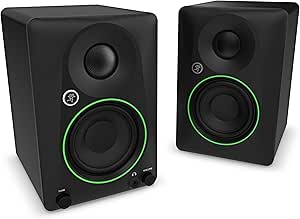 | Best for Flexible Desktop Listening | Speaker type: Powered studio monitor pair | Woofer: 3.5 inches | Tweeter: 1 inch | VIEW ON AMAZON | See Our Full Breakdown |
| PreSonus Eris 4.5 2-Way Near-Field Studio Monitor Speakers (Pair) |  | Best for Balanced Near-Field Work | Speaker type: 2-way near-field studio monitors, pair | Woofer: 4.5-inch woven-composite | Tweeter: 1-inch silk-dome | VIEW ON AMAZON | See Our Full Breakdown |
| Yamaha HS4 Powered Studio Monitors, Black, Pair |  | Best Compact Pick for Editing | Configuration: 2-way powered monitor pair | Woofer: 4.5-inch cone | Tweeter: 1-inch dome | VIEW ON AMAZON | See Our Full Breakdown |
| PreSonus Eris 3.5 Powered Desktop Studio Monitors, White, Pair |  | Best for a Small, Shared Desk | Configuration: Stereo pair | Amplification: 50 watts total; 25 watts per side | Frequency range: 80 Hz–20 kHz | VIEW ON AMAZON | See Our Full Breakdown |
| JBL 305P MkII 5-Inch 2-Way Powered Studio Monitor Speakers, Pair |  | Best for a Wider Listening Sweet Spot | Configuration: 2-way powered monitor pair | Woofer: 5 inches | Tweeter: 1 inch (25 mm) | VIEW ON AMAZON | See Our Full Breakdown |
| studio monitor speakers pair | Inputs | Tweeter | Dimensions | Woofer |
|---|---|---|---|---|
| PreSonus Eris 3.5 Powered Stud | Balanced TRS, RCA, front-panel aux | — | 5.5 × 6 × 8.3 inches | — |
| Yamaha HS5 Powered Studio Moni | XLR and TRS phone jack | — | — | — |
| Pioneer DJ DM-50D-BT 5-Inch Ac | — | — | 12.6 × 17.48 × 14.57 inches (D × W × H) | — |
| Edifier MR3 Powered Studio Mon | Balanced TRS, RCA, AUX, Bluetooth 5.4 | — | 6.9 × 12.1 × 16.2 inches | — |
| PreSonus Eris E5 2-Way 5.25-In | Balanced XLR and 1/4-inch; unbalanced RCA | — | — | — |
| Ortizan C7 Powered Studio Moni | USB, RCA, 3.5 mm AUX, 6.35 mm TRS | 0.75-inch silk dome | — | — |
| PreSonus Eris E5 Pair of 5.25- | Balanced XLR and 1/4-inch; unbalanced RCA | 1-inch silk dome | 7.7 × 7 × 10.2 inches | 5.25-inch woven composite |
| JBL Professional 305P MkII 5-I | Balanced XLR and 1/4-inch TRS | — | 9.9 × 7.3 × 11.75 inches | — |
| M-Audio BX3 3.5-Inch Wired Stu | 1/4-inch, 1/8-inch, and RCA | 1-inch silk dome | — | 3.5-inch Kevlar |
| Ortizan C7 Powered Studio Moni | RCA, 3.5 mm AUX, 6.35 mm TRS, USB | 0.75-inch silk dome | — | 3.5-inch carbon fiber |
| Mackie CR3.5 Powered Studio Mo | RCA, TRS | 1 inch | 7.1 x 5.5 x 8.1 inches | 3.5 inches |
| PreSonus Eris 4.5 2-Way Near-F | 1/4-inch TRS balanced, RCA unbalanced, 1/8-inch TRS stereo aux | 1-inch silk-dome | — | 4.5-inch woven-composite |
| Yamaha HS4 Powered Studio Moni | XLR/TRS combo, RCA, stereo mini | 1-inch dome | — | 4.5-inch cone |
| PreSonus Eris 3.5 Powered Desk | Balanced TRS, RCA, front-panel aux | 1 inch silk-dome | 6 x 5.5 x 8.3 inches (D x W x H) | 3.5 inches |
| JBL 305P MkII 5-Inch 2-Way Pow | XLR and 1/4-inch TRS | 1 inch (25 mm) | 9.9 x 7.3 x 11.75 inches (D x W x H) | 5 inches |
More Details on Our Top Picks
PreSonus Eris 3.5 Powered Studio Monitors, Stereo Pair
The PreSonus Eris 3.5 is the space-conscious choice here: its small cabinets and included stereo pair fit desktop editing, gaming, and everyday listening without requiring separate amplification. Its front-panel aux and headphone jack make quick device changes convenient, while high- and low-frequency tuning lets you adjust the presentation to your room. Compared with the larger Yamaha HS5, these monitors take up less space and offer more casual-use connections, but their 3.5-inch woofers and 80 Hz lower frequency limit provide less low-end reach. The 50-watt system suits close listening, not filling a large room or checking deep bass. I’d choose them for a compact, versatile workstation; skip them if bass-heavy production demands fuller low-frequency monitoring or you need Bluetooth.
Pros:- Complete stereo pair with 50 watts of built-in amplification
- Compact cabinets suit crowded desks and near-field listening
- Balanced TRS, RCA, and front-panel aux inputs accommodate several sources
- Acoustic tuning controls and front headphone output add setup flexibility
Cons:- 3.5-inch woofers and an 80 Hz lower limit offer limited deep-bass monitoring
- No Bluetooth connectivity is listed
- Lower output and scale are less suited to larger listening spaces
Best for: Desktop creators, gamers, and listeners who want a complete, compact wired stereo pair with easy headphone access.
Not ideal for: Producers mixing deep bass or working in larger rooms, and anyone who needs wireless Bluetooth playback.
- Type:Active near-field studio monitors
- Configuration:Stereo pair
- Amplification:50 watts
- Frequency response:80 Hz–20 kHz
- Drivers:3.5-inch woven-composite woofer; 1-inch silk-dome tweeter
- Inputs:Balanced TRS, RCA, front-panel aux
- Controls and output:High- and low-frequency acoustic tuning; front volume control and headphone jack
- Dimensions:5.5 × 6 × 8.3 inches
Our verdict“Choose the Eris 3.5 for a small, flexible desktop setup, but pick the Yamaha HS5 if you need more low-frequency reach for production.”
Yamaha HS5 Powered Studio Monitors, Pair
The Yamaha HS5 earns its place for buyers who value a monitoring-focused presentation over everyday conveniences. Its bi-amplified design and 54 Hz–30 kHz response give this pair more stated frequency range than the compact PreSonus Eris 3.5, making it a stronger fit for production decisions that depend on hearing detail across the mix. Balanced and unbalanced XLR and TRS inputs also suit common studio interfaces. The tradeoff is a narrower use case: unlike the Pioneer DJ DM-50D-BT, the HS5 has no listed Bluetooth or casual mode switching, and its supplied data doesn’t mention acoustic tuning controls. Its 5-inch drivers still cannot replace a dedicated subwoofer when judging the deepest bass. I’d favor this pair for a wired studio desk, not a do-everything living-room setup.
Pros:- Sold as a pair of powered, bi-amplified monitors
- Designed for accurate, uncolored monitoring
- XLR and TRS inputs support balanced or unbalanced connections
- Stated 54 Hz–30 kHz response spans a broad monitoring range
Cons:- No Bluetooth connectivity is listed
- No acoustic tuning controls are specified in the supplied product data
- 5-inch woofers do not provide the deepest bass extension
Best for: Home-studio producers who want a wired, pair-matched near-field monitor setup with balanced interface connections.
Not ideal for: Listeners seeking Bluetooth, quick switching between production and DJ sound modes, or strong sub-bass without a subwoofer.
- Quantity:2 monitors
- Type:Powered, bi-amplified, two-way near-field studio monitors
- Drivers:5-inch cone woofer; 1-inch dome tweeter
- Frequency response:54 Hz–30 kHz
- Amplifier output:70 W per monitor (45 W LF + 25 W HF)
- Inputs:XLR and TRS phone jack
- Enclosure materials:MDF, polypropylene, and silk
- Weight:5.3 kg
Our verdict“Pick the HS5 for wired production monitoring and broad stated frequency response; choose the Pioneer DJ pair if wireless playback and listening modes matter more.”
Pioneer DJ DM-50D-BT 5-Inch Active Monitor Speakers with Bluetooth, Pair
The Pioneer DJ DM-50D-BT is the lineup’s clearest choice for someone splitting time between DJ practice, production, and wireless listening. Its switchable DJ and Production modes let one pair serve different tasks, while Bluetooth adds a convenient playback route that the wired Yamaha HS5 lacks. RCA and mini-jack inputs, a headphone socket, and level control round out a practical desktop setup. Compared with the Edifier MR3, it offers fewer listed connection types and no app-based sound adjustment, but its dedicated DJ/Production mode switch gives it a more purpose-built workflow. The tradeoff is that Bluetooth and flexible modes don’t replace detailed studio setup information: the supplied data gives no frequency response or amplifier power. Its sizable cabinet dimensions also make it less desk-friendly than the Eris 3.5.
Pros:- Bluetooth supports convenient wireless playback
- Switchable DJ and Production modes suit different listening tasks
- RCA and mini-jack inputs plus a headphone socket support desktop use
- Sold as a stereo pair with 5-inch woofers
Cons:- Corded power limits placement options
- Listed dimensions make this pair less suitable for small desks
- Supplied specifications do not state frequency response or amplifier output
Best for: Bedroom DJs and home producers who want one pair for wired monitoring, mode-switched listening, and Bluetooth playback.
Not ideal for: Buyers with very limited desk space or engineers who need frequency-response and amplifier-power specifications to guide a precise studio setup.
- Model:DM-50D-BT
- Configuration:Active stereo monitor pair
- Drivers:5-inch woofer; 0.75-inch tweeter
- Connectivity:Bluetooth, RCA, mini-jack
- Sound modes:DJ and Production
- Mounting:Tabletop
- Dimensions:12.6 × 17.48 × 14.57 inches (D × W × H)
- Weight:20.5 pounds
Our verdict“Choose the DM-50D-BT for a flexible DJ desk with Bluetooth and quick mode changes, but favor the Yamaha HS5 for a more explicitly specified production-focused setup.”
Edifier MR3 Powered Studio Monitor Speakers
The Edifier MR3 stands out for combining studio-style inputs with everyday wireless convenience. Balanced TRS, RCA, AUX, and Bluetooth 5.4 give this stereo pair more listed connection options than the Pioneer DJ DM-50D-BT, while app-based Music, Monitor, and Custom modes offer another way to shape listening. Its 3.5-inch drivers keep it closer to the compact PreSonus Eris 3.5 than to the 5-inch Yamaha HS5, though its stated 52 Hz lower response reaches below the Eris 3.5’s 80 Hz figure. That broader stated range doesn’t change the small-driver tradeoff: buyers seeking authoritative low bass should look at larger monitors or add a subwoofer. I’d pick the MR3 for a versatile, compact desk where app adjustments and multiple sources matter more than maximum output.
Pros:- TRS, RCA, AUX, and Bluetooth 5.4 cover wired and wireless sources
- App offers Music, Monitor, and Custom modes
- Listed 52 Hz–40 kHz frequency response
- Headphone output supports private listening
Cons:- 3.5-inch drivers limit deep-bass authority compared with larger monitors such as the Yamaha HS5
- Listed Bluetooth range is 10 meters
- Waterproofing is not supported
Best for: Desktop creators and everyday listeners who want a compact stereo pair with Bluetooth, balanced inputs, and app-selectable sound modes.
Not ideal for: Bass-focused producers or buyers who need high output for a large room rather than near-field listening.
- Model:MR3
- Configuration:Powered stereo monitor pair
- Output power:18 W × 2 RMS; 42 W maximum
- Frequency response:52 Hz–40 kHz
- Drivers:3.5-inch mid-low drivers; 1-inch tweeters
- Inputs:Balanced TRS, RCA, AUX, Bluetooth 5.4
- Peak sound pressure level:92.5 dB
- Dimensions:6.9 × 12.1 × 16.2 inches
Our verdict“Choose the MR3 for broad connectivity and app-based flexibility in a desktop pair, but look to the Yamaha HS5 for larger drivers and a more studio-focused wired setup.”
PreSonus Eris E5 2-Way 5.25-Inch Nearfield Studio Monitor
The PreSonus Eris E5 suits a wired studio where stronger output and room adjustment take priority over Bluetooth. Its 80-watt Class AB bi-amplification, 5.25-inch woofer, and acoustic tuning controls give it a more substantial setup than the compact Eris 3.5; XLR, 1/4-inch, and RCA inputs also make it easy to connect to common studio equipment. Compared with the Yamaha HS5, the E5 lists higher amplifier output and adds tuning controls, while the HS5 provides a clearer stated frequency-response range. That missing full response specification is a real limitation when comparing low-end expectations. This product listing describes one monitor, so buyers needing a stereo pair should confirm quantity or buy a matching second unit. I’d choose it for a configurable wired setup, not a ready-to-go wireless pair.
Pros:- 80-watt Class AB bi-amplification
- 5.25-inch woven-composite woofer and 1-inch silk-dome tweeter
- Balanced XLR and 1/4-inch inputs plus unbalanced RCA
- Acoustic tuning and built-in protection features support studio setup
Cons:- This listing describes a monitor rather than clearly confirming a pair
- Wired connectivity only; no Bluetooth is listed
- Supplied frequency-response information is incomplete
Best for: Home-studio producers building a wired monitoring setup who want a 5.25-inch driver, multiple input types, and acoustic tuning.
Not ideal for: Buyers who require a clearly listed stereo pair, Bluetooth, or complete frequency-response data before choosing monitors.
- Model:Eris E5
- Speaker type:Two-way near-field studio monitor
- Woofer and tweeter:5.25-inch woven-composite woofer; 1-inch silk-dome tweeter
- Amplifier:80-watt Class AB bi-amplification
- Maximum continuous SPL:102 dB
- Inputs:Balanced XLR and 1/4-inch; unbalanced RCA
- Controls and protection:Acoustic tuning controls; RF interference, over-temperature, and subsonic protection
- Warranty:1 year
Our verdict“Choose the Eris E5 for a higher-output, adjustable wired studio setup, but confirm you are buying two monitors if your roundup goal is a stereo pair.”
Ortizan C7 Powered Studio Monitor Speakers, Pair, Bluetooth 5.3, Black
I’d shortlist the black Ortizan C7 pair for a compact desk setup that needs more than one way to connect. Bluetooth 5.3 is handy for casual playback, while USB audio with a built-in 24-bit DAC and balanced TRS inputs let the same pair connect to a computer or compatible audio gear. That range makes it more adaptable for switching between editing, gaming, and everyday listening than the wired-only M-Audio BX3.
The tradeoff is size: 3.5-inch mid-bass drivers suit near-desktop listening, but buyers seeking a larger monitor format may prefer the 5.25-inch PreSonus Eris E5. The C7 also needs corded power, and the supplied details don’t give power or frequency-response figures to help set expectations. I’d pick it for a small workspace where connection flexibility matters more than a larger speaker platform.
Pros:- Bluetooth 5.3 plus USB, RCA, AUX, and balanced TRS inputs
- Built-in 24-bit DAC supports USB audio from a computer
- Compact stereo pair fits desktop studios and gaming setups
- Front headphone output provides a convenient listening connection
Cons:- 3.5-inch drivers are a smaller format than the PreSonus Eris E5’s 5.25-inch woofers
- Requires corded power, so placement still depends on an outlet
- Power and frequency-response figures are not provided
Best for: Desktop creators who want Bluetooth, USB, and balanced TRS connectivity in one compact stereo pair.
Not ideal for: Producers who need published power and frequency-response figures or prefer larger 5-inch-class monitors for their workspace.
- Speaker type:Powered studio monitor
- Quantity:Pair
- Bluetooth:Version 5.3
- Inputs:USB, RCA, 3.5 mm AUX, 6.35 mm TRS
- Mid-bass driver:3.5-inch carbon fiber
- Tweeter:0.75-inch silk dome
- DAC:24-bit
- Headphone output:Yes
- Color:Black
Our verdict“Choose the black Ortizan C7 if you want a compact monitor pair with unusually flexible wired and wireless connections for desktop use.”
PreSonus Eris E5 Pair of 5.25-Inch 2-Way Nearfield Studio Monitors
For a dedicated mixing desk, I’d put the PreSonus Eris E5 pair ahead of the smaller desktop options here. Its 5.25-inch woven composite woofers and 1-inch silk-dome tweeters form a larger nearfield setup than the Ortizan C7 or M-Audio BX3, while 80-watt Class AB bi-amplification gives the pair a clearly specified power platform. XLR, 1/4-inch, and RCA inputs also make it easier to connect to varied studio equipment.
The E5’s acoustic tuning controls are useful when desk or wall placement affects the sound, though they don’t make this a universal living-room speaker: it is built for nearfield monitoring. At 7.7 × 7 × 10.2 inches per listing and 11.6 pounds, it needs more room than the compact C7. I’d favor this pair when the workspace and mixing priorities justify the larger format.
Pros:- 5.25-inch woofers provide a larger monitor format than the Ortizan C7 and M-Audio BX3
- 80-watt Class AB bi-amplification is specified
- Acoustic tuning controls help adapt placement and room response
- Balanced XLR and 1/4-inch inputs plus unbalanced RCA
Cons:- Nearfield focus may not suit buyers seeking speakers for a broad room-listening setup
- Larger and heavier than compact 3.5-inch desktop pairs
- No Bluetooth or USB input is listed
Best for: Home-studio musicians and editors who mix at a desk and need 5.25-inch monitors, multiple input types, and room-tuning controls.
Not ideal for: Desk users with very limited space or buyers who want Bluetooth and USB playback built into the monitors.
- Model:Eris E5 Pair
- Quantity:2 monitors
- Woofer:5.25-inch woven composite
- Tweeter:1-inch silk dome
- Amplifier:80-watt Class AB bi-amplification
- Inputs:Balanced XLR and 1/4-inch; unbalanced RCA
- Maximum continuous SPL:102 dB
- Dimensions:7.7 × 7 × 10.2 inches
- Warranty:2 years
Our verdict“Choose the Eris E5 pair for a dedicated mixing desk where a larger woofer, acoustic tuning, and studio-standard inputs matter more than compact size.”
JBL Professional 305P MkII 5-Inch Powered Studio Monitor Speaker, Single, Black
The JBL 305P MkII stands apart in this group for one defining reason: this listing is for one speaker, not a stereo pair. That can suit a buyer replacing one monitor or building a matched setup in stages, but stereo monitoring requires two units. Compared with the PreSonus Eris E5 pair, the JBL listing offers an 82-watt Class-D amplifier in one cabinet and includes boundary EQ to help adjust low-frequency response when the speaker sits near a wall.
Its 5-inch woofer and balanced XLR and 1/4-inch TRS inputs make it a studio-oriented option, while the broad listening sweet spot can be useful when the listener shifts position. The catch is practical: buying this listing alone won’t provide stereo, unlike the M-Audio BX3 or Eris E5 bundles. I’d choose it for a matched replacement or a deliberate single-monitor purchase, not as a ready-to-use pair.
Pros:- 82-watt integrated Class-D amplification
- Balanced XLR and 1/4-inch TRS inputs
- Boundary EQ helps adjust low-frequency response near walls
- Designed for a broad listening sweet spot
Cons:- Sold as one speaker, so stereo use requires a second unit
- Less straightforward for buyers seeking a complete pair than the Eris E5 or BX3
- Not water resistant
Best for: Studio owners replacing one matching JBL monitor or buyers assembling a pair one unit at a time.
Not ideal for: Anyone expecting a stereo pair in one purchase; this listing contains a single speaker.
- Speaker type:Powered studio monitor
- Quantity:1 speaker
- Speaker size:5 inches
- Amplifier power:82 watts
- Inputs:Balanced XLR and 1/4-inch TRS
- Controls:Adjustable volume, input-sensitivity switch, trim switch, boundary EQ
- Dimensions:9.9 × 7.3 × 11.75 inches
- Weight:10.1 pounds
- Warranty:5 years
Our verdict“Buy this JBL if you need one monitor for a matching replacement or staged setup, but choose a pair listing if you need stereo immediately.”
M-Audio BX3 3.5-Inch Wired Studio Monitors, Pair
I’d steer desktop creators toward the M-Audio BX3 pair when they want a complete, wired stereo setup with practical controls and useful accessories. The 3.5-inch Kevlar woofers and silk-dome tweeters keep the speakers in the same compact class as the Ortizan C7, but the BX3 adds front-panel AUX and headphone connections for quick switching at a desk. High and low EQ dials also give users a way to adjust the sound without relying only on software settings.
Unlike the C7, the BX3 has no listed Bluetooth or USB input, so it suits a cable-based setup rather than one that alternates between wireless playback and production gear. Its wired inter-speaker connection also limits placement flexibility. The included cables and MPC Beats software make it a convenient desktop starter, while the larger PreSonus Eris E5 is a better fit for buyers who can accommodate 5.25-inch monitors.
Pros:- Stereo pair with 3.5-inch Kevlar woofers and 1-inch silk-dome tweeters
- Front-panel AUX input and headphone output simplify desktop use
- High and low EQ dials and a left/right active-speaker switch
- Includes interconnect and audio cables, foam feet, and MPC Beats software
Cons:- No Bluetooth or USB input is listed, unlike the Ortizan C7
- Wired connections limit placement flexibility
- 3.5-inch woofer format is smaller than the PreSonus Eris E5’s 5.25-inch drivers
Best for: New desktop producers and gamers who want a complete wired stereo pair with front-panel headphone and AUX access.
Not ideal for: Buyers who need Bluetooth, USB audio, or the larger monitor format of the PreSonus Eris E5.
- Configuration:Stereo pair with one active and one passive speaker
- Woofer:3.5-inch Kevlar
- Tweeter:1-inch silk dome
- Power:120W
- Inputs:1/4-inch, 1/8-inch, and RCA
- Front connections:1/8-inch AUX input and headphone output
- Controls:High and low EQ dials; left/right active speaker position switch
- Enclosure material:Engineered wood and Kevlar
- Included accessories:Foam feet, speaker interconnect cable, AUX cable, RCA cable, MPC Beats software
Our verdict“Choose the BX3 for a compact, ready-to-connect wired desktop pair with useful front-panel access and included setup accessories.”
Ortizan C7 Powered Studio Monitor Speakers, Pair, White
The white Ortizan C7 offers the same connection flexibility as its black counterpart, so I’d choose this version for a compact desk where a lighter finish better suits the setup. Its Bluetooth 5.3, USB audio with a 24-bit DAC, RCA, AUX, and balanced TRS cover both casual playback and connections to compatible studio equipment. Against the wired M-Audio BX3, the C7 is the more adaptable choice for a desk shared by a computer, phone, and audio gear.
This is a finish-led alternative, not a step up in driver size: it retains 3.5-inch woofers and 0.75-inch silk-dome tweeters. Buyers wanting a larger nearfield pair should compare it with the 5.25-inch PreSonus Eris E5 instead. The listed details omit power and frequency-response figures, and the speakers still need corded power. I’d select the white C7 for style and input variety, not for a larger monitoring platform.
Pros:- Bluetooth 5.3 alongside USB, RCA, AUX, and balanced TRS inputs
- Built-in 24-bit DAC supports USB audio
- Compact pair with a white finish for desktop setups
- Front-panel headphone output is listed
Cons:- 3.5-inch woofers are smaller than those in the PreSonus Eris E5
- Power and frequency-response figures are not provided
- Requires corded power despite Bluetooth playback
Best for: Desktop musicians and creators who want Bluetooth, USB, and balanced inputs in a compact pair with a white finish.
Not ideal for: Buyers who need published power or frequency-response specifications, or want a larger woofer for a dedicated mixing desk.
- Speaker type:Powered studio monitors
- Quantity:Pair
- Color:White
- Woofer:3.5-inch carbon fiber
- Tweeter:0.75-inch silk dome
- Bluetooth:Version 5.3
- Inputs:RCA, 3.5 mm AUX, 6.35 mm TRS, USB
- DAC:24-bit
- Audio output:Front-panel headphone output
Our verdict“Choose the white C7 if you want the Ortizan’s broad input options in a compact pair that suits a light-colored desktop setup.”
Mackie CR3.5 Powered Studio Monitors, Pair, 3.5-Inch Woofers, Tone Control, Black
The Mackie CR3.5 is a sensible pick for a desk that serves both music work and everyday listening. Its tone control lets you adjust the sound for different uses, while the location switch helps adapt bass response when you move the pair between a desktop and a bookshelf. Included isolation pads and cables make setup more straightforward than with a bare-bones pair. Compared with the larger PreSonus Eris 4.5, the CR3.5 takes up less room but has smaller 3.5-inch woofers, so it is less suited to buyers who want stronger low-frequency output or to fill a larger space. RCA and TRS connections add flexibility, though the product data does not list a headphone output. I’d choose it for a compact, adaptable setup, not as a substitute for larger monitors in a spacious studio.
Pros:- Tone control supports different listening and production uses.
- Location switch helps adapt bass response to desktop or bookshelf placement.
- Isolation pads and connection cables are included.
- RCA and TRS inputs suit a range of desktop audio sources.
Cons:- The 3.5-inch woofers are a limitation for fuller bass and larger rooms.
- No headphone output is listed in the supplied product data.
Best for: Desktop listeners who switch between casual playback and basic music work, and want placement adjustments in a compact pair.
Not ideal for: Producers working in larger rooms or buyers who need more low-frequency reach than compact 3.5-inch monitors can provide.
- Speaker type:Powered studio monitor pair
- Woofer:3.5 inches
- Tweeter:1 inch
- Maximum output power:50 watts
- Inputs:RCA, TRS
- Dimensions:7.1 x 5.5 x 8.1 inches
- Placement:Tabletop
- Included accessories:Isolation pads, 1/8-inch to 1/8-inch cable, 1/8-inch to RCA cable, speaker wire
Our verdict“Choose the Mackie CR3.5 for a flexible small-desk setup; choose the PreSonus Eris 4.5 if you can give a larger pair more space.”
PreSonus Eris 4.5 2-Way Near-Field Studio Monitor Speakers (Pair)
The Eris 4.5 suits a home producer who wants a larger desktop monitor without stepping up to a 5-inch model such as the JBL 305P MkII. Its 4.5-inch woven-composite woofers and 50 watts of total Class AB amplification make it a more substantial near-field option than compact 3.5-inch pairs, while high- and low-frequency controls help tailor playback to the room. The front-panel aux input and headphone output are practical when a computer, phone, or headphones are part of the same workspace. Compared with the Mackie CR3.5, this pair gives you larger drivers and room tuning, but it occupies a larger footprint. Its low-frequency output may still leave bass-focused producers wanting a separate subwoofer, which is sold separately. I’d shortlist it for close listening and mixed media, rather than a room that needs high output.
Pros:- 4.5-inch woofers provide a larger-driver option than compact 3.5-inch pairs.
- High- and low-frequency controls support room adjustment.
- Balanced TRS, RCA, and stereo aux inputs accommodate different sources.
- Front-panel headphone output and aux input are convenient at a desk.
Cons:- A separate subwoofer is needed for greater low-frequency output.
- Larger cabinets take up more desk space than the Mackie CR3.5 or PreSonus Eris 3.5.
Best for: Home producers and multimedia creators who want a 4.5-inch near-field pair with both studio and convenient desktop connections.
Not ideal for: Bass-focused producers seeking extended low frequencies from the speakers alone, or desk owners with very limited space.
- Speaker type:2-way near-field studio monitors, pair
- Woofer:4.5-inch woven-composite
- Tweeter:1-inch silk-dome
- Amplification:50 watts total Class AB; 25 watts per side
- Inputs:1/4-inch TRS balanced, RCA unbalanced, 1/8-inch TRS stereo aux
- Room controls:High- and low-frequency tuning
- Headphone output:Front-panel output with built-in headphone amplifier
- Power-saving mode:Activates after 40 minutes idle
Our verdict“Pick the Eris 4.5 for flexible, close-range production and media listening when you have room for larger cabinets.”
Yamaha HS4 Powered Studio Monitors, Black, Pair
The Yamaha HS4 is aimed at producers and video editors who need compact, adjustable monitors with studio-friendly connections. Its 4.5-inch woofer and 1-inch dome tweeter offer a larger-driver format than the Mackie CR3.5, while the HS4’s room control and high-trim response controls give you ways to compensate for a challenging placement. XLR/TRS combo, RCA, and stereo mini inputs make it easier to connect either studio gear or consumer devices. Compared with the PreSonus Eris 4.5, the HS4 also fits the near-field desktop role, but its listed maximum output power is 26 watts, so I would favor it for close listening rather than a loud or expansive setup. The supplied cables and anti-slip pads are useful additions; the tradeoff is that the product data gives less power headroom than some alternatives in this roundup.
Pros:- Compact format works well on limited desks.
- Room control and high-trim controls allow response adjustments.
- XLR/TRS combo, RCA, and stereo mini inputs offer connection flexibility.
- Speaker cable, stereo mini-to-RCA cable, and anti-slip pads are included.
Cons:- Listed maximum output power is 26 watts, limiting its appeal for louder playback.
- The product data does not specify a headphone output.
Best for: Video editors and home producers who need a compact 4.5-inch pair, room-response controls, and connections for both studio and consumer gear.
Not ideal for: People who need high output for a large room or want the greater listed amplification of the PreSonus Eris 4.5.
- Configuration:2-way powered monitor pair
- Woofer:4.5-inch cone
- Tweeter:1-inch dome
- Frequency response:60 Hz–22 kHz (-10 dB)
- Maximum output power:26 watts
- Inputs:XLR/TRS combo, RCA, stereo mini
- Controls:Room control and high-trim response
- Included accessories:Speaker cable, stereo mini-to-RCA cable, anti-slip pads
Our verdict“Choose the HS4 for compact editing and production at close range, but favor the Eris 4.5 if you want more listed amplification.”
PreSonus Eris 3.5 Powered Desktop Studio Monitors, White, Pair
The white Eris 3.5 makes the most sense when desk space and day-to-day convenience matter as much as production use. Its 3.5-inch woofers keep the pair compact, while high- and low-frequency tuning lets you adjust their response for the room. Balanced TRS and RCA inputs handle common studio and consumer sources; the front-panel aux input and headphone jack are especially useful when the speakers share a desk with a computer or console. Compared with the larger PreSonus Eris 4.5, this model is easier to fit but gives up woofer size and is rated down to 80 Hz, so bass-heavy mixes may need a subwoofer or another monitoring reference. The 50-watt total amplification is a useful feature on paper, but the compact drivers still define the pair’s limits. I’d pick it for close listening, not room-filling playback.
Pros:- Compact shelf-mount format suits a crowded desktop.
- High- and low-frequency tuning controls allow acoustic adjustment.
- Balanced TRS, RCA, and front-panel aux inputs support varied sources.
- Front-panel headphone output includes volume control.
Cons:- The 3.5-inch woofers and 80 Hz lower frequency limit restrict low-bass monitoring.
- No subwoofer is included.
Best for: Desktop producers, gamers, and multimedia users who need a compact stereo pair with easy headphone and auxiliary connections.
Not ideal for: Bass-focused music makers or buyers who want larger low-frequency drivers for fuller monitoring without a separate subwoofer.
- Configuration:Stereo pair
- Amplification:50 watts total; 25 watts per side
- Frequency range:80 Hz–20 kHz
- Woofer:3.5 inches
- Tweeter:1 inch silk-dome
- Inputs:Balanced TRS, RCA, front-panel aux
- Headphone output:Front-panel 1/8-inch jack with volume control
- Dimensions:6 x 5.5 x 8.3 inches (D x W x H)
Our verdict“Choose the Eris 3.5 for a compact, connection-friendly desk setup; step up to the Eris 4.5 if bass reach and larger drivers matter more.”
JBL 305P MkII 5-Inch 2-Way Powered Studio Monitor Speakers, Pair
The JBL 305P MkII stands out for buyers who want a 5-inch monitor pair with a wider listening area than the smaller desktop options here. JBL’s Image Control Waveguide is designed to support precise imaging across a broad sweet spot, a useful distinction when you do not always sit perfectly centered. Boundary EQ and HF Trim provide room-response adjustments, while balanced XLR and 1/4-inch TRS inputs suit interface-based setups. Compared with the compact Yamaha HS4 and the 3.5-inch PreSonus Eris, the JBL is the more substantial choice for mixing space and output; its larger cabinets also demand more room on the desk. These are not water resistant, and the supplied data gives differing power figures, so I would not use the power listings as a direct comparison. This is the stronger fit for a dedicated studio position than a crowded desktop.
Pros:- Image Control Waveguide is designed for precise imaging across a wide listening area.
- Boundary EQ and HF Trim support room-response adjustments.
- Balanced XLR and 1/4-inch TRS inputs suit studio equipment.
- 5-inch woofers offer a larger-driver option than the Eris 3.5 and Yamaha HS4.
Cons:- The larger cabinet dimensions require more placement space than compact pairs.
- No RCA or stereo mini input is listed in the supplied product data.
- The product data lists differing power figures, making direct power comparisons unclear.
Best for: Home-studio mixers who want 5-inch monitors, a broad listening sweet spot, and balanced connections to an audio interface.
Not ideal for: People with very limited desk space, or buyers whose setup depends on unbalanced consumer inputs or water resistance.
- Configuration:2-way powered monitor pair
- Woofer:5 inches
- Tweeter:1 inch (25 mm)
- Amplifiers:Dual 41-watt Class-D amplifiers
- Peak sound pressure level:108 dB
- Inputs:XLR and 1/4-inch TRS
- Controls:Boundary EQ and HF Trim
- Dimensions:9.9 x 7.3 x 11.75 inches (D x W x H)
- Warranty:5 years
Our verdict“Choose the JBL 305P MkII for a dedicated mixing position and wider listening sweet spot, rather than a space-constrained desktop.”

How We Picked
I ranked these options around the needs implied by a studio monitor speaker pair: useful nearfield sound, a practical match for a home workspace, and enough connection or control flexibility for common setups. I also weighed cabinet and woofer size against desk space, since a monitor that is too large for its listening distance can be harder to place than a smaller model. Convenience features such as Bluetooth and tone controls count as advantages for mixed-use desks, but they do not replace checking the wired connections and monitoring needs first.
The order favors models with a clear role and broad usefulness, then separates compact, value-oriented, and feature-rich alternatives by who benefits from them. I treated pair versus single-speaker labeling as a major buying concern: the JBL 305P MkII single and some PreSonus E5 listings need particular scrutiny before purchase. The product lineup includes repeated models in different finishes or listing formats, so those entries are distinguished by configuration rather than presented as wholly different designs.
Factors to Consider When Choosing Studio Monitor Speakers Pair
Choosing a pair is less about finding the biggest woofer or the longest feature list than matching the monitors to your room, listening distance, and actual workflow. I’d settle those basics before comparing convenience features or finishes.
Match Speaker Size to Your Room and Listening Distance
A larger monitor is not automatically a better fit for a small desk. Your listening distance, available space, and ability to position the speakers symmetrically all affect how useful a larger cabinet will be. Compact models can be easier to place close to the listener, while 5-inch monitors generally make more sense when the desk and room can accommodate them. Avoid pushing speakers into corners just to make them fit; nearby walls can alter bass and make comparisons less reliable. Think about where the speakers will sit before choosing a size, not after the boxes arrive. If space is severely limited, a small pair may be the more practical tool even if it cannot provide the same low-end reach as a larger option.
Decide How Much Low-End Information You Need
Small woofers can work well for editing, vocals, podcasts, and close listening, but they are a poor substitute for a room that can reproduce deep bass accurately. One common mistake is compensating for limited bass by turning up low frequencies on small speakers; that can make mixes translate poorly elsewhere. Larger monitors may offer more bass extension, yet their performance still depends on room placement and acoustics. If you work with bass-heavy music, consider whether headphones or a subwoofer are part of your monitoring plan rather than expecting a compact pair to do everything. For general production in a modest room, balanced translation often matters more than chasing the deepest possible bass response.
Check Whether the Listing Is a Pair or a Single
Product names and retailer listings do not always make speaker quantity obvious, and a single monitor cannot provide stereo monitoring on its own. Read the configuration details for every listing before comparing it with a pair. This matters in this lineup because one JBL 305P MkII entry is identified as a single speaker, while another is sold as a pair; some PreSonus E5 entries also differ in how the quantity is stated. Check whether cables or other required accessories are included rather than assuming they are. Matching a second speaker later may be possible, but it can introduce differences if the model or version changes. Confirming the box contents is a small step that can prevent a mismatched setup.
Choose Connections for Your Actual Sources
List every device you plan to connect: an audio interface, computer, phone, DJ controller, or game system. Bluetooth can make casual playback convenient, but wireless convenience does not replace a wired studio connection when you need a direct, dependable signal path. Check which inputs each speaker accepts and whether you’ll need adapters or a separate interface. A monitor with more connection options can simplify a shared desk, but unused inputs should not outweigh a poor fit in size or listening role. Also think about how quickly you need to switch between sources; a simple setup can be easier to manage than a feature-rich one that requires extra routing. Match the input panel to your gear before choosing based on connectivity labels alone.
Treat Controls as a Room-Setup Tool, Not a Fix
Some monitors provide tone or placement controls that help adapt their output to a desk or nearby wall. These adjustments can be useful, but they cannot correct every problem caused by poor positioning, untreated reflections, or an unsuitable room. Start with equal speaker spacing and a clear line from each speaker to your listening position. Then use available controls conservatively to address the room or placement, rather than making broad changes by ear. A common mistake is boosting bass to make small speakers feel larger; that can conceal mix problems instead of solving them. Prioritize workable placement and a repeatable listening position before relying on rear-panel switches.
Spend More for a Clear Need, Not Just a Bigger Spec
Paying more makes sense when the upgrade addresses a limitation you have noticed: insufficient monitoring space, a need for more flexible connections, or a larger working area that can support bigger speakers. It makes less sense if your room is too cramped to place the larger model properly or if your work does not benefit from its added capability. Beginners often gain more from a simple, correctly positioned pair and consistent reference listening than from extra controls. Mixed-use listeners may value Bluetooth or convenient tone adjustment more than a strictly studio-focused design. Before choosing an upgrade, identify what your current setup cannot do and connect that need to a specific feature. This keeps the selection grounded in your workflow rather than a spec-sheet contest.
Frequently Asked Questions
Can I buy the JBL 305P MkII listing that says single and use it as a pair?
One single-speaker listing provides only one monitor, so it cannot create a stereo pair by itself. You would need a second compatible speaker to complete the setup, and you should confirm that the model and version match. The lineup also includes a JBL 305P MkII listing identified as a pair, which is the more straightforward choice if you need stereo speakers in one purchase. Check the quantity and package contents on the specific listing before ordering. Do not rely on a product title alone when the configuration is unclear.
Are 3.5-inch monitors enough for producing music in a small room?
They can be a sensible choice for close listening, editing, voice work, and general production when desk space is tight. Their compact size does limit how confidently you can judge the deepest bass, so bass-heavy mixes may need a second reference such as headphones. That limitation applies to small speakers generally, not just one model in this roundup. Keep the listening distance short and position the pair evenly around your work area. If low-frequency decisions are central to your work, a larger monitor or another monitoring method may be a better fit.
Should I choose Bluetooth monitors if I already have an audio interface?
Bluetooth can be useful for playing audio from a phone or for a shared desk, but an audio interface can already provide a wired path for studio sources. The convenience feature may have little value if your speakers will stay connected to the interface and you rarely switch devices. Check that the monitors also have inputs suited to your interface, rather than assuming Bluetooth covers the main connection requirement. For mixing, a consistent wired setup is often simpler to manage. Choose Bluetooth when you expect to use it, not just because it appears on the feature list.
Is the Yamaha HS4 a better choice than the HS5 for a small desk?
The HS4 pair is the more space-conscious option in this lineup, while the HS5 pair offers a larger monitor format for a setup with more room. A smaller desk or close listening position can make the HS4 easier to place and live with. The HS5 may suit buyers who want a larger nearfield monitor and can give it adequate space. Neither size is automatically right for every room; placement and listening distance matter alongside woofer size. Measure your desk and think through speaker positioning before choosing between them.
Do I need matching studio monitors if I already own one speaker?
For reliable stereo monitoring, the two speakers should be the same model and version whenever possible. Different models can reproduce frequencies and stereo information differently, which makes left-to-right comparisons less dependable. If you already own one monitor, first confirm its exact model and whether the other speaker is sold individually. A listed pair may be easier than piecing together separate units, while a single-speaker option can make sense when it matches your existing monitor. Also check input and connection compatibility across the setup.
Conclusion
For a broadly useful home-studio setup with room for 5-inch monitors, I’d choose the JBL 305P MkII pair as best overall. My best value and beginner-friendly pick is the PreSonus Eris 3.5 pair for a compact desk and close listening, with the tradeoff of limited deep-bass judgment. Choose the Yamaha HS5 pair as the more revealing, larger-format alternative if your space supports it; the HS4 pair is a better match for tighter setups. For mixed-use desks that benefit from wireless playback or tone controls, compare the Pioneer DJ DM-50D-BT, Ortizan C7, and Mackie CR3.5, then confirm the wired inputs you need. Before ordering any option, verify whether the listing contains one speaker or a pair—especially for the JBL single-speaker entry and the differently described Eris E5 listings.