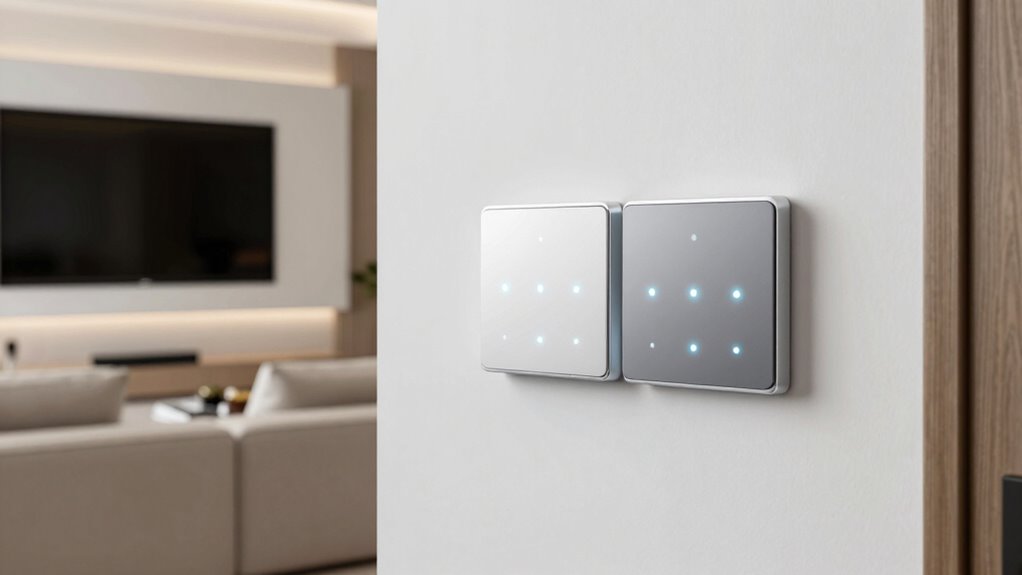

A smart light switch starter kit bundles the switch, a hub or bridge, and usually a remote, so you can automate your lighting without buying pieces separately. The Lutron Caseta Smart Dimmer Starter Kit with Hub takes the top spot here because its hub supports up to 60 devices, its dimmer works with almost any bulb, and its Clear Connect wireless signal reaches farther than Wi-Fi-only rivals. If you want the best value, the Third Reality Smart Switch Starter Kit with Bridge skips the dimming but costs far less and still handles scheduling and voice control. The main tradeoff in this category is between hub-based reliability (Lutron, Leviton) and Wi-Fi simplicity — plus whether you need a neutral wire, since the Leviton No-Neutral kit exists specifically for older homes. Read on for the full breakdown of all eight kits.

Get the latest gadgets delivered free with Prime
- Fast, free delivery on millions of items
- Prime Video, Amazon Music and more included
- Member-only deals all year
Complete the kit



Key Takeaways
- Lutron dominates this lineup with five of the eight kits, but they are not interchangeable — the differences come down to dimmer vs. on/off switch, included Pico remotes, and whether a hub is bundled.
- The Lutron Caseta Smart Dimmer Starter Kit with Hub ranked best overall because it balances hub expandability (up to 60 devices), broad bulb compatibility, and the industry’s most reliable hub-based wireless protocol.
- Third Reality is the only genuinely budget-friendly option, and the only one with a Zigbee-based bridge — a good fit for small apartments, but it lacks dimming and the ecosystem depth of Lutron.
- The Leviton DNKIT-1RW is the standout pick for older homes: it is the only kit here that dims without a neutral wire, solving a problem none of the Lutron kits can.
- The Deluxe and Diva Lutron kits justify their higher positioning only if you need multiple Pico remotes or a designer-style paddle dimmer — otherwise the standard starter kit covers the same basics for less.
| Lutron Caseta 3-Way Smart Light Switch Kit with Pico Remote |  | Best for Multi-Switch Setups | Included Items: 1 Smart Switch, 1 Pico Remote, 1 Wall Plate Adapter, 1 White Wall Plate | Max Load (Incandescent/Halogen): 600W | Max Load (LED/CFL): 5 Amps | VIEW ON AMAZON | See Our Full Breakdown |
| Third Reality Smart Switch Starter Kit with Bridge |  | Best No-Wiring Option for Beginners | Connectivity: Zigbee (via Bridge), 2.4GHz WiFi | Switch Compatibility: Toggle and Rocker switches | Voltage Support: 12V, 24V, 110V, 220V | VIEW ON AMAZON | See Our Full Breakdown |
| Lutron Caseta Smart Switch Starter Kit |  | Best Overall | Included Items: 1 Smart Switch, 1 Smart Hub, 1 White Wallplate | Connectivity: Clear Connect RF (No Wi-Fi required for operation) | Compatibility: Alexa, Apple HomeKit, Google Home, Ring, Sonos, Samsung | VIEW ON AMAZON | See Our Full Breakdown |
| Lutron Caseta Smart Lamp Dimmer Starter Kit |  | Best for Lamps and Zero-Install Setups | Included Items: 1 Caseta Smart Lamp Dimmer, 1 Smart Hub, 1 Pico Remote | Compatibility: Amazon Alexa, Apple Home, Google Assistant, Ring, Serena shades, Sonos | Max Load (LED/CFL): 100 Watts | VIEW ON AMAZON | See Our Full Breakdown |
| Leviton Decora Smart No-Neutral Dimmer & Wi-Fi Bridge Kit (DNKIT-1RW) |  | Best for Older Homes Without Neutral Wires | Model: DNKIT-1RW | Color: White | Components: Dimmer (DN6HD), Wi-Fi Bridge (MLWSB) | VIEW ON AMAZON | See Our Full Breakdown |
| Lutron Caseta Deluxe Smart Dimmer Starter Kit |  | Best Overall | Contents: 1 Smart Hub, 2 Dimmer Switches, 2 Pico Remotes, 2 Wall Plates | Connectivity: Clear Connect RF (Wi-Fi independent) | Compatibility: Alexa, Apple HomeKit, Google Home, Ring, Sonos | VIEW ON AMAZON | See Our Full Breakdown |
| Lutron Caseta Diva Smart Dimmer Starter Kit | 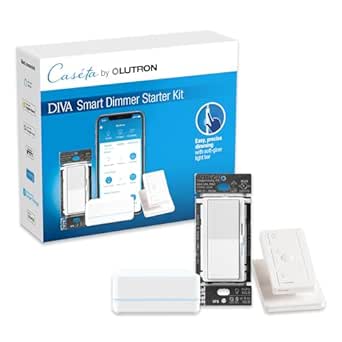 | Best Premium Feel | Included Items: 1 Diva smart dimmer switch, 1 Pico remote, 1 Pico pedestal, 1 Lutron smart hub | Compatibility: Alexa, Apple HomeKit, Google Home, Ring, Sonos | Max Load (LED): 150W | VIEW ON AMAZON | See Our Full Breakdown |
| Lutron Caseta Smart Dimmer Starter Kit with Hub, Dimmer Switch, Pico Remote, and Bracket |  | Best Single-Room Entry Point | Included Items: 1 Smart Hub, 1 Dimmer Switch, 1 Pico Remote, 1 Wall Plate Bracket | Connectivity: Clear Connect RF (no Wi-Fi required for local control) | Compatibility: Alexa, Apple HomeKit, Google Home, Ring, Sonos, Serena Shades | VIEW ON AMAZON | See Our Full Breakdown |
| smart light switch starter kit | Compatibility | Included Items | Connectivity |
|---|---|---|---|
| Lutron Caseta 3-Way Smart Ligh | Alexa, Apple Home, Google Assistant, Ring, Serena, Sonos | 1 Smart Switch, 1 Pico Remote, 1 Wall Plate Adapter, 1 White Wall Plate | — |
| Third Reality Smart Switch Sta | — | 1 Zigbee Switch, 1 Bridge, 2 AAA Batteries, Mounting Hardware | Zigbee (via Bridge), 2.4GHz WiFi |
| Lutron Caseta Smart Switch Sta | Alexa, Apple HomeKit, Google Home, Ring, Sonos, Samsung | 1 Smart Switch, 1 Smart Hub, 1 White Wallplate | Clear Connect RF (No Wi-Fi required for operation) |
| Lutron Caseta Smart Lamp Dimme | Amazon Alexa, Apple Home, Google Assistant, Ring, Serena shades, Sonos | 1 Caseta Smart Lamp Dimmer, 1 Smart Hub, 1 Pico Remote | Proprietary RF (does not use Wi-Fi) |
| Leviton Decora Smart No-Neutra | Google Assistant, Alexa, Apple Siri | — | — |
| Lutron Caseta Deluxe Smart Dim | Alexa, Apple HomeKit, Google Home, Ring, Sonos | — | Clear Connect RF (Wi-Fi independent) |
| Lutron Caseta Diva Smart Dimme | Alexa, Apple HomeKit, Google Home, Ring, Sonos | 1 Diva smart dimmer switch, 1 Pico remote, 1 Pico pedestal, 1 Lutron smart hub | Clear Connect RF via Lutron Smart Hub (no Wi-Fi dependence) |
| Lutron Caseta Smart Dimmer Sta | Alexa, Apple HomeKit, Google Home, Ring, Sonos, Serena Shades | 1 Smart Hub, 1 Dimmer Switch, 1 Pico Remote, 1 Wall Plate Bracket | Clear Connect RF (no Wi-Fi required for local control) |
More Details on Our Top Picks
Lutron Caseta 3-Way Smart Light Switch Kit with Pico Remote
What sets this kit apart from the standard Caseta starter kit is the included Pico remote and wall plate adapter, which solves the 3-way problem without cutting new holes or pulling wire through walls. That remote mounts in place of a second switch, turning a two-location circuit into a smart one in an afternoon. Compared with the Third Reality kit, which attaches motors to existing switches, this is a true in-wall replacement — cleaner looking, more responsive, and far more durable. The tradeoff is real, though: unlike the Third Reality option, this requires a neutral wire, and smart features depend on a separately purchased Caseta hub, so the true entry cost is higher than the box suggests.
Pros:- Pico remote enables 3-way control without new wiring or wall damage
- Works with Alexa, Google Assistant, Apple Home, Ring, and Sonos
- Geofencing and sunset tracking automate lights by location and time
- Handles LED, incandescent, and halogen loads up to 600W
Cons:- Requires a separate Lutron Caseta Smart Hub for app and voice features
- Neutral wire required, ruling out many older homes
Best for: Homeowners with hallways or stairways controlled from two locations who want a clean in-wall 3-way solution
Not ideal for: Renters or anyone unwilling to buy a separate hub and swap out wall switches
- Included Items:1 Smart Switch, 1 Pico Remote, 1 Wall Plate Adapter, 1 White Wall Plate
- Max Load (Incandescent/Halogen):600W
- Max Load (LED/CFL):5 Amps
- Max Load (Fans):3 Amps
- Wiring Requirement:Neutral Wire Required
- Compatibility:Alexa, Apple Home, Google Assistant, Ring, Serena, Sonos
- Hub Requirement:Lutron Caseta Smart Hub (L-BDG2-WH) required for smart features
Our verdict“This pick makes the most sense for anyone who specifically needs smart control across two switch locations without rewiring.”
Third Reality Smart Switch Starter Kit with Bridge
If the thought of opening an electrical box stops you cold, this is the entry point. The switch mounts over your existing toggle or rocker switch and automates it mechanically — no wiring, no neutral wire, no electrician. Compared with the Leviton No-Neutral kit, which still requires swapping the wall device, this demands nothing more than a screwdriver and the included AAA batteries. The compromise is aesthetic and precision: it’s a surface-mounted device sitting on top of your switch plate, and its physical actuation feels less snappy than a true in-wall switch like the Caseta options. Add the need for a dedicated Zigbee bridge and 2.4GHz-only Wi-Fi, and this is clearly a starter kit rather than a whole-home solution.
Pros:- Zero wiring required — works over existing toggle or rocker switches
- Compatible with HomeKit, Alexa, Google Assistant, SmartThings, and Hubitat
- Supports low-voltage 12V and 24V systems alongside 110V/220V
- Batteries and bridge included for true out-of-box setup
Cons:- Surface-mount design is bulky and visible compared with in-wall switches
- Requires a separate bridge and only works on 2.4GHz Wi-Fi
Best for: Renters and nervous first-timers who want app and voice control without touching wiring
Not ideal for: Design-conscious homeowners who want a flush, built-in look — the surface mount is visible on every switch
- Connectivity:Zigbee (via Bridge), 2.4GHz WiFi
- Switch Compatibility:Toggle and Rocker switches
- Voltage Support:12V, 24V, 110V, 220V
- Power Source:2 AAA Batteries (included)
- Included Items:1 Zigbee Switch, 1 Bridge, 2 AAA Batteries, Mounting Hardware
- Mounting Type:Surface Mount
- Max Temperature:45 °C
Our verdict“The easiest on-ramp to smart lighting for anyone who can’t or won’t modify their switches.”
Lutron Caseta Smart Switch Starter Kit
This is the kit I’d point most people toward first, because it solves the biggest hidden cost in the lineup: unlike the 3-way Caseta kit, this one includes the Smart Hub, so app control, scheduling, and voice integration work out of the box. Lutron’s Clear Connect RF protocol runs independently of Wi-Fi, which means lights respond instantly even when your router is struggling — a reliability edge over Wi-Fi-based options like the Leviton DNKIT-1RW. Installation runs about 15 minutes with solid video guides, and the ecosystem (Alexa, HomeKit, Google, Ring, Sonos) is the broadest here. The catches: you still need a neutral wire, and if you later want remote controls or 3-way setups, Pico remotes are sold separately — the Deluxe kits elsewhere in this roundup bundle them.
Pros:- Hub included, so scheduling and voice control work immediately
- Clear Connect RF operates without Wi-Fi, avoiding network congestion and outages
- Works across Alexa, HomeKit, Google Home, Ring, Sonos, and Samsung
- Scenes, geofencing, smart-away, and timers all supported
Cons:- Neutral wire required, excluding many pre-1980s homes
- Pico remotes and wall brackets sold separately for multi-location control
Best for: Homeowners starting a Lutron ecosystem who want hub, switch, and app control in one purchase
Not ideal for: Anyone wanting a second control point — Pico remotes and brackets cost extra here
- Included Items:1 Smart Switch, 1 Smart Hub, 1 White Wallplate
- Connectivity:Clear Connect RF (No Wi-Fi required for operation)
- Compatibility:Alexa, Apple HomeKit, Google Home, Ring, Sonos, Samsung
- Load Capacity:600W Incandescent/Halogen/ELV/MLV, 5A LED/CFL, 3A Fans
- Installation Requirement:Neutral wire required
- Remote Range:30 feet through walls, 60 feet line of sight
- Control Features:Scenes, scheduling, geofencing, smart-away, timers
Our verdict“The most complete and reliable starting point for a permanent smart lighting setup, provided your boxes have neutral wires.”
Lutron Caseta Smart Lamp Dimmer Starter Kit
Not every smart lighting project needs a screwdriver. This kit plugs into an outlet and dims up to two table or floor lamps, making it the only option in this lineup with genuinely zero installation — even the Third Reality kit requires mounting hardware. Like the full Caseta Smart Switch Starter Kit, it includes the Smart Hub and a Pico remote, so the ecosystem, scheduling, and reliability are identical; the difference is simply what it controls. That narrow focus is also its ceiling: 100W LED and 300W incandescent limits mean it can’t replace switched ceiling fixtures, and it won’t work with track or landscape lighting. If your goal is bedside or living room lamps rather than hardwired lights, this is the friction-free path into the Lutron ecosystem.
Pros:- No wiring, cutting, or wall work — plugs into any outlet
- Hub and Pico remote included for full app and voice control
- Works during Wi-Fi outages thanks to proprietary RF connectivity
- Dimming support for up to two lamps
Cons:- Limited to plug-in lamps; capped at 100W LED / 300W incandescent
- Wall mount bracket for a 3-way-style setup sold separately
Best for: Apartment dwellers and lamp-heavy rooms where plugging in beats rewiring
Not ideal for: Anyone hoping to control ceiling fixtures — this only handles plug-in lamps
- Included Items:1 Caseta Smart Lamp Dimmer, 1 Smart Hub, 1 Pico Remote
- Compatibility:Amazon Alexa, Apple Home, Google Assistant, Ring, Serena shades, Sonos
- Max Load (LED/CFL):100 Watts
- Max Load (Incandescent/Halogen):300 Watts
- Connectivity:Proprietary RF (does not use Wi-Fi)
- Lamp Capacity:Up to 2 floor or table lamps
Our verdict“The fastest way into smart lighting if your lights plug in rather than wire in.”
Leviton Decora Smart No-Neutral Dimmer & Wi-Fi Bridge Kit (DNKIT-1RW)
Every Lutron pick in this roundup stalls on the same requirement: a neutral wire. This kit exists for the houses where that wire simply isn’t there, needing only line, load, and ground — a genuine differentiator against the Caseta Smart Switch Starter Kit. The plug-in Wi-Fi bridge keeps things simple too, with no hub shelf space or proprietary protocol to manage, and the My Leviton app offers deeper customization than most, including fade rates and full-range dimming presets. The tradeoffs cut both ways: it’s a dimmer only, so fixtures you want simple on/off control on are a poor match, and 3-way configurations demand separately purchased companion switches. Wi-Fi dependence also means it can’t match Lutron’s operate-during-outage reliability.
Pros:- Works with no neutral wire — line, load, and ground only
- Alexa, Google Assistant, and Apple Siri voice control supported
- Plug-in Wi-Fi bridge means no separate smart hub purchase
- Deep customization of dim levels, fade rates, and schedules in My Leviton app
Cons:- Functions only as a dimmer, not a standard on/off switch
- 3-way setups require separately purchased companion switches
Best for: Owners of pre-1980s homes lacking neutral wires who still want in-wall smart dimming
Not ideal for: Anyone needing plain on/off switching or offline reliability during internet outages
- Model:DNKIT-1RW
- Color:White
- Components:Dimmer (DN6HD), Wi-Fi Bridge (MLWSB)
- Wiring Requirement:No Neutral Required (Line, Load, Ground only)
- Compatibility:Google Assistant, Alexa, Apple Siri
- App:My Leviton
- Features:Full range dimming, custom presets, scheduling, wireless 3-way support
Our verdict“The right pick when your electrical boxes rule out every neutral-wire switch on this list.”
Lutron Caseta Deluxe Smart Dimmer Starter Kit
This Deluxe kit earns the top spot because it is the only option here that covers two rooms out of the box — two dimmers, two Pico remotes, two wall plates, and the hub. Compared with the single-dimmer Lutron Caseta Smart Dimmer Starter Kit, the per-switch value improves the moment you decide you like smart lighting and want to keep going. The Clear Connect RF protocol means lighting stays responsive even when Wi-Fi stutters, a real advantage over the Wi-Fi-dependent Third Reality Smart Switch Starter Kit. Dimming down to 150W of LED is flicker-free and works with the dimmable bulbs you already own. The tradeoff: this is a closed ecosystem, so every future switch needs the same Lutron hub, and multi-location Pico installs require a separately purchased wall plate adapter.
Pros:- Two dimmers and two remotes included, covering two rooms from day one
- Wi-Fi-independent Clear Connect RF keeps switches responsive during network outages
- Works with Alexa, Apple HomeKit, Google Home, Ring, and Sonos
- Installs in about 15 minutes with no neutral wire required
Cons:- Future expansion is locked into the Lutron hub and ecosystem
- Pico remotes need a separate wall plate adapter for in-wall multi-location setups
Best for: Homeowners outfitting two or more rooms at once who want a proven, hub-based system they can expand over years
Not ideal for: Renters or anyone wanting a single smart switch without committing to a proprietary hub ecosystem
- Contents:1 Smart Hub, 2 Dimmer Switches, 2 Pico Remotes, 2 Wall Plates
- Connectivity:Clear Connect RF (Wi-Fi independent)
- Compatibility:Alexa, Apple HomeKit, Google Home, Ring, Sonos
- Installation:No neutral wire required
- Dimming Capacity:Up to 150W dimmable LEDs
- Pico Remote Battery Life:Approx. 10 years
- Control Methods:In-wall switch, Pico remote, app, voice
Our verdict“If you’re starting a whole-home lighting project, this two-room kit is the most complete and reliable foundation in the lineup.”
Lutron Caseta Diva Smart Dimmer Starter Kit
The Diva kit stands out for one reason: its dimmer has the look and tactile slider feel of a traditional high-end wall control, which matters if guests and family members hate fiddling with apps or buttons they don’t recognize. Unlike the Lutron Caseta Smart Dimmer Starter Kit, which uses the standard Caseta paddle, the Diva pairs familiar analog operation with full smart features behind the scenes. It also handles 600W of incandescent or halogen load alongside 150W of LED, making it friendlier to older fixtures than most picks here. The included Pico pedestal turns the remote into a tabletop controller — handy for a nightstand. The tradeoffs mirror the rest of the Caseta line: the wall plate is sold separately, and nothing works without the dedicated Lutron hub.
Pros:- Traditional slider design feels familiar to anyone in the household
- Handles up to 600W incandescent/halogen plus 150W LED loads
- Includes a Pico pedestal for tabletop control
- Full ecosystem support including Alexa, HomeKit, and Google Home
Cons:- Wall plate is not included in the box
- Requires the proprietary Lutron Smart Hub to function as a smart device
Best for: Design-conscious buyers and households with mixed LED and incandescent fixtures who want a classic slider look with smart features
Not ideal for: Budget-limited buyers who need the wall plate included — or anyone hoping to avoid a hub
- Included Items:1 Diva smart dimmer switch, 1 Pico remote, 1 Pico pedestal, 1 Lutron smart hub
- Compatibility:Alexa, Apple HomeKit, Google Home, Ring, Sonos
- Max Load (LED):150W
- Max Load (Incandescent/Halogen):600W
- Installation:No neutral wire required, under 15 minutes
- Connectivity:Clear Connect RF via Lutron Smart Hub (no Wi-Fi dependence)
- Wall Plate:Sold separately
Our verdict“This is the pick for buyers who want smart lighting that still looks and feels like a premium traditional dimmer.”
Lutron Caseta Smart Dimmer Starter Kit with Hub, Dimmer Switch, Pico Remote, and Bracket
This kit is the simplest way to test the Lutron ecosystem: one hub, one dimmer, one Pico remote, and a bracket that lets you mount the remote on the wall for faux three-way control without running new wiring. Compared with the Deluxe kit, you give up a second switch and a wall plate, but you also spend less to find out whether hub-based lighting suits you. It shares the same Clear Connect RF reliability and no-neutral-wire install as its siblings, and even adds Serena shade compatibility the smaller kits don’t advertise. The bracket mounting trick is genuinely useful for stairways and hallways where a second switch location would otherwise require an electrician. The drawback is scale — a one-room kit with a wall plate you must buy separately makes less sense if you already know you want multiple rooms done.
Pros:- Bracket lets you mount the Pico remote as a wireless second switch location
- Hub-based RF control stays fast and stable without Wi-Fi
- No neutral wire or smart bulbs required
- Adds Serena smart shade compatibility for future expansion
Cons:- Only covers a single room, limiting value for whole-home projects
- Wall plate is not included despite the bracket being in the box
Best for: First-time smart lighting buyers testing one room, or anyone adding a second switch location in a hallway without rewiring
Not ideal for: Multi-room planners — the Deluxe two-switch kit covers more space for a better per-switch value
- Included Items:1 Smart Hub, 1 Dimmer Switch, 1 Pico Remote, 1 Wall Plate Bracket
- Connectivity:Clear Connect RF (no Wi-Fi required for local control)
- Compatibility:Alexa, Apple HomeKit, Google Home, Ring, Sonos, Serena Shades
- Installation:No neutral wire required; approx. 15 minutes
- Dimming Capacity:Up to 150W dimmable LEDs
- Remote Battery:1 CR2032 (included)
- Wall Plate:Not included
Our verdict“A low-commitment, reliable gateway into Lutron’s ecosystem that shines when you need a second control point without new wiring.”

How We Picked
I evaluated each kit on five buyer-relevant factors: ease of installation (neutral wire requirements, 3-way support, app-guided setup), ecosystem compatibility (Alexa, Google Home, HomeKit, and Matter support), expandability (how many devices the included hub or bridge can handle), reliability of the wireless protocol, and what the bundle actually includes relative to buying components separately. Because these are starter kits, the hub’s capacity mattered a lot — a kit capped at a handful of devices defeats the purpose of starting a smart home.
The ranking logic favors kits that grow with you. That is why hub-based Lutron kits rank above the single-room Third Reality bridge, and why the standard Caseta dimmer kit with hub beats the fancier Diva kit — expandability and bulb compatibility deliver more long-term value than styling. Installation flexibility (the Leviton no-neutral design) earned a dedicated spot for older homes, and the Pico-remote-equipped kits were judged on whether the extra remote genuinely adds control or just adds cost.
| smart light switch starter kit | Compatibility | Connectivity |
|---|---|---|
| Lutron Caseta 3-Way Smart Ligh | Alexa, Apple Home, Google Assistant, Ring, Serena, Sonos | — |
| Third Reality Smart Switch Sta | — | Zigbee (via Bridge), 2.4GHz WiFi |
| Lutron Caseta Smart Switch Sta | Alexa, Apple HomeKit, Google Home, Ring, Sonos, Samsung | Clear Connect RF (No Wi-Fi required for operation) |
| Lutron Caseta Smart Lamp Dimme | Amazon Alexa, Apple Home, Google Assistant, Ring, Serena shades, Sonos | Proprietary RF (does not use Wi-Fi) |
| Leviton Decora Smart No-Neutra | Google Assistant, Alexa, Apple Siri | — |
| Lutron Caseta Deluxe Smart Dim | Alexa, Apple HomeKit, Google Home, Ring, Sonos | Clear Connect RF (Wi-Fi independent) |
| Lutron Caseta Diva Smart Dimme | Alexa, Apple HomeKit, Google Home, Ring, Sonos | Clear Connect RF via Lutron Smart Hub (no Wi-Fi dependence) |
| Lutron Caseta Smart Dimmer Sta | Alexa, Apple HomeKit, Google Home, Ring, Sonos, Serena Shades | Clear Connect RF (no Wi-Fi required for local control) |
Factors to Consider When Choosing Smart Light Switch Starter Kit
Before picking a kit, it helps to understand what actually separates these bundles — and where buyers commonly go wrong. These are the factors that shaped my rankings and should shape your decision.Hub or No Hub: The Biggest Structural Choice
Every kit here except none — all eight include either a hub or bridge, which is what makes them starter kits. But hubs differ enormously in capacity. Lutron’s Caseta hub supports up to 60 devices and acts as a real smart home foundation, while Third Reality’s bridge is designed for a modest setup of switches and sensors. A common mistake is buying the cheapest bridge available, then outgrowing it within a year and having to rebuild around a different ecosystem. Hub-based systems also use dedicated wireless protocols (Lutron’s Clear Connect, Zigbee) that avoid the congestion and dropouts common with Wi-Fi-only switches. If you plan to add more than three or four switches eventually, pay for the bigger hub now.
Neutral Wire Requirements and Your Home’s Wiring
This is the factor that trips up the most first-time buyers. Most smart switches need a neutral wire in the switch box to power their radios, and homes built before the mid-1980s often lack one at the switch. The Leviton DNKIT-1RW exists specifically for this situation — it dims without a neutral wire, which is why it holds a permanent place in this lineup despite Lutron’s dominance. Before buying any kit, turn off the breaker and look inside your switch box: if you see a bundle of white wires capped in the back, you likely have a neutral. Ordering the wrong kit means a return shipment and a week of waiting. Renters face an even simpler constraint — a plug-in lamp dimmer kit like the Lutron Smart Lamp Dimmer bypasses wall wiring entirely.
Dimmer vs. On/Off Switch: Match the Kit to the Fixture
A dimmer kit and an on/off switch kit are not interchangeable, and choosing wrong is the second most common mistake. Dimmers belong on overhead lights, dining fixtures, and anywhere you want scene lighting — but they require dimmable bulbs, and some budget LEDs flicker or buzz even when labeled dimmable. On/off switches like the Third Reality kit are the right call for bathrooms, closets, fans, and non-dimmable fixtures where forcing a dimmer would damage the electronics. Lutron’s Caseta dimmers are unusually forgiving with bulb types, which is part of why they rank so highly here. Map out which rooms you are automating first, and buy the kit type that matches the majority of them.
Voice Assistant and Ecosystem Compatibility
All eight kits work with Alexa and Google Home, but the details diverge. Lutron’s Caseta hub is one of the few third-party hubs with native Apple HomeKit support, which matters if your household runs on iPhones and HomePods. Third Reality’s Zigbee bridge can integrate with SmartThings and other Zigbee ecosystems, giving it a niche advantage for tinkerers. If Matter compatibility is part of your future plans, check the current firmware support for whichever kit you choose — hub-based systems have generally updated faster than budget bridges. The mistake to avoid is assuming compatibility: verify your specific assistant is supported before ordering, because returns on opened electrical hardware are more friction than most people expect.
What Should Actually Be in the Box
A true starter kit should include everything for a working setup: at least one switch or dimmer, the hub, and ideally a Pico remote or wall plate bracket. The Lutron kits vary here more than their names suggest — the Deluxe kits include two Pico remotes plus a bracket for mounting one as a virtual 3-way switch, while the basic kit includes one. The 3-way kit with Pico exists specifically because controlling a light from two locations is one of the hardest things to do with standard smart switches; Lutron sidesteps the rewiring entirely by letting the Pico act as the second switch. Compare kit contents against what buying components individually would cost, because some bundles save real money and others barely save any.
3-Way and Multi-Location Circuits
If your light is controlled from two or more switches (hallways, staircases, open-plan living areas), this constraint alone can determine your kit. Traditional 3-way smart switch installations often require a companion switch at the second location, doubling your hardware cost. Lutron’s Pico remote approach replaces that second switch without rewiring — the Caseta 3-Way Kit and the Deluxe kits with brackets are built around exactly this. Leviton’s no-neutral kit handles 3-way circuits differently and with more installation complexity. Measure how many multi-location circuits you have before choosing; a household with three of them may find that Pico-based kits save enough on companion hardware to offset Lutron’s higher entry cost.
Frequently Asked Questions
Do I need an electrician to install a smart light switch starter kit?
Most homeowners with basic DIY skills can install these kits in 20–30 minutes per switch, since it involves little more than turning off the breaker, swapping wires, and pairing the hub through an app. The Lutron and Leviton kits both include excellent app-guided installation with wiring diagrams you can match to your own box. An electrician becomes worthwhile if you have aluminum wiring, no neutral wire and want a neutral-requiring switch, or a confusing multi-switch configuration you can’t map to the instructions. If any step makes you uncomfortable, a single service call is cheap insurance compared to working on live circuits.
Which kit should I buy if my home has no neutral wires?
The Leviton Decora Smart No-Neutral Dimmer & Wi-Fi Bridge Kit (DNKIT-1RW) is the clear answer in this lineup — it is the only kit here engineered to dim without a neutral connection. Lutron’s Caseta dimmers do require a neutral wire, so despite Lutron’s otherwise superior ecosystem, those kits are off the table for older wiring unless you run new wire. One workaround: if the light you most want to automate is a plugged-in lamp rather than a hardwired fixture, the Lutron Smart Lamp Dimmer Starter Kit sidesteps wall wiring entirely. For whole-home automation in a pre-1980s house, though, the Leviton kit or an electrician-run neutral are your realistic paths.
Can I start with one kit and expand later, or should I buy switches à la carte from the start?
Starting with a kit is almost always the smarter move, because the bundled hub typically accounts for the biggest single cost, and kits price it more attractively than buying it alone. Once you own a Lutron Caseta hub, every additional Caseta switch, dimmer, Pico remote, and even smart shade pairs to it — up to 60 devices — so you only ever buy the hardware going forward. Third Reality works the same way with its Zigbee bridge, though with a smaller device ceiling and accessory catalog. The one scenario where à la carte makes sense is when you already own a compatible hub, such as a SmartThings hub for Third Reality’s Zigbee switches.
Why do so many of these kits include a Pico remote — isn’t the app enough?
The Pico remote solves two problems an app cannot. First, it gives household members and guests a physical wall control, so nobody has to install an app or ask you to turn on the lights — this is the most common reason smart lighting setups get abandoned by families. Second, a Pico mounted in a bracket acts as a wireless second switch for 3-way circuits, replacing expensive companion switches and complex rewiring. Compared with app control, a Pico also responds instantly and works during internet outages. If your kit includes one, mount it where a second switch would logically go; if it doesn’t, the remotes are inexpensive add-ons later.
Will these switches still work if my Wi-Fi or internet goes down?
Yes — all eight kits keep the physical switch or dimmer functioning locally during outages, because the wall control is wired directly to the light. What changes is remote access: hub-based systems like Lutron Caseta and the Leviton bridge continue executing schedules and scenes locally on the hub even without internet, so your automated lighting keeps running. Only voice commands and away-from-home control need a working internet connection. Third Reality’s Zigbee bridge similarly maintains local schedules. This resilience is one of the main reasons hub-based kits rank above cheap Wi-Fi-only switches in this comparison, some of which become dumb until the network returns.
Conclusion
For best overall, the Lutron Caseta Smart Dimmer Starter Kit with Hub is the pick that grows with you — reliable wireless, broad bulb compatibility, and a hub that will still be relevant at 60 devices. The Third Reality Smart Switch Starter Kit with Bridge wins on value for anyone automating a single room or rental on a budget. For best premium, the Caseta Deluxe Smart Dimmer Starter Kit’s dual Pico remotes and bracket deliver the most complete control package out of the box. Beginners should start with the Lutron Caseta Smart Switch Starter Kit, which pairs the simplest setup with room to expand. Specific needs round out the list: the 3-Way Kit with Pico Remote for hallways and stairs, the Diva Smart Dimmer Kit for design-conscious renovations, the Smart Lamp Dimmer Kit for renters, and the Leviton No-Neutral Kit for older homes without neutral wires. Match the kit to your wiring and your expansion plans, and you can’t go far wrong with any of them.
Fall Picks
fall essentials
As an affiliate, we earn on qualifying purchases.