
For a smart door sensor kit with professional-grade monitoring potential, I’d put the YoLink Door and Window Sensor Kit with SpeakerHub, 3-Pack first for its hub-based setup and audible alert option. The Tapo T31 Starter Kit is a strong alternative for buyers who want a chime alongside sensors, while the Eufy Security 5-Piece Home Alarm Kit suits households seeking a broader alarm bundle. The main tradeoffs are coverage, hub and ecosystem requirements, alert style, and whether sensors need to work outdoors. Read on for the full breakdown of all 13 options and which setup fits your doors, gates, and monitoring preferences.

Get the latest gadgets delivered free with Prime
- Fast, free delivery on millions of items
- Prime Video, Amazon Music and more included
- Member-only deals all year
Complete the kit



Key Takeaways
- YoLink’s hub-based kits fill several distinct roles: the SpeakerHub bundle prioritizes audible alerts, while the 2- and 4-sensor kits let buyers choose a smaller or larger indoor sensor count.
- Tapo T31 combines contact sensing with a chime-oriented starter setup, which may suit buyers who want a more immediate household alert rather than sensors alone.
- Outdoor placement changes the shortlist: YoLink’s Outdoor Gate and Door Contact Sensor kits are the lineup’s purpose-specific choices for gates and exposed entry points.
- Broad alarm bundles trade sensor-only simplicity for more system components: Eufy’s 5-piece and tolviviov’s 8-piece kits are aimed at buyers who want more than contact sensors in one purchase.
- Several Zigbee and Wi-Fi sensor packs depend on compatible equipment or app ecosystems; check what is required before choosing them as a standalone professional-style setup.
| YoLink Door and Window Sensor Kit with Hub, 2-Pack | 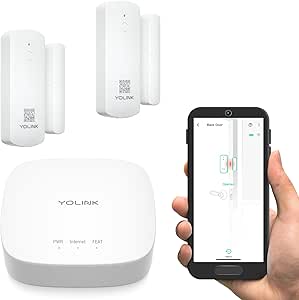 | Best for Long-Range Coverage | Included: 1 hub and 2 door sensors | Wireless protocol: YoLink LoRa | Maximum range: Up to 2,034 ft. open-air | VIEW ON AMAZON | See Our Full Breakdown |
| YoLink Door and Window Sensor Kit with SpeakerHub, 3-Pack |  | Best for Audible Alerts | Included items: 1 SpeakerHub and 3 door and window sensors | Connectivity: LoRa; 2.4 GHz band required for hub | Maximum range: Up to 2,034 ft. open-air (description); 400 meters (specifications) | VIEW ON AMAZON | See Our Full Breakdown |
| Tapo T31 Smart Door and Window Sensor Starter Kit with Hub and Chime |  | Best for Smart-Home Integration | Included: 3 Tapo T110 contact sensors and 1 Tapo H100 smart hub with chime | Connectivity: Sub-G protocol; 2.4 GHz Wi-Fi required | Compatibility: Alexa, Google Home, Apple HomeKit, Samsung SmartThings, Matter | VIEW ON AMAZON | See Our Full Breakdown |
| Eufy Security 5-Piece Home Alarm Kit |  | Best for a Ready-Made Alarm Setup | Components: HomeBase, keypad, motion sensor, 2 entry sensors | Setup time: Minutes | Monthly fees: None | VIEW ON AMAZON | See Our Full Breakdown |
| Ring Alarm Contact Sensor, 2nd Generation, 6-Pack |  | Best for Expanding an Existing Ring Alarm | Pack size: 6 sensors | Battery: CR2032 coin cell | Battery life: Approximately 3 years | VIEW ON AMAZON | See Our Full Breakdown |
| Aqara Zigbee Door and Window Sensor 3 Pack, Wireless Mini Contact Sensor |  | Best for Apple HomeKit Households | Unit count: 3 sensors | Model: MCCG11LM | Mounting type: Door mount | VIEW ON AMAZON | See Our Full Breakdown |
| tolviviov 8-Piece WiFi Home Alarm System |  | Best Complete DIY Alarm Starter Kit | Model: DP-W2 | Kit contents: 1 alarm station, 5 door and window sensors, 2 remote controls | Connectivity: 2.4 GHz Wi-Fi; does not support 5 GHz | VIEW ON AMAZON | See Our Full Breakdown |
| YoLink Door and Window Sensor Kit with Hub, 4 Sensors |  | Best for Long-Range Whole-Home Coverage | Included devices: 1 YoLink Hub and 4 door sensors | Wireless technology: LoRa, 900 MHz | Open-air range: Up to 2,034 feet | VIEW ON AMAZON | See Our Full Breakdown |
| YoLink Outdoor Gate and Door Contact Sensor Kit with Hub, 2-Pack |  | Best Outdoor Pick for Multiple Remote Openings | Included devices: 2 outdoor contact sensors and 1 hub | Wireless technology: LoRa | Maximum range: 2,034 feet | VIEW ON AMAZON | See Our Full Breakdown |
| YoLink Outdoor Gate and Door Contact Sensor Kit with Hub |  | Best Single-Sensor Remote Gate Pick | Included devices: 1 outdoor contact sensor and 1 hub | Wireless technology: LoRa | Wireless range: Up to 2,034 feet | VIEW ON AMAZON | See Our Full Breakdown |
| ThirdReality Zigbee Contact Sensor 4-Pack |  | Best for Hub-Based Smart Home Setups | Pack size: 4 sensors | Connectivity: Zigbee | Power: 2 AAA batteries | VIEW ON AMAZON | See Our Full Breakdown |
| Wireless Smart WiFi Home Security System with 120dB Siren, Door/Window Sensors, and Remote Control |  | Best Complete DIY Alarm Starter Kit | Included components: 1 alarm hub, 4 door/window sensors, 1 remote control | Siren volume: 120dB | WiFi connectivity: 2.4GHz; 5GHz not supported | VIEW ON AMAZON | See Our Full Breakdown |
| Zigbee Door Sensor 4 Pack, Smart Contact Sensor for Door and Window Security |  | Best for Discreet, Flexible Mounting | Pack size: 4 sensors | Connectivity: Zigbee | Compatibility: SmartThings, Alexa with a Zigbee hub, Home Assistant, Hubitat, Aeotec, and Homey | VIEW ON AMAZON | See Our Full Breakdown |
More Details on Our Top Picks
YoLink Door and Window Sensor Kit with Hub, 2-Pack
For a professional-style setup where sensors may be far from the hub, this YoLink two-sensor kit stands out for its LoRa connection, rated for up to 2,034 feet in open air. That reach can help cover detached or widely spaced areas where ordinary short-range kits may struggle, though walls and other obstacles affect real-world range. The included hub and two sensors make it a smaller starting point than the YoLink SpeakerHub 3-Pack, which adds an audible alert hub and a third sensor. You still get app alerts for openings and doors left open, plus a battery-life claim of up to five years. The tradeoff is that the hub, smartphone, and network connection are required, and the kit does not include the SpeakerHub’s stated tones and text-to-speech features.
Pros:- Includes one hub and two sensors for a complete starting setup
- LoRa communication offers up to 2,034 feet of open-air range
- Sensors support door-open and left-open alerts
- Batteries are included and rated for up to five years
Cons:- Hub is required for full functionality
- Setup requires a compatible smartphone and Ethernet or stable 2.4 GHz Wi-Fi
- Only two sensors are included
Best for: Homeowners who need to monitor a few widely separated doors or windows and value long-range sensor communication.
Not ideal for: Buyers who want a local spoken or siren alert from the hub, or who need more than two sensors in the starter kit.
- Included:1 hub and 2 door sensors
- Wireless protocol:YoLink LoRa
- Maximum range:Up to 2,034 ft. open-air
- Power source:Battery powered
- Battery life:Up to 5 years
- Installation:Self-adhesive
- Device capacity:Supports 300+ devices
- Requirements:Android or Apple smartphone; wired Ethernet or stable 2.4 GHz Wi-Fi
Our verdict“Choose this kit for long-range coverage of a small number of openings; pick the YoLink SpeakerHub 3-Pack if local audible alerts and an extra sensor matter more.”
YoLink Door and Window Sensor Kit with SpeakerHub, 3-Pack
The SpeakerHub 3-Pack is the YoLink choice for buyers who want more than a phone notification: its hub can play tones, siren sounds, uploaded MP3s, and text-to-speech alerts. That can make an opening easier to notice around the home, while three sensors cover more entry points than the two included with the YoLink Door and Window Sensor Kit with Hub. The sensors also support app monitoring, left-open reminders, and device-to-device pairing, and their batteries are rated for up to five years. This is a stronger fit for a self-monitored system than the simpler YoLink kit if local audio matters. The tradeoffs are a required SpeakerHub and 2.4 GHz connection; buyers who only need app alerts may prefer the less feature-heavy two-sensor option.
Pros:- Includes a SpeakerHub and three sensors
- Hub supports tones, siren sounds, uploaded MP3s, and text-to-speech
- Sensors support app monitoring, left-open reminders, and device-to-device pairing
- Self-monitoring requires no monthly fee
Cons:- SpeakerHub is required for full functionality
- Hub requires a 2.4 GHz connection
- More hub alert features may be unnecessary for buyers who only need phone notifications
Best for: Households that want spoken or other audible alerts at home and need three sensors to cover several doors or windows.
Not ideal for: Buyers who only want basic phone notifications, or who cannot connect the hub to a 2.4 GHz network.
- Included items:1 SpeakerHub and 3 door and window sensors
- Connectivity:LoRa; 2.4 GHz band required for hub
- Maximum range:Up to 2,034 ft. open-air (description); 400 meters (specifications)
- Power and battery:Battery powered; alkaline; up to 5 years
- Control method:App
- Sensor voltage:1.5 volts DC
- SpeakerHub dimensions:3.15 x 3.15 x 4.33 inches
- Item weight:66 g
Our verdict“Pick this YoLink kit when audible and spoken hub alerts are a priority; choose the two-sensor YoLink kit if you mainly need long-range app monitoring.”
Tapo T31 Smart Door and Window Sensor Starter Kit with Hub and Chime
The Tapo T31 earns its place for buyers who want contact sensors to trigger a broader smart-home routine, not just report an opening. Its three Tapo T110 sensors and H100 hub provide app notifications and activity history, while compatible cameras and lights can join automations. The hub also has a built-in chime and a customizable 90 dB alarm, giving it a more direct local alert option than the basic two-sensor YoLink hub kit. Its stated compatibility spans Alexa, Google Home, Apple HomeKit, Samsung SmartThings, and Matter, a useful distinction for homes with mixed platforms. The main tradeoff is battery life: up to two years, shorter than the five-year claims for both YoLink kits. It also depends on its hub and 2.4 GHz Wi-Fi.
Pros:- Includes three sensors and a hub with a built-in chime
- Provides app notifications and activity history
- Compatible with several major smart-home platforms, including Matter
- Supports a customizable 90 dB alarm and automations with compatible devices
Cons:- Sensors require the Tapo hub to operate
- Requires 2.4 GHz Wi-Fi
- Sensor battery life is rated for up to two years, shorter than the YoLink kits’ claims
Best for: Smart-home owners who want three entry sensors to work with compatible cameras, lights, and major smart-home platforms.
Not ideal for: Buyers prioritizing multi-year battery life or those who want sensors that can operate without the Tapo hub.
- Included:3 Tapo T110 contact sensors and 1 Tapo H100 smart hub with chime
- Connectivity:Sub-G protocol; 2.4 GHz Wi-Fi required
- Compatibility:Alexa, Google Home, Apple HomeKit, Samsung SmartThings, Matter
- Alarm:Customizable 90 dB
- Hub capacity:Up to 64 sensors, switches, and buttons
- Sensor battery life:Up to 2 years
- Mounting:Magnetic or adhesive
- Sensor dimensions:2.42 x 1.48 x 0.48 inches
Our verdict“Choose the Tapo kit for platform-spanning automations and a built-in alarm; favor a YoLink kit if long battery life or extended sensor range is your main priority.”
Eufy Security 5-Piece Home Alarm Kit
Unlike the contact-sensor-focused YoLink kits, Eufy packages a broader starter alarm system: a HomeBase, keypad, motion sensor, and two entry sensors. That mix gives buyers a way to monitor both selected openings and movement, with app alerts for detected motion or breaches. DIY installation is designed to take minutes, and the kit operates without monthly fees. This makes more sense for someone building a basic alarm setup from the start than for someone who simply wants to add sensors to an existing smart home. The compromise is scale: the listed system is limited to five devices, so it offers less room to grow than the YoLink two-sensor kit, which supports 300+ devices. Buyers expanding across a larger property may need additional purchases.
Pros:- Combines a HomeBase, keypad, motion sensor, and two entry sensors
- Designed for quick DIY installation
- Sends app alerts for motion or breaches
- Operates without monthly subscription fees
Cons:- Limited to five devices according to the product data
- Includes only two entry sensors
- Larger homes may need additional purchases
Best for: Households starting a small DIY alarm system who want a keypad, motion sensor, entry sensors, and app alerts in one kit.
Not ideal for: Owners planning to cover many openings or expand a large sensor network; the listed device limit is five.
- Components:HomeBase, keypad, motion sensor, 2 entry sensors
- Setup time:Minutes
- Monthly fees:None
- Alert method:Instant mobile alerts via eufy app
- Installation:DIY
- Device limit:5 devices
Our verdict“Choose Eufy for a compact, multi-part alarm starter kit; choose the YoLink two-sensor kit if long-range contact sensing and future device expansion matter more.”
Ring Alarm Contact Sensor, 2nd Generation, 6-Pack
This six-pack is the most direct pick here for adding coverage to an existing Ring Alarm installation. Each tool-free contact sensor mounts on a door or window and sends mobile alerts when it opens, while the slim body gives it more placement flexibility than a bulkier alarm component. A pack of six can cover more openings at once than either YoLink starter kit or the Tapo three-sensor kit, but it is not a standalone setup: a Ring Alarm Base Station is required. The sensors use Z-Wave and have a stated open-air line-of-sight range of 250 feet to the base station, well below the YoLink kits’ published open-air range. Battery life is approximately three years. Ring Protect is sold separately, so check which features you need before choosing this over a hub-included kit.
Pros:- Six sensors cover more openings than the YoLink two-sensor kit or Tapo three-sensor kit
- Tool-free mounting on doors and windows
- Slim dimensions allow flexible placement
- Approximately three-year battery life
Cons:- Requires a Ring Alarm Base Station
- Ring Protect subscription is sold separately
- Published range is 250 feet in open air, line of sight
Best for: Ring Alarm owners who need to add contact coverage to several doors or windows without buying another starter kit.
Not ideal for: New buyers without a Ring Alarm Base Station, or households seeking the longer published range and battery-life claims of the YoLink kits.
- Pack size:6 sensors
- Battery:CR2032 coin cell
- Battery life:Approximately 3 years
- Maximum sensor gap:1 inch
- Connectivity:Z-Wave
- Range to base station:250 feet in open air, line of sight
- Dimensions:1.56 × 2.09 × 0.55 inches
- Requirements:Ring Alarm Base Station
Our verdict“Buy this pack to expand an existing Ring Alarm across multiple openings; choose a YoLink or Tapo starter kit if you still need a hub.”
Aqara Zigbee Door and Window Sensor 3 Pack, Wireless Mini Contact Sensor
I’d pick Aqara when compact sensors and Apple HomeKit integration matter more than getting a complete alarm system in the box. The three small contacts can cover doors, windows, drawers, or cabinets, and their gap tolerance gives more flexibility at installation than a sensor that needs close alignment. They can also trigger Aqara automations, so an opening can do more than send a phone alert. Compared with the tolviviov 8-Piece WiFi Home Alarm System, Aqara is a focused sensor pack rather than a starter alarm with a station and remotes. That makes it a better fit for someone who already has an Aqara hub, but a poor match for a hub-free setup: it requires an Aqara hub and does not support third-party hubs or SmartThings. I’d skip it if you want a self-contained alarm kit or broad hub choice.
Pros:- Three compact sensors can cover multiple doors, windows, drawers, or cabinets.
- Works with Apple HomeKit and Alexa through an Aqara hub.
- Up to 0.86-inch gap tolerance gives more flexibility when positioning the sensor and magnet.
- Can trigger other Aqara automations as well as opening alerts.
Cons:- Requires an Aqara hub and is not compatible with third-party hubs or SmartThings.
- The listed 400-inch sensing range depends on a stable Zigbee connection to the hub.
- This is a sensor pack, not a complete alarm station kit.
Best for: Apple HomeKit or Alexa households that already use an Aqara hub and want compact sensors for several openings or cabinets.
Not ideal for: SmartThings users, buyers who want to avoid a proprietary hub, or anyone seeking a complete alarm station and controls in one kit.
- Unit count:3 sensors
- Model:MCCG11LM
- Mounting type:Door mount
- Output type:Digital
- Sensing distance:400 inches
- Dimensions:1.61 x 0.86 x 0.43 inches
- Weight:46.5 g
- Hub requirement:Aqara hub required
Our verdict“Choose Aqara if you already have its hub and want small, automation-friendly contacts; skip it if you need an open hub ecosystem or a complete alarm kit.”
tolviviov 8-Piece WiFi Home Alarm System
For a buyer who wants an alarm system rather than just contact sensors, this is the most complete starting point in this group. The box includes an alarm station, five door and window sensors, and two remotes, so several entry points can be covered without building the setup from separate components. Alexa and Google Assistant support adds voice control, while expansion to 20 sensors leaves room to add coverage later. Compared with the Aqara three-pack, tolviviov supplies the central alarm hardware and remotes, but gives up Aqara’s Apple HomeKit support and compact sensor-only simplicity. The station also needs an AC adapter, so its eight-hour backup is a fallback rather than a fully independent power plan. I’d choose it for a straightforward DIY alarm setup, not for a home that needs 5 GHz Wi-Fi or a cordless alarm station.
Pros:- Includes an alarm station, five contact sensors, and two remote controls.
- Supports app alerts and voice control through Alexa and Google Assistant.
- Can expand to as many as 20 sensors and five remotes or keypads.
- Self-adhesive installation does not require tools.
Cons:- Wi-Fi support is limited to 2.4 GHz, not 5 GHz.
- The alarm station must stay connected to its AC adapter for normal operation.
- The stated backup battery provides up to eight hours, which limits operation during extended outages.
Best for: Renters or homeowners who want a self-installed alarm station, several entry sensors, remote controls, and Alexa or Google Assistant support.
Not ideal for: Buyers with only 5 GHz Wi-Fi, anyone who needs a battery-powered alarm station, or Apple HomeKit users seeking native integration.
- Model:DP-W2
- Kit contents:1 alarm station, 5 door and window sensors, 2 remote controls
- Connectivity:2.4 GHz Wi-Fi; does not support 5 GHz
- Sensor expansion:Up to 20 sensors
- Remote/keypad expansion:Up to 5
- Backup battery:Up to 8 hours
- Alarm station power:AC adapter required
- Voice assistants:Alexa and Google Assistant
- Maximum range:100 meters
Our verdict“Choose tolviviov for an all-in-one DIY alarm setup with remotes and room to expand, but not if you need 5 GHz support or a cordless station.”
YoLink Door and Window Sensor Kit with Hub, 4 Sensors
This four-sensor YoLink kit earns its place for homes where the openings to monitor are spread beyond the usual reach of a short-range wireless setup. Its LoRa connection is rated up to 2,034 feet in open air, and the included hub supports more than 300 devices, so it can serve as a base for a wider YoLink installation. The sensors also support device-to-device pairing and are rated for up to five years of battery life, reducing routine battery changes. Compared with the YoLink Outdoor Gate and Door Contact Sensor Kit with Hub, 2-Pack, this package is better suited to several indoor doors or windows; the two-pack is the more relevant choice for outdoor openings. The tradeoff is dependence on the hub and internet-connected setup: buyers need a smartphone and wired Ethernet or stable 2.4 GHz Wi-Fi. I’d favor it for broad coverage, not for a simple standalone alarm.
Pros:- Includes a hub and four door sensors in one kit.
- LoRa wireless communication has a stated open-air range of up to 2,034 feet.
- Sensor batteries are rated for up to five years.
- Hub supports more than 300 devices, leaving room to expand a larger setup.
Cons:- Full functionality requires the included YoLink hub.
- Setup requires a smartphone and wired Ethernet or stable 2.4 GHz Wi-Fi.
- Provides sensor monitoring rather than a complete alarm station with siren and remotes.
Best for: Homeowners monitoring several widely separated doors or windows who want a long-range sensor network that can grow beyond this four-sensor kit.
Not ideal for: Buyers without a smartphone or reliable network connection, or those who want an alarm station and audible siren included.
- Included devices:1 YoLink Hub and 4 door sensors
- Wireless technology:LoRa, 900 MHz
- Open-air range:Up to 2,034 feet
- Power source:Battery powered
- Battery life:Up to 5 years
- Hub device capacity:300+ devices
- Installation:Mounting tape
- Network requirements:Wired Ethernet or stable 2.4 GHz Wi-Fi; smartphone required
Our verdict“Choose this kit for multiple openings spread across a large property and a scalable YoLink system, not for a self-contained alarm.”
YoLink Outdoor Gate and Door Contact Sensor Kit with Hub, 2-Pack
For a detached gate, shed, or other outlying entry point, I’d favor this two-sensor YoLink kit over the indoor-focused four-sensor YoLink package. It includes the hub and two outdoor contact sensors, with LoRa communication rated up to 2,034 feet, so it is aimed at distance rather than filling every room with sensors. App, email, and text alerts offer several ways to hear about an opening, and compatible-device pairing can support automations. The two-pack is more practical than the single-sensor YoLink Outdoor Gate and Door Contact Sensor Kit with Hub when a property has two separate gates or openings to monitor. Its key limitation is exposure: outdoor-rated does not mean waterproof, and the sensors need a protected spot away from rain and excess moisture. I’d skip it for an uncovered gate or a site without a usable network connection for setup.
Pros:- Includes two outdoor contact sensors, a hub, and two AA alkaline batteries.
- LoRa range is rated up to 2,034 feet.
- Supports app, email, and text alerts.
- Compatible-device pairing can trigger automations.
Cons:- Sensors are not waterproof and need protection from rain and excess moisture.
- Setup requires a smartphone and wired Ethernet or 2.4 GHz Wi-Fi.
- The hub adds an extra component and network dependency.
Best for: Property owners monitoring two gates, outbuildings, or remote doors who need long-range alerts and can mount sensors in sheltered locations.
Not ideal for: Buyers needing a waterproof sensor for direct weather exposure, or anyone without a smartphone and Ethernet or 2.4 GHz Wi-Fi for setup.
- Included devices:2 outdoor contact sensors and 1 hub
- Wireless technology:LoRa
- Maximum range:2,034 feet
- Power source:Battery powered
- Included batteries:2 AA alkaline batteries
- Battery life:5+ years standby
- Connectivity requirements:Smartphone and wired Ethernet or 2.4 GHz Wi-Fi
- Weather limitation:Not waterproof; install in a protected location
Our verdict“Choose this two-pack for sheltered, far-reaching gate or outbuilding coverage; choose a different sensor if it must sit in direct rain.”
YoLink Outdoor Gate and Door Contact Sensor Kit with Hub
This single-sensor kit is the leaner choice when there is just one distant gate, lid, or outbuilding entry to monitor. It includes a hub and uses LoRa wireless communication rated up to 2,034 feet, with AA batteries rated for more than five years of standby use. Alerts can arrive through the app, email, or text, and the description also notes device-to-device pairing that can work without Wi-Fi or internet. Compared with the YoLink Outdoor Gate and Door Contact Sensor Kit with Hub, 2-Pack, this package covers one opening rather than two, so it suits a focused installation but offers less immediate coverage. The same weather caveat applies: the sensor is not waterproof and must be sheltered from rain and excess moisture. I’d choose it for one remote opening, not for a multi-entry property that would benefit from the two-pack.
Pros:- Includes one outdoor contact sensor and a hub for a focused setup.
- LoRa wireless range is rated up to 2,034 feet.
- Includes two AA batteries rated for 5+ years of standby use.
- Supports app, email, and text alerts, with device-to-device pairing noted for offline operation.
Cons:- Covers only one opening, unlike the two-sensor outdoor YoLink kit.
- Not waterproof and must be installed away from rain and excess moisture.
- Setup requires a smartphone and hub; network requirements include wired Ethernet or 2.4 GHz Wi-Fi.
Best for: Owners who need to monitor one remote gate, door, lid, or window and can install the sensor in a protected location.
Not ideal for: Buyers covering several outdoor openings, or anyone who needs a sensor exposed to direct rain or excess moisture.
- Included devices:1 outdoor contact sensor and 1 hub
- Wireless technology:LoRa
- Wireless range:Up to 2,034 feet
- Power source:Battery powered
- Included batteries:2 AA batteries
- Battery life:5+ years standby
- Connectivity requirements:Smartphone and wired Ethernet or 2.4 GHz Wi-Fi
- Outdoor use:Not waterproof; install in a protected location
Our verdict“Pick this kit for one sheltered, remote opening; choose the two-sensor YoLink outdoor kit if you need coverage at more than one location.”
ThirdReality Zigbee Contact Sensor 4-Pack
I’d choose the ThirdReality Zigbee Contact Sensor 4-Pack when I already have a compatible hub and want four sensors that can feed into a broader automation setup. Its listed compatibility spans Home Assistant, SmartThings, Hubitat, Homey, Aeotec, and Echo devices with built-in Zigbee, giving it a wider hub-based role than the standalone-style Wireless Smart WiFi Home Security System, which includes its own alarm hub. The stated battery life of up to two years can mean fewer battery changes, while Alexa routines let open-and-close events trigger other actions. The tradeoff is that the hub is not included, so this four-pack is not a complete alarm system by itself. It is also indoor only and not suited to metal doors or windows, which limits placement compared with outdoor-focused YoLink kits.
Pros:- Works with a broad selection of listed Zigbee hubs and compatible Echo devices.
- Four sensors suit homes monitoring several indoor openings.
- Battery life is listed at up to two years.
- Supports Alexa routines for automating alerts and actions.
Cons:- Requires a separate compatible Zigbee hub.
- Not suitable for metal doors or windows.
- Designed for indoor use only.
Best for: Smart home owners who already have a compatible Zigbee hub and want four contact sensors for indoor doors and windows.
Not ideal for: Buyers who need a complete alarm kit, lack a Zigbee hub, or want sensors for metal frames or outdoor gates.
- Pack size:4 sensors
- Connectivity:Zigbee
- Power:2 AAA batteries
- Stated battery life:Up to 2 years
- Compatibility:Home Assistant, SmartThings, Aeotec, Homey, Hubitat, and Echo devices with a Zigbee hub
- Intended use:Indoor only
Our verdict“Choose this four-pack if you already run a compatible Zigbee hub and want long-battery-life sensors for multiple indoor openings.”
Wireless Smart WiFi Home Security System with 120dB Siren, Door/Window Sensors, and Remote Control
This kit is the clearest choice here for someone who wants more than sensor notifications: it combines an alarm hub, four door/window sensors, a remote, and a 120dB siren. Unlike the ThirdReality Zigbee four-pack, it includes the central alarm hardware, so there is no separate Zigbee hub to source. Setup is described as a roughly 15-minute DIY job, and Smart Life app alerts plus Alexa and Google Home compatibility add convenient ways to manage the system. Its support for up to 100 accessories also leaves room to expand. The tradeoff is that it relies on 2.4GHz WiFi and 433MHz accessories, not a flexible Zigbee sensor network; the base kit also lacks a motion detector. I’d skip it if the home only has 5GHz WiFi or if discreet sensor automation matters more than a built-in siren.
Pros:- Includes an alarm hub, four contact sensors, and a remote control.
- 120dB siren provides an audible alarm rather than relying only on phone alerts.
- DIY installation is listed at about 15 minutes, with no wiring required.
- Can expand to support up to 100 accessories and works with Alexa and Google Home.
Cons:- Supports 2.4GHz WiFi only; 5GHz networks are not supported.
- Base kit includes magnetic contact sensors but no motion detector.
- Uses a Smart Life and 433MHz setup rather than the Zigbee hub ecosystem used by the ThirdReality sensors.
Best for: Renters or homeowners seeking a self-installed alarm starter kit with a loud siren, remote control, and app alerts without monthly fees.
Not ideal for: Households with only 5GHz WiFi, or buyers who want a Zigbee-based sensor network or motion detection in the included kit.
- Included components:1 alarm hub, 4 door/window sensors, 1 remote control
- Siren volume:120dB
- WiFi connectivity:2.4GHz; 5GHz not supported
- Wireless frequency:433MHz
- Maximum accessories:Up to 100
- App and voice compatibility:Smart Life app, Alexa, Google Home
- Hub backup power:Rechargeable backup battery
- Stated installation time:About 15 minutes
- Warranty:2-year replacement warranty
Our verdict“Pick this kit if you want an expandable DIY alarm with a siren and included hub, and your home has 2.4GHz WiFi.”
Zigbee Door Sensor 4 Pack, Smart Contact Sensor for Door and Window Security
I’d favor this four-pack when the sensor’s size and mounting options matter as much as hub compatibility. The compact design is intended to blend into rooms, while adhesive or screw mounting gives me a choice between quick installation and a more fixed fit. It covers doors, windows, and cabinets, making it useful for monitoring smaller openings as well as entry points. Like the ThirdReality Zigbee Contact Sensor 4-Pack, it requires a compatible Zigbee hub; unlike that listing, the supplied details do not state battery type or expected battery life. That makes long-term maintenance harder to compare from the available product information. It also is not a standalone alarm kit like the Wireless Smart WiFi Home Security System. I’d choose it for discreet indoor monitoring, but skip it if I need WiFi-only operation or a complete alarm hub and siren.
Pros:- Four compact sensors are suited to discreet placement around the home.
- Supports adhesive backing or screw mounting for different installation preferences.
- Can monitor doors, windows, and cabinets.
- Lists compatibility with SmartThings, Home Assistant, Hubitat, Aeotec, Homey, and Alexa through a Zigbee hub.
Cons:- Requires a compatible Zigbee hub to function.
- Does not work with standard WiFi or Bluetooth hubs without a bridge.
- Battery type and battery-life estimate are not provided in the supplied product details.
Best for: Smart home owners with a compatible Zigbee hub who want discreet sensors for doors, windows, cabinets, or kids’ rooms and prefer a choice of adhesive or screw mounting.
Not ideal for: Buyers without a Zigbee hub, those who need WiFi or Bluetooth operation without a bridge, or anyone seeking an all-in-one alarm with a siren.
- Pack size:4 sensors
- Connectivity:Zigbee
- Compatibility:SmartThings, Alexa with a Zigbee hub, Home Assistant, Hubitat, Aeotec, and Homey
- Installation:Adhesive backing or screw mounting
- Use cases:Doors, windows, cabinets, and kids’ rooms
- Form factor:Compact design
Our verdict“Choose this pack for compact, flexibly mounted Zigbee sensors across doors, windows, and cabinets, provided you already have a compatible hub.”

How We Picked
I ranked these kits by how well they support a dependable, usable door-monitoring setup—not by sensor count alone. My main criteria were the clarity of the kit’s hub or connectivity requirements, the range of use cases covered, alert options, suitability for indoor versus outdoor openings, and how much of a working alarm setup is included. I also weighed setup complexity and the practical tradeoff between buying a focused contact-sensor pack and choosing a larger system bundle.
The ranking favors options with a clearly defined role and a useful path from sensor activity to an alert. That puts the YoLink SpeakerHub kit first for buyers who value an audible alert, while Tapo and Eufy stand out for different starter-system needs. Outdoor YoLink kits rank highest for gate-specific use, not general indoor coverage. Compact Zigbee and Wi-Fi sensor packs can make sense when a buyer already has compatible equipment, but their reliance on ecosystem fit limits their appeal as all-in-one choices.
Factors to Consider When Choosing Smart Door Sensor Kit Professional
A professional-feeling setup comes from matching sensors, alerts, and system dependencies to the property—not simply choosing the largest pack. I’d start with where sensors will go and how you expect to hear about an opening, then check which hub, network, or compatible platform the kit needs.
Count openings before comparing pack sizes
Map every door, window, and gate you actually want monitored, then decide which openings need immediate alerts. A two-sensor kit can be a sensible first step for primary entry doors, while a larger bundle can reduce the need to buy extra sensors if you have several access points. Avoid treating every opening as equal: a basement window may need monitoring, but a frequently used interior door may create needless notifications. Leave room for future expansion only after checking that the system supports additional compatible sensors. Buying more sensors than the system can manage, or than your household will monitor, adds setup work without necessarily improving coverage.
Match the connectivity to your existing setup
Sensor kits may rely on a dedicated hub, a compatible Zigbee coordinator, or Wi-Fi, and those paths are not interchangeable. Before buying, check whether the hub is included and whether the sensor can connect directly to the equipment you already own. A sensor pack that looks inexpensive or compact can become a poor fit if it requires an extra bridge or a particular smart-home platform. If you want a standalone alarm-style setup, favor a bundle with a clearly specified hub and alert path. If you already run a compatible ecosystem, a smaller sensor-only pack may be the cleaner choice.
Choose alerts your household will notice
App notifications are useful when you can check your phone, but they may not be enough when people are home and moving between rooms. A chime or speaker can make an opening audible to the household, while a siren-oriented kit may be better suited to a more overt alarm response. Think about who needs to hear the alert, where they spend time, and whether a loud sound could be disruptive. Also check whether alerts are configurable so routine door use does not become noise that people ignore. The right alert method often matters more day to day than adding another sensor.
Treat outdoor gates as a different installation problem
A sensor for a sheltered front door does not automatically suit an exposed gate. Outdoor openings face weather, dirt, movement, and larger alignment gaps, so check that the specific sensor kit is intended for that placement and that the magnet and sensor can be mounted securely. Measure the closed gap and consider how the gate flexes or shifts in wind. A standard indoor contact sensor may be a poor substitute if its placement limits or build are not suited to outdoor conditions. For a gate, prioritize the sensor’s stated use case and mounting fit over the number of units in the box.
Plan for power, maintenance, and alert checks
Wireless sensors reduce wiring, but they still need periodic attention to batteries, mounting, and connection status. Think about whether you can reach each sensor easily and how you will notice a low-battery or offline warning. Test alerts after installation and again after changing a hub, router, or smart-home setting. A sensor that remains mounted but stops communicating can create a false sense of coverage. For a larger home, prefer an arrangement that makes routine status checks manageable rather than scattering devices without a maintenance plan.
Decide whether you need sensors or an alarm system
A contact sensor reports that an opening changed state; a fuller alarm bundle may add a siren, keypad, remote, or other components. Those extras can be useful if you want a coordinated response at home, but they may also increase setup steps and dependence on a particular system. If your priority is knowing when a door opens, a focused sensor kit can be simpler. If several household members need a shared way to arm or hear the system, a broader bundle may fit better. Compare what is actually included with the response you want, rather than assuming a larger piece count means stronger protection.
Frequently Asked Questions
Do I need a hub for a smart door sensor kit?
It depends on the sensor’s connection method and the system you already own. Several kits in this roundup are sold with a hub, while Zigbee sensor packs may need a compatible coordinator or hub to send alerts. Check whether the listing includes the required bridge and whether it works with your preferred app or smart-home platform. If you want a simpler setup, choose a bundle that spells out the complete connection path rather than assuming a sensor can connect directly to your router.
Can I use an indoor contact sensor on a driveway gate?
Do not assume an indoor sensor will suit an exposed gate. Outdoor placement can involve moisture, dirt, temperature changes, and movement that affects the gap between the sensor and magnet. The YoLink Outdoor Gate and Door kits are the purpose-specific options in this lineup, so compare their intended use with your gate’s mounting conditions. Check the product’s placement guidance and measure the closed gap before installation; a sensor that cannot stay aligned may send unreliable status reports.
Should I choose a sensor pack or a full home alarm kit?
Choose a sensor pack if your main goal is to receive an alert when selected doors or windows open and you already have a suitable hub or alert setup. A fuller alarm kit makes more sense if you want several components coordinated, such as a siren or controls in the same system. Bundles can reduce separate purchases, but they may also bring extra setup and ecosystem commitments. Make a list of the actions you expect the system to take, then buy only the components that support those actions.
How many door and window sensors should I buy at once?
Start with the openings that matter most to your household, usually the entrances you rely on or windows that are difficult to observe. Add sensors for other openings only when you know you want alerts there and can manage the resulting notifications. A larger pack can be convenient when you have several monitored points, but it is not automatically a better fit for a small apartment or a focused entry-door setup. Confirm that the system supports the number of sensors you plan to install before choosing a bundle.
What should I check before relying on phone alerts?
Confirm that the sensor is connected to its required hub or network and that notifications are enabled in both the system app and your phone settings. Check how the system reports a lost connection or low battery, since those conditions can affect whether you receive useful alerts. Test each monitored opening after installation and repeat the check if you change network equipment or move a hub. If you need people at home to notice an event without looking at a phone, choose a kit with an audible alert option rather than relying on app notifications alone.
Conclusion
For the strongest all-around fit in this roundup, I’d choose the YoLink Door and Window Sensor Kit with SpeakerHub, 3-Pack for its mix of hub-based monitoring and audible alerts. The YoLink 2-Pack is my value-oriented choice for focused coverage, while the Eufy Security 5-Piece Home Alarm Kit is the premium-style pick for buyers who want a broader alarm bundle. For beginners who want a chime-oriented starter setup, I’d look at the Tapo T31; for exposed gates, choose one of the YoLink Outdoor Gate and Door kits. If you already have a compatible Zigbee or Wi-Fi system, a smaller sensor pack may be enough—but check its hub requirements before buying.