For most buyers seeking an external SSD with 4TB of space, I’d start with the Crucial X10 for its high-speed positioning, while the Samsung T9 is a strong fit for compatible setups that can use USB 3.2 Gen 2×2. If you need a rugged drive for travel, the SanDisk Extreme models put more emphasis on portable protection. The main tradeoffs are speed versus device compatibility, ruggedness versus size, and paying for performance your computer may not support. Capacity is the same headline across this lineup, but connection standards and product tiers change how useful that capacity feels day to day. Read on for the full comparison and help matching a drive to your devices and workload.

Get the latest gadgets delivered free with Prime
- Fast, free delivery on millions of items
- Prime Video, Amazon Music and more included
- Member-only deals all year
Complete the kit



Key Takeaways
- The connection can limit real-world speed: the Samsung T9 advertises USB 3.2 Gen 2×2, but a computer without that interface may not reach its intended performance.
- There are distinct speed tiers: the Samsung T5 EVO lists speeds up to 460MB/s, while the SanDisk Extreme USB-C model lists up to 1050MB/s; the right tier depends on your workload and host device.
- Ruggedness is a deciding factor for mobile use: the SanDisk Extreme family is the lineup’s clearest match for buyers who prioritize a portable drive built around protection.
- Compatibility features can beat headline speed: the SSK drive’s USB-C and USB-A connections may suit mixed-device households better than a faster drive with less convenient connections.
- Several options share a brand or family name but are not interchangeable: the T5 EVO, T7, and T9 occupy different speed and interface positions, so check the exact model rather than shopping by Samsung name alone.
| Samsung T5 EVO Portable SSD, 4TB, USB 3.2 Gen 1, Up to 460MB/s |  | Best for Broad Device Compatibility | Storage capacity: 4 TB | Interface: USB-C 3.2 Gen 1 | Maximum data transfer rate: Up to 460 MB/s | VIEW ON AMAZON | See Our Full Breakdown |
| SSK 4TB Portable External SSD with USB-C and USB-A |  | Best for Direct iPhone Video Capture | Storage capacity: 4 TB | Interface: USB 3.2 Gen 2, USB Type-C | Included connectivity: USB-C and USB-A cables | VIEW ON AMAZON | See Our Full Breakdown |
| SanDisk 4TB Extreme Portable SSD |  | Best Rugged All-Rounder | Capacity: 4 TB | Interface: USB-C | Read speed: Up to 2,000 MB/s | VIEW ON AMAZON | See Our Full Breakdown |
| SanDisk Extreme PRO 4TB Portable SSD |  | Best for High-Speed Creative Work | Storage capacity: 4 TB | Read speed: Up to 2,000 MB/s | Write speed: Up to 2,000 MB/s | VIEW ON AMAZON | See Our Full Breakdown |
| Crucial X10 4TB Portable SSD |  | Best for Cross-Device Flexibility | Capacity: 4 TB | Read speed: Up to 2,100 MB/s | Interface: USB 3.2, USB-C, USB-A | VIEW ON AMAZON | See Our Full Breakdown |
| SanDisk Extreme Portable SSD 4TB, USB-C, Up to 1050MB/s |  | Best for Outdoor Carry | Storage capacity: 4 TB | Read speed: Up to 1050 MB/s | Write speed: Up to 1000 MB/s | VIEW ON AMAZON | See Our Full Breakdown |
| Samsung T9 Portable SSD 4TB, USB 3.2 Gen 2×2 | 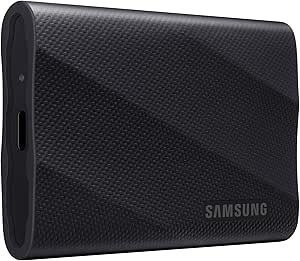 | Best for Maximum Speed | Storage capacity: 4 TB | Interface: USB 3.2 Gen 2×2 | Read/write speed: Up to 2,000 MB/s | VIEW ON AMAZON | See Our Full Breakdown |
| Crucial X8 4TB Portable SSD |  | Best for Broad Device Compatibility | Storage capacity: 4 TB | Read speed: Up to 1050 MB/s | Interface: USB 3.2 | VIEW ON AMAZON | See Our Full Breakdown |
| Samsung T7 Portable SSD, 4TB, USB 3.2 Gen 2, Titan Gray | 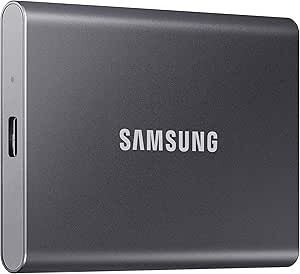 | Best Balanced Everyday Pick | Storage capacity: 4 TB | Interface: USB 3.2 Gen 2 | Sequential read speed: Up to 1,050 MB/s | VIEW ON AMAZON | See Our Full Breakdown |
| external ssd 4tb | Interface | Storage capacity | Read speed |
|---|---|---|---|
| Samsung T5 EVO Portable SSD | USB-C 3.2 Gen 1 | 4 TB | — |
| SSK 4TB Portable External SSD | USB 3.2 Gen 2, USB Type-C | 4 TB | Up to 1,050 MB/s |
| SanDisk 4TB Extreme Portable S | USB-C | — | Up to 2,000 MB/s |
| SanDisk Extreme PRO 4TB Portab | USB 3.2 Gen 2×2 | 4 TB | Up to 2,000 MB/s |
| Crucial X10 4TB Portable SSD | USB 3.2, USB-C, USB-A | — | Up to 2,100 MB/s |
| SanDisk Extreme Portable SSD 4 | USB-C | 4 TB | Up to 1050 MB/s |
| Samsung T9 Portable SSD 4TB | USB 3.2 Gen 2×2 | 4 TB | — |
| Crucial X8 4TB Portable SSD | USB 3.2 | 4 TB | Up to 1050 MB/s |
| Samsung T7 Portable SSD | USB 3.2 Gen 2 | 4 TB | — |
More Details on Our Top Picks
Samsung T5 EVO Portable SSD, 4TB, USB 3.2 Gen 1, Up to 460MB/s
The Samsung T5 EVO makes the most sense when 4TB capacity and wide device support matter more than quick transfers. It works with computers, consoles, phones, and tablets, and its 2-meter drop resistance adds reassurance for a drive that may travel between them. AES 256-bit hardware encryption is another useful distinction for people carrying work or personal files. Its main compromise is speed: the 460 MB/s ceiling is far below the SanDisk Extreme Portable SSD and Crucial X10, both of which are designed for much faster movement of large media files. That gap can mean longer waits when backing up video libraries or active creative projects. I’d choose the T5 EVO for everyday storage and device flexibility, not as the speed-focused pick in this group.
Pros:- 4TB capacity in a portable form factor
- Compatible with computers, consoles, smartphones, and tablets
- Rated for drops up to 2 meters
- AES 256-bit hardware encryption
Cons:- Maximum transfer speed of 460 MB/s is low compared with faster options in this roundup
- Large project transfers and backups can take longer than on USB 3.2 Gen 2 drives
Best for: People who want a 4TB drive for moving files among a computer, console, phone, or tablet and value encryption and drop protection.
Not ideal for: Video editors and other users who regularly transfer very large files and would benefit from the much higher speeds of the SanDisk Extreme Portable SSD or Crucial X10.
- Storage capacity:4 TB
- Interface:USB-C 3.2 Gen 1
- Maximum data transfer rate:Up to 460 MB/s
- Drop resistance:Up to 2 meters
- Hardware encryption:AES 256-bit
- Form factor:Portable
- Compatible devices:Gaming consoles, Mac, PC, smartphones, and tablets
Our verdict“Choose the T5 EVO if you want a versatile, encrypted 4TB drive for everyday device-to-device storage and can accept slower transfers.”
SSK 4TB Portable External SSD with USB-C and USB-A
The SSK 4TB Portable External SSD stands out for a specific workflow: direct 4K60 ProRes HDR capture on compatible iPhones. Its included USB-C and USB-A cables also make it easier to connect across newer and older devices without sourcing a separate cable. Read speeds up to 1,050 MB/s and write speeds up to 1,000 MB/s put it well ahead of the Samsung T5 EVO for large transfers, though it trails the SanDisk Extreme Portable SSD on stated read speed. S.M.A.R.T. and TRIM support add useful drive-management features, but neither removes compatibility limits: the recording mode depends on the iPhone and setup, and displayed capacity can vary by operating system. I’d pick this for a compatible phone-camera workflow, rather than for buyers seeking the strongest stated speed or ruggedness.
Pros:- Supports direct 4K60 ProRes HDR capture on compatible iPhones
- Includes both USB-C and USB-A cables
- Read speeds up to 1,050 MB/s and write speeds up to 1,000 MB/s
- S.M.A.R.T. and TRIM support
Cons:- iPhone recording features depend on compatible devices and setup
- Displayed capacity may vary by operating system
- The product data does not specify water, dust, or drop protection
Best for: iPhone creators with a compatible device who want to record 4K60 ProRes HDR directly to a 4TB external drive and also connect to USB-A computers.
Not ideal for: Buyers who need a clearly specified water- and dust-resistant drive, or those whose devices do not support the advertised iPhone recording workflow.
- Storage capacity:4 TB
- Interface:USB 3.2 Gen 2, USB Type-C
- Included connectivity:USB-C and USB-A cables
- Read speed:Up to 1,050 MB/s
- Write speed:Up to 1,000 MB/s
- Form factor:M.2
- Enclosure material:Metal
- Features:LED light, S.M.A.R.T., and TRIM
Our verdict“Pick the SSK when compatible iPhone ProRes recording and included USB-C and USB-A cables matter more than ruggedness or higher peak speeds.”
SanDisk 4TB Extreme Portable SSD
The SanDisk Extreme Portable SSD is a strong fit for buyers who carry a 4TB drive into varied settings and want speed alongside protection. Its read speed reaches up to 2,000 MB/s, and the IP65 rating and 3-meter drop protection offer more documented resistance than the Samsung T5 EVO. AES 256-bit encryption also suits people transporting sensitive project files. Compared with the SanDisk Extreme PRO, this model is not specified with a matching 2,000 MB/s write speed, so it is a less compelling choice for sustained write-heavy work. Password protection software requires a download and specific operating-system versions, which adds setup friction. I’d choose it for portable backups and mixed-device media libraries; buyers focused on maximum write performance should look at the Extreme PRO instead.
Pros:- Read speeds up to 2,000 MB/s
- IP65 water and dust resistance with protection against drops up to 3 meters
- AES 256-bit encryption
- Compatibility includes computers, mobile devices, and PlayStation 5
Cons:- Write speeds are lower than read speeds
- Password protection software requires a download and specific OS versions
- Usable capacity is less than the advertised 4TB
Best for: Photographers, field workers, and mobile creators who need 4TB of storage, strong environmental protection, and fast reads across compatible devices.
Not ideal for: Users whose work involves frequent, sustained large writes and who want a stated 2,000 MB/s write rate, or buyers who want password software without OS requirements.
- Capacity:4 TB
- Interface:USB-C
- Read speed:Up to 2,000 MB/s
- Durability:IP65 rated; up to 3-meter drop protection
- Security:256-bit AES encryption
- Color:Black
- Compatibility:Windows 10+, macOS v12+, Android, iOS, iPadOS, and PlayStation 5
Our verdict“Choose this SanDisk for rugged, fast-read portable storage, but select the Extreme PRO if matched high read and write speeds are your priority.”
SanDisk Extreme PRO 4TB Portable SSD
The SanDisk Extreme PRO 4TB is the performance-focused choice here, with stated read and write speeds of up to 2,000 MB/s. That matched ceiling makes it a better fit for moving large project files in both directions than the regular SanDisk Extreme Portable SSD, whose write speed is described as lower than its read speed. Its forged aluminum chassis and silicone shell pair with IP65 protection and 3-meter drop protection, so the fast drive is also suited to travel. The tradeoff is hardware dependence: reaching those headline speeds requires compatible equipment, including support for its USB 3.2 Gen 2×2 interface. Buyers with slower ports may get less benefit and could prefer the Crucial X10’s broad USB-C and USB-A compatibility. The five-year limited warranty is an added ownership advantage.
Pros:- Up to 2,000 MB/s read and write speeds
- Forged aluminum chassis with silicone shell
- IP65 water and dust resistance and protection against drops up to 3 meters
- Five-year limited warranty
Cons:- Maximum speeds depend on compatible hardware
- USB 3.2 Gen 2×2 support may limit the benefit on other connections
Best for: Creative professionals and power users with compatible USB 3.2 Gen 2×2 hardware who frequently move large files and need a rugged 4TB drive.
Not ideal for: People connecting mainly to hardware that cannot take advantage of USB 3.2 Gen 2×2, or buyers who prioritize broad connection flexibility over peak performance.
- Storage capacity:4 TB
- Read speed:Up to 2,000 MB/s
- Write speed:Up to 2,000 MB/s
- Interface:USB 3.2 Gen 2×2
- Connectivity:USB-C
- Water and dust resistance:IP65
- Drop protection:Up to 3 meters
- Weight:78 g
- Warranty:5-year limited
Our verdict“Choose the Extreme PRO for fast, bidirectional transfers on compatible hardware; skip it if your devices cannot use its high-speed interface.”
Crucial X10 4TB Portable SSD
The Crucial X10 combines a high stated read speed—up to 2,100 MB/s—with compatibility across computers, mobile devices, and major consoles. That makes it a flexible 4TB choice for someone who moves a library between a Mac or PC and a PS5 or Xbox. Its IP65 rating and drop protection up to 9.8 feet also make it more travel-ready than the Samsung T5 EVO, whose stated drop protection is 2 meters but whose data does not list an IP rating. The X10’s speed advantage is not universal: it depends on the connected hardware, and the supplied information gives a read-speed figure rather than a matching write-speed claim. A USB-A adapter may be needed for older devices. I’d choose it for mixed-device use, while the SanDisk Extreme PRO better fits users seeking a stated high write speed.
Pros:- Read speeds up to 2,100 MB/s
- IP65 dust and water resistance with drop protection up to 9.8 feet
- Compatibility spans Windows, Mac, mobile devices, Linux, and major gaming consoles
- Includes time-limited Mylio, Adobe, and Acronis software subscriptions
Cons:- Actual speed depends on the connected device and interface
- USB-A adapter may be needed for older devices
- Bonus software subscriptions are time-limited
Best for: Students, gamers, and creators who want one 4TB drive for computers, mobile devices, and multiple console families.
Not ideal for: Buyers who need a specified 2,000 MB/s write speed or who want guaranteed USB-A connection without an adapter for older devices.
- Capacity:4 TB
- Read speed:Up to 2,100 MB/s
- Interface:USB 3.2, USB-C, USB-A
- Durability:IP65 dust and water resistance; drop resistant up to 9.8 feet
- Compatibility:Windows, Mac, iPad Pro, Chromebooks, Android, Linux, PS4, PS5, and Xbox
- Color:Black
- Model number:CT4000X10SSD9C02
Our verdict“Choose the Crucial X10 if you need a fast, rugged 4TB drive to move among computers, mobile devices, and consoles.”
SanDisk Extreme Portable SSD 4TB, USB-C, Up to 1050MB/s
The SanDisk Extreme Portable SSD is the pick here for buyers who expect a 4TB drive to travel beyond a desk. Its carabiner loop gives you a practical way to attach it to a bag, while hardware encryption adds protection for stored files. Its read and write speeds sit in the same general class as the Samsung T7, rather than the faster ceiling claimed by the Samsung T9. That makes it a sensible match for routine transfers and backups, but not the standout for maximum throughput.
There is a documentation wrinkle: supplied details cite both IP65 and IP55 ratings and different drop heights. I would check the exact unit’s specifications before relying on a particular protection level. Choose this for portable rugged features; skip it if consistent rating information or the T9’s higher compatible-host speed is your priority.
Pros:- 4TB capacity in a portable drive
- Carabiner loop helps attach it to a bag or kit
- 256-bit AES hardware encryption with password protection
- Rated for water, dust, and drop resistance
Cons:- Supplied descriptions conflict on IP rating and drop-protection height
- Maximum transfer speeds depend on the host device and operating conditions
Best for: Travelers, field workers, and photographers who want 4TB of storage with a way to secure the drive to a bag and hardware encryption.
Not ideal for: Buyers who need one unambiguous water, dust, and drop rating, or users with a compatible Gen 2×2 setup seeking the higher stated speed of the Samsung T9.
- Storage capacity:4 TB
- Read speed:Up to 1050 MB/s
- Write speed:Up to 1000 MB/s
- Interface:USB-C
- USB standard:USB 3.2 Gen 2
- Encryption:256-bit AES hardware encryption
- Protection:IP65 water and dust resistance; up to 3-meter drop protection listed in item details; other supplied description cites IP55 and up to 2 meters
- Model:SDSSDE61-4T00-G25
Our verdict“Choose the SanDisk Extreme if outdoor-friendly attachment and hardware encryption matter more than the T9’s higher compatible-host speed.”
Samsung T9 Portable SSD 4TB, USB 3.2 Gen 2×2
The Samsung T9 has the highest stated transfer ceiling in this group: up to 2,000 MB/s read and write. That makes it the speed-focused choice for large project files and frequent transfers, but only when the computer, port, and cable support USB 3.2 Gen 2×2. On a more typical connection, the advantage can shrink; the Samsung T7 offers up to 1,050 MB/s read and 1,000 MB/s write over Gen 2, a more broadly attainable target.
The T9 also combines AES 256-bit hardware encryption with Dynamic Thermal Guard, which is intended to manage heat during demanding use. Its stated drop resistance adds some travel reassurance, though this is not the same emphasis as the SanDisk Extreme’s carabiner loop and water-and-dust protection. Pick the T9 for a compatible high-bandwidth setup, not simply because its headline speed is larger.
Pros:- Up to 2,000 MB/s read and write with a compatible host and cable
- 4TB capacity for sizable media and project libraries
- AES 256-bit hardware encryption
- Dynamic Thermal Guard is designed to manage heat during heavy use
Cons:- Maximum speed requires USB 3.2 Gen 2×2 support and a compatible cable
- Its speed advantage may be limited on common lower-bandwidth connections
Best for: Video editors and other large-file users with a USB 3.2 Gen 2×2 computer, compatible cable, and a need for fast 4TB portable storage.
Not ideal for: Buyers using standard USB Gen 2 ports who will not benefit from Gen 2×2 speeds, or those prioritizing a carabiner and stated water-and-dust resistance.
- Storage capacity:4 TB
- Interface:USB 3.2 Gen 2×2
- Read/write speed:Up to 2,000 MB/s
- Hardware encryption:AES 256-bit
- Drop resistance:Up to 9.8 ft
- Form factor:Portable external SSD
- Color:Black
- Compatible devices:Gaming consoles, Mac, PC, tablet, iPhone 15/16
Our verdict“Choose the T9 if your setup supports Gen 2×2 and you can use its higher speed; otherwise the T7’s Gen 2 performance may be a better fit.”
Crucial X8 4TB Portable SSD
The Crucial X8 is a practical 4TB choice for households or work kits that move between computers, tablets, phones, and consoles. Its listed compatibility is broad, and the package includes a USB-C cable and USB-C-to-USB-A adapter, reducing the chance that an older USB-A device needs a separate cable purchase. Read speeds reach 1,050 MB/s, broadly matching the Samsung T7 on the stated read figure, although the supplied X8 data does not give a write-speed figure for a direct comparison.
Drop protection up to 7.5 feet gives it a useful durability claim, but the plastic enclosure feels less substantial on paper than the T7’s aluminum body. Maximum speed also depends on the connected device and interface. I’d favor the X8 for mixed-device convenience and included connectivity, not for premium enclosure materials or a verified higher-speed workflow.
Pros:- Broad listed compatibility across computers, mobile devices, and consoles
- Includes USB-C cable and USB-C-to-USB-A adapter
- Read speeds up to 1050 MB/s
- Drop protection rated up to 7.5 feet
Cons:- Plastic enclosure is less substantial than the Samsung T7’s aluminum body
- Maximum speed depends on the connected device and interface
- Supplied product data does not specify a write-speed figure
Best for: People sharing one 4TB drive across Windows or Mac computers, tablets, Android devices, and older consoles that may need USB-A connectivity.
Not ideal for: Buyers who want an aluminum enclosure, a supplied write-speed specification, or transfer rates beyond the listed 1,050 MB/s read ceiling.
- Storage capacity:4 TB
- Read speed:Up to 1050 MB/s
- Interface:USB 3.2
- Included cables:USB-C to USB-C cable and USB-C to USB-A adapter
- Compatible devices:Windows, Mac, iPad Pro, Chromebook, Android, Linux, PS4, Xbox One
- Drop protection:Up to 7.5 feet
- Dimensions:4.33 × 2.09 × 0.45 inches
- Weight:0.1 kg
- Warranty:3-year limited warranty
Our verdict“Choose the X8 if you need one 4TB drive and included cables for a varied mix of devices, rather than a metal enclosure or a higher speed tier.”
Samsung T7 Portable SSD, 4TB, USB 3.2 Gen 2, Titan Gray
The Samsung T7 makes the strongest case as an everyday 4TB drive: USB 3.2 Gen 2 supports stated sequential speeds of up to 1,050 MB/s read and 1,000 MB/s write, and its aluminum body is rated for falls up to 6 feet. That combination suits backups, game libraries, and regular file transfers without requiring the Gen 2×2 host needed to reach the Samsung T9’s higher 2,000 MB/s claim.
Compared with the Crucial X8, the T7’s listed advantage is its aluminum enclosure and specified write speed; the X8 instead supplies a USB-A adapter and lists a wider range of device compatibility. The T7’s actual speed still depends on the host, cable, and UASP support, and compatibility can vary. It is a balanced pick, but not the fastest option here or the one with the most rugged features.
Pros:- Up to 1,050 MB/s sequential read and 1,000 MB/s sequential write
- Aluminum enclosure with shock resistance and fall protection up to 6 feet
- Compact 4TB portable form factor
- Listed compatibility with computers, mobile devices, tablets, and gaming consoles
Cons:- Actual speeds depend on the host device, cable, and UASP support
- Compatibility may vary by host device
- Does not list the T9’s 2,000 MB/s speed ceiling or the SanDisk Extreme’s carabiner and water-and-dust protection
Best for: Everyday users who want a compact 4TB drive for computer backups, media libraries, and console storage, with an aluminum body and clear read/write speed figures.
Not ideal for: Users with USB 3.2 Gen 2×2 systems who want the T9’s higher speed ceiling, or travelers seeking the SanDisk Extreme’s carabiner and stated water-and-dust resistance.
- Storage capacity:4 TB
- Interface:USB 3.2 Gen 2
- Sequential read speed:Up to 1,050 MB/s
- Sequential write speed:Up to 1,000 MB/s
- Data transfer rate:Up to 10 Gbps
- Form factor:Portable external SSD
- Enclosure material:Aluminum
- Color:Titan Gray
- Drop protection:Up to 6 feet
Our verdict“Choose the T7 for a balanced mix of 4TB capacity, specified Gen 2 speeds, and an aluminum body without needing a Gen 2×2 setup.”

How We Picked
I ranked these 4TB external SSDs around the choices that affect ownership: stated transfer speeds, connection standards, device compatibility, portable protection, and ease of fitting the drive into different setups. I gave weight to whether a drive’s features are useful in everyday transfers, backups, creative work, or travel—not just to the highest speed claim. Since performance depends on both the drive and the connected device, a fast interface only counts as an advantage when buyers are likely to have compatible hardware.
The order favors versatile options first, then models with more specific strengths or tradeoffs. The Crucial X10 leads as a high-speed choice, while the Samsung T9 follows for buyers with compatible Gen 2×2 devices. Rugged SanDisk models rank well for mobile protection, and the Samsung T5 EVO and Crucial X8 suit buyers who may value simpler performance tiers over maximum throughput. I also considered connection flexibility, including the SSK’s USB-C and USB-A options, while keeping the distinction between similar-looking models clear.
| external ssd 4tb | Read speed |
|---|---|
| Samsung T5 EVO Portable SSD | — |
| SSK 4TB Portable External SSD | Up to 1,050 MB/s |
| SanDisk 4TB Extreme Portable S | Up to 2,000 MB/s |
| SanDisk Extreme PRO 4TB Portab | Up to 2,000 MB/s |
| Crucial X10 4TB Portable SSD | Up to 2,100 MB/s |
| SanDisk Extreme Portable SSD 4 | Up to 1050 MB/s |
| Samsung T9 Portable SSD 4TB | — |
| Crucial X8 4TB Portable SSD | Up to 1050 MB/s |
| Samsung T7 Portable SSD | — |
Factors to Consider When Choosing External Ssd 4tb
Choosing a 4TB portable SSD is less about capacity—every drive here offers the same headline amount—and more about whether its speed, connections, and build suit your devices and routine. I’d settle the compatibility questions before paying for a faster tier, then decide how much portable protection and connection flexibility matter.
Match the SSD’s speed to your device
A drive’s advertised speed is a ceiling tied to its interface, not a promise for every computer or phone. Check the ports and supported USB standards on the device you’ll use most, then compare those with the SSD’s connection type. A faster drive can still be a sensible choice if you expect to upgrade your computer, but it may deliver little immediate benefit on older hardware. For large video files or frequent project transfers, higher speeds can save time across repeated jobs. For occasional backups and document storage, compatibility and ease of use may matter more. Avoid paying for an interface your main device cannot use unless future-proofing is part of your plan.
Decide whether portable protection matters
Portable drives face more bumps, dust, and weather exposure than drives that stay on a desk. If the SSD will travel in a camera bag or move between work sites, prioritize a model whose design emphasizes rugged use. A protective design does not make any drive indestructible, so keep backups of irreplaceable files and avoid treating resistance claims as permission to handle it carelessly. A less rugged model can be a better fit for a home office where the drive rarely moves. Also think about the cable and storage pouch: small accessories can affect how safely and conveniently the drive travels. Choose protection for your actual routine, not an imagined worst-case scenario.
Check every device and cable in your setup
USB-C describes a connector shape, while USB standards describe capabilities; the two are not the same thing. Confirm that the included or intended cable fits your computer, tablet, or phone and supports the data rate you want. A USB-A connection can be useful for older computers, while USB-C may simplify newer-device use. If you plan to connect the drive to a phone or tablet, verify that the device supports external storage and can supply enough power. A small adapter may solve a connector mismatch, but it will not add a faster data standard. Reviewing the whole connection chain prevents buying a drive whose best feature stays unused.
Plan how you will divide and protect 4TB
One large volume is convenient, but it can be awkward when a drive serves different purposes or operating systems. Before copying files, decide whether you want separate partitions or a single shared volume, and check which file system works across your computers and other devices. Reformatting can erase existing data, so set this up before the drive becomes your only copy of important files. Four terabytes can hold a large working library, but it is not a backup plan by itself; a second copy should live on another drive or in another storage location. If you share the SSD across platforms, test a small file transfer before moving a full archive. That simple check can reveal permission or file-system issues early.
Choose the right performance tier for your workload
Frequent transfers of large media projects can make a faster SSD worthwhile, while a drive used mainly for archives may spend most of its life idle. Think about how often you write many gigabytes, not just how quickly you want a benchmark to look. Sustained workloads can also behave differently from short transfers, so keep a separate copy of active projects and avoid filling a drive to its limit. Lower-speed options can be perfectly practical for scheduled backups and general storage. Paying for a higher tier makes the most sense when your computer supports it and saved transfer time has real value. Otherwise, a more modest option can meet the same capacity need without chasing unused performance.
Frequently Asked Questions
Will the Samsung T9 be faster on every computer than the T7?
No. The T9’s USB 3.2 Gen 2×2 interface can reach its intended advantage only when the connected computer supports that standard and the right connection path. On a system with a slower USB interface, the host can limit both drives, narrowing or removing the practical difference. Check your computer’s technical specifications rather than relying on the USB-C connector alone. If your current setup lacks Gen 2×2, the T7 may be a more straightforward match unless you plan to upgrade.
Is the Samsung T5 EVO too slow for a 4TB backup drive?
Not automatically. Its stated speed of up to 460MB/s is a lower tier than the 1050MB/s claim on the listed SanDisk Extreme USB-C model, so large transfers will take longer under comparable conditions. For periodic backups, that difference may matter less than straightforward capacity and a compatible connection. If you regularly move large video libraries or work directly from the SSD, a faster option may better suit the routine. Consider how long your typical transfer takes today before deciding whether the speed gap would affect your work.
Can I use one 4TB SSD with both a Mac and a Windows PC?
Often, but the drive’s format determines how easily both systems can read and write files. Some file systems work well across platforms, while others may need extra software or a reformat, which erases existing data. Check the needs of any devices beyond the two computers, such as a game console, camera, or tablet, before choosing a format. If you plan to share the drive, test it on each device before storing important files. Keep another copy of important data, since a shared portable SSD can be lost or damaged.
Should I choose a rugged SanDisk model for travel even if I do not need maximum speed?
That can make sense if the drive will regularly move between locations or live in a bag with other equipment. For a desk-bound backup drive, rugged positioning may offer less practical value than connection flexibility or a speed tier better matched to your computer. The SanDisk Extreme options stand out in this lineup for buyers who put portable protection high on the list. Compare the exact model carefully, since the listed versions have different speed descriptions. No portable drive replaces a separate backup of files you cannot afford to lose.
Is USB-C and USB-A support worth prioritizing over a faster interface?
It is often useful when you regularly move files between newer and older computers, since it can reduce reliance on adapters. A faster interface is the better priority if your main device supports it and you often transfer large files. These are different benefits: port flexibility can make a drive easier to use, while a higher data rate can shorten compatible transfers. List the devices you expect to connect before choosing, including any shared or older machines. If you use only one modern computer, broad connector options may matter less than the interface it supports.
Conclusion
For a single drive that balances fast positioning with broad everyday appeal, I’d choose the Crucial X10 as the best overall, while checking that its connection suits your devices. The Samsung T5 EVO is my best value-oriented pick for buyers who can accept its lower stated speed, and the Samsung T9 is the best premium performance choice for systems that support USB 3.2 Gen 2×2. For beginners, I’d favor a model whose connection matches the computer they already own rather than paying for a speed tier they cannot use; the Samsung T7 is a sensible starting point to compare. For travel and tougher handling, choose a SanDisk Extreme model; for mixed USB-C and USB-A devices, look closely at the SSK. The right 4TB SSD is the one whose speed and connections your setup can actually use.