Based on my latest reviews, the best 3D printers of 2025 include models like the ELEGOO Centauri with auto calibration, FLASHFORGE Adventurer 5M for easy setup, and the Creality Ender 3 for affordability and community support. High-speed options like the K1 SE and multi-color systems such as the Anycubic Kobra S1 add versatility. If you continue exploring, you’ll discover key features and how these choices can suit your projects perfectly.
Key Takeaways
- The top 3D printers in 2025 combine high-speed performance, large build volumes, and versatile material support for professional and hobbyist needs.
- Advanced features like auto bed leveling, quick nozzle swaps, and WiFi connectivity enhance user experience and workflow efficiency.
- Open-source designs and compatibility with community upgrades provide flexibility and customization options for creators.
- Models with AI cameras and multi-color printing systems offer improved reliability, automation, and complex project capabilities.
- Price ranges vary from beginner-friendly compact models to high-end, large-volume printers suitable for commercial and educational applications.

ELEGOO Centauri Carbon 3D Printer, CoreXY 500mm/s High Speed Printing with Auto Calibration, 320°C Nozzle and Built-in Camera, Ready to Print Out of the Box, 256x256x256mm Printing Size
Print Right Out of the Box: ELEGOO Centauri Carbon arrives fully assembled and pre-calibrated, ready to go right...
As an affiliate, we earn on qualifying purchases.
ELEGOO Centauri Carbon 3D Printer with Auto Calibration

The ELEGOO Centauri Carbon 3D Printer with Auto Calibration is an excellent choice for both beginners and experienced makers who want a hassle-free printing experience. It arrives fully assembled and pre-calibrated, so you can start printing right away. Its auto bed leveling and intuitive touchscreen make setup simple, while the generous 256x256x256 mm build volume handles larger projects. Built with a rigid aluminum frame and a CoreXY structure, it offers high-speed performance up to 500 mm/s without compromising stability. Plus, its advanced hotend and chamber design support tough, heat-resistant materials like carbon fiber reinforced filaments, ensuring strong, precise, and durable prints.
Best For: hobbyists, educators, and small-scale professionals seeking a reliable, easy-to-use 3D printer capable of high-speed, high-quality printing with advanced material support.
Pros:
- Fully assembled and pre-calibrated for immediate use, reducing setup time
- Auto bed leveling and intuitive touchscreen for simplified operation
- Supports high-performance materials like carbon fiber reinforced filaments for durable, detailed prints
Cons:
- May have a higher initial cost compared to entry-level 3D printers
- Limited build volume size for very large projects
- Enclosed chamber and hotend require careful handling and maintenance

FLASHFORGE Adventurer 5M 3D Printer with Fully Auto Leveling, Max 600mm/s High Speed Printing, 280°C Direct Extruder with 3S Detachable Nozzle, CoreXY All Metal Structure, Print Size 220x220x220mm
One-Click Automatic Printing: Experience hassle-free 3D printing with the Adventurer 5M Series. Enjoy automatic bed leveling for flawless...
As an affiliate, we earn on qualifying purchases.
FLASHFORGE Adventurer 5M 3D Printer with Auto Leveling

Are you looking for a 3D printer that combines speed, ease of use, and precise results? The FlashForge Adventurer 5M is perfect for that. It features fully automatic bed leveling, ensuring flawless first layers and saving time. With a max speed of 600mm/s and rapid 3-second nozzle changes, it’s ideal for quick prototyping and mass production. Its all-metal CoreXY structure provides stability and accuracy, while dual-sided PEI platforms make print removal easy. The high-temperature extruder heats up fast, and multiple nozzle sizes support various projects. Overall, it’s a reliable, user-friendly choice that delivers professional-quality prints with minimal hassle.
Best For: hobbyists, educators, and small businesses seeking fast, reliable, and high-quality 3D printing with minimal setup and calibration.
Pros:
- Fully automatic bed leveling for effortless first-layer adhesion
- High-speed printing up to 600mm/s with rapid nozzle changes
- All-metal CoreXY structure ensures stability and precision
Cons:
- Compatibility issues with newer MacOS versions may require alternative setups
- Fan noise can be noticeable during operation
- Initial software setup can be challenging for less tech-savvy users

Official Creality Ender 3 3D Printer Fully Open Source with Resume Printing Function DIY Printers Build Volulme 8.66x8.66x9.84 inch
Resume Printing Function: no worry to the immediate power outage or electric circuit error, Ender 3 has the...
As an affiliate, we earn on qualifying purchases.
Creality Ender 3 3D Printer

For hobbyists, students, and newcomers seeking an affordable yet reliable 3D printer, the Creality Ender 3 stands out with its open-source design and impressive build volume. It features a 8.66×8.66×9.84-inch workspace, a resume printing function for power outages, and a safety-protected power supply that heats the bed to 100°C in just five minutes. Weighing only 15.43 pounds, it’s easy to move and set up, though assembly takes about two hours. Its advanced extruder reduces clogging, and the noiseless V-shape movement ensures quieter operation. With support for SD cards and community-driven upgrades, the Ender 3 offers excellent value for makers at all levels.
Best For: hobbyists, students, and newcomers seeking an affordable, reliable, and customizable 3D printing experience.
Pros:
- Open-source design with extensive community support and upgrade options
- Compact, lightweight, and easy to set up for beginners
- Quiet operation with advanced extruder technology and safety features
Cons:
- Assembly can be time-consuming and may require troubleshooting for calibration
- Re-leveling and frame adjustments might be necessary during initial setup and use
- Slicing and software configuration have a learning curve for newcomers
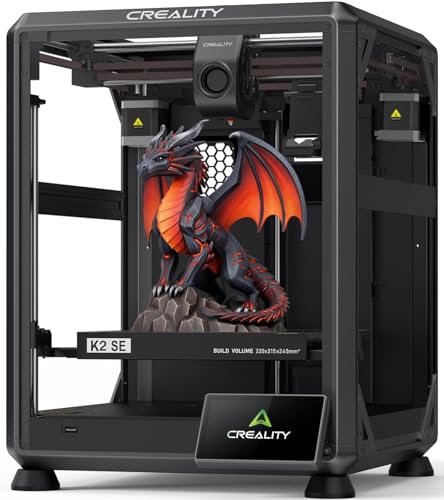
Creality K2 SE 3D Printer, 500mm/s High-Speed Printing, Support Multi Color 3D Printing Needs CFS, Solid Metal Build, Auto Leveling, Direct Drive Extruder, Quick-Swap Nozzle, 220×215×245mm Print Size
【500mm/s High-Speed Fast Printing】Driven by a lightweight CoreXY motion system, the Creality K2 SE delivers up to 500mm/s...
As an affiliate, we earn on qualifying purchases.
Creality K1 SE 3D Printer

If you need a 3D printer that combines blazing-fast speeds with precise motion control, the Creality K1 SE stands out as an ideal choice for demanding users. Its CoreXY system delivers speeds up to 600mm/s with 20,000mm/s² acceleration, making it 12 times faster than standard models while maintaining high-quality prints. It features a reliable extruder with quick filament feeding and a run-out sensor to reduce waste. The sturdy aluminum frame minimizes vibrations, ensuring stability during rapid printing. With plug-and-play setup, one-click auto-calibration, and advanced software support, the K1 SE makes high-speed, precision printing accessible and efficient.
Best For: hobbyists and professionals who demand high-speed, precise 3D printing with minimal setup and real-time monitoring.
Pros:
- Achieves blazing-fast printing speeds up to 600mm/s with stable high-quality output
- Easy plug-and-play setup with one-click auto-calibration and minimal manual leveling
- Rigid aluminum frame and advanced motion system ensure stability and vibration reduction during rapid printing
Cons:
- High-speed operation may require careful tuning to prevent print artifacts in some filaments
- Larger dimensions and rapid movements might generate more noise compared to standard printers
- Advanced features like open-source software and remote monitoring may have a learning curve for beginners
ELEGOO Neptune 3 Pro 3D Printer

The ELEGOO Neptune 3 Pro stands out as an excellent choice for hobbyists and educators seeking a reliable and user-friendly 3D printer. It offers a solid 225x225x280 mm build volume, perfect for a variety of projects. The sturdy, pre-assembled design and included toolkit mean you can get started quickly. Its dual lead screws and dual motors ensure precise, stable vertical movement, while the POM V-guide wheels guarantee smooth operation. The dual-gear direct drive extruder with upgraded nozzle components supports multiple filaments like PLA, TPU, PETG, and ABS. Features like auto bed leveling, filament sensor, and silent operation make it both convenient and quiet for everyday use.
Best For: hobbyists, educators, and small-scale creators seeking a reliable, user-friendly 3D printer with a versatile build volume and quiet operation.
Pros:
- Easy setup with pre-assembled design and comprehensive toolkit
- Precise and stable printing thanks to dual lead screws and dual motors
- Supports multiple filament types including PLA, TPU, PETG, and ABS
Cons:
- Slightly limited build volume compared to larger printers
- May require occasional calibration for optimal results
- No advanced features like enclosed chamber or touchscreen customization
FLASHFORGE AD5M 3D Printer with Auto Calibration and Quick-Swap Nozzle

With its auto calibration and quick-swap nozzle system, the FLASHFORGE AD5M stands out as an ideal choice for both beginners and professionals seeking efficient, reliable 3D printing. Its one-click leveling system guarantees perfect first layers every time, while the flexible double-sided PEI steel plate makes print removal simple—especially with PETG. The printer supports multiple nozzle sizes (0.25/0.4/0.6/0.8 mm), offering versatility for detailed or fast prints. Its all-metal CoreXY structure enables high-speed, smooth operation up to 600mm/s without sacrificing quality. Quick tool-free nozzle changes take around three seconds, and remote control via the Flash Maker app keeps workflow seamless and efficient.
Best For: both beginners seeking an easy-to-use 3D printer and professionals requiring high-speed, reliable, and versatile printing capabilities.
Pros:
- Fully automatic one-click leveling ensures precise calibration and perfect first layers.
- Quick-release nozzle system allows tool-free swaps in about 3 seconds, enhancing maintenance efficiency.
- Supports multiple nozzle sizes (0.25/0.4/0.6/0.8 mm) for diverse printing needs from high detail to fast production.
Cons:
- The all-metal CoreXY structure may produce more noise during operation compared to enclosed systems.
- The maximum printing speed of 600mm/s might be challenging to maintain consistently for complex models.
- Requires internet connectivity and compatible software for remote monitoring, which may pose a learning curve for some users.
FLASHFORGE Adventurer 5M 3D Printer with Auto Leveling System

The FLASHFORGE Adventurer 5M stands out as an ideal choice for beginners and hobbyists seeking reliable, high-quality 3D printing without the hassle of manual calibration. Its fully automatic leveling system guarantees perfect first layers with just one click, saving time and reducing errors. The CoreXY all-metal structure supports high-speed printing up to 600mm/s, providing smooth, stable operation. Quick-detachable nozzles make swapping sizes effortless, and the flexible PEI steel plate simplifies model removal. Compact and easy to set up in about 15 minutes, it delivers consistent results, making it perfect for those new to 3D printing or looking for a dependable, user-friendly machine.
Best For: Beginners and hobbyists seeking a reliable, easy-to-use 3D printer with automatic leveling and high-quality performance.
Pros:
- Fully automatic leveling system for quick and flawless first layers
- Support for high-speed printing up to 600mm/s with stable, smooth operation
- Easy quick-detachable nozzles and simple model removal with flexible PEI steel plate
Cons:
- Occasional software bugs and limited remote management stability
- Limited support and flexibility for firmware and third-party upgrades
- Possible difficulty in removing PETG models from the build plate at higher temperatures
Upgraded Tina2S 3D Printer with WiFi Cloud Printing

If you’re a beginner or educational user seeking an easy-to-use 3D printer, the upgraded Tina2S with WiFi cloud printing is an excellent choice. Fully assembled and compact, it fits well on a desk or classroom. Its WiFi connectivity via the Poloprint Cloud app allows effortless online slicing and printing from mobile devices, making the process straightforward. Auto bed leveling, a flexible heatable platform, and quiet operation simplify setup and use. Supporting small models and various filaments like PLA and PETG, it’s perfect for prototypes, projects, and learning. Users praise its user-friendliness, quality prints, and versatility—ideal for beginners, students, and hobbyists alike.
Best For: beginners, students, and hobbyists seeking an easy-to-use, compact 3D printer with WiFi connectivity and auto-leveling features.
Pros:
- User-friendly setup with clear instructions, ideal for newcomers and educational use.
- Wireless cloud printing via the Poloprint Cloud app simplifies operation and model management.
- Compact size and quiet operation make it suitable for home, classroom, or small workspace environments.
Cons:
- Limited build volume (~100x100x100mm) not suitable for large or complex projects.
- Occasional connectivity issues reported with WiFi setup and stable operation.
- Software updates or initial setup may cause some confusion for less experienced users.
FLASHFORGE AD5M 3D Printer with Auto Leveling and High-Speed Printing

Designed for makers and professionals who need rapid results, the FLASHFORGE AD5M 3D printer delivers high-speed printing capabilities that outperform many entry-level models. It reaches speeds up to 600mm/s with impressive acceleration, making it perfect for fast prototyping and high-volume runs. The auto-leveling feature with a pressure sensor guarantees consistent first layers, while the 220×220×220mm build volume supports diverse projects. Its high-temp extruder enables advanced materials, and remote monitoring adds convenience. Although setup is quick and user-friendly, some software bugs and mechanical quirks exist. Still, its speed, upgradeability, and value make it a strong contender for serious creators.
Best For: makers, engineers, and professionals seeking rapid prototyping, high-volume production, and high-speed 3D printing capabilities.
Pros:
- Exceptional high-speed printing up to 600mm/s with fast acceleration.
- Auto-leveling with a pressure sensor ensures consistent first-layer adhesion.
- Open-source hardware and firmware allow easy upgrades and modifications.
Cons:
- Some software bugs and limited responsiveness in the interface.
- Mechanical noise and bed warping issues can affect print quality.
- Initial setup and calibration can be challenging due to unclear instructions and mechanical quirks.
Creality K2 Plus 3D Printer with Auto-Leveling and Dual AI Cameras

For professionals and serious hobbyists seeking precision and efficiency, the Creality K2 Plus 3D Printer stands out with its advanced auto-leveling system and dual AI cameras. It offers multi-color printing by connecting four CFS units for up to 16 colors, and supports a wide range of materials, including high-temp filaments, with an actively heated chamber. The printer boasts high-speed printing up to 600mm/s, a sturdy die-cast frame, and dual Z-axes for stability. Its auto-leveling guarantees perfect first layers, while the AI cameras monitor progress, detect issues, and enable real-time alerts, making it a versatile, professional-grade solution.
Best For: Professionals and serious hobbyists seeking high-speed, multi-material, and multi-color 3D printing with advanced auto-leveling and real-time monitoring.
Pros:
- Supports multi-color (up to 16) and multi-material printing, reducing post-processing.
- Equipped with dual AI cameras for real-time monitoring and issue detection.
- High-speed printing capability up to 600mm/s with a robust and stable frame.
Cons:
- The advanced features and large build volume may come with a higher price point.
- Setup and calibration might be complex for beginners unfamiliar with auto-leveling systems.
- Requires multiple CFS units for full multi-color capability, which could increase operational costs.
AI-Powered 3D Printer for Kids with 8 PLA Filament Set and App Control

The AI-Powered X-Maker Joy 3D Printer stands out as the perfect choice for families with kids enthusiastic to explore 3D printing creatively and safely. Its AI-driven features make modeling simple—kids can generate custom designs using voice, text, or images, and transform photos into cartoon figures or avatars. The printer’s user-friendly app offers one-click setup, voice commands, and wireless control, ensuring a smooth experience. With high-speed printing, auto-leveling, and safety enclosures, it’s reliable and safe for kids. The kit includes 8 PLA filaments, DIY stickers, and all essentials, inspiring children to start creating immediately.
Best For: families and kids eager to explore creative, safe, and easy 3D printing projects at home.
Pros:
- AI-driven modeling tools make design simple and accessible for children with no prior experience
- Fast printing speeds (up to 400mm/s) and high accuracy (0.05mm) ensure efficient and detailed creations
- User-friendly app with wireless control, voice commands, and real-time monitoring enhances convenience and safety
Cons:
- The comprehensive starter kit may be more costly compared to basic 3D printers
- Limited to PLA filament, which may restrict material options for advanced users
- The complexity of some AI features could be overwhelming for very young children without adult supervision
Creality K2 Plus 3D Printer with Large Build Volume

If you’re looking to print large, complex models with precision and speed, the Creality K2 Plus 3D Printer is an excellent choice. It offers a generous 350×350×350mm build volume, supported by an aerospace-grade aluminum alloy frame for stability and quiet operation at just 45dB. With a blazing speed of 600mm/s and 0.05mm accuracy, you get detailed, high-quality prints fast. The smart CFS system manages four filaments simultaneously, enabling up to 16-color blending. Plus, dual AI cameras and 18 sensors monitor the print process, reducing errors and ensuring smooth, reliable multi-color printing every time.
Best For: hobbyists, educators, and professionals seeking high-speed, large-volume, multi-color 3D printing with precision and automation.
Pros:
- Large 350×350×350mm build volume ideal for complex and sizable projects
- Fast printing speed of 600mm/s with high accuracy of 0.05mm for detailed results
- Advanced filament management with four-slot CFS system supporting up to 16-color blending and automated switching
Cons:
- Filaments are not included, requiring additional purchase
- High initial cost may be a barrier for casual users
- The complex system with multiple sensors and AI cameras may require technical expertise for setup and maintenance
FLASHFORGE Adventurer 5M 3D Printer

The FLASHFORGE Adventurer 5M 3D Printer stands out as an excellent choice for beginners and educators who need fast, reliable, and easy-to-use printing solutions. It boasts impressive speeds of up to 600mm/s and quick auto-leveling, making setup effortless. The upgraded direct extruder and quick-detach nozzle simplify filament changes, while vibration compensation guarantees smooth results. Its open design and removable PEI plate support various filaments, including PLA, PETG, and TPU. With a compact build and user-friendly OrcaSlicer software, I find it perfect for quick prototyping and classroom projects. Overall, it balances speed, quality, and ease of use remarkably well.
Best For: beginners, educators, and small-scale creators seeking a fast, reliable, and user-friendly 3D printer for prototyping and educational projects.
Pros:
- High-speed printing up to 600mm/s with rapid startup capabilities
- Easy setup with fully automatic bed leveling and user-friendly OrcaSlicer software
- Removable PEI plates and upgraded direct extruder simplify filament changes and support various materials
Cons:
- Slightly limited interface responsiveness and touchscreen sensitivity reported by some users
- Occasional firmware freezes and minor hardware issues like sensor failures
- External accessories like lighting or integrated controls could enhance usability
Anycubic Kobra S1 Combo Multicolor 3D Printer

Looking for a versatile 3D printer that can handle complex, multi-colored models with ease? The Anycubic Kobra S1 Combo makes it possible with its 4-color printing capability, expandable to 8 colors using two ACE PRO units. It features a high-speed 600mm/s hotend, suitable for materials like ABS and ASA, and an enclosed CoreXY design for stability and safety. The built-in camera allows AI monitoring, while active filament drying keeps your filaments in top condition. Despite some feeding and calibration challenges, users praise its speed, ease of assembly, and support for creative multi-hued projects, making it a strong choice for makers.
Best For: hobbyists, educators, and makers seeking a versatile, multi-color 3D printer capable of high-speed, complex models with user-friendly assembly and creative potential.
Pros:
- Supports multicolor printing with up to 8 colors using dual ACE PRO units, ideal for detailed multi-hued models.
- High-speed capabilities up to 600mm/s with a versatile hotend and enclosed CoreXY design for stability and safety.
- Easy to assemble with a built-in camera for monitoring, making it suitable for beginners and home use.
Cons:
- Filament feeding and extrusion can be problematic due to flawed feeder design, requiring manual intervention.
- Calibration and bed leveling may be challenging, with some users experiencing uneven prints or bed humping.
- Limited moisture control features and potential issues with auto-leveling and support, leading to occasional print failures.
FLASHFORGE Adventurer 5M 3D Printer

Are you seeking a reliable 3D printer that combines speed, precision, and ease of use? The FlashForge Adventurer 5M is a high-speed FDM printer capable of reaching 600mm/s and rapid heating in just 35 seconds. Its Core XY all-metal structure guarantees stability, while the automatic leveling system makes setup effortless. With a versatile range of nozzle sizes and compatibility with filaments like PLA, PETG, ABS, and composites, it’s perfect for detailed models and functional prototypes. The dual cooling fans and removable nozzle simplify maintenance. Compact and user-friendly, the Adventurer 5M is ideal for creators who want fast, reliable results without complex calibration.
Best For: hobbyists, educators, and professionals seeking a reliable, high-speed 3D printer with easy setup and versatile filament compatibility.
Pros:
- Fast print speeds of up to 600mm/s and rapid heating within 35 seconds, reducing overall print time.
- Automatic leveling system and dual-sided PEI platform ensure easy setup and high-quality first layers.
- Compatible with a wide range of filaments including PLA, PETG, ABS, ASA, and composites, supporting diverse projects.
Cons:
- Slightly heavier and larger compared to compact 3D printers, requiring adequate space.
- Learning curve involved in software setup and designing models for beginners.
- Price point may be higher than basic entry-level 3D printers, reflecting advanced features.
Factors to Consider When Choosing 3D Printers

When selecting a 3D printer, I focus on key factors like print resolution, material compatibility, and speed to meet my project needs. Ease of setup, maintenance, and support also play a vital role in ensuring smooth operation. Understanding these points helps me choose the best machine for reliable, high-quality results.
Print Resolution Quality
Choosing a 3D printer with high print resolution means paying close attention to several key factors that directly impact the quality of your final prints. First, layer height is vital—lower heights like 0.05mm produce finer details and smoother surfaces. The nozzle diameter also matters; smaller nozzles (0.1-0.3mm) allow for more detailed prints but can increase print time. Consistent extrusion and precise calibration are essential to prevent issues like layer shifting or surface roughness, ensuring clarity in your designs. The filament quality and hotend stability influence resolution by reducing defects such as stringing or blobs. Finally, advanced features like multi-point auto-leveling and vibration compensation can considerably enhance surface finish and layer accuracy, helping you achieve professional-quality results.
Material Compatibility Range
Material compatibility plays a vital role in determining the versatility of a 3D printer. It influences the types of filaments I can use, such as PLA, ABS, PETG, TPU, or composite materials. Some printers are limited to specific filament diameters, usually 1.75mm or 2.85mm, which affects material options. High-temperature extruders above 250°C allow printing with advanced materials like Nylon, PEEK, and carbon fiber-reinforced filaments. An enclosed chamber and specialized hotends are essential for warping-prone or temperature-sensitive materials like ABS and polycarbonate. Additionally, supporting flexible or abrasive filaments depends on extruder design, nozzle material, and features like a hardened steel nozzle or direct drive system. When choosing a printer, understanding its material compatibility guarantees I can work with the materials I need.
Speed and Efficiency
Speed and efficiency are crucial factors that shape the overall performance and productivity of a 3D printer. Faster printers, capable of 50mm/s to over 600mm/s, can dramatically reduce project timelines, especially with systems like CoreXY that balance speed and accuracy. However, higher speeds may impact layer adhesion and surface quality unless paired with advanced features like vibration compensation and pressure advance. Slowing down can improve detail and precision but increases print times, so finding the right balance is necessary. Efficient printers include auto-calibration, optimized hotends, and reliable filament feeding, minimizing delays and maximizing throughput. Ultimately, selecting a printer that aligns speed with project needs ensures a smooth workflow without sacrificing quality.
Ease of Setup
When selecting a 3D printer, ease of setup plays a vital role in ensuring a smooth and frustration-free experience. A printer with automatic bed leveling and pre-calibrated settings lets you start printing within minutes, saving time and hassle. Fully assembled models are ideal for beginners, as they eliminate complex assembly steps. User-friendly interfaces, like touchscreens and clear software guides, make configuration quick and intuitive. Features such as quick-detachable nozzles and automatic Z-offset adjustment simplify maintenance and calibration during setup. Compatibility with simple workflows and minimal adjustments ensures a consistent, hassle-free start for both newcomers and experienced users. Prioritizing these ease-of-setup features helps you get the most out of your 3D printing experience from the very beginning.
Maintenance and Support
Have you considered how ongoing maintenance and reliable support can make or break your 3D printing experience? Regular tasks like bed leveling, nozzle cleaning, and part replacement are essential for consistent quality and keeping your printer in top shape. Support availability, including responsive customer service and troubleshooting resources, directly impacts how quickly you can resolve issues. Firmware and software updates are equally significant—they enhance stability, introduce new features, and fix bugs. Compatibility with replacement parts and upgrade options ensures your printer stays functional and adaptable over time. Additionally, detailed user manuals, online tutorials, and active forums provide valuable guidance, making maintenance easier. Investing in a printer with solid support and clear maintenance pathways saves time and frustration, letting you focus on creating.
Budget and Value
Choosing the right 3D printer involves balancing initial costs with long-term value, ensuring you get a machine that’s both affordable and capable of growing with your needs. Affordable models can save money upfront but often have limitations in build volume or material options, which may restrict your projects. Higher-priced printers usually include advanced features like auto-leveling, faster speeds, and support for multiple materials, boosting productivity and versatility. It’s also essential to contemplate ongoing expenses, such as replacement parts and filament costs, which can add up over time. Additionally, evaluating the software ecosystem, customer support, and community resources can help you navigate potential issues and maximize your investment, ultimately making your 3D printing experience more efficient and rewarding.
Frequently Asked Questions
What Are the Maintenance Requirements for These 3D Printers?
Maintenance for these 3D printers mainly involves regular cleaning of the print bed and extruder, checking and replacing nozzles when clogged, and lubricating moving parts to guarantee smooth operation. I also recommend updating firmware and software periodically to keep everything running efficiently. Additionally, inspecting belts and wires for wear helps prevent issues. Staying consistent with these steps keeps my printer in top shape and produces quality prints.
How Energy-Efficient Are the Top 3D Printers of 2025?
These 3D printers are surprisingly energy-efficient, saving power without sacrificing performance. I’ve noticed that many models now come with smart features like auto-shutdown and energy-saving modes, which help cut down on electricity bills. It’s like hitting two birds with one stone—you get high-quality prints while being kinder to the environment. Overall, they’re designed to maximize efficiency, making them a smart choice for creators who care about sustainability.
Can These Printers Handle Flexible or Specialty Filaments?
Yes, many of the top 3D printers of 2025 can handle flexible and specialty filaments. I’ve found that printers with direct drive extruders excel at printing flexible materials like TPU and TPE, providing better control and fewer jams. However, I always check the filament compatibility and recommended settings before starting a new project. With the right setup, you can achieve fantastic results using a variety of specialty filaments.
What Safety Features Are Integrated Into These Models?
Safety features in these models are thoughtfully integrated to guarantee peace of mind. I find that many include automatic shutoff, which kicks in if overheating occurs, and enclosed builds that prevent accidental contact with moving parts or hot surfaces. Plus, some have filament sensors that pause printing if filament runs out or jams. These features help me stay focused on my projects while keeping safety at the forefront.
How User-Friendly Are These Printers for Complete Beginners?
I find these printers incredibly user-friendly for beginners. They feature intuitive touchscreens, clear setup instructions, and automatic calibration, making the learning curve much less steep. Plus, many come with built-in safety features like filament sensors and enclosed chambers, which help prevent accidents. I recommend starting with models that offer extensive tutorials and active community support—it really makes the process smoother and more enjoyable for newcomers.
Conclusion
Choosing the right 3D printer feels like finding a perfect partner—reliable yet exciting, simple yet versatile. While the ELEGOO Centauri offers precision, the Creality Ender 3 delivers affordability, and the Kobra S1 adds multicolor magic. Each has its charm, just like a good friend or a favorite tool. Whether you’re a creator or a maker, selecting the right machine balances your dreams with your budget—making every print a step closer to your vision.