For most gaming setups, I’d start with the Govee Gaming Light Bars Pro: their smart RGBIC lighting and Wi-Fi control make them the most capable all-around pick in this group. The Micomlan LED Desk Lamp stands out if you need adjustable task lighting that frees up desk space, while the SIBRILLE 22W Dual-Head Lamp combines useful work light with RGB effects. The main tradeoff is between immersive color behind a screen and practical, glare-conscious light on the desk; not every gaming light does both well. Desk space, control preferences, and how often you work at the same setup can change which option makes sense. Read on for my full comparison of the 7 best gaming desk lights and who each one suits.
Complete the kit



Key Takeaways
- Govee Gaming Light Bars Pro lead for buyers who want smart RGBIC effects and Wi-Fi control, but their feature set is more than a simple task-light user may need.
- Micomlan’s clamp-mounted lamp is the strongest fit when reclaiming desk space and aiming light precisely matter more than screen-synced color.
- SIBRILLE’s 22W dual-head lamp offers a practical middle ground: broad task lighting plus RGB ambience, rather than focusing only on decorative glow.
- The two Govee light-bar models and the Velted bar prioritize ambient effects; they are not substitutes for a lamp that lights papers, keyboards, or detailed work evenly.
- SIBRILLE’s ultra-wide lamp favors broad desk coverage and USB charging, while its wider form makes placement and available desk depth more relevant.
| Velted RGB Music Sync LED Light Bar |  | Best Simple Music-Sync Accent | Model: DX21005-1 | Light source: LED | Power: USB, corded electric; 5 volts | VIEW ON AMAZON | See Our Full Breakdown |
| SIBRILLE 22W Dual-Head LED Desk Lamp with RGB Lighting and Remote |  | Best for Task Lighting and RGB | Power: 22 watts | Light sources: 2 LED heads | Color temperature: 3000K–6500K | VIEW ON AMAZON | See Our Full Breakdown |
| Govee Smart RGBICWW Light Bars for TV and Gaming |  | Best Smart-Light Balance | Model: H6056 | Quantity: 2 LED light bars | Color technology: RGBICWW | VIEW ON AMAZON | See Our Full Breakdown |
| Govee H6047 RGBIC Gaming Light Bars with Smart Controller |  | Best for Gaming-Setup Integration | Model: H6047 | Light technology: RGBIC LED | Color options: 16.8 million | VIEW ON AMAZON | See Our Full Breakdown |
| Govee Gaming Light Bars Pro, 16-Inch Smart RGBIC Wi-Fi LED Lights | 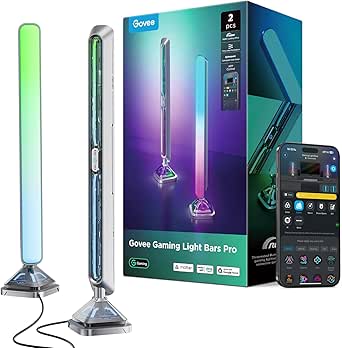 | Best Premium Screen-Sync Setup | Model: H6048 | Quantity: 2 light bars | Dimensions: 3.1 × 3.1 × 15.7 in | VIEW ON AMAZON | See Our Full Breakdown |
| Micomlan LED Desk Lamp with Clamp, Adjustable Architect Lamp with Ambient Lighting | 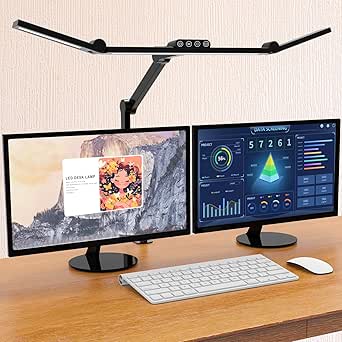 | Best for Precise, Glare-Conscious Lighting | Power: 24 watts | Light source: LED; 3 light sources | Color temperature: 3000K–6500K | VIEW ON AMAZON | See Our Full Breakdown |
| SIBRILLE Ultra-Wide Dimmable LED Desk Lamp with USB Charging |  | Best for Wide Desk Coverage | Wattage: 22 watts | Light source: LED | Lamp length: 24 inches | VIEW ON AMAZON | See Our Full Breakdown |
| gaming desk light | Power | Model |
|---|---|---|
| Velted RGB Music Sync LED Ligh | USB, corded electric; 5 volts | DX21005-1 |
| SIBRILLE 22W Dual-Head LED Des | 22 watts | — |
| Govee Smart RGBICWW Light Bars | 18 W; 12 V DC | H6056 |
| Govee H6047 RGBIC Gaming Light | — | H6047 |
| Govee Gaming Light Bars Pro | 24 W; 12 V; 2 A | H6048 |
| Micomlan LED Desk Lamp with Cl | 24 watts | — |
| SIBRILLE Ultra-Wide Dimmable L | — | — |
More Details on Our Top Picks
Velted RGB Music Sync LED Light Bar
The Velted is the straightforward pick for adding sound-reactive color without setting up an app or smart-home system. Its three music-sync modes respond to nearby sound, while the remote and onboard button make mode changes simple. Compared with the Govee H6047, it offers fewer ways to customize and connect, but also avoids relying on app, Wi-Fi, or desktop controls. The tradeoff is significant for desk work: it produces no white light, so it cannot double as a practical task lamp. Its single tabletop bar is also a more contained effect than the multi-placement, two-bar Govee H6056. Choose it for ambient gaming color, not for illuminating a keyboard or notes; it is also not water resistant.
Pros:- Three sound-reactive modes add audio-responsive ambience
- Eight dynamic color modes offer variety without an app
- USB power works with common USB ports
- Remote and onboard button provide two control options
Cons:- No white-light setting for work or reading
- Single tabletop bar offers less flexible placement than the Govee H6056 pair
- Not water resistant
Best for: Gamers who want a compact, USB-powered sound-reactive accent light controlled by a remote or button
Not ideal for: Players who need white light for reading or desk tasks, or want app-based smart-home and screen-sync controls
- Model:DX21005-1
- Light source:LED
- Power:USB, corded electric; 5 volts
- Lighting modes:8 dynamic modes
- Music-sync modes:3
- Controls:IR remote control and onboard button
- Dimensions:3.54 × 1.22 × 12.76 in
- Mounting:Tabletop
Our verdict“Choose the Velted for uncomplicated, USB-powered music-reactive color, but skip it if you need functional white desk lighting.”
SIBRILLE 22W Dual-Head LED Desk Lamp with RGB Lighting and Remote
Unlike the Velted RGB Music Sync LED Light Bar, this SIBRILLE is built to light the desk as well as add color. Its two adjustable heads, flexible gooseneck, and reach of up to 71 inches wide suit broad work areas where one fixed bar would leave shadows. Five color temperatures and five brightness levels let you tune the everyday light; seven RGB modes add gaming ambience when task lighting is not the priority. The remote, touch controls, memory, and timer make adjustments easier than on simpler accent lights such as the Velted. That versatility comes with a corded connection and clamp-mounted footprint, so it needs an outlet and a suitable desk edge. It is the functional choice here, though not as focused on smart RGB effects as the Govee H6047.
Pros:- Dual adjustable heads and gooseneck spread light across a wide desk
- Five color temperatures and five brightness settings support task use
- Seven RGB modes provide ambient color as well as functional lighting
- Remote, touch controls, memory, and timer simplify daily adjustments
Cons:- Corded power requires access to an electrical outlet
- Clamp mounting requires a compatible desk edge
- RGB control and effects are less advanced than the Govee H6047’s app and gaming integrations
Best for: Gamers who also study, work, or read at a wide desk and want adjustable white lighting alongside RGB effects
Not ideal for: Users with no clear desk edge for the clamp, limited outlet access, or a preference for app-driven, screen-reactive RGB
- Power:22 watts
- Light sources:2 LED heads
- Color temperature:3000K–6500K
- Brightness:5 levels, 10%–100%
- RGB modes:7
- Arm extension:Up to 31.5 in
- Desk coverage:Up to 71 in wide
- Controls and mounting:Remote and touch; tabletop clamp
Our verdict“Pick this SIBRILLE if you want one lamp for both desk work and RGB ambience and have room for its clamp and cord.”
Govee Smart RGBICWW Light Bars for TV and Gaming
The Govee H6056 earns its place by pairing segmented RGB color with tunable warm-to-cool white light, making it more adaptable than the color-only Velted RGB Music Sync LED Light Bar. A pair of bars can sit flat, stand vertically, or mount behind a monitor, so the setup can suit a desk without committing to one position. App scenes, DIY effects, music sync, and Alexa or Google Home support give it more control options than the SIBRILLE 22W lamp, though the SIBRILLE is better suited to illuminating a wide work surface directly. Govee recommends this set for monitors under 45 inches, which narrows its fit for larger displays. Buyers should also expect a corded setup and app-based customization rather than a dedicated physical desktop dial.
Pros:- RGBIC segmentation and tunable white provide more range than color-only bars
- App scenes and DIY effects allow detailed customization
- Music sync and Alexa and Google Home support add control options
- Two bars allow flat, vertical, or behind-screen placement
Cons:- Recommended for monitors under 45 inches
- Corded power limits placement near the desk
- Less suited to direct, broad task lighting than the SIBRILLE 22W dual-head lamp
Best for: PC gamers with a monitor under 45 inches who want configurable backlighting, tunable white, and voice or app control
Not ideal for: Owners of larger monitors, or buyers seeking a wide-reaching task lamp rather than monitor and room ambience
- Model:H6056
- Quantity:2 LED light bars
- Color technology:RGBICWW
- Power:18 W; 12 V DC
- Cord length:106 in
- Scene modes:60+
- Smart-home compatibility:Matter, Alexa, Google Home
- Recommended monitor size:Under 45 in
Our verdict“Choose the H6056 for flexible, app-controlled monitor ambience with both color and white light on a display under 45 inches.”
Govee H6047 RGBIC Gaming Light Bars with Smart Controller
For players who want lighting tied into their gaming setup, the H6047 stands out for Razer Synapse 3 support and several control routes: app, desktop dial, touch, voice, Bluetooth, or Wi-Fi. Its RGBIC effects and more than 60 scenes offer a deeper color toolkit than the Velted RGB Music Sync LED Light Bar, while game and audio syncing give effects a gaming-oriented focus. The desktop dial is a useful alternative to reaching for a phone. Compared with the Govee H6056, however, this model does not list tunable white light, and it has no camera or screen color picking. That means it suits scene-based and game-linked effects better than matching colors directly to on-screen content. Its indoor-only, plastic construction also calls for a protected desk setup.
Pros:- Razer Synapse 3 support connects effects with a gaming setup
- More than 60 scene modes and RGBIC color choices expand ambience options
- Game and audio syncing can respond to play or headphone audio
- App, desktop dial, touch, and voice controls offer multiple ways to adjust lighting
Cons:- No camera and no screen color-picking support
- No tunable white-light feature is listed
- Indoor-only and not water resistant
Best for: PC gamers who use Razer Synapse or want app, dial, and voice control for customizable RGB effects
Not ideal for: Buyers who want screen color matching, a camera-based sync feature, or tunable white task lighting
- Model:H6047
- Light technology:RGBIC LED
- Color options:16.8 million
- Scene modes:60+
- Wattage:3 W
- Connectivity:Bluetooth and Wi-Fi
- Controls:App, touch, voice, and desktop dial
- Gaming compatibility:Razer Synapse 3
Our verdict“Pick the H6047 if gaming integrations and flexible controls matter more than screen color matching or white task lighting.”
Govee Gaming Light Bars Pro, 16-Inch Smart RGBIC Wi-Fi LED Lights
The Govee Gaming Light Bars Pro is the most feature-forward pick in this batch: triple-sided RGBIC illumination, a stated maximum output of 900 lumens, and support for Alexa, Google Home, Matter, and Razer Chroma. Its weighted table-mount base avoids the placement limits of a clamp, while the 15.7-inch bars make a more substantial desk presence than the shorter Govee H6056. Music sync and more than 60 scenes cover ambient use; matching colors to a screen takes a separate route, since screen sync requires Govee Desktop on Windows. That limitation makes the H6047 a simpler fit for users who prioritize its listed Razer Synapse integration without needing Windows screen matching. The Pro also needs a corded 24-watt supply, and its light bars have no built-in color-matching function.
Pros:- Triple-sided RGBIC lighting creates color from multiple faces of each bar
- Weighted base supports table placement without complicated installation
- Alexa, Google Home, Matter, and Razer Chroma compatibility suit connected setups
- Music sync and more than 60 scenes provide multiple ambience options
Cons:- Screen color matching requires Govee Desktop on Windows
- No built-in color-matching function on the bars
- Corded 24-watt power supply and 15.7-inch bars need desk space
Best for: Gamers building a larger RGB setup who want table-mounted bars, broad smart-home support, and Windows-based screen matching
Not ideal for: Console-only users, people who want built-in screen color matching without desktop software, or desks where the cord and larger bars are awkward
- Model:H6048
- Quantity:2 light bars
- Dimensions:3.1 × 3.1 × 15.7 in
- Lighting:Triple-sided RGBIC; 16 million colors
- Maximum light output:900 lumens
- Power:24 W; 12 V; 2 A
- Mounting:Table mount with weighted base
- Screen-sync compatibility:Govee Desktop for Windows
- Smart-home compatibility:Alexa, Google Home, Matter
Our verdict“Choose the Pro for a feature-rich, table-mounted RGB setup if you have room for the bars and can use Windows software for screen matching.”
Micomlan LED Desk Lamp with Clamp, Adjustable Architect Lamp with Ambient Lighting
For a gaming desk that doubles as a work surface, the Micomlan’s clamp mount and seven adjustable joints make it easier to direct light where it helps without taking up base space. Its three LED light bars offer more positioning flexibility than the fixed ambient placement of the Govee H6047 RGBIC Gaming Light Bars, while the Micomlan prioritizes usable task lighting over colorful room effects. The asymmetric light design is intended to reduce screen glare, and adjustable color temperature, dimming, a sensor, and memory give you several ways to tailor a session. The tradeoff is a more involved setup than a simple light bar, and the main and auxiliary lights operate separately. Choose it for directed, adjustable illumination; skip it if you want synchronized RGB effects or one-control simplicity.
Pros:- Clamp mounting frees desk surface compared with a lamp that uses a base.
- Seven joints and three light bars allow flexible coverage and positioning.
- Asymmetric lighting is designed to reduce screen glare.
- Brightness and color temperature adjustment, a sensor, and memory support customized use.
Cons:- Main and auxiliary lights must be switched on or off separately.
- Clamp mounting may not suit desks without a compatible edge.
- Not waterproof.
Best for: PC gamers who also study or work at the same desk and want clamp-mounted task lighting that can be aimed around a monitor.
Not ideal for: Gamers focused on colorful, music-synced room effects, or anyone who wants the main and ambient lights to switch together.
- Power:24 watts
- Light source:LED; 3 light sources
- Color temperature:3000K–6500K
- Brightness adjustment:5 levels and stepless dimming from 20% to 100%
- Color rendering index:CRI > 90
- Joints:7
- Mounting and control:Tabletop clamp; touch control
- Power:Corded electric; 24 volts
- Materials and color:Aluminum, metal, and ABS; black
Our verdict“Choose the Micomlan if you want precisely aimed, screen-conscious desk lighting more than RGB gaming effects.”
SIBRILLE Ultra-Wide Dimmable LED Desk Lamp with USB Charging
The 24-inch lamp head gives this SIBRILLE a clear role: broad, direct illumination across a desk, rather than the decorative RGB glow offered by the Govee Gaming Light Bars Pro. Its adjustable height and rotating head help aim that coverage around a monitor, while five color temperatures and stepless dimming from 10% to 100% let you tune the light for gaming, reading, or other desk work. A stable metal base and one-hour timer add practical everyday touches. Compared with the clamp-mounted Micomlan, this lamp is easier to place on a desk without attaching hardware, but its base occupies surface area and it offers no stated ambient-light bars or RGB effects. It also needs a corded connection and isn’t waterproof, so it suits a fixed indoor setup better than a portable or spill-prone one.
Pros:- Wide 24-inch lamp head covers more of a desk than compact light bars.
- Adjustable height and 0–180° head rotation help direct the beam around a monitor.
- Stepless brightness and five color temperatures support different tasks and preferences.
- Stable metal base and one-hour timer suit regular desk use.
Cons:- The base uses desk space that a clamp-mounted lamp such as the Micomlan can leave free.
- Corded power limits placement and portability.
- Not waterproof.
Best for: Gamers with wide desks who want adjustable, even task lighting for a monitor, keyboard, and nearby work area.
Not ideal for: Small-desk users who need to preserve every inch of surface, or buyers seeking RGB effects and smart lighting integration.
- Wattage:22 watts
- Light source:LED
- Lamp length:24 inches
- Adjustable height:16.5–22.4 inches
- Lamp head rotation:0–180°
- Color temperatures:3000K–6500K
- Brightness:Stepless adjustment from 10% to 100%
- Controls and timer:Touch controls; 1-hour timer
- Power, materials, and warranty:Corded electric, 110 volts; metal base and plastic shade; 2-year warranty
Our verdict“Pick this SIBRILLE for broad, adjustable desk illumination if you have room for its base and don’t need RGB effects.”

How We Picked
I ranked these lights by how well they answer common gaming-desk needs: comfortable task lighting, useful ambient color, manageable controls, flexible placement, and a sensible fit for different desk layouts. I also looked at the distinction between a light that illuminates the work surface and a light bar that adds color around a display. Those jobs overlap, but they are not interchangeable.
The order favors versatility first, then specialized strengths. The Govee Gaming Light Bars Pro take the lead for combining smart lighting features with gaming-focused ambience; the Micomlan and dual-head SIBRILLE follow for buyers who need functional desk light. The remaining bars and wide lamp rank by how specifically their design fits a setup, such as screen ambience, simpler RGB use, or broad coverage. I weighed convenience against complexity and treated placement, glare, and desk space as real tradeoffs rather than minor details.
Factors to Consider When Choosing 7 Best Gaming Desk Lights
Before choosing a gaming desk light, decide whether you need to see your desk better, change the mood around your screen, or do both. A feature list can make very different products seem comparable, so I’d match the light’s role to your routine before weighing smart controls or effects.
Choose Task Light, Ambient Glow, or a Blend
Start with the job the light must do most often. A desk lamp directs useful light onto a keyboard, notebook, or work surface, while a light bar mainly adds color around a monitor or nearby wall. RGB effects can make a setup feel more personal, but they do not automatically provide comfortable illumination for reading or detailed tasks. If you game and work at the same desk, a hybrid lamp may reduce the need for separate fixtures. If you already have a good task lamp, an ambient bar can add atmosphere without duplicating its role. Avoid buying by the word “gaming” alone; check whether the product is designed to light the desk or decorate the screen area.
Plan Placement Before You Buy
Measure the usable desk area, including the space behind your monitor and any shelves or wall panels. Bars need a stable place near the display, while clamp lamps need an accessible edge that can support the mount. A wide lamp can cover more of a surface but may compete with monitors, speakers, or a laptop stand. Think about cable routes too: a light placed well for ambience can still create clutter if its power lead crosses your mouse area. Check how much room the controls need and whether you can reach them without shifting other gear. A quick layout sketch can prevent the common mistake of choosing a light that fits the desk dimension but not the actual setup.
Treat Color Effects and Screen Sync as Extras
Color zones, music response, and screen-linked effects appeal to different buyers, so decide how often you will use them. A multi-zone RGB system can create more nuanced effects than a single-color glow, but it may bring more setup and control choices. Music-reactive lighting can add energy to a room, yet it is less useful if you mostly play with headphones or prefer a steady background. For long sessions, consider whether the light can also run at a restrained brightness and color. Ambient effects should sit outside your direct line of sight rather than compete with the game image. Pay for advanced syncing when you expect to use it, not just because it appears on a feature list.
Prioritize Glare Control and Useful Adjustment
Brightness alone does not determine comfort; direction and diffusion matter just as much. A lamp with adjustable arms or heads lets you aim light at the desk rather than at your eyes or glossy screen. Light bars placed too close to a display can create distracting reflections, especially in a dark room. Consider whether you need to switch between focused work light and softer evening ambience. If you share a room or use a webcam, adjustable direction can help keep light off other people and out of the camera frame. A brighter fixture is not automatically better if it has limited control over where the light lands.
Match Controls to Your Routine
Decide whether you prefer a physical button, a remote, a smart controller, or app-based adjustments. Physical controls are direct and work without opening a phone, while app features can make color changes and saved scenes easier once configured. Wi-Fi or smart-home functions can add convenience but may be unnecessary if you want a light that simply turns on with the desk. Check whether key adjustments remain easy to reach during a game. Think about who else uses the room: straightforward controls can matter more than extra customization in a shared setup. A control method that suits your habits will see more use than one with the longest feature list.
Spend for a Benefit You Will Notice
Pay more when a feature solves a real problem, such as reclaiming desk space with a clamp or coordinating several lighting zones through smart controls. A premium effects system is harder to justify if all you want is a steady glow behind the monitor. Likewise, a wide work lamp earns its place when it lights a large surface, but can feel oversized on a compact desk. Compare the full setup you would still need: an ambient bar may not replace a task lamp, and a task lamp may not deliver the screen glow you want. Keep room lighting in mind as well, since a desk light is not usually a substitute for general illumination. The best fit is the option that fills a gap without adding controls or hardware you will rarely use.
Frequently Asked Questions
Can gaming light bars replace a desk lamp for work or studying?
Usually not by themselves. Light bars in this roundup are aimed mainly at ambient color around a screen, while a task lamp directs more useful light onto a desk. If you write, read, or handle detailed work at the same station, choose a desk lamp or pair an ambient bar with one. A hybrid option can cover both needs, though its task-light performance and color effects may not be equally central. Check how the light is aimed before treating any RGB product as your only desk illumination.
Which type makes the most sense for a small gaming desk?
For a compact desk, favor a mount or form factor that leaves the main work surface clear. A clamp lamp can move its base off the desk, while bars may fit well if there is space beside or behind the monitor. A wide lamp can give generous coverage but may crowd a narrow setup. Measure the monitor stand, desk edge, and cable paths rather than relying on the product’s general category. If the screen is already close to the wall, confirm that an ambient bar has a workable placement.
Is smart RGB lighting worth choosing over a simpler light?
Smart RGB is a good fit if you will use color scenes, multi-zone effects, or app-based changes as part of your setup. It is less compelling when you want one reliable brightness setting and rarely adjust the light. More control options can add setup steps, so think about whether you want to configure lighting or keep it simple. For a dual-purpose desk, prioritize easy access to comfortable white light alongside color modes. The Govee Gaming Light Bars Pro suit feature-focused buyers, while a straightforward task lamp may better serve someone who values quick operation.
Should I choose a dual-purpose lamp or separate task and ambient lights?
A dual-purpose lamp saves space and simplifies the setup, which is appealing if your desk has limited room or you want fewer devices. Separate lights can give you more control over each job: one can illuminate the work surface while another adds a glow behind the screen. The tradeoff is more hardware, cables, and placement decisions. Consider whether you change between work and gaming often, since independent controls can make those shifts easier. If you mostly want one effect, a specialized light may be a better use of space than a compromise fixture.
What should I check before mounting a clamp-style gaming desk lamp?
Check that the desk edge is accessible, sturdy, and shaped in a way the clamp can grip securely. A rear cable tray, thick lip, or nearby wall may block the mounting point even when the desk appears large enough. Look at the lamp arm’s reach and range of movement so it can illuminate the intended area without pointing into your eyes. Also leave room for the clamp hardware and any controls. If the desk cannot take a clamp, a bar or freestanding lamp may be a simpler fit.
Conclusion
My best overall pick is the Govee Gaming Light Bars Pro for buyers who want feature-rich smart ambience around a gaming display. For best value in practical use, I’d choose the SIBRILLE 22W Dual-Head Lamp if a desk needs both usable work light and RGB mood lighting. The Micomlan is my choice for a space-conscious task-light setup, while the simpler Velted or Govee bars make more sense for beginners who mainly want a colorful screen-side glow. Choose the SIBRILLE Ultra-Wide Lamp for broad desk coverage and USB charging, or the Govee H6047 and Smart RGBICWW bars when their particular smart-lighting approach better fits your display and control preferences. Match the light to the job you need it to do most; that matters more than collecting the most effects.