Choosing the right media player from the current market requires balancing resolution, processing power, and ecosystem compatibility. The Roku Streaming Stick 4K stands out as the best overall pick for its intuitive interface and broad app support, while the Amazon Fire TV Stick 4K Max offers superior performance for heavy users who demand faster load times. Many buyers struggle to distinguish between marginal hardware upgrades and actual user experience improvements, often overpaying for features they will not use. This guide breaks down the specific strengths and limitations of each device to help you avoid common compatibility pitfalls. Continue reading to see which stick fits your specific viewing habits and technical requirements.

Get the latest gadgets delivered free with Prime
- Fast, free delivery on millions of items
- Prime Video, Amazon Music and more included
- Member-only deals all year
Complete the kit



Key Takeaways
- The Roku Ultra remains the only option in this lineup with an Ethernet port, making it the clear choice for households with unstable Wi-Fi.
- Refurbished and renewed models like the Roku Streaming Stick Plus (Renewed) offer nearly identical performance to new units at a lower cost, provided the warranty is verified.
- The TiVo Stream 4K is unique for its unified search across multiple subscriptions, but it lacks the native app breadth of Roku and Amazon.
- Budget Android sticks with 2GB RAM often suffer from app compatibility issues that premium brands handle better through official partnerships.
- Wi-Fi 6 support, found in the Fire TV Stick 4K Plus, is only beneficial if your router also supports the newer standard, making it irrelevant for many users.
| Roku Streaming Stick Plus 4K HDR10+ with Voice Remote (Renewed) |  | Best for Simple, Portable Roku Streaming | Brand: Roku | Model: Streaming Stick Plus (3830XB) | Resolution: 4K | VIEW ON AMAZON | See Our Full Breakdown |
| Amazon Fire TV Stick 4K Select |  | Best for Alexa and Cloud Gaming | Processor: Quad-core 1.7 GHz | Storage: 8 GB | Resolution: 2160p, 1080p, and 720p up to 60 fps | VIEW ON AMAZON | See Our Full Breakdown |
| onn Android TV 4K UHD Streaming Device with Voice Remote and HDMI Cable |  | Best for Google Casting and Android TV | Model number: 100026240 | Resolution: 4K UHD (3840 × 2160 pixels) | Operating system: Android TV | VIEW ON AMAZON | See Our Full Breakdown |
| Roku Ultra Ultimate Streaming Player – 4K Streaming Device for TV |  | Best Premium Roku Player | Form factor: TV box | Resolution: 4K (3840 × 2160) | Video formats: H.264/AVC, H.265/HEVC, AV1, VP9, HDR10+, Dolby Vision | VIEW ON AMAZON | See Our Full Breakdown |
| Amazon Fire TV Stick HD with Alexa Voice Remote |  | Best for Full HD TVs | Resolution: Full HD | Wi-Fi: Wi-Fi 6 | Connectivity: HDMI | VIEW ON AMAZON | See Our Full Breakdown |
| Android 14.0 TV Stick, 2GB RAM, 16GB ROM, RK3518 Quad-Core, 4K, Wi‑Fi 6 |  | Best for Newer Android Software | Operating system: Android 14.0 | Processor: RK3518 Quad-Core Cortex-A53 | RAM: 2GB | VIEW ON AMAZON | See Our Full Breakdown |
| Amazon Fire TV Stick 4K (2nd Gen, Like-New Refurbished) |  | Best Refurbished 4K Feature Set | Condition: Refurbished, tested and certified | Processor: Quad-core 1.7GHz | Storage: 8GB | VIEW ON AMAZON | See Our Full Breakdown |
| Roku Streaming Stick+ 4K HDR Streaming Device with Long-Range Wi-Fi and Voice Remote |  | Best for a Distant Router | Resolution: HD and 4K | HDR: Supported | Connectivity: Wi-Fi with long-range wireless receiver | VIEW ON AMAZON | See Our Full Breakdown |
| Amazon Fire TV Stick 4K (Newest Model) with Fire TV Remote |  | Best for Simple Setup | Resolution: 4K UHD | HDR support: HDR10+ | Connectivity: Wi-Fi 6 | VIEW ON AMAZON | See Our Full Breakdown |
| onn Android TV 2K FHD Streaming Stick with Voice Remote |  | Best for 1080p TVs and Casting | Resolution: 1080p (2K FHD) | Connectivity: HDMI and Wi-Fi | Casting: Chromecast built in | VIEW ON AMAZON | See Our Full Breakdown |
| Amazon Fire TV Stick 4K Plus with Wi-Fi 6 and Alexa Voice Remote |  | Best Wi-Fi 6 Value | Processor: Quad-core 1.7 GHz | Storage: 8 GB | Wi-Fi: Dual-band Wi-Fi 6 (802.11 ax) | VIEW ON AMAZON | See Our Full Breakdown |
| Roku Streaming Stick 4K with Voice Remote (Renewed) | 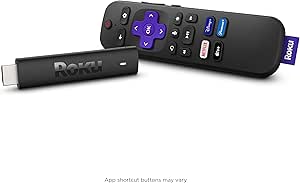 | Best Budget Renewed Option | Brand: Roku | Video Resolution: 4K | Supported Formats: Dolby Vision, HDR10+ | VIEW ON AMAZON | See Our Full Breakdown |
| Amazon Fire TV Stick 4K Max (2nd Gen) Streaming Device |  | Best Performance Stick | Processor: Quad-core 2.0 GHz | GPU: 850 MHz | Storage: 16 GB | VIEW ON AMAZON | See Our Full Breakdown |
| Roku Streaming Stick 4K with Voice Remote |  | Best for AirPlay Users | Brand: Roku | Video Resolution: 3840 x 2160 | Supported Services: Netflix, Disney+, AirPlay, Roku Channel | VIEW ON AMAZON | See Our Full Breakdown |
| TiVo Stream 4K Streaming Media Player |  | Best for Content Discovery | Brand: TiVo | RAM: 2 GB | Storage: 8 GB | VIEW ON AMAZON | See Our Full Breakdown |
| streaming stick | Resolution | Connectivity | Remote | Storage |
|---|---|---|---|---|
| Roku Streaming Stick Plus 4K H | 4K | HDMI, Wi-Fi | Voice remote with voice control | — |
| Amazon Fire TV Stick 4K Select | 2160p, 1080p, and 720p up to 60 fps | — | — | 8 GB |
| onn Android TV 4K UHD Streamin | 4K UHD (3840 × 2160 pixels) | HDMI, Wi-Fi | — | 8 GB |
| Roku Ultra Ultimate Streaming | 4K (3840 × 2160) | Bluetooth, Ethernet, HDMI, USB, Wi-Fi | Rechargeable Voice Remote Pro with backlit buttons, hands-free voice, and lost-remote finder | — |
| Amazon Fire TV Stick HD with A | Full HD | HDMI | Alexa Voice Remote with power and volume buttons | — |
| Android 14.0 TV Stick | — | — | Voice remote with voice control | 16GB ROM |
| Amazon Fire TV Stick 4K | Up to 2160p at 60fps | — | — | 8GB |
| Roku Streaming Stick+ 4K HDR S | HD and 4K | Wi-Fi with long-range wireless receiver | Voice remote with TV power and volume controls | 16GB |
| Amazon Fire TV Stick 4K | 4K UHD | Wi-Fi 6 | Navigation ring, shortcut buttons, and TV power/volume controls | — |
| onn Android TV 2K FHD Streamin | 1080p (2K FHD) | HDMI and Wi-Fi | — | — |
| Amazon Fire TV Stick 4K Plus w | — | — | Alexa Voice Remote | 8 GB |
| Roku Streaming Stick 4K with V | — | — | — | — |
| Amazon Fire TV Stick 4K Max | — | — | Alexa Voice Remote Enhanced | 16 GB |
| Roku Streaming Stick 4K with V | — | Long-range Wi-Fi | — | — |
| TiVo Stream 4K Streaming Media | 4K | — | — | 8 GB |
More Details on Our Top Picks
Roku Streaming Stick Plus 4K HDR10+ with Voice Remote (Renewed)
This renewed Roku stick suits viewers who want 4K and a straightforward interface in a compact form. Its HDR10+ support adds richer color on a compatible TV, while TV-powered operation means there is no separate power adapter to pack. The voice remote also handles TV power and volume, cutting down on remote juggling. Compared with the Roku Ultra, this model gives up Dolby Vision, Dolby Atmos, Ethernet, and a rechargeable hands-free remote, but its stick form is easier to take on trips and keeps the setup minimal. The main compromise is its renewed condition, which may not suit buyers who prefer a new device. I’d choose it for familiar Roku access and portability, not premium home-theater connections.
Pros:- Streams in 4K with HDR10+ on compatible TVs
- Compact stick leaves neighboring HDMI ports accessible
- Voice remote controls streaming, TV power, and volume
- Powered by the TV, reducing separate accessories to pack
Cons:- Renewed condition may not suit buyers who want a new device
- Does not offer the Roku Ultra’s Dolby Vision, Dolby Atmos, or Ethernet
- Streaming requires an internet connection
Best for: Roku fans who want a compact 4K device for a secondary TV or travel and are comfortable buying renewed electronics.
Not ideal for: Buyers who want a new device, Dolby Vision, wired Ethernet, or the Ultra’s premium remote and audio features.
- Brand:Roku
- Model:Streaming Stick Plus (3830XB)
- Resolution:4K
- HDR:HDR10+
- Connectivity:HDMI, Wi-Fi
- Remote:Voice remote with voice control
- Power:Powered by TV
- Condition:Renewed
- Dimensions:3.7 × 0.8 × 0.5 in
Our verdict“Choose this renewed Roku stick for portable 4K streaming and a simple voice remote, but pick the Roku Ultra for premium audio, video, and wired networking.”
Amazon Fire TV Stick 4K Select
The Fire TV Stick 4K Select is a strong fit for viewers who want 4K streaming alongside Alexa search and access to cloud gaming services. Its support for HDR10+, HLG, and several video codecs gives it broad format coverage, while Alexa voice control can also reach compatible smart-home devices. Xbox Game Pass and Luna support set it apart from the Roku Streaming Stick Plus, which is more focused on conventional streaming and travel-friendly simplicity. Those gaming options depend on subscriptions, a reliable connection, and, for some play, compatible equipment; they are not a substitute for a dedicated console. The included 90-day limited warranty is also shorter than the one-year manufacturer warranty listed for the renewed Roku stick. Pick this model when Alexa and gaming access matter more than a longer stated warranty.
Pros:- 4K playback with HDR10+, HLG, and broad video codec support
- Alexa Voice Remote supports voice search and compatible smart-home controls
- Access to streaming apps, free ad-supported content, and live TV
- Supports Xbox Game Pass and Luna cloud gaming services
Cons:- Cloud gaming can require a subscription and compatible controller
- Many apps and content services require separate subscriptions
- The listed warranty is a 90-day limited warranty
Best for: Alexa users who want a 4K streaming stick with compatible smart-home controls and the option to use cloud gaming services.
Not ideal for: Buyers seeking a long stated warranty or a gaming setup that works without subscriptions, a strong internet connection, and compatible equipment.
- Processor:Quad-core 1.7 GHz
- Storage:8 GB
- Resolution:2160p, 1080p, and 720p up to 60 fps
- Video formats:HDR10, HDR10+, HLG, H.265, H.264, VP9, AV1
- Wi-Fi:Dual-band, dual-antenna MIMO; 802.11a/b/g/n/ac
- Bluetooth:Bluetooth 5.0 and Bluetooth Low Energy
- Voice control:Alexa Voice Remote included; Fire TV app supported
- Ports:HDMI output; micro-USB for power
- Warranty:90-day limited warranty
Our verdict“Choose the Fire TV Stick 4K Select if Alexa controls and optional cloud gaming matter more to you than Roku’s simpler travel-focused experience.”
onn Android TV 4K UHD Streaming Device with Voice Remote and HDMI Cable
This onn Android TV device makes the most sense for viewers who want Google Play apps and an easy way to cast from a phone. With Chromecast built in, an Android or iOS user can send compatible content to the TV instead of searching for every app with the remote. Its voice remote adds Google Assistant, and the included HDMI cable is a practical inclusion for a box-style device. Compared with the Amazon Fire TV Stick 4K Select, it leans into Android TV and casting rather than Alexa controls and cloud gaming. The stated United States regional compatibility is a firm limitation, though, and its 12-ounce listed weight is less travel-friendly than the Roku stick. I’d shortlist it for a US household already using Google services, but skip it for international use or a compact stick setup.
Pros:- 4K UHD resolution supports high-resolution viewing on compatible TVs
- Chromecast built in supports casting from Android and iOS devices
- Google Assistant voice remote supports voice control
- Includes an HDMI cable
Cons:- Designed for use in the United States, limiting regional suitability
- Listed weight is 12 ounces, making it less convenient for travel than compact sticks
- Android TV and casting may be a less natural fit for Alexa-focused households
Best for: US-based Android and iOS households that want Google Play apps, Google Assistant voice control, and phone-to-TV casting.
Not ideal for: Travelers who need a lightweight HDMI stick or buyers planning to use the device outside the United States.
- Model number:100026240
- Resolution:4K UHD (3840 × 2160 pixels)
- Operating system:Android TV
- Connectivity:HDMI, Wi-Fi
- Memory:2 GB RAM
- Storage:8 GB
- Casting:Chromecast built in
- Included:HDMI cable
- Regional compatibility:Designed for use in the United States
Our verdict“Choose this onn device for Google apps and phone casting in the United States, but pick a compact Roku stick for more convenient travel.”
Roku Ultra Ultimate Streaming Player – 4K Streaming Device for TV
The Roku Ultra is the premium pick for a home theater where network options, picture formats, and remote features matter more than stick-sized portability. It supports Dolby Vision, HDR10+, and Dolby Atmos, and gives buyers a choice of Wi-Fi 6 or Ethernet—a useful advantage over the Roku Streaming Stick Plus when a TV is far from the router or a wired connection is preferred. Its rechargeable Voice Remote Pro adds backlit buttons, hands-free voice control, and a lost-remote finder, features that can make everyday use easier than a basic voice remote. The tradeoff is its TV box form factor, which is less discreet and portable than Roku’s stick. The remote also needs periodic charging, and USB-C is listed for charging rather than storage expansion. Choose it for a more capable fixed setup, not for travel.
Pros:- Supports 4K, HDR10+, Dolby Vision, and Dolby Atmos
- Offers Wi-Fi 6 and Ethernet connectivity
- Rechargeable remote has backlit buttons, hands-free voice, and a lost-remote finder
- Supports multiple video codecs, including AV1 and VP9
Cons:- TV box form factor is less discreet and portable than a streaming stick
- Rechargeable remote requires periodic charging
- USB-C port is listed for charging, not external storage expansion
Best for: Roku households building a fixed 4K home-theater setup that can benefit from Dolby Vision, Dolby Atmos, Ethernet, and an advanced remote.
Not ideal for: Travelers or buyers who want a discreet HDMI stick, and anyone who does not need the Ultra’s premium formats or networking options.
- Form factor:TV box
- Resolution:4K (3840 × 2160)
- Video formats:H.264/AVC, H.265/HEVC, AV1, VP9, HDR10+, Dolby Vision
- Connectivity:Bluetooth, Ethernet, HDMI, USB, Wi-Fi
- Network:Wi-Fi 6 and Ethernet
- Remote:Rechargeable Voice Remote Pro with backlit buttons, hands-free voice, and lost-remote finder
- Audio:Dolby Atmos support
- Dimensions:5 × 4.9 × 1 in
Our verdict“Choose the Roku Ultra for a fixed Roku home theater that benefits from Dolby formats and Ethernet, but take the Streaming Stick Plus for a smaller travel setup.”
Amazon Fire TV Stick HD with Alexa Voice Remote
The Fire TV Stick HD is the sensible fit for a bedroom, older TV, or other screen where Full HD is enough. Its Wi-Fi 6 support and Alexa Voice Remote bring current conveniences without making 4K capability the focus. The remote can control compatible TVs, soundbars, and receivers, while Bluetooth listening offers a way to watch without playing audio through the room. Compared with the Fire TV Stick 4K Select, this model gives up 4K playback and HDR formats, so it is a weaker match for a modern 4K display. The included USB-C direct-power setup also depends on the TV, which may affect placement or power reliability. I’d choose it when the screen is Full HD and private listening matters, but not as a future-facing pick for a 4K upgrade.
Pros:- Full HD streaming suits 1080p TVs
- Wi-Fi 6 support is included
- Alexa remote controls compatible TVs, soundbars, and receivers
- Supports Bluetooth headphone listening
Cons:- Full HD resolution lacks the 4K playback offered by the Fire TV Stick 4K Select
- Some content requires paid subscriptions
- USB-C direct power depends on the TV
Best for: Viewers adding streaming to a Full HD bedroom or secondary TV who value Alexa controls and Bluetooth headphone listening.
Not ideal for: Owners of 4K TVs who want UHD and HDR playback, or buyers whose TV cannot reliably supply power over the included USB-C connection.
- Resolution:Full HD
- Wi-Fi:Wi-Fi 6
- Connectivity:HDMI
- Power:Direct Power via included USB-C cable
- Voice assistant:Alexa+
- Remote:Alexa Voice Remote with power and volume buttons
- Bluetooth listening:Supported
Our verdict“Choose this Fire TV Stick for a Full HD screen and Bluetooth private listening, but select the 4K Select if your TV supports 4K.”
Android 14.0 TV Stick, 2GB RAM, 16GB ROM, RK3518 Quad-Core, 4K, Wi‑Fi 6
This stick’s clearest distinction is its Android 14 operating system, paired with 4K output and dual-band Wi-Fi 6. That makes it a fit for buyers who want a flexible Android TV-style device and wireless connectivity beyond the basics. Compared with the onn Android TV 2K FHD Streaming Stick, it offers higher-resolution output and more listed storage, while the onn option has the clearer advantage for casting through built-in Chromecast. The tradeoff is that the product details don’t identify specific streaming-service certifications, so buyers should check app compatibility for the services they rely on. Its 16GB storage is useful for installing apps, though it can still feel tight for a large library. Bluetooth 5.4 and a voice remote add convenience, but this is a less established choice than Amazon’s Fire TV alternatives.
Pros:- Android 14 operating system
- 4K video output
- Dual-band Wi-Fi 6 connectivity
- Bluetooth 5.4 and included voice remote
Cons:- 16GB storage may limit larger app collections
- Listed details do not specify certification for particular streaming services
Best for: Buyers seeking an Android 14 stick with 4K output, Wi-Fi 6, and room for a modest collection of apps
Not ideal for: Viewers who need confirmed support for particular streaming apps or want a familiar Roku or Fire TV interface
- Operating system:Android 14.0
- Processor:RK3518 Quad-Core Cortex-A53
- RAM:2GB
- Storage:16GB ROM
- Video output:4K (2160p)
- Wi-Fi:Dual-band Wi-Fi 6 (2.4GHz/5GHz)
- Bluetooth:5.4
- Remote:Voice remote with voice control
Our verdict“Choose this stick for Android 14 and 4K in a compact device, but verify app compatibility before relying on it as your main streamer.”
Amazon Fire TV Stick 4K (2nd Gen, Like-New Refurbished)
This refurbished Fire TV Stick 4K combines Dolby Vision, HDR10+, Dolby Atmos, and Wi-Fi 6 in a small device, making it the strongest listed option here for buyers who want broad 4K format support without choosing a newer model. The included Alexa Voice Remote also handles voice search and compatible TV controls. Compared with the Roku Streaming Stick+ 4K HDR, this Fire TV offers more explicitly listed HDR and audio formats; Roku may suit viewers who prefer its straightforward channel-led interface. Refurbished condition is the main tradeoff: the stick is certified as tested and includes a one-year limited warranty, but it is not new. Its 8GB storage also leaves less room for apps than the Android 14 stick’s 16GB. Full benefit from 4K and advanced formats depends on compatible equipment and available content.
Pros:- Supports Dolby Vision, HDR10+, and other listed HDR formats
- Dolby Atmos and HDMI audio pass-through support
- Wi-Fi 6 and Alexa Voice Remote included
- One-year limited warranty on the refurbished device
Cons:- Refurbished rather than new
- 8GB storage can constrain app installations
- Advanced video and audio formats require compatible equipment and content
Best for: A buyer who wants Dolby Vision, HDR10+, Atmos, and Wi-Fi 6 in a refurbished Fire TV device with a one-year warranty
Not ideal for: Shoppers who want a new device, more than 8GB of storage, or do not use the Fire TV interface
- Condition:Refurbished, tested and certified
- Processor:Quad-core 1.7GHz
- Storage:8GB
- Wi-Fi:Dual-band Wi-Fi 6
- Bluetooth:Bluetooth 5.2 + BLE
- Resolution:Up to 2160p at 60fps
- Video formats:Dolby Vision, HDR10, HDR10+, HLG, H.265, H.264, VP9, AV1
- Remote and warranty:Alexa Voice Remote; 1-year limited warranty
Our verdict“Pick this refurbished model if its broad HDR and audio support matters more than new condition or extra storage.”
Roku Streaming Stick+ 4K HDR Streaming Device with Long-Range Wi-Fi and Voice Remote
The case for this Roku is its long-range wireless receiver, a practical advantage for a TV in a room where the router signal is weaker. It streams HD, 4K, and HDR content, and the voice remote can control TV power and volume. Compared with the Amazon Fire TV Stick 4K (2nd Gen, Like-New Refurbished), this model emphasizes reception and support for Siri, Alexa, and Google Assistant rather than listing advanced HDR formats such as Dolby Vision or HDR10+. That makes it a simpler match for households with mixed voice-assistant preferences, though its feature details are less specific on picture and audio formats. Roku’s broad channel selection is another draw, but streaming still depends on an internet connection, and some channels require subscriptions. Choose it for room-to-router flexibility, not for the most detailed format checklist.
Pros:- Long-range wireless receiver aimed at improving reception
- Supports HD, 4K, and HDR streaming
- Voice remote controls TV power and volume
- Works with Siri, Alexa, and Google Assistant
Cons:- Requires an internet connection for streaming
- Some channels and services require paid subscriptions
- Product details do not list specific advanced HDR or audio formats
Best for: Viewers with a 4K TV in a room where a standard wireless connection may be unreliable
Not ideal for: Buyers who prioritize specified Dolby Vision or Atmos support, or who want to stream without an internet connection
- Resolution:HD and 4K
- HDR:Supported
- Connectivity:Wi-Fi with long-range wireless receiver
- Storage:16GB
- Remote:Voice remote with TV power and volume controls
- Voice assistants:Siri, Alexa, and Google Assistant
- Dimensions:3.7 × 0.8 × 0.47 inches
- Compatible device:Television
Our verdict“Choose this Roku when wireless reach and broad assistant compatibility matter more than a detailed list of premium picture formats.”
Amazon Fire TV Stick 4K (Newest Model) with Fire TV Remote
This Fire TV Stick’s distinguishing feature is Direct Power from the TV’s HDMI port, which can simplify setup by avoiding a separate wall adapter. It pairs that convenience with 4K UHD, HDR10+, Wi-Fi 6, and a redesigned remote with TV controls and shortcut buttons. Compared with the Amazon Fire TV Stick 4K (2nd Gen, Like-New Refurbished), this newer listing emphasizes Alexa+ and streamlined power rather than detailing Dolby Vision, Dolby Atmos, or a storage figure. That makes it a straightforward choice for buyers who value a tidy installation, but not the obvious pick for anyone seeking the most fully specified format support. Bluetooth support for private listening adds flexibility, while the HDMI-port requirement and subscription costs for many apps remain part of the decision.
Pros:- 4K UHD output with HDR10+
- Wi-Fi 6 support
- Direct Power can avoid a separate wall adapter
- Remote includes TV controls, shortcuts, and Alexa+
Cons:- Requires an available HDMI port
- Many premium apps require separate subscriptions
- Product details do not specify storage or Dolby Vision support
Best for: People setting up a 4K TV who want a compact, low-clutter installation and a remote with direct TV controls
Not ideal for: Viewers seeking listed Dolby Vision or Dolby Atmos support, or buyers whose TV has no available HDMI port
- Resolution:4K UHD
- HDR support:HDR10+
- Connectivity:Wi-Fi 6
- Power:Direct Power from TV HDMI
- Remote:Navigation ring, shortcut buttons, and TV power/volume controls
- Assistant:Alexa+
- Audio:Bluetooth support for private listening
- Connection:HDMI
Our verdict“Choose this newer Fire TV model for a simple HDMI-powered setup and HDR10+, not for the most complete published format specifications.”
onn Android TV 2K FHD Streaming Stick with Voice Remote
For a bedroom or older television, this onn stick keeps the focus on 1080p streaming and built-in Chromecast rather than paying for 4K capability the display cannot show. Its voice remote and Google Play Store access make it a flexible app-based option, while Chromecast offers a simple route for sending compatible content from a phone or computer. Compared with the Android 14.0 TV Stick, it gives up 4K output and Wi-Fi 6, but Chromecast is a specifically listed convenience that the other stick’s details do not promise. The compromises are meaningful: this is a 2022 model with a three-month warranty, and the stated 8.8-ounce weight is substantially heavier than a typical stick-shaped device. It suits basic streaming and casting better than a high-end home theater setup.
Pros:- 1080p streaming suits Full HD televisions
- Built-in Chromecast supports casting from compatible devices
- Voice control through the remote
- Google Play Store access to apps
Cons:- No 4K output
- Warranty is limited to three months
- Listed weight of 8.8 ounces is heavy for a streaming stick
Best for: Owners of a 1080p television who want Google Play apps and easy casting from a compatible phone or computer
Not ideal for: 4K TV owners seeking sharper output, longer warranty coverage, or a lightweight stick for a crowded HDMI area
- Resolution:1080p (2K FHD)
- Connectivity:HDMI and Wi-Fi
- Casting:Chromecast built in
- Audio:Dolby Audio
- HDMI ports:1
- USB ports:1
- Weight:8.8 ounces
- Warranty:3 months
Our verdict“Pick this onn device for 1080p viewing and Chromecast convenience, but step up to a 4K model for a higher-resolution TV.”
Amazon Fire TV Stick 4K Plus with Wi-Fi 6 and Alexa Voice Remote
This stick stands out for bringing Wi-Fi 6 connectivity to the mid-range segment, a feature often reserved for pricier models. Compared to the Roku Streaming Stick 4K, which relies on standard dual-band Wi-Fi, the Fire TV Stick 4K Plus offers better resistance to network congestion in busy households. The inclusion of Dolby Vision and Atmos ensures high-quality audiovisual output, though you need compatible hardware to see the difference. While it shares the same physical footprint as the base model, the internal upgrade matters for future-proofing. However, the interface remains cluttered with Amazon-specific promotions, which may frustrate users who prefer a cleaner layout. It is a strong choice if your router supports Wi-Fi 6, but less compelling if your network is older.Pros:- Wi-Fi 6 support reduces buffering in congested networks
- Supports Dolby Vision, HDR10+, and Dolby Atmos
- Alexa voice remote integrates with smart home devices
- Compact design fits behind most TVs
Cons:- Wi-Fi 6 benefits require a compatible router
- Interface includes significant Amazon promotional content
- Only 8 GB storage limits app installation space
Best for: Users with Wi-Fi 6 routers who want premium video formats without paying for the top-tier Fire TV Stick.
Not ideal for: Those with older routers who won’t benefit from Wi-Fi 6 speeds, or users who dislike Amazon’s ad-heavy interface.
- Processor:Quad-core 1.7 GHz
- Storage:8 GB
- Wi-Fi:Dual-band Wi-Fi 6 (802.11 ax)
- Video Formats:Dolby Vision, HDR10+, HLG, AV1
- Audio:Dolby Atmos, 7.1 surround sound
- Remote:Alexa Voice Remote
- Dimensions:99 × 30 × 14 mm
Our verdict“Choose this if you have a modern Wi-Fi 6 router and want the best value for high-end video formats.”
Roku Streaming Stick 4K with Voice Remote (Renewed)
As a renewed device, this model offers the core functionality of the newer Roku Stick 4K at a lower entry point. It delivers 4K, Dolby Vision, and HDR10+, matching the video quality of the standard new version. However, the 90-day warranty is a significant risk compared to the one-year coverage on new units. While the voice remote handles TV power and volume, the interface feels slower than the Fire TV Stick 4K Plus due to less powerful hardware. This is a viable option for budget-conscious buyers who prioritize brand ecosystem over warranty security. It lacks the advanced connectivity of newer sticks but remains a reliable plug-and-play solution for secondary TVs.Pros:- Supports 4K, Dolby Vision, and HDR10+
- Voice remote controls TV power and volume
- Access to extensive free and live TV channels
- Significantly lower cost than new equivalents
Cons:- Limited 90-day warranty on renewed product
- Performance may lag behind newer generation sticks
- Requires strong Wi-Fi for stable 4K streaming
Best for: Budget buyers who trust Roku’s ecosystem and accept the shorter warranty period of renewed electronics.
Not ideal for: Users who require a full manufacturer warranty or the fastest possible interface performance.
- Brand:Roku
- Video Resolution:4K
- Supported Formats:Dolby Vision, HDR10+
- Storage Capacity:4 GB
- Warranty:90-day limited
- Condition:Renewed
- Weight:25.54 g
Our verdict“A cost-effective way to access Roku’s 4K ecosystem if you are comfortable with a short warranty.”
Amazon Fire TV Stick 4K Max (2nd Gen) Streaming Device
This device is the power user’s choice, featuring a 2.0 GHz quad-core processor and 16 GB of storage. It handles app switching and heavy interfaces much faster than the Fire TV Stick 4K Plus. The inclusion of Wi-Fi 6E allows for tri-band connectivity, reducing interference further than the Plus model’s dual-band setup. While physically similar, the internal specs justify the premium for those who want a snappy experience. It supports cloud gaming and high-bitrate streaming without the stutter seen on lower-tier models. However, the extra storage is only useful if you install many apps locally; most users stream directly, making the 16 GB capacity somewhat redundant for casual viewers.Pros:- Faster 2.0 GHz processor for smoother navigation
- 16 GB storage allows for more installed apps
- Wi-Fi 6E tri-band support for minimal latency
- Enhanced Alexa remote with better device control
Cons:- Wi-Fi 6E requires a compatible router to utilize
- Higher price point than standard 4K sticks
- Extra storage is unnecessary for most streaming users
Best for: Power users who install many apps, play cloud games, or demand the fastest interface response.
Not ideal for: Casual streamers who only use a few major apps and do not need extra storage or Wi-Fi 6E.
- Processor:Quad-core 2.0 GHz
- GPU:850 MHz
- Storage:16 GB
- Wi-Fi:Wi-Fi 6E tri-band
- Video Formats:Dolby Vision, HDR10+, AV1
- Remote:Alexa Voice Remote Enhanced
- Generation:2nd Gen
Our verdict“The definitive choice for users who want the fastest, most responsive streaming experience available in a stick form factor.”
Roku Streaming Stick 4K with Voice Remote
The standout feature here is native Apple AirPlay support, allowing seamless casting from iPhones and Macs without extra apps. This differentiates it sharply from the Fire TV Stick 4K Plus, which lacks native AirPlay. The long-range Wi-Fi receiver is advertised as twice as fast as previous generations, helping maintain 4K stability in rooms far from the router. The interface remains simple and neutral, avoiding the aggressive promotions found on Amazon devices. While it supports Dolby Vision and HDR10+, the hardware is slightly less powerful than the Fire TV Max, resulting in marginally slower app launches. It is the ideal companion for households heavily invested in the Apple ecosystem.Pros:- Native Apple AirPlay support for easy casting
- Long-range Wi-Fi for stable streaming at distance
- Supports 4K, Dolby Vision, and HDR10+
- Clean interface with fewer forced promotions
Cons:- Slower app launch times compared to Fire TV Max
- No native Alexa or Google Assistant integration
- Video quality depends on TV compatibility
Best for: Apple device users who want easy AirPlay casting and a clean, ad-light interface.
Not ideal for: Users who rely on Alexa for smart home control or need the fastest processing speed.
- Brand:Roku
- Video Resolution:3840 x 2160
- Supported Services:Netflix, Disney+, AirPlay, Roku Channel
- Connectivity:Long-range Wi-Fi
- Remote Control:Voice control with TV buttons
- Dimensions:0.45 x 0.83 x 3.72 inches
- UPC:829610004884
Our verdict“The best streaming stick for Apple users who value seamless casting and a straightforward user interface.”
TiVo Stream 4K Streaming Media Player
This device prioritizes content aggregation over raw processing power. Its main strength is cross-app search and recommendations, which surface content across Netflix, Disney+, and Prime Video in a single list. This solves the common frustration of jumping between apps to find something to watch, a task that is more manual on the Roku Streaming Stick 4K. While it supports 4K, Dolby Vision, and Atmos, the hardware is modest with only 2 GB of RAM. The Google Assistant integration is less robust than Alexa’s on Fire TV devices. It is a niche pick for viewers who spend more time browsing than streaming, but the limited storage and older hardware may feel sluggish for heavy app users.Pros:- Unified search across multiple streaming apps
- Personalized recommendations and watch lists
- Supports 4K, Dolby Vision, and Dolby Atmos
- Google Assistant voice control included
Cons:- Limited 2 GB RAM can cause slower navigation
- Only 8 GB storage for apps and caches
- Hardware is less powerful than current Fire TV models
Best for: Viewers who struggle to find content across multiple subscriptions and want a unified guide.
Not ideal for: Users who want fast app switching or rely heavily on Alexa for smart home automation.
- Brand:TiVo
- RAM:2 GB
- Storage:8 GB
- Resolution:4K
- Video Codec:VP9 Profile 2
- Voice Control:Google Assistant
- Power Input:5V/1.0A
Our verdict“A smart choice for discovery-focused viewers, though it lacks the raw speed of competing high-end sticks.”

How We Picked
My selection process prioritized devices that offer a balance of reliable hardware, consistent software updates, and broad application support. I evaluated each stick based on processor speed, memory allocation, and interface responsiveness, as these factors directly impact the daily user experience more than raw resolution specs. Devices were compared on their ability to handle 4K HDR content without buffering, as well as the ease of navigating complex menus with voice or physical remotes.
Ranking logic favored products with established ecosystems that provide long-term software support, rather than generic Android devices that may lack ongoing updates. I also weighed the value proposition of renewed or refurbished units against new models, considering warranty coverage and expected lifespan. This approach ensures that the recommendations reflect real-world usability rather than just theoretical specifications on a spec sheet.
Factors to Consider When Choosing 15 Best Streaming Sticks
Selecting a streaming stick involves more than just picking the highest resolution. You must consider how the device integrates with your existing smart home setup, your internet infrastructure, and your specific viewing habits. The following factors will help you narrow down the field from fifteen options to the one that truly fits your needs.Ecosystem Lock-in and Voice Assistant Preference
Most streaming sticks lock you into a specific ecosystem, which affects how you control your smart home and access content. Amazon Fire TV devices integrate deeply with Alexa, allowing you to control smart lights and view doorbell cameras directly on your TV screen. In contrast, Roku devices offer a more neutral platform with its own voice assistant and a vast library of apps that are often not available on other platforms. If you are heavily invested in the Google Home or Apple HomeKit ecosystem, neither of these major brands is a perfect fit, but Roku’s neutrality makes it a safer long-term choice. Consider whether you want your TV remote to control your thermostat or just your volume. This decision often matters more than the hardware specs when you are using the device daily.
The Real-World Impact of Wi-Fi 6 Support
Marketing materials heavily emphasize Wi-Fi 6 support, but this feature is only useful if your home network infrastructure matches it. If you have an older router that only supports Wi-Fi 5, a stick with Wi-Fi 6 will not provide faster speeds or better stability. However, for those with modern mesh networks, Wi-Fi 6 devices like the Fire TV Stick 4K Plus can reduce interference and maintain higher bitrates during peak usage hours. It is a future-proofing feature that pays off only if you upgrade your router or already own one. Buyers on a tight budget should prioritize a device with good Wi-Fi 5 reception over a newer standard they cannot utilize. Check your router specifications before paying a premium for this connectivity feature.
Understanding Renewed vs. New Hardware
Many top-tier streaming sticks are available as renewed or refurbished units, often at a fraction of the cost of new models. These devices are typically returned items that have been inspected and cleaned, offering performance identical to new units for most users. The primary risk lies in the warranty terms and the potential for a shorter remaining lifespan of the internal components. For a secondary TV or a guest room, a renewed model is an excellent value that saves money without sacrificing picture quality. However, for your primary living room TV where reliability is paramount, buying new might be worth the extra cost for peace of mind. Always verify the seller’s return policy before purchasing renewed electronics to avoid getting stuck with a defective unit.
App Ecosystem and Channel Availability
Not all streaming apps are available on all platforms, which can be a dealbreaker depending on your niche interests. Roku typically has the largest library of free and paid channels, including many niche apps for hobbies, news, and international content. Amazon Fire TV and Google TV devices sometimes lack specific apps due to licensing disputes or business strategies. If you rely on a specific niche service, check its availability on each platform before purchasing. The TiVo Stream 4K offers a unique advantage by aggregating content from multiple subscriptions into a single interface, but it may not support every app you use. Verify your must-have apps on the manufacturer’s website to ensure compatibility before committing to a device.
Storage and Processing Power for Multitasking
While 8GB of storage is standard, it fills up quickly with app updates and cache data, leading to slower performance over time. Devices with 16GB of storage and more RAM, such as the Fire TV Stick 4K Max, handle multitasking and app switching more smoothly. If you plan to install dozens of apps or use your stick for gaming, extra memory is a practical investment rather than a luxury. Budget sticks with 2GB of RAM may struggle when switching between heavy apps like Netflix and YouTube back-to-back. For basic streaming of one or two apps, the standard specs are sufficient. Assess your app usage habits honestly to determine if you need the premium performance tier.
Frequently Asked Questions
Do I need a streaming stick if I already have a smart TV?
Yes, if your smart TV is more than three or four years old, a streaming stick will likely offer a faster interface and access to newer apps that your TV’s native system no longer supports. Smart TV software often receives fewer updates than dedicated streaming devices, leading to sluggish performance and missing features over time. A stick like the Roku Streaming Stick 4K essentially gives your TV a new brain, improving responsiveness and adding features like voice search that your built-in system might lack. It is also a cost-effective way to upgrade without buying a new television. However, if your TV is a recent model with Google TV or Roku built-in, a separate stick may be redundant unless you need a specific feature like an Ethernet port.
Is 4K resolution worth it on a streaming stick?
4K resolution is only worth it if you have a 4K television and a high-speed internet connection capable of delivering 4K streams. If you watch content on a 1080p TV, a 4K stick will not improve the picture quality, though it may offer better processing power and interface smoothness. The Amazon Fire TV Stick HD is a better value for non-4K TVs, as it focuses on performance rather than unnecessary resolution support. For 4K TV owners, the difference is visible, but it depends heavily on the source material. Many streaming services compress 4K content, so the visual jump from high-quality 1080p to 4K is less dramatic than marketing suggests. Consider your TV’s capabilities and your internet speed before paying for 4K support.
Can I use a streaming stick without a Wi-Fi connection?
No, you cannot use a streaming stick without an internet connection, as these devices rely entirely on online sources for content. They do not have built-in tuners for over-the-air broadcasts unless you add a separate antenna and DVR service, which some models like the TiVo Stream 4K support via subscription. If your home has poor Wi-Fi coverage where the TV is located, consider a model with an Ethernet port like the Roku Ultra for a wired connection. Alternatively, you can use a mesh Wi-Fi extender to boost the signal to the device. Without a stable connection, you will experience buffering, low resolution, and frequent disconnections, regardless of how expensive the stick is.
Why are some streaming sticks cheaper than others?
Price differences usually come down to processing power, memory, connectivity standards, and brand premiums. A budget stick like the onn Android TV 2K FHD uses older processors and less RAM, which can result in slower app loading times and less smooth navigation. More expensive models like the Fire TV Stick 4K Max include faster chips and Wi-Fi 6, which improve the user experience even if the picture quality is the same. Additionally, some devices are cheaper because they are renewed or refurbished, meaning they are previously owned units sold at a discount. The key is to match the price point to your usage needs; a basic user may not notice the difference between a $30 stick and a $60 stick, while a power user will appreciate the extra speed.
Do streaming sticks work with older non-smart TVs?
Yes, any streaming stick with an HDMI output will work with any TV that has an HDMI port, regardless of whether the TV is ‘smart’ or not. The stick handles all the internet connectivity and app processing, sending the video and audio signal to the TV via HDMI. You will need the remote that comes with the stick to control the interface, as your TV remote will only control volume and power. For very old TVs without HDMI, you would need an HDMI-to-RCA converter, but picture quality will be limited to standard definition. This makes streaming sticks a versatile solution for upgrading older television sets without replacing them, effectively turning any HDMI-enabled screen into a smart hub.
Conclusion
Choosing the right streaming stick depends largely on your existing ecosystem and technical requirements. For most users, the Roku Streaming Stick 4K offers the best balance of ease of use, app availability, and performance, making it the best overall pick. If you are deeply integrated into the Alexa ecosystem and want the fastest interface, the Amazon Fire TV Stick 4K Max is the superior premium choice. For those on a strict budget who still want 4K capability, the Roku Streaming Stick Plus (Renewed) provides exceptional value, assuming you are comfortable with a refurbished product. Beginners who want a simple, no-nonsense experience should stick with the standard Roku Streaming Stick 4K for its intuitive menu. Finally, if you have unstable Wi-Fi, the Roku Ultra is the only option in this list with a wired Ethernet port, making it the best choice for reliability-focused buyers.