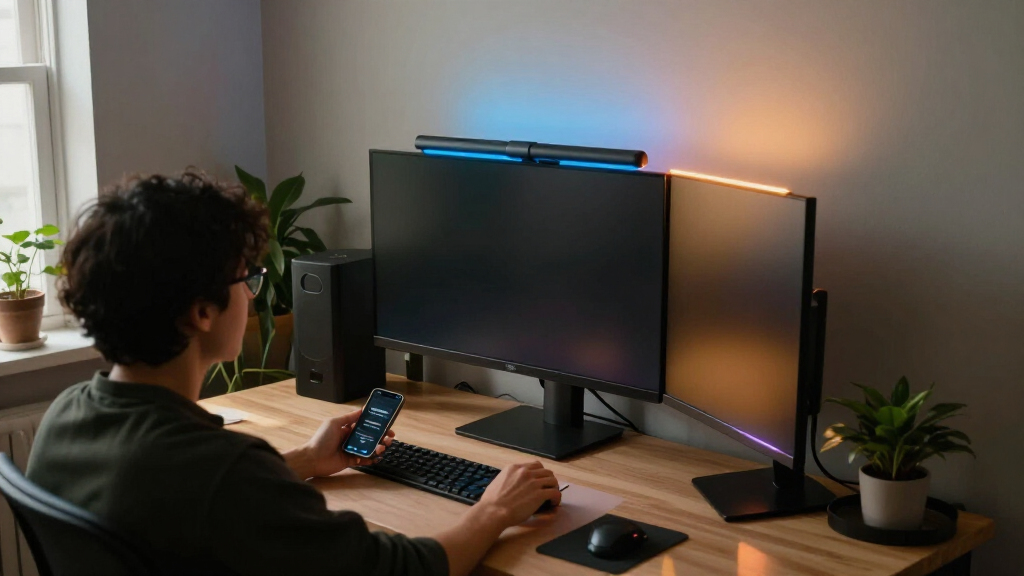

The best smart light bars balance vivid effects, easy placement, and dependable app control without making setup a project. I’d put the Philips Hue Play White and Color Ambiance Base Kit first for buyers who value a polished smart-home ecosystem, while the Govee RGBIC Gaming Light Bars H6047 stand out for gaming effects and the NEEWER NF16 for a more creator-focused setup. The main tradeoffs are ecosystem compatibility versus standalone control, richer multicolor effects versus simpler lighting, and flexible placement versus a tidy, fixed installation. Some bars are made to sit beside a monitor, while others suit TV backlighting or decorative wall placement better. Read on for the full comparison and help matching a light bar to your room and setup.

Get the latest gadgets delivered free with Prime
- Fast, free delivery on millions of items
- Prime Video, Amazon Music and more included
- Member-only deals all year
Complete the kit



Key Takeaways
- The lineup splits into distinct jobs: Hue Play is the ecosystem-led pick, Govee’s gaming bars focus on screen-side effects, and the NEEWER NF16 is aimed at creator and desk setups.
- RGBIC models prioritize segmented color effects: several Govee, DAYBETTER, ECWEYAG, and other bars offer multicolor patterns, while RGBW and RGBWW models can suit buyers who want more attention on white-light options.
- Two-bar kits are the practical norm here: many choices include a pair for balancing light on both sides of a screen, but buyers should check the exact kit contents before planning a layout.
- Control methods vary as much as lighting effects: app, remote, smart-controller, and broader ecosystem approaches suit different habits; the most feature-rich control is not always the simplest day to day.
- Form factor matters more than a long mode list: bars designed for desk or TV placement are easier to fit into those setups than wall-panel products, even when their effects appear similar on paper.
| Philips Smart Lighting RGBIC Gradient Light Bars |  | Best for Smart-Home Compatibility | Number of bars: 2 | Lighting technology: RGBIC, seven color segments | Controls: WiZ app, accessories, or compatible voice assistant | VIEW LATEST PRICE | See Our Full Breakdown |
| Govee RGBIC Gaming Light Bars H6047 with Smart Controller |  | Best for Desktop Gaming | Model: H6047 | Lighting: RGBIC LED, 16.8 million colors | Scene modes: 60+ | VIEW LATEST PRICE | See Our Full Breakdown |
| 16.5-Inch RGB Smart Light Bar with Music Sync | 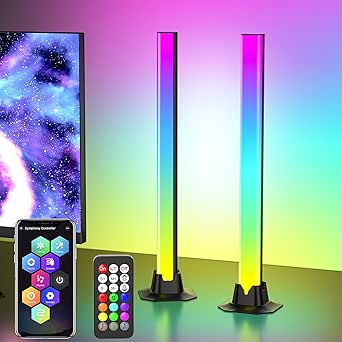 | Best for Mode Variety | Length: 16.5 inches | Colors: 16 million | Lighting modes: 213 dynamic modes and 8 preset scenes | VIEW LATEST PRICE | See Our Full Breakdown |
| DAYBETTER Smart RGBICW LED Light Bars with App and Remote Control |  | Best for Flexible Placement | Lighting: RGBICW LED | Light output: 110 lumens | Controls: App, remote, control box | VIEW LATEST PRICE | See Our Full Breakdown |
| BASON LIGHTING Smart RGBW Desk Light Bars, 2-Pack |  | Best for Adjustable White Light | Model: BZ101 | Quantity: 2 light bars | Lighting features: RGBW color changing, adjustable white tones, music sync | VIEW LATEST PRICE | See Our Full Breakdown |
| Philips Hue Play White and Color Ambiance Smart Light Bar Base Kit, 2-Pack |  | Best for Hue Households | Light source: LED | Number of light bars: 2 | Power source: Corded electric | VIEW LATEST PRICE | See Our Full Breakdown |
| NEEWER NF16 Smart RGB LED Light Bars |  | Best for Flexible Controls | Model: NF16 | Light bars: 2 | Color temperature: 2700K–6500K | VIEW LATEST PRICE | See Our Full Breakdown |
| Govee Smart RGBICWW Light Bars, Silver |  | Best Compact Monitor Pick | Model: H6056 | Number of light bars: 2 | Recommended monitor size: Under 45 inches | VIEW LATEST PRICE | See Our Full Breakdown |
| Govee Glide RGBIC Smart Wall Lights, 2 Panels |  | Best for Wall-Mounted Effects | Number of panels: 2 | Light sections: 6 total; 3 per panel | Length per segment: 37.6 cm | VIEW LATEST PRICE | See Our Full Breakdown |
| Govee Smart RGBWIC Light Bars for 45–70-Inch TVs |  | Best for Large TVs | Model: H6046111 | Compatible TV size: 45–70 inches | Length: 15 inches | VIEW LATEST PRICE | See Our Full Breakdown |
| DAYBETTER Smart RGBICWW LED Light Bars with App and Remote Control |  | Best for Flexible Placement | Light sources: 60 LEDs | Brightness: 220 lumens | Power: 5 W | VIEW LATEST PRICE | See Our Full Breakdown |
| ECWEYAG Smart RGBICWW LED Light Bars for TV and Gaming |  | Best for Voice-Controlled Setups | Set: 2 light bars | Lighting technology: RGBICWW LED | Colors: 16 million | VIEW LATEST PRICE | See Our Full Breakdown |
| Govee Gaming Light Bars Pro, 16-Inch Smart RGBIC Wi-Fi LED Lights | 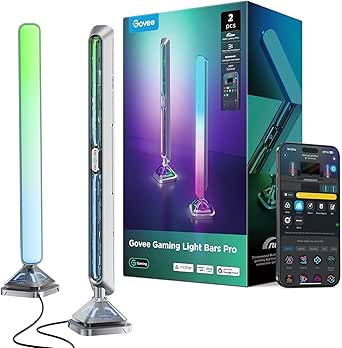 | Best Premium Gaming Pick | Set: 2 light bars | Dimensions: 3.1 × 3.1 × 15.7 in | Maximum light output: 900 lumens | VIEW LATEST PRICE | See Our Full Breakdown |
| RGB LED Light Bars with Music Sync and 213 Modes |  | Best for Preset Variety | Lighting modes: 213 | Dimensions: 2.36 × 3.54 × 13 in | Light sources: 48 LEDs | VIEW LATEST PRICE | See Our Full Breakdown |
| Eastfine RGB LED Light Bars, 2-Pack, USB Powered with App and Music Sync |  | Best Compact Pick | Set: 2 light bars | Dimensions per bar: 1.18 × 1.18 × 12.59 in | Power: USB, 5 V DC, 5 W | VIEW LATEST PRICE | See Our Full Breakdown |
| smart light bar | Power | Controls |
|---|---|---|
| Philips Smart Lighting RGBIC G | Corded electric, 8.4 watts, 120 volts | WiZ app, accessories, or compatible voice assistant |
| Govee RGBIC Gaming Light Bars | Corded electric, 3 watts | App, touch, voice, desktop dial |
| 16.5-Inch RGB Smart Light Bar | USB corded electric | App, remote control, USB cable buttons |
| DAYBETTER Smart RGBICW LED Lig | Corded electric, 5 watts, 5 volts | App, remote, control box |
| BASON LIGHTING Smart RGBW Desk | USB | — |
| Philips Hue Play White and Col | — | — |
| NEEWER NF16 Smart RGB LED Ligh | 14 watts | App, control box, Alexa, and Google Assistant |
| Govee Smart RGBICWW Light Bars | 12 V, 1.5 A | — |
| Govee Glide RGBIC Smart Wall L | 36 watts | App, Alexa, and Google Assistant |
| Govee Smart RGBWIC Light Bars | 10 watts | — |
| DAYBETTER Smart RGBICWW LED Li | 5 W | App, remote, and touch |
| ECWEYAG Smart RGBICWW LED Ligh | USB, 5 W, 5 V | Tuya app, Smart Life app, button box, Alexa, and Google Assistant |
| Govee Gaming Light Bars Pro | Corded electric, 24 W | — |
| RGB LED Light Bars with Music | USB, 5 V DC, 5 W | App, remote, and control box |
| Eastfine RGB LED Light Bars | USB, 5 V DC, 5 W | App, remote, and buttons |
More Details on Our Top Picks
Philips Smart Lighting RGBIC Gradient Light Bars
For buyers who want light bars that fit into a broader smart-home setup, this Philips pair stands out for Matter support alongside Alexa, Google Home, and Apple Home compatibility. Its seven RGBIC segments can show multiple colors at once, giving gradients more depth than the single-color-at-a-time look of basic ambient bars. I also like the choice of tabletop or vertical mounting, which makes it easier to frame a monitor or add color beside a TV. Compared with the Govee H6047, the Philips option puts more emphasis on smart-home integration than desktop gaming controls and Razer Synapse syncing. The tradeoffs are specific: it does not work with Philips Hue, TV screen syncing needs extra hardware, and music response relies on a smartphone microphone.
Pros:- Matter support works with compatible Alexa, Google Home, and Apple Home systems
- Seven RGBIC segments create multicolor gradients and dynamic effects
- Can sit horizontally or mount vertically
- Two-year warranty
Cons:- Not compatible with Philips Hue
- TV screen syncing requires additional hardware
- Music syncing uses a smartphone microphone
Best for: Smart-home users who want two gradient light bars controllable through Matter-compatible Apple Home, Alexa, or Google Home
Not ideal for: Philips Hue owners seeking a Hue-compatible expansion or TV viewers who want screen syncing without buying additional hardware
- Number of bars:2
- Lighting technology:RGBIC, seven color segments
- Controls:WiZ app, accessories, or compatible voice assistant
- Compatibility:Matter, Alexa, Google Home, Apple Home; not Philips Hue
- Placement:Tabletop or mounting brackets
- Power:Corded electric, 8.4 watts, 120 volts
- Dimensions:11.81 × 1.81 × 1.81 inches (D × W × H)
- Warranty:2 years
Our verdict“Choose these if broad smart-home compatibility and flexible gradient placement matter more than direct Hue integration or out-of-box TV syncing.”
Govee RGBIC Gaming Light Bars H6047 with Smart Controller
The H6047 is the clearest fit for a gaming desk: its desktop dial gives quick physical control, while Wi-Fi, Bluetooth, Alexa, and Google Assistant offer other ways to adjust the lighting. Its RGBIC effects, 60-plus scenes, and audio-reactive modes make it more gaming-focused than the Philips Smart Lighting bars, which lean harder on smart-home compatibility and flexible mounting. Razer Synapse 3 support is a useful distinction for players who want lighting to join a compatible PC setup. That focus comes with a limit: the H6047 has no camera and does not pick colors from the screen, so it cannot provide direct screen-matching effects. I’d skip it for TV bias lighting built around screen capture, and its indoor-only, non-water-resistant design rules out damp spaces.
Pros:- RGBIC lighting supports multicolor effects and more than 60 scene modes
- Desktop dial adds a dedicated physical control option
- Audio-reactive effects work with speakers and headphones
- Compatible with Razer Synapse 3, Alexa, and Google Assistant
Cons:- No camera or screen color-picking support
- Not water resistant
- Gaming-oriented controls offer less emphasis on Matter smart-home integration than the Philips bars
Best for: PC gamers who want RGBIC scenes, audio-reactive effects, a physical desktop dial, and Razer Synapse 3 integration
Not ideal for: TV viewers seeking camera-based screen matching or anyone needing light bars for a damp or outdoor location
- Model:H6047
- Lighting:RGBIC LED, 16.8 million colors
- Scene modes:60+
- Connectivity:Wi-Fi and Bluetooth
- Controls:App, touch, voice, desktop dial
- Compatibility:Alexa, Google Assistant, Razer Synapse 3
- Power:Corded electric, 3 watts
- Water resistance:Not water resistant
Our verdict“Pick the H6047 for a feature-rich gaming desk with hands-on controls, but not for screen-matched TV lighting.”
16.5-Inch RGB Smart Light Bar with Music Sync
With 213 dynamic modes and eight preset scenes, this 16.5-inch bar is aimed at buyers who want lots of lighting changes without paying for a gaming-specific ecosystem. App, remote, and USB-cable buttons give it more control routes than the BASON LIGHTING two-bar set, which relies on Bluetooth app control. Its music-sync feature and small table-mount format suit a gaming desk, shelf, or other spot where portability matters more than a paired-bar arrangement. Compared with the Govee H6047, this model lists far more modes but lacks the Govee’s stated Wi-Fi, voice-assistant, and Razer Synapse compatibility. The main practical caveat is power: it needs a USB source, and its listed 12-volt supply and 5-watt draw may call for checking the intended adapter.
Pros:- Offers 213 dynamic modes and eight preset scenes
- Three control methods: app, remote, and buttons on the USB cable
- Music-sync lighting adds reactive effects
- USB power and table-mount design make it easy to reposition
Cons:- Requires a USB power source
- Listed specs specify both a 12-volt supply and 5-watt wattage, so buyers may need to confirm the power setup
- Does not list Wi-Fi or voice-assistant compatibility like the Govee H6047
Best for: Desk and room-lighting buyers who want a portable USB-powered bar with many effects and app, remote, and cable-button controls
Not ideal for: Buyers who need a matched two-bar setup, voice-assistant support, or a clearly specified power arrangement without checking the USB supply
- Length:16.5 inches
- Colors:16 million
- Lighting modes:213 dynamic modes and 8 preset scenes
- Controls:App, remote control, USB cable buttons
- Features:Music sync, dimmable
- Power:USB corded electric
- Electrical specs:12 volts, 5 watts
- Weight:0.45 kg
Our verdict“Choose this bar for extensive effect choices and flexible controls, provided its USB power setup suits your space.”
DAYBETTER Smart RGBICW LED Light Bars with App and Remote Control
These DAYBETTER bars suit buyers who want to change placement without relying on mounting brackets: they can sit flat, stand vertically, or go behind a screen. The app, remote, and control box give households a mix of phone-based and direct controls, while DIY effects and dimming let users tune the ambient look. Compared with the Philips Smart Lighting pair, this set emphasizes flexible positioning and built-in-microphone sound response rather than Matter smart-home compatibility. Its stated guidance covers monitors under 85 inches, with bars spaced up to 8.2 feet apart, which gives a sense of the setup it targets. The key compromise is audio syncing: music sync does not work with TV audio, so it is a weaker pick for a home-theater setup built around reactive sound. It is also not waterproof.
Pros:- Can be placed flat, vertically, or behind a screen without brackets
- App, remote, and control box provide several control options
- DIY effects, dimming, and timer support allow customization
- Built-in microphone enables music and ambient-sound response
Cons:- Music sync does not work with TV audio
- Not waterproof
- Bluetooth connectivity does not offer the stated Matter compatibility of the Philips bars
Best for: Gaming and monitor users who want multiple placement options and app, remote, and control-box operation
Not ideal for: TV owners who want the bars to react to TV audio, or anyone planning to use them where they may get wet
- Lighting:RGBICW LED
- Light output:110 lumens
- Controls:App, remote, control box
- Connectivity:Bluetooth
- Features:Music sync, dimmable, timer, DIY mode
- Placement:Flat, vertical, or behind screens
- Recommended monitor size:Under 85 inches
- Power:Corded electric, 5 watts, 5 volts
Our verdict“Choose DAYBETTER for flexible monitor-side placement and varied controls, not for TV-audio-reactive effects.”
BASON LIGHTING Smart RGBW Desk Light Bars, 2-Pack
The BASON LIGHTING pair stands apart from more effect-heavy options by adding adjustable white tones alongside RGBW color. That makes it a practical desk choice for buyers who want a colored backdrop for gaming but also a less saturated setting for everyday use. It includes two bars and USB power, while the Govee H6047 offers a more elaborate gaming-control package with a desktop dial, Wi-Fi, and Razer Synapse 3 support. BASON instead keeps control to a Bluetooth app and adds music response through a built-in microphone. That simpler setup may suit a compact monitor station, but it means there is no listed remote, voice-assistant control, or wider smart-home integration. Plastic construction and the need for a USB power source are further tradeoffs for a desk-focused set.
Pros:- RGBW colors are paired with adjustable white tones
- Two bars suit a monitor or gaming desk setup
- Built-in microphone enables music-sync effects
- USB power suits desk and monitor-side placement
Cons:- Requires a USB power source
- Plastic construction
- Bluetooth app control offers fewer stated control options than the Govee H6047
Best for: Desk users who want a two-bar ambient setup with both RGBW colors and adjustable white tones, controlled from a Bluetooth app
Not ideal for: Gamers seeking physical dial or voice control, or buyers who want Wi-Fi, screen syncing, or a more extensive smart-light ecosystem
- Model:BZ101
- Quantity:2 light bars
- Lighting features:RGBW color changing, adjustable white tones, music sync
- Control:Bluetooth app
- Power:USB
- Wattage:5 watts
- Mounting:Table mount
- Included components:Bracket, controller, controller adhesive, LED bar
Our verdict“Pick this pair if adjustable white light matters as much as color and you are comfortable with app-only Bluetooth control.”
Philips Hue Play White and Color Ambiance Smart Light Bar Base Kit, 2-Pack
The Hue Play two-pack is the strongest fit here for buyers who already use Hue and want light bars that join a broader smart-lighting setup. It offers color and warm-to-cool white light, with options to place the bars on a surface or mount them behind a TV. Hue Sync can coordinate the lighting with movies, games, or music, giving it a more integrated entertainment role than the simpler scene-and-music controls on the NEEWER NF16. The tradeoff is the Hue Bridge requirement for the full smart experience, plus app setup before voice control and syncing are ready. Unlike the Govee 45–70-inch bars, this kit does not specify a TV-size range; its appeal is flexible placement and Hue ecosystem compatibility, not a size-matched TV package.
Pros:- Produces both color effects and warm-to-cool white light
- Can sit on a surface or mount behind a TV
- Supports dimming, voice assistants, and Hue Sync for entertainment
- Includes two bars, table stands, and TV mounting supports
Cons:- A Hue Bridge is required for the full smart-lighting experience
- Voice control and smart features require setup through the Hue app
Best for: Hue users who want a pair of versatile ambient bars for a TV or gaming area and plan to use Hue Sync
Not ideal for: Buyers who want a hub-free setup or prefer to control lights without configuring a companion app
- Light source:LED
- Number of light bars:2
- Power source:Corded electric
- Wattage:6.6 watts
- Mounting options:Tabletop, floor mount, or TV mounting
- Special features:Dimmable, color changing, wireless control, and music sync
- Smart home compatibility:Alexa, Google Assistant, and Apple HomeKit
- Hub requirement:Hue Bridge required for the full smart-lighting experience
Our verdict“Choose the Hue Play kit if you already use Hue and value entertainment syncing and flexible mounting more than a hub-free setup.”
NEEWER NF16 Smart RGB LED Light Bars
The NEEWER NF16 suits buyers who want several ways to control a pair of freestanding bars without relying on a single app workflow. The included control box, app, voice assistant support, and NFC pairing offer useful alternatives, while 72 scenes and music sync provide variety for a desk or TV setup. Its adjustable 2700K–6500K white range also makes it more adaptable for everyday lighting than a color-effects-only accent light. Compared with the Philips Hue Play, it does not require a Hue Bridge, but it gives up Hue ecosystem integration and the listed Hue Sync experience. The main fit limits are practical: it needs corded power, and its Wi-Fi connection supports 2.4 GHz only. Buyers with a 5 GHz-only network should look elsewhere.
Pros:- Offers app, control-box, Alexa, Google Assistant, and NFC controls
- Includes 72 preset scenes and music sync
- Adjustable 2700K–6500K white light complements RGB effects
- Aluminum alloy bodies and Ra90+ color rendering
Cons:- Connects over 2.4 GHz Wi-Fi only
- Requires a corded power connection
Best for: Gamers and desk users who want freestanding bars, multiple control methods, and lots of built-in scene choices
Not ideal for: Households using only 5 GHz Wi-Fi or anyone who needs battery-powered or cable-free lighting
- Model:NF16
- Light bars:2
- Color temperature:2700K–6500K
- Color rendering index:Ra90+
- Power:14 watts
- Connectivity:2.4 GHz Wi-Fi and NFC pairing
- Controls:App, control box, Alexa, and Google Assistant
- Scenes:72
Our verdict“Pick the NF16 if you want freestanding RGB bars with varied controls and scenes, and your network supports 2.4 GHz Wi-Fi.”
Govee Smart RGBICWW Light Bars, Silver
For a monitor-centered setup, these Govee RGBICWW bars combine segmented color effects with tunable white light and several placement options: tabletop, vertical standing, or behind-screen mounting. Their recommended fit for monitors under 45 inches gives buyers a clearer size boundary than the general-purpose Hue Play kit. Music sync, 60-plus scenes, and compatibility with Matter, Alexa, Google Home, and SmartThings make them flexible for a mixed smart-home setup. Compared with the Govee H6046111, which is specified for 45–70-inch TVs, this pair is aimed at smaller screens rather than a large living-room display. The limit is that these are still corded bars with plastic construction; buyers seeking a larger-screen solution or a cordless accent light should skip them.
Pros:- Segmented RGBIC effects pair with tunable cool-to-warm white lighting
- Can stand vertically, lie flat, or mount behind a screen
- Works with Matter, Alexa, Google Home, and SmartThings
- Includes music sync and more than 60 scene modes
Cons:- Recommended for monitors under 45 inches, limiting its fit for larger screens
- Requires a corded power connection
- Plastic construction may feel less substantial than the NEEWER NF16’s aluminum bodies
Best for: PC users with monitors under 45 inches who want segmented color effects, tunable whites, and multiple mounting choices
Not ideal for: Owners of large TVs or anyone seeking battery-powered lights or a non-plastic housing
- Model:H6056
- Number of light bars:2
- Recommended monitor size:Under 45 inches
- Dimensions:4.8 × 3.9 × 11.3 inches
- Power:12 V, 1.5 A
- Mounting options:Table mount, vertical standing, or behind-screen mounting
- Smart home compatibility:Matter, Alexa, Google Home, and SmartThings
- Special features:Dimmable, music sync, app control, and 60+ scene modes
Our verdict“Choose these Govee bars for a smaller monitor setup that needs flexible placement and broad smart-home compatibility.”
Govee Glide RGBIC Smart Wall Lights, 2 Panels
The Govee Glide two-panel set is the outlier in this roundup: it is designed as a wall-mounted lighting feature, not as a pair of bars to flank a monitor or TV. Six light sections across two rigid panels create flowing RGBIC effects, with app and voice controls, 64-plus scenes, and 11 music modes. That makes it a better choice for a gaming-room wall than the freestanding NEEWER NF16 or the screen-focused Govee H6056. The compromise is placement flexibility: the panels are rigid and corded, and adhesive mounting works best on smooth surfaces and needs preparation time. They are also not water resistant, so this is strictly an indoor wall accent rather than a light for damp spaces.
Pros:- Six light sections support flowing RGBIC effects
- Offers app, Alexa, and Google Assistant control
- Includes 11 music modes and more than 64 scene modes
- Mounting hardware includes adhesive and Velcro
Cons:- Rigid panels cannot be repositioned like freestanding light bars
- Adhesive installation works best on smooth surfaces and requires waiting time
- Not water resistant
Best for: Gamers or entertainment-room owners who want a permanent RGBIC feature on a smooth indoor wall
Not ideal for: Buyers who want movable tabletop bars, flexible installation on textured walls, or lighting for damp areas
- Number of panels:2
- Light sections:6 total; 3 per panel
- Length per segment:37.6 cm
- Power:36 watts
- Connectivity:Wi-Fi and Bluetooth
- Controls:App, Alexa, and Google Assistant
- Music modes:11
- Mounting:Wall mount with included adhesive and Velcro
Our verdict“Pick the Glide panels if wall-spanning effects matter more than the portability and screen-side placement of conventional light bars.”
Govee Smart RGBWIC Light Bars for 45–70-Inch TVs
These Govee RGBWIC bars are the most clearly sized option in this group: their 15-inch bars are specified for 45–70-inch TVs, making them a better match for a large-screen setup than the Govee H6056, which is recommended for monitors under 45 inches. RGBWIC LEDs add dedicated white lighting alongside color effects, while Matter, Alexa, and Google Home support allow smart-home control without a hub. Music-reactive modes and app scenes add entertainment variety, but the important omission is color matching: they do not sample a TV picture and reproduce its colors around the screen. Compared with Hue Play, this is a more size-targeted TV pick, but buyers seeking Hue Sync or screen-color matching should choose another system.
Pros:- Specified for 45–70-inch TVs, giving large-screen buyers a defined fit
- RGBWIC LEDs provide color effects and purer white lighting
- Supports Matter, Alexa, Google Home, and SmartThings
- Includes music modes and more than 60 preset scenes
Cons:- Does not include a color-matching function
- Requires corded electric power
- Plastic construction may be less appealing than the NEEWER NF16’s aluminum bodies
Best for: TV owners with 45–70-inch screens who want hub-free smart light bars for ambient color and music-reactive effects
Not ideal for: Viewers who want lighting to match on-screen colors or prefer a cordless setup
- Model:H6046111
- Compatible TV size:45–70 inches
- Length:15 inches
- Power:10 watts
- Number of light sources:30
- Smart home compatibility:Matter, Alexa, Google Home, and SmartThings
- Preset scenes:60+
- Music modes:8
Our verdict“Choose these bars for a large TV and hub-free ambient lighting, but skip them if screen-color matching is a priority.”
DAYBETTER Smart RGBICWW LED Light Bars with App and Remote Control
Flexible placement and three ways to control it make this DAYBETTER set a good fit for a gaming desk or compact home theater. You can position the bars upright, flat, or behind a screen, then adjust colors, brightness, scenes, and timers through the app, remote, or onboard buttons. Its music mode reacts to ambient sound, adding movement without requiring a separate audio connection.
Compared with the ECWEYAG Smart RGBICWW LED Light Bars, this model gives you similar placement flexibility but lacks Alexa and Google Assistant support. It also does not sync with a TV’s picture, so buyers seeking screen-matched backlighting should look elsewhere. The lack of Wi-Fi and voice control keeps it simpler, but limits smart-home integration; its 220-lumen output is better suited to accent lighting than bright room illumination.
Pros:- App, remote, and touch controls offer several convenient ways to adjust lighting
- Flexible tabletop, upright, and behind-screen placement
- Music sync, DIY effects, dimming, and timers add useful customization
- The 8.2-foot distance between bars supports separated placement
Cons:- Does not match colors to TV content
- No Wi-Fi or Alexa support
- Not water resistant and intended for indoor use
Best for: Desk and monitor owners who want adaptable accent lighting with app, remote, and button controls but do not need voice assistants.
Not ideal for: TV owners seeking picture-matched backlighting, or smart-home users who expect Wi-Fi or Alexa control.
- Light sources:60 LEDs
- Brightness:220 lumens
- Power:5 W
- Voltage:5 V
- Distance between bars:8.2 ft (2.5 m)
- Controls:App, remote, and touch
- Features:Music sync, dimming, timer, and DIY mode
- Placement:Tabletop, vertical, or behind screens
Our verdict“Choose this DAYBETTER set for flexible, music-reactive accent lighting with multiple control options, but skip it if TV color matching or voice control matters.”
ECWEYAG Smart RGBICWW LED Light Bars for TV and Gaming
The ECWEYAG bars stand out for voice-assistant compatibility at this end of the lineup: they work with Alexa and Google Assistant as well as the Tuya and Smart Life apps. That makes them a stronger fit for a connected room than the DAYBETTER Smart RGBICWW bars, which rely on app, remote, and touch controls without Wi-Fi or Alexa. The built-in microphone offers three music-sync modes, while adjustable brightness and speed let you tune the effect to a desk or TV setup.
You can stand the pair upright, lay them horizontally, or mount them behind a TV, giving them more setup options than a fixed-position light. The tradeoff is USB power and sound-reactive rather than screen-matched lighting; the supplied information does not list TV color matching. Buyers should also plan for a nearby USB power source, and keep the non-water-resistant bars indoors.
Pros:- Works with Alexa and Google Assistant as well as Tuya and Smart Life apps
- Three music-sync modes use a built-in microphone
- Can stand upright, lie horizontally, or mount behind a TV
- Adjustable brightness and lighting speed
Cons:- Requires a USB power connection
- No TV screen color matching is specified
- Not water resistant
Best for: Alexa or Google Assistant users who want adaptable accent bars for a TV or gaming space and are comfortable powering them by USB.
Not ideal for: Buyers who need TV-picture color matching, outdoor lighting, or a setup without a nearby USB power source.
- Set:2 light bars
- Lighting technology:RGBICWW LED
- Colors:16 million
- Dynamic scenes:8
- Music sync:3 modes with built-in microphone
- Power:USB, 5 W, 5 V
- Controls:Tuya app, Smart Life app, button box, Alexa, and Google Assistant
- Mounting:Floor mount, horizontal placement, or behind-TV mounting
- Warranty:12 months
Our verdict“Pick ECWEYAG for voice-controlled, repositionable bars that react to room audio, not for screen-matched effects or USB-free installation.”
Govee Gaming Light Bars Pro, 16-Inch Smart RGBIC Wi-Fi LED Lights
Bright output and triple-sided RGBIC illumination give the Govee Gaming Light Bars Pro a more substantial presence than the smaller, USB-powered Eastfine pair. At up to 900 lumens, these 16-inch bars can contribute more visible light around a gaming station, while more than 60 scene modes and music sync give you plenty of ways to change the look. Matter, Alexa, and Google Home support also make this the clearest choice here for a gaming setup already built around smart-home controls.
The main limitation is its screen-color feature: color matching requires Govee Desktop on a Windows computer, and the bars do not match screen colors on their own. That makes them less convenient for console-only TV setups than light bars designed around direct screen matching. They are also corded and table-mounted, so they suit a desk more naturally than a clean, wall-mounted installation.
Pros:- Triple-sided RGBIC lighting creates illumination from multiple directions
- Up to 900 lumens offers more output than the compact USB-powered options here
- More than 60 scene modes and music sync support varied gaming looks
- Matter, Alexa, and Google Home compatibility
Cons:- Screen color matching requires Govee Desktop on Windows
- No built-in color matching for screens
- Corded, table-mounted design is less suited to discreet wall mounting
Best for: PC gamers who want bright, multi-sided accent lighting, extensive scenes, and compatibility with Matter or major voice assistants.
Not ideal for: Console-only TV users seeking automatic screen color matching without a Windows computer, or anyone who needs a compact USB-powered pair.
- Set:2 light bars
- Dimensions:3.1 × 3.1 × 15.7 in
- Maximum light output:900 lumens
- Power:Corded electric, 24 W
- Voltage:12 V
- Smart-home compatibility:Matter, Alexa, and Google Home
- Mounting:Table mount
- Warranty:One year
Our verdict“Choose the Govee Pro pair for a bright, feature-rich PC gaming desk with smart-home integration, but skip it if you need automatic TV color matching.”
RGB LED Light Bars with Music Sync and 213 Modes
213 lighting modes are the defining reason to choose these bars: they offer more preset variety than the eight scenes listed for the ECWEYAG Smart RGBICWW bars, which may suit buyers who like switching effects rather than settling on a few favorites. A built-in microphone reacts to music or ambient sound, and you can adjust colors, brightness, scenes, and timers through the app, remote, or control box. Tabletop or hanging placement gives them some flexibility around an entertainment space.
The feature count comes with a practical caveat: the app and Bluetooth details are unclear, so setup may be less predictable than with ECWEYAG’s named Tuya and Smart Life apps. The listing also does not specify voice-assistant support or TV picture matching. USB power keeps the setup straightforward, but these are indoor accent lights, not waterproof fixtures.
Pros:- 213 lighting modes provide broad preset choice
- Built-in microphone syncs effects to music or ambient sound
- App, remote, and control box operation
- Brightness and timer settings support flexible everyday use
Cons:- App compatibility and Bluetooth details are not clearly specified
- No voice-assistant support or TV color matching is listed
- Not waterproof
Best for: Buyers who want a large selection of preset effects and music-reactive lighting for a desk or entertainment area.
Not ideal for: Shoppers who prioritize clearly documented app compatibility, voice-assistant controls, or TV screen color matching.
- Lighting modes:213
- Dimensions:2.36 × 3.54 × 13 in
- Light sources:48 LEDs
- Power:USB, 5 V DC, 5 W
- Controls:App, remote, and control box
- Music sync:Built-in microphone
- Materials:Aluminum, plastic, polycarbonate, and PVC
- Mounting:Tabletop or hanging
Our verdict“Pick these bars for a wide menu of music-reactive presets, but choose ECWEYAG instead if named app and voice-assistant support are priorities.”
Eastfine RGB LED Light Bars, 2-Pack, USB Powered with App and Music Sync
Compact size and straightforward control options make the Eastfine pair a sensible accent-lighting choice for a desk or monitor where larger bars might crowd the workspace. Each bar is about 12.6 inches long, and the 270-degree beam angle spreads light beyond a narrow forward-facing strip. App, remote, and onboard-button controls give you ways to change colors and dynamic modes, while three music-sync modes add sound-reactive effects.
Compared with the Govee Gaming Light Bars Pro, Eastfine is a smaller, lower-spec alternative: its listing gives no lumen output, wattage is 5 W, and no Matter or voice-assistant compatibility is specified. USB power is convenient if a suitable port or adapter is nearby, but it still ties placement to a cable. The warranty information conflicts, stating both 12 and 24 months, so I would not rely on a specific term without checking with the seller.
Pros:- Compact 12.59-inch bars fit smaller desks and monitor setups
- App, remote, and onboard buttons provide multiple control methods
- Three music-sync modes react to audio
- 270-degree beam angle spreads light broadly
Cons:- Requires USB power, which limits placement to cable reach
- Warranty duration is inconsistent across the product listing
- No lumen output or smart-assistant compatibility is specified
Best for: Desk and monitor owners who want compact, USB-powered color effects with app, remote, and onboard-button controls.
Not ideal for: Buyers seeking documented high brightness, voice-assistant integration, or a clearly stated warranty term.
- Set:2 light bars
- Dimensions per bar:1.18 × 1.18 × 12.59 in
- Power:USB, 5 V DC, 5 W
- Controls:App, remote, and buttons
- Music sync:3 rhythm modes
- Beam angle:270 degrees
- Mounting:Table mount
- Warranty:Listing states both 12 months and 24 months
Our verdict“Choose Eastfine for compact, music-reactive desk lighting with several control methods, but look to the Govee Pro for documented brightness and smart-home support.”


How We Picked
I ranked these products by how well they fit the core jobs people expect from smart light bars: adding ambient light beside a monitor or TV, creating controllable color effects, and fitting neatly into a desk or room. I weighed the stated lighting type and control options alongside placement flexibility, kit format, and whether a product appears aimed at general ambient use, gaming, creator work, or decorative wall lighting. Features matter here only when they help a buyer make a setup work; a long effects list cannot make up for a poor fit or a control scheme that does not suit the household.
The order gives more weight to clear use-case fit, useful control, and versatility than to the number of modes alone. Philips Hue ranks first for buyers who want a more established smart-lighting route; Govee’s gaming-focused options rank strongly for screen-side color effects, while lower-ranked alternatives can still make sense when their format, included controls, or intended use better matches a particular setup. I also account for tradeoffs: a wall-lighting product is not automatically a better desk bar, and a model with multiple control paths may still be more involved than a simple remote-led option.
Factors to Consider When Choosing Best Smart Light Bars
Before choosing a model, decide where the bars will sit and how you want them to behave. Placement, control, and the kind of light you actually use can matter more than the headline number of colors or modes.
Match the bar to the screen and space
Start by measuring the clear space beside your monitor or TV, including room for cables and any stands or speakers. Two bars placed symmetrically can make a screen setup feel balanced, but a wide television may call for a product specifically presented for larger TVs rather than a compact desk pair. Check whether each bar can stand freely, attach to a surface, or sit at an angle before assuming it will fit your furniture. Buyers often focus on screen size and forget that a narrow desk can leave no room for side-mounted lighting. If the bars will sit behind a display, confirm that their shape and mounting method suit the available gap. A good fit usually beats extra effects you will rarely use.
Choose effects or practical white light
RGBIC is useful when you want different colors to appear along one bar at the same time, which gives animated scenes more variety than a single-color glow. RGBW and RGBWW labels point to white-light elements alongside color, a distinction that may matter if the bars will also serve as everyday room or desk lighting. Do not assume that a larger number of modes means better illumination for reading or working. Think about the hours when the bars will be on: gaming accents, soft background light, and task lighting place different demands on a product. If you need clear, comfortable desk light, check the maker’s stated brightness and white-light features rather than relying on promotional effect names. For screen ambience, color range and placement may matter more than strong room illumination.
Pick controls that fit your routine
App control is useful for changing colors and scenes, while a physical remote or controller can make quick adjustments simpler when a phone is not nearby. Smart-home integration can help if you already manage other lights through a particular ecosystem, but it may add setup steps or limit which features work outside the manufacturer’s app. Before buying, check the exact control methods and compatibility claims for the specific model, not just the product family. A common mistake is choosing a feature-rich app when several people need to operate the lights quickly. Conversely, a remote-led bar may feel limiting if you want scheduled scenes or coordinated control with other devices. Choose the control path you will use most often, not the one with the longest feature list.
Treat music sync and screen sync as different features
Music sync reacts to sound, while screen-related effects are intended to coordinate lighting with what is displayed; the terms are not interchangeable. Sound-reactive lighting can add energy to a gaming or entertainment setup, but it may respond to room audio rather than accurately following on-screen colors. Check how the product detects sound and whether the setup relies on a microphone, controller, or other hardware. For buyers who mainly want a steady glow behind a TV, music-reactive modes may add little value. If synchronized screen color is the priority, confirm that the model supports the specific method you expect and that any required components are included. Understanding this distinction prevents paying for a feature that does not match your intended effect.
Compare power, cables, and kit contents
USB-powered bars can be convenient near a monitor or television, but the placement of available USB ports may affect cable routing and power behavior. Other kits may use a separate adapter or controller, so inspect the listed contents before planning a clean installation. A two-pack does not automatically mean each bar can be controlled independently, and included stands or mounts can differ between models. Measure the cable route as well as the bar locations; a short lead can force an awkward arrangement even when the lights themselves fit. Buyers sometimes overlook whether a kit includes everything needed for the intended setup. A little planning around outlets and cable paths can make the difference between an unobtrusive accent and a cluttered desk.
Pay for the feature you will keep using
A more developed ecosystem may justify a higher spend when you already use compatible lighting and want coordinated scenes across a room. For a standalone desk accent, an app-and-remote model may cover the basics without requiring a broader smart-home setup. Extra modes, multicolor segments, and gaming-oriented features have value only if they fit your routine. Think about whether the bars will stay in one place or move between a desk, TV, and another room; flexible placement can be more useful than elaborate integration for a portable setup. For beginners, straightforward controls and a clear installation path may be worth more than advanced automation. The best choice is the one whose premium features solve a real problem in your space.
Frequently Asked Questions
Should I buy a smart light bar with RGBIC or RGBW lighting?
Choose RGBIC when animated multicolor effects along a bar are the main attraction. RGBW or RGBWW may be a better fit if you also want white-light options for ordinary room ambience. The labels alone do not tell you how bright or comfortable the white output will be, so check the product’s stated lighting details. If the bars will mostly sit behind a gaming display, segmented color effects may matter more than white light. For a desk used throughout the day, white-light capability deserves closer attention.
Can any of these light bars sync accurately with what is on my TV screen?
Do not assume that a smart light bar automatically matches on-screen colors. Some products offer music-reactive effects, which respond to sound and may not track picture content. Screen-linked lighting can require a different feature or hardware, so verify the exact model’s stated sync method before buying. Also check whether its sync feature works with your TV or source device. If you mainly want a static glow behind the screen, you may not need synchronization at all.
Are two light bars enough for a large television?
Two bars can create balanced light on the sides of a television, but the result depends on screen width, bar placement, and how much ambient coverage you want. A pair designed for larger TVs may suit that job better than a compact desk-oriented set. Side lighting does not cover the full perimeter of a screen, so it will not look like full backlighting. Check the product’s intended screen range and measure the space around the TV before choosing. If you want a stronger surround effect, a different lighting format may be a better match.
Is a smart light bar a good choice for everyday desk lighting?
It can work as accent or supplementary light, but gaming effects and colorful scenes do not guarantee comfortable task lighting. Look for stated white-light options and brightness information if you plan to read or work beside the bars. Their direction and position matter too: light aimed at a wall creates a softer glow than light pointed directly at your eyes or screen. For long work sessions, a dedicated task lamp may be a better primary source. A light bar is most useful when you want ambient color with some additional practical light.
What should I check before buying a smart light bar for a shared room?
Check whether the lights can be operated without opening an app, since a remote or physical controller may be easier for other people to use. Confirm the product’s smart-home compatibility if more than one person will control it through a shared setup. Sound-reactive modes can also affect others in the room, especially if the bars respond to ambient audio. Review the available brightness and color options so the lighting can suit quiet viewing as well as gaming. A simple control routine often matters more in a shared space than having the largest collection of effects.
Conclusion
For the broadest fit, I’d choose the Philips Hue Play White and Color Ambiance Base Kit as the best overall pick, particularly for buyers who value ecosystem-led lighting. The Govee RGBIC Gaming Light Bars H6047 are my best fit for gaming setups that call for expressive screen-side effects, while the NEEWER NF16 suits buyers building a creator-focused desk. For a more approachable starting point, look to the DAYBETTER or BASON LIGHTING options and compare their control methods and kit details against your space. Buyers seeking a wall-mounted decorative effect should look at the Govee Glide, while larger-TV owners should compare models explicitly intended for that screen size. My best-value recommendation is a basic app-and-remote pair that meets your placement and lighting needs without paying for ecosystem features you will not use; check the exact package and controls before deciding.
Evergreen bestsellers Picks

Hisense 85U6SF Pro 85-Inch U6 Pro Mini-LED 4K UHD Smart Fire TV

Hisense 75-Inch E6SR Series Hi-QLED 4K UHD Smart Roku TV (2026 Model)

Dyson V11 Torque Drive Cordless Vacuum Cleaner
As an affiliate, we earn on qualifying purchases.