The best smart home devices make everyday routines simpler without trapping you in a complicated setup. My best overall pick is the Amazon Echo Show 11, which combines a roomy display with spatial audio for a useful household hub; the TP-Link Tapo P125M is a strong choice for Matter flexibility, while the ecobee Smart Thermostat Essential stands out for climate control. The main tradeoffs are whether you want a screen or a single-purpose device, how much you depend on Alexa, and whether cross-platform compatibility matters more than a quick setup. Smart plugs are approachable and easy to spread around the home, while thermostats can offer a bigger routine benefit but need closer attention to wiring and compatibility. Read on for my full breakdown of all 15 picks and how to choose the right mix for your home.

Get the latest gadgets delivered free — and shop member deals
- Fast, free delivery on millions of items
- Access to Prime Big Deal Days deals on October 6–7
- Prime Video, Amazon Music and more included
Complete the kit



Key Takeaways
- The Echo Show 11 is my best overall pick because it serves as a more capable shared home hub than the smaller Echo Spot and Echo Show 5, while avoiding the wall-mounted, large-screen commitment of the Echo Show 15.
- Matter support is the standout differentiator among smart plugs: the amazon.com/dp/B09B93ZDG4?tag=t3chbillion-20&ascsubtag=dc-1137322″ target=”_blank” rel=”nofollow sponsored noopener”>amazon.com/dp/B0CL9D9HM4?tag=t3chbillion-20&ascsubtag=dc-1137322″ target=”_blank” rel=”nofollow sponsored noopener”>amazon.com/dp/B0DC91H3JK?tag=t3chbillion-20&ascsubtag=dc-1137322″ target=”_blank” rel=”nofollow sponsored noopener”>amazon.com/dp/B0BFC7WQ6R?tag=t3chbillion-20&ascsubtag=dc-1137322″ target=”_blank” rel=”nofollow sponsored noopener”>amazon.com/dp/B0BXMNJDW3?tag=t3chbillion-20&ascsubtag=dc-1137322″ target=”_blank” rel=”nofollow sponsored noopener”>TP-Link Tapo P125M and Linkind plug offer a more flexible route across compatible ecosystems than Alexa-focused choices.
- Four-packs make sense when you already know where you need automation, but the single amazon.com/dp/B089DR29T6?tag=t3chbillion-20&ascsubtag=dc-1137322″ target=”_blank” rel=”nofollow sponsored noopener”>amazon.com/dp/B0D6SX8VLQ?tag=t3chbillion-20&ascsubtag=dc-1137322″ target=”_blank” rel=”nofollow sponsored noopener”>amazon.com/dp/B09B2SRGXH?tag=t3chbillion-20&ascsubtag=dc-1137322″ target=”_blank” rel=”nofollow sponsored noopener”>Amazon Smart Plug is a simpler starting point for an Alexa household that wants to test one routine first.
- Thermostats answer a different need than speakers and plugs. The ecobee and Amazon models can affect whole-home comfort, but compatibility and installation matter more than voice-assistant convenience.
- Screen size changes how an Echo fits into a room: the Show 5 and Spot suit bedside or small-counter use, while the Show 15 is better suited to a prominent shared space with room for a larger display.
| Amazon Echo Show 5 Smart Display with Alexa, Cloud Blue |  | Best Compact Smart Display | Display: 5.5 inches | Camera: 2 MP | Smart assistant: Alexa | VIEW LATEST PRICE | See Our Full Breakdown |
| Amazon Echo Dot Max Alexa Speaker, Graphite |  | Best Smart Speaker Hub | Color: Graphite | Connectivity: Wi-Fi | Smart assistant: Alexa | VIEW LATEST PRICE | See Our Full Breakdown |
| Amazon Smart Plug with Alexa |  | Best Simple Alexa Plug | Dimensions: 3.2 × 1.5 × 2.2 in (80 × 38 × 57 mm) | Weight: 3.1 oz (87 g) | Input: 120 VAC, 60 Hz, 15 A maximum | VIEW LATEST PRICE | See Our Full Breakdown |
| Amazon Echo Show 15, 15.6-Inch Full HD Smart Display with Fire TV |  | Best Family Command Center | Display: 15.6-inch Full HD (1080p) | Entertainment: Built-in Fire TV | Camera: Centered auto-framing camera with 3.3x zoom and wide field of view | VIEW LATEST PRICE | See Our Full Breakdown |
| TP-Link Tapo P125M Matter Smart Plug Mini, 3-Pack |  | Best Multi-Platform Plug Pack | Model: Tapo P125M | Pack size: 3 plugs | Maximum load: 15 A / 1800 W | VIEW LATEST PRICE | See Our Full Breakdown |
| Amazon Echo Spot Smart Alarm Clock with Alexa, Black |  | Best Smart Alarm Clock | Color: Black | Display: Customizable clock face with time, weather, and song titles | Connectivity: Wi-Fi; eero Built-in mesh extender | VIEW LATEST PRICE | See Our Full Breakdown |
| Amazon Echo Show 11 Smart Display with Full HD Screen and Spatial Audio |  | Best Smart Display for a Shared Space | Display: 11-inch Full HD touchscreen | Audio: Spatial audio with up to 2x the bass of Echo Show 8 (2023 release) | Processor: AZ3 Pro chip | VIEW LATEST PRICE | See Our Full Breakdown |
| Amazon Basics Alexa Smart Plug, 4-Pack | 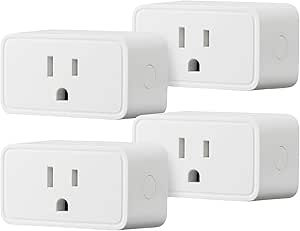 | Best Value for Alexa-Only Plug Control | Compatibility: Amazon Alexa only | Connectivity: 2.4 GHz Wi-Fi | Pack size: 4 plugs | VIEW LATEST PRICE | See Our Full Breakdown |
| Kasa Smart Wi-Fi Plug HS103P4, 4-Pack |  | Best Multi-Assistant Smart Plug Set | Model: HS103P4 | Pack size: 4 | Operating voltage: 120 V AC | VIEW LATEST PRICE | See Our Full Breakdown |
| ecobee Smart Thermostat Essential Wi-Fi Thermostat |  | Best Smart Thermostat for Multiple Ecosystems | Connectivity: Wi-Fi | Display: Color touchscreen | Certification: ENERGY STAR | VIEW LATEST PRICE | See Our Full Breakdown |
| Amazon Echo Dot (5th Gen) Smart Speaker, Deep Sea Blue |  | Best Compact Alexa Hub | Generation: 5th Gen | Color: Deep Sea Blue | Dimensions: 3.9 × 3.9 × 3.5 in (100 × 100 × 89 mm) | VIEW LATEST PRICE | See Our Full Breakdown |
| Amazon Smart Thermostat with Alexa and Ring Compatibility |  | Best Alexa-Connected Thermostat | Compatibility: Alexa and Ring | Installation: Do-it-yourself with Alexa app guidance | Wiring requirement: C-wire required | VIEW LATEST PRICE | See Our Full Breakdown |
| Tapo H110 Smart IR & IoT Hub with Chime, Matter-Certified Universal Remote |  | Best for Connecting Legacy IR Appliances | Model: H110 | Connectivity: 2.4 GHz Wi-Fi | Protocol: Matter-certified | VIEW LATEST PRICE | See Our Full Breakdown |
| Linkind Matter Smart Plug |  | Best Cross-Platform Smart Plug | Connectivity: Matter and 2.4 GHz Wi-Fi | Power capacity: 1,800 W, 15 A | Compatible platforms: Apple Home, Alexa, Google Home, SmartThings, and AiDot | VIEW LATEST PRICE | See Our Full Breakdown |
| Govee Smart Plug, Wi-Fi Outlet, 4-Pack |  | Best Multi-Plug Starter Pack | Quantity: 4 plugs | Connectivity: Bluetooth and 2.4 GHz Wi-Fi; 5 GHz Wi-Fi not supported | Voice assistants: Amazon Alexa and Google Assistant | VIEW LATEST PRICE | See Our Full Breakdown |
| smart home device | Connectivity |
|---|---|
| Amazon Echo Show 5 Smart Displ | — |
| Amazon Echo Dot Max Alexa Spea | Wi-Fi |
| Amazon Smart Plug with Alexa | — |
| Amazon Echo Show 15 | — |
| TP-Link Tapo P125M Matter Smar | 2.4 GHz Wi-Fi; Bluetooth onboarding |
| Amazon Echo Spot Smart Alarm C | Wi-Fi; eero Built-in mesh extender |
| Amazon Echo Show 11 Smart Disp | — |
| Amazon Basics Alexa Smart Plug | 2.4 GHz Wi-Fi |
| Kasa Smart Wi-Fi Plug HS103P4 | 2.4 GHz Wi-Fi |
| ecobee Smart Thermostat Essent | Wi-Fi |
| Amazon Echo Dot | — |
| Amazon Smart Thermostat with A | — |
| Tapo H110 Smart IR & IoT Hub w | 2.4 GHz Wi-Fi |
| Linkind Matter Smart Plug | Matter and 2.4 GHz Wi-Fi |
| Govee Smart Plug | Bluetooth and 2.4 GHz Wi-Fi; 5 GHz Wi-Fi not supported |
More Details on Our Top Picks
Amazon Echo Show 5 Smart Display with Alexa, Cloud Blue
The Echo Show 5 earns its place as the compact choice for buyers who want Alexa controls and glanceable information without giving up much counter or bedside space. Its 5.5-inch screen handles weather, news, media, compatible camera feeds, and video calls, while physical camera and microphone controls offer a clear privacy option. Compared with the larger Echo Show 15, it is easier to fit into a small room, but it lacks that model’s family-sized widgets and built-in Fire TV setup. The tradeoff is scale: this screen is better for quick checks than shared viewing, and video calls are limited to Alexa app users and screen-equipped Echo devices. Smart home controls also depend on compatible devices, so it is not a standalone route to universal device support.
Pros:- Compact display shows weather, news, media, and compatible camera feeds
- Built-in camera supports video calls
- Physical camera shutter and microphone/camera-off control
- Uses recycled fabric and aluminum, with recyclable packaging
Cons:- Video calling is limited to Alexa app users and Echo devices with a screen
- Smart home control depends on device compatibility
- Small screen is less suited to shared viewing than the Echo Show 15
Best for: People who want an Alexa screen for a bedside table, desk, or small kitchen, plus occasional video calls and camera checks
Not ideal for: Households that want a large shared dashboard or broad video-calling compatibility; its screen is small and calls are limited to Alexa app users and screen-equipped Echo devices
- Display:5.5 inches
- Camera:2 MP
- Smart assistant:Alexa
- Color:Cloud Blue
- Privacy controls:Microphone/camera-off button and built-in camera shutter
- Recycled materials:Fabric made from 100% post-consumer recycled polyester yarn; aluminum made from 100% recycled aluminum
- Packaging:100% recyclable
Our verdict“Choose the Echo Show 5 for a space-saving Alexa display, but pick the Echo Show 15 if you need a room-wide family dashboard.”
Amazon Echo Dot Max Alexa Speaker, Graphite
The Echo Dot Max is the strongest fit here for buyers who want a speaker to do more than respond to voice commands. Its built-in smart home hub and Omnisense temperature and presence detection can support routines without relying on a separate hub, while room-adaptive playback and nearly three times the bass of the 2022 Echo Dot give it a fuller sound profile than a basic voice speaker. That makes it a more capable audio-and-automation pick than the Amazon Smart Plug, which controls an individual outlet but adds no sound or sensing. Its limits are tied to the setup: eero extension works only with a compatible eero network, and pairing or home-theater features require compatible devices. Choose it for a central Alexa speaker, not as a universal solution for every home platform.
Pros:- Room-filling sound with nearly three times the bass of the 2022 Echo Dot
- Built-in hub and Omnisense detection support smart-home routines
- Can pair with compatible Echo and Fire TV devices
- Can extend a compatible eero network
Cons:- Wi-Fi extension requires an existing compatible eero network
- Some pairing and home-theater features require compatible devices
- Alexa-centered features make it a less flexible choice for mixed-platform homes
Best for: Alexa households seeking a fuller-sounding central speaker with built-in smart-home hub features and presence-aware routines
Not ideal for: People using another assistant or expecting Wi-Fi extension without a compatible eero network
- Color:Graphite
- Connectivity:Wi-Fi
- Smart assistant:Alexa
- Smart home features:Built-in hub; Omnisense temperature and presence detection
- Wi-Fi extension:Up to 1,000 sq. ft. with a compatible eero network
- Privacy control:Microphone enable/disable button
Our verdict“Pick the Echo Dot Max if you want one Alexa speaker to combine stronger sound with hub and sensing features, and skip it if you need platform-neutral control.”
Amazon Smart Plug with Alexa
The Amazon Smart Plug is the most straightforward way in this group to add schedules and voice control to an ordinary indoor device, without setting up a separate smart-home hub. Its compact body leaves the second outlet free, and automatic reconnection after power or Wi-Fi interruptions can save you from manually restoring a routine. Compared with the TP-Link Tapo P125M three-pack, this plug is a simpler Alexa-only choice rather than a cross-platform option: the Tapo supports Matter across Apple Home, Google Home, Samsung SmartThings, and Alexa, while this model works only with Alexa. The Amazon plug also needs a 2.4 GHz Wi-Fi network and is indoor-only. It makes sense for a small Alexa setup, but buyers building a mixed-platform home should choose the Tapo instead.
Pros:- No separate smart-home hub required
- Supports Alexa voice control, routines, and schedules
- Compact design leaves the second outlet free
- Reconnects to Alexa after power or Wi-Fi outages
Cons:- Works only with Alexa and compatible Alexa devices
- Supports 2.4 GHz Wi-Fi only
- Indoor use only
Best for: Alexa users who want to automate a lamp or other compatible indoor device with voice commands and schedules
Not ideal for: People using Apple Home, Google Home, Samsung SmartThings, or 5 GHz-only Wi-Fi, and anyone needing outdoor control
- Dimensions:3.2 × 1.5 × 2.2 in (80 × 38 × 57 mm)
- Weight:3.1 oz (87 g)
- Input:120 VAC, 60 Hz, 15 A maximum
- Maximum output:15 A
- Wi-Fi:2.4 GHz, 802.11 b/g/n; does not support 5 GHz
- Use:Indoor only
- Compatibility:Alexa app and compatible Alexa devices; does not support other voice assistants or smart hubs
- Warranty:1-year limited warranty
Our verdict“Choose this plug for a basic Alexa-only setup; the Tapo P125M is a better match if you need Matter and multiple smart-home platforms.”
Amazon Echo Show 15, 15.6-Inch Full HD Smart Display with Fire TV
The Echo Show 15 is the clearest choice for households that want smart-home controls and shared family information on one prominent screen. Its 15.6-inch Full HD display has room for calendars, to-do lists, weather, and device controls, while built-in Fire TV adds streaming without needing another screen. An auto-framing camera with 3.3x zoom supports video calls, and physical camera and microphone controls give privacy-conscious households a direct way to disable them. Compared with the smaller Echo Show 5, the Show 15 is better suited to a shared kitchen or living space, but it demands more wall or counter space and is less discreet in a bedroom. Some streaming content may require a subscription, so its entertainment appeal depends partly on the services you already use.
Pros:- Large Full HD screen gives shared widgets room to stay readable
- Customizable widgets combine calendars, lists, weather, and smart-home controls
- Built-in Fire TV supports streaming apps
- Auto-framing camera, physical shutter, and mic/camera-off control
Cons:- Large screen takes more wall or counter space than the Echo Show 5
- Some streaming content may require a subscription
Best for: Families who want a large shared kitchen display for calendars, household lists, smart-home controls, video calls, and streaming
Not ideal for: Buyers with limited wall or counter space, or anyone seeking a compact bedside display like the Echo Show 5
- Display:15.6-inch Full HD (1080p)
- Entertainment:Built-in Fire TV
- Camera:Centered auto-framing camera with 3.3x zoom and wide field of view
- Audio:Noise reduction technology
- Included accessories:Fire TV remote
- Privacy controls:Mic/camera-off button and built-in camera shutter
Our verdict“Choose the Echo Show 15 if your household will use a shared information and entertainment screen; choose the Echo Show 5 for a smaller room.”
TP-Link Tapo P125M Matter Smart Plug Mini, 3-Pack
The Tapo P125M three-pack stands out for homes that use more than one smart-home platform or may change platforms later. Matter support brings the plugs to Apple Home, Alexa, Google Home, and Samsung SmartThings, while local network control can keep supported operation available when the internet is down. That flexibility makes it a stronger long-term fit than the Alexa-only Amazon Smart Plug, which is simpler if your setup already revolves around Alexa. The Tapo plugs also support schedules and timers, and their compact shape helps preserve access to neighboring outlets. The main constraint is shared with many Wi-Fi smart plugs: they require a 2.4 GHz network. Buyers who want a plug for a platform outside the listed systems, or who cannot use 2.4 GHz Wi-Fi, should look elsewhere.
Pros:- Matter support spans Apple Home, Amazon Alexa, Google Home, and Samsung SmartThings
- Local network control can work when the internet is unavailable
- Three-plug pack supports automating multiple devices
- Compact design helps avoid blocking adjacent outlets
Cons:- Requires a 2.4 GHz Wi-Fi network
- Compatibility is limited to the listed platforms and supported Matter setups
Best for: Households automating several indoor devices across Apple Home, Alexa, Google Home, or SmartThings, especially those seeking local control
Not ideal for: Buyers with only 5 GHz Wi-Fi or a smart-home platform outside the listed Matter-compatible options
- Model:Tapo P125M
- Pack size:3 plugs
- Maximum load:15 A / 1800 W
- Connectivity:2.4 GHz Wi-Fi; Bluetooth onboarding
- Compatibility:Apple Home, Amazon Alexa, Google Home, Samsung SmartThings
- Certification:UL-certified flame-retardant design
- Warranty:2-year limited warranty
Our verdict“Choose the Tapo P125M pack for multi-platform flexibility and local control; choose the Amazon Smart Plug for a simpler Alexa-only setup.”
Amazon Echo Spot Smart Alarm Clock with Alexa, Black
The Echo Spot is the most bedroom-focused pick here: its customizable clock face can show the time, weather, or song titles, while Alexa routines can link your wake-up to compatible lights and other devices. Compared with the Echo Show 11, it takes up less visual space and centers on glanceable clock information rather than video calls and a large touchscreen. It also plays music, podcasts, and audiobooks, making it more versatile than a basic alarm clock. The tradeoff is that its smart-home control depends on compatible devices, and its Wi-Fi extension only helps homes that already use an eero network. Choose it for a bedside Alexa hub, not as a universal networking upgrade or a full-size smart display.
Pros:- Customizable display can show the clock, weather, or song titles
- Alexa routines can coordinate compatible smart-home devices
- Plays music, podcasts, and audiobooks
- Can extend an existing eero network by up to 1,000 sq. ft.
Cons:- Wi-Fi extension requires an existing eero network
- Smart-home controls depend on compatible devices
- Its compact display is less suited to video and visual entertainment than the Echo Show 11
Best for: Bedrooms where someone wants an Alexa alarm clock, quick at-a-glance information, and routines for compatible smart-home devices
Not ideal for: Households without an eero network that want Wi-Fi extension, or buyers seeking a large screen for video calls and entertainment
- Color:Black
- Display:Customizable clock face with time, weather, and song titles
- Connectivity:Wi-Fi; eero Built-in mesh extender
- Wi-Fi coverage:Up to 1,000 sq. ft. with an existing eero network
- Privacy controls:Microphone off button and in-app controls
- Recycled materials:36%
Our verdict“Choose the Echo Spot for a compact Alexa bedside clock with useful routines, but skip it if you need a large screen or eero-free Wi-Fi extension.”
Amazon Echo Show 11 Smart Display with Full HD Screen and Spatial Audio
The Echo Show 11 earns its place as the most capable screen-centered device in this group. Its 11-inch Full HD touchscreen gives recipes, video calls, and smart-home controls more room than the Echo Spot, while the built-in hub reduces the need for a separate smart-home hub for compatible devices. Spatial audio and an auto-framing camera make it a stronger fit for a kitchen or common room where people watch, listen, and call from a distance. That larger, more feature-rich setup also means it is less discreet than a bedside clock, and some functions require Alexa+. Buyers should also treat comparisons with Echo Show 8 cautiously because the cited model years differ.
Pros:- 11-inch Full HD touchscreen offers more viewing area than compact smart displays
- Built-in smart-home hub controls compatible Alexa devices
- Spatial audio is designed for clearer vocals and a wider sound stage
- Auto-framing camera supports video calls while users move
Cons:- Some features require Alexa+
- Its larger screen takes more space than the Echo Spot
- Some listed comparisons use different Echo Show 8 model years
Best for: Households wanting a large Alexa screen for shared-room video calls, entertainment, and control of compatible smart-home devices
Not ideal for: Buyers who want a compact bedside device, do not need a touchscreen, or want every advertised feature without Alexa+
- Display:11-inch Full HD touchscreen
- Audio:Spatial audio with up to 2x the bass of Echo Show 8 (2023 release)
- Processor:AZ3 Pro chip
- Smart home:Built-in smart home hub; controls compatible Alexa devices
- Camera:Auto-framing camera with 3.3x zoom and noise reduction
- Privacy:Microphone and camera enable/disable button; camera controls on device and in app
- Color:Graphite
Our verdict“Pick the Echo Show 11 when a shared room needs a large screen, video calling, and a built-in hub; choose the Echo Spot for a simpler bedside role.”
Amazon Basics Alexa Smart Plug, 4-Pack
This four-pack of Alexa smart plugs is a straightforward way to schedule lamps and other suitable appliances without adding a hub or another app. Voice commands, remote control, and sunrise or sunset routines can make everyday devices easier to manage, while the compact shape is designed to leave the other outlet free. Compared with the Kasa Smart Wi-Fi Plug HS103P4, this set keeps control within Alexa rather than adding Google Assistant support through a separate app. That simplicity is a benefit for Alexa households, but a real limitation if your home uses mixed platforms. It also requires 2.4 GHz Wi-Fi, so check your network setup before buying. Pick it for basic Alexa routines, not broad smart-home compatibility.
Pros:- Four plugs support control of devices in multiple rooms
- Voice and remote control work through Alexa
- Schedules and custom routines include sunrise and sunset triggers
- Compact design leaves the other outlet free
Cons:- Works with Amazon Alexa only
- Requires a 2.4 GHz Wi-Fi network
- Offers less cross-platform flexibility than the Kasa HS103P4
Best for: Alexa households that want to schedule lamps or other compatible appliances across several rooms without a separate hub
Not ideal for: Homes using Google Assistant or another platform, or buyers whose Wi-Fi network does not provide 2.4 GHz connectivity
- Compatibility:Amazon Alexa only
- Connectivity:2.4 GHz Wi-Fi
- Pack size:4 plugs
- Plug type:Type B
- Amperage:15 A
- Dimensions:2.7 × 2.1 × 1.5 in
- Warranty:1 year limited
Our verdict“Choose this set for simple Alexa-only scheduling across several outlets; pick the Kasa HS103P4 if Google Assistant support matters.”
Kasa Smart Wi-Fi Plug HS103P4, 4-Pack
The Kasa HS103P4 is the more flexible four-plug choice for homes split between Alexa and Google Assistant. Each plug can be controlled remotely through the Kasa app or by voice, and timers and schedules add everyday automation without a separate hub. Compared with the Amazon Basics Alexa Smart Plug, its key advantage is broader assistant support—not a more elaborate automation setup. That makes it a sensible fit when household members use different voice platforms, though it still relies on 2.4 GHz Wi-Fi and does not offer the hub-free, multi-platform convenience of a universal smart-home system. Check the stated 120 V AC and 1,800 W maximum against the devices you plan to connect; these plugs are for suitable household loads, not every appliance.
Pros:- Works with both Amazon Alexa and Google Assistant
- Four-pack can automate devices in multiple locations
- Kasa app supports remote control, timers, and schedules
- No separate hub is required
Cons:- Requires a 2.4 GHz Wi-Fi connection
- Does not list support for Apple HomeKit
- Still depends on a compatible Wi-Fi network for app and voice control
Best for: Households with Alexa and Google Assistant users who want app-based or voice control for lamps, fans, and other suitable devices
Not ideal for: Buyers who need support for Apple HomeKit or other platforms, or who lack a 2.4 GHz Wi-Fi connection
- Model:HS103P4
- Pack size:4
- Operating voltage:120 V AC
- Maximum wattage:1,800 W
- Connectivity:2.4 GHz Wi-Fi
- Voice assistants:Amazon Alexa and Google Assistant
- Hub required:No
- Certification:UL certified
Our verdict“Choose the Kasa HS103P4 over the Amazon Basics set if your household needs both Alexa and Google Assistant control.”
ecobee Smart Thermostat Essential Wi-Fi Thermostat
The ecobee Smart Thermostat Essential stands apart from the plugs and Echo devices here by automating a home’s heating and cooling rather than individual outlets or routines. Its touchscreen, app, and schedule assistant give owners several ways to adjust temperatures, while support for Apple HomeKit, Google Assistant, and Alexa makes it a stronger fit for mixed-platform homes than an Alexa-centered device such as the Echo Show 11. ENERGY STAR certification and scheduled adjustments are aimed at reducing energy use; the stated savings are a claim, not a guaranteed result for every home. Compatibility covers many 24 VAC systems, but installation may require a separately sold Power Extender Kit if there is no C-wire. A SmartSensor is also sold separately, so this is not the pick for buyers seeking room-by-room sensing out of the box.
Pros:- Supports Apple HomeKit, Google Assistant, and Amazon Alexa
- Color touchscreen and ecobee app provide direct control options
- Scheduling can adjust temperatures when the home is unoccupied
- Compatible with many common 24 VAC heating and cooling systems
Cons:- Power Extender Kit is sold separately for homes without a C-wire
- SmartSensor is sold separately
- Compatibility and installation depend on the home’s HVAC system
Best for: Homeowners with a compatible 24 VAC HVAC system who want app scheduling and thermostat control across Apple, Google, or Alexa ecosystems
Not ideal for: Renters, homes with incompatible HVAC wiring, or buyers who need a C-wire solution or SmartSensor included
- Connectivity:Wi-Fi
- Display:Color touchscreen
- Certification:ENERGY STAR
- HVAC compatibility:Most 24 VAC systems, including gas, oil, electric, dual fuel, forced air, heat pumps, and boilers
- Smart home compatibility:Apple HomeKit, Google Assistant, and Amazon Alexa
- C-wire:Power Extender Kit sold separately for homes without a C-wire
- Additional features:Indoor humidity detection, schedule assistant, and time-of-use preheating and precooling
- Energy savings claim:Up to 23% annually on heating and cooling costs
Our verdict“Choose the ecobee if your HVAC system is compatible and you want a scheduled thermostat that works across major smart-home platforms.”
Amazon Echo Dot (5th Gen) Smart Speaker, Deep Sea Blue
The Echo Dot (5th Gen) is the easiest fit for buyers who want Alexa in a small room without adding a screen. Its compact body handles music, podcasts, timers, and voice control for compatible smart home devices, while Matter support gives it a role beyond a basic speaker. Compared with the Echo Show 5, it takes up less space but lacks a display for video calls or visual information; its mono, single-driver audio also makes it a simpler listening choice than a larger Echo speaker. A microphone-off button provides a direct privacy control. The built-in eero coverage feature can extend a compatible eero network, but it requires that router and setup, so it is not a standalone Wi-Fi extender. Choose it for convenient Alexa control, not room-filling sound.
Pros:- Compact speaker combines Alexa assistance with compatible smart home control
- Supports Matter alongside Wi-Fi and Bluetooth Low Energy Mesh
- Can pair with compatible Echo devices or Fire TV
- Microphone-off button gives users a physical privacy control
Cons:- Mono audio from one 1.6-inch driver is less suited to expansive listening than larger speakers
- eero Built-in requires a compatible eero router, account linking, and setup
- Does not support ad-hoc or peer-to-peer Wi-Fi networks
Best for: People who want an unobtrusive Alexa speaker and smart home control in a bedroom, office, or small living area
Not ideal for: Buyers who want a visual smart display, more expansive audio, or an eero extender that works without a compatible eero router
- Generation:5th Gen
- Color:Deep Sea Blue
- Dimensions:3.9 × 3.9 × 3.5 in (100 × 100 × 89 mm)
- Weight:10.7 oz (304 g)
- Speaker:1.6-inch full-range driver; mono playback
- Wi-Fi:Dual-band 802.11a/b/g/n/ac, 2.4 and 5 GHz
- Smart home compatibility:Wi-Fi, Bluetooth Low Energy Mesh, and Matter
- eero Built-in:Up to 1,000 sq. ft. with a compatible eero network
Our verdict“Choose the Echo Dot if you want a compact Alexa speaker with smart home capabilities, and pick the Echo Show 5 instead if a screen matters more.”
Amazon Smart Thermostat with Alexa and Ring Compatibility
The Amazon Smart Thermostat is the lineup’s dedicated choice for automating home heating and cooling, rather than adding general-purpose control like the Linkind Matter Smart Plug. It supports schedules, remote changes through the Alexa app, and temperature adjustments through compatible Alexa devices, so routines can extend beyond switching individual outlets. Its app-guided DIY installation may appeal to homeowners comfortable checking their wiring before starting, and the thermostat uses Honeywell Home technology. The main limitation is firm: a C-wire is required, which can rule it out in some homes or add installation work. Automatic adjustments based on readings or presence also depend on compatible Alexa devices; the thermostat alone does not provide that sensing. It is a focused Alexa ecosystem pick, not the best fit for buyers who need broad platform flexibility.
Pros:- Supports schedules and remote control through the Alexa app
- Compatible Alexa devices can adjust temperature based on readings or presence
- App guidance supports DIY installation
- Uses Honeywell Home thermostat technology
Cons:- Requires a C-wire, which may limit compatibility with existing wiring
- Automatic adjustment based on readings or presence requires compatible Alexa devices
- Control is centered on Alexa and Ring compatibility rather than broad smart home platforms
Best for: Alexa households with compatible heating and cooling systems, a C-wire, and an interest in schedules or remote temperature control
Not ideal for: Renters or homeowners without a C-wire, and buyers who want temperature automation without adding compatible Alexa devices
- Compatibility:Alexa and Ring
- Installation:Do-it-yourself with Alexa app guidance
- Wiring requirement:C-wire required
- Control options:Alexa app, schedules, and compatible Alexa devices
- Thermostat technology:Honeywell Home Thermostat Technology
- Temperature automation:Compatible Alexa devices can use readings or presence
Our verdict“Pick this thermostat if your home has a C-wire and Alexa is already central to your smart home; skip it if either condition is missing.”
Tapo H110 Smart IR & IoT Hub with Chime, Matter-Certified Universal Remote
The Tapo H110 solves a different problem from the Linkind Matter Smart Plug: it brings compatible infrared-controlled appliances, such as TVs, air conditioners, and fans, into app-based routines. Support for over 8,000 IR brands and 18 appliance types can reduce dependence on separate remotes, while Matter certification and Alexa, Google Assistant, and Siri support give it broader platform reach than an Alexa-only accessory. Its built-in 93 dB alarm also adds a notification function for connected sensors. The tradeoff is that IR control depends on line of sight, so an appliance tucked behind a cabinet may not respond. It also requires a 2.4 GHz Wi-Fi network. Choose this hub to connect older remote-controlled gear, not to control every device regardless of placement or protocol.
Pros:- Supports over 8,000 IR brands and 18 appliance types
- Matter certification works with Alexa, Google Assistant, and Siri
- Built-in 93 dB alarm can provide alerts from connected sensors
- Smart pairing maps controls for compatible legacy devices
Cons:- Infrared control requires line of sight to the appliance
- Requires a 2.4 GHz Wi-Fi network
- IR-based control is limited to compatible appliances and does not replace every type of smart home hub
Best for: Households with IR-controlled TVs, air conditioners, or fans that want to bring them into voice control and smart routines
Not ideal for: Buyers whose appliances are hidden from the hub, or homes without a 2.4 GHz Wi-Fi network
- Model:H110
- Connectivity:2.4 GHz Wi-Fi
- Protocol:Matter-certified
- Alarm volume:93 dB
- Supported appliance types:18
- Voice assistants:Alexa, Google Assistant, and Siri
- App compatibility:iOS and Android
- IR brand support:Over 8,000 brands
Our verdict“Choose the Tapo H110 to add compatible IR appliances to smart routines; a Matter smart plug is a better match for controlling simple plug-in devices.”
Linkind Matter Smart Plug
The Linkind Matter Smart Plug is the strongest choice here for shoppers who want one plug to fit into a mixed-platform home. It works with Apple Home, Alexa, Google Home, and SmartThings, while local control during internet outages can keep supported routines available when the internet drops. That makes it more flexible across ecosystems than the hub-free Govee Smart Plug, though Govee’s four-plug pack may better suit buyers outfitting several outlets at once. Linkind offers schedules, timers, voice commands, and remote control, with overload and short-circuit protection. The setup caveat is real: most platforms require a compatible Matter hub, and the plug uses 2.4 GHz Wi-Fi and requires an IPv6 network. It is a capable single-plug option for a Matter-ready home, but a less direct choice for buyers who want plug-and-play control without checking network requirements.
Pros:- Supports Apple Home, Alexa, Google Home, and SmartThings
- Local network control can continue when the internet is offline
- Offers remote, voice, scheduled, and timed control
- Includes overload and short-circuit protection
Cons:- Most supported platforms require a compatible Matter hub
- Requires 2.4 GHz Wi-Fi and an IPv6 network
- Single-plug format is less suited to outfitting multiple outlets than the Govee four-pack
Best for: People with a Matter-compatible hub who want a single smart plug that can work across Apple Home, Alexa, Google Home, or SmartThings
Not ideal for: Buyers without a compatible Matter hub or IPv6 network, and shoppers who want several plugs in one purchase
- Connectivity:Matter and 2.4 GHz Wi-Fi
- Power capacity:1,800 W, 15 A
- Compatible platforms:Apple Home, Alexa, Google Home, SmartThings, and AiDot
- Hub requirement:Matter-certified hub required for most platforms; AiDot app can be used without a hub
- Safety features:FCC certified, fire-resistant materials, short-circuit and overload protection
- Control features:Remote control, voice control, scheduling, and timer
- Network requirement:2.4 GHz Wi-Fi and IPv6
Our verdict“Choose Linkind for cross-platform Matter control and local operation, but pick Govee if you need multiple hub-free plugs at once.”
Govee Smart Plug, Wi-Fi Outlet, 4-Pack
The Govee Smart Plug four-pack is the practical pick for adding control to several lamps or small appliances without buying a separate hub. Its Alexa and Google Assistant support, schedules, and group control cover the everyday jobs many households need, while Bluetooth and 2.4 GHz Wi-Fi offer two connection methods. Compared with the Linkind Matter Smart Plug, Govee is less flexible across platforms and does not list local outage control, but it avoids a hub requirement and supplies four plugs together. There is an important network limit: it does not support 5 GHz Wi-Fi, so buyers should confirm they have a compatible 2.4 GHz network. The product data also gives inconsistent current ratings of 10 A and 11 A. I would check the rating on the device or packaging before connecting appliances with substantial electrical loads.
Pros:- Four plugs support control of multiple outlets
- Works with Amazon Alexa and Google Assistant
- Schedules and group control are available through the Govee Home app
- Bluetooth and 2.4 GHz Wi-Fi connectivity with no hub required
Cons:- Does not support 5 GHz Wi-Fi
- Product information lists inconsistent 10 A and 11 A current ratings
- Offers less cross-platform flexibility than the Matter-certified Linkind plug
Best for: Alexa or Google Assistant households that want several hub-free plugs for lamps and other compatible appliances
Not ideal for: Users who need Apple Home, Matter, 5 GHz-only Wi-Fi, or a clearly verified current rating for higher-load appliances
- Quantity:4 plugs
- Connectivity:Bluetooth and 2.4 GHz Wi-Fi; 5 GHz Wi-Fi not supported
- Voice assistants:Amazon Alexa and Google Assistant
- Plug type:Type B
- Certifications:ETL and FCC
- Hub requirement:No hub required
- Model:B5081
Our verdict“Choose this pack for several straightforward Alexa- or Google-controlled outlets, but verify its current rating before using it with higher-load appliances.”

How We Picked
I ranked these devices by how well they solve distinct smart-home jobs, not by treating every speaker, plug, display, and thermostat as interchangeable. My criteria include practical usefulness, setup demands, compatibility, day-to-day control, build and placement fit, and the likely effort required to maintain a dependable setup. I also weighed whether a device can work across ecosystems or is most compelling for households already using Alexa.
The ranking favors options that balance usefulness with flexibility for a broad range of homes. That puts the Echo Show 11 first as a versatile household control point, while specialist products rank higher for buyers with a clear goal, such as Matter-compatible outlet control or thermostat upgrades. Compact displays, entry-level speakers, and multipacks remain worthwhile when their narrower role matches the buyer; they rank below more versatile picks when they demand a specific ecosystem or solve only one task. Before buying, readers should check current device compatibility and installation requirements, particularly for thermostats and connected-home platforms.
Factors to Consider When Choosing Best Smart Home Devices
Choosing smart home gear works best when you plan around routines and compatibility rather than filling a cart with devices that share an assistant logo. These broader decisions can help prevent duplicated controls, unused features, and upgrades that do not work with your existing setup.
Start With the Routine, Not the Device
Pick a recurring annoyance to solve before choosing a product: turning off a lamp, checking a shared calendar, adjusting the temperature, or keeping a kitchen timer visible. A smart plug can handle simple on-and-off control for a compatible appliance, but it cannot make every appliance smart or safely control every load. A display or speaker makes more sense when voice control, reminders, or household information will be used throughout the day. One common mistake is buying several devices before deciding who will control them and how. Start with one routine, then add products only when they remove a separate source of friction. This approach also makes it easier to tell whether you need another hub or just a better placement for an existing device.
Choose an Ecosystem You Can Live With
Alexa compatibility can make setup and voice control straightforward for a household already using Amazon devices, but it may be less appealing if family members rely on different platforms. Matter support can improve cross-platform flexibility, yet it does not mean every feature works identically in every app or with every controller. Check the exact functions you need—such as scheduling, remote access, or voice control—against the device and platform requirements. Avoid assuming that a Matter label removes the need for a compatible hub or network configuration. If you expect to change ecosystems, prioritize devices with broad support and keep a record of which app manages each product. A single, clear control path is often more useful than collecting several overlapping apps.
Match Device Size and Screen to Its Location
A compact speaker or display is easier to place on a bedside table or crowded counter, while a larger screen can be more legible and useful in a shared room. Decide what the device needs to show from its normal viewing distance; a display used for quick reminders has different needs from one used for video or household controls. Larger devices also claim more wall or counter space and can draw more attention in a room. A common buying error is choosing by screen size alone without checking the mounting plan, viewing angle, or nearby power access. For speakers, think about whether the device is mainly for voice responses or also needs to fill a room with audio. The right footprint depends on the task and placement, not simply on which model has the most features.
Check Thermostat Compatibility Before Planning an Upgrade
A smart thermostat is a more involved purchase than a plug because it connects to your home’s heating and cooling system. Before selecting one, verify the existing thermostat wiring, HVAC system type, and any installation requirements in the manufacturer’s compatibility information. Do not assume that two thermostats with similar app or voice features install the same way. If your wiring or system is unclear, getting a qualified installer to check it can prevent a stalled project or incorrect setup. Also consider who needs access to temperature controls and whether schedules will suit everyone in the home. Pay more attention to compatibility and ease of ongoing adjustment than to adding another voice assistant to a room.
Buy Multipacks Only When You Have a Plan
A pack of several plugs can be a practical way to automate multiple lamps or other compatible devices, but unused units are not a bargain for a home that needs only one. Before choosing a multipack, list the outlets and appliances you intend to control and check whether each outlet is reachable without blocking neighboring sockets. Wi-Fi congestion and app fragmentation can become irritating when many devices are added without a consistent naming and grouping plan. Start by assigning clear room-based names and routines so other household members can understand what each control does. For appliances that must remain powered or have special operating requirements, confirm that smart-plug control is suitable. A small, deliberate setup is easier to troubleshoot than a home full of devices with unclear jobs.
Frequently Asked Questions
Should I buy a Matter smart plug or one made for Alexa?
Choose based on how likely you are to use more than one smart-home platform. A Matter plug can offer broader control options when paired with compatible platforms and controllers, while an Alexa-focused plug may be simpler for a home already organized around Amazon devices. Matter does not guarantee that every app exposes every feature, so check the functions you rely on before buying. If you only need one outlet controlled through Alexa, simplicity may matter more than flexibility. If you are building a mixed-platform home or expect to change systems, cross-platform support can help preserve your choices.
Is a smart display more useful than a smart speaker?
A display earns its space when you benefit from seeing information, such as reminders, controls, or video, rather than hearing a voice response alone. A speaker is a simpler fit for music, timers, and spoken commands, and it usually asks less of your counter or wall space. Think about where the device will sit and whether people will glance at it while doing other tasks. A display in a shared room can serve several household members, while a compact speaker may be easier to place in a bedroom. Avoid paying for a screen if your routines are almost entirely voice-based.
Can I use a smart plug with any appliance?
No: a smart plug is best for compatible devices that behave as expected when power is switched on and off. Check the plug’s electrical limits and the appliance’s instructions before connecting anything, especially equipment that draws substantial power or requires a particular shutdown procedure. A smart plug usually controls power, not the appliance’s full set of functions. It may not restart a device automatically after power returns if that device requires a button press. When in doubt, consult the appliance and plug documentation rather than relying on the outlet’s form factor alone.
What should I check before replacing my thermostat with a smart model?
Check your HVAC system type, thermostat wiring, and the new model’s compatibility guidance before purchasing. Some installations need wiring or equipment that an existing thermostat setup may not provide, so a quick look at the wall unit is not always enough to confirm fit. Also decide whether you are comfortable handling the installation or would rather hire a professional. App and voice features cannot make up for a thermostat that does not match your system. If you are unsure about wiring, get qualified advice before removing the existing control.
Should I buy a four-pack of smart plugs to outfit my home at once?
A multipack is sensible when you already have several specific lamps or compatible appliances in mind and have confirmed that their outlets are suitable. If you are new to smart plugs, starting with one lets you check app setup, Wi-Fi reliability, and how your household uses the controls before adding more. Multiple plugs can be harder to manage if they have inconsistent names or live in separate apps. Plan device names and room groupings as you add them, and avoid automating appliances that should not be power-cycled. A clear use for each plug matters more than having spare units available.
Conclusion
For a broad household hub, I recommend the Amazon Echo Show 11 as best overall; its larger screen and spatial audio give it a wider role than the compact Show 5 or Spot. For a flexible outlet setup, the TP-Link Tapo P125M is my best value-style pick for buyers who want a three-plug Matter set, while the Amazon Basics Alexa Smart Plug four-pack suits households committed to Alexa that need several outlets. The Echo Show 15 is my best premium display choice for a shared space that can accommodate a large screen, and the Echo Dot (5th Gen) is my best pick for beginners who want a straightforward voice-first starting point. For specific needs, choose the ecobee Smart Thermostat Essential for a thermostat-focused upgrade, the Echo Spot for a compact bedside clock, or a Matter plug if platform flexibility matters most. Match the device to the routine and check compatibility before expanding your setup.
Halloween Picks
halloween
As an affiliate, we earn on qualifying purchases.