

Selecting the best mesh Wi-Fi systems requires balancing raw speed, coverage area, and setup simplicity. My analysis places the TP-Link Deco X55 as the top choice for most households, offering reliable Wi-Fi 6 performance without the premium price tag of newer standards. For those needing maximum throughput for large estates, the NETGEAR Orbi 770 Series stands out with its tri-band Wi-Fi 7 architecture, while the Amazon eero Pro 7 remains the go-to for users deeply integrated into the Alexa ecosystem. The primary tradeoff you face is between future-proofing with Wi-Fi 7 hardware and cost-efficiency with proven Wi-Fi 6 models. Continue reading to see how these options stack up against each other in real-world scenarios.

Get the latest gadgets delivered free with Prime
- Fast, free delivery on millions of items
- Prime Video, Amazon Music and more included
- Member-only deals all year
Complete the kit



Key Takeaways
- Wi-Fi 7 is not yet necessary for most users; Wi-Fi 6 and 6E offer sufficient bandwidth for current 4K streaming and gaming needs at a lower cost.
- Tri-band systems with dedicated backhaul (like the Orbi 770) provide more stable speeds in dense environments compared to dual-band competitors.
- Amazon eero devices excel in simplicity and smart home integration but often lack the advanced parental controls and port flexibility found in TP-Link Deco units.
- Coverage claims vary wildly by wall material; a system rated for 8,000 sq. ft. may only effectively cover 5,000 sq. ft. in homes with brick or metal studs.
- Setup friction is highest in enterprise-grade features; consumer-focused apps like Deco and eero prioritize one-click mesh formation over manual network configuration.
| TP-Link Deco X55 AX3000 Wi-Fi 6 Mesh System, 3-Pack |  | Best Value for Wired Backhaul | Wi-Fi generation: Wi-Fi 6 | Wi-Fi class: AX3000 | Frequency bands: Dual-band | VIEW LATEST PRICE | See Our Full Breakdown |
| NETGEAR Orbi 770 Series WiFi 7 Tri-Band Mesh System, 3-Pack, Covers up to 8,000 sq. ft. |  | Best for Wi-Fi 7 Coverage Without the Highest Capacity Tier | Wi-Fi generation: Wi-Fi 7 (802.11be) | Frequency bands: Tri-band, including 6 GHz | Maximum data transfer rate: 11 Gbps | VIEW LATEST PRICE | See Our Full Breakdown |
| TP-Link Deco 7 Pro BE67 Wi-Fi 7 Tri-Band Mesh System, 3-Pack |  | Best for Multi-Gig Wired Flexibility | Wi-Fi standard: Wi-Fi 7 | Frequency bands: Tri-band | Maximum total bandwidth: Up to 14 Gbps | VIEW LATEST PRICE | See Our Full Breakdown |
| NETGEAR Orbi 970 Series WiFi 7 Mesh System, 3-Pack | 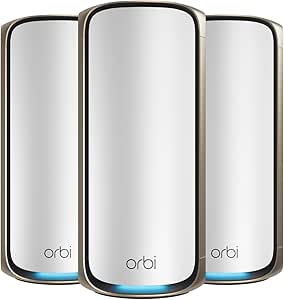 | Best Premium for Maximum Capacity | Wi-Fi standard: Wi-Fi 7 | System configuration: 1 router and 2 satellites | Frequency bands: Quad-band | VIEW LATEST PRICE | See Our Full Breakdown |
| Google WiFi AC1200 Mesh Router System, 3-Pack, Snow |  | Best for Simple Google Home Setups | Wi-Fi standard: Wi-Fi 5 (802.11ac) | Frequency bands: Dual-band | Data transfer rate: 1200 Mbps | VIEW LATEST PRICE | See Our Full Breakdown |
| TP-Link Deco XE75 AXE5400 Tri-Band WiFi 6E Mesh System, 3-Pack |  | Best Wi-Fi 6E Value | Wi-Fi generation: Wi-Fi 6E | Bands: Tri-band: 6 GHz, 5 GHz, 2.4 GHz | Maximum combined data rate: 5,400 Mbps | VIEW LATEST PRICE | See Our Full Breakdown |
| Amazon eero Pro 7 Tri-Band Mesh Wi-Fi 7 Router, 3-Pack |  | Best for High-Capacity Homes | Wi-Fi standard: Wi-Fi 7 | Radio configuration: Tri-band | Wireless speed: Up to 3.9 Gbps | VIEW LATEST PRICE | See Our Full Breakdown |
| Tenda Nova MW6 AC1200 Dual-Band Mesh Wi-Fi System, 3-Pack |  | Best Basic Budget Mesh | Wi-Fi standard: Wi-Fi 5 (802.11ac) | Wireless speed class: AC1200 | Bands: Dual-band | VIEW LATEST PRICE | See Our Full Breakdown |
| Google Wifi AC1200 Mesh Wi-Fi System, 3-Pack, Snow |  | Best Refurbished Pick for Google Home Users | Condition: Certified refurbished | Wi-Fi generation: Wi-Fi 5 (802.11ac) | Bands: Dual-band | VIEW LATEST PRICE | See Our Full Breakdown |
| NETGEAR Orbi 370 Series WiFi 7 Mesh System, 3-Pack, Up to 6,000 sq. ft. |  | Best Wi-Fi 7 Upgrade for Mid-Range Broadband | Wi-Fi generation: Wi-Fi 7 (802.11be) | Bands: Dual-band | Maximum data transfer rate: Up to 5 Gbps | VIEW LATEST PRICE | See Our Full Breakdown |
| Netgear Nighthawk Mesh WiFi 6 System (MK6W) – 3-Pack Dual-Band AX1500 |  | Best for Budget-Conscious Gigabit Households | Wi-Fi Generation: WiFi 6 (802.11ax) | Frequency Band: Dual-Band (2.4GHz and 5GHz) | Coverage Area: Up to 4,500 sq. ft. | VIEW LATEST PRICE | See Our Full Breakdown |
| TP-Link Deco 7 Pro BE10000 Tri-Band Wi-Fi 7 Whole-Home Mesh System, 3-Pack |  | Best Premium Performance for Large Homes | System type: Tri-band Wi-Fi 7 mesh system | Combined wireless speed: Up to 10 Gbps | Coverage: Up to 7,600 sq. ft. | VIEW LATEST PRICE | See Our Full Breakdown |
| Amazon eero Pro 6E Tri-Band Mesh Wi-Fi System, 3-Pack |  | Best Ecosystem Integration for Alexa Users | Wi-Fi standard: Wi-Fi 6E | Coverage: Up to 6,000 sq. ft. | Connected devices: 100+ | VIEW LATEST PRICE | See Our Full Breakdown |
| Amazon eero 6+ Wi-Fi 6 Mesh System, 3-Pack |  | Best Entry-Level Smart Home Hub | Wi-Fi: Wi-Fi 6 dual-band concurrent | Coverage: Up to 4,500 sq. ft. | Supported internet plans: Up to 1 Gbps | VIEW LATEST PRICE | See Our Full Breakdown |
| Amazon eero 7 Dual-Band Wi-Fi 7 Mesh Router, 3-Pack |  | Best Future-Proof Value for Eero Upgraders | Wi-Fi standard: Wi-Fi 7 (802.11be) | Bands: Dual-band (2.4 GHz and 5 GHz) | Coverage: Up to 6,000 sq. ft. | VIEW LATEST PRICE | See Our Full Breakdown |
| mesh Wi-Fi system | Coverage |
|---|---|
| TP-Link Deco X55 AX3000 Wi-Fi | — |
| NETGEAR Orbi 770 Series WiFi 7 | — |
| TP-Link Deco 7 Pro BE67 Wi-Fi | — |
| NETGEAR Orbi 970 Series WiFi 7 | — |
| Google WiFi AC1200 Mesh Router | — |
| TP-Link Deco XE75 AXE5400 Tri- | Up to 7,200 sq. ft. |
| Amazon eero Pro 7 Tri-Band Mes | Up to 6,000 sq. ft. (3-pack) |
| Tenda Nova MW6 AC1200 Dual-Ban | Listed as up to 3,500 sq. ft.; also listed as 6,000 sq. ft. |
| Google Wifi AC1200 Mesh Wi-Fi | Up to 4,500 sq. ft. |
| NETGEAR Orbi 370 Series WiFi 7 | Up to 6,000 sq. ft. |
| Netgear Nighthawk Mesh WiFi 6 | — |
| TP-Link Deco 7 Pro BE10000 Tri | Up to 7,600 sq. ft. |
| Amazon eero Pro 6E Tri-Band Me | Up to 6,000 sq. ft. |
| Amazon eero 6+ Wi-Fi 6 Mesh Sy | Up to 4,500 sq. ft. |
| Amazon eero 7 Dual-Band Wi-Fi | Up to 6,000 sq. ft. |
More Details on Our Top Picks
TP-Link Deco X55 AX3000 Wi-Fi 6 Mesh System, 3-Pack
The Deco X55 is a practical choice for households that want broad mesh coverage without moving to Wi-Fi 7. Its three units are rated for up to 6,500 sq. ft., and each has three Gigabit Ethernet ports, giving wired devices and Ethernet backhaul a useful place in the setup. Compared with the Google WiFi AC1200, it offers newer Wi-Fi 6 and a larger stated coverage area; the Google system is a simpler, lower-capacity fit for lighter use.
The tradeoff is that this is dual-band Wi-Fi 6, not a tri-band system with a dedicated wireless backhaul. Wired backhaul can help, but its benefits depend on having Ethernet cabling. A modem is also required for most providers, and real coverage varies with the home layout. I’d choose it for a roomy home with a mix of wired and wireless devices, not for shoppers seeking the newest Wi-Fi generation.
Pros:- Rated to cover up to 6,500 sq. ft. with three units.
- Three Gigabit Ethernet ports on each unit support wired devices and backhaul.
- Wi-Fi 6 provides a newer wireless generation than the Google WiFi AC1200.
- Deco app supports setup and network management.
Cons:- Dual-band design lacks a separate dedicated wireless backhaul band.
- A modem is required for most internet service providers.
- Coverage and performance can drop with distance, obstacles, and home construction.
Best for: Households with a larger home, several wired devices, and Ethernet cabling available for backhaul.
Not ideal for: Buyers seeking Wi-Fi 7 or a dedicated wireless backhaul, or households without a modem compatible with their internet service.
- Wi-Fi generation:Wi-Fi 6
- Wi-Fi class:AX3000
- Frequency bands:Dual-band
- Maximum data transfer rate:3000 Mbps
- Pack size:3 units
- Stated coverage:Up to 6,500 sq. ft.
- Maximum connected devices:150
- Ethernet ports per unit:3 Gigabit
- Backhaul:Wired Ethernet supported
Our verdict“Choose the Deco X55 for broad Wi-Fi 6 coverage and flexible wired connections, but skip it if you need Wi-Fi 7 or rely on wireless backhaul across a large home.”
NETGEAR Orbi 770 Series WiFi 7 Tri-Band Mesh System, 3-Pack, Covers up to 8,000 sq. ft.
The Orbi 770 brings Wi-Fi 7 and tri-band networking to a three-piece system rated for up to 8,000 sq. ft. Its stated speed reaches 11 Gbps, while compatibility with Wi-Fi 5 and Wi-Fi 6 devices lets a mixed-age household upgrade its network without replacing every client. The Orbi app guides setup and provides device and guest-network management. Against the TP-Link Deco X55, this is the more future-facing option, with a newer wireless standard and a larger stated coverage area.
That step up comes with limits: the system supports up to 100 devices, fewer than the Deco X55’s stated 150, and its reach is below the Orbi 970’s 10,000 sq. ft. rating. A 2.5 Gbps LAN port is useful for faster wired connections, but the full benefit depends on compatible internet service and devices. NETGEAR Armor is a 30-day trial; continued use requires a separate subscription, and this model is specified for the United States.
Pros:- Tri-band Wi-Fi 7 with stated speeds up to 11 Gbps.
- Three-piece system is rated for coverage up to 8,000 sq. ft.
- Supports existing Wi-Fi 5 and Wi-Fi 6 devices.
- Includes a 2.5 Gbps LAN port and app-guided setup.
Cons:- Supports up to 100 connected devices, fewer than the Deco X55’s stated limit.
- NETGEAR Armor requires a separate subscription after its 30-day trial.
- Designed for use in the United States only.
Best for: U.S. households planning a Wi-Fi 7 upgrade, with cable or fiber service and a large area to cover.
Not ideal for: Homes needing capacity above 100 connected devices, more than 8,000 sq. ft. of stated coverage, or a system for use outside the United States.
- Wi-Fi generation:Wi-Fi 7 (802.11be)
- Frequency bands:Tri-band, including 6 GHz
- Maximum data transfer rate:11 Gbps
- Package contents:1 router and 2 satellites
- Stated coverage:Up to 8,000 sq. ft.
- Maximum connected devices:100
- Number of ports:7
- LAN port bandwidth:2,500 Mbps
- Internet compatibility:Cable or fiber; plans up to 2.5 Gbps
Our verdict“Pick the Orbi 770 for tri-band Wi-Fi 7 and broad coverage, but choose a higher-capacity system if your home has more than 100 connected devices.”
TP-Link Deco 7 Pro BE67 Wi-Fi 7 Tri-Band Mesh System, 3-Pack
The Deco 7 Pro BE67 stands apart from the Orbi 770 by pairing tri-band Wi-Fi 7 with unusually flexible wired connections: each unit has 10 Gbps, 2.5 Gbps, and 1 Gbps WAN/LAN ports, plus USB 3.0. That gives a home with multi-gig internet, a fast NAS, or other wired equipment more room to build around the mesh. Its three units are rated for up to 8,100 sq. ft. and 200 devices, compared with the Orbi 770’s 8,000 sq. ft. and 100-device limits.
The headline wireless capacity reaches 14 Gbps, but that figure is not a promise that ordinary devices or internet plans will reach that speed. Buyers need compatible service and client hardware to make use of multi-gig performance. AI-driven roaming, Multi-Link Operation, VPN support, and HomeShield add network tools, though the feature set may be more than a basic household needs. A modem is sold separately, much like with the Deco X55.
Pros:- Tri-band Wi-Fi 7 with stated total bandwidth up to 14 Gbps.
- Rated for up to 8,100 sq. ft. and 200 connected devices.
- Each unit includes 10 Gbps, 2.5 Gbps, and 1 Gbps WAN/LAN ports.
- Adds USB 3.0, VPN client and server support, and AI-driven roaming.
Cons:- Modem is not included.
- Full multi-gig performance depends on compatible internet service and devices.
- Advanced features may add little value for households with basic networking needs.
Best for: Multi-gig households with wired network equipment, many connected devices, and a large area to cover.
Not ideal for: Buyers with basic internet plans or older devices who would not use its multi-gig ports and Wi-Fi 7 capabilities.
- Wi-Fi standard:Wi-Fi 7
- Frequency bands:Tri-band
- Maximum total bandwidth:Up to 14 Gbps
- Pack size:3 Deco units
- Stated coverage:Up to 8,100 sq. ft.
- Device capacity:Up to 200 devices
- Ports per unit:10 Gbps WAN/LAN, 2.5 Gbps WAN/LAN, 1 Gbps WAN/LAN, USB 3.0
- Mesh features:AI-driven roaming and Multi-Link Operation
- VPN support:VPN client and server
Our verdict“Choose the Deco 7 Pro BE67 if multi-gig wired connections and high device capacity matter, but a simpler system is a better fit for routine browsing and streaming.”
NETGEAR Orbi 970 Series WiFi 7 Mesh System, 3-Pack
The Orbi 970 is the lineup’s scale-first choice: a router and two satellites are rated for up to 10,000 sq. ft. and 200 connected devices. Its quad-band Wi-Fi 7 design includes dedicated backhaul, which separates satellite-to-router traffic from client traffic in the system design. That makes it a more suitable match for demanding, expansive homes than the tri-band Orbi 770, while its 10 Gig and 2.5 Gig LAN ports support fast wired links. It is also rated for internet plans up to 10 Gbps.
Those capabilities are only useful when the home’s service and devices can take advantage of them, and the 27 Gbps wireless figure is a system maximum, not a typical device speed. For a smaller home or a modest broadband plan, the Deco X55 is a less elaborate fit. Orbi 970 also has a U.S.-only usage region, and NETGEAR Armor moves to a separate subscription after the included 30-day trial.
Pros:- Rated for up to 10,000 sq. ft. and 200 connected devices.
- Quad-band Wi-Fi 7 includes dedicated backhaul.
- 10 Gig internet and LAN ports plus 2.5 Gig LAN support multi-gig wiring.
- Compatible with Wi-Fi 6, Wi-Fi 5, and older Wi-Fi devices.
Cons:- Its high wireless capacity may go unused with modest internet service or older client devices.
- NETGEAR Armor requires a separate subscription after the 30-day trial.
- Designed for use in the United States only.
Best for: U.S. households with a very large home, many connected devices, multi-gig or fiber service, and a need for dedicated wireless backhaul.
Not ideal for: Smaller homes or households with basic broadband that cannot use the system’s high-capacity Wi-Fi and multi-gig ports.
- Wi-Fi standard:Wi-Fi 7
- System configuration:1 router and 2 satellites
- Frequency bands:Quad-band
- Maximum wireless speed:Up to 27 Gbps
- Stated coverage:Up to 10,000 sq. ft.
- Maximum connected devices:Up to 200
- Backhaul:Dedicated wireless backhaul
- Ports:10 Gig internet, 10 Gig LAN, and 2.5 Gig LAN
- Maximum supported internet plan:Up to 10 Gbps
Our verdict“Choose the Orbi 970 for a large, device-heavy home with multi-gig needs; skip it if a smaller mesh system can cover your space and broadband plan.”
Google WiFi AC1200 Mesh Router System, 3-Pack, Snow
The Google WiFi AC1200 is the straightforward pick for buyers who want three mesh points managed through the Google Home app, including parental controls and guest networks. Its stated coverage reaches 4,500 sq. ft., making it a smaller-scale option than the TP-Link Deco X55, which is rated for 6,500 sq. ft. and uses Wi-Fi 6. Google’s system uses older Wi-Fi 5, so it makes more sense for routine household browsing and streaming than for buyers building around newer wireless devices or high-capacity service.
The Google Home app is both an advantage and a constraint: setup and device management stay in one familiar place, but the system requires that app for control. AC1200 and dual-band operation offer less headroom than the Wi-Fi 7 Orbi models in this roundup, and the supplied coverage figure may not suit a sprawling layout. I’d choose this for a modest home already centered on Google Home, rather than for a buyer seeking the broadest reach or newer mesh technology.
Pros:- Three routers form a mesh system rated for homes up to 4,500 sq. ft.
- Google Home app includes device management and parental controls.
- Guest mode supports a separate guest network.
- WPA3 security protocol is listed in the product specifications.
Cons:- Wi-Fi 5 is older than the Wi-Fi 6 Deco X55 and the Wi-Fi 7 systems in this roundup.
- Stated coverage is below the Deco X55 and the Orbi systems.
- Setup and management require the Google Home app.
Best for: Google Home households with a modest-sized home, routine internet use, and a preference for app-based parental and guest-network controls.
Not ideal for: Buyers with large homes, newer Wi-Fi devices, or high-speed plans who want more capacity than Wi-Fi 5 AC1200 provides.
- Wi-Fi standard:Wi-Fi 5 (802.11ac)
- Frequency bands:Dual-band
- Data transfer rate:1200 Mbps
- Router quantity:3
- Stated coverage:Up to 4,500 sq. ft.
- LAN port bandwidth:1000 Mbps
- Number of ports:3
- Security protocol:WPA3
- App features:Device management, parental controls, and guest networks
Our verdict“Pick Google WiFi AC1200 for a modest Google Home household that values simple app controls, but choose a newer system for larger spaces or more demanding devices.”
TP-Link Deco XE75 AXE5400 Tri-Band WiFi 6E Mesh System, 3-Pack
The Deco XE75 is a sensible step up from older dual-band mesh kits when you want a separate 6 GHz band without moving to Wi-Fi 7. That band can carry traffic between nodes or serve compatible devices, helping reduce competition on the 5 GHz and 2.4 GHz bands. Its stated 7,200-square-foot coverage also gives this three-pack a larger published footprint than the eero Pro 7 and Orbi 370 systems here. The Deco app and HomeShield tools add accessible controls for families and busy households.
The tradeoff is that 6 GHz benefits are limited to compatible devices, and the three Ethernet ports per unit are gigabit rather than multi-gig. Choose the XE75 for broad coverage and Wi-Fi 6E; skip it if you want Wi-Fi 7 or faster wired links.
Pros:- Tri-band Wi-Fi 6E offers a 6 GHz band for backhaul or compatible devices.
- Three-pack coverage is specified for areas up to 7,200 sq. ft.
- Deco app supports setup and remote network management.
- HomeShield includes basic security, parental controls, QoS, and usage reports.
Cons:- Gigabit Ethernet ports can limit wired connections above 1 Gbps.
- 6 GHz device access requires Wi-Fi 6E-compatible hardware.
- Most internet providers require a separate modem.
Best for: Households with a large floor plan, several Wi-Fi 6E devices, and a preference for app-managed setup and parental controls.
Not ideal for: Buyers with multi-gig internet or a priority on Wi-Fi 7, since this system has gigabit LAN ports and uses Wi-Fi 6E.
- Wi-Fi generation:Wi-Fi 6E
- Bands:Tri-band: 6 GHz, 5 GHz, 2.4 GHz
- Maximum combined data rate:5,400 Mbps
- Coverage:Up to 7,200 sq. ft.
- Device capacity:Up to 200 devices
- Pack size:3 units
- Ports:9 total; gigabit LAN
- Management:Deco app; Alexa compatible
Our verdict“Choose the Deco XE75 if you want wide three-band Wi-Fi 6E coverage and can live without Wi-Fi 7 or multi-gig Ethernet.”
Amazon eero Pro 7 Tri-Band Mesh Wi-Fi 7 Router, 3-Pack
For a crowded home with fast broadband and many connected devices, the eero Pro 7 stands out for its stated support for 600+ devices and two auto-sensing 5 GbE ports on every router. Wi-Fi 7 and support for internet plans up to 5 Gbps give it more headroom than the Wi-Fi 6E Deco XE75, while compatibility with earlier eero units can help existing eero households expand without replacing everything. Thread and Alexa support also suit homes building around connected devices.
Its stated 6,000-square-foot coverage is less than the Deco XE75’s published figure, and the system is dual-band rather than tri-band. Setup requires an iOS or Android device and an internet connection; advanced security features require an optional subscription. This is a strong fit for capacity and wired flexibility, not for buyers seeking subscription-free extras.
Pros:- Wi-Fi 7 with wireless speeds specified up to 3.9 Gbps.
- Two auto-sensing 5 GbE ports on each router.
- Supports more than 600 devices and covers up to 6,000 sq. ft.
- Works with previous eero generations and supports Thread.
Cons:- Dual-band design may offer less band flexibility than tri-band options such as the Deco XE75.
- Advanced security and other eero Plus features require an optional subscription.
- Setup requires a supported iOS or Android device and an internet connection.
Best for: Large, device-dense households with a broadband plan up to 5 Gbps, wired equipment, or an existing eero network.
Not ideal for: Buyers who want tri-band operation, setup without a smartphone, or advanced security features without an optional subscription.
- Wi-Fi standard:Wi-Fi 7
- Radio configuration:Tri-band
- Wireless speed:Up to 3.9 Gbps
- Supported internet plan speed:Up to 5 Gbps
- Coverage:Up to 6,000 sq. ft. (3-pack)
- Supported devices:600+
- Ethernet:Two auto-sensing 5 GbE ports per router
- Smart home support:Thread, Alexa, and Matter controller
- Warranty:3-year limited warranty
Our verdict“Pick the eero Pro 7 for a high-device-count home that can use its Wi-Fi 7 and 5 GbE ports, rather than for tri-band coverage or subscription-free extras.”
Tenda Nova MW6 AC1200 Dual-Band Mesh Wi-Fi System, 3-Pack
The Tenda Nova MW6 is the straightforward choice for replacing dead zones with one shared network name, rather than chasing the highest speeds or newest wireless standard. Its three nodes support seamless roaming, and the app offers setup and guest networking. Gigabit Ethernet ports, MU-MIMO, and beamforming give it useful basics for everyday browsing and streaming, while its listed capacity of up to 90 devices is higher than the Orbi 370’s stated 70.
That device count should not be mistaken for high-performance capacity: the MW6 is a Wi-Fi 5 AC1200 dual-band system, so it lacks the newer standards and band options of the Deco XE75 and Wi-Fi 7 eero Pro 7. Coverage information is inconsistent, listing both 3,500 and 6,000 square feet. Choose it for basic mesh needs, but not for demanding speeds or confident coverage planning.
Pros:- Three nodes create one network name with roaming between mesh points.
- Gigabit Ethernet ports are useful for wired devices.
- Supports MU-MIMO, beamforming, and up to 90 devices.
- App supports setup and guest networking.
Cons:- Wi-Fi 5 dual-band hardware is older and less capable than Wi-Fi 6E and Wi-Fi 7 alternatives.
- Product information lists conflicting coverage figures of 3,500 and 6,000 sq. ft.
- Security and parental-control features are basic.
Best for: Small or mid-sized homes seeking a simple three-node mesh for everyday internet use, guest access, and basic roaming.
Not ideal for: Households with multi-gig broadband, demanding latency-sensitive use, or a need for a dependable published coverage figure.
- Wi-Fi standard:Wi-Fi 5 (802.11ac)
- Wireless speed class:AC1200
- Bands:Dual-band
- Pack size:3 nodes
- Coverage:Listed as up to 3,500 sq. ft.; also listed as 6,000 sq. ft.
- Device capacity:Up to 90 devices
- Ports:6 total; gigabit LAN
- Security:WPA2-PSK
Our verdict“Choose the Nova MW6 for basic whole-home mesh and guest access, but skip it if speed, modern Wi-Fi features, or clear coverage figures matter most.”
Google Wifi AC1200 Mesh Wi-Fi System, 3-Pack, Snow
This certified refurbished Google Wifi makes its case through familiar Google Home controls rather than cutting-edge speed. The app lets parents manage screen time, restrict adult content, and pause Wi-Fi for individual devices—more clearly defined family controls than the basic features described for the Tenda Nova MW6. Its three points are specified to cover up to 4,500 square feet, and WPA3 support adds a current security protocol to this Wi-Fi 5 system.
There are real compromises: the product is refurbished, comes with a 90-day limited hardware warranty, and lists only one port. Its Wi-Fi 5 dual-band design also trails newer choices such as the Deco XE75 and Orbi 370 in wireless generation. This pick suits buyers who value Google Home management and parental tools over speed, ports, or a longer warranty.
Pros:- Three mesh points are specified for coverage up to 4,500 sq. ft.
- Google Home app supports setup and network management.
- Parental controls include screen-time tools, content restrictions, and device-level Wi-Fi pause.
- Supports WPA3 security.
Cons:- Certified refurbished condition may show wear.
- Only one port is listed.
- The 90-day limited hardware warranty is shorter than the eero Pro 7 warranty.
Best for: Google Home households seeking app-based parental controls and broad basic coverage, and comfortable buying certified refurbished hardware.
Not ideal for: Buyers who need multiple wired connections, the latest Wi-Fi generation, or a longer hardware warranty.
- Condition:Certified refurbished
- Wi-Fi generation:Wi-Fi 5 (802.11ac)
- Bands:Dual-band
- Pack size:3 units
- Coverage:Up to 4,500 sq. ft.
- Data transfer rate:Up to 1 Gbps
- Ports:1 listed port
- Security:WPA3
- Warranty:90-day limited hardware warranty
Our verdict“Choose this refurbished Google Wifi system for Google Home controls and family Wi-Fi management, not for newer wireless standards or extensive wired connectivity.”
NETGEAR Orbi 370 Series WiFi 7 Mesh System, 3-Pack, Up to 6,000 sq. ft.
The Orbi 370 is a practical way to get Wi-Fi 7 across a three-piece mesh without aiming at the largest coverage claims in the lineup. Its router-and-two-satellite arrangement is specified for up to 6,000 square feet and 70 connected devices, while the 2.5 Gbps LAN bandwidth gives wired equipment more room than the gigabit ports on the Deco XE75. It also supports Wi-Fi 6 and Wi-Fi 5 devices, so older phones and computers can remain on the network.
Unlike the tri-band eero Pro 7, the Orbi 370 is dual-band, and its stated internet compatibility tops out at plans up to 2.5 Gbps. The Orbi app handles setup and guest Wi-Fi, but NETGEAR Armor becomes a separate subscription after its 30-day trial. Its US-only compatibility also rules it out for buyers elsewhere.
Pros:- Wi-Fi 7 supports data rates up to 5 Gbps.
- Router and two satellites are specified for coverage up to 6,000 sq. ft.
- 2.5 Gbps LAN bandwidth supports faster wired connections than gigabit-only systems.
- Compatible with Wi-Fi 6 and Wi-Fi 5 devices and supports satellite expansion.
Cons:- Dual-band design has fewer bands than the tri-band eero Pro 7.
- Designed for use in the US only.
- NETGEAR Armor requires a separate subscription after the 30-day trial.
Best for: US households with Wi-Fi 7 devices, broadband plans up to 2.5 Gbps, and a need for a router plus two satellites.
Not ideal for: Buyers outside the US, homes needing tri-band operation, or users seeking included long-term NETGEAR Armor features.
- Wi-Fi generation:Wi-Fi 7 (802.11be)
- Bands:Dual-band
- Maximum data transfer rate:Up to 5 Gbps
- Coverage:Up to 6,000 sq. ft.
- Device capacity:Up to 70 devices
- Package contents:One router and two satellites
- LAN port bandwidth:2.5 Gbps
- Security protocols:WPA3, WPA2-PSK
- Regional compatibility:For use in the US only
Our verdict“Choose the Orbi 370 for a US home seeking Wi-Fi 7 mesh and 2.5 Gbps wired capacity, but not if you need tri-band or international compatibility.”
Netgear Nighthawk Mesh WiFi 6 System (MK6W) – 3-Pack Dual-Band AX1500
This system is a pragmatic choice for homes that need broad coverage without breaking the bank. The Netgear Nighthawk MK6W uses Wi-Fi 6 to handle multiple devices efficiently, though its dual-band AX1500 speed is modest compared to the tri-band TP-Link Deco 7 Pro. While the 4,500 sq. ft. coverage is solid for average-sized homes, it lacks the 6 GHz band found in higher-end models like the eero Pro 6E, which means less headroom for interference in dense neighborhoods. The inclusion of three LAN ports is a practical touch for connecting stationary devices like consoles or smart TVs, but the 1 Gbps port limit will bottleneck internet plans faster than gigabit. It serves well as a straightforward, app-managed network for users who prioritize ease of setup over raw speed.
Pros:- Extensive 4,500 sq. ft. coverage with three units
- Wi-Fi 6 technology improves efficiency for multiple devices
- Three LAN ports provide flexible wired connectivity
- User-friendly app-based management and setup
Cons:- LAN ports capped at 1 Gbps, limiting multi-gigabit potential
- Uses older WPA2 security protocol instead of WPA3
- Dual-band design lacks the dedicated backhaul of tri-band systems
Best for: Homeowners with internet plans under 1 Gbps who need simple, wide coverage for 10–20 devices.
Not ideal for: Gamers or heavy streamers with multi-gigabit internet plans who need the lowest possible latency and highest throughput.
- Wi-Fi Generation:WiFi 6 (802.11ax)
- Frequency Band:Dual-Band (2.4GHz and 5GHz)
- Coverage Area:Up to 4,500 sq. ft.
- Max LAN Data Rate:1000 Mbps
- Number of Units:3 (1 Router, 2 Satellites)
- Security Protocol:WPA2
- Control Method:App
Our verdict“A solid, affordable entry into Wi-Fi 6 mesh networking for standard households that don’t need multi-gigabit speeds.”
TP-Link Deco 7 Pro BE10000 Tri-Band Wi-Fi 7 Whole-Home Mesh System, 3-Pack
The TP-Link Deco 7 Pro represents the upper tier of current mesh technology, leveraging Wi-Fi 7 to deliver combined speeds up to 10 Gbps. This tri-band design is a significant step up from the dual-band Netgear Nighthawk MK6W, offering a dedicated 6 GHz band that reduces congestion for high-demand devices. With four 2.5 Gbps ports per unit, it is far more future-proof than the eero 6+, which is limited to gigabit ethernet. The 7,600 sq. ft. coverage makes it ideal for sprawling layouts, and its ability to handle over 200 devices ensures stability in smart-home-heavy environments. However, the requirement for a separate modem and the premium price point mean it is an investment best suited for users with multi-gigabit internet plans who demand top-tier performance.
Pros:- Wi-Fi 7 tri-band speeds up to 10 Gbps for maximum throughput
- Massive 7,600 sq. ft. coverage with three units
- Four 2.5 Gbps WAN/LAN ports per unit for wired flexibility
- Supports over 200 connected devices simultaneously
Cons:- Requires a separate modem for internet connection
- Premium price point reflects high-end specifications
- Complex setup may be overwhelming for non-technical users
Best for: Power users with multi-gigabit internet plans and large homes (up to 7,600 sq. ft.) requiring Wi-Fi 7 capabilities.
Not ideal for: Users with basic internet needs or those unwilling to purchase a separate modem and accept a higher upfront cost.
- System type:Tri-band Wi-Fi 7 mesh system
- Combined wireless speed:Up to 10 Gbps
- Coverage:Up to 7,600 sq. ft.
- Device capacity:Over 200 devices
- Ethernet ports:Four 2.5 Gbps WAN/LAN ports
- Features:VPN support, Access Point Mode, QoS
- Modem requirement:Separate modem required
Our verdict“The definitive choice for large homes with multi-gigabit internet seeking the latest Wi-Fi 7 performance and port density.”
Amazon eero Pro 6E Tri-Band Mesh Wi-Fi System, 3-Pack
The eero Pro 6E strikes a balance between performance and ecosystem integration, particularly for those entrenched in the Amazon ecosystem. Its Wi-Fi 6E support grants access to the clean 6 GHz band, offering a tangible improvement over the dual-band Netgear Nighthawk MK6W in terms of interference resistance. While it doesn’t match the raw port speed of the TP-Link Deco 7 Pro‘s 2.5 Gbps ports, its single 2.5 Gb port per unit is sufficient for most high-end internet plans. The built-in Thread and Zigbee hubs streamline smart home management, reducing the need for separate bridges compared to the eero 6+‘s earlier iteration. However, the reliance on a subscription for advanced security features is a drawback for users who prefer a one-time purchase model, making it less appealing for privacy-focused buyers.
Pros:- Wi-Fi 6E access to the 6 GHz band for reduced interference
- Built-in Thread, Zigbee, and Bluetooth hubs for smart homes
- 2.5 Gb Ethernet port per unit for high-speed backhaul
- TrueMesh technology optimizes traffic routing automatically
Cons:- Advanced security features require a paid eero Plus subscription
- Setup requires a supported smartphone and internet connection
- Limited port count compared to prosumer mesh systems
Best for: Smart home owners using Alexa, Thread, and Zigbee devices who want seamless integration and Wi-Fi 6E performance.
Not ideal for: Users who dislike subscription models for network security and management features.
- Wi-Fi standard:Wi-Fi 6E
- Coverage:Up to 6,000 sq. ft.
- Connected devices:100+
- Ethernet ports per unit:One 2.5 Gb and one 1 Gb port
- Smart home connectivity:Alexa, Zigbee, Thread, BLE 5.0
- Processor:1 GHz dual-core
- Warranty:1-year limited
Our verdict“An excellent smart-home-centric mesh system for Alexa users who value ease of use and Wi-Fi 6E efficiency over raw port flexibility.”
Amazon eero 6+ Wi-Fi 6 Mesh System, 3-Pack
The eero 6+ is the accessible gateway into mesh networking, specifically designed for homes with internet plans up to 1 Gbps. Unlike the eero Pro 6E, it lacks the 6 GHz band, which means it may struggle in apartment complexes with heavy 5 GHz congestion. However, for suburban homes, its 4,500 sq. ft. coverage is adequate and significantly more affordable than the TP-Link Deco 7 Pro. The standout feature is its integrated Thread and Zigbee hub, which simplifies connecting smart locks and lights without extra dongles. While it supports fewer devices than the Netgear Nighthawk MK6W, its TrueMesh routing helps maintain stable connections. It is a streamlined, no-fuss option, but users with multi-gigabit plans or heavy gaming needs will find the dual-band Wi-Fi 6 performance limiting compared to tri-band alternatives.
Pros:- Integrated Thread and Zigbee hubs for smart home devices
- Supports internet plans up to 1 Gbps with Wi-Fi 6
- Compact design with easy app-based setup
- TrueMesh routing reduces dead zones effectively
Cons:- No 6 GHz band, limiting performance in congested areas
- Limited to 1 Gbps wired speeds
- Premium security features locked behind a subscription
Best for: First-time mesh buyers with gigabit internet plans who want integrated smart home hub functionality.
Not ideal for: Homes with dense 2.4/5 GHz interference or users with internet speeds exceeding 1 Gbps.
- Wi-Fi:Wi-Fi 6 dual-band concurrent
- Coverage:Up to 4,500 sq. ft.
- Supported internet plans:Up to 1 Gbps
- Ethernet:Two auto-sensing gigabit ports
- Smart home connectivity:Alexa, Thread, Zigbee, BLE
- Memory:512 MB RAM
- Dimensions:3.9 × 3.8 × 2.6 in
Our verdict“A simple, effective mesh system for smart home beginners who need reliable gigabit coverage without the complexity of tri-band setups.”
Amazon eero 7 Dual-Band Wi-Fi 7 Mesh Router, 3-Pack
The eero 7 brings Wi-Fi 7 to the eero lineup at a more accessible price point than the TP-Link Deco 7 Pro, though it sacrifices the tri-band design for a dual-band configuration. This means it lacks the dedicated 6 GHz band found in the eero Pro 6E, which could impact performance in extremely crowded RF environments. However, its 2.5 GbE ports are a major upgrade over the eero 6+, allowing for faster wired backhaul and support for multi-gigabit internet plans. The inclusion of WPA3 security and a 3-year warranty adds significant value compared to the 1-year coverage on the Pro 6E. For existing eero users, this system offers a seamless upgrade path with backward compatibility, making it a logical choice for those wanting next-gen speed without the premium cost of tri-band hardware.
Pros:- Wi-Fi 7 support with backward compatibility
- Two 2.5 GbE ports per router for high-speed wired connections
- Includes Thread, Zigbee, and Matter smart home hubs
- 3-year limited warranty provides long-term peace of mind
Cons:- Dual-band design lacks the 6 GHz band of tri-band rivals
- Advanced features require an optional eero Plus subscription
- Maximum wireless speed is lower than tri-band Wi-Fi 7 competitors
Best for: Existing eero users or new buyers wanting Wi-Fi 7 speeds and 2.5 GbE ports without paying for tri-band hardware.
Not ideal for: Users in high-density housing who need the interference-free 6 GHz band available in tri-band systems.
- Wi-Fi standard:Wi-Fi 7 (802.11be)
- Bands:Dual-band (2.4 GHz and 5 GHz)
- Coverage:Up to 6,000 sq. ft.
- Ethernet:Two 2.5 GbE ports per router
- Security:WPA3 and WPA2
- Smart home compatibility:Thread, Zigbee, Matter, Alexa
- Warranty:3-year limited
Our verdict“A smart, value-oriented Wi-Fi 7 upgrade for eero fans who prioritize 2.5 GbE connectivity over the 6 GHz band.”

How We Picked
I evaluated these mesh systems based on three core pillars: coverage consistency, feature depth, and long-term value. Coverage consistency was judged by the theoretical backhaul speed and the number of bands available, as dedicated backhaul channels prevent speed drops when multiple devices connect. Feature depth involved analyzing app usability, parental control granularity, and integration with smart home ecosystems, ensuring the system fits modern household management needs. Long-term value considered the likelihood of future firmware support and the cost-to-performance ratio, filtering out models that offer marginal gains for a steep price increase.
The ranking logic prioritizes balance. Systems that offer premium performance but require complex manual configuration were ranked lower than those providing excellent out-of-the-box experiences. I also weighed the necessity of Wi-Fi 7; since few client devices currently support this standard, systems with robust Wi-Fi 6/6E performance were favored over overpriced Wi-Fi 7 entry-level units. This approach ensures recommendations remain relevant for today’s devices while acknowledging the trajectory of home networking technology.
| mesh Wi-Fi system | Coverage |
|---|---|
| TP-Link Deco X55 AX3000 Wi-Fi | — |
| NETGEAR Orbi 770 Series WiFi 7 | — |
| TP-Link Deco 7 Pro BE67 Wi-Fi | — |
| NETGEAR Orbi 970 Series WiFi 7 | — |
| Google WiFi AC1200 Mesh Router | — |
| TP-Link Deco XE75 AXE5400 Tri- | Up to 7,200 sq. ft. |
| Amazon eero Pro 7 Tri-Band Mes | Up to 6,000 sq. ft. (3-pack) |
| Tenda Nova MW6 AC1200 Dual-Ban | Listed as up to 3,500 sq. ft.; also listed as 6,000 sq. ft. |
| Google Wifi AC1200 Mesh Wi-Fi | Up to 4,500 sq. ft. |
| NETGEAR Orbi 370 Series WiFi 7 | Up to 6,000 sq. ft. |
| Netgear Nighthawk Mesh WiFi 6 | — |
| TP-Link Deco 7 Pro BE10000 Tri | Up to 7,600 sq. ft. |
| Amazon eero Pro 6E Tri-Band Me | Up to 6,000 sq. ft. |
| Amazon eero 6+ Wi-Fi 6 Mesh Sy | Up to 4,500 sq. ft. |
| Amazon eero 7 Dual-Band Wi-Fi | Up to 6,000 sq. ft. |
Factors to Consider When Choosing Best Mesh Wi-Fi Systems
Choosing a mesh system isn’t just about picking the fastest router. It involves understanding your home’s layout, your device ecosystem, and how much time you want to spend managing your network. These factors will guide you to the right fit.
Understanding Backhaul vs. Front-End Speeds
Many buyers confuse the advertised speed of a mesh node with the speed they actually get. The backhaul is the wireless connection between your main router and the satellite nodes. If a system is dual-band, the backhaul shares the same airwaves as your devices, causing speed reductions as you move further from the main unit. Tri-band systems, like the NETGEAR Orbi 770, dedicate one band exclusively to backhaul traffic. This separation means your laptops and phones get the full bandwidth of the other bands, resulting in consistent performance throughout the home. If you have many devices or thick walls, paying for a dedicated backhaul is the single most important upgrade you can make.
The Wi-Fi 7 Premium vs. Wi-Fi 6 Practicality
Wi-Fi 7 represents the cutting edge, offering lower latency and higher throughput. However, the ecosystem of devices that support Wi-Fi 7 is still growing. Unless you have a very specific need for ultra-low latency for competitive gaming or 8K streaming, Wi-Fi 6 and 6E remain the sweet spot for value. Systems like the TP-Link Deco X55 provide ample speed for 99% of households. Buying Wi-Fi 7 today is an investment in future-proofing, but it comes with a significant price premium. I recommend sticking with Wi-Fi 6 unless you are building a new home with structured cabling and plan to upgrade devices simultaneously.
Ecosystem Integration and Smart Home Compatibility
Mesh routers are no longer just for internet access; they are hubs for smart home automation. Amazon eero systems integrate seamlessly with Alexa, allowing you to create custom routines or prioritize smart home traffic. Conversely, TP-Link Deco offers broader compatibility with various IoT standards and provides more robust parental control features. If your home is heavily reliant on Alexa for voice control, eero simplifies management. If you prefer granular control over which devices get priority bandwidth or time limits, Deco’s interface is more detailed. Consider your existing smart home investments before choosing; switching ecosystems can create friction in device management.
Coverage Claims and Physical Obstacles
Manufacturer coverage numbers are best-case scenarios calculated in open fields. In reality, wall materials drastically reduce signal strength. Drywall has minimal impact, but brick, concrete, and metal studs can cut range in half. A system rated for 5,000 sq. ft. might struggle in a 3,000 sq. ft. home with multiple brick fireplaces. I recommend buying a system with more nodes than you think you need. It is easier to remove a node later than to add one mid-contract. Also, consider the placement limitations; some nodes require a power outlet, which restricts placement options in older homes with sparse electrical access.
Subscription Costs and Hidden Fees
Some mesh systems lock advanced features behind a paywall. TP-Link HomeShield, for example, offers basic security for free but charges for detailed threat detection and parental controls. Amazon eero requires an eero Plus subscription for advanced security and ad blocking. Netgear’s Armor service is also a recurring cost. Before purchasing, calculate the total cost of ownership over three to five years. A cheaper hardware price tag might be offset by mandatory subscriptions. If you prefer a one-time purchase with no recurring fees, look for systems that offer robust free features, such as basic QoS and guest network controls, without gating them behind a paywall.
Frequently Asked Questions
Do I really need Wi-Fi 7 if I have a small apartment?
For a small apartment, Wi-Fi 7 is generally overkill unless you have a specific need for ultra-low latency or multiple 8K streams. Wi-Fi 6 systems are significantly cheaper and provide more than enough bandwidth for standard streaming, browsing, and gaming. The main advantage of Wi-Fi 7 in a small space is congestion handling in dense apartment buildings, but Wi-Fi 6E also handles this well. Save your money for a better placement strategy or a higher-quality modem rather than upgrading to the newest standard prematurely.
Can I mix different mesh brands or models together?
No, you cannot mix different brands or even different generations of the same brand easily. Mesh systems rely on proprietary protocols to communicate between nodes. For example, a TP-Link Deco node will not talk to a Netgear Orbi node. Even within the same brand, older Wi-Fi 5 models often cannot join a Wi-Fi 6 mesh network. Always buy a complete kit (2-pack or 3-pack) to ensure compatibility. If you need to expand coverage later, you must purchase the exact same model or a model explicitly listed as compatible by the manufacturer.
Is it better to use Ethernet backhaul or wireless backhaul?
Ethernet backhaul is always superior if your home has wired infrastructure. It provides a stable, high-speed connection between nodes that is immune to wireless interference. If you have Ethernet ports in each room, configure your mesh system to use wired backhaul. This allows you to buy less expensive dual-band systems because the nodes don’t need to reserve wireless bandwidth for talking to each other. If you lack wiring, you must rely on wireless backhaul, which makes tri-band systems a better investment to maintain speed.
Why does my internet speed drop when I move to a different room?
This is known as the ‘handoff’ problem. When you move from the main router’s coverage zone to a satellite node’s zone, the device must disconnect from one and connect to the other. This process can cause brief interruptions or speed dips. High-quality mesh systems use roaming protocols to make this seamless. If you experience significant drops, try moving the satellite node closer to the main router. The goal is to overlap coverage areas so that devices stay connected to the strongest signal without needing a hard switch.
Do mesh systems work with my existing ISP modem?
Yes, most mesh systems are compatible with any ISP modem. You simply connect the main mesh router to your modem via Ethernet. However, if you have a combined modem-router gateway from your ISP, you may need to put it in ‘bridge mode’ to avoid double NAT issues. Bridge mode disables the router functions of the ISP device, allowing the mesh system to handle all routing and Wi-Fi duties. Check your ISP’s support page for instructions on enabling bridge mode for your specific equipment.
Conclusion
Choosing the right mesh system depends on your specific household needs. For the best overall balance of price and performance, the TP-Link Deco X55 is my primary recommendation, offering solid Wi-Fi 6 coverage without unnecessary complexity. If you demand premium performance for a large home and want to future-proof your network, the NETGEAR Orbi 770 Series is the superior choice, thanks to its dedicated tri-band backhaul. For beginners or those deeply invested in the Amazon ecosystem, the Amazon eero Pro 7 provides the easiest setup and most intuitive app experience. Finally, if you are on a strict budget, the Tenda Nova MW6 delivers basic mesh functionality at an entry-level price, though it lacks the advanced features of its competitors. Evaluate your square footage, device count, and budget to make the final decision.