The best indoor security cameras balance useful image detail, room coverage, privacy controls, and storage that fits how you monitor your home. My best overall pick is the eufy Security 4K Indoor Camera E30, which pairs sharp video with pan-and-tilt coverage and no required subscription. For broader room coverage, the REOLINK FE-W uses a 360-degree fisheye view, while the Google Nest Cam Indoor (3rd Gen) is a strong choice for buyers already using Google Home. The main tradeoffs are fixed versus moving views, subscription-dependent features versus local storage, and higher resolution versus the network and storage demands it can bring. Read on for the full breakdown and a guide to choosing a camera that fits your rooms and routines.

Get the latest gadgets delivered free with Prime
- Fast, free delivery on millions of items
- Prime Video, Amazon Music and more included
- Member-only deals all year
Complete the kit



Key Takeaways
- Pan-and-tilt coverage is the most flexible fit for a room where a fixed camera might leave blind spots; the eufy E30, Ring Pan-Tilt, and Arlo 2-Cam set take different approaches to that need.
- Resolution is not the only measure of useful footage: the 360-degree REOLINK FE-W prioritizes whole-room visibility, while 1080p options such as the Kasa EC60 can suit basic monitoring without chasing extra detail.
- Storage and ongoing service needs separate the field: eufy emphasizes no required subscription, while buyers comparing Ring, Blink, Arlo, and Google models should check which recording and detection features depend on a plan.
- Multi-camera packs solve a different problem from single-camera models: Tapo C100, Tapo C211, Arlo, and Anona packs can cover several rooms, but placement and app management matter as much as the camera count.
- There is no single best ecosystem for every home: Ring, Google Nest, TP-Link Tapo/Kasa, Blink, and eufy differ in app experience, smart-home fit, privacy choices, and how easily cameras work together.
| eufy Security 4K Indoor Camera E30 – No Subscription, Pan and Tilt |  | Best Overall | Resolution: 4K UHD | Pan and tilt: 360° | Detection: Human, pet, audio cue, and crying detection with auto tracking | VIEW LATEST PRICE | See Our Full Breakdown |
| Kasa EC60 1080p Indoor Wired Security Camera |  | Best Value | Resolution: 1080p | Detection: Motion and sound | Activity zones: Up to 4 | VIEW LATEST PRICE | See Our Full Breakdown |
| Ring Indoor Cam 2K Indoor Security Camera, White |  | Best for Physical Privacy Control | Video resolution: 2K | Field of view: 115° horizontal, 60° vertical | Zoom: Up to 6x | VIEW LATEST PRICE | See Our Full Breakdown |
| Blink Mini 2K+ Plug-in Home & Pet Indoor Security Camera – White |  | Best Compact Camera | Camera resolution: 2K (2560 × 1440) | Field of view: 138° diagonal | Digital zoom: Up to 4x | VIEW LATEST PRICE | See Our Full Breakdown |
| REOLINK FE-W 6MP 360° Wi-Fi Indoor Fisheye Security Camera |  | Best for Panoramic Coverage | Resolution: 6MP | Field of view: 360° panoramic | Frame rate: Up to 25 fps | VIEW LATEST PRICE | See Our Full Breakdown |
| Tapo C201 1080p Pan/Tilt Indoor Security Camera |  | Best Value Pan/Tilt Coverage | Resolution: 1080p | Pan range: 360° horizontal | Tilt range: 114° vertical | VIEW LATEST PRICE | See Our Full Breakdown |
| TP-Link Tapo C100 1080p Indoor Security Camera, 4-Pack |  | Best Multi-Room Value | Quantity: 4 cameras | Resolution and frame rate: 1080p at 30 fps | Viewing angle: 117° | VIEW LATEST PRICE | See Our Full Breakdown |
| Kasa EC71 1080p Pan/Tilt Indoor Security Camera | 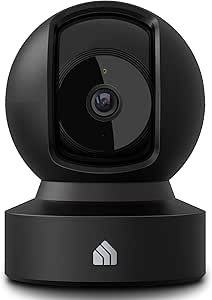 | Best for Motion Tracking | Resolution: 1080p Full HD | Pan and tilt: 360° horizontal, 113° vertical | Motion tracking: Supported | VIEW LATEST PRICE | See Our Full Breakdown |
| Ring Pan-Tilt Indoor Cam (1st Gen), White |  | Best Pan-and-Tilt Range | Video: 1080p HD | Pan and tilt coverage: 360° pan, 169° tilt | Color night vision: Supported | VIEW LATEST PRICE | See Our Full Breakdown |
| Blink Mini 4K+ Indoor Security Camera, White |  | Best for High-Detail Video | Resolution: 4K HDR | Field of view: 115° | Zoom: 10× enhanced zoom | VIEW LATEST PRICE | See Our Full Breakdown |
| Arlo Essential Indoor Pan Tilt Zoom Security Camera 2K Wired (2-Cam) |  | Best for Active Room Tracking | Resolution: 2K | Digital zoom: 12× | Pan and tilt: 360° pan; 180° tilt | VIEW LATEST PRICE | See Our Full Breakdown |
| Tapo C211 2K Pan Tilt Security Camera – 2-Pack (Baby Monitor, Dog Camera) | 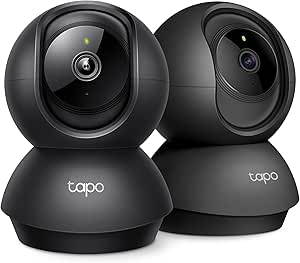 | Best Value for Two-Room Coverage | Video resolution: 2K | Still image resolution: 3 MP | Pan and tilt: 360° horizontal; 114° vertical | VIEW LATEST PRICE | See Our Full Breakdown |
| Google Nest Cam Indoor (Wired, 3rd Gen) – Snow | 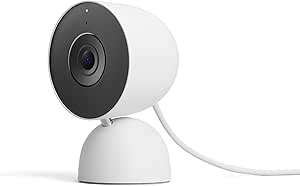 | Best for Google Home Households | Video resolution: 2K HDR | Night vision: Color | Use: Indoor | VIEW LATEST PRICE | See Our Full Breakdown |
| Ring Indoor Cam (2nd Gen), 1080p HD Security Camera, White |  | Best for Simple Privacy Control | Video: 1080p HD with Live View | Field of view: 143° diagonal; 115° horizontal; 59° vertical | Night vision: Color | VIEW LATEST PRICE | See Our Full Breakdown |
| Anona 4K UHD Indoor Camera – 360° Pan/Tilt, AI Person/Pet/Baby Cry Detection, Dual-Band Wi-Fi 6, Two-Way Audio (4-Pack) |  | Best Multi-Room 4K Bundle | Video resolution: 4K UHD (8 MP) | Digital zoom: 8× | Pan and tilt: 355° pan; 110° tilt | VIEW LATEST PRICE | See Our Full Breakdown |
| indoor security camera | Connectivity | Audio | Power |
|---|---|---|---|
| eufy Security 4K Indoor Camera | — | Two-way audio | — |
| Kasa EC60 1080p Indoor Wired S | — | Two-way audio | — |
| Ring Indoor Cam 2K Indoor Secu | Single-band 2.4 GHz Wi-Fi 4 | Two-way talk with noise cancellation | USB-C cable and power adapter; 6.5-foot cable included |
| Blink Mini 2K+ Plug-in Home & | 2.4 GHz 802.11b/g/n Wi-Fi | Two-way audio with noise cancellation | Plug-in; USB-C cable and indoor power adapter included |
| REOLINK FE-W 6MP 360° Wi-Fi In | 2.4 GHz and 5 GHz Wi-Fi | — | — |
| Tapo C201 1080p Pan/Tilt Indoo | 2.4 GHz Wi-Fi | — | — |
| TP-Link Tapo C100 1080p Indoor | 2.4 GHz Wi-Fi | — | — |
| Kasa EC71 1080p Pan/Tilt Indoo | 2.4 GHz Wi-Fi | — | — |
| Ring Pan-Tilt Indoor Cam | 802.11 b/g/n Wi-Fi, 2.4 GHz | Two-way audio with noise cancellation | USB-A to USB-C cable and power adapter |
| Blink Mini 4K+ Indoor Security | Wi-Fi 6, dual-band | Two-way audio with noise cancellation | Plug-in USB-C |
| Arlo Essential Indoor Pan Tilt | Dual-band Wi-Fi | Noise-cancelling two-way audio | Wired, 6.5 ft cable |
| Tapo C211 2K Pan Tilt Security | 2.4 GHz Wi-Fi | Two-way audio | — |
| Google Nest Cam Indoor | Wi-Fi | — | Corded electric |
| Ring Indoor Cam | 2.4 GHz Wi-Fi (802.11 b/g/n) | Two-way audio with noise cancellation | 10W USB-A adapter and 6.5 ft USB-A to Micro USB cable |
| Anona 4K UHD Indoor Camera | — | — | Corded, 5 V and 10 W |
More Details on Our Top Picks
eufy Security 4K Indoor Camera E30 – No Subscription, Pan and Tilt
The eufy E30 is my strongest all-around choice for buyers who want detailed indoor footage, broad room coverage, and local storage without a required subscription. Its 4K resolution and 360° pan-and-tilt view let it capture more detail across a room than the fixed-view Kasa EC60, while on-device detection can distinguish people, pets, audio cues, and crying sounds. A built-in spotlight adds color night vision, and two-way audio makes the camera useful for checking in as well as monitoring.
The tradeoffs are practical: recording to an SD card requires buying one separately, and the camera needs an outlet. HomeKit users should also note that its stream is limited to 1080p there, so the full 4K benefit is not available through that platform. I’d choose the E30 for flexible local monitoring, but skip it if battery power or full-resolution HomeKit video is a priority.
Pros:- 4K video with 360° pan-and-tilt coverage captures detail across a room.
- On-device detection identifies people, pets, audio cues, and crying sounds, with automatic tracking.
- Color night vision uses a built-in spotlight for more informative dark-room footage.
- Local SD-card recording and compatibility with HomeKit, Alexa, and Google Assistant.
Cons:- SD card for local recording is sold separately.
- Requires continuous wired power from an outlet.
- HomeKit video is limited to 1080p.
Best for: Households that want high-detail, room-spanning monitoring with local recording and person, pet, and sound detection.
Not ideal for: HomeKit users who require 4K in the Home app, or anyone who needs a battery-powered camera or included storage card.
- Resolution:4K UHD
- Pan and tilt:360°
- Detection:Human, pet, audio cue, and crying detection with auto tracking
- Night vision:Color night vision with built-in spotlight
- Audio:Two-way audio
- Smart home compatibility:HomeKit (1080p max), Alexa, and Google Assistant
- Storage:Local SD card; card sold separately
- Power and mounting:Corded electric; wall mount
Our verdict“Choose the eufy E30 for feature-rich, subscription-free indoor monitoring with broad coverage, unless you need battery power or 4K through HomeKit.”
Kasa EC60 1080p Indoor Wired Security Camera
The Kasa EC60 is a straightforward pick for buyers who want core indoor monitoring without paying for features they may not use. Its 1080p video, motion and sound alerts, and night vision up to 30 feet cover the basics, while up to four customizable activity zones can reduce alerts from areas that do not matter. Local microSD recording is supported, so cloud storage is optional rather than required. Compared with the 4K eufy E30, the EC60 gives up resolution, pan-and-tilt coverage, and richer detection, but its simpler feature set may suit a fixed view of an entryway or nursery.
That simplicity comes with limits: it is wired, indoor-only, and fixed-view, and the card is not included. I’d choose it for a basic, app-connected camera with local recording; buyers who need room-wide tracking or higher-detail footage should look at the E30 or REOLINK FE-W instead.
Pros:- 1080p video with night vision reaching up to 30 feet.
- Local microSD recording is available without a cloud plan.
- Up to four activity zones help focus motion alerts on selected areas.
- Two-way audio and Alexa and Google Assistant voice control.
Cons:- Requires a wired outlet and cannot run on battery power.
- MicroSD card is not included.
- Fixed-view design and 1080p resolution offer less coverage and detail than the eufy E30.
Best for: Budget-conscious households that need a fixed-view camera for one room, with adjustable alert zones and local microSD recording.
Not ideal for: Buyers who want pan-and-tilt coverage, advanced person or pet tracking, outdoor use, or a camera with storage included.
- Resolution:1080p
- Detection:Motion and sound
- Activity zones:Up to 4
- Night vision range:Up to 30 feet
- Storage:microSD card up to 64 GB; optional cloud storage
- Audio:Two-way audio
- Voice assistants:Amazon Alexa and Google Assistant
- Power and connectivity:Corded electric; Wi-Fi
Our verdict“Pick the Kasa EC60 for affordable, fixed-view monitoring with local recording, but choose a pan-and-tilt model for broader room coverage.”
Ring Indoor Cam 2K Indoor Security Camera, White
The Ring Indoor Cam 2K stands out for pairing sharper-than-1080p footage with a sliding physical lens cover. Its 2K video, up to 6x zoom, customizable motion zones, and two-way talk make it a useful fixed-view monitor for a room where checking details matters. Compared with the Kasa EC60, it offers more resolution and zoom; unlike the pan-and-tilt eufy E30, it cannot sweep across the room to follow activity. Its low-light color video works when ambient light is available, but footage switches to black and white in darkness.
The lens cover provides a visible way to block the camera, but it does not mute the microphone: that must be disabled in the app. The camera also needs wired power and uses 2.4 GHz Wi-Fi only. I’d favor it for buyers who value a physical camera cover and zoom, not for anyone seeking room-wide movement tracking or a fully private switch that also silences audio.
Pros:- 2K video and up to 6x zoom help inspect details in a fixed view.
- Sliding lens cover provides a physical way to block the camera.
- Customizable motion zones and real-time motion alerts.
- Two-way talk with noise cancellation.
Cons:- Microphone remains active with the lens cover closed unless disabled in the app.
- Requires wired power and a 2.4 GHz Wi-Fi connection.
- Low-light color video depends on ambient light; darkness uses black-and-white video.
Best for: Ring households that want a fixed indoor camera with 2K footage, zoom, motion zones, and a physical lens cover.
Not ideal for: Buyers who need pan-and-tilt tracking, battery operation, dual-band Wi-Fi, or a lens cover that also disables the microphone.
- Video resolution:2K
- Field of view:115° horizontal, 60° vertical
- Zoom:Up to 6x
- Motion detection:Advanced motion detection with customizable zones
- Audio:Two-way talk with noise cancellation
- Privacy control:Sliding lens cover; microphone must be disabled separately
- Connectivity:Single-band 2.4 GHz Wi-Fi 4
- Power:USB-C cable and power adapter; 6.5-foot cable included
Our verdict“Choose the Ring Indoor Cam 2K if a physical lens cover and zoom matter more than pan-and-tilt coverage or complete audio privacy.”
Blink Mini 2K+ Plug-in Home & Pet Indoor Security Camera – White
The Blink Mini 2K+ is the compact option in this group: its 2-by-2-inch body can fit on a crowded shelf or desk, while 2K video and a 138° diagonal field of view provide a useful view for everyday home or pet monitoring. It also includes two-way audio with noise cancellation and up to 4x digital zoom. Compared with the larger REOLINK FE-W, it is easier to place discreetly but cannot deliver that camera’s 360° panoramic coverage. The eufy E30 is a better match for automated tracking and richer on-device detection.
Person and vehicle detection requires an optional Blink subscription, which makes this less compelling for buyers who want advanced alerts without an ongoing plan. The Mini 2K+ also relies on 2.4 GHz Wi-Fi and continuous USB-C power. I’d choose it for a small, simple monitoring spot, but not for subscription-free smart detection or whole-room viewing.
Pros:- Compact 2-by-2-inch camera fits in small indoor spaces.
- 2K video with up to 4x digital zoom and night vision.
- Two-way audio includes noise cancellation.
- Alexa voice control and person or vehicle detection are available.
Cons:- Smart person and vehicle detection requires an optional Blink subscription.
- Limited to 2.4 GHz Wi-Fi.
- Must remain plugged in and has no battery backup.
Best for: People who need a small plug-in camera for a shelf, desk, or pet area and primarily want video, two-way talk, and Alexa control.
Not ideal for: Buyers who want subscription-free person detection, dual-band Wi-Fi, battery backup, or 360° room coverage.
- Camera resolution:2K (2560 × 1440)
- Field of view:138° diagonal
- Digital zoom:Up to 4x
- Dimensions:2 × 2 × 1.57 inches
- Weight:65 g (camera only)
- Audio:Two-way audio with noise cancellation
- Connectivity:2.4 GHz 802.11b/g/n Wi-Fi
- Power:Plug-in; USB-C cable and indoor power adapter included
Our verdict“Pick the Blink Mini 2K+ for compact, basic monitoring, but choose the eufy E30 or REOLINK FE-W for broader coverage and more capable detection.”
REOLINK FE-W 6MP 360° Wi-Fi Indoor Fisheye Security Camera
The REOLINK FE-W is the clearest fit for buyers who want to see an entire room from one fixed mounting point. Its 360° panoramic view and 6MP video at up to 25 fps provide broader coverage than the fixed-view Ring Indoor Cam 2K, without relying on a motorized pan-and-tilt mechanism like the eufy E30. Person detection can send push or email alerts and trigger a built-in siren, while local recording supports a microSD card or compatible Reolink NVR. Dual-band Wi-Fi adds flexibility when a 2.4 GHz network is crowded.
The fisheye approach is not for everyone: the camera is relatively large, and its panoramic image differs from a conventional view that follows a subject around the room. A microSD card or compatible NVR is sold separately, and the camera is indoor-only and not water resistant. I’d choose it for wide-area room monitoring, not outdoor placement or buyers who need a compact camera.
Pros:- 360° panoramic view covers a room from one camera position.
- 6MP video records at up to 25 fps.
- Person detection can trigger push and email alerts or the built-in siren.
- Local recording supports microSD cards up to 512 GB and compatible Reolink NVRs.
Cons:- MicroSD card and compatible NVR are sold separately.
- Indoor-only and not water resistant.
- Larger footprint than the compact Blink Mini 2K+.
Best for: Households that want a single indoor camera to cover a whole room and record locally to microSD or a compatible Reolink NVR.
Not ideal for: Buyers seeking outdoor installation, a compact camera, included storage, or motorized subject tracking.
- Resolution:6MP
- Field of view:360° panoramic
- Frame rate:Up to 25 fps
- Connectivity:2.4 GHz and 5 GHz Wi-Fi
- Storage:Up to 512 GB microSD card or compatible Reolink NVR
- Detection:Person motion detection
- Alerts:Email and push notifications; built-in siren
- Mounting and power:Ceiling, wall, or desk; corded electric
Our verdict“Choose the REOLINK FE-W when whole-room panoramic coverage and local recording matter more than compact size or motorized tracking.”
Tapo C201 1080p Pan/Tilt Indoor Security Camera
The Tapo C201 is a practical choice when you want one camera to scan a whole room rather than watch a fixed corner. Its 360° horizontal pan and 114° tilt can follow activity across a living space, while person and baby-crying detection help make alerts more specific than basic motion notices. Local recording to a microSD card gives it an alternative to cloud storage, though the card is sold separately and some features depend on Tapo Care.
Compared with the Kasa EC71, the C201 accepts a larger microSD card—up to 512 GB versus 256 GB—while both offer 1080p video and broad pan-and-tilt coverage. The tradeoff is that this is still a 2.4 GHz, corded camera, and its 30-foot night vision is shorter than the Tapo C100’s stated 40-foot range. I’d choose it for flexible room coverage, not for higher resolution or untethered placement.
Pros:- 360° pan and 114° tilt let it cover more of a room than a fixed-view camera.
- Person and baby-crying detection can make alerts more useful than motion-only notifications.
- Supports local microSD recording up to 512 GB as well as optional cloud storage.
- Two-way audio and a built-in siren add ways to respond remotely.
Cons:- Requires a 2.4 GHz Wi-Fi network and continuous power.
- MicroSD card is not included, and some features or cloud storage require a subscription.
- 1080p resolution and 30-foot night vision offer less detail or reach than higher-spec alternatives.
Best for: Households that want a single 1080p camera to scan a large indoor room and record locally.
Not ideal for: Buyers who need 5 GHz Wi-Fi, battery power, or longer-range night vision than 30 feet.
- Resolution:1080p
- Pan range:360° horizontal
- Tilt range:114° vertical
- Night vision:Infrared, up to 30 ft
- Detection:Motion, person, and baby crying
- Storage:microSD up to 512 GB (not included) or optional Tapo Care cloud storage
- Connectivity:2.4 GHz Wi-Fi
- Audio and power:Two-way audio; corded electric
- Smart assistant compatibility:Amazon Alexa and Google Assistant
Our verdict“Choose the Tapo C201 if room-wide pan-and-tilt coverage and local storage matter more than higher resolution or battery operation.”
TP-Link Tapo C100 1080p Indoor Security Camera, 4-Pack
The four-camera Tapo C100 pack suits buyers who want several rooms covered with straightforward fixed-view cameras. Each unit records at 1080p, detects people and baby crying, and has night vision rated up to 40 feet. That longer stated range gives the C100 an advantage over the Tapo C201 and Kasa EC71 for darker rooms, but it cannot pan or tilt; placement determines what each camera can see.
Compared with the single-camera Tapo C201, this bundle prioritizes coverage across multiple locations over remotely sweeping one room. It also supports local microSD recording, Alexa, Google Assistant, and RTSP/ONVIF, which may appeal to buyers integrating cameras into a compatible setup. The tradeoffs are four power connections to manage, 2.4 GHz-only Wi-Fi, and cards sold separately. I’d skip it if you need movable framing or battery-powered cameras.
Pros:- Four cameras cover multiple indoor locations from one purchase.
- 1080p video and night vision rated up to 40 feet suit common room-monitoring needs.
- Person and baby-crying detection supplement motion alerts.
- Local microSD recording, RTSP/ONVIF, Alexa, and Google Assistant compatibility offer flexible setup options.
Cons:- Fixed viewing angle cannot follow activity like the Tapo C201 or Kasa EC71.
- Each camera needs continuous power and a 2.4 GHz Wi-Fi connection.
- microSD cards are sold separately, and optional cloud storage may require a subscription.
Best for: Households wanting fixed cameras in several rooms, with local recording and support for compatible RTSP/ONVIF setups.
Not ideal for: Buyers who need pan-and-tilt tracking, battery placement, or a camera that works on 5 GHz Wi-Fi.
- Quantity:4 cameras
- Resolution and frame rate:1080p at 30 fps
- Viewing angle:117°
- Night vision:Up to 40 ft
- Detection:Motion, person, and baby crying
- Storage:microSD up to 512 GB (cards sold separately); optional cloud storage
- Connectivity:2.4 GHz Wi-Fi
- Power and audio:DC adapter; two-way audio with built-in siren
- Compatibility:Amazon Alexa, Google Assistant, and RTSP/ONVIF
Our verdict“Pick this four-pack for affordable multi-room coverage if fixed framing and outlet-powered cameras fit your home.”
Kasa EC71 1080p Pan/Tilt Indoor Security Camera
The Kasa EC71 makes sense for a room where activity may move beyond a fixed camera’s frame. Its 360° pan, 113° tilt, and motion tracking help keep moving subjects in view, while person and baby-crying detection can narrow the alerts to events a household may care about. Two-way audio and local microSD recording round out a useful indoor setup without making cloud storage the only recording route.
Against the nearly similar Tapo C201, the EC71’s clearest distinction is motion tracking; the C201 supports a slightly wider 114° tilt and larger microSD cards, up to 512 GB compared with the EC71’s 256 GB. Both are 1080p, corded, and limited to 2.4 GHz Wi-Fi, so neither is a fit for buyers seeking sharper video or wireless placement. I’d favor the EC71 when automatic tracking matters more than maximum local-storage capacity.
Pros:- Motion tracking can keep moving activity in view without manual camera adjustment.
- 360° pan and 113° tilt provide broad room coverage.
- Person and baby-crying alerts plus two-way audio support day-to-day monitoring.
- Supports local microSD recording and Alexa and Google Home compatibility.
Cons:- Supports microSD cards only up to 256 GB, less than the Tapo C201’s stated capacity.
- Requires continuous power and 2.4 GHz Wi-Fi.
- Card is not included, and optional cloud storage requires a subscription.
Best for: Pet owners or families who want a corded camera to track movement across a room and record locally.
Not ideal for: Buyers who need 5 GHz Wi-Fi, a battery-powered camera, or microSD capacity above 256 GB.
- Resolution:1080p Full HD
- Pan and tilt:360° horizontal, 113° vertical
- Motion tracking:Supported
- Night vision:Up to 30 ft
- Detection:Motion, person, and baby crying
- Storage:microSD up to 256 GB (not included) or optional cloud storage
- Connectivity:2.4 GHz Wi-Fi
- Audio and power:Two-way audio; corded electric
- Smart home compatibility:Amazon Alexa and Google Home
Our verdict“Choose the Kasa EC71 if motion tracking is your priority and its 256 GB local-storage limit is enough.”
Ring Pan-Tilt Indoor Cam (1st Gen), White
The Ring Pan-Tilt Indoor Cam stands out for how far its view can move: 360° pan and 169° tilt give it more vertical reach than the Tapo C201 or Kasa EC71. That can help cover a tall or awkwardly arranged room from one mounting position. It records 1080p HD video, adds Color Night Vision, and includes two-way talk with noise cancellation; the privacy cover and mounting hardware also give buyers practical placement options.
Compared with the Tapo C201, Ring offers substantially more stated tilt coverage and color night viewing, but its product details do not list local microSD recording. Recording and some alerts or playback features require a compatible Ring subscription, so check that service model against the Tapo and Kasa cameras if avoiding cloud dependence is a priority. It also needs an outlet and 2.4 GHz Wi-Fi. I’d pick Ring for expansive pan-and-tilt movement within the Ring ecosystem, not for subscription-free recording.
Pros:- 360° pan and 169° tilt offer more stated movement range than the Tapo C201 and Kasa EC71.
- Color Night Vision supplements 1080p HD video.
- Two-way audio includes noise cancellation.
- Includes a privacy cover, power adapter, and wall-mounting hardware.
Cons:- Requires a power outlet and 2.4 GHz Wi-Fi.
- Additional recording, alerts, and playback features require compatible devices or a Ring subscription.
- No local microSD storage is listed in the supplied product data.
Best for: Ring households that want extensive pan-and-tilt coverage, color night viewing, and a camera with included mounting accessories.
Not ideal for: Buyers who want listed local microSD recording, 5 GHz Wi-Fi, or access to all recording features without a Ring subscription.
- Video:1080p HD
- Pan and tilt coverage:360° pan, 169° tilt
- Color night vision:Supported
- Static field of view:143° diagonal, 115° horizontal, 59° vertical
- Audio:Two-way audio with noise cancellation
- Connectivity:802.11 b/g/n Wi-Fi, 2.4 GHz
- Power:USB-A to USB-C cable and power adapter
- Dimensions:2.37 × 2.37 × 5.78 in, including stand
- Included accessories:Privacy cover, power cable, adapter, mounting plate, wall bracket, and installation hardware
Our verdict“Choose the Ring camera for unusually broad pan-and-tilt coverage and color night viewing if Ring’s subscription-dependent features suit you.”
Blink Mini 4K+ Indoor Security Camera, White
The Blink Mini 4K+ is the detail-first pick in this group. Its 4K HDR video and 10× enhanced zoom provide more scope to inspect what appears within its 115° field of view than the 1080p Tapo C201, Kasa EC71, and Ring Pan-Tilt Indoor Cam. Color in low light can also make a dim scene easier to interpret, while noise-canceling two-way audio and a built-in siren provide ways to respond from the app.
This model does not pan or tilt, so its fixed framing cannot match the room-wide movement offered by the Ring Pan-Tilt Indoor Cam or the Tapo C201. Wi-Fi 6 dual-band connectivity is a useful distinction, but power still comes from a USB-C cable, and cloud storage and some features require a separate subscription. I’d choose it for sharper views of a defined area, not for tracking activity across an entire room or avoiding ongoing service requirements.
Pros:- 4K HDR video and 10× enhanced zoom provide more detail than the 1080p cameras in this batch.
- 115° field of view covers a substantial fixed area.
- Night vision can show color in low light.
- Two-way audio with noise cancellation, a built-in siren, and Alexa compatibility add practical controls.
Cons:- Fixed framing cannot follow activity like the Ring Pan-Tilt Indoor Cam or Tapo C201.
- Requires a power outlet and USB-C cable.
- Cloud storage and some features require a separate subscription.
Best for: Buyers who want high-resolution views and zoom detail from a fixed indoor camera, especially in Alexa-compatible homes.
Not ideal for: People who need pan-and-tilt room coverage, battery operation, or all recording features without a subscription.
- Resolution:4K HDR
- Field of view:115°
- Zoom:10× enhanced zoom
- Connectivity:Wi-Fi 6, dual-band
- Night vision:Color in low light; black and white in near darkness
- Audio:Two-way audio with noise cancellation
- Power:Plug-in USB-C
- Compatibility:Alexa
- Included:Camera, mounting kit with stand, USB-C cable, and power adapter
Our verdict“Choose the Blink Mini 4K+ if detailed fixed-view footage matters more than pan-and-tilt coverage or subscription-free access to every feature.”
Arlo Essential Indoor Pan Tilt Zoom Security Camera 2K Wired (2-Cam)
The Arlo Essential Indoor is the strongest fit here for monitoring a room where people or pets move in and out of view. Its 360° pan, 180° tilt, and automatic motion tracking can follow activity, while 2K video and 12× digital zoom help reveal more detail than the Ring Indoor Cam (2nd Gen)’s fixed 1080p view. Wired power means no battery upkeep, and two-way audio, night vision, and an integrated siren add useful response options. The tradeoff is that Arlo’s advanced features, including extended video history and AI detection, require a paid plan after the included trial. It also cannot connect to Arlo SmartHubs or Base Stations, so this is a standalone camera choice rather than an add-on for an existing Arlo hub setup.
Pros:- 2K video and 12× digital zoom provide more detail than the 1080p Ring Indoor Cam (2nd Gen)
- 360° pan and 180° tilt with automatic tracking follow movement across a room
- Wired power avoids battery replacement
- Night vision, two-way audio, and an integrated siren support monitoring and response
Cons:- Advanced AI detection and extended video history require a paid subscription after the trial
- Does not work with Arlo SmartHubs or Base Stations
- Listed for use in the United States; functionality may be restricted elsewhere
Best for: Households that want a wired camera to track pets, children, or activity across a large indoor room
Not ideal for: Arlo SmartHub owners seeking a hub-compatible camera, or buyers who want premium detection and video history without a subscription
- Resolution:2K
- Digital zoom:12×
- Pan and tilt:360° pan; 180° tilt
- Power:Wired, 6.5 ft cable
- Connectivity:Dual-band Wi-Fi
- Audio:Noise-cancelling two-way audio
- Night vision and siren:Night vision; integrated siren
- Smart home compatibility:Alexa, Google Home, Samsung SmartThings, and IFTTT
Our verdict“Choose the Arlo Essential Indoor if room-wide motion tracking and high-detail video matter more than subscription-free advanced features.”
Tapo C211 2K Pan Tilt Security Camera – 2-Pack (Baby Monitor, Dog Camera)
The Tapo C211 two-pack makes sense for buyers who want to cover two rooms without committing to a premium camera system. Both cameras provide 2K video and 360° horizontal movement, with free baby-crying, motion, and person alerts helping caregivers check on a nursery or pet area. Unlike the Google Nest Cam Indoor, which ties its Gemini features to a subscription, the Tapo includes useful basic detection and supports local recording on a microSD card. That card is not included, and the cameras only connect to 2.4 GHz Wi-Fi, so they may not suit homes that depend on 5 GHz-only networks. Vertical movement reaches 114°, less than the Arlo Essential Indoor’s 180°, but the Tapo’s two-camera format is better suited to monitoring separate spaces than tracking one room from every angle.
Pros:- Two 2K cameras cover separate rooms from one package
- Free baby-crying, motion, and person alerts support nursery and pet monitoring
- Local recording supports microSD cards up to 512 GB
- Works with Alexa and Google Assistant for voice-controlled live view
Cons:- MicroSD cards are not included, and cloud storage requires a paid Tapo Care plan
- Wi-Fi connectivity is limited to 2.4 GHz
- 114° vertical movement offers less tilt range than the Arlo Essential Indoor
Best for: Caregivers and pet owners who want two cameras, local recording options, and basic alerts for separate rooms
Not ideal for: Households with only 5 GHz Wi-Fi or buyers who want cloud recording without a subscription or a separately purchased memory card
- Video resolution:2K
- Still image resolution:3 MP
- Pan and tilt:360° horizontal; 114° vertical
- Connectivity:2.4 GHz Wi-Fi
- Local storage:microSD card up to 512 GB; card not included
- Detection:Baby crying, motion, and person alerts
- Audio:Two-way audio
- Smart home compatibility:Alexa and Google Assistant
Our verdict“Pick the Tapo C211 two-pack for affordable coverage of two rooms, provided 2.4 GHz Wi-Fi and separate storage purchases suit your setup.”
Google Nest Cam Indoor (Wired, 3rd Gen) – Snow
For homes already centered on Google Home, the Nest Cam Indoor offers a more cohesive fit than the Alexa- and Google-compatible Tapo C211. Its 2K HDR video and color night vision are designed to preserve useful detail across changing light, while Google Assistant integration makes voice control straightforward within that ecosystem. Gemini-powered alerts and searchable video summaries can make event review easier, but those features require a Google Home Premium subscription; buyers seeking no-cost local recording may prefer the Tapo’s microSD option. This Nest model is also a fixed, wired camera, not a pan-and-tilt unit, so placement needs to give it a clear view of the area. It suits a stable monitoring position better than a room where a camera must follow movement from one side to another.
Pros:- 2K HDR video captures detail across varied indoor lighting
- Color night vision supports viewing in low-light conditions
- Google Assistant and Google Home integration fit existing Google smart-home setups
- Corded power allows continuous operation without battery changes
Cons:- Gemini alerts and searchable video summaries require a Google Home Premium subscription
- Fixed view cannot pan or tilt to follow activity
- Wired power limits placement compared with battery-powered cameras
Best for: Google Home households wanting a fixed indoor camera with HDR video, color night vision, and integrated voice control
Not ideal for: Buyers who need remote pan-and-tilt coverage, local microSD recording, or Gemini features without a paid plan
- Video resolution:2K HDR
- Night vision:Color
- Use:Indoor
- Mounting:Tabletop, freestanding
- Power:Corded electric
- Connectivity:Wi-Fi
- Controller:Google Assistant
- AI features:Gemini alerts and searchable video summaries with Google Home Premium
Our verdict“Choose the Nest Cam Indoor if you use Google Home and want a fixed, high-detail camera rather than a camera that moves to track activity.”
Ring Indoor Cam (2nd Gen), 1080p HD Security Camera, White
The Ring Indoor Cam (2nd Gen) is a straightforward pick for buyers who value a physical way to stop indoor monitoring. Its manual privacy cover can block the camera and microphone, giving it a clear advantage over the Tapo C211 when household members want an easy, visible privacy measure. Ring also supplies Live View, color night vision, two-way audio, and customizable motion zones in a compact plug-in design. The main compromise is image detail: its 1080p video is less sharp than the 2K Arlo Essential Indoor and Google Nest Cam Indoor. It also uses 2.4 GHz Wi-Fi, and some video history and alert features need a Ring subscription. This is a better fit for basic room checks and privacy-conscious placement than for buyers who want high-resolution footage or pan-and-tilt coverage.
Pros:- Manual privacy cover can disable the camera and microphone
- Color night vision and Live View support day-and-night checks
- Two-way audio includes noise cancellation
- Tabletop placement and swivel mounting offer flexible positioning
Cons:- 1080p video provides less detail than the 2K Arlo Essential Indoor and Nest Cam Indoor
- Some video history and alert features require a Ring subscription
- Requires a power outlet and 2.4 GHz Wi-Fi
Best for: Ring users and privacy-conscious households seeking a compact wired camera with a manual camera-and-microphone cover
Not ideal for: Buyers who need 2K or 4K detail, pan-and-tilt coverage, or subscription-free access to all video history features
- Video:1080p HD with Live View
- Field of view:143° diagonal; 115° horizontal; 59° vertical
- Night vision:Color
- Audio:Two-way audio with noise cancellation
- Motion detection:Customizable detection field
- Connectivity:2.4 GHz Wi-Fi (802.11 b/g/n)
- Power:10W USB-A adapter and 6.5 ft USB-A to Micro USB cable
- Mounting:Tabletop or flexible swivel mount
Our verdict“Choose the Ring Indoor Cam (2nd Gen) if a manual privacy cover matters more than higher resolution or pan-and-tilt movement.”
Anona 4K UHD Indoor Camera – 360° Pan/Tilt, AI Person/Pet/Baby Cry Detection, Dual-Band Wi-Fi 6, Two-Way Audio (4-Pack)
The Anona four-pack is aimed at buyers who want to place high-resolution cameras throughout a home, not just monitor one room. Each camera records 4K UHD video, adds 8× digital zoom, and pans 355° with 110° of tilt; person, pet, and baby-cry detection can make alerts more relevant than basic motion notices. Dual-band Wi-Fi 6 gives it a connectivity advantage over the 2.4 GHz-only Tapo C211, while local microSD recording provides an alternative to encrypted cloud storage. The tradeoffs are practical: cards are sold separately, the cameras are corded, and 15 fps footage may look less smooth than higher-frame-rate video. Its 110° tilt is also narrower than the Arlo Essential Indoor’s 180°, so the Anona favors broad multi-room deployment and detail over maximum vertical movement.
Pros:- 4K UHD resolution and 8× digital zoom capture fine detail
- Four cameras support coverage across multiple rooms
- AI detection identifies people, pets, and baby crying
- Dual-band Wi-Fi 6 and local microSD storage offer flexible connectivity and recording
Cons:- 15 fps footage may appear less smooth than higher-frame-rate video
- MicroSD cards are not included
- Corded power and 110° tilt limit placement flexibility compared with battery cameras and the Arlo Essential Indoor
Best for: Households wanting a four-camera indoor setup with 4K detail, AI alerts, and a choice of local or cloud recording
Not ideal for: Buyers who need smooth high-frame-rate footage, included local storage, battery-powered placement, or extensive vertical tilt
- Video resolution:4K UHD (8 MP)
- Digital zoom:8×
- Pan and tilt:355° pan; 110° tilt
- Wi-Fi:Dual-band 2.4/5 GHz Wi-Fi 6
- AI detection:Person, pet, and baby crying
- Storage:Encrypted cloud or microSD up to 512 GB
- Frame rate:15 fps
- Power:Corded, 5 V and 10 W
- Voice assistant compatibility:Amazon Alexa and Google Assistant
Our verdict“Choose the Anona four-pack for broad, detail-focused coverage across several rooms if 15 fps video and separately purchased storage are acceptable.”

How We Picked
I ranked these indoor cameras around the decisions that matter after installation: whether the view covers the room, whether the footage can identify useful detail, how straightforward alerts and controls are, and what recording options remain available without ongoing service. I also weighed privacy features, two-way audio, compatibility with common smart-home setups, and the practical difference between a single camera and a multi-camera pack. Product names and headline resolution alone did not decide placement; a camera earns a higher spot when its strengths solve a common indoor-monitoring need without forcing buyers into a narrow use case.
The eufy E30 leads as the best overall because its 4K resolution, pan-and-tilt movement, and no-required-subscription positioning combine several priorities in one camera. The REOLINK FE-W ranks as a specialist option for broad, fixed-position room coverage, while simpler 1080p cameras remain sensible for basic monitoring or spreading coverage across multiple rooms. Ecosystem-dependent models are most compelling for households already invested in their apps and devices, but they rank lower for buyers who want flexibility across platforms or clear choices around storage.
| indoor security camera | Audio |
|---|---|
| eufy Security 4K Indoor Camera | Two-way audio |
| Kasa EC60 1080p Indoor Wired S | Two-way audio |
| Ring Indoor Cam 2K Indoor Secu | Two-way talk with noise cancellation |
| Blink Mini 2K+ Plug-in Home & | Two-way audio with noise cancellation |
| REOLINK FE-W 6MP 360° Wi-Fi In | — |
| Tapo C201 1080p Pan/Tilt Indoo | — |
| TP-Link Tapo C100 1080p Indoor | — |
| Kasa EC71 1080p Pan/Tilt Indoo | — |
| Ring Pan-Tilt Indoor Cam | Two-way audio with noise cancellation |
| Blink Mini 4K+ Indoor Security | Two-way audio with noise cancellation |
| Arlo Essential Indoor Pan Tilt | Noise-cancelling two-way audio |
| Tapo C211 2K Pan Tilt Security | Two-way audio |
| Google Nest Cam Indoor | — |
| Ring Indoor Cam | Two-way audio with noise cancellation |
| Anona 4K UHD Indoor Camera | — |
Factors to Consider When Choosing Best Indoor Security Cameras
Before choosing a model, decide what problem the camera needs to solve: checking a doorway, watching a pet, covering a large room, or recording several areas. The following factors can prevent a mismatch that headline resolution or a long feature list will not reveal.
Choose Coverage Around the Room, Not the Camera Label
A fixed camera can be a good fit when it watches a specific entry point or crib from a carefully chosen position. For a shared living area, a pan-and-tilt camera can follow more of the room, but movement does not remove every blind spot and can make the view less predictable if the lens is turned away. A fisheye model captures a broad scene from one mounting point, though its perspective can look distorted and details may be harder to judge near the edges. Measure the room and identify where a person could enter before choosing between fixed, moving, and wide-angle views. A common mistake is buying a movable camera to solve a placement problem that could be fixed by mounting a stationary camera higher or closer to the room’s center. If you need coverage in several rooms, separate cameras may give more consistent views than relying on one camera to scan a large area.
Match Resolution to What You Need to Identify
Higher resolution can preserve more detail when you need to distinguish a person or object in a wide or distant view, but it does not guarantee clearer footage in dim light or at a distance. Lens quality, lighting, camera angle, and motion all affect what the recording shows. A 1080p camera may be enough for checking whether a pet is in a room or whether a door opened, while finer detail can matter for a larger space. Higher-resolution streams can also use more bandwidth and storage, so check your home network before placing several high-resolution cameras online. Avoid treating resolution as a substitute for coverage: a sharp image of only half the room may be less useful than a lower-resolution view that captures the relevant entrance. Think about the question you expect footage to answer, then choose the image detail that supports it.
Check Recording and Subscription Terms Before Buying
Live viewing and recorded event history are different capabilities, and buyers sometimes assume a camera saves footage automatically because it shows a live feed. Check whether a model supports local storage, cloud recording, or both, and confirm which detection and playback features require a paid plan. Local recording can reduce reliance on a service, but it may require a memory card or hub and can be less convenient to review remotely. Cloud storage can make footage easier to access across devices, though it may bring recurring costs and account dependence. Also check how long clips are retained and whether continuous recording is supported; event-only clips may miss context before or after motion. Choose the recording setup before comparing camera features, since storage rules can change the real cost and usefulness of a system.
Treat Privacy as a Placement and Routine Decision
An indoor camera can capture private conversations, household routines, and visitors, so placement deserves more thought than simply aiming at the widest view. Look for practical controls such as a physical privacy shutter, a camera-off mode, account security options, and clear settings for audio and motion alerts. A camera in a bedroom or near a shared space may need a predictable schedule that disables recording when people are home. Two-way audio can help with pets or family check-ins, but it also means the microphone and speaker need careful control. Tell household members and regular visitors where cameras are placed, and avoid aiming them at areas where people expect privacy. Before buying several cameras, check whether the app makes it easy to manage privacy settings across all of them rather than repeating setup one device at a time.
Choose an Ecosystem You Can Live With
Indoor cameras are easiest to manage when their app, alerts, and smart-home links fit the devices you already use. A household built around Google Home may prefer a Nest camera, while existing Ring or Blink users may value keeping devices in one app. TP-Link Tapo and Kasa models can appeal to buyers already using that family of products, but names and feature sets vary across models, so confirm compatibility rather than assuming every device works the same way. If more than one person needs access, check how sharing permissions, notifications, and camera controls work for each household member. Mixing brands can provide more choice, but it may scatter alerts across apps and complicate routines. Prioritize a simple, dependable daily workflow over a list of smart-home integrations you may never use.
Plan Power, Wi-Fi, and Multi-Room Setup
Most cameras in this roundup are wired, so the outlet and cable path can determine whether the best viewing position is practical. A nearby outlet may force a compromise in angle, while a long cable can create clutter or become accessible to children and pets. Check your Wi-Fi signal where the camera will sit, not just beside the router; walls and distance can affect live viewing and alerts. For a multi-camera pack, think about how several streams will affect your network and whether each camera needs a separate account or setup step. A two-camera or four-camera kit can make multi-room coverage easier, but it is not automatically better value if some cameras will have poor placement or go unused. Plan mounting spots first, then select the camera count and resolution that your home can support.
Frequently Asked Questions
Do indoor security cameras need a subscription to record footage?
Not always, but the answer depends on the specific model and the recording features you want. Some cameras offer local storage or basic viewing without a plan, while cloud history, longer retention, or advanced detection may require a subscription. The eufy E30 is positioned around no required subscription, but that does not mean every camera feature across every brand works without a service. Before buying, check whether footage is stored locally, whether clips remain available when the internet is down, and how much history you can review without paying. If avoiding recurring fees is a priority, compare storage rules rather than relying on a general claim about free use.
Should I choose a pan-and-tilt camera or a 360-degree fisheye camera?
Choose based on how you want to view the room. Pan-and-tilt cameras let you point the lens toward different areas, which can help when you want to check a doorway, pet bed, or changing activity across a room. A fisheye camera captures a broad scene at once, which can be useful when you want an overview without moving the lens, though curved perspective may make details less natural. Neither design guarantees coverage behind furniture or around walls. If you need both a stable view and the ability to inspect specific areas, consider whether a movable lens or multiple fixed cameras better suits your layout.
Is 4K worth choosing over a 1080p indoor camera?
4K can be useful when you need more detail across a larger view, but it is not automatically the better choice for every room. Lighting, camera distance, lens quality, and the angle of the shot affect how much detail you can actually use. Higher-resolution video may also demand more from Wi-Fi and storage, especially if several cameras run at once. For a small room where you mainly want to check activity, a 1080p camera may do the job with fewer demands. Compare the intended view and recording setup before paying extra for resolution alone.
Can I mix cameras from Ring, Google, TP-Link, and other brands?
You can use cameras from different brands in one home, but they may not share a single app or offer identical smart-home controls. Mixing brands can let you choose a camera that suits each room, yet it may split notifications, recording settings, and household access across several apps. Check whether your preferred voice assistant or smart-home platform supports the exact models you want, since compatibility can vary by device and feature. If simplicity matters more than choosing a specialized camera for each space, staying within one ecosystem may be easier to manage. If you do mix brands, set up alerts and privacy routines deliberately so one camera does not behave differently from the rest.
Is a multi-camera pack better than buying cameras one at a time?
A pack makes sense when you already know which rooms need coverage and the included camera types match those locations. It can simplify buying several units, but a bundle may include cameras that do not suit every space or viewing angle. Plan each camera’s position, power access, Wi-Fi strength, and privacy needs before choosing the count. Also check whether all cameras use the same app and storage plan, particularly if a pack includes a specific monitoring purpose such as baby or pet viewing. If you are unsure where coverage is needed, starting with one camera can help you learn what view and alerts work in your home before expanding.
Conclusion
For a single camera that balances detail, room coverage, and fewer subscription constraints, I recommend the eufy Security 4K Indoor Camera E30 as best overall. The best value path is a straightforward 1080p option such as the Kasa EC60 for one room or the Tapo C100 4-pack when several spaces need basic coverage. For a buyer who wants a polished connected-home setup, the Google Nest Cam Indoor (3rd Gen) is my premium-leaning choice, especially in a Google Home household; check its recording terms before deciding. Beginners who want a simple starting point can look at the Ring Indoor Cam (2nd Gen) or a basic Tapo model, depending on their preferred app. For a wide view from one position, choose the REOLINK FE-W; for remote room coverage, compare the pan-and-tilt options. The right pick is the one whose view, storage rules, and app fit your home—not simply the one with the highest resolution.
Black Friday Picks
Bose SoundLink Max Portable Bluetooth Speaker, IP67 Waterproof, Black
As an affiliate, we earn on qualifying purchases.