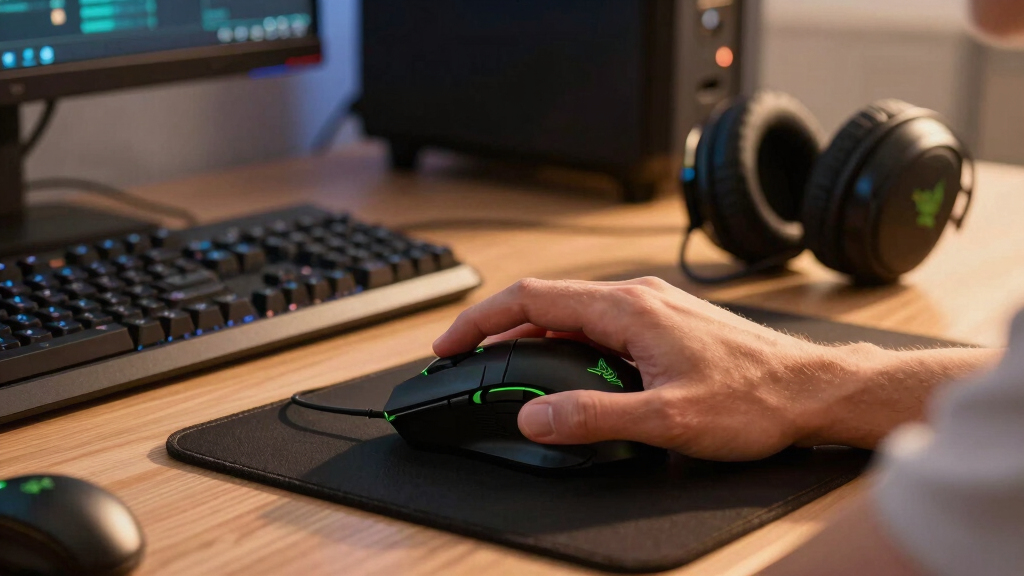

For gamers seeking the best Razer peripherals, this lineup offers a range of options tailored to different needs. The Razer Viper V4 Pro Wireless stands out as the top overall choice for its combination of speed and versatility. The Razer Basilisk V3 Pro is ideal for those who want advanced customization, while the Razer Ornata V3 offers a budget-friendly yet capable gaming keyboard. The main tradeoffs revolve around balancing performance, comfort, and price. Keep reading for a detailed breakdown of each product and what makes them unique.
Complete the kit



Key Takeaways
- The top-tier Razer peripherals prioritize wireless connectivity and high DPI for competitive gaming.
- Customization options, like programmable buttons and adjustable switches, significantly impact usability for different players.
- There’s a clear tradeoff between premium features and affordability; more advanced models tend to be more expensive.
- Build quality and ergonomic design vary, influencing comfort during long gaming sessions.
- Not all high-end features are necessary for casual gamers; choosing based on your specific needs saves money.
| Razer Viper V4 Pro Wireless Esports Gaming Mouse |  | Best Overall for Competitive Esports | Weight: 49g | DPI: 50,000 | Polling Rate: 8,000 Hz | VIEW LATEST PRICE | See Our Full Breakdown |
| Razer Basilisk V3 Pro Wireless Gaming Mouse | 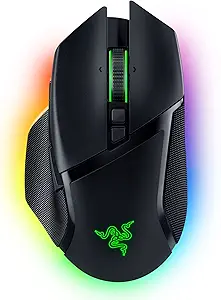 | Best for Customization and Versatile Gaming | Sensor: 30K DPI optical sensor | Buttons: 13 programmable buttons | Lighting: 13-zone Chroma RGB | VIEW LATEST PRICE | See Our Full Breakdown |
| Razer Ornata V3 Gaming Keyboard |  | Best for Comfort and Long Sessions | Key Type: Mecha-Membrane | Keycaps: UV Coated | Lighting: 10 Zone RGB | VIEW LATEST PRICE | See Our Full Breakdown |
| Razer BlackWidow V4 X Mechanical Gaming Keyboard with Yellow Switches |  | Best Quiet Mechanical Keyboard | Switch Type: Yellow Mechanical Linear | Actuation Distance: 1.2mm | Force Required: 45g | VIEW LATEST PRICE | See Our Full Breakdown |
| Razer Basilisk V3 X HyperSpeed Wireless Gaming Mouse with RGB and 9 Programmable Controls |  | Best Budget Wireless with Custom Controls | Sensor: Razer 5G Advanced 18K Optical Sensor | Controls: 9 Programmable Controls | Battery Life: Up to 285 hours (HyperSpeed Wireless) | VIEW LATEST PRICE | See Our Full Breakdown |
| Razer DeathAdder Essential Gaming Mouse |  | Best Value Pick for Classic Comfort and Reliability | DPI: 6400 | Switches: Mechanical, 10 million clicks | Buttons: 5 programmable | VIEW LATEST PRICE | See Our Full Breakdown |
| Razer Viper V3 HyperSpeed Gaming Mouse – Wireless, Optical, 30,000 DPI, 6 Programmable Buttons, Right-Handed |  | Best for Competitive Play with Wireless Freedom | Weight: 82g | Sensor: Focus Pro 30K Optical | Connectivity: Wireless (2.4 GHz), USB | VIEW LATEST PRICE | See Our Full Breakdown |
| Razer Basilisk V3 Customizable Ergonomic Gaming Mouse |  | Best for Long Sessions and Custom Control | DPI: 26,000 | Buttons: 11 programmable | Lighting: Chroma RGB with 16.8 million colors | VIEW LATEST PRICE | See Our Full Breakdown |
| Razer gaming peripheral | Sensor | Lighting | DPI | Battery Life |
|---|---|---|---|---|
| Razer Viper V4 Pro Wireless Es | Razer Focus Pro 50K Optical Sensor Gen‑3 | — | 50,000 | Up to 180 hours at 1000 Hz |
| Razer Basilisk V3 Pro Wireless | 30K DPI optical sensor | 13-zone Chroma RGB | — | Up to 150 hours (Bluetooth), 110 hours (Wireless) |
| Razer Ornata V3 Gaming Keyboar | — | 10 Zone RGB | — | — |
| Razer BlackWidow V4 X Mechanic | — | Chroma RGB with 16.8 million colors | — | — |
| Razer Basilisk V3 X HyperSpeed | Razer 5G Advanced 18K Optical Sensor | Chroma RGB with 16.8 million colors | — | Up to 285 hours (HyperSpeed Wireless) |
| Razer DeathAdder Essential Gam | — | — | 6400 | — |
| Razer Viper V3 HyperSpeed Gami | Focus Pro 30K Optical | — | 30,000 | Up to 280 hours |
| Razer Basilisk V3 Customizable | Optical sensor with zero smoothing | Chroma RGB with 16.8 million colors | 26,000 | — |
More Details on Our Top Picks
Razer Viper V4 Pro Wireless Esports Gaming Mouse
The Razer Viper V4 Pro stands out as the best choice for serious esports competitors due to its ultra-lightweight design and high-precision 50K DPI sensor. Compared to the Viper V3 HyperSpeed, it offers a lower weight and faster polling rate, making movements even more agile. However, this focus on speed and precision comes with a tradeoff: the high polling rate can drain the battery faster, and its premium price may deter casual gamers. The Viper V4 Pro’s combination of durability, responsiveness, and extended battery life makes it ideal for players who prioritize speed and accuracy in competitive settings, but less so for those seeking multitasking or casual use.
Pros:- Extremely lightweight at just 49g for rapid, precise movements
- High-precision 50K DPI sensor with low latency for accuracy
- Durable optical switches rated for 100 million clicks
- Long battery life supports extended gaming sessions
Cons:- High polling rate may lead to faster battery depletion
- Premium price point limits accessibility for some users
Best for: Professional or aspiring esports players needing the lightest, most precise wireless mouse
Not ideal for: Casual gamers or users on a tight budget who won’t benefit from the high-end features
- Weight:49g
- DPI:50,000
- Polling Rate:8,000 Hz
- Sensor:Razer Focus Pro 50K Optical Sensor Gen‑3
- Battery Life:Up to 180 hours at 1000 Hz
- Switches:Gen‑4 Optical Switches
Our verdict“This mouse is perfect for competitive gamers who demand speed, precision, and ultra-lightweight design in wireless form.”
Razer Basilisk V3 Pro Wireless Gaming Mouse
The Razer Basilisk V3 Pro offers a highly customizable experience with its 13 programmable buttons and 13-zone Chroma RGB lighting. Compared to the V3 X, it provides a more advanced sensor and more control options, making it suitable for players who value personalization and multi-genre versatility. While the complex customization suite might be overwhelming for casual users, it ensures a tailored experience for dedicated gamers. Its reliable wireless connection and long battery life support extended gameplay, though the higher price and additional accessories may be a barrier for some. Overall, this mouse is designed for gamers who want maximum control and adaptability.
Pros:- 13 programmable buttons for complex in-game commands
- Excellent tracking performance on various surfaces including glass
- Long battery life up to 150 hours (Bluetooth) and 110 hours (wireless)
- Reliable, fast wireless connection
Cons:- Premium price may be prohibitive
- Complex setup could overwhelm casual users
- Requires separate purchase for docking accessories
Best for: Gamers who seek extensive customization and versatility across different game genres
Not ideal for: Casual players or those seeking a straightforward, plug-and-play mouse without extensive setup
- Sensor:30K DPI optical sensor
- Buttons:13 programmable buttons
- Lighting:13-zone Chroma RGB
- Connection Modes:Wireless, Bluetooth, Wired
- Battery Life:Up to 150 hours (Bluetooth), 110 hours (Wireless)
- Switches:Gen-3 optical switches
Our verdict“This mouse is ideal for gamers who want a highly customizable, feature-rich wireless experience with long-lasting performance.”
Razer Ornata V3 Gaming Keyboard
The Razer Ornata V3 combines a comfortable typing experience with gaming-appropriate features. Its low-profile mecha-membrane switches strike a balance between mechanical feel and quieter operation, making it suitable for long gaming or typing sessions. The inclusion of UV-coated keycaps ensures durability, comparable to higher-end mechanical keyboards like the BlackWidow V4 X, but at a more accessible price point. The dedicated media keys and customizable RGB lighting enhance usability, though purists seeking true mechanical switches might find the feel slightly lacking. It’s a solid choice for gamers who want comfort without sacrificing style or durability.
Pros:- Comfortable low-profile keys suitable for extended use
- Durable UV-coated keycaps resist wear and fading
- Customizable RGB lighting and dedicated media controls
- Spill-resistant design for added durability
Cons:- Mecha-membrane switches may not satisfy purists
- Higher price compared to standard membrane keyboards
Best for: Casual gamers and streamers who prioritize comfort and aesthetics during long gaming marathons
Not ideal for: Hardcore mechanical switch enthusiasts seeking the most authentic mechanical feel
- Key Type:Mecha-Membrane
- Keycaps:UV Coated
- Lighting:10 Zone RGB
- Media Keys:Backlit, Dedicated
- Wrist Rest:Magnetic Soft Touch
- Spill Resistant:Yes
Our verdict“This keyboard is perfect for gamers who want a comfortable, durable, and stylish keyboard for long sessions, with a slight compromise on switch authenticity.”
Razer BlackWidow V4 X Mechanical Gaming Keyboard with Yellow Switches
The BlackWidow V4 X is tailored for gamers seeking a quiet yet rapid mechanical experience thanks to its yellow linear switches. Compared to tactile switches, these provide a smoother, quieter actuation ideal for late-night gaming without disturbing others. The inclusion of six macro keys and a multi-function roller makes it versatile for gaming and productivity. Its durable doubleshot ABS keycaps and sound dampening features elevate the typing experience, though this specialized switch type may feel too soft for some users preferring a heavier click. If silence and speed are priorities, this keyboard offers an excellent balance, but it may be less satisfying for those wanting a more tactile feel.
Pros:- Quiet, rapid-fire linear switches for fast gameplay
- Extensive RGB customization with 16.8 million colors
- Durable doubleshot keycaps resist wear
- Additional macro keys and media controls
Cons:- May feel too soft or light for some users
- Higher price due to advanced sound dampening features
Best for: Gamers who prefer quiet, fast mechanical switches and need macro customization
Not ideal for: Players who desire a tactile or clicky switch feel or are on a tight budget
- Switch Type:Yellow Mechanical Linear
- Actuation Distance:1.2mm
- Force Required:45g
- Macro Keys:6
- Lighting:Chroma RGB with 16.8 million colors
- Additional Features:Sound dampening, multi-function roller
Our verdict“This keyboard suits gamers who want a fast, quiet, and durable mechanical keyboard with macro support, especially in shared spaces.”
Razer Basilisk V3 X HyperSpeed Wireless Gaming Mouse with RGB and 9 Programmable Controls
The Basilisk V3 X offers an impressive balance of features and affordability. Its 9 programmable controls and responsive 18K optical sensor make it a versatile choice for various game styles, while its up to 285 hours of battery life supports long gaming sessions without frequent charging. Compared to the V3 Pro, it sacrifices some customization options but remains reliable and precise. The Chroma RGB lighting adds style, though some users may find the controls overwhelming or the wireless connection susceptible to interference in crowded environments. This pick is best suited for gamers who want a capable, customizable wireless mouse at a more accessible price.
Pros:- Ergonomic design for comfortable extended use
- Responsive, precise 18K optical sensor
- Long battery life up to 285 hours
- Vivid RGB lighting with dynamic effects
Cons:- Battery life varies with usage intensity
- Some may find the controls overwhelming
- Wireless performance can be affected by interference
Best for: Budget-conscious gamers who need reliable, customizable wireless performance
Not ideal for: Players who prefer a mouse with more advanced controls or longer battery life in extreme scenarios
- Sensor:Razer 5G Advanced 18K Optical Sensor
- Controls:9 Programmable Controls
- Battery Life:Up to 285 hours (HyperSpeed Wireless)
- Connectivity:HyperSpeed Wireless, Bluetooth
- Lighting:Chroma RGB with 16.8 million colors
- Switches:Razer Mechanical Switches Gen-2
Our verdict“This mouse is a solid choice for gamers seeking a reliable, customizable wireless experience without the premium price tag.”
Razer DeathAdder Essential Gaming Mouse
The Razer DeathAdder Essential stands out for its straightforward design and reliable performance, making it a top choice for gamers who want a high-precision mouse without the bells and whistles. Compared with the Razer Basilisk V3, it offers a more minimalist approach, lacking extensive customization but excelling in simplicity and durability. Its 6400 DPI sensor provides precise tracking suited for most competitive titles, and the mechanical switches support up to 10 million clicks, ensuring longevity. However, it doesn’t include advanced features like customizable RGB lighting or wireless connectivity, which might be a downside for users seeking more flair or convenience. This pick makes the most sense for budget-conscious gamers who prioritize core performance over extras.
Pros:- High-precision 6400 DPI sensor for accurate tracking
- Durable mechanical switches supporting 10 million clicks
- Simple, ergonomic design for comfortable long gaming sessions
- Customizable buttons for macros
Cons:- Limited to basic gaming features without RGB or wireless options
- Lacks adjustable weights or advanced ergonomics
Best for: Casual gamers or those new to gaming peripherals who want dependable performance at an affordable price
Not ideal for: Enthusiasts seeking advanced customization, wireless capabilities, or RGB lighting for a premium setup
- DPI:6400
- Switches:Mechanical, 10 million clicks
- Buttons:5 programmable
- Scroll Wheel:Rubberized with tactile bumps
Our verdict“This mouse is best for gamers who want a reliable, no-frills option that covers core performance needs.”
The Razer Viper V3 HyperSpeed makes a compelling case for gamers who prioritize speed and wireless convenience, especially when compared to the DeathAdder Essential. Its 30,000 DPI optical sensor offers ultra-precise tracking suitable for esports-level accuracy, while the lightweight 82g design minimizes fatigue during extended sessions. The long battery life of up to 280 hours and a stable 2.4 GHz wireless connection reduce downtime, making it ideal for competitive environments. However, the reliance on AA batteries might be less convenient than rechargeable models, and its right-handed design limits ambidextrous users. For those seeking a mouse that balances speed, portability, and minimal latency, this model is a top-tier choice.
Pros:- Lightweight at 82g for quick, agile movements
- High-precision 30,000 DPI sensor for accurate tracking
- Long battery life of up to 280 hours on a single AA battery
- Stable, low-latency wireless connection
Cons:- Requires AA battery, which may be less convenient than rechargeable options
- Limited to right-handed users
- Fewer customizable buttons compared to larger models
Best for: Competitive gamers who want a lightweight, wireless mouse with extreme precision and long battery life
Not ideal for: Left-handed users or gamers who prefer rechargeable batteries over disposable AA power sources
- Weight:82g
- Sensor:Focus Pro 30K Optical
- Connectivity:Wireless (2.4 GHz), USB
- DPI:30,000
- Programmable Buttons:6
- Battery Life:Up to 280 hours
Our verdict“Ideal for competitive gamers who need a fast, wireless mouse that combines accuracy and portability.”
Razer Basilisk V3 Customizable Ergonomic Gaming Mouse
The Razer Basilisk V3 stands out for its ergonomic design with a thumb rest and extensive customization options, making it ideal for players who spend hours gaming. Its 26K DPI optical sensor ensures precise tracking, comparable to the Viper V3 but with added comfort for prolonged use. The 11 programmable buttons and hyperscroll tilt wheel offer versatile control, especially for complex game strategies. Compared with the DeathAdder Essential, it provides a more feature-rich experience, but this comes with a higher price tag and a more complex setup process. It’s best suited for serious gamers who want a personalized, comfortable experience and are willing to invest in premium features.
Pros:- Ergonomic design with thumb rest for extended comfort
- 11 programmable buttons for personalized controls
- Fast, responsive switches with 0.2ms actuation speed
- Highly customizable RGB lighting
Cons:- High price point may deter budget-conscious buyers
- Complex customization options could overwhelm beginners
- Heavier than the Viper V3, which might affect speed for some users
Best for: Players who prioritize comfort and extensive customization for long gaming marathons
Not ideal for: Casual gamers or those on a tight budget who won’t utilize advanced features
- DPI:26,000
- Buttons:11 programmable
- Lighting:Chroma RGB with 16.8 million colors
- Sensor:Optical sensor with zero smoothing
- Scroll Wheel:Hyperscroll tilt wheel
Our verdict“This mouse is best for gamers seeking a comfortable, highly customizable device for extended use and serious gameplay.”
How We Picked
This lineup was curated based on performance, build quality, usability, and value. We focused on products that offer reliable performance in fast-paced gaming scenarios, with an emphasis on responsiveness and durability. User reviews and expert opinions helped determine which peripherals excel in key areas like comfort and customization. The ranking reflects a balance between high-end features and practicality, ensuring options for different budgets and skill levels. Our goal was to highlight products that truly enhance the gaming experience while considering tradeoffs like price and complexity.| Razer gaming peripheral | Battery Life | Switches |
|---|---|---|
| Razer Viper V4 Pro Wireless Es | Up to 180 hours at 1000 Hz | Gen‑4 Optical Switches |
| Razer Basilisk V3 Pro Wireless | Up to 150 hours (Bluetooth), 110 hours (Wireless) | Gen-3 optical switches |
| Razer Ornata V3 Gaming Keyboar | — | — |
| Razer BlackWidow V4 X Mechanic | — | — |
| Razer Basilisk V3 X HyperSpeed | Up to 285 hours (HyperSpeed Wireless) | Razer Mechanical Switches Gen-2 |
| Razer DeathAdder Essential Gam | — | Mechanical, 10 million clicks |
| Razer Viper V3 HyperSpeed Gami | Up to 280 hours | — |
| Razer Basilisk V3 Customizable | — | — |
Factors to Consider When Choosing Best Razer Gaming Peripherals
When choosing the best Razer gaming peripherals, several factors come into play. Understanding your specific gaming style and setup needs will help you select the right gear. Features like DPI, connectivity, and customization can dramatically influence performance. Comfort and build quality affect long-term usability, especially during extended gaming sessions. Price is also a key consideration, as high-end models offer advanced features but at a higher cost. Balancing these factors ensures you get peripherals that match your playstyle and budget.Performance and Responsiveness
For competitive gaming, responsiveness is critical. Look for high DPI sensors, low latency wireless options, and reliable tracking to gain an advantage. The difference between 20,000 and 30,000 DPI might seem small but can be noticeable in fast-paced games. Wired models tend to offer lower latency, but premium wireless options like Razer’s HyperSpeed technology narrow this gap significantly. Prioritize responsiveness if your gameplay demands precision and quick reactions.Customization and Features
Adjustable buttons, programmable controls, and customizable RGB lighting enhance usability and personalization. These features are especially beneficial for MMO or MOBA players who need quick access to commands. Consider models with software that’s easy to use and reliable. However, more features often mean a steeper learning curve or increased complexity, so choose based on how much you want to tailor your setup.Comfort and Ergonomics
Comfort is often overlooked but vital for long gaming sessions. Ergonomic designs, suitable grip types, and adjustable weights improve comfort and reduce fatigue. Some models like the Basilisk V3 emphasize ergonomic features tailored to right-handed players, while others are more ambidextrous. Always consider hand size and grip style to avoid discomfort over time.Build Quality and Durability
Gaming peripherals face intense use, so durability matters. Look for high-quality switches, sturdy materials, and reinforced cables. Mechanical switches, like Razer’s Yellow or Green, tend to last longer and provide better tactile feedback. Cheaper models might save money initially but could wear out faster, leading to replacement costs down the line.Price and Value
High-performance peripherals come at a premium, but not every gamer needs the most expensive gear. Balance your budget with desired features. The best value options deliver solid performance without unnecessary extras, while premium models offer advanced customization and build quality for serious gamers. Avoid paying for features you won’t use, but don’t compromise on critical performance aspects.Frequently Asked Questions
Is wireless or wired better for gaming?
Wireless peripherals have improved significantly and now offer latency levels comparable to wired models, especially with technologies like Razer HyperSpeed. Wireless offers greater freedom of movement, reducing clutter on your desk. However, wired peripherals still provide the lowest latency and are favored by competitive gamers who need absolute responsiveness. Your choice should depend on your priorities: convenience versus latency.
Do I need customizable buttons on my gaming mouse?
Customizable buttons can provide quick access to in-game commands, improving efficiency in fast-paced titles. They are especially useful for MMO or MOBA gamers who rely on macros and quick shortcuts. If you play primarily FPS games, fewer buttons might be preferable to avoid accidental presses. Consider your game genre and playstyle when deciding how much customization you need.
Are premium switches worth the extra cost?
Premium switches like Razer’s Yellow or Green are designed for durability, tactile feedback, and faster actuation. They tend to last longer and provide a better feel, which can enhance performance. For casual gaming, standard switches may suffice, but for serious players, investing in quality switches can pay off in responsiveness and longevity over time.
What should I prioritize if I have a small desk space?
In tight spaces, compact or ambidextrous peripherals can help maximize your desk area. The Razer Viper series, for example, offers small footprints without sacrificing performance. Wireless models also reduce cable clutter, making your setup cleaner. Focus on ergonomic designs that fit comfortably in your hand, especially if space is limited.
Can I use Razer peripherals for non-gaming tasks?
Absolutely. Many Razer peripherals, such as the Basilisk V3 or DeathAdder, excel at productivity tasks thanks to their precise sensors and customizable controls. These peripherals often feature programmable buttons and adjustable settings that can streamline workflows. While designed primarily for gaming, their versatility makes them suitable for general use, content creation, and work tasks.
Conclusion
The best overall choice for most gamers is the Razer Viper V4 Pro, offering a perfect blend of speed, comfort, and wireless convenience. Budget-conscious players should consider the Razer DeathAdder Essential for reliable performance without breaking the bank. For those seeking advanced customization, the Razer Basilisk V3 Pro stands out as the premium pick. Beginners or casual gamers might prefer the Razer Ornata V3 keyboard for easy entry into gaming. Finally, if you need a compact, versatile mouse, the Razer Viper V3 HyperSpeed provides excellent performance in a smaller form factor suited for varied uses.