For a premium split ergonomic keyboard, my best overall pick is the Kinesis Advantage360 Professional, which stands out for its distinct contoured layout and separation between key wells. The Kinesis Freestyle Edge RGB Plus is a stronger fit for people who want a more familiar mechanical layout with room to position each half, while the Logitech ERGO K860 favors a gentler move to split typing with wireless convenience and an integrated wrist rest. The main tradeoffs are how much layout change you can handle, whether you need mechanical switches, and how much adjustability matters at your desk. Less expensive wired and wireless models in this group can cover everyday typing, but typically offer fewer ways to tailor the setup. Read on for the full comparison and my picks by buyer type.

Get the latest gadgets delivered free with Prime
- Fast, free delivery on millions of items
- Prime Video, Amazon Music and more included
- Member-only deals all year
Complete the kit



Key Takeaways
- Kinesis Advantage360 Professional leads for buyers willing to learn a contoured key-well layout in exchange for a more distinctive ergonomic design.
- Kinesis Freestyle Edge RGB Plus offers a more familiar mechanical typing arrangement than the Advantage models, with split positioning and hot-swappable linear switches.
- Logitech ERGO K860 is the less demanding starting point: it combines wireless use and a built-in wrist rest, but does not offer the mechanical feel or layout customization of the Kinesis options.
- The lineup includes a wide range of layouts, from full-size boards with numpads to compact Alice-style designs; buyers should check their number-entry and shortcut needs before choosing.
- Several products appear in closely related versions, especially the Logitech K860 and Arteck wireless keyboards, so compare the exact model and connection details rather than relying on the family name.
| Cloud Nine ErgoPRO Full-Size Split Mechanical Keyboard for Mac |  | Best for Customization | Layout: Full-size split ergonomic QWERTY | Switches: Tactile Kailh Box Brown; compatible hot-swappable switches | Firmware: QMK with VIA customization | VIEW ON AMAZON | See Our Full Breakdown |
| Wired Ergonomic Split Keyboard with RGB Backlight & Numpad, Black |  | Best for Full-Size Office Features | Layout: Full-size QWERTY with numpad | Switch type: Membrane | Connectivity: USB-A cable, 5.6 ft, with USB-C adapter | VIEW ON AMAZON | See Our Full Breakdown |
| Kinesis Advantage360 Professional Split Ergonomic Keyboard |  | Best for Contoured Ergonomics | Layout: 76-key QWERTY split layout | Switches: Kailh Box Pink Silent linear, rated for 50 million presses | Connectivity: Bluetooth; included split connector cable | VIEW ON AMAZON | See Our Full Breakdown |
| Arteck Split Ergonomic USB Wired Backlit Keyboard with Palm Rest | 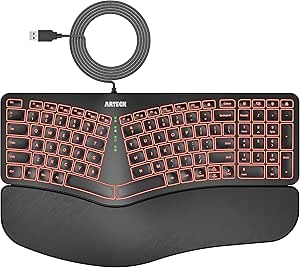 | Best for Simple, Cushioned Typing | Layout: 101-key QWERTY | Switch type: Scissor switch | Connectivity: USB wired | VIEW ON AMAZON | See Our Full Breakdown |
| KINESIS Freestyle Edge RGB Plus Split Mechanical Keyboard with Hot-Swap Linear Switches |  | Best for Adjustable Gaming-Style Customization | Layout: AZERTY | Switch type: Hot-swap linear mechanical | Connectivity: USB-A | VIEW ON AMAZON | See Our Full Breakdown |
| SABLUTE Ergonomic Wireless Keyboard and Mouse Combo, Rechargeable, Windows and Mac |  | Best Complete Wireless Setup | Layout: Full-size split QWERTY | Connectivity: 2.4GHz wireless via USB-A receiver; USB-C adapter included | Compatible operating systems: Windows, macOS | VIEW ON AMAZON | See Our Full Breakdown |
| Cloud Nine C989M Ergonomic Split Mechanical Keyboard with Kailh Brown Switches |  | Best for Adjustable Mechanical Typing | Model: C989M | Layout and key count: QWERTY, 104 keys | Switches: Tactile Kailh Brown | VIEW ON AMAZON | See Our Full Breakdown |
| Logitech ERGO K860 Wireless Ergonomic Split Keyboard with Wrist Rest |  | Best for Everyday Wireless Comfort | Layout: QWERTY, 105 keys | Connectivity: Bluetooth, USB receiver | Palm lift settings: 0°, -4°, -7° | VIEW ON AMAZON | See Our Full Breakdown |
| Arteck Ergonomic Split Wireless Keyboard with Cushioned Wrist Rest |  | Best for Switching Between Devices | Model: HD315 | Layout: QWERTY ergonomic split | Connectivity: Bluetooth, 2.4GHz USB-A receiver, 2.4GHz USB-C receiver | VIEW ON AMAZON | See Our Full Breakdown |
| Kinesis Advantage2 Ergonomic Keyboard with Cherry MX Brown Switches |  | Best for Deep Ergonomic Shaping | Model: KB600 | Layout and key count: QWERTY, 68 keys | Switches: Cherry MX Brown | VIEW ON AMAZON | See Our Full Breakdown |
| Keychron Q8 Wired 65% Alice Layout Mechanical Keyboard with Knob, Hot-Swappable Gateron G Pro Blue Switches |  | Best Premium Mechanical Alice Keyboard | Layout: 65% Alice | Connectivity: Wired USB-C | Switches: Gateron G Pro Blue listed; product details conflict on switch color | VIEW ON AMAZON | See Our Full Breakdown |
| Logitech ERGO K860 Split Ergonomic Wireless Keyboard for Business |  | Best for Wireless Office Setups | Layout: Full-size QWERTY, 104 keys | Connectivity: Bluetooth and RF via Logi Bolt | Wireless security: Encrypted Logi Bolt connections | VIEW ON AMAZON | See Our Full Breakdown |
| Kinesis Freestyle2 Ergonomic USB Keyboard with VIP3 Lifters for PC |  | Best for Adjustable Split Positioning | Layout: QWERTY, standard Windows layout | Connectivity: USB | Keys: 94 | VIEW ON AMAZON | See Our Full Breakdown |
| Arteck Split Ergonomic Wireless Keyboard with Palm Rest |  | Best Simple Wireless Pick | Model: HW315 | Layout: QWERTY, 102 keys | Connectivity: 2.4 GHz wireless via USB nano receiver | VIEW ON AMAZON | See Our Full Breakdown |
| split ergonomic keyboard premium | Connectivity | Layout | Compatibility | Dimensions |
|---|---|---|---|---|
| Cloud Nine ErgoPRO Full-Size S | USB-A and USB-C | Full-size split ergonomic QWERTY | Mac, PC; macOS, Windows, iOS | — |
| Wired Ergonomic Split Keyboard | USB-A cable, 5.6 ft, with USB-C adapter | Full-size QWERTY with numpad | Windows, macOS, Chrome OS, Linux | 17.1 × 9.4 × 1.1 in |
| Kinesis Advantage360 Professio | Bluetooth; included split connector cable | 76-key QWERTY split layout | Windows 7–11, macOS, Linux, ChromeOS | — |
| Arteck Split Ergonomic USB Wir | USB wired | 101-key QWERTY | Windows | — |
| KINESIS Freestyle Edge RGB Plu | USB-A | AZERTY | Windows 10 or later | — |
| SABLUTE Ergonomic Wireless Key | 2.4GHz wireless via USB-A receiver; USB-C adapter included | Full-size split QWERTY | — | 19 × 10.45 × 1.88 inches |
| Cloud Nine C989M Ergonomic Spl | USB | — | — | 28.6 × 9.1 × 2 inches |
| Logitech ERGO K860 Wireless Er | Bluetooth, USB receiver | QWERTY, 105 keys | — | 17.95 × 9.17 × 1.89 inches |
| Arteck Ergonomic Split Wireles | Bluetooth, 2.4GHz USB-A receiver, 2.4GHz USB-C receiver | QWERTY ergonomic split | — | — |
| Kinesis Advantage2 Ergonomic K | Wired USB | — | — | 16.5 × 8 × 3 inches |
| Keychron Q8 Wired 65% Alice La | Wired USB-C | 65% Alice | Mac, Windows, Linux | — |
| Logitech ERGO K860 Split Ergon | Bluetooth and RF via Logi Bolt | Full-size QWERTY, 104 keys | Windows, macOS, Linux | 17.95 x 9.17 x 1.89 in |
| Kinesis Freestyle2 Ergonomic U | USB | QWERTY, standard Windows layout | Windows, Linux | — |
| Arteck Split Ergonomic Wireles | 2.4 GHz wireless via USB nano receiver | QWERTY, 102 keys | Windows | 16.5 x 9.6 x 1.02 inches |
More Details on Our Top Picks
Cloud Nine ErgoPRO Full-Size Split Mechanical Keyboard for Mac
I’d choose the Cloud Nine ErgoPRO for a buyer who wants a premium split layout and plans to tailor the keyboard around their workflow. Its QMK firmware and VIA support allow programmable layouts and macros, while compatible hot-swappable switches make future switch changes possible without soldering. Compared with the Kinesis Advantage360 Professional, it keeps a conventional full-size shape rather than using deep contoured key wells, which may be easier to adapt to but offers less sculpted hand positioning. The aluminum frame and PBT keycaps are a sturdier-feeling combination than the plastic construction of the Wired Ergonomic Split Keyboard with RGB Backlight & Numpad. The tradeoff is a wired-only connection, and switch swapping is limited to compatible models. I’d favor it for customization and durable materials, not for wireless flexibility.
Pros:- QMK and VIA support programmable keymaps and macros
- Compatible hot-swappable switches allow changes without soldering
- Aluminum frame and PBT keycaps are built for durable daily use
- Full-size split layout retains a familiar QWERTY arrangement
Cons:- Wired USB connectivity rules out a wireless setup
- Hot-swapping is limited to compatible mechanical switches
- Its conventional flat layout is less contoured than the Kinesis Advantage360 Professional
Best for: Mac or PC users who want a full-size split mechanical keyboard with programmable layouts and the option to change compatible switches.
Not ideal for: Buyers who need Bluetooth or a wireless desk setup, or who want a deeply contoured key-well design like the Kinesis Advantage360 Professional.
- Layout:Full-size split ergonomic QWERTY
- Switches:Tactile Kailh Box Brown; compatible hot-swappable switches
- Firmware:QMK with VIA customization
- Lighting:RGB with 43 preset effects
- Keycaps and frame:PBT keycaps; aluminum frame and plate
- Connectivity:USB-A and USB-C
- Compatibility:Mac, PC; macOS, Windows, iOS
- Warranty:2 years
Our verdict“Choose the ErgoPRO if you want a durable, full-size split mechanical board with extensive customization and do not need wireless connectivity.”
Wired Ergonomic Split Keyboard with RGB Backlight & Numpad, Black
This keyboard is the practical pick for someone who wants a split shape without giving up a numpad, dedicated media controls, or an integrated wrist rest. Its plug-and-play USB connection avoids pairing and battery upkeep, while the adjustable tilt legs let buyers make basic changes to the typing angle. Compared with the mechanical Cloud Nine ErgoPRO, this model uses membrane switches, so it is better suited to a quieter, straightforward office setup than to buyers seeking tactile feedback or switch customization. It also has more built-in desk conveniences than the compactly equipped Arteck Split Ergonomic USB Wired Backlit Keyboard with Palm Rest, including a numpad and multimedia shortcuts. The tradeoff is a large plastic body that can crowd smaller desks, and its wired cable limits placement. I’d rank it for office functionality, not premium mechanical feel.
Pros:- Full-size layout includes a numpad and 17 multimedia shortcut keys
- Integrated wrist rest and adjustable tilt legs offer basic positioning options
- Plug-and-play wired connection needs no batteries or pairing
- RGB lighting includes multiple modes and brightness settings
Cons:- Membrane switches lack the tactile feel and switch options of the Cloud Nine ErgoPRO
- Large footprint can be cumbersome on a small desk
- Wired connection limits placement, and console compatibility is not supported
Best for: Home-office users who regularly enter numbers, use media shortcuts, and want a full-size wired keyboard with a wrist rest.
Not ideal for: Mechanical-keyboard enthusiasts or people with limited desk space who would rather have a more compact, tactile board.
- Layout:Full-size QWERTY with numpad
- Switch type:Membrane
- Connectivity:USB-A cable, 5.6 ft, with USB-C adapter
- Backlight:RGB; 10 dynamic rainbow modes, 7 solid colors, 17 effects, 5 brightness levels
- Dimensions:17.1 × 9.4 × 1.1 in
- Construction:ABS plastic enclosure and plate
- Features:Integrated wrist rest, adjustable tilt legs, media keys, hotkeys
- Compatibility:Windows, macOS, Chrome OS, Linux
Our verdict“Pick this model if a numpad, media keys, and a wrist rest matter more to your office setup than mechanical switches or a compact footprint.”
Kinesis Advantage360 Professional Split Ergonomic Keyboard
The Kinesis Advantage360 Professional is the most specialized ergonomic choice here: its contoured key wells, thumb keys, integrated palm supports, and three tenting heights are designed to shape hand position, rather than simply separate two keyboard halves. That makes it a stronger fit for buyers seeking a sculpted layout than the flatter Cloud Nine ErgoPRO or the membrane-based Wired Ergonomic Split Keyboard with RGB Backlight & Numpad. Its quiet Kailh Box Pink linear switches and Bluetooth connection also suit shared or cable-conscious workspaces. The tradeoff is a more distinctive layout that may demand adaptation, and the premium palm pads are sold separately. Backlighting is optional, too, so buyers seeking a lit mechanical board may prefer the ErgoPRO’s included RGB. I’d put this first for contoured hand positioning, not for conventional layout familiarity or all-in-one lighting.
Pros:- Contoured key wells and thumb keys create a distinct ergonomic layout
- Three tenting heights allow adjustment of the keyboard halves
- Quiet Kailh Box Pink linear switches are rated for 50 million presses
- Bluetooth and programmable layouts support a flexible multi-system setup
Cons:- The contoured design can require an adjustment period compared with the Cloud Nine ErgoPRO
- Premium palm pads are sold separately
- Backlighting is optional rather than a standard feature
Best for: Experienced typists who want a contoured split board with thumb keys, adjustable tenting, quiet linear switches, and Bluetooth.
Not ideal for: Buyers who prefer a familiar flat full-size layout, need included premium palm pads, or want standard RGB backlighting.
- Layout:76-key QWERTY split layout
- Switches:Kailh Box Pink Silent linear, rated for 50 million presses
- Connectivity:Bluetooth; included split connector cable
- Split distance:Up to 10 in with included cable
- Tenting:3 adjustable heights
- Backlighting:Optional, single color
- Power:Battery powered
- Compatibility:Windows 7–11, macOS, Linux, ChromeOS
- Warranty:3 years
Our verdict“Choose the Advantage360 Professional if contoured key wells and adjustable tenting matter more than a familiar layout or included lighting.”
Arteck Split Ergonomic USB Wired Backlit Keyboard with Palm Rest
I’d steer buyers toward the Arteck HA315B when they want a simple split layout with a cushioned palm rest and backlighting, without the setup demands of a programmable mechanical keyboard. Its scissor switches give it a different character from the mechanical Cloud Nine ErgoPRO: this is a straightforward Windows-focused office board, not a platform for switch swapping or elaborate keymap changes. It is also a simpler alternative to the full-size Wired Ergonomic Split Keyboard with RGB Backlight & Numpad, trading that model’s numpad and media-key extras for a more restrained lighting system and a 101-key layout. The six-foot USB cable makes setup easy but ties the keyboard to a wired desk, while the plastic, rubber, and silicone construction is not water resistant. I’d choose it for basic comfort features, not premium mechanical customization.
Pros:- Split layout and cushioned palm rest support a more spread-out typing position
- Seven backlight colors with three brightness levels
- Six-foot USB cable allows straightforward wired setup
- Scissor switches offer an alternative to mechanical boards such as the Cloud Nine ErgoPRO
Cons:- Wired connection limits where the keyboard can sit
- Not water resistant
- Windows-only compatibility is narrower than the wired RGB numpad model’s listed system support
Best for: Windows users who want a wired split keyboard with a cushioned palm rest, simple setup, and adjustable backlighting.
Not ideal for: Mac-first buyers, mechanical-switch enthusiasts, or anyone who needs water resistance or wireless placement.
- Layout:101-key QWERTY
- Switch type:Scissor switch
- Connectivity:USB wired
- Cable length:6 ft (1.8 m)
- Backlighting:7 colors with 3 brightness levels
- Materials:Plastic, rubber, and silicone
- Compatibility:Windows
- Water resistance:Not water resistant
- Warranty:24 months
Our verdict“Choose the Arteck HA315B if you want a basic, cushioned wired split keyboard for Windows rather than mechanical customization or wireless freedom.”
KINESIS Freestyle Edge RGB Plus Split Mechanical Keyboard with Hot-Swap Linear Switches
The KINESIS Freestyle Edge RGB Plus is the pick for buyers who want a split mechanical board with programmable controls and physical accessories for changing its setup. Its included lift kit and detachable palm support give it more positioning flexibility out of the box than the Cloud Nine ErgoPRO, while hot-swap linear switches add a way to change compatible switches without soldering. RGB lighting and full programmability suit users who want to tune controls as well as appearance. The key caveat is substantial: the listed layout is AZERTY, so it is a poor match for buyers who type on QWERTY and do not want to change layouts. Its listed operating-system support is also limited to Windows 10 or later, unlike the broader compatibility specified for the Kinesis Advantage360 Professional. I’d rank it for adjustable, programmable use, not broad layout or platform flexibility.
Pros:- Split mechanical layout supports separated hand positioning
- Hot-swap linear switches allow compatible switch changes without soldering
- Fully programmable controls and RGB provide customization options
- Detachable palm support, lift kit, and Mac keycaps are included
Cons:- AZERTY layout will not suit buyers who want a standard QWERTY arrangement
- Listed compatibility is limited to Windows 10 or later
- The product data does not specify a split distance or adjustment range for the lift kit
Best for: Windows 10-or-later users who type on AZERTY and want a split mechanical board with hot-swap linear switches, RGB, and included positioning accessories.
Not ideal for: QWERTY typists or buyers who need listed macOS, Linux, or ChromeOS support.
- Layout:AZERTY
- Switch type:Hot-swap linear mechanical
- Connectivity:USB-A
- Lighting:RGB
- Programmability:Fully programmable
- Included accessories:Detachable palm support, lift kit, Mac keycaps
- Compatibility:Windows 10 or later
- Manufacturer part number:KB975-LIN
Our verdict“Choose the Freestyle Edge RGB Plus if you use AZERTY on Windows and want programmable hot-swap switches with positioning accessories included.”
SABLUTE Ergonomic Wireless Keyboard and Mouse Combo, Rechargeable, Windows and Mac
The SABLUTE is the most complete desk bundle here: its full-size split keyboard, cushioned wrist rest, and ergonomic mouse arrive as one rechargeable wireless setup. Adjustable tilt and mouse DPI give buyers practical ways to tune the feel, while support for Windows and macOS makes it more flexible across platforms than the Windows-only Cloud Nine C989M. The tradeoff is a large 19-inch-wide keyboard that takes substantial desk space, and its 2.4GHz connection depends on a USB receiver rather than Bluetooth. Compared with the Logitech ERGO K860, SABLUTE includes a mouse and USB-C charging, but the Logitech offers Bluetooth and a more compact footprint. I’d choose SABLUTE for a one-box keyboard-and-mouse refresh, not for a minimal or receiver-free desk.
Pros:- Includes an ergonomic mouse alongside the full-size split keyboard
- Cushioned wrist rest and adjustable tilt offer useful posture adjustments
- Works with Windows and macOS and includes productivity shortcuts
- Both keyboard and mouse recharge via USB-C
Cons:- Full-size footprint needs substantial desk space
- Wireless connection relies on a 2.4GHz USB receiver rather than Bluetooth
Best for: Windows or Mac users replacing both keyboard and mouse who want a cushioned wrist rest, adjustable tilt, and rechargeable peripherals in one set.
Not ideal for: Laptop users with crowded desks or people who need Bluetooth, since the full-size keyboard occupies considerable space and connects through a USB receiver.
- Layout:Full-size split QWERTY
- Connectivity:2.4GHz wireless via USB-A receiver; USB-C adapter included
- Compatible operating systems:Windows, macOS
- Mouse DPI:800 / 1200 / 1600 / 2400
- Dimensions:19 × 10.45 × 1.88 inches
- Weight:3.4 pounds
- Wireless range:Up to 33 feet
- Charging:USB-C rechargeable
Our verdict“Choose SABLUTE if you want a rechargeable split keyboard and ergonomic mouse bundle and have room for its full-size layout.”
Cloud Nine C989M Ergonomic Split Mechanical Keyboard with Kailh Brown Switches
The Cloud Nine C989M is the strongest fit here for buyers who want a full-size mechanical board with adjustable separation, rather than a fixed ergonomic shape. Its halves can sit up to 8 inches apart, and built-in tenting plus angled wrist rests help tailor the posture without buying separate accessories. Kailh Brown tactile switches, 10 macro keys, a number pad, and USB pass-through add useful control for work-heavy setups. Compared with the Kinesis Advantage2, the C989M keeps a familiar QWERTY arrangement and full number pad, while the Kinesis takes a more specialized contoured-keywell approach. That familiar layout comes at a cost: the C989M spans 28.6 inches, connects only by USB, and lists Windows compatibility only. It makes sense for a roomy Windows desk, not a portable or cross-platform setup.
Pros:- Keyboard halves separate up to 8 inches for adjustable shoulder positioning
- Built-in tenting and angled wrist rests support a more tailored posture
- Tactile Kailh Brown switches with RGB backlighting
- Adds 10 programmable macro keys, a number pad, and USB pass-through
Cons:- At 28.6 inches wide, it needs a notably large desk area
- USB-only connection limits placement flexibility
- Listed compatibility is limited to Windows
Best for: Windows users who type on a full-size mechanical layout and want to adjust keyboard separation and tenting while keeping a number pad and programmable macros.
Not ideal for: Mac or Linux users, and anyone with limited desk width or a need for wireless portability.
- Model:C989M
- Layout and key count:QWERTY, 104 keys
- Switches:Tactile Kailh Brown
- Maximum separation:8 inches
- Wrist rest angle:7 degrees
- Programmable macro keys:10
- Connectivity:USB
- Dimensions:28.6 × 9.1 × 2 inches
- Compatible operating system:Windows
Our verdict“Pick the C989M if you want an adjustable, full-size mechanical split keyboard for a roomy Windows workstation.”
Logitech ERGO K860 Wireless Ergonomic Split Keyboard with Wrist Rest
The Logitech ERGO K860 is the balanced choice for someone who wants an ergonomic change without moving to a deeply sculpted or mechanical layout. Its curved split keyframe and sculpted keys guide the hands into a more natural position, while the memory foam wrist rest supports the palms during long typing sessions. Three palm-lift settings let buyers tune the typing angle, and Bluetooth or a USB receiver gives it more connection options than the receiver-only SABLUTE. The Kinesis Advantage2 goes further with concave keywells and thumb keys, but that specialized layout asks for a bigger learning commitment; the K860 keeps a more familiar key arrangement. Its limits are battery power from two replaceable batteries and no backlighting. I’d favor it for multi-device office use over buyers seeking mechanical switches or extensive layout customization.
Pros:- Curved split frame and sculpted keys encourage a more natural hand position
- Memory foam wrist rest supports the palms
- Bluetooth and USB receiver connectivity
- Works with Windows, macOS, Linux, and Chrome OS
Cons:- Runs on two batteries rather than charging over USB
- No keyboard backlighting
- Does not offer the deep keywell shaping or onboard layout customization of the Kinesis Advantage2
Best for: Office workers who want a familiar, wireless split keyboard with wrist support and compatibility across several desktop operating systems.
Not ideal for: Mechanical-keyboard enthusiasts, users who require backlighting, or buyers who prefer a rechargeable keyboard.
- Layout:QWERTY, 105 keys
- Connectivity:Bluetooth, USB receiver
- Palm lift settings:0°, -4°, -7°
- Power source:2 batteries
- Compatible operating systems:Windows, macOS, Linux, Chrome OS
- Dimensions:17.95 × 9.17 × 1.89 inches
- Color:Graphite
- Recycled plastic content:71% of plastic parts
Our verdict“Choose the ERGO K860 for comfortable, familiar wireless typing across operating systems, provided batteries and no backlight suit your setup.”
Arteck Ergonomic Split Wireless Keyboard with Cushioned Wrist Rest
The Arteck HD315 earns its place through connection flexibility: it can pair with up to three devices and includes both USB-A and USB-C receivers alongside Bluetooth. That makes it a practical desk-hopping option for someone moving between a PC, laptop, and tablet, without carrying separate adapters. Its split shape and cushioned wrist rest add basic ergonomic support, while the rechargeable battery is rated for up to six months at two hours of daily use. That runtime estimate is tied to light daily use, so heavier typists should expect a different result. Compared with the Logitech ERGO K860, Arteck offers multi-device switching and rechargeable power, but the Logitech lists broader OS support and adjustable palm lift. Arteck’s stated compatibility is limited to Windows and Android, so it’s a less certain choice for macOS or Linux users.
Pros:- Switches among up to three connected devices
- Includes Bluetooth plus USB-A and USB-C wireless receivers
- Cushioned wrist rest and split design support a relaxed typing posture
- Rechargeable battery is rated for up to six months at two hours of daily use
Cons:- Listed operating system compatibility is limited to Windows and Android
- Six-month battery estimate assumes only two hours of use per day
Best for: Windows and Android users who alternate among a desktop, laptop, and tablet and want Bluetooth plus both USB receiver formats.
Not ideal for: Mac or Linux users, or heavy daily typists who need a battery-life estimate based on more than light use.
- Model:HD315
- Layout:QWERTY ergonomic split
- Connectivity:Bluetooth, 2.4GHz USB-A receiver, 2.4GHz USB-C receiver
- Multi-device support:Up to 3 devices
- Battery:Rechargeable lithium battery; up to 6 months at 2 hours of daily use
- Compatible devices:PC, desktop, laptop, tablet
- Compatible operating systems:Windows, Android
- Included accessories:USB-A receiver, USB-C receiver, USB-C charging cable
- Warranty:24 months
Our verdict“Choose the Arteck HD315 if you use several Windows or Android devices and value flexible connections over broad OS support.”
Kinesis Advantage2 Ergonomic Keyboard with Cherry MX Brown Switches
The Kinesis Advantage2 takes the most specialized approach in this group. Its concave keywells, split layout, 20-degree tenting, and thumb keys place keys around the hands rather than asking the hands to adapt to a conventional flat board. That can suit experienced typists seeking a strongly contoured setup, and onboard programming supports custom layouts, macros, and remapping. The payoff is a steeper adjustment period: unlike the more familiar Logitech ERGO K860, the Advantage2 changes the reach and location of keys enough that speed and comfort may take time to settle. Cherry MX Brown switches provide tactile feedback, and the wired USB connection keeps the setup straightforward, but it rules out wireless use. I’d rank it ahead for ergonomic depth, not convenience; buyers wanting adjustable halves should compare it with the Cloud Nine C989M instead.
Pros:- Concave keywells, split layout, and 20-degree tenting create a deeply contoured typing position
- Thumb keys can reduce reliance on distant keys
- Onboard macros, remapping, and custom layouts
- Cherry MX Brown switches are rated for 50 million key presses
Cons:- Specialized layout can require a substantial adjustment period
- Wired USB connection limits placement flexibility
- The halves do not separate independently like the Cloud Nine C989M
Best for: Experienced typists ready to learn a contoured keywell layout and customize key assignments for a fixed, wired workstation.
Not ideal for: Beginners seeking a familiar typing layout, people who need wireless connectivity, or users who want independently positioned keyboard halves.
- Model:KB600
- Layout and key count:QWERTY, 68 keys
- Switches:Cherry MX Brown
- Design:Contoured split keywells with 20-degree tenting
- Connectivity:Wired USB
- Dimensions:16.5 × 8 × 3 inches
- Compatible operating systems:Windows 7–10, Mac OS X, Linux, Chrome
- Warranty:3 years
Our verdict“Choose the Advantage2 if deep keywell shaping and onboard customization matter more than a familiar layout or wireless use.”
Keychron Q8 Wired 65% Alice Layout Mechanical Keyboard with Knob, Hot-Swappable Gateron G Pro Blue Switches
The Q8 is my pick for buyers who want a premium, compact Alice layout with mechanical switches and room to customize. Its CNC-machined aluminum body and double-gasket design give it a more substantial build than the Kinesis Freestyle2, while QMK/VIA support and a programmable knob offer control over key assignments and shortcuts. Hot-swap sockets make switch changes possible without soldering, so the keyboard can evolve with a buyer’s preferences. The tradeoff is a fixed, wired setup: unlike the wireless Logitech ERGO K860, the Q8 needs a USB-C connection and has no separate modules to reposition. Product details also conflict on whether the included switches are blue or red, so buyers should verify the switch version before ordering. Its 65% layout leaves out keys some full-size users expect.
Pros:- Alice layout separates and angles the key groups for a different wrist and forearm position than a standard straight keyboard.
- QMK/VIA remapping and a programmable knob support personalized shortcuts.
- Hot-swappable MX-style sockets accept compatible 3-pin and 5-pin switches without soldering.
- CNC-machined aluminum body and double-gasket construction help reduce resonance.
Cons:- USB-C wired connection limits flexible desk placement compared with the wireless Logitech ERGO K860.
- Product details conflict on whether the included switches are blue or red.
- The 65% layout omits keys and a number pad found on full-size models.
Best for: Mechanical-keyboard enthusiasts who want an aluminum Alice layout, programmable controls, and the option to swap compatible switches.
Not ideal for: Wireless-first users, buyers who need a full-size number pad, or anyone who needs certainty about the included switch color before purchase.
- Layout:65% Alice
- Connectivity:Wired USB-C
- Switches:Gateron G Pro Blue listed; product details conflict on switch color
- Hot-swappable:Yes; compatible with MX-style 3-pin and 5-pin switches
- Programmability:QMK/VIA
- Construction:CNC-machined aluminum with double-gasket design
- Backlighting:South-facing RGB
- Compatibility:Mac, Windows, Linux
Our verdict“Choose the Q8 if you want a customizable, metal-bodied Alice mechanical keyboard and can live with a wired 65% layout.”
Logitech ERGO K860 Split Ergonomic Wireless Keyboard for Business
The K860 makes the most sense for a buyer who wants an ergonomic shape without building a custom mechanical setup. Its curved, split full-size layout, cushioned wrist rest, and three palm-lift positions give users several ways to adjust hand and wrist support. Bluetooth and Logi Bolt let it connect to as many as three devices, a practical advantage over the wired Keychron Q8 and Kinesis Freestyle2. It also offers a familiar 104-key QWERTY layout, though its non-mechanical design gives up the switch choice and remapping flexibility of the Q8. The K860 is sizable, and its AAA batteries and single-color backlighting may disappoint buyers seeking a rechargeable, highly customizable premium board. I’d favor it for office comfort and device switching, not mechanical-keyboard tuning.
Pros:- Curved split layout is designed to support a more natural typing posture.
- Cushioned wrist rest and three palm-lift positions allow some adjustment to hand support.
- Bluetooth and Logi Bolt support connections to up to three devices.
- Full-size 104-key QWERTY layout retains familiar keys and a number pad.
Cons:- Uses two AAA batteries rather than a rechargeable battery.
- Single-color backlighting offers less lighting customization than the Keychron Q8’s RGB.
- Its full-size footprint is less suited to compact desks than the Q8.
Best for: Office workers who switch among multiple computers and want a full-size split keyboard with adjustable palm lift and a cushioned wrist rest.
Not ideal for: Mechanical-keyboard enthusiasts who want hot-swap switches or extensive remapping, and users who need a compact keyboard or rechargeable power.
- Layout:Full-size QWERTY, 104 keys
- Connectivity:Bluetooth and RF via Logi Bolt
- Wireless security:Encrypted Logi Bolt connections
- Power:2 AAA batteries
- Battery life:Up to 2 years
- Palm support:Cushioned wrist rest; three adjustable palm-lift positions
- Dimensions:17.95 x 9.17 x 1.89 in
- Compatibility:Windows, macOS, Linux
Our verdict“Pick the K860 for a wireless, full-size office setup with adjustable palm support rather than mechanical switches or deep customization.”
Kinesis Freestyle2 Ergonomic USB Keyboard with VIP3 Lifters for PC
The Freestyle2 stands out because its two sections can separate by as much as 9 inches, letting buyers set hand spacing instead of adapting to a fixed split. The included VIP3 lifters add three tenting angles, and cushioned palm supports provide a different kind of comfort from the Kinesis Q8’s compact, rigid Alice layout. This is the more adjustable choice for someone who wants to experiment with spacing and tenting, but the tradeoff is a two-piece arrangement that needs more desk room and cable management. Its low-force membrane switches are quieter and less mechanically customizable than the Keychron Q8’s hot-swappable switches. The standard Windows layout also feels familiar, but this model’s listed compatibility is limited to Windows and Linux rather than the broader system support specified for the Q8.
Pros:- Separate sections can be positioned up to 9 inches apart for adjustable hand spacing.
- VIP3 lifters offer 5-, 10-, and 15-degree tenting options.
- Cushioned palm supports are included.
- Low-force membrane switches provide an alternative to the heavier mechanical feel of the Keychron Q8.
Cons:- Two keyboard sections take up more desk space than a single-body design such as the Keychron Q8.
- Membrane switches do not offer the mechanical switch choice or hot-swap capability of the Q8.
- Listed operating-system compatibility covers Windows and Linux, not macOS.
Best for: Windows or Linux users who want to adjust the distance between keyboard sections and try multiple tenting angles.
Not ideal for: Buyers with limited desk space, people seeking mechanical or hot-swappable switches, and Mac users who need listed operating-system compatibility.
- Layout:QWERTY, standard Windows layout
- Connectivity:USB
- Keys:94
- Sections:2
- Maximum separation:9 inches
- Tenting angles:5, 10, or 15 degrees
- Switch type:Membrane
- Compatibility:Windows, Linux
Our verdict“Choose the Freestyle2 if adjustable module spacing and tenting matter more to you than mechanical switches or a compact footprint.”
Arteck Split Ergonomic Wireless Keyboard with Palm Rest
The Arteck is a straightforward choice for Windows users who want a wireless split layout and cushioned palm rest without the mechanical features of the Keychron Q8 or the adjustable tenting of the Kinesis Freestyle2. Its 2.4 GHz nano receiver makes setup simple, while the rechargeable battery is rated for up to six months based on two hours of daily use. That convenience comes with limits: the receiver occupies a USB port, and the stated compatibility is Windows only. Its scissor switches also make this a quieter, conventional typing option rather than a board for switch customization. Compared with the Logitech ERGO K860, the Arteck includes a rechargeable battery, but its connection depends on a USB receiver rather than Bluetooth or Logi Bolt and it does not list multi-device pairing.
Pros:- Split layout and cushioned wrist rest are designed to support a more relaxed typing position.
- 2.4 GHz nano receiver provides a simple wireless connection.
- Rechargeable battery is rated for up to six months at two hours of use per day.
- Scissor switches offer a conventional alternative to the Keychron Q8’s mechanical switches.
Cons:- The USB receiver needs an available port, unlike the Bluetooth option on the Logitech ERGO K860.
- Listed operating-system compatibility is limited to Windows.
- No hot-swap or mechanical switch customization is specified.
Best for: Windows laptop and desktop users who want a simple wireless split keyboard, cushioned wrist support, and rechargeable power.
Not ideal for: Mac or Linux users, people who need Bluetooth or multi-device pairing, and mechanical-keyboard buyers who want hot-swappable switches.
- Model:HW315
- Layout:QWERTY, 102 keys
- Connectivity:2.4 GHz wireless via USB nano receiver
- Switch type:Scissor switch
- Power:Rechargeable lithium battery
- Battery life:Up to 6 months based on 2 hours of use per day
- Dimensions:16.5 x 9.6 x 1.02 inches
- Compatibility:Windows
- Warranty:2 years
Our verdict“Choose the Arteck for basic wireless split typing on Windows, but skip it if you need broader compatibility or a customizable mechanical feel.”

How We Picked
I ranked these keyboards by how well their design matches the promise of a premium split ergonomic setup: separation between the hands, useful positioning or layout features, typing practicality, and the fit between their build and intended buyer. I also weighed connection type, included wrist support or tenting accessories, switch options, and the learning curve. A distinctive layout can be a benefit, but only when its adjustment demands make sense for the person buying it.
The ranking favors products with clearer ergonomic differentiation and flexibility, followed by approachable everyday options and then simpler boards with fewer ways to tailor the setup. Mechanical switches or wireless connectivity alone did not move a product to the top; each needs to serve a real typing need. I treated near-duplicate models carefully, since small differences in accessories, layout, and stated compatibility can matter more than a shared product name.
Factors to Consider When Choosing Split Ergonomic Keyboard Premium
A premium split keyboard is not defined by one feature. I would match its layout and adjustment range to your hands, desk habits, and tolerance for relearning before treating extras such as lighting or a knob as deciding factors.
Choose How Much Layout Change You Can Handle
Split keyboards range from familiar staggered keys to layouts with curved key wells or an Alice-style angle. The more a design changes where your fingers travel, the more adaptation it may ask of you, even if the end position feels more natural. Buyers who need to switch quickly between multiple computers or share a desk may prefer a layout that stays close to standard. A contoured design makes more sense when you can give yourself time to build new typing habits. A common mistake is choosing the most unusual layout because it appears most ergonomic, without accounting for daily shortcuts, number entry, or specialized software. Prioritize a layout you can keep using consistently.
Separate Tenting, Split Distance, and Wrist Support
These features solve different problems, so do not treat them as interchangeable. Splitting the halves lets you place your hands farther apart, tenting raises their inner edges, and a wrist rest supports the lower part of your hands when positioned appropriately. Some keyboards include wrist support but provide limited height adjustment; others depend on separate lifters or accessories. Check what comes in the box and whether your desk setup can accommodate the keyboard at the angle you want. A frequent buying mistake is assuming that a split design automatically includes adjustable tenting. If you are unsure, favor a setup with a clear path to adjust the halves rather than paying for an accessory you may not use.
Decide Whether Mechanical Switches Matter to Your Work
Mechanical switches can offer a more customizable or defined typing feel, but they do not automatically make a keyboard more comfortable. Switch type affects sound and key response, while the key layout and hand position shape how the board fits your routine. Hot-swappable models give owners more room to change switches later, but that flexibility is useful only if you expect to experiment. For a quiet shared space or a simple office setup, a conventional non-mechanical keyboard may be the more practical choice. Avoid paying for mechanical features just because they sound premium; first decide whether you prefer a tactile, linear, or familiar membrane feel. Also check whether the listed switch configuration matches the exact version you are buying.
Match the Connection and Compatibility to Your Devices
Wired models avoid battery management and can suit a fixed workstation, while wireless boards reduce cable clutter and make it easier to change desk arrangements. Confirm the connection method and operating-system compatibility for your own computer rather than assuming that a keyboard described as Mac or Windows friendly covers every shortcut. Some product listings also distinguish versions by platform or bundled accessories. If you alternate between systems, check how modifier keys are labeled and whether the board supports the way you switch devices. A wireless combo can be convenient, but the included mouse may not match your preferred shape or workflow. Choose based on your actual desk routine, not connectivity alone.
Treat Size and Numpad Needs as a Workflow Decision
Full-size and numpad-equipped boards preserve familiar number-entry access, while compact designs leave more room for a mouse and may reduce how far your hands travel across the desk. Neither size is inherently more ergonomic: the right choice depends on how often you enter numbers and where you keep your pointing device. If you regularly use a numpad, removing it may lead to reaching for a separate accessory or changing established habits. If it is rarely used, a large keyboard can take up space without helping your work. Measure the available desk area and account for both keyboard halves at their intended spacing. Do not judge fit from a single width measurement for a connected keyboard.
Pay More for Adjustability You Will Actually Use
A higher-end board is easier to justify when it offers a layout, tenting, split placement, or switch flexibility that addresses a specific need. It is harder to justify premium features that add setup complexity without changing how you type. Consider whether you need a dedicated number pad, backlighting, wireless operation, or the ability to change switches, then rank those needs rather than collecting extras. Also think about upkeep: mechanical boards can invite switch changes and keycap adjustments, while simpler office models usually ask less of their owners. A common mistake is comparing only feature counts instead of asking which feature removes a real friction point. Spend on fit and useful control before decorative extras.
Frequently Asked Questions
Is the Kinesis Advantage360 Professional a good first split keyboard?
It can suit a first-time buyer who is ready for a substantial layout adjustment, but it is not the gentlest introduction in this group. Its contoured key wells set it apart from boards that keep a more familiar typing layout. If you want to test split positioning without changing finger movement as much, the Logitech ERGO K860 or Kinesis Freestyle2 is a less dramatic starting point. Plan for a learning period and check that your daily shortcuts and number-entry habits fit the design. The best first choice is the one you can keep using while your habits adapt.
Do I need tenting to get a benefit from a split keyboard?
No; splitting the halves can let you position your hands farther apart even when the board stays flat. Tenting is a separate adjustment that changes the angle of each half, and not every user will want the same height or tilt. Before buying, check whether the model includes lifters or supports tenting through available accessories. Also confirm that your desk has enough space for the halves at the intended distance. Start with the adjustment you know you need rather than assuming more tenting is always better.
Should I choose a mechanical model or the Logitech ERGO K860?
Choose a mechanical model if switch feel, mechanical key response, or features such as hot-swapping are a meaningful part of your preference. The Logitech ERGO K860 is a more straightforward office-style option for someone who values wireless use and an integrated wrist rest over mechanical customization. Neither category guarantees a better fit; layout, hand placement, and typing habits still matter. If you have not formed a switch preference, a less complex board can keep the decision focused on ergonomics. If you already know which key feel you like, prioritize the matching switch configuration.
How can I tell which Logitech ERGO K860 listing is the right one?
The roundup includes two K860 listings, so compare the exact product name, stated platform support, connection details, and included items on the listing you plan to buy. Product-family names can cover versions or bundles that differ in labeling and packaging. Check the keyboard layout and modifier-key legends if you switch between Mac and Windows. Do not assume that a business-labeled version changes the physical design in a way you need. When details are unclear, use the manufacturer’s model information to confirm the specific version.
Is an Alice-style keyboard such as the Keychron Q8 the same as a fully split keyboard?
No. The Keychron Q8 uses an Alice layout, which angles the key sections within a single keyboard body; it does not provide two independent halves like the Kinesis Freestyle models. That can offer a more compact alternative for buyers who want an angled arrangement without managing separate keyboard sections. A fully split design gives you more freedom to set the distance between the hands. Consider desk space and whether independent placement is a core need before choosing between them. The Q8’s mechanical features do not change that physical distinction.
Conclusion
For the strongest combination of distinctive ergonomic design and split-keyboard intent, I would start with the Kinesis Advantage360 Professional as best overall and best premium, provided you are willing to adapt to its key wells. The Kinesis Freestyle Edge RGB Plus is my pick for mechanical flexibility and independent positioning, while the Logitech ERGO K860 is the better beginner choice for a familiar, wireless office setup. For buyers seeking a simpler everyday board, compare the wired and wireless Arteck options against the features you actually need; for a compact angled mechanical layout, consider the Keychron Q8, while remembering it is not a two-piece split. My best-value choice is the Kinesis Freestyle2 with VIP3 Lifters for buyers who want split placement and added elevation without needing a contoured layout. Choose by the adjustment you will use, not by the longest feature list.